Servers, Switches, and Firewalls Oh My!An overview our school network
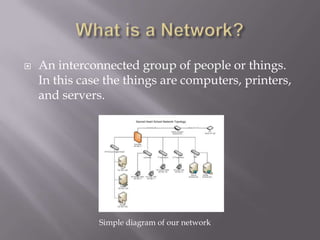
What is a Network?An interconnected group of people or things. In this case the things are computers, printers, and servers.Simple diagram of our network
Let’s Start at the BeginningThe most important  part of this network is the server.A server is a computer designed to process requests and deliver data to other (client) computers over a local network or the Internet. We actually have five of them.  They each serve a different function. Let’s look at them.
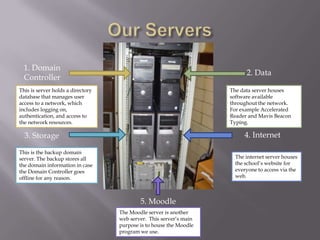
Our Servers1. Domain Controller2. DataThis is server holds a directory database that manages user access to a network, which includes logging on, authentication, and access to the network resources.The data server houses software available throughout the network.  For example Accelerated Reader and Mavis Beacon Typing.4. Internet3. StorageThis is the backup domain server. The backup stores all the domain information in case the Domain Controller goes offline for any reason. The internet server houses the school’s website for everyone to access via the web. 5. MoodleThe Moodle server is another web server.  This server’s main purpose is to house the Moodle program we use.
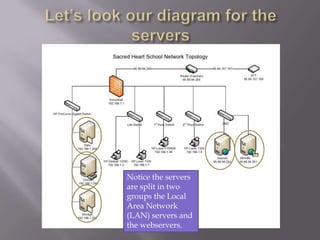
Let’s look our diagram for the serversNotice the servers are split in two groups the Local Area Network (LAN) servers and the webservers.
From the Servers to the SwitchesBefore information from the Domain and Data servers reaches the client computers (lab computers and classroom computers) it runs through switches.Switches are computer networking devices that connect network segments (client computers and printers).
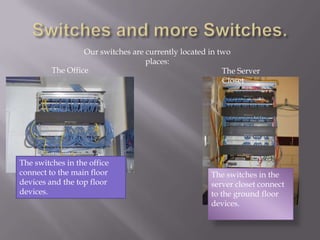
Switches and more Switches.Our switches are currently located in two places:The OfficeThe Server ClosetThe switches in the office connect to the main floor devices and the top floor devices.The switches in the server closet connect to the ground floor devices.
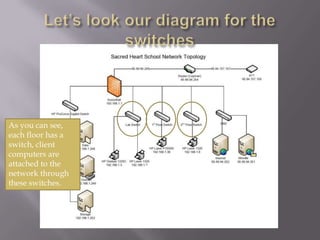
Let’s look our diagram for the switchesAs you can see, each floor has a switch, client computers are attached to the network through these switches.
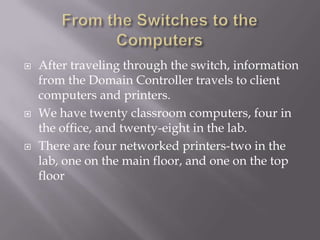
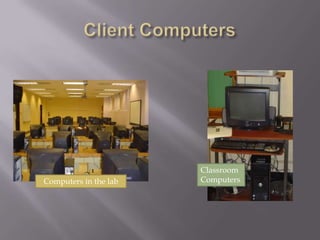
From the Switches to the ComputersAfter traveling through the switch, information from the Domain Controller travels to client computers and printers.We have twenty classroom computers, four in the office, and twenty-eight in the lab.There are four networked printers-two in the lab, one on the main floor, and one on the top floor
Client ComputersClassroom ComputersComputers in the lab
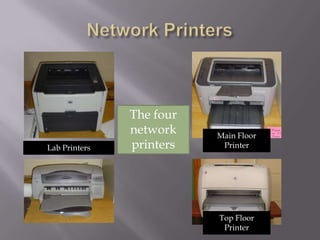
Network PrintersThe four network printersMain Floor PrinterLab PrintersTop Floor Printer
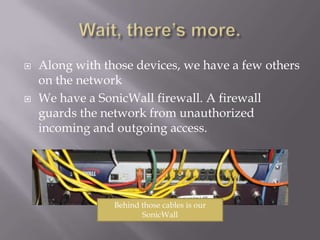
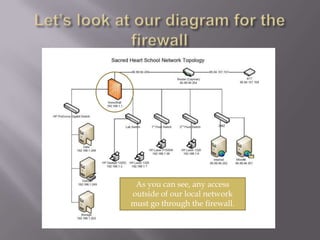
Wait, there’s more.Along with those devices, we have a few others on the networkWe have a SonicWall firewall. A firewall guards the network from unauthorized incoming and outgoing access.Behind those cables is our SonicWall
Let’s look at our diagram for the firewallAs you can see, any access outside of our local network must go through the firewall.
Access to the WebTo get to the Internet, we have to pass through the firewall, then a router and finally through the DSL modem. A router is a device that connects two or more networks, in this case it connects our local network with the Internet.Finally we have the DSL modem, which connects us to the ISP or Internet Service Provider.  (in this case it is AT&T)
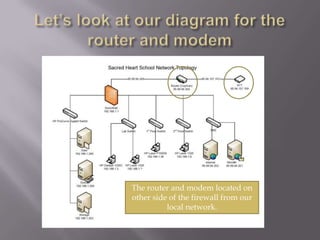
Let’s look at our diagram for the router and modemThe router and modem located on other side of the firewall from our local network.
Are you confused yet?As you can see, our network may seem complicated, but in reality it is very simple to understand.You just have to get passed all those cords!Hopefully you have a better understanding of our network.*All pictures and diagrams property of Sacred Heart Catholic School.

Our School Network

  • 1.
    Servers, Switches, andFirewalls Oh My!An overview our school network
  • 2.
    What is aNetwork?An interconnected group of people or things. In this case the things are computers, printers, and servers.Simple diagram of our network
  • 3.
    Let’s Start atthe BeginningThe most important part of this network is the server.A server is a computer designed to process requests and deliver data to other (client) computers over a local network or the Internet. We actually have five of them. They each serve a different function. Let’s look at them.
  • 4.
    Our Servers1. DomainController2. DataThis is server holds a directory database that manages user access to a network, which includes logging on, authentication, and access to the network resources.The data server houses software available throughout the network. For example Accelerated Reader and Mavis Beacon Typing.4. Internet3. StorageThis is the backup domain server. The backup stores all the domain information in case the Domain Controller goes offline for any reason. The internet server houses the school’s website for everyone to access via the web. 5. MoodleThe Moodle server is another web server. This server’s main purpose is to house the Moodle program we use.
  • 5.
    Let’s look ourdiagram for the serversNotice the servers are split in two groups the Local Area Network (LAN) servers and the webservers.
  • 6.
    From the Serversto the SwitchesBefore information from the Domain and Data servers reaches the client computers (lab computers and classroom computers) it runs through switches.Switches are computer networking devices that connect network segments (client computers and printers).
  • 7.
    Switches and moreSwitches.Our switches are currently located in two places:The OfficeThe Server ClosetThe switches in the office connect to the main floor devices and the top floor devices.The switches in the server closet connect to the ground floor devices.
  • 8.
    Let’s look ourdiagram for the switchesAs you can see, each floor has a switch, client computers are attached to the network through these switches.
  • 9.
    From the Switchesto the ComputersAfter traveling through the switch, information from the Domain Controller travels to client computers and printers.We have twenty classroom computers, four in the office, and twenty-eight in the lab.There are four networked printers-two in the lab, one on the main floor, and one on the top floor
  • 10.
  • 11.
    Network PrintersThe fournetwork printersMain Floor PrinterLab PrintersTop Floor Printer
  • 12.
    Wait, there’s more.Alongwith those devices, we have a few others on the networkWe have a SonicWall firewall. A firewall guards the network from unauthorized incoming and outgoing access.Behind those cables is our SonicWall
  • 13.
    Let’s look atour diagram for the firewallAs you can see, any access outside of our local network must go through the firewall.
  • 14.
    Access to theWebTo get to the Internet, we have to pass through the firewall, then a router and finally through the DSL modem. A router is a device that connects two or more networks, in this case it connects our local network with the Internet.Finally we have the DSL modem, which connects us to the ISP or Internet Service Provider. (in this case it is AT&T)
  • 15.
    Let’s look atour diagram for the router and modemThe router and modem located on other side of the firewall from our local network.
  • 16.
    Are you confusedyet?As you can see, our network may seem complicated, but in reality it is very simple to understand.You just have to get passed all those cords!Hopefully you have a better understanding of our network.*All pictures and diagrams property of Sacred Heart Catholic School.