Lonnie Decker
Multiarea OSPF for CCNA
Department Chair, Networking/Information
Assurance
Davenport University, Michigan
August 2013
Elaine Horn
Cisco Academy Instructor
2© 2013 Cisco Systems, Inc. All rights reserved. Cisco confidential.Cisco Networking Academy, U.S./Canada
• Review OSPF Single Area
• Multiarea OSPF Implementation
• Types of LSAs Exchanged Between Areas
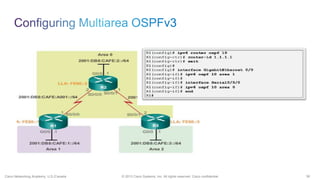
• Configuring Multiarea OSPFv2 and OSPFv3
• Verifying an OSPFv2 and OSPFv3 Configuration
• Review OSPF Key Points
Cisco Public© 2013 Cisco and/or its affiliates. All rights reserved. 3
4© 2013 Cisco Systems, Inc. All rights reserved. Cisco confidential.Cisco Networking Academy, U.S./Canada
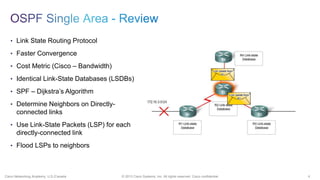
• Link State Routing Protocol
• Faster Convergence
• Cost Metric (Cisco – Bandwidth)
• Identical Link-State Databases (LSDBs)
• SPF – Dijkstra’s Algorithm
• Determine Neighbors on Directly-
connected links
• Use Link-State Packets (LSP) for each
directly-connected link
• Flood LSPs to neighbors
5© 2013 Cisco Systems, Inc. All rights reserved. Cisco confidential.Cisco Networking Academy, U.S./Canada
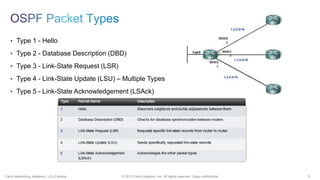
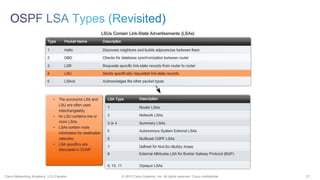
• Type 1 - Hello
• Type 2 - Database Description (DBD)
• Type 3 - Link-State Request (LSR)
• Type 4 - Link-State Update (LSU) – Multiple Types
• Type 5 - Link-State Acknowledgement (LSAck)
6© 2013 Cisco Systems, Inc. All rights reserved. Cisco confidential.Cisco Networking Academy, U.S./Canada
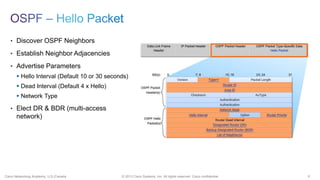
• Discover OSPF Neighbors
• Establish Neighbor Adjacencies
• Advertise Parameters
ď‚§ Hello Interval (Default 10 or 30 seconds)
ď‚§ Dead Interval (Default 4 x Hello)
ď‚§ Network Type
• Elect DR & BDR (multi-access
network)
7© 2013 Cisco Systems, Inc. All rights reserved. Cisco confidential.Cisco Networking Academy, U.S./Canada
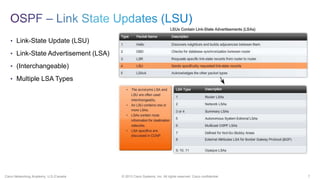
• Link-State Update (LSU)
• Link-State Advertisement (LSA)
• (Interchangeable)
• Multiple LSA Types
8© 2013 Cisco Systems, Inc. All rights reserved. Cisco confidential.Cisco Networking Academy, U.S./Canada
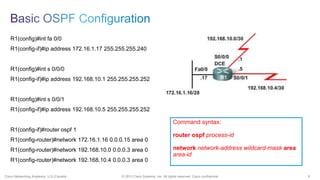
R1(config)#int fa 0/0
R1(config-if)#ip address 172.16.1.17 255.255.255.240
R1(config)#int s 0/0/0
R1(config-if)#ip address 192.168.10.1 255.255.255.252
R1(config)#int s 0/0/1
R1(config-if)#ip address 192.168.10.5 255.255.255.252
R1(config-if)#router ospf 1
R1(config-router)#network 172.16.1.16 0.0.0.15 area 0
R1(config-router)#network 192.168.10.0 0.0.0.3 area 0
R1(config-router)#network 192.168.10.4 0.0.0.3 area 0
Command syntax:
router ospf process-id
network network-address wildcard-mask area
area-id
9© 2013 Cisco Systems, Inc. All rights reserved. Cisco confidential.Cisco Networking Academy, U.S./Canada
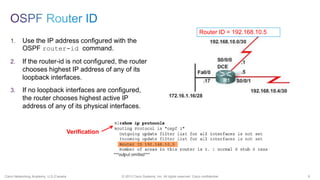
1. Use the IP address configured with the
OSPF router-id command.
2. If the router-id is not configured, the router
chooses highest IP address of any of its
loopback interfaces.
3. If no loopback interfaces are configured,
the router chooses highest active IP
address of any of its physical interfaces.
Router ID = 192.168.10.5
Verification
10© 2013 Cisco Systems, Inc. All rights reserved. Cisco confidential.Cisco Networking Academy, U.S./Canada
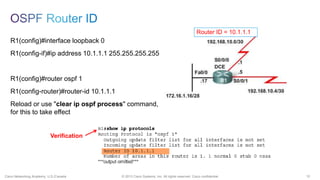
R1(config)#interface loopback 0
R1(config-if)#ip address 10.1.1.1 255.255.255.255
R1(config)#router ospf 1
R1(config-router)#router-id 10.1.1.1
Reload or use "clear ip ospf process" command,
for this to take effect
Verification
Router ID = 10.1.1.1
11© 2013 Cisco Systems, Inc. All rights reserved. Cisco confidential.Cisco Networking Academy, U.S./Canada
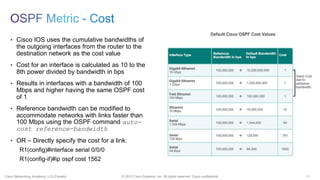
• Cisco IOS uses the cumulative bandwidths of
the outgoing interfaces from the router to the
destination network as the cost value
• Cost for an interface is calculated as 10 to the
8th power divided by bandwidth in bps
• Results in interfaces with a bandwidth of 100
Mbps and higher having the same OSPF cost
of 1
• Reference bandwidth can be modified to
accommodate networks with links faster than
100 Mbps using the OSPF command auto-
cost reference-bandwidth
• OR – Directly specify the cost for a link:
R1(config)#interface serial 0/0/0
R1(config-if)#ip ospf cost 1562
12© 2013 Cisco Systems, Inc. All rights reserved. Cisco confidential.Cisco Networking Academy, U.S./Canada
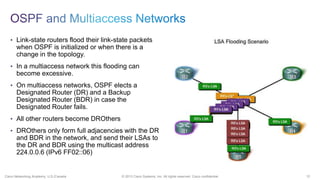
• Link-state routers flood their link-state packets
when OSPF is initialized or when there is a
change in the topology.
• In a multiaccess network this flooding can
become excessive.
• On multiaccess networks, OSPF elects a
Designated Router (DR) and a Backup
Designated Router (BDR) in case the
Designated Router fails.
• All other routers become DROthers
• DROthers only form full adjacencies with the DR
and BDR in the network, and send their LSAs to
the DR and BDR using the multicast address
224.0.0.6 (IPv6 FF02::06)
13© 2013 Cisco Systems, Inc. All rights reserved. Cisco confidential.Cisco Networking Academy, U.S./Canada
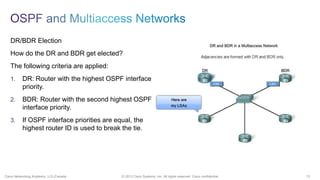
DR/BDR Election
How do the DR and BDR get elected?
The following criteria are applied:
1. DR: Router with the highest OSPF interface
priority.
2. BDR: Router with the second highest OSPF
interface priority.
3. If OSPF interface priorities are equal, the
highest router ID is used to break the tie.
Cisco Public© 2013 Cisco and/or its affiliates. All rights reserved. 14
15© 2013 Cisco Systems, Inc. All rights reserved. Cisco confidential.Cisco Networking Academy, U.S./Canada
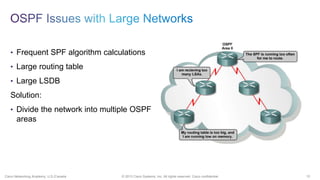
• Frequent SPF algorithm calculations
• Large routing table
• Large LSDB
Solution:
• Divide the network into multiple OSPF
areas
16© 2013 Cisco Systems, Inc. All rights reserved. Cisco confidential.Cisco Networking Academy, U.S./Canada
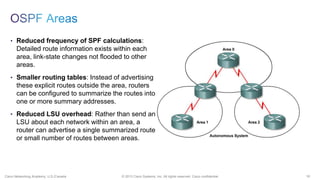
• Reduced frequency of SPF calculations:
Detailed route information exists within each
area, link-state changes not flooded to other
areas.
• Smaller routing tables: Instead of advertising
these explicit routes outside the area, routers
can be configured to summarize the routes into
one or more summary addresses.
• Reduced LSU overhead: Rather than send an
LSU about each network within an area, a
router can advertise a single summarized route
or small number of routes between areas.
17© 2013 Cisco Systems, Inc. All rights reserved. Cisco confidential.Cisco Networking Academy, U.S./Canada
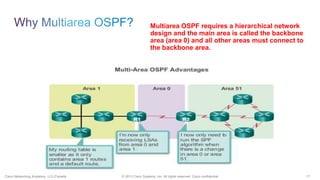
Multiarea OSPF requires a hierarchical network
design and the main area is called the backbone
area (area 0) and all other areas must connect to
the backbone area.
18© 2013 Cisco Systems, Inc. All rights reserved. Cisco confidential.Cisco Networking Academy, U.S./Canada
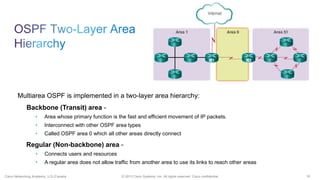
Multiarea OSPF is implemented in a two-layer area hierarchy:
Backbone (Transit) area -
• Area whose primary function is the fast and efficient movement of IP packets.
• Interconnect with other OSPF area types
• Called OSPF area 0 which all other areas directly connect
Regular (Non-backbone) area -
• Connects users and resources
• A regular area does not allow traffic from another area to use its links to reach other areas
19© 2013 Cisco Systems, Inc. All rights reserved. Cisco confidential.Cisco Networking Academy, U.S./Canada
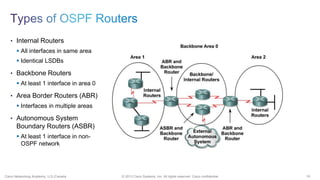
• Internal Routers
ď‚§ All interfaces in same area
ď‚§ Identical LSDBs
• Backbone Routers
ď‚§ At least 1 interface in area 0
• Area Border Routers (ABR)
ď‚§ Interfaces in multiple areas
• Autonomous System
Boundary Routers (ASBR)
ď‚§ At least 1 interface in non-
OSPF network
Cisco Public© 2013 Cisco and/or its affiliates. All rights reserved. 20
21© 2013 Cisco Systems, Inc. All rights reserved. Cisco confidential.Cisco Networking Academy, U.S./Canada
22© 2013 Cisco Systems, Inc. All rights reserved. Cisco confidential.Cisco Networking Academy, U.S./Canada
23© 2013 Cisco Systems, Inc. All rights reserved. Cisco confidential.Cisco Networking Academy, U.S./Canada
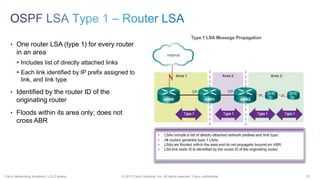
• One router LSA (type 1) for every router
in an area
ď‚§ Includes list of directly attached links
ď‚§ Each link identified by IP prefix assigned to
link, and link type
• Identified by the router ID of the
originating router
• Floods within its area only; does not
cross ABR
24© 2013 Cisco Systems, Inc. All rights reserved. Cisco confidential.Cisco Networking Academy, U.S./Canada
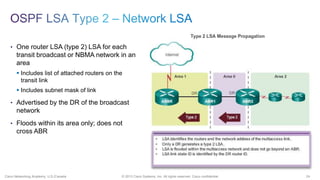
• One router LSA (type 2) LSA for each
transit broadcast or NBMA network in an
area
ď‚§ Includes list of attached routers on the
transit link
ď‚§ Includes subnet mask of link
• Advertised by the DR of the broadcast
network
• Floods within its area only; does not
cross ABR
25© 2013 Cisco Systems, Inc. All rights reserved. Cisco confidential.Cisco Networking Academy, U.S./Canada
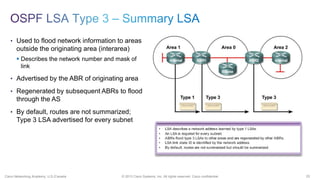
• Used to flood network information to areas
outside the originating area (interarea)
ď‚§ Describes the network number and mask of
link
• Advertised by the ABR of originating area
• Regenerated by subsequent ABRs to flood
through the AS
• By default, routes are not summarized;
Type 3 LSA advertised for every subnet
26© 2013 Cisco Systems, Inc. All rights reserved. Cisco confidential.Cisco Networking Academy, U.S./Canada
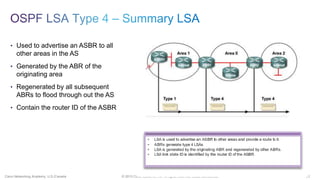
• Used to advertise an ASBR to all
other areas in the AS
• Generated by the ABR of the
originating area
• Regenerated by all subsequent
ABRs to flood through out the AS
• Contain the router ID of the ASBR
27© 2013 Cisco Systems, Inc. All rights reserved. Cisco confidential.Cisco Networking Academy, U.S./Canada
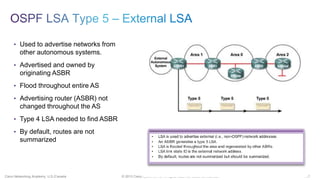
• Used to advertise networks from
other autonomous systems.
• Advertised and owned by
originating ASBR
• Flood throughout entire AS
• Advertising router (ASBR) not
changed throughout the AS
• Type 4 LSA needed to find ASBR
• By default, routes are not
summarized
28© 2013 Cisco Systems, Inc. All rights reserved. Cisco confidential.Cisco Networking Academy, U.S./Canada
29© 2013 Cisco Systems, Inc. All rights reserved. Cisco confidential.Cisco Networking Academy, U.S./Canada
30© 2013 Cisco Systems, Inc. All rights reserved. Cisco confidential.Cisco Networking Academy, U.S./Canada
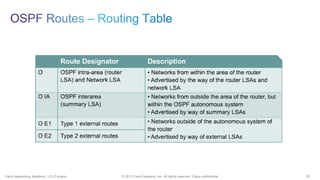
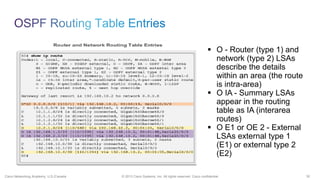
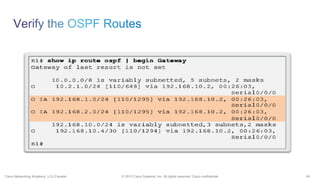
ď‚§ O - Router (type 1) and
network (type 2) LSAs
describe the details
within an area (the route
is intra-area)
ď‚§ O IA - Summary LSAs
appear in the routing
table as IA (interarea
routes)
ď‚§ O E1 or OE 2 - External
LSAs external type 1
(E1) or external type 2
(E2)) routes
31© 2013 Cisco Systems, Inc. All rights reserved. Cisco confidential.Cisco Networking Academy, U.S./Canada
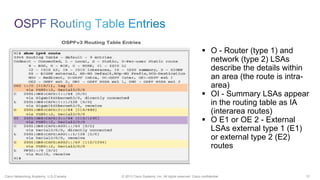
ď‚§ O - Router (type 1) and
network (type 2) LSAs
describe the details within
an area (the route is intra-
area)
ď‚§ OI - Summary LSAs appear
in the routing table as IA
(interarea routes)
ď‚§ O E1 or OE 2 - External
LSAs external type 1 (E1)
or external type 2 (E2)
routes
32© 2013 Cisco Systems, Inc. All rights reserved. Cisco confidential.Cisco Networking Academy, U.S./Canada
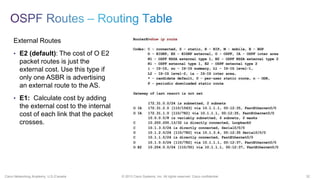
External Routes
• E2 (default): The cost of O E2
packet routes is just the
external cost. Use this type if
only one ASBR is advertising
an external route to the AS.
• E1: Calculate cost by adding
the external cost to the internal
cost of each link that the packet
crosses.
33© 2013 Cisco Systems, Inc. All rights reserved. Cisco confidential.Cisco Networking Academy, U.S./Canada
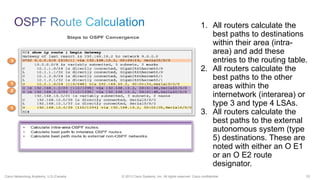
1. All routers calculate the
best paths to destinations
within their area (intra-
area) and add these
entries to the routing table.
2. All routers calculate the
best paths to the other
areas within the
internetwork (interarea) or
type 3 and type 4 LSAs.
3. All routers calculate the
best paths to the external
autonomous system (type
5) destinations. These are
noted with either an O E1
or an O E2 route
designator.
Cisco Public© 2013 Cisco and/or its affiliates. All rights reserved. 34
35© 2013 Cisco Systems, Inc. All rights reserved. Cisco confidential.Cisco Networking Academy, U.S./Canada
36© 2013 Cisco Systems, Inc. All rights reserved. Cisco confidential.Cisco Networking Academy, U.S./Canada
37© 2013 Cisco Systems, Inc. All rights reserved. Cisco confidential.Cisco Networking Academy, U.S./Canada
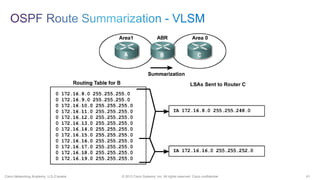
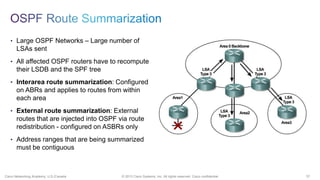
• Large OSPF Networks – Large number of
LSAs sent
• All affected OSPF routers have to recompute
their LSDB and the SPF tree
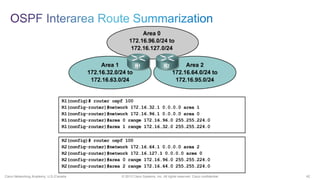
• Interarea route summarization: Configured
on ABRs and applies to routes from within
each area
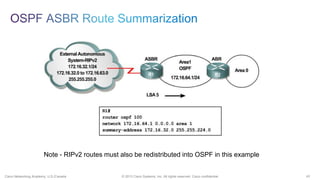
• External route summarization: External
routes that are injected into OSPF via route
redistribution - configured on ASBRs only
• Address ranges that are being summarized
must be contiguous
38© 2013 Cisco Systems, Inc. All rights reserved. Cisco confidential.Cisco Networking Academy, U.S./Canada
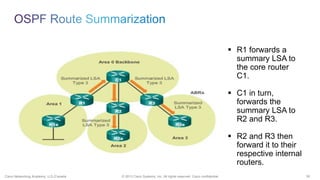
ď‚§ R1 forwards a
summary LSA to
the core router
C1.
ď‚§ C1 in turn,
forwards the
summary LSA to
R2 and R3.
ď‚§ R2 and R3 then
forward it to their
respective internal
routers.
39© 2013 Cisco Systems, Inc. All rights reserved. Cisco confidential.Cisco Networking Academy, U.S./Canada
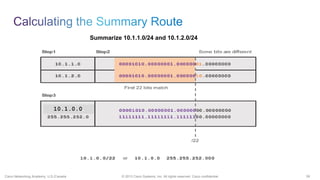
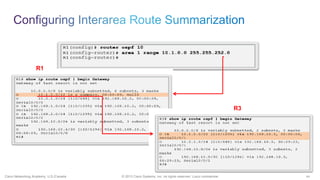
Summarize 10.1.1.0/24 and 10.1.2.0/24
10.1.0.0.
40© 2013 Cisco Systems, Inc. All rights reserved. Cisco confidential.Cisco Networking Academy, U.S./Canada
R3
R1
41© 2013 Cisco Systems, Inc. All rights reserved. Cisco confidential.Cisco Networking Academy, U.S./Canada
42© 2013 Cisco Systems, Inc. All rights reserved. Cisco confidential.Cisco Networking Academy, U.S./Canada
43© 2013 Cisco Systems, Inc. All rights reserved. Cisco confidential.Cisco Networking Academy, U.S./Canada
Note - RIPv2 routes must also be redistributed into OSPF in this example
44© 2013 Cisco Systems, Inc. All rights reserved. Cisco confidential.Cisco Networking Academy, U.S./Canada
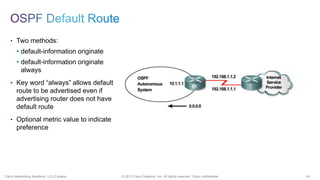
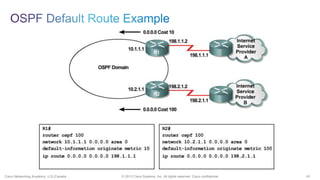
• Two methods:
• default-information originate
always
• Key word “always” allows default
route to be advertised even if
advertising router does not have
default route
• Optional metric value to indicate
preference
45© 2013 Cisco Systems, Inc. All rights reserved. Cisco confidential.Cisco Networking Academy, U.S./Canada
Cisco Public© 2013 Cisco and/or its affiliates. All rights reserved. 46
47© 2013 Cisco Systems, Inc. All rights reserved. Cisco confidential.Cisco Networking Academy, U.S./Canada
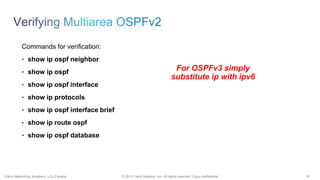
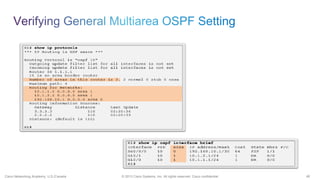
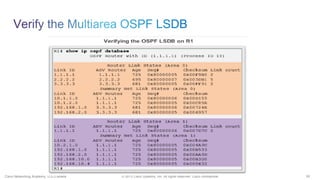
Commands for verification:
• show ip ospf neighbor
• show ip ospf
• show ip ospf interface
• show ip protocols
• show ip ospf interface brief
• show ip route ospf
• show ip ospf database
For OSPFv3 simply
substitute ip with ipv6
48© 2013 Cisco Systems, Inc. All rights reserved. Cisco confidential.Cisco Networking Academy, U.S./Canada
49© 2013 Cisco Systems, Inc. All rights reserved. Cisco confidential.Cisco Networking Academy, U.S./Canada
50© 2013 Cisco Systems, Inc. All rights reserved. Cisco confidential.Cisco Networking Academy, U.S./Canada
Cisco Public© 2013 Cisco and/or its affiliates. All rights reserved. 51
52© 2013 Cisco Systems, Inc. All rights reserved. Cisco confidential.Cisco Networking Academy, U.S./Canada
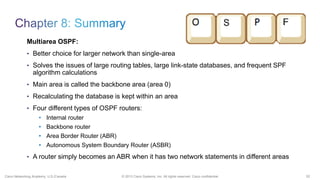
Multiarea OSPF:
• Better choice for larger network than single-area
• Solves the issues of large routing tables, large link-state databases, and frequent SPF
algorithm calculations
• Main area is called the backbone area (area 0)
• Recalculating the database is kept within an area
• Four different types of OSPF routers:
• Internal router
• Backbone router
• Area Border Router (ABR)
• Autonomous System Boundary Router (ASBR)
• A router simply becomes an ABR when it has two network statements in different areas
53© 2013 Cisco Systems, Inc. All rights reserved. Cisco confidential.Cisco Networking Academy, U.S./Canada
Multiarea OSPF:
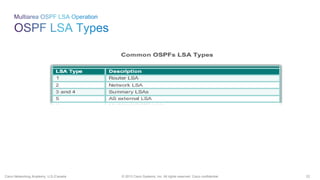
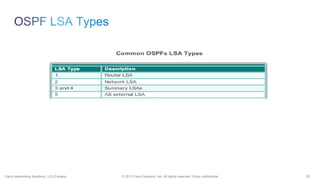
• Link State Advertisements (LSAs) are the building blocks of OSPF
• Type 1 LSAs are referred to as the router link entries
• Type 2 LSAs are referred to as the network link entries and are flooded by a DR
• Type 3 LSAs are referred to as the summary link entries and are created and propagated by
ABRs
• A type 4 summary LSA is generated by an ABR only when an ASBR exists within an area
• Type 5 external LSAs describe routes to networks outside the OSPF autonomous system,
originated by the ASBR and are flooded to the entire autonomous system
• SPF tree is used to determine the best paths
• OSPF routes in an IPv4 or IPv6 routing table are identified using the following descriptors:
O, O IA (OI), O E1 or O E2.
54© 2013 Cisco Systems, Inc. All rights reserved. Cisco confidential.Cisco Networking Academy, U.S./Canada
Multiarea OSPF:
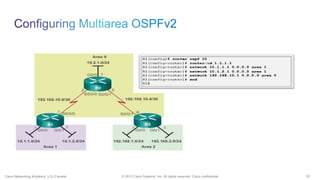
• An example of multiarea OSPFv2 configuration:
• R1(config)#router ospf 10
• R1(config-router)#router-id 1.1.1.1
• R1(config-router)#network 10.1.1.0 0.0.0.15 area 1
• R1(config-router)#network 10.1.2.0 0.0.0.3 area 1
• R1(config-router)#network 192.168.10.1 0.0.0.0 area 0
• Does not perform auto summarization but can be manually configured using the area X
range or summary-address router configuration command
55© 2013 Cisco Systems, Inc. All rights reserved. Cisco confidential.Cisco Networking Academy, U.S./Canada
Multiarea OSPFv2:
• Commands that are used to verify OSPF configuration consist of the following:
ď‚§ show ip ospf neighbor
ď‚§ show ip ospf
ď‚§ show ip ospf interface
ď‚§ show ip protocols
ď‚§ show ip ospf interface brief
ď‚§ show ip route ospf
ď‚§ show ip ospf database
56© 2013 Cisco Systems, Inc. All rights reserved. Cisco confidential.Cisco Networking Academy, U.S./Canada
Created by Lonnie Decker
Department Chair
Davenport University
57© 2013 Cisco Systems, Inc. All rights reserved. Cisco confidential.Cisco Networking Academy, U.S./Canada
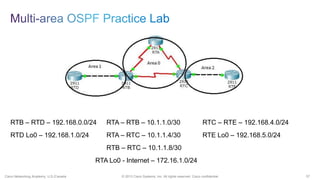
RTB – RTD – 192.168.0.0/24 RTA – RTB – 10.1.1.0/30 RTC – RTE – 192.168.4.0/24
RTD Lo0 – 192.168.1.0/24 RTA – RTC – 10.1.1.4/30 RTE Lo0 – 192.168.5.0/24
RTB – RTC – 10.1.1.8/30
RTA Lo0 - Internet – 172.16.1.0/24
Thank you.
59© 2013 Cisco Systems, Inc. All rights reserved. Cisco confidential.Cisco Networking Academy, U.S./Canada

CCNAS :Multi Area OSPF

  • 1.
    Lonnie Decker Multiarea OSPFfor CCNA Department Chair, Networking/Information Assurance Davenport University, Michigan August 2013 Elaine Horn Cisco Academy Instructor
  • 2.
    2© 2013 CiscoSystems, Inc. All rights reserved. Cisco confidential.Cisco Networking Academy, U.S./Canada • Review OSPF Single Area • Multiarea OSPF Implementation • Types of LSAs Exchanged Between Areas • Configuring Multiarea OSPFv2 and OSPFv3 • Verifying an OSPFv2 and OSPFv3 Configuration • Review OSPF Key Points
  • 3.
    Cisco Public© 2013Cisco and/or its affiliates. All rights reserved. 3
  • 4.
    4© 2013 CiscoSystems, Inc. All rights reserved. Cisco confidential.Cisco Networking Academy, U.S./Canada • Link State Routing Protocol • Faster Convergence • Cost Metric (Cisco – Bandwidth) • Identical Link-State Databases (LSDBs) • SPF – Dijkstra’s Algorithm • Determine Neighbors on Directly- connected links • Use Link-State Packets (LSP) for each directly-connected link • Flood LSPs to neighbors
  • 5.
    5© 2013 CiscoSystems, Inc. All rights reserved. Cisco confidential.Cisco Networking Academy, U.S./Canada • Type 1 - Hello • Type 2 - Database Description (DBD) • Type 3 - Link-State Request (LSR) • Type 4 - Link-State Update (LSU) – Multiple Types • Type 5 - Link-State Acknowledgement (LSAck)
  • 6.
    6© 2013 CiscoSystems, Inc. All rights reserved. Cisco confidential.Cisco Networking Academy, U.S./Canada • Discover OSPF Neighbors • Establish Neighbor Adjacencies • Advertise Parameters  Hello Interval (Default 10 or 30 seconds)  Dead Interval (Default 4 x Hello)  Network Type • Elect DR & BDR (multi-access network)
  • 7.
    7© 2013 CiscoSystems, Inc. All rights reserved. Cisco confidential.Cisco Networking Academy, U.S./Canada • Link-State Update (LSU) • Link-State Advertisement (LSA) • (Interchangeable) • Multiple LSA Types
  • 8.
    8© 2013 CiscoSystems, Inc. All rights reserved. Cisco confidential.Cisco Networking Academy, U.S./Canada R1(config)#int fa 0/0 R1(config-if)#ip address 172.16.1.17 255.255.255.240 R1(config)#int s 0/0/0 R1(config-if)#ip address 192.168.10.1 255.255.255.252 R1(config)#int s 0/0/1 R1(config-if)#ip address 192.168.10.5 255.255.255.252 R1(config-if)#router ospf 1 R1(config-router)#network 172.16.1.16 0.0.0.15 area 0 R1(config-router)#network 192.168.10.0 0.0.0.3 area 0 R1(config-router)#network 192.168.10.4 0.0.0.3 area 0 Command syntax: router ospf process-id network network-address wildcard-mask area area-id
  • 9.
    9© 2013 CiscoSystems, Inc. All rights reserved. Cisco confidential.Cisco Networking Academy, U.S./Canada 1. Use the IP address configured with the OSPF router-id command. 2. If the router-id is not configured, the router chooses highest IP address of any of its loopback interfaces. 3. If no loopback interfaces are configured, the router chooses highest active IP address of any of its physical interfaces. Router ID = 192.168.10.5 Verification
  • 10.
    10© 2013 CiscoSystems, Inc. All rights reserved. Cisco confidential.Cisco Networking Academy, U.S./Canada R1(config)#interface loopback 0 R1(config-if)#ip address 10.1.1.1 255.255.255.255 R1(config)#router ospf 1 R1(config-router)#router-id 10.1.1.1 Reload or use "clear ip ospf process" command, for this to take effect Verification Router ID = 10.1.1.1
  • 11.
    11© 2013 CiscoSystems, Inc. All rights reserved. Cisco confidential.Cisco Networking Academy, U.S./Canada • Cisco IOS uses the cumulative bandwidths of the outgoing interfaces from the router to the destination network as the cost value • Cost for an interface is calculated as 10 to the 8th power divided by bandwidth in bps • Results in interfaces with a bandwidth of 100 Mbps and higher having the same OSPF cost of 1 • Reference bandwidth can be modified to accommodate networks with links faster than 100 Mbps using the OSPF command auto- cost reference-bandwidth • OR – Directly specify the cost for a link: R1(config)#interface serial 0/0/0 R1(config-if)#ip ospf cost 1562
  • 12.
    12© 2013 CiscoSystems, Inc. All rights reserved. Cisco confidential.Cisco Networking Academy, U.S./Canada • Link-state routers flood their link-state packets when OSPF is initialized or when there is a change in the topology. • In a multiaccess network this flooding can become excessive. • On multiaccess networks, OSPF elects a Designated Router (DR) and a Backup Designated Router (BDR) in case the Designated Router fails. • All other routers become DROthers • DROthers only form full adjacencies with the DR and BDR in the network, and send their LSAs to the DR and BDR using the multicast address 224.0.0.6 (IPv6 FF02::06)
  • 13.
    13© 2013 CiscoSystems, Inc. All rights reserved. Cisco confidential.Cisco Networking Academy, U.S./Canada DR/BDR Election How do the DR and BDR get elected? The following criteria are applied: 1. DR: Router with the highest OSPF interface priority. 2. BDR: Router with the second highest OSPF interface priority. 3. If OSPF interface priorities are equal, the highest router ID is used to break the tie.
  • 14.
    Cisco Public© 2013Cisco and/or its affiliates. All rights reserved. 14
  • 15.
    15© 2013 CiscoSystems, Inc. All rights reserved. Cisco confidential.Cisco Networking Academy, U.S./Canada • Frequent SPF algorithm calculations • Large routing table • Large LSDB Solution: • Divide the network into multiple OSPF areas
  • 16.
    16© 2013 CiscoSystems, Inc. All rights reserved. Cisco confidential.Cisco Networking Academy, U.S./Canada • Reduced frequency of SPF calculations: Detailed route information exists within each area, link-state changes not flooded to other areas. • Smaller routing tables: Instead of advertising these explicit routes outside the area, routers can be configured to summarize the routes into one or more summary addresses. • Reduced LSU overhead: Rather than send an LSU about each network within an area, a router can advertise a single summarized route or small number of routes between areas.
  • 17.
    17© 2013 CiscoSystems, Inc. All rights reserved. Cisco confidential.Cisco Networking Academy, U.S./Canada Multiarea OSPF requires a hierarchical network design and the main area is called the backbone area (area 0) and all other areas must connect to the backbone area.
  • 18.
    18© 2013 CiscoSystems, Inc. All rights reserved. Cisco confidential.Cisco Networking Academy, U.S./Canada Multiarea OSPF is implemented in a two-layer area hierarchy: Backbone (Transit) area - • Area whose primary function is the fast and efficient movement of IP packets. • Interconnect with other OSPF area types • Called OSPF area 0 which all other areas directly connect Regular (Non-backbone) area - • Connects users and resources • A regular area does not allow traffic from another area to use its links to reach other areas
  • 19.
    19© 2013 CiscoSystems, Inc. All rights reserved. Cisco confidential.Cisco Networking Academy, U.S./Canada • Internal Routers  All interfaces in same area  Identical LSDBs • Backbone Routers  At least 1 interface in area 0 • Area Border Routers (ABR)  Interfaces in multiple areas • Autonomous System Boundary Routers (ASBR)  At least 1 interface in non- OSPF network
  • 20.
    Cisco Public© 2013Cisco and/or its affiliates. All rights reserved. 20
  • 21.
    21© 2013 CiscoSystems, Inc. All rights reserved. Cisco confidential.Cisco Networking Academy, U.S./Canada
  • 22.
    22© 2013 CiscoSystems, Inc. All rights reserved. Cisco confidential.Cisco Networking Academy, U.S./Canada
  • 23.
    23© 2013 CiscoSystems, Inc. All rights reserved. Cisco confidential.Cisco Networking Academy, U.S./Canada • One router LSA (type 1) for every router in an area  Includes list of directly attached links  Each link identified by IP prefix assigned to link, and link type • Identified by the router ID of the originating router • Floods within its area only; does not cross ABR
  • 24.
    24© 2013 CiscoSystems, Inc. All rights reserved. Cisco confidential.Cisco Networking Academy, U.S./Canada • One router LSA (type 2) LSA for each transit broadcast or NBMA network in an area  Includes list of attached routers on the transit link  Includes subnet mask of link • Advertised by the DR of the broadcast network • Floods within its area only; does not cross ABR
  • 25.
    25© 2013 CiscoSystems, Inc. All rights reserved. Cisco confidential.Cisco Networking Academy, U.S./Canada • Used to flood network information to areas outside the originating area (interarea)  Describes the network number and mask of link • Advertised by the ABR of originating area • Regenerated by subsequent ABRs to flood through the AS • By default, routes are not summarized; Type 3 LSA advertised for every subnet
  • 26.
    26© 2013 CiscoSystems, Inc. All rights reserved. Cisco confidential.Cisco Networking Academy, U.S./Canada • Used to advertise an ASBR to all other areas in the AS • Generated by the ABR of the originating area • Regenerated by all subsequent ABRs to flood through out the AS • Contain the router ID of the ASBR
  • 27.
    27© 2013 CiscoSystems, Inc. All rights reserved. Cisco confidential.Cisco Networking Academy, U.S./Canada • Used to advertise networks from other autonomous systems. • Advertised and owned by originating ASBR • Flood throughout entire AS • Advertising router (ASBR) not changed throughout the AS • Type 4 LSA needed to find ASBR • By default, routes are not summarized
  • 28.
    28© 2013 CiscoSystems, Inc. All rights reserved. Cisco confidential.Cisco Networking Academy, U.S./Canada
  • 29.
    29© 2013 CiscoSystems, Inc. All rights reserved. Cisco confidential.Cisco Networking Academy, U.S./Canada
  • 30.
    30© 2013 CiscoSystems, Inc. All rights reserved. Cisco confidential.Cisco Networking Academy, U.S./Canada  O - Router (type 1) and network (type 2) LSAs describe the details within an area (the route is intra-area)  O IA - Summary LSAs appear in the routing table as IA (interarea routes)  O E1 or OE 2 - External LSAs external type 1 (E1) or external type 2 (E2)) routes
  • 31.
    31© 2013 CiscoSystems, Inc. All rights reserved. Cisco confidential.Cisco Networking Academy, U.S./Canada  O - Router (type 1) and network (type 2) LSAs describe the details within an area (the route is intra- area)  OI - Summary LSAs appear in the routing table as IA (interarea routes)  O E1 or OE 2 - External LSAs external type 1 (E1) or external type 2 (E2) routes
  • 32.
    32© 2013 CiscoSystems, Inc. All rights reserved. Cisco confidential.Cisco Networking Academy, U.S./Canada External Routes • E2 (default): The cost of O E2 packet routes is just the external cost. Use this type if only one ASBR is advertising an external route to the AS. • E1: Calculate cost by adding the external cost to the internal cost of each link that the packet crosses.
  • 33.
    33© 2013 CiscoSystems, Inc. All rights reserved. Cisco confidential.Cisco Networking Academy, U.S./Canada 1. All routers calculate the best paths to destinations within their area (intra- area) and add these entries to the routing table. 2. All routers calculate the best paths to the other areas within the internetwork (interarea) or type 3 and type 4 LSAs. 3. All routers calculate the best paths to the external autonomous system (type 5) destinations. These are noted with either an O E1 or an O E2 route designator.
  • 34.
    Cisco Public© 2013Cisco and/or its affiliates. All rights reserved. 34
  • 35.
    35© 2013 CiscoSystems, Inc. All rights reserved. Cisco confidential.Cisco Networking Academy, U.S./Canada
  • 36.
    36© 2013 CiscoSystems, Inc. All rights reserved. Cisco confidential.Cisco Networking Academy, U.S./Canada
  • 37.
    37© 2013 CiscoSystems, Inc. All rights reserved. Cisco confidential.Cisco Networking Academy, U.S./Canada • Large OSPF Networks – Large number of LSAs sent • All affected OSPF routers have to recompute their LSDB and the SPF tree • Interarea route summarization: Configured on ABRs and applies to routes from within each area • External route summarization: External routes that are injected into OSPF via route redistribution - configured on ASBRs only • Address ranges that are being summarized must be contiguous
  • 38.
    38© 2013 CiscoSystems, Inc. All rights reserved. Cisco confidential.Cisco Networking Academy, U.S./Canada  R1 forwards a summary LSA to the core router C1.  C1 in turn, forwards the summary LSA to R2 and R3.  R2 and R3 then forward it to their respective internal routers.
  • 39.
    39© 2013 CiscoSystems, Inc. All rights reserved. Cisco confidential.Cisco Networking Academy, U.S./Canada Summarize 10.1.1.0/24 and 10.1.2.0/24 10.1.0.0.
  • 40.
    40© 2013 CiscoSystems, Inc. All rights reserved. Cisco confidential.Cisco Networking Academy, U.S./Canada R3 R1
  • 41.
    41© 2013 CiscoSystems, Inc. All rights reserved. Cisco confidential.Cisco Networking Academy, U.S./Canada
  • 42.
    42© 2013 CiscoSystems, Inc. All rights reserved. Cisco confidential.Cisco Networking Academy, U.S./Canada
  • 43.
    43© 2013 CiscoSystems, Inc. All rights reserved. Cisco confidential.Cisco Networking Academy, U.S./Canada Note - RIPv2 routes must also be redistributed into OSPF in this example
  • 44.
    44© 2013 CiscoSystems, Inc. All rights reserved. Cisco confidential.Cisco Networking Academy, U.S./Canada • Two methods: • default-information originate • default-information originate always • Key word “always” allows default route to be advertised even if advertising router does not have default route • Optional metric value to indicate preference
  • 45.
    45© 2013 CiscoSystems, Inc. All rights reserved. Cisco confidential.Cisco Networking Academy, U.S./Canada
  • 46.
    Cisco Public© 2013Cisco and/or its affiliates. All rights reserved. 46
  • 47.
    47© 2013 CiscoSystems, Inc. All rights reserved. Cisco confidential.Cisco Networking Academy, U.S./Canada Commands for verification: • show ip ospf neighbor • show ip ospf • show ip ospf interface • show ip protocols • show ip ospf interface brief • show ip route ospf • show ip ospf database For OSPFv3 simply substitute ip with ipv6
  • 48.
    48© 2013 CiscoSystems, Inc. All rights reserved. Cisco confidential.Cisco Networking Academy, U.S./Canada
  • 49.
    49© 2013 CiscoSystems, Inc. All rights reserved. Cisco confidential.Cisco Networking Academy, U.S./Canada
  • 50.
    50© 2013 CiscoSystems, Inc. All rights reserved. Cisco confidential.Cisco Networking Academy, U.S./Canada
  • 51.
    Cisco Public© 2013Cisco and/or its affiliates. All rights reserved. 51
  • 52.
    52© 2013 CiscoSystems, Inc. All rights reserved. Cisco confidential.Cisco Networking Academy, U.S./Canada Multiarea OSPF: • Better choice for larger network than single-area • Solves the issues of large routing tables, large link-state databases, and frequent SPF algorithm calculations • Main area is called the backbone area (area 0) • Recalculating the database is kept within an area • Four different types of OSPF routers: • Internal router • Backbone router • Area Border Router (ABR) • Autonomous System Boundary Router (ASBR) • A router simply becomes an ABR when it has two network statements in different areas
  • 53.
    53© 2013 CiscoSystems, Inc. All rights reserved. Cisco confidential.Cisco Networking Academy, U.S./Canada Multiarea OSPF: • Link State Advertisements (LSAs) are the building blocks of OSPF • Type 1 LSAs are referred to as the router link entries • Type 2 LSAs are referred to as the network link entries and are flooded by a DR • Type 3 LSAs are referred to as the summary link entries and are created and propagated by ABRs • A type 4 summary LSA is generated by an ABR only when an ASBR exists within an area • Type 5 external LSAs describe routes to networks outside the OSPF autonomous system, originated by the ASBR and are flooded to the entire autonomous system • SPF tree is used to determine the best paths • OSPF routes in an IPv4 or IPv6 routing table are identified using the following descriptors: O, O IA (OI), O E1 or O E2.
  • 54.
    54© 2013 CiscoSystems, Inc. All rights reserved. Cisco confidential.Cisco Networking Academy, U.S./Canada Multiarea OSPF: • An example of multiarea OSPFv2 configuration: • R1(config)#router ospf 10 • R1(config-router)#router-id 1.1.1.1 • R1(config-router)#network 10.1.1.0 0.0.0.15 area 1 • R1(config-router)#network 10.1.2.0 0.0.0.3 area 1 • R1(config-router)#network 192.168.10.1 0.0.0.0 area 0 • Does not perform auto summarization but can be manually configured using the area X range or summary-address router configuration command
  • 55.
    55© 2013 CiscoSystems, Inc. All rights reserved. Cisco confidential.Cisco Networking Academy, U.S./Canada Multiarea OSPFv2: • Commands that are used to verify OSPF configuration consist of the following:  show ip ospf neighbor  show ip ospf  show ip ospf interface  show ip protocols  show ip ospf interface brief  show ip route ospf  show ip ospf database
  • 56.
    56© 2013 CiscoSystems, Inc. All rights reserved. Cisco confidential.Cisco Networking Academy, U.S./Canada Created by Lonnie Decker Department Chair Davenport University
  • 57.
    57© 2013 CiscoSystems, Inc. All rights reserved. Cisco confidential.Cisco Networking Academy, U.S./Canada RTB – RTD – 192.168.0.0/24 RTA – RTB – 10.1.1.0/30 RTC – RTE – 192.168.4.0/24 RTD Lo0 – 192.168.1.0/24 RTA – RTC – 10.1.1.4/30 RTE Lo0 – 192.168.5.0/24 RTB – RTC – 10.1.1.8/30 RTA Lo0 - Internet – 172.16.1.0/24
  • 58.
  • 59.
    59© 2013 CiscoSystems, Inc. All rights reserved. Cisco confidential.Cisco Networking Academy, U.S./Canada