Distributed System
Nadeem Qasmi 01-133132-142
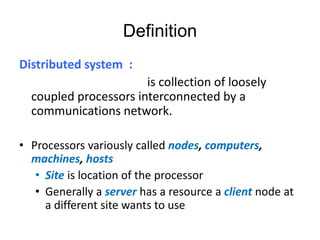
Definition
Distributed system :
is collection of loosely
coupled processors interconnected by a
communications network.
• Processors variously called nodes, computers,
machines, hosts
• Site is location of the processor
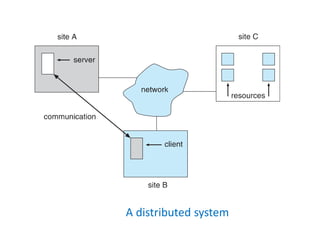
• Generally a server has a resource a client node at
a different site wants to use
A distributed system
Reasons for Distributed Systems
There are fours major reasons for building
distributed systems.
1. Resource sharing
2. Computation speedup
3. Reliability
4. Communication
Reasons for Distributed Systems
– Resource sharing
• Sharing and printing files at remote sites
• Processing information in a distributed database
• Using remote specialized hardware devices
– Computation speedup – load sharing or job migration
– Reliability – detect and recover from site failure,
function transfer, reintegrate failed site
– Communication – message passing
• All higher-level functions of a standalone system can be
expanded to encompass a distributed system
Types of Distributed Operating
Systems
• Network Operating Systems
• Distributed Operating Systems
Network-Operating Systems
• Users are aware of multiplicity of machines
• Access to resources of various machines is
done explicitly by:
– Remote logging into the appropriate remote
machine (telnet)
– Remote Desktop (Microsoft Windows)
– Transferring data from remote machines to local
machines, via the File Transfer Protocol (FTP)
mechanism
Distributed-Operating Systems
Access to remote resources similar to access to local
resources
• Data Migration – transfer data by transferring entire
file, or transferring only those portions of the file
necessary for the immediate task
• Computation Migration – transfer the computation,
rather than the data, across the system
– Via remote procedure calls (RPCs)
– or via messaging system
Network Structure
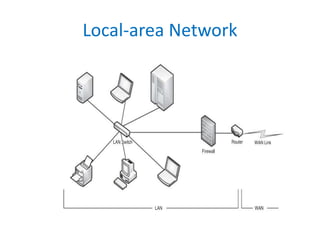
• Local-Area Network (LAN) – designed to cover
small geographical area
– Multiple topologies like star or ring
– Speeds from 1Mb per second (Appletalk, bluetooth)
to 40 Gbps for fastest Ethernet over twisted pair
copper or optical fibre
– Consists of multiple computers (mainframes through
mobile devices), peripherals (printers, storage arrays),
routers (specialized network communication
processors) providing access to other networks
– Ethernet most common way to construct LANs
Local-area Network
Network Structure
• Wide-Area Network (WAN) – links geographically
separated sites
– Point-to-point connections over long-haul lines (often
leased from a phone company)
• Implemented via connection processors known as routers
– Internet WAN enables hosts world wide to communicate
• Hosts differ in all dimensions but WAN allows communications
– WANs and LANs interconnect, similar to cell phone
network:
• Cell phones use radio waves to cell towers
• Towers connect to other towers and hubs
Communication Structure
The design of a communication network must
address four basic issues:
• Naming and name resolution - How do two processes
locate each other to communicate?
• Routing strategies - How are messages sent through
the network?
• Connection strategies - How do two processes send a
sequence of messages?
• Contention - The network is a shared resource, so how
do we resolve conflicting demands for its use?
Naming and Name Resolution
• Name systems in the network
• Address messages with the process-id
• Identify processes on remote systems by
<host-name, identifier> pair
• Domain name system (DNS) – specifies the
naming structure of the hosts, as well as name
to address resolution (Internet)
Routing Strategies
• Fixed routing - A path from A to B is specified in advance;
path changes only if a hardware failure disables it
– Since the shortest path is usually chosen, communication costs
are minimized
– Fixed routing cannot adapt to load changes
– Ensures that messages will be delivered in the order in which
they were sent
• Virtual routing- A path from A to B is fixed for the duration
of one session. Different sessions involving messages from
A to B may have different paths
– Partial remedy to adapting to load changes
– Ensures that messages will be delivered in the order in which
they were sent
Routing Strategies
• Dynamic routing - The path used to send a message
form site A to site B is chosen only when a message is
sent
– Usually a site sends a message to another site on the link
least used at that particular time
– Adapts to load changes by avoiding routing messages on
heavily used path
– Messages may arrive out of order
• This problem can be remedied by appending a sequence number
to each message
– Most complex to set up
• Tradeoffs mean all methods are used
– UNIX provides ability to mix fixed and dynamic
– Hosts may have fixed routes and gateways connecting
networks together may have dynamic routes
Routing Strategies
• Router is communications processor responsible
for routing messages
• Must have at least 2 network connections
• Maybe special purpose or just function running
on host
• Checks its tables to determine where destination
host is, where to send messages
– Static routing – table only changed manually
– Dynamic routing – table changed via routing protocol
Connection Strategies
• Circuit switching - A permanent physical link is established
for the duration of the communication (i.e., telephone
system)
• Message switching - A temporary link is established for the
duration of one message transfer (i.e., post-office mailing
system)
• Packet switching - Messages of variable length are divided
into fixed-length packets which are sent to the destination
– Each packet may take a different path through the network
– The packets must be reassembled into messages as they arrive
• Circuit switching requires setup time, but incurs less
overhead for shipping each message, and may waste
network bandwidth
– Message and packet switching require less setup time, but incur
more overhead per message
Advantages
• Economics
• Speed
• Function can be carried out over great
distance.
• Collaborte on a project
Disadvantages
• Complexity
• Network problems
• Security
Conclusion
• In this age of optimization everybody is trying to get
optimized output from their limited resources. The
concept of distributed computing is the most
efficient way to achieve the optimization. Is case of
distributed computing the actual task is modularized
and is distributed among various computer system. It
mot only increases the efficiency of the task but also
reduce the total time required to complete the task.
Thanks

Os lab presentation

  • 1.
  • 2.
    Definition Distributed system : iscollection of loosely coupled processors interconnected by a communications network. • Processors variously called nodes, computers, machines, hosts • Site is location of the processor • Generally a server has a resource a client node at a different site wants to use
  • 3.
  • 4.
    Reasons for DistributedSystems There are fours major reasons for building distributed systems. 1. Resource sharing 2. Computation speedup 3. Reliability 4. Communication
  • 5.
    Reasons for DistributedSystems – Resource sharing • Sharing and printing files at remote sites • Processing information in a distributed database • Using remote specialized hardware devices – Computation speedup – load sharing or job migration – Reliability – detect and recover from site failure, function transfer, reintegrate failed site – Communication – message passing • All higher-level functions of a standalone system can be expanded to encompass a distributed system
  • 6.
    Types of DistributedOperating Systems • Network Operating Systems • Distributed Operating Systems
  • 7.
    Network-Operating Systems • Usersare aware of multiplicity of machines • Access to resources of various machines is done explicitly by: – Remote logging into the appropriate remote machine (telnet) – Remote Desktop (Microsoft Windows) – Transferring data from remote machines to local machines, via the File Transfer Protocol (FTP) mechanism
  • 8.
    Distributed-Operating Systems Access toremote resources similar to access to local resources • Data Migration – transfer data by transferring entire file, or transferring only those portions of the file necessary for the immediate task • Computation Migration – transfer the computation, rather than the data, across the system – Via remote procedure calls (RPCs) – or via messaging system
  • 9.
    Network Structure • Local-AreaNetwork (LAN) – designed to cover small geographical area – Multiple topologies like star or ring – Speeds from 1Mb per second (Appletalk, bluetooth) to 40 Gbps for fastest Ethernet over twisted pair copper or optical fibre – Consists of multiple computers (mainframes through mobile devices), peripherals (printers, storage arrays), routers (specialized network communication processors) providing access to other networks – Ethernet most common way to construct LANs
  • 10.
  • 11.
    Network Structure • Wide-AreaNetwork (WAN) – links geographically separated sites – Point-to-point connections over long-haul lines (often leased from a phone company) • Implemented via connection processors known as routers – Internet WAN enables hosts world wide to communicate • Hosts differ in all dimensions but WAN allows communications – WANs and LANs interconnect, similar to cell phone network: • Cell phones use radio waves to cell towers • Towers connect to other towers and hubs
  • 12.
    Communication Structure The designof a communication network must address four basic issues: • Naming and name resolution - How do two processes locate each other to communicate? • Routing strategies - How are messages sent through the network? • Connection strategies - How do two processes send a sequence of messages? • Contention - The network is a shared resource, so how do we resolve conflicting demands for its use?
  • 13.
    Naming and NameResolution • Name systems in the network • Address messages with the process-id • Identify processes on remote systems by <host-name, identifier> pair • Domain name system (DNS) – specifies the naming structure of the hosts, as well as name to address resolution (Internet)
  • 14.
    Routing Strategies • Fixedrouting - A path from A to B is specified in advance; path changes only if a hardware failure disables it – Since the shortest path is usually chosen, communication costs are minimized – Fixed routing cannot adapt to load changes – Ensures that messages will be delivered in the order in which they were sent • Virtual routing- A path from A to B is fixed for the duration of one session. Different sessions involving messages from A to B may have different paths – Partial remedy to adapting to load changes – Ensures that messages will be delivered in the order in which they were sent
  • 15.
    Routing Strategies • Dynamicrouting - The path used to send a message form site A to site B is chosen only when a message is sent – Usually a site sends a message to another site on the link least used at that particular time – Adapts to load changes by avoiding routing messages on heavily used path – Messages may arrive out of order • This problem can be remedied by appending a sequence number to each message – Most complex to set up • Tradeoffs mean all methods are used – UNIX provides ability to mix fixed and dynamic – Hosts may have fixed routes and gateways connecting networks together may have dynamic routes
  • 16.
    Routing Strategies • Routeris communications processor responsible for routing messages • Must have at least 2 network connections • Maybe special purpose or just function running on host • Checks its tables to determine where destination host is, where to send messages – Static routing – table only changed manually – Dynamic routing – table changed via routing protocol
  • 17.
    Connection Strategies • Circuitswitching - A permanent physical link is established for the duration of the communication (i.e., telephone system) • Message switching - A temporary link is established for the duration of one message transfer (i.e., post-office mailing system) • Packet switching - Messages of variable length are divided into fixed-length packets which are sent to the destination – Each packet may take a different path through the network – The packets must be reassembled into messages as they arrive • Circuit switching requires setup time, but incurs less overhead for shipping each message, and may waste network bandwidth – Message and packet switching require less setup time, but incur more overhead per message
  • 18.
    Advantages • Economics • Speed •Function can be carried out over great distance. • Collaborte on a project
  • 19.
  • 20.
    Conclusion • In thisage of optimization everybody is trying to get optimized output from their limited resources. The concept of distributed computing is the most efficient way to achieve the optimization. Is case of distributed computing the actual task is modularized and is distributed among various computer system. It mot only increases the efficiency of the task but also reduce the total time required to complete the task.
  • 21.