Unit 1: Basic Network Architecture
Network Goals ; Network Types; Network topologies: Message,
Packet and Circuit switching,
Architecture, Services-Layered Architecture: OSI Reference
Model, TCP/IP Model, Comparison: OSI and TCP /IP model.
[Start]
↓
[You type a message in WhatsApp]
↓
[Message is converted into data (0s and 1s)]
↓
[Data is sent over the internet (Wi-Fi or mobile data)]
↓
[Data goes to WhatsApp server]
↓
[Server finds your friend’s phone]
↓
[Message is delivered to your friend's phone]
↓
[Data is converted back to text: "Hi!"]
↓
[Your friend sees the message on WhatsApp]
↓
A computer network is a system that connects multiple computers to share resources and
information.
Goals:
● Resource Sharing: Share hardware (printers), software, or files across computers.
● High Reliability: If one system fails, others continue working.
● Cost Efficiency: Centralized resources reduce cost (e.g., shared printer).
● Communication Medium: Enables emails, video calls, chatting, etc.
● Scalability: Easy to add more computers to the network.
● Security: Allows centralized security control and access management.
Network Types
Based on Geography:
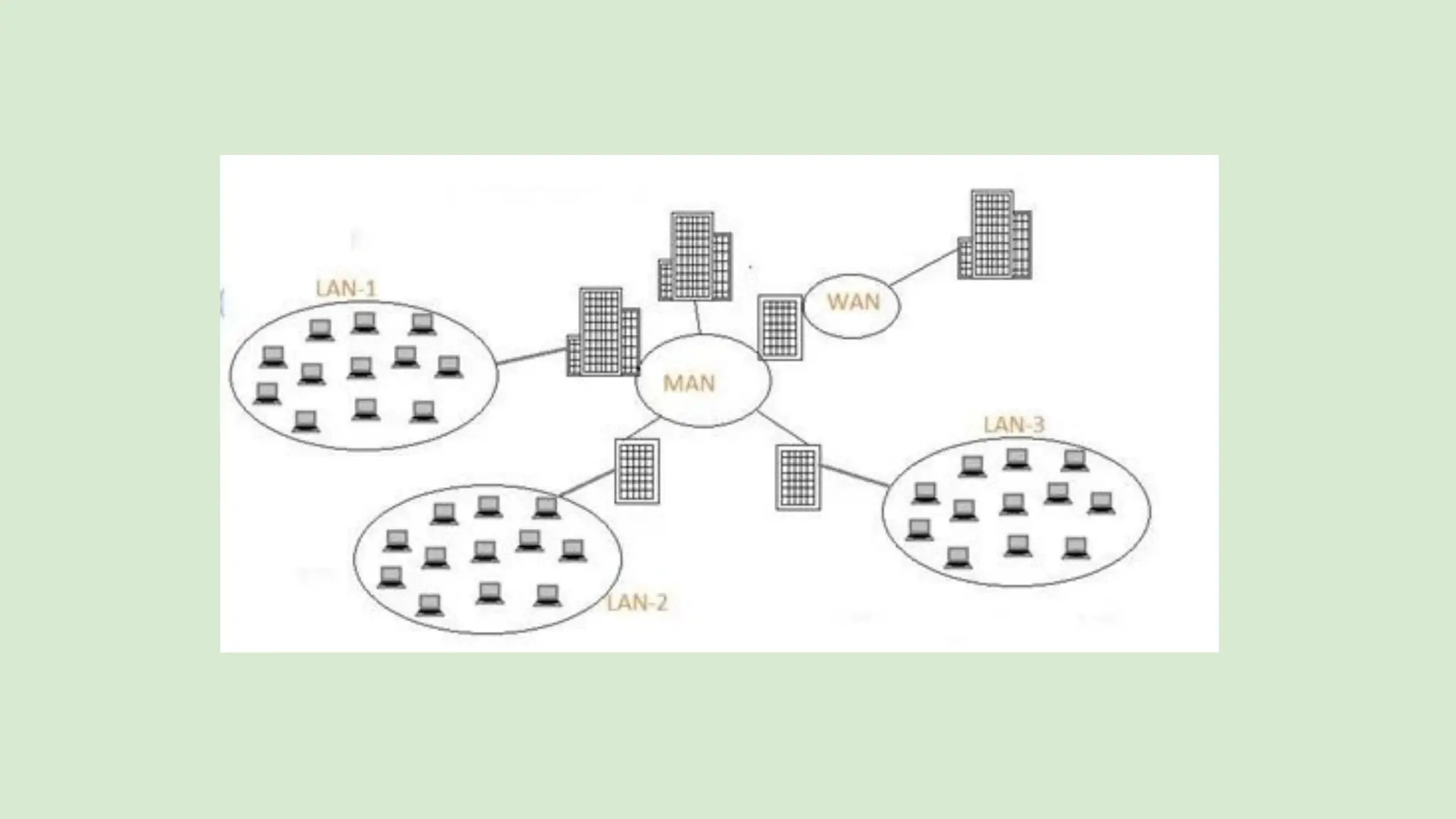
● LAN (Local Area Network): Covers a small area (e.g., office, school). High speed and low cost.
● MAN (Metropolitan Area Network): Covers a city or town. Medium range and cost.
● WAN (Wide Area Network): Covers large areas (e.g., countries). Internet is the biggest WAN.
Based on Architecture:
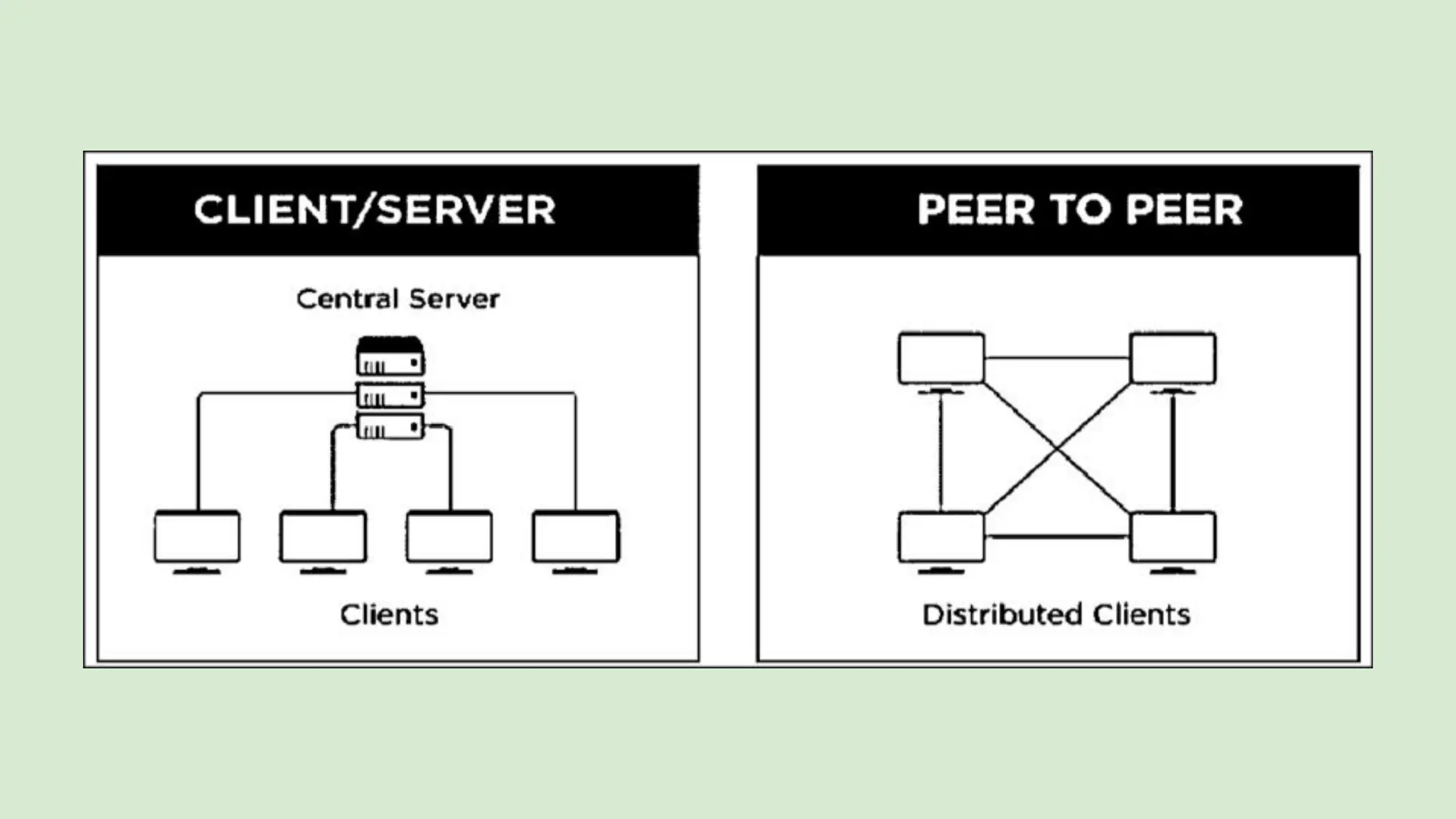
● Peer-to-Peer: All computers are equal. Share files without a server.
● Client-Server: One central server manages resources; other computers (clients) request services.
Based on Access:
● Private Network: Used by one organization (e.g., office intranet).
● Public Network: Open to everyone (e.g., Internet).
● LAN stands for Local Area Network
● Connects devices within a limited area (home, office, school)
● Allows sharing of files, printers, and internet
● Example: Your home Wi-Fi network
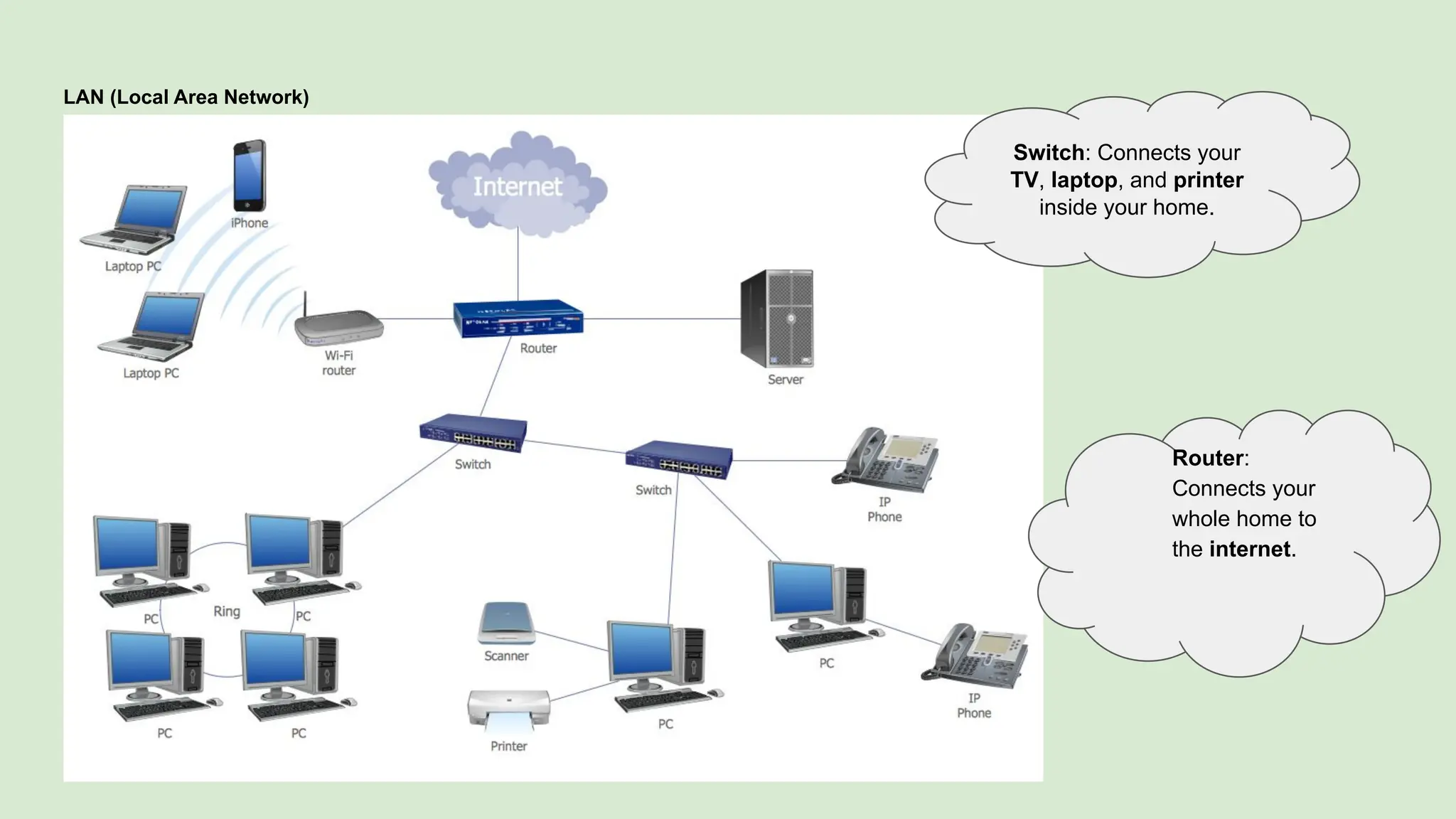
LAN (Local Area Network)
Switch: Connects your
TV, laptop, and printer
inside your home.
Router:
Connects your
whole home to
the internet.
Key Features of a LAN
● Limited Coverage – Confined to one building or floor
● High Data Transfer Speeds – Fast communication between devices
● Resource Sharing – Share printers, files, internet, etc.
● Secure Access – Controlled access and privacy
● Cost-Effective – One internet connection for many devices
Components of a LAN
● Devices (Nodes): Computers, smartphones, printers, etc.
● Switches: Directs traffic within the LAN
● Routers: Connect LAN to the internet
● Cables/Wi-Fi: Medium to connect devices
● NICs (Network Interface Cards): Enables device connection to
network(network port or antenna of your device)
How LAN Works
● Connection of Devices: Using Ethernet cables or Wi-Fi
● Data Transmission: Data flows through switch to the correct device
● Switches/Routers: Help route internal and external data
● Resource Sharing: Devices share printers, files, internet, etc.
What is a MAN (Metropolitan Area Network)?
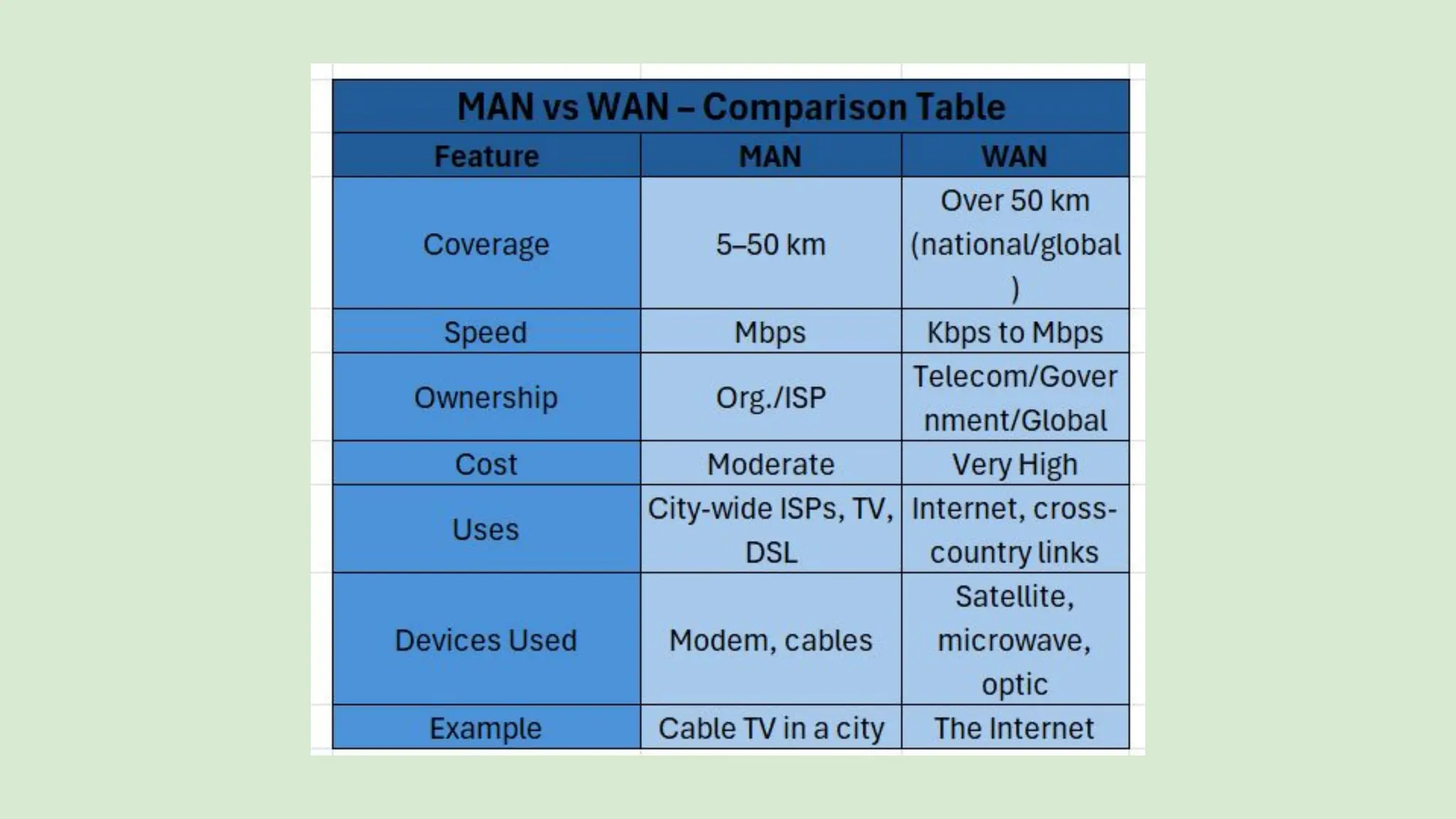
● Covers larger area than LAN but smaller than WAN (typically 5–50
km)
● Connects users within the same city or across nearby cities
● Can serve as an Internet Service Provider (ISP)
Example:
Cable TV network or high-speed DSL network in a city
How MAN Works
● Connects multiple LANs across city-wide areas
● Transmission through modems, cables, or optical fiber
● Can be owned by multiple organizations or telecom companies
● Designed for high-speed usage like video streaming or data backup
Advantages of MAN
● High-speed connectivity over wider areas than LAN
● Can serve multiple customers as an ISP
● Faster than WAN in some cases due to shorter range
Disadvantages of MAN
● Costly to set up and maintain
● Less fault tolerant and more network congestion
● Security risks if not properly managed
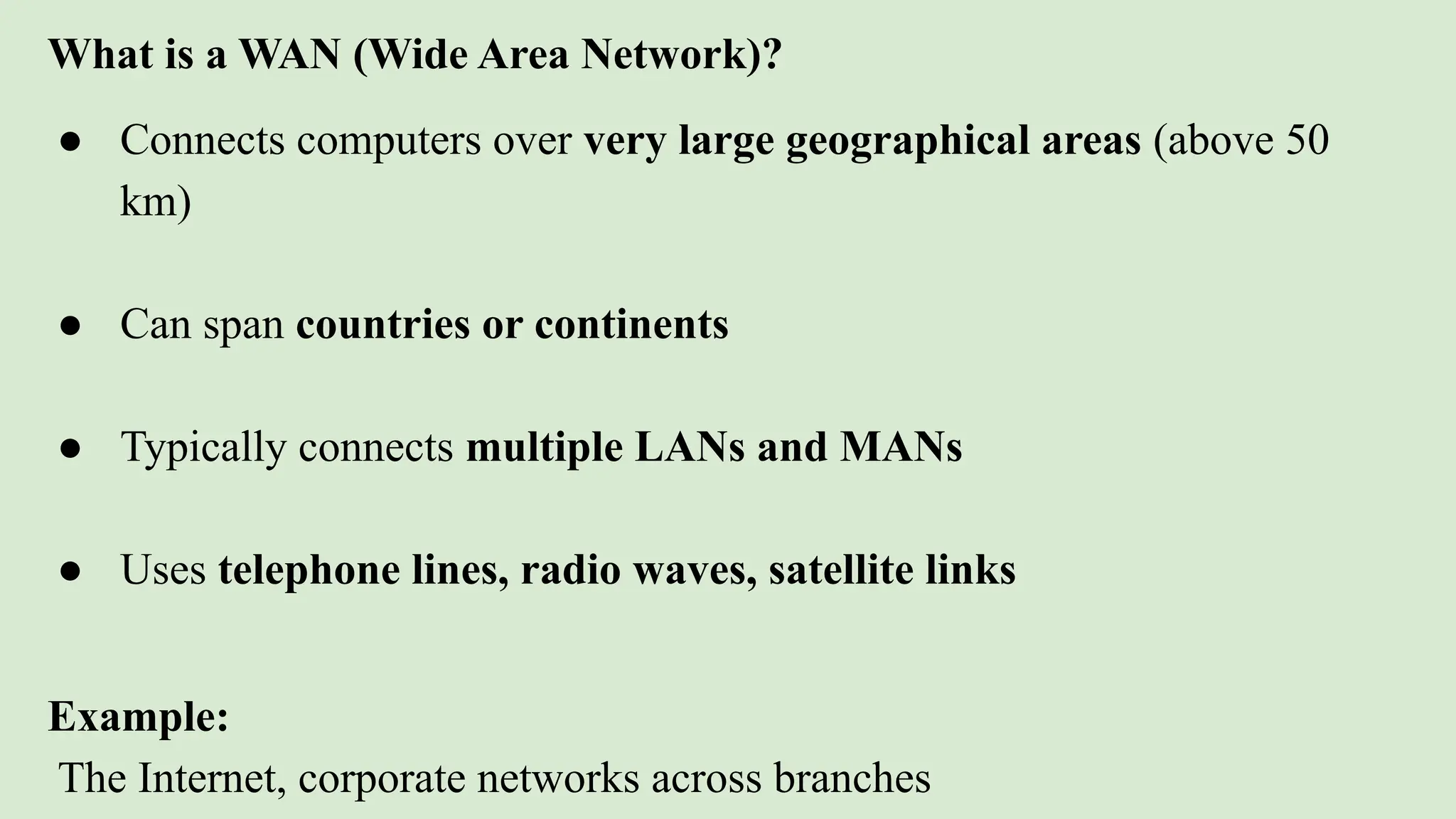
What is a WAN (Wide Area Network)?
● Connects computers over very large geographical areas (above 50
km)
● Can span countries or continents
● Typically connects multiple LANs and MANs
● Uses telephone lines, radio waves, satellite links
Example:
The Internet, corporate networks across branches
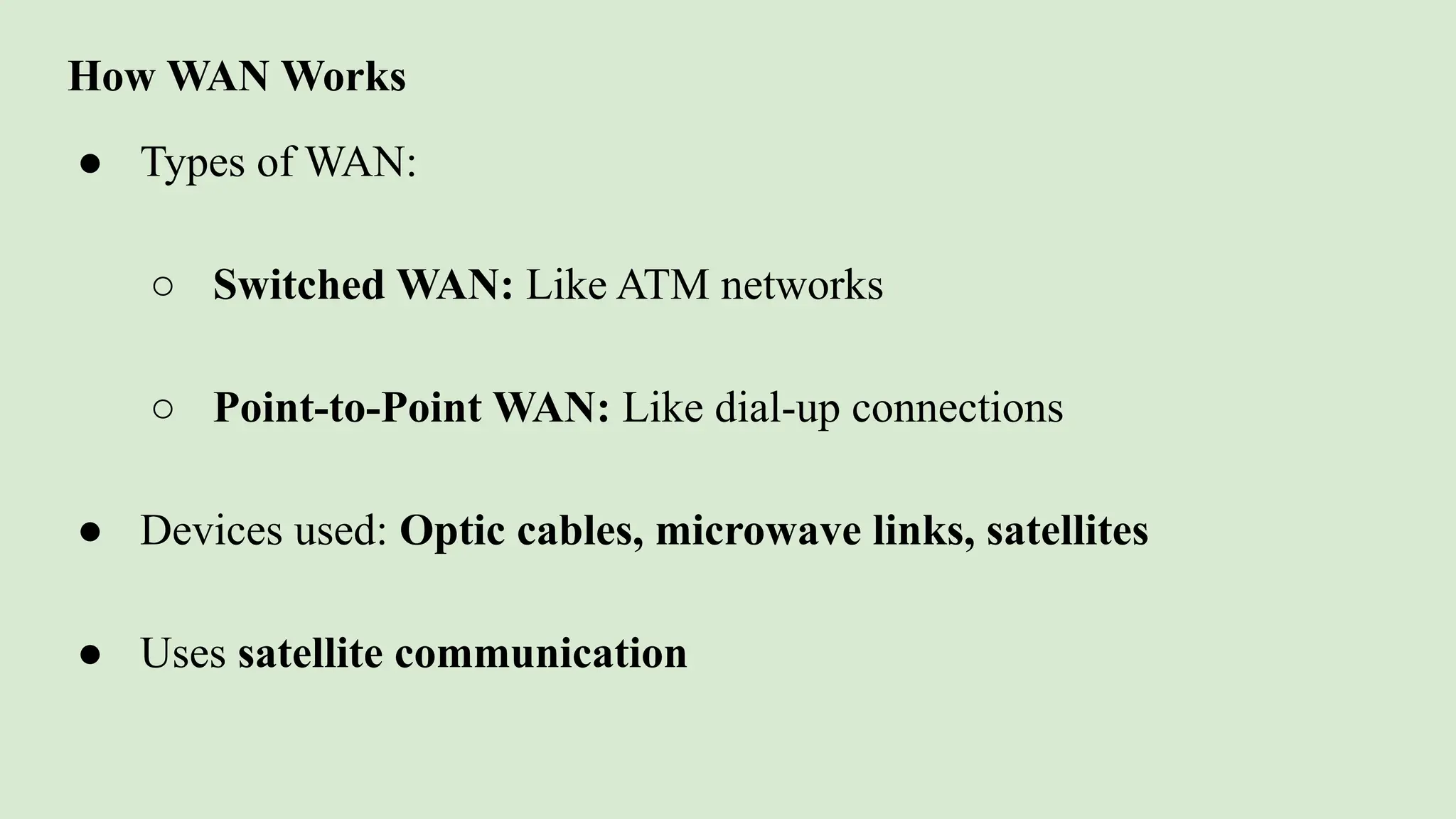
How WAN Works
● Types of WAN:
○ Switched WAN: Like ATM networks
○ Point-to-Point WAN: Like dial-up connections
● Devices used: Optic cables, microwave links, satellites
● Uses satellite communication
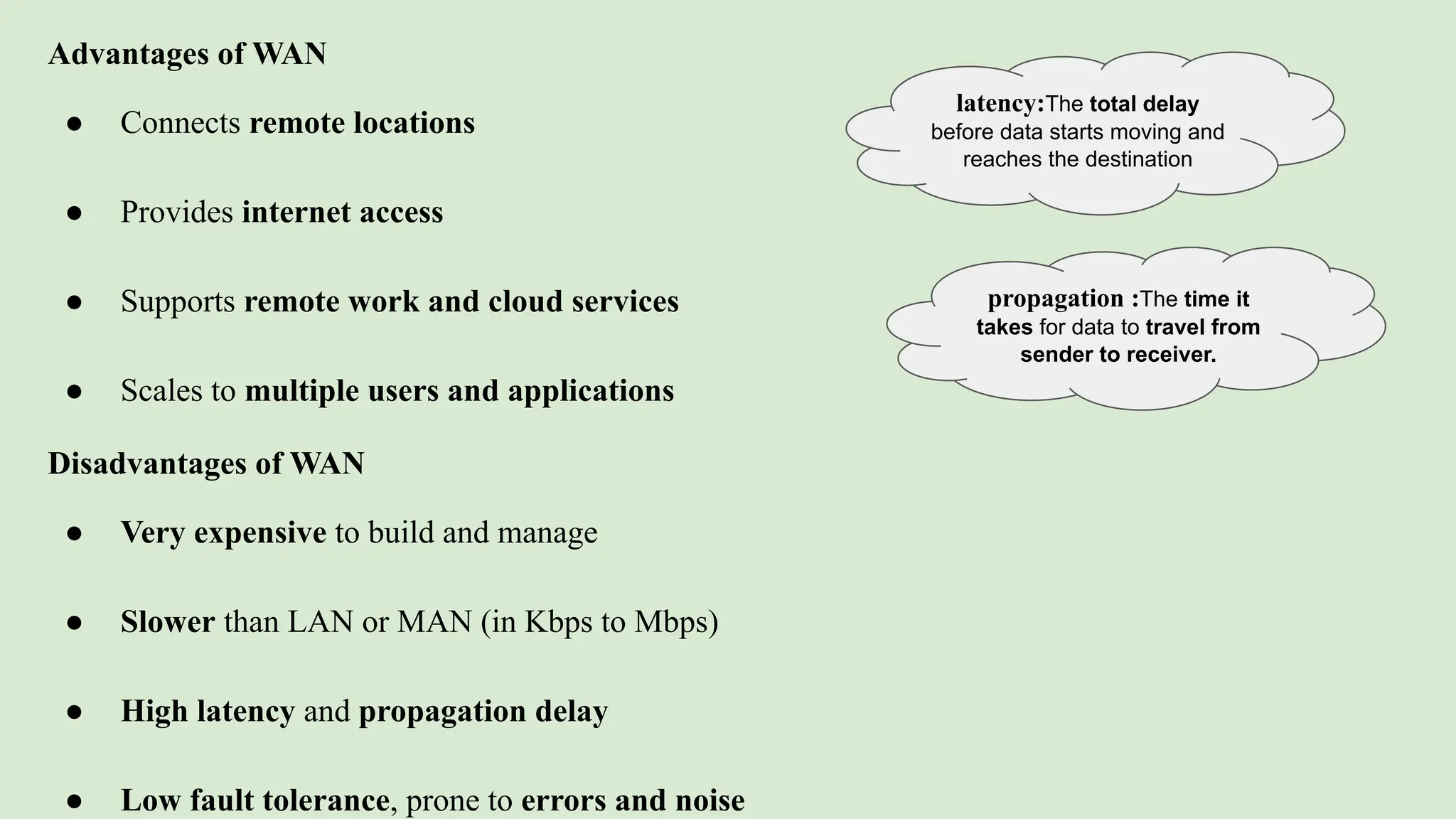
Advantages of WAN
● Connects remote locations
● Provides internet access
● Supports remote work and cloud services
● Scales to multiple users and applications
Disadvantages of WAN
● Very expensive to build and manage
● Slower than LAN or MAN (in Kbps to Mbps)
● High latency and propagation delay
● Low fault tolerance, prone to errors and noise
latency:The total delay
before data starts moving and
reaches the destination
propagation :The time it
takes for data to travel from
sender to receiver.
Network Topologies
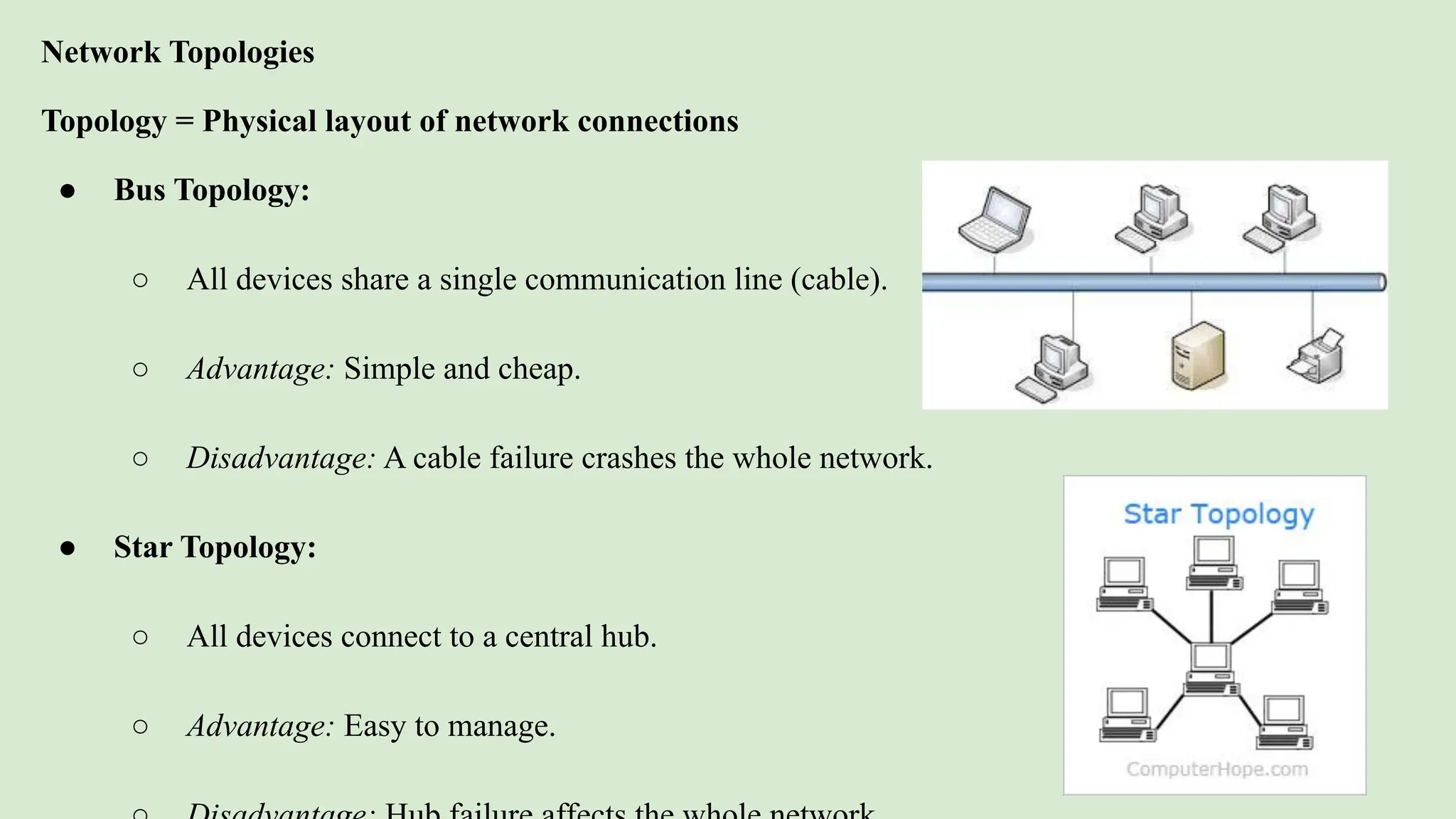
Topology = Physical layout of network connections
● Bus Topology:
○ All devices share a single communication line (cable).
○ Advantage: Simple and cheap.
○ Disadvantage: A cable failure crashes the whole network.
● Star Topology:
○ All devices connect to a central hub.
○ Advantage: Easy to manage.
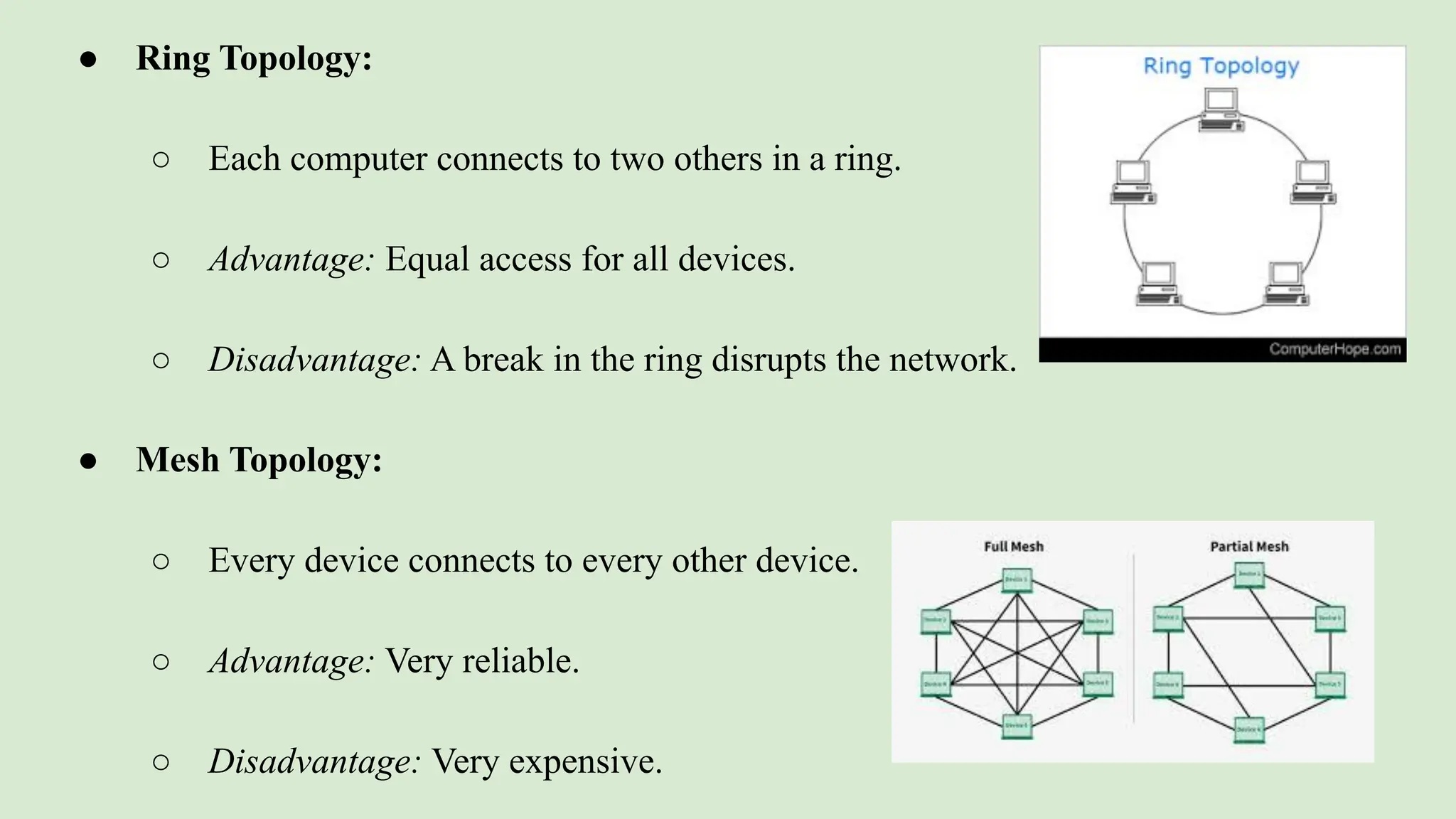
● Ring Topology:
○ Each computer connects to two others in a ring.
○ Advantage: Equal access for all devices.
○ Disadvantage: A break in the ring disrupts the network.
● Mesh Topology:
○ Every device connects to every other device.
○ Advantage: Very reliable.
○ Disadvantage: Very expensive.
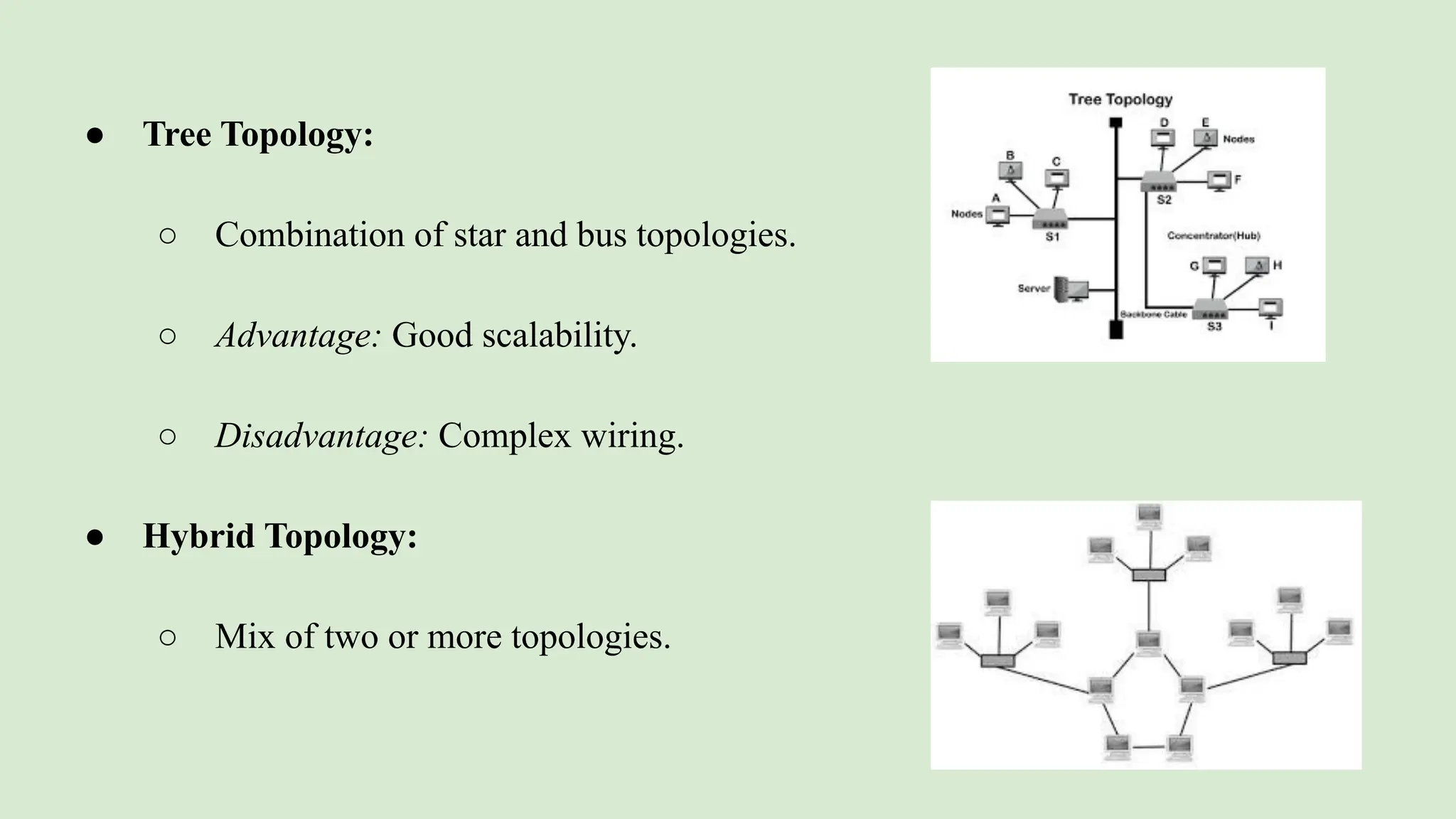
● Tree Topology:
○ Combination of star and bus topologies.
○ Advantage: Good scalability.
○ Disadvantage: Complex wiring.
● Hybrid Topology:
○ Mix of two or more topologies.
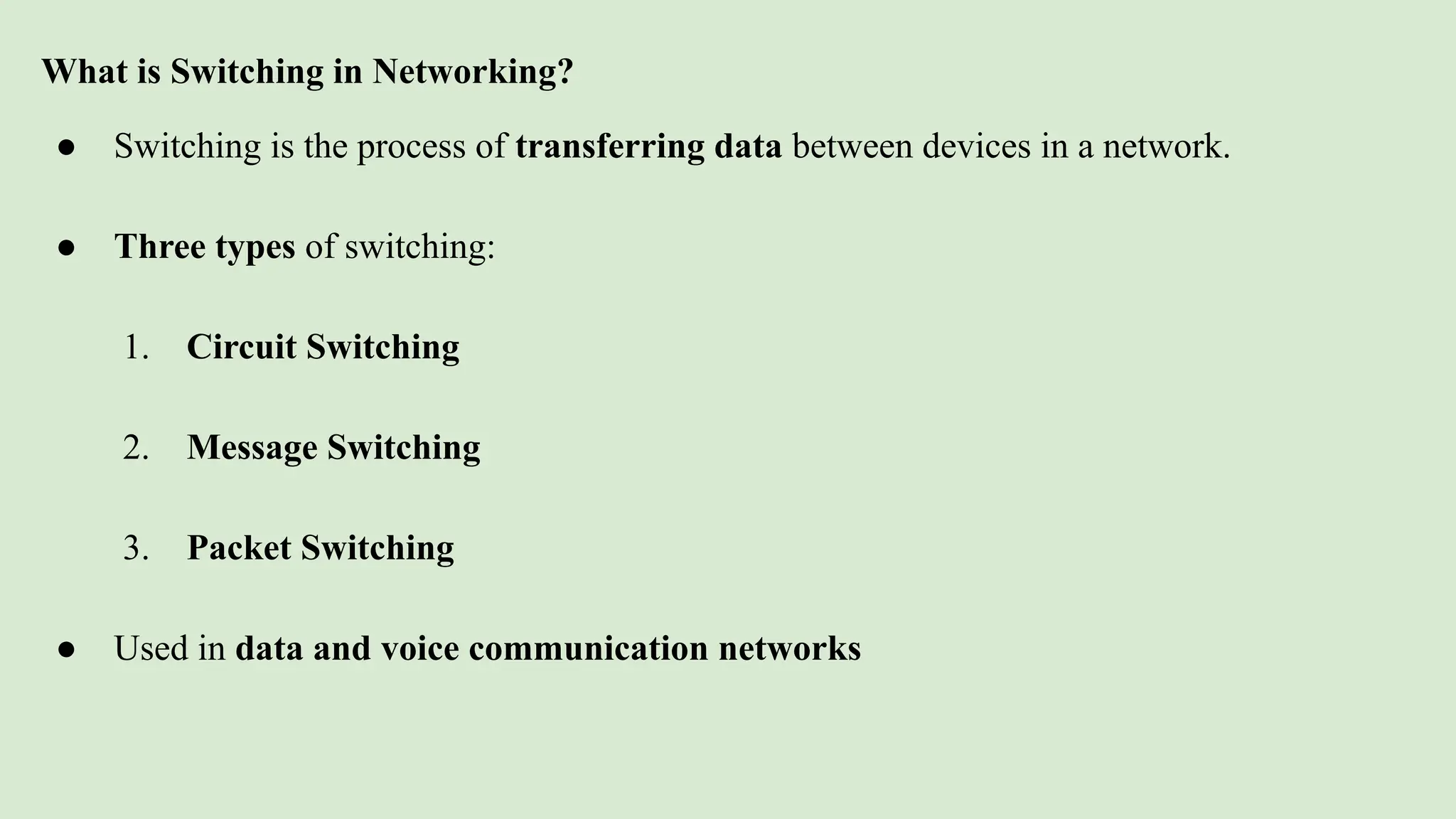
What is Switching in Networking?
● Switching is the process of transferring data between devices in a network.
● Three types of switching:
1. Circuit Switching
2. Message Switching
3. Packet Switching
● Used in data and voice communication networks
Message Switching
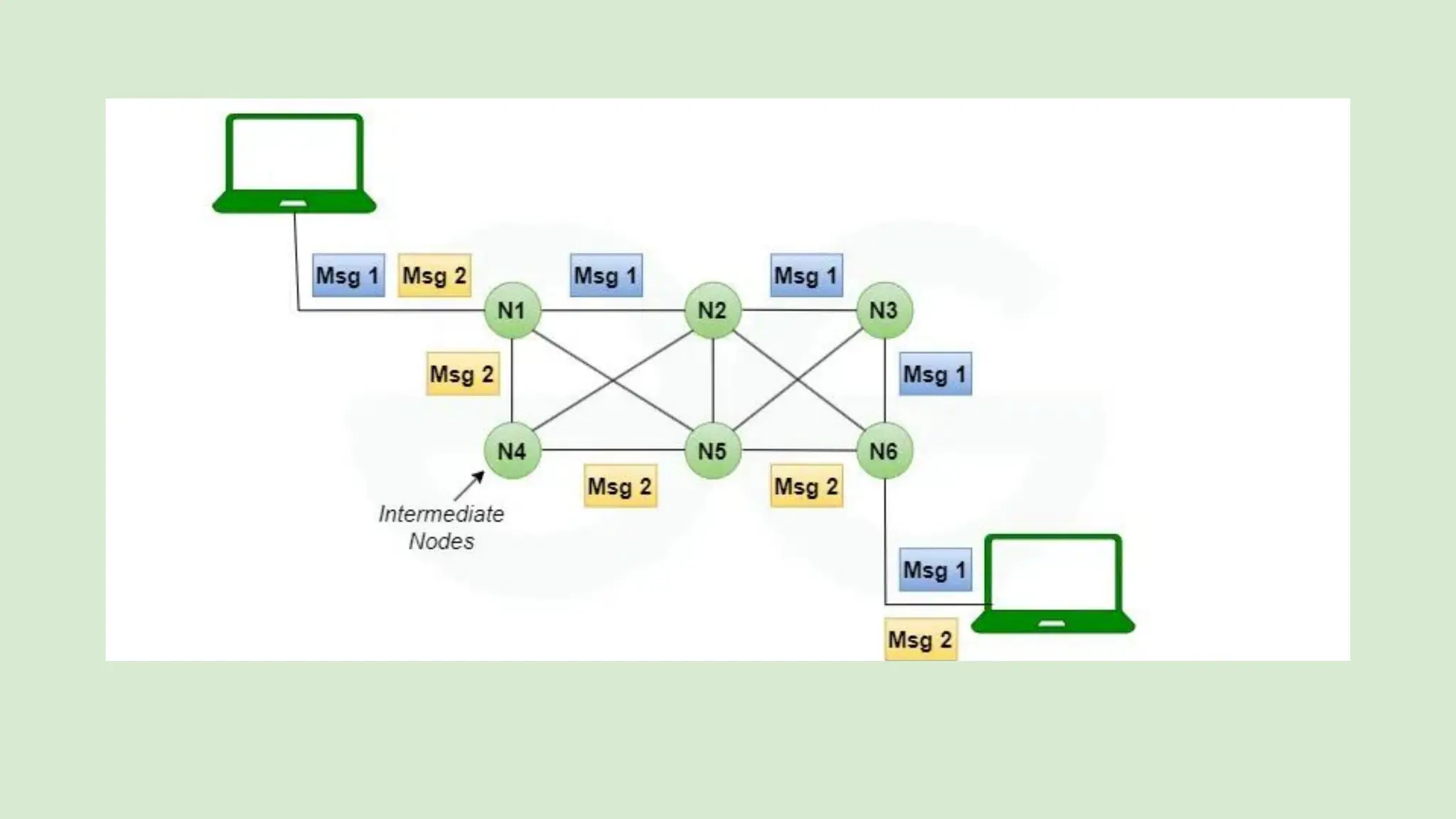
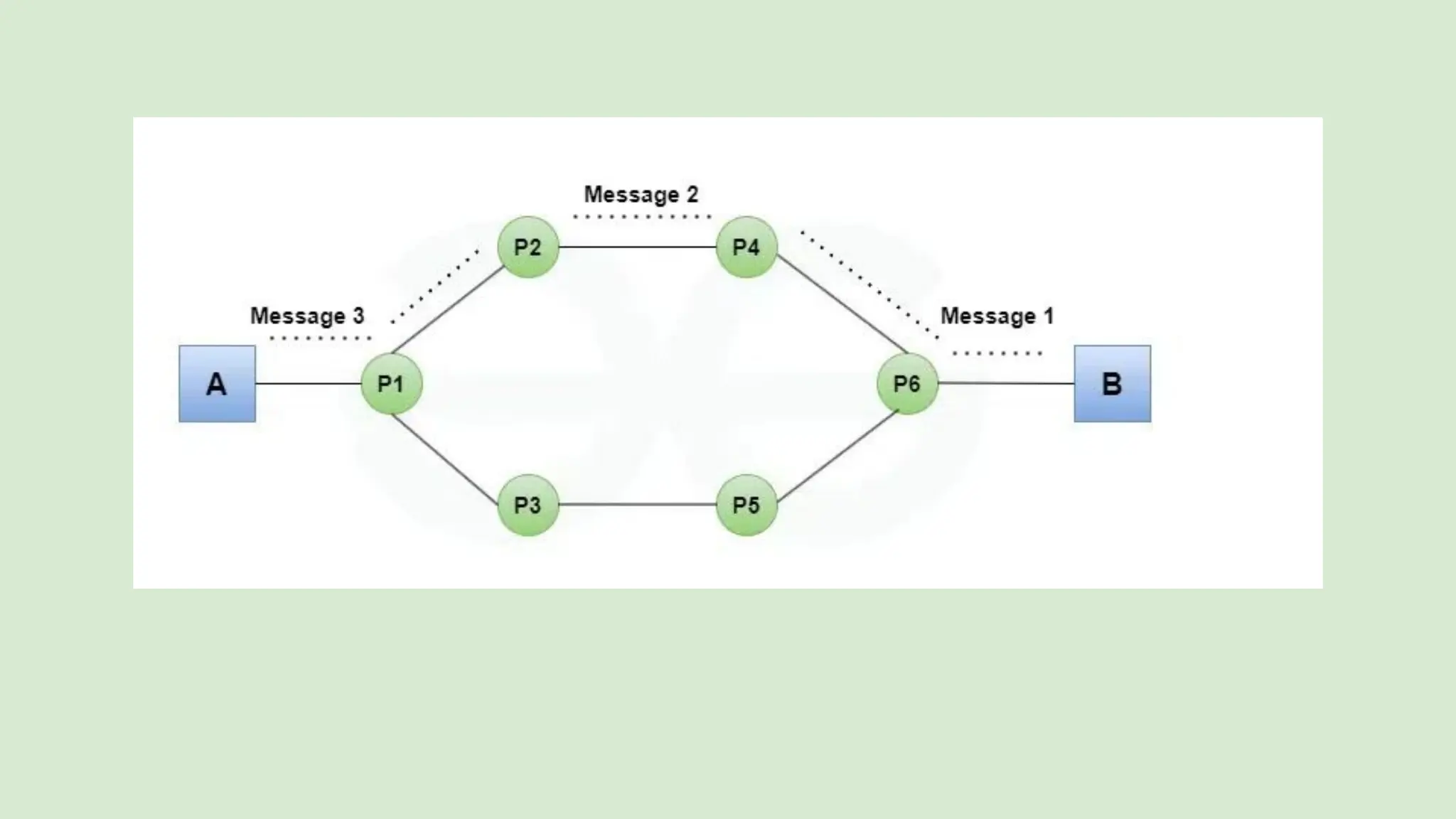
● The entire message is sent as a single unit.
● Stored at each intermediate device before forwarding.
● No dedicated path needed.
Key Points:
● Known as store-and-forward method.
● Each message has the destination address.
● Suitable for non-real-time communication.
Store and Forward:
In this method, each device (called a node) in the network receives the
whole message first, stores it, and then sends it to the next device. So,
every node must have some storage space. The message is sent only if
the next device and the connection to it are ready. If not, the message is
stored until it can be sent. This method is called store-and-forward.
Message Delivery:
Here, the whole information is packed into one message and sent from
the sender to the receiver. Each message has a header, which carries
details like where the message came from and where it is going.
Advantages of Message Switching:
1. Reduces network traffic:
Messages can be stored if the path is busy, which helps avoid congestion.
2. Shares network resources:
Many devices can use the same communication path, saving resources.
3. Messages can have priority:
Important messages can be sent first by giving them high priority.
4. Flexible message size:
Messages can be of any length.
5. No need for a direct connection:
The sender and receiver don’t need to be connected at the same time.
Disadvantages of Message Switching:
1. Slow for real-time use:
Storing messages causes delays, so it’s not good for things like live calls or video
chats.
2. Needs more memory:
Each device in the network must have large storage to hold messages.
3. Uncertainty in delivery:
It can be hard to know if a message was delivered properly.
4. No fixed path:
Since there’s no dedicated connection, it may be less reliable.
Applications of Message Switching:
1. Email Systems:
Emails are stored and then forwarded when the receiver is available — just like message switching.
2. Telegraph Systems (historical):
Old telegraph systems used message switching to send long messages across countries.
3. Store-and-Forward SMS (Text Messaging):
In mobile networks, if your phone is off, the SMS is stored and delivered later when the phone is back online.
4. Computer Networks (non-real-time data):
It is used in transferring large files or messages where speed is not the main concern.
5. Military Communication Systems:
Messages can be stored safely and sent when the path is clear and secure.
6. Disaster Management Networks:
Important alerts can be given high priority and sent even when the network is partially down.
Circuit switching is a type of network configuration in which a
physical path is obtained and dedicated to a single connection
between two endpoints in the network for the duration of a
dedicated connection. Ordinary voice phone service uses circuit
switching. This reserved circuit is used for the duration of a call.
As long as the call lasts, the circuit cannot be used for anything
else.
Circuit Switching
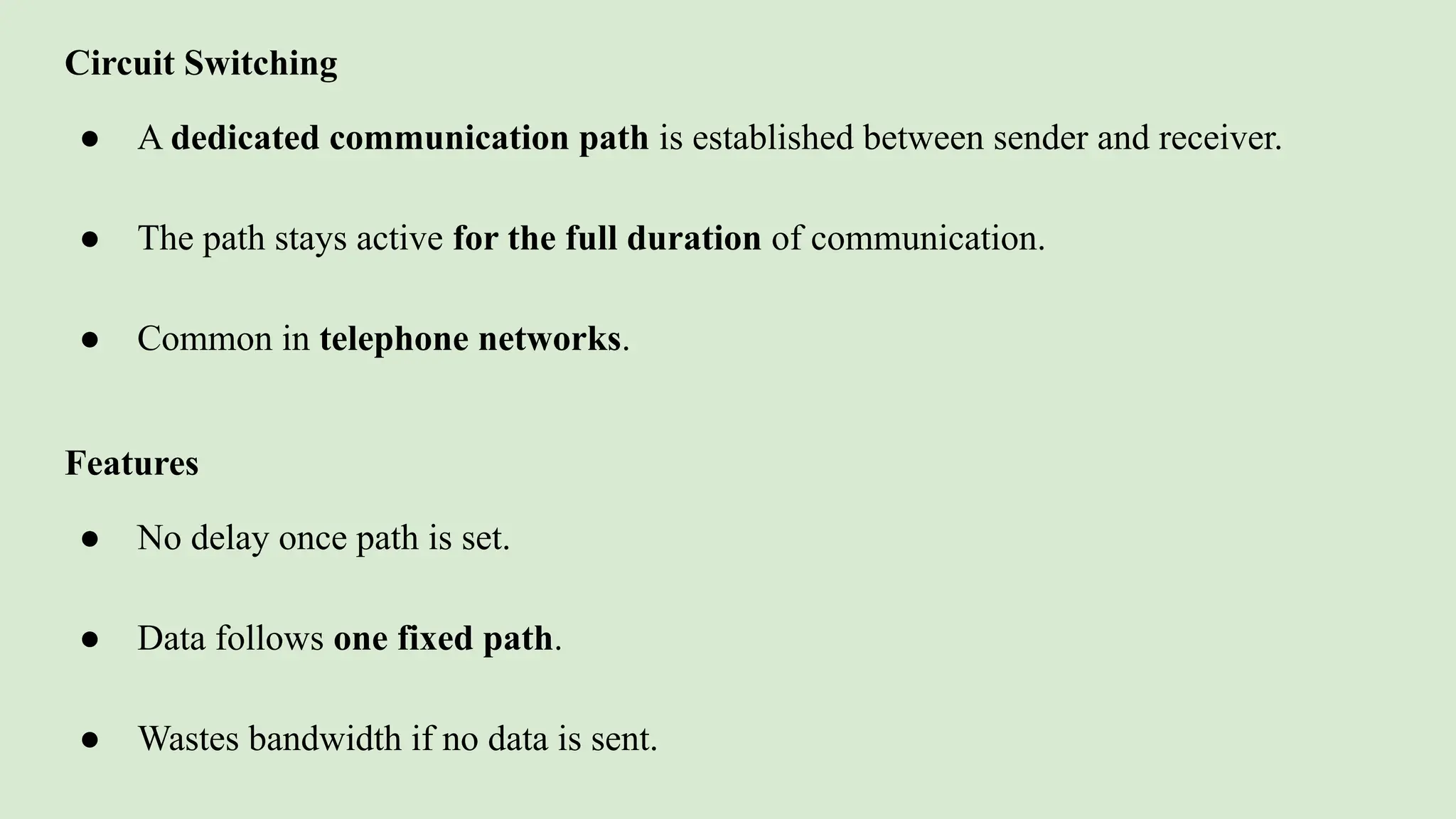
● A dedicated communication path is established between sender and receiver.
● The path stays active for the full duration of communication.
● Common in telephone networks.
Features
● No delay once path is set.
● Data follows one fixed path.
● Wastes bandwidth if no data is sent.
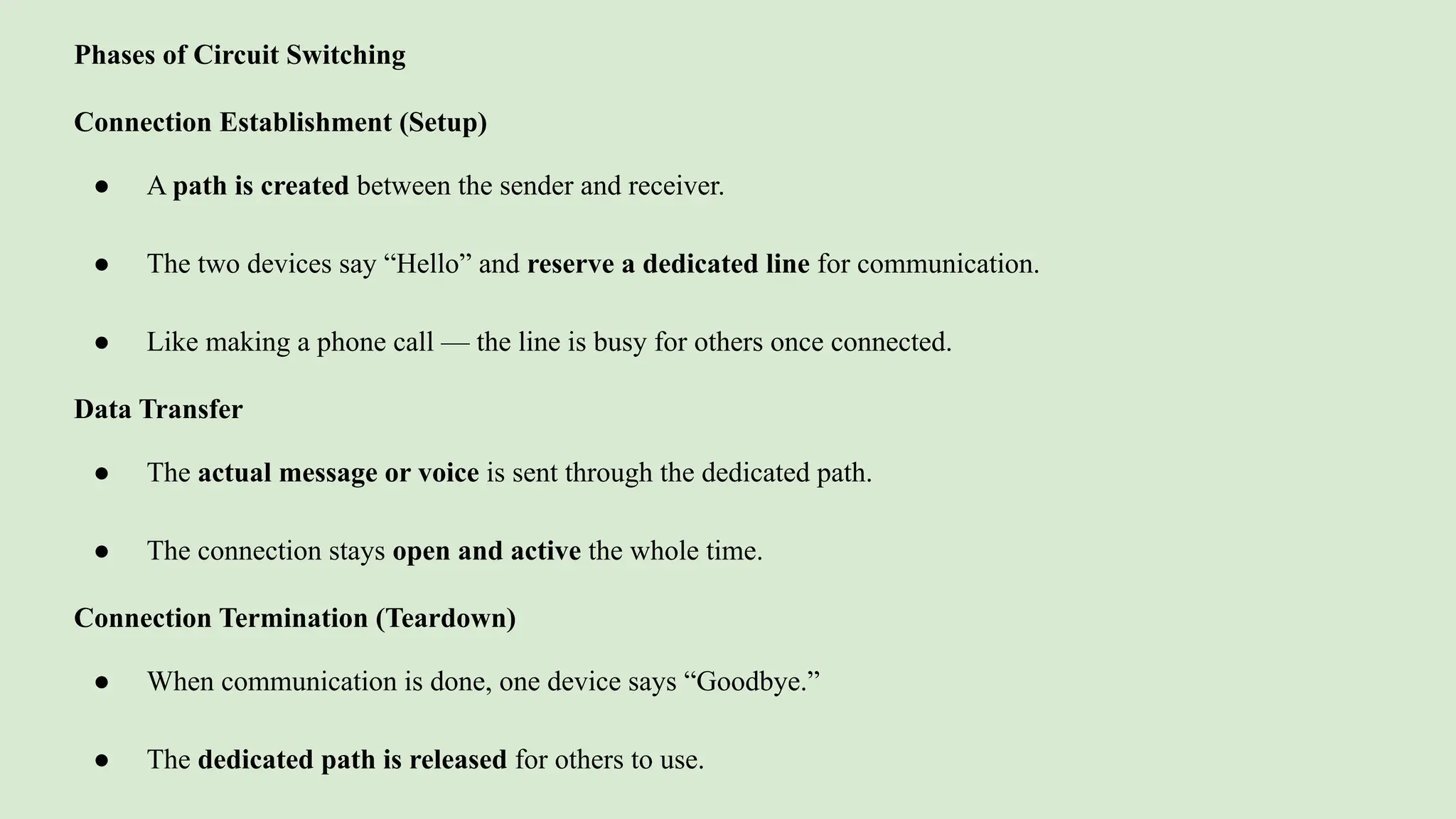
Phases of Circuit Switching
Connection Establishment (Setup)
● A path is created between the sender and receiver.
● The two devices say “Hello” and reserve a dedicated line for communication.
● Like making a phone call — the line is busy for others once connected.
Data Transfer
● The actual message or voice is sent through the dedicated path.
● The connection stays open and active the whole time.
Connection Termination (Teardown)
● When communication is done, one device says “Goodbye.”
● The dedicated path is released for others to use.
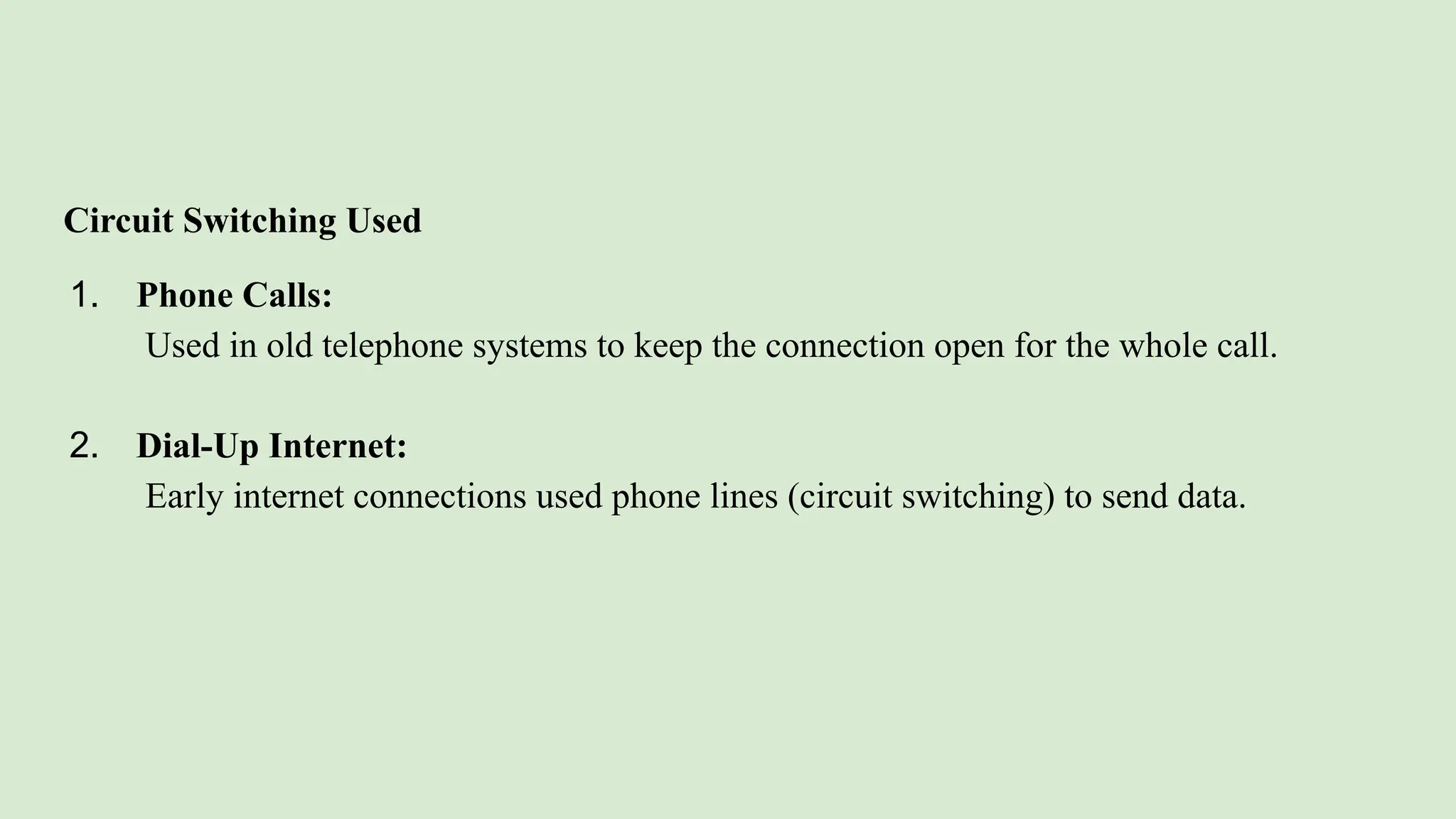
Circuit Switching Used
1. Phone Calls:
Used in old telephone systems to keep the connection open for the whole call.
2. Dial-Up Internet:
Early internet connections used phone lines (circuit switching) to send data.
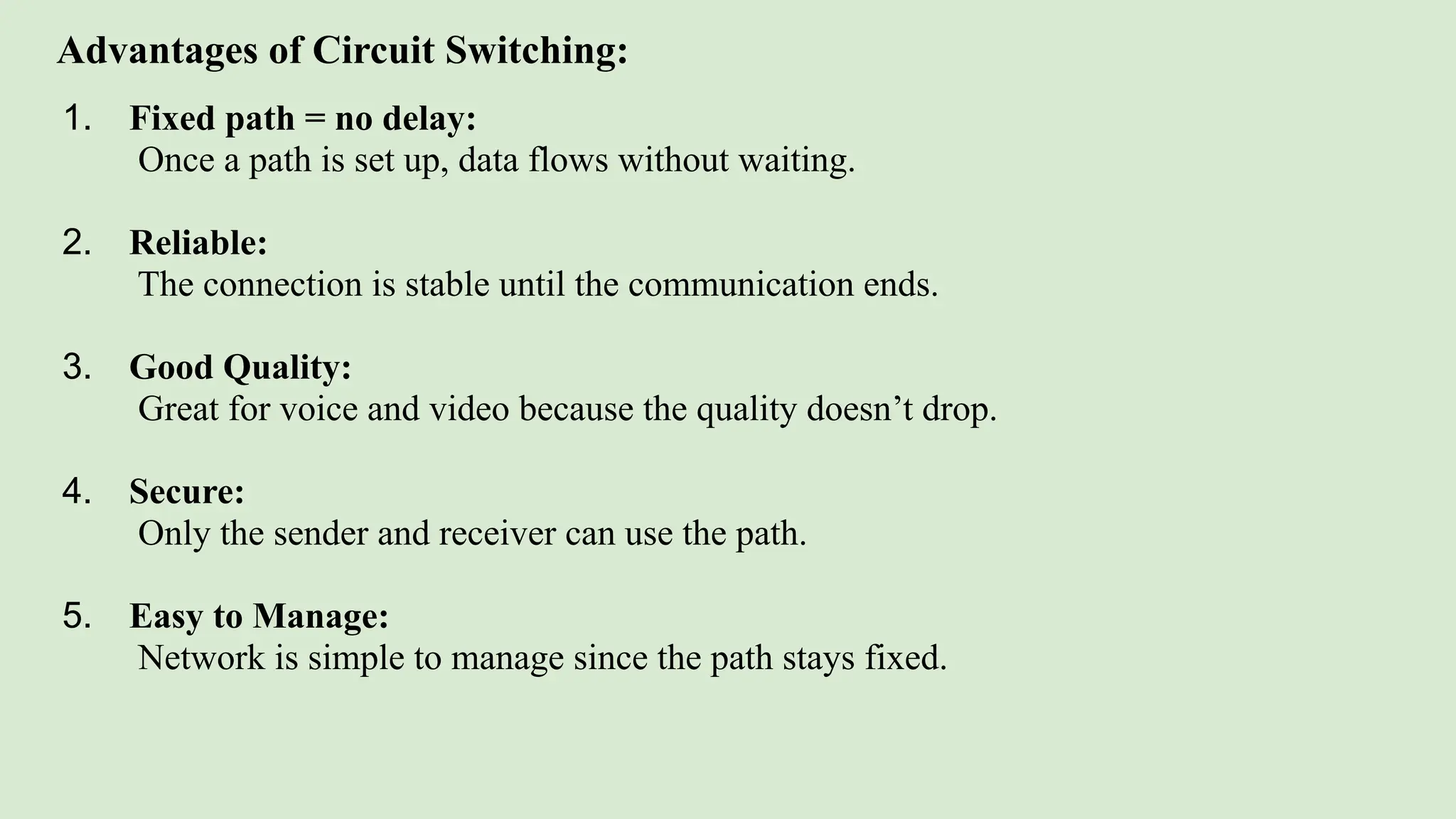
Advantages of Circuit Switching:
1. Fixed path = no delay:
Once a path is set up, data flows without waiting.
2. Reliable:
The connection is stable until the communication ends.
3. Good Quality:
Great for voice and video because the quality doesn’t drop.
4. Secure:
Only the sender and receiver can use the path.
5. Easy to Manage:
Network is simple to manage since the path stays fixed.
Disadvantages of Circuit Switching:
1. Not Scalable:
Hard to manage in big networks with many users.
2. Wastes Resources:
The path stays reserved even when no data is being sent.
3. Less Flexible:
The line cannot be used for anything else during a call.
4. Costly:
Setting up and maintaining dedicated paths is expensive.
5. Breakdowns Affect Everything:
If the path breaks, the call or data transfer stops.
6. No Prioritization:
All data is treated the same – urgent data can’t be given priority.
Applications of Circuit Switching:
1. Traditional Telephone Networks:
Used in landline phone systems where a dedicated path is set up for the entire call.
2. Dial-up Internet Connections:
Early internet connections used circuit-switched telephone lines to access the
internet.
Packet Switching
● The message is divided into packets.
● Packets travel independently and may take different routes.
● Reassembled at the destination using sequence numbers.
Key Points:
● Used in the Internet and TCP/IP networks.
● Efficient use of bandwidth.
● Packets may arrive out of order.
Advantages of Packet Switching:
1. Better use of bandwidth:
No fixed path needed, so network is used more efficiently.
2. Less delay in starting:
Data is sent as soon as it’s ready—no need to wait for a full connection.
3. More reliable:
If some packets are lost, the receiver can ask for them again.
4. Can handle failures:
If one path breaks, packets take another path to reach the destination.
5. Cheaper and easier:
Packet switching networks cost less and are simpler to maintain.
Disadvantages of Packet Switching:
1. Packets may arrive in the wrong order:
Since packets take different paths, they may reach the destination out of sequence.
2. Needs extra info:
Each packet must have a number to put them back in the right order.
3. More work for network devices:
Routers must decide how to send each packet, which increases complexity.
4. Possible delays:
During heavy traffic, packets may wait in queues, causing delays.
5. Not ideal for long, steady data:
Circuit switching is better for continuous data like voice or video.
Types of Packet Switching:
1. Connection-Oriented (Virtual Circuit):
● A temporary path is set up before sending data.
● All packets follow the same path.
● 3 Phases:
○ Setup: Path is created.
○ Data Transfer: Packets move through this path.
○ Teardown: Path is closed after sending data.
2.Connectionless:
● No path is set up before sending.
● Each packet is sent separately with full address.
● Packets may take different paths and arrive out of order.
● Receiver uses TCP to re-order and check all packets.
HW
1.Difference Between Message Switching and Packet Switching
2.Difference Between Packet Switching and Circuit Switching
Network Architecture:
● Structure and design of a network.
● Defines:
○ How devices are connected
○ Rules (protocols) for communication
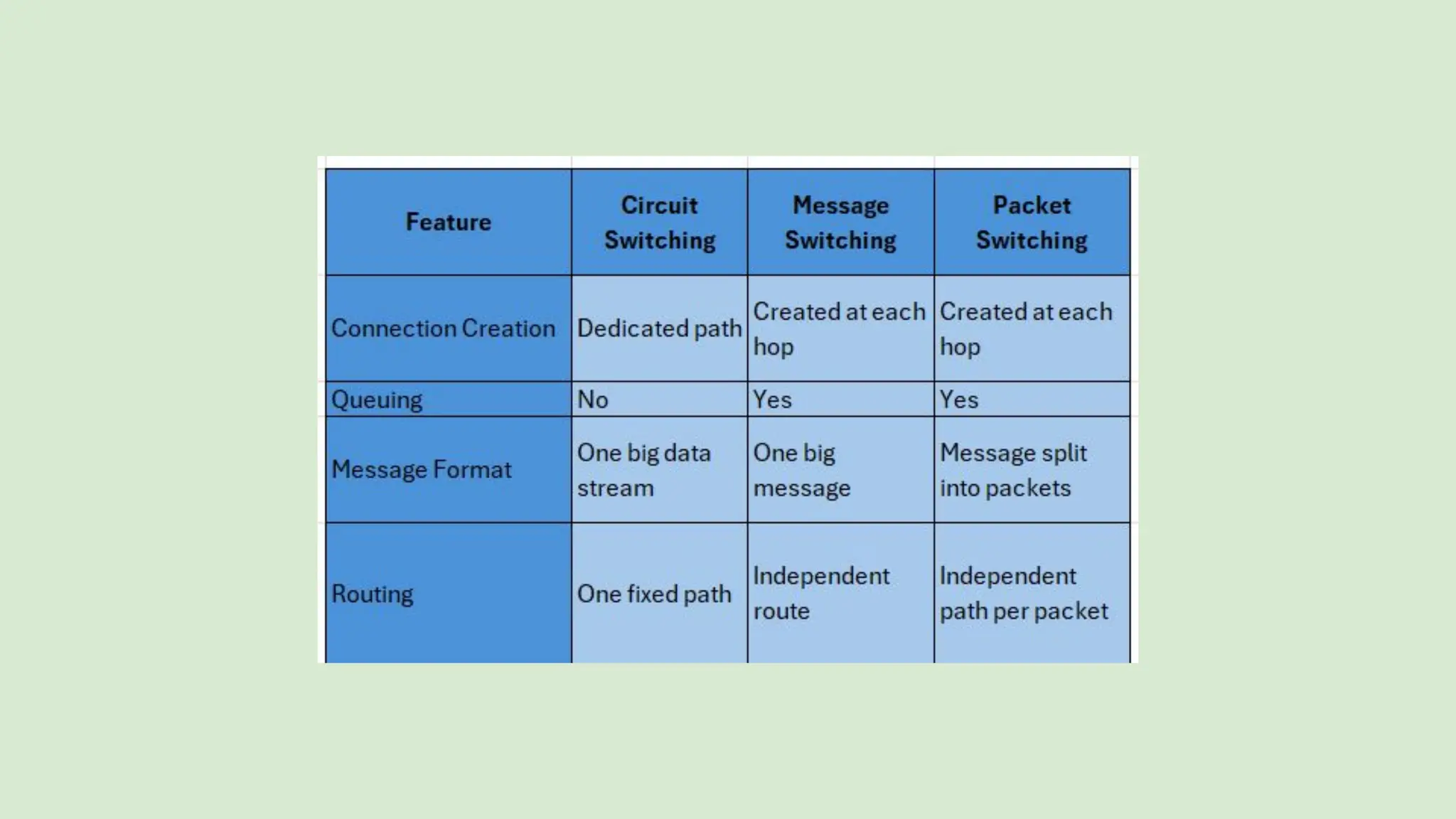
○ Services provided (e.g., email, file sharing)
Network Services:
● Connection-Oriented: Ensures reliable communication (e.g., TCP).
● Connectionless: No guarantee of delivery (e.g., UDP).
● Reliable: Uses acknowledgment and retransmission.
● Unreliable: No error checking or retransmission.
What is Network Architecture?
● Network architecture is the design and structure of a computer network.
● It defines hardware, software, communication protocols, and the way
devices interact.
● Applies to both LANs and WANs.
● A good architecture ensures efficient communication and resource sharing.
Components of Network Architecture
● Network Topology: Physical/logical layout of devices.
● Client: Requests resources from a server.
● Router: Chooses best paths and connects networks.
● Switch: Connects devices and directs data.
● Protocols: Rules for communication (e.g., TCP/IP).
● Transmission Media: Cables, fiber optics, Wi-Fi.
Types of Network Architecture
Based on Functionality
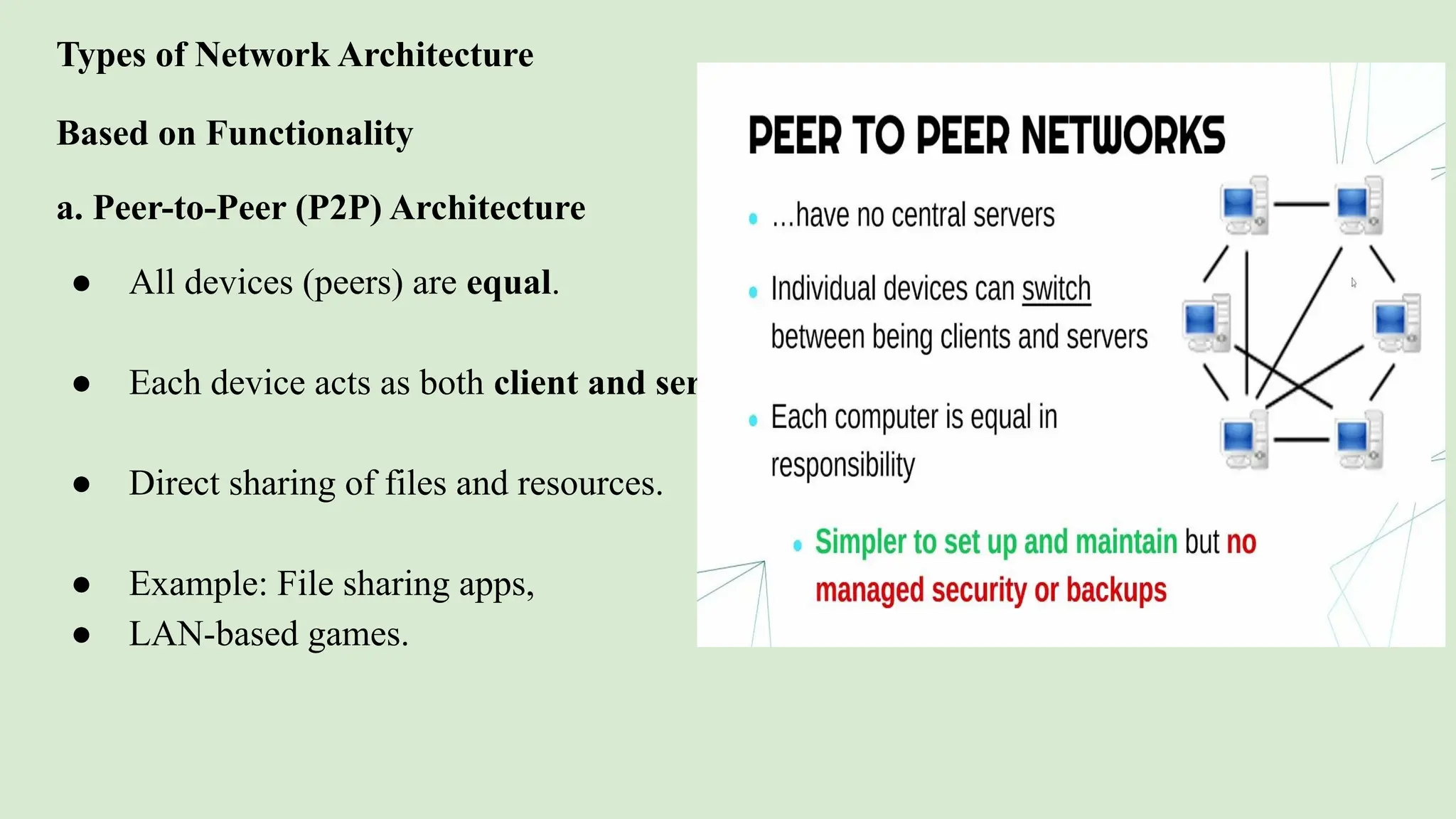
a. Peer-to-Peer (P2P) Architecture
● All devices (peers) are equal.
● Each device acts as both client and server.
● Direct sharing of files and resources.
● Example: File sharing apps,
● LAN-based games.
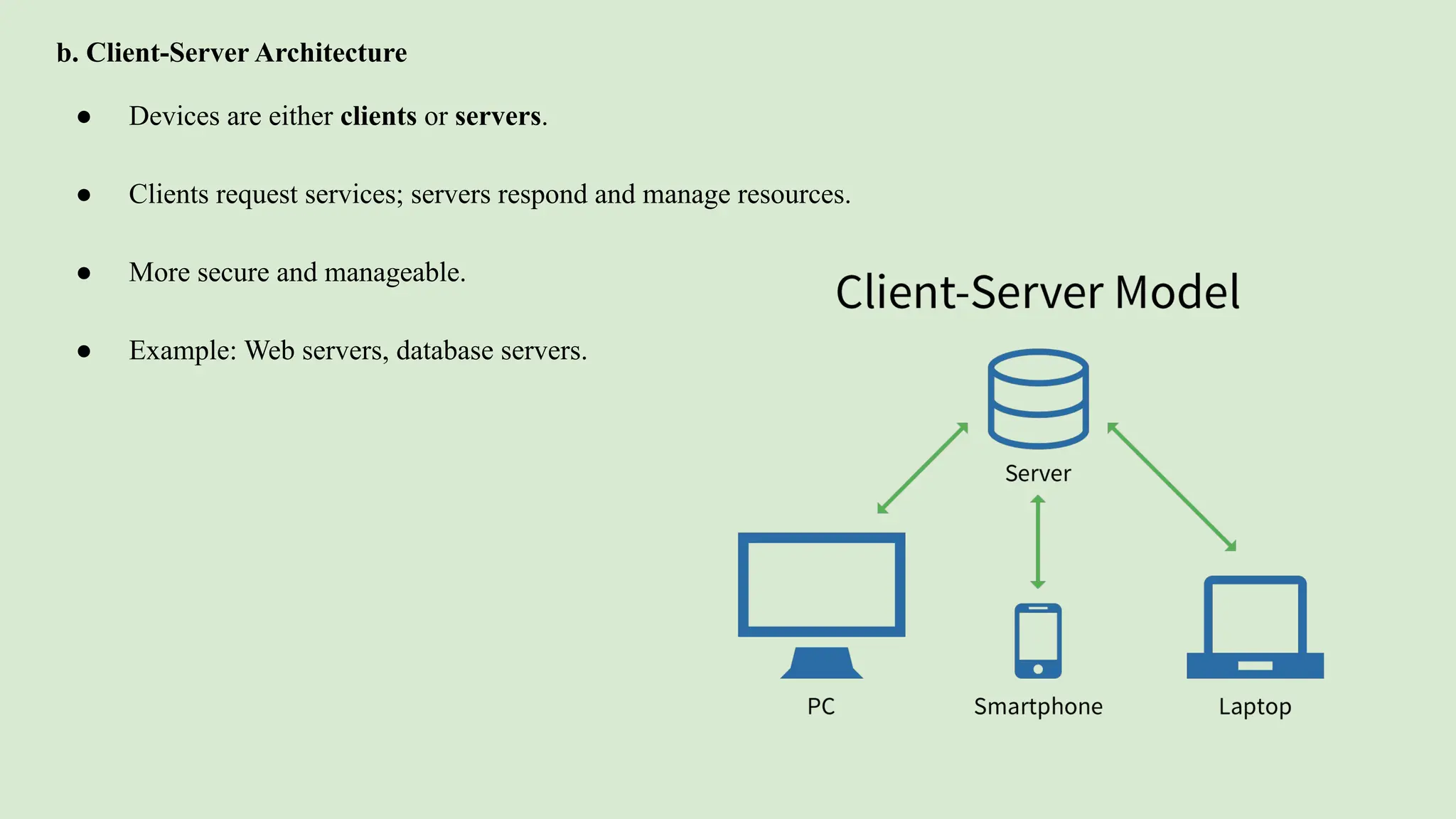
b. Client-Server Architecture
● Devices are either clients or servers.
● Clients request services; servers respond and manage resources.
● More secure and manageable.
● Example: Web servers, database servers.
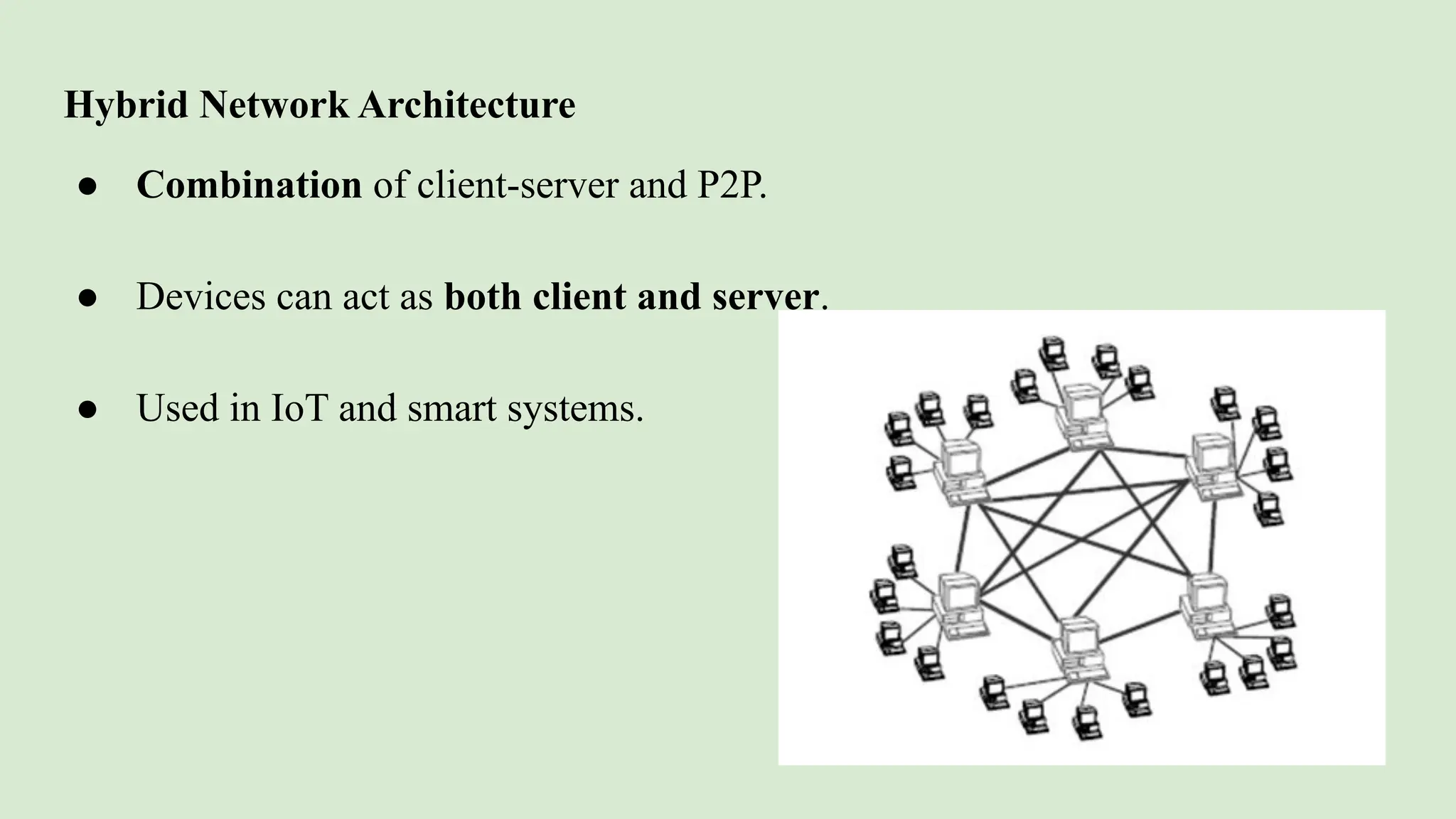
Hybrid Network Architecture
● Combination of client-server and P2P.
● Devices can act as both client and server.
● Used in IoT and smart systems.
Based on Deployment or Location
a. LAN (Local Area Network)
● Covers a small area like a room, building, or campus.
● Fast and secure.
b. MAN (Metropolitan Area Network)
● Covers a city or large town.
● Used by ISPs, government offices.
c. WAN (Wide Area Network)
● Covers countries or continents.
● Example: The Internet.
Based on Layered Design
a. OSI Model (7 Layers)
● Standard model defining network functions.
● Layers: Physical → Application
b. TCP/IP Model (4 Layers)
● Real-world model used for the Internet.
What are Network Services?
Network services are the basic services and functionalities provided by a computer
network to support communication, resource sharing, and system operations.
They help users and devices interact, exchange data, and access resources over a
network.
Common Network Services
Here are some key network services:
1. File Sharing
● Allows users to share files across computers.
● Example: Shared folders in LAN.
2. Print Services
● Allows multiple users to use a networked printer.
● Print servers manage jobs and queues.
3. Email Services
● Sending and receiving emails through mail servers.
● Example: Gmail, Outlook (uses SMTP, IMAP, POP protocols).
4. Web Services
● Accessing websites and web applications via HTTP/HTTPS.
● Example: Web browsing, cloud apps.
5. DNS (Domain Name System)
● Translates domain names (like google.com) into IP addresses.
● Acts like the phonebook of the internet.
6. Authentication Services
● Controls access to the network using usernames, passwords, roles.
7. Remote Access
● Accessing network resources from a different location using VPNs or remote desktop.
Why Network Services Are Important
● Enable communication between devices and users.
● Support productivity with shared tools (printers, apps).
● Manage traffic and resources (IP addresses, data requests).
● Secure and control access to the network.
● Automate tasks, saving time and effort.
Introduction
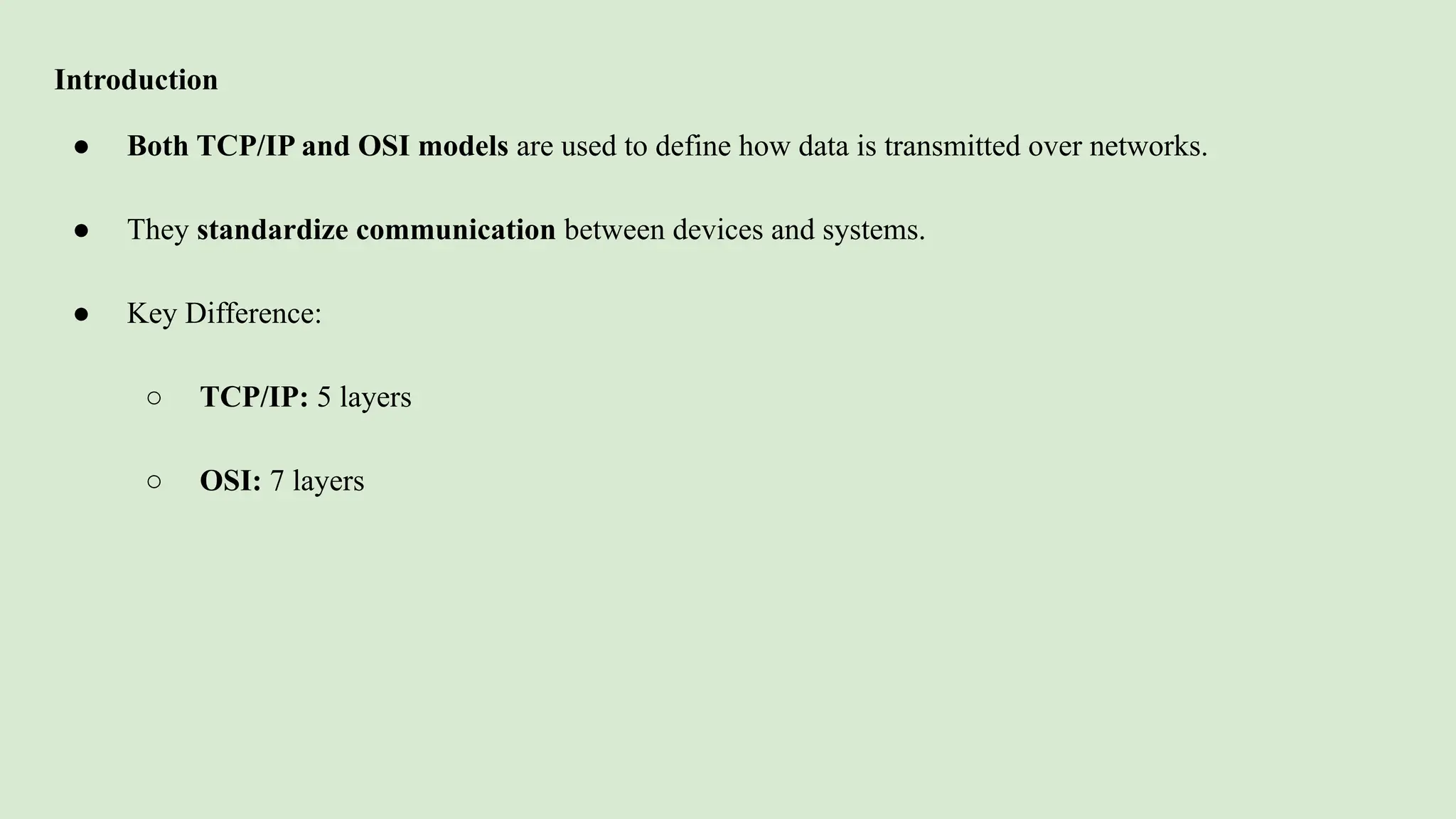
● Both TCP/IP and OSI models are used to define how data is transmitted over networks.
● They standardize communication between devices and systems.
● Key Difference:
○ TCP/IP: 5 layers
○ OSI: 7 layers
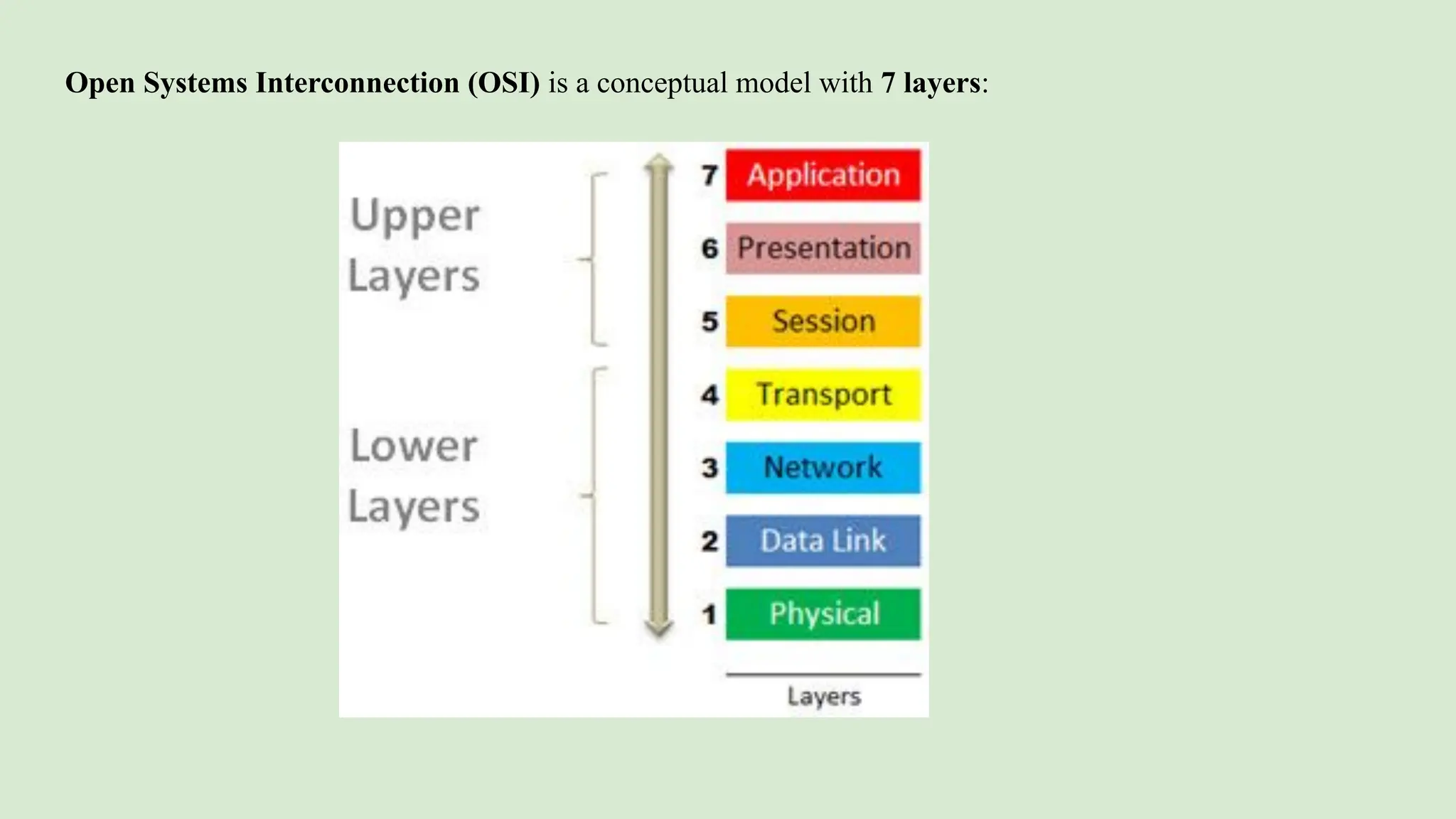
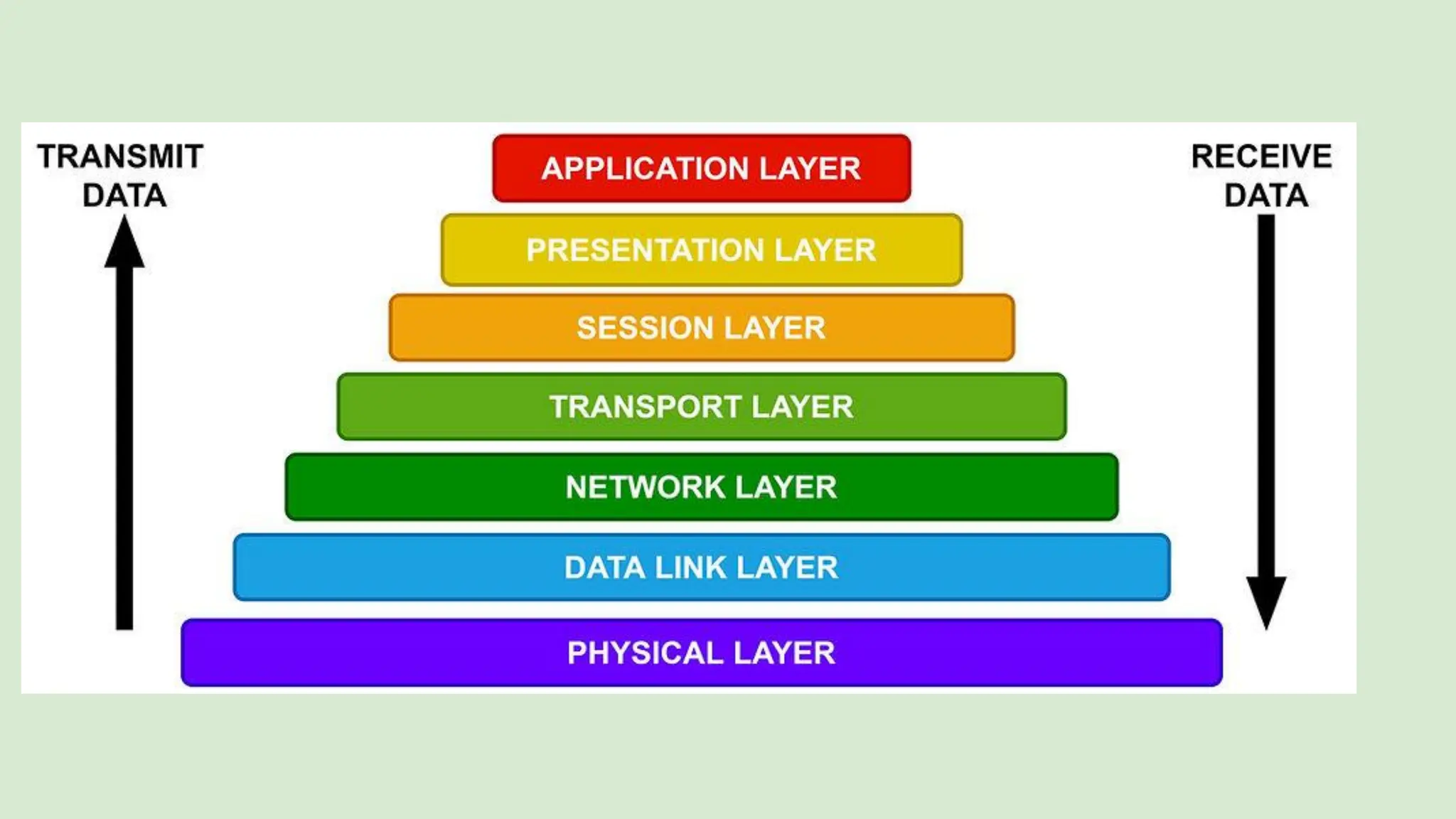
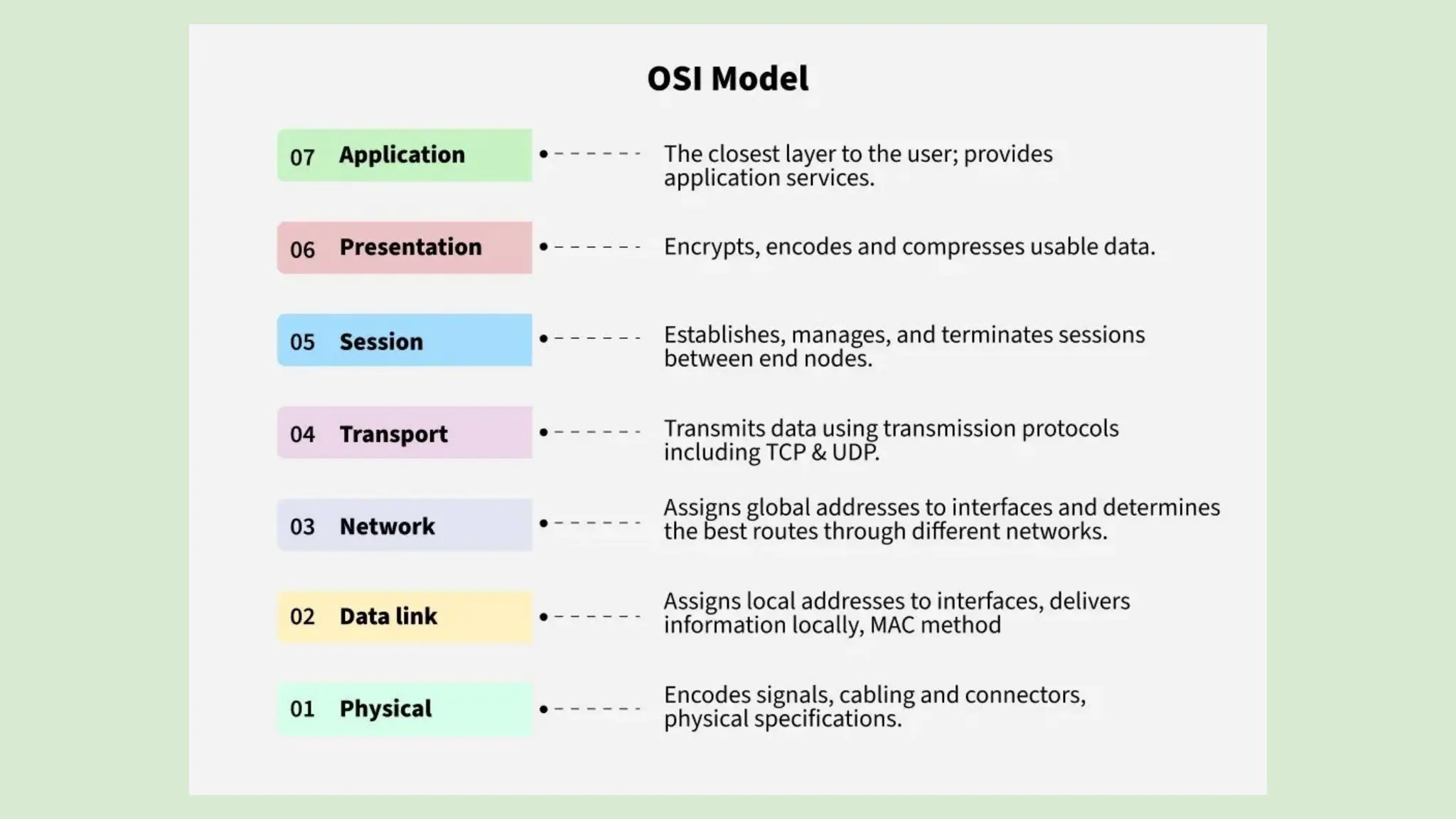
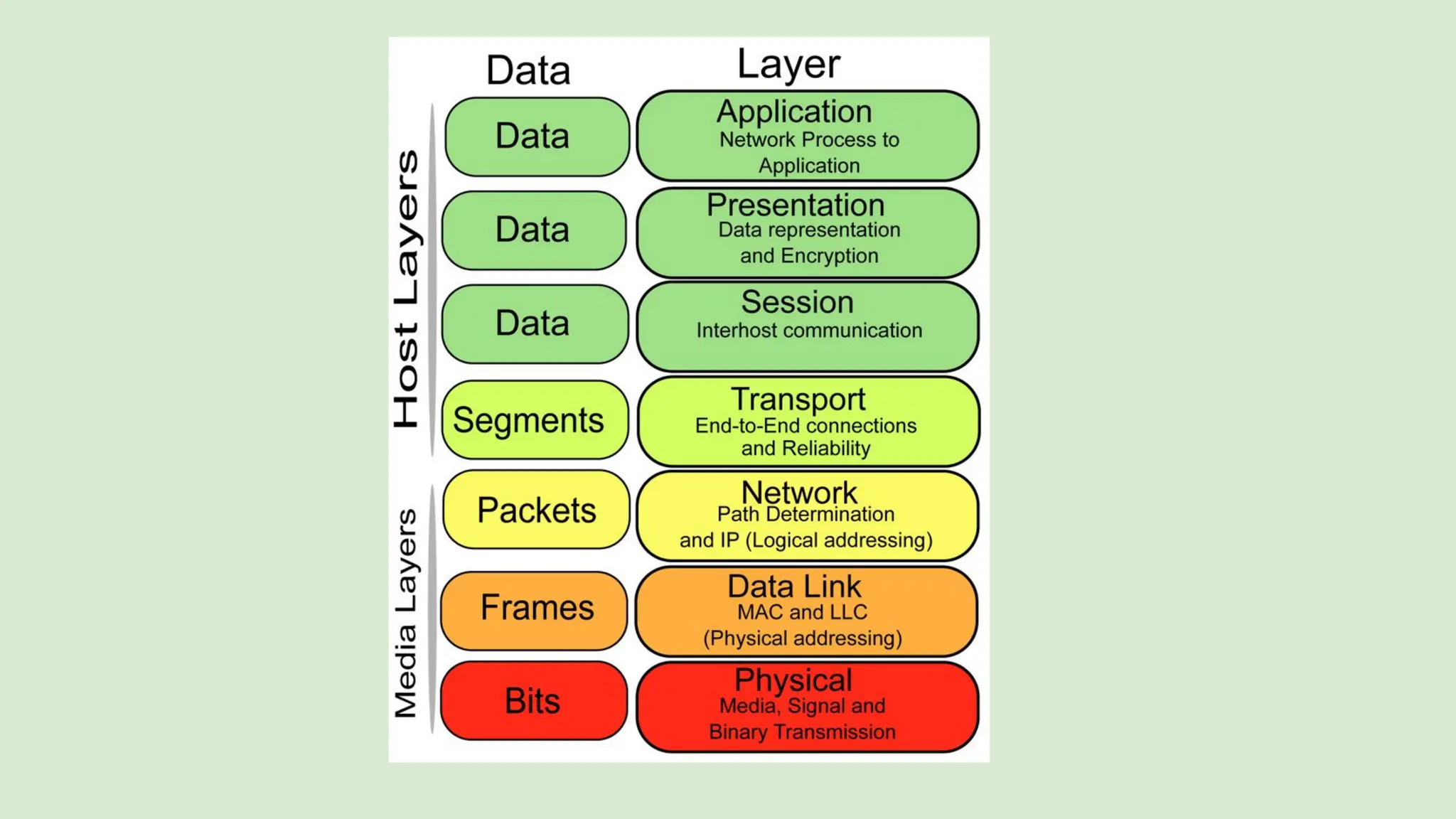
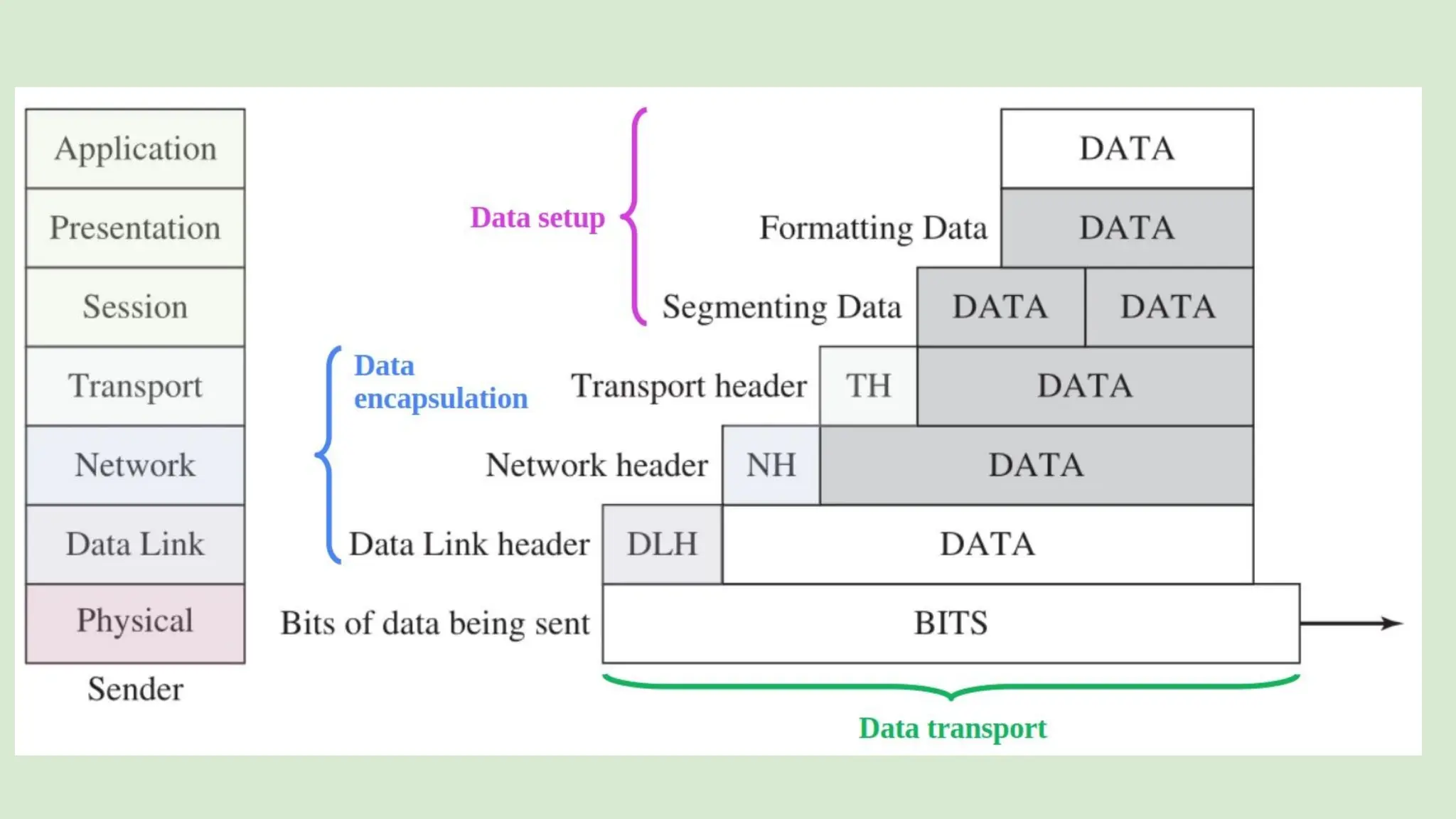
Open Systems Interconnection (OSI) is a conceptual model with 7 layers:
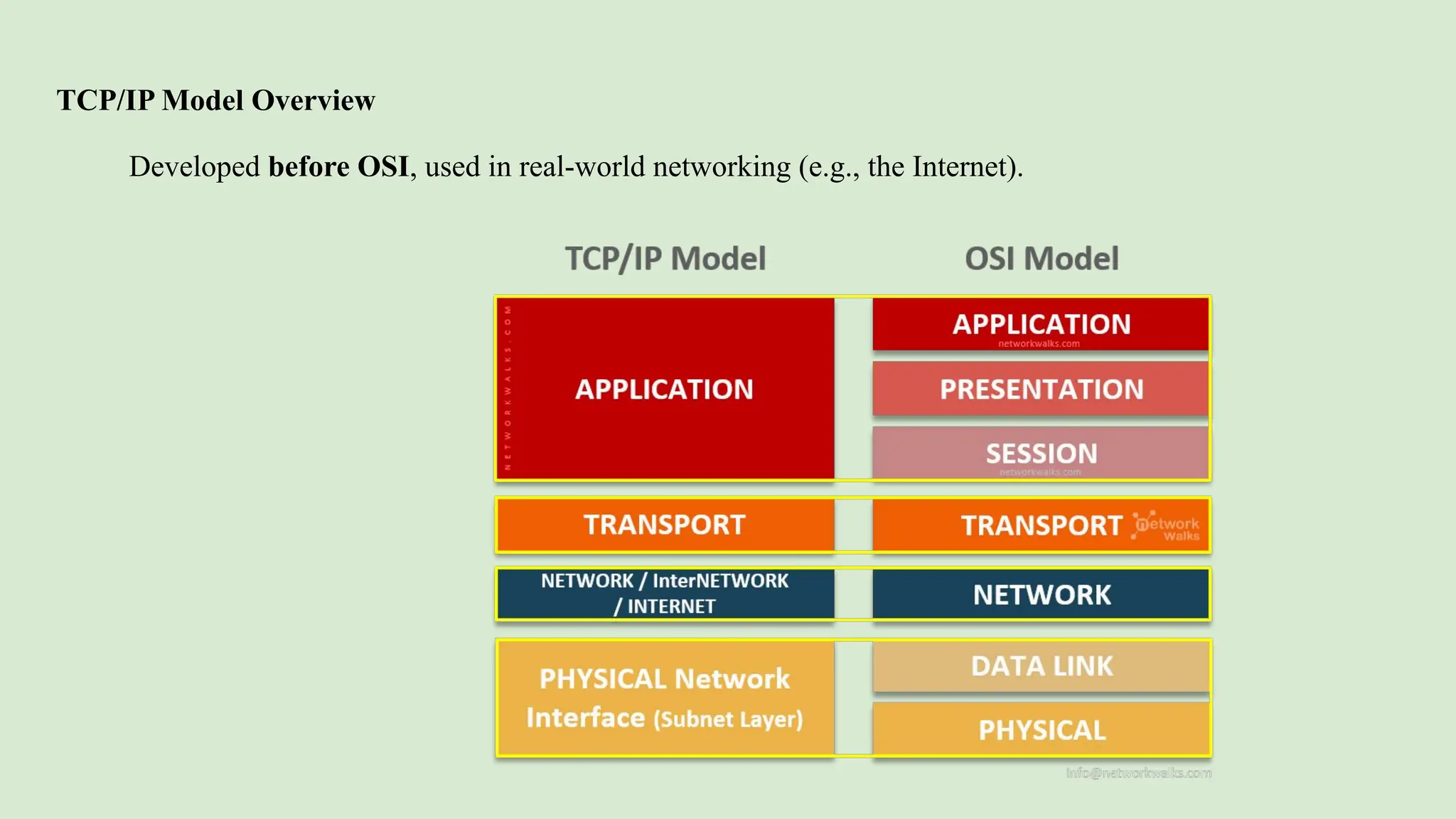
TCP/IP Model Overview
Developed before OSI, used in real-world networking (e.g., the Internet).
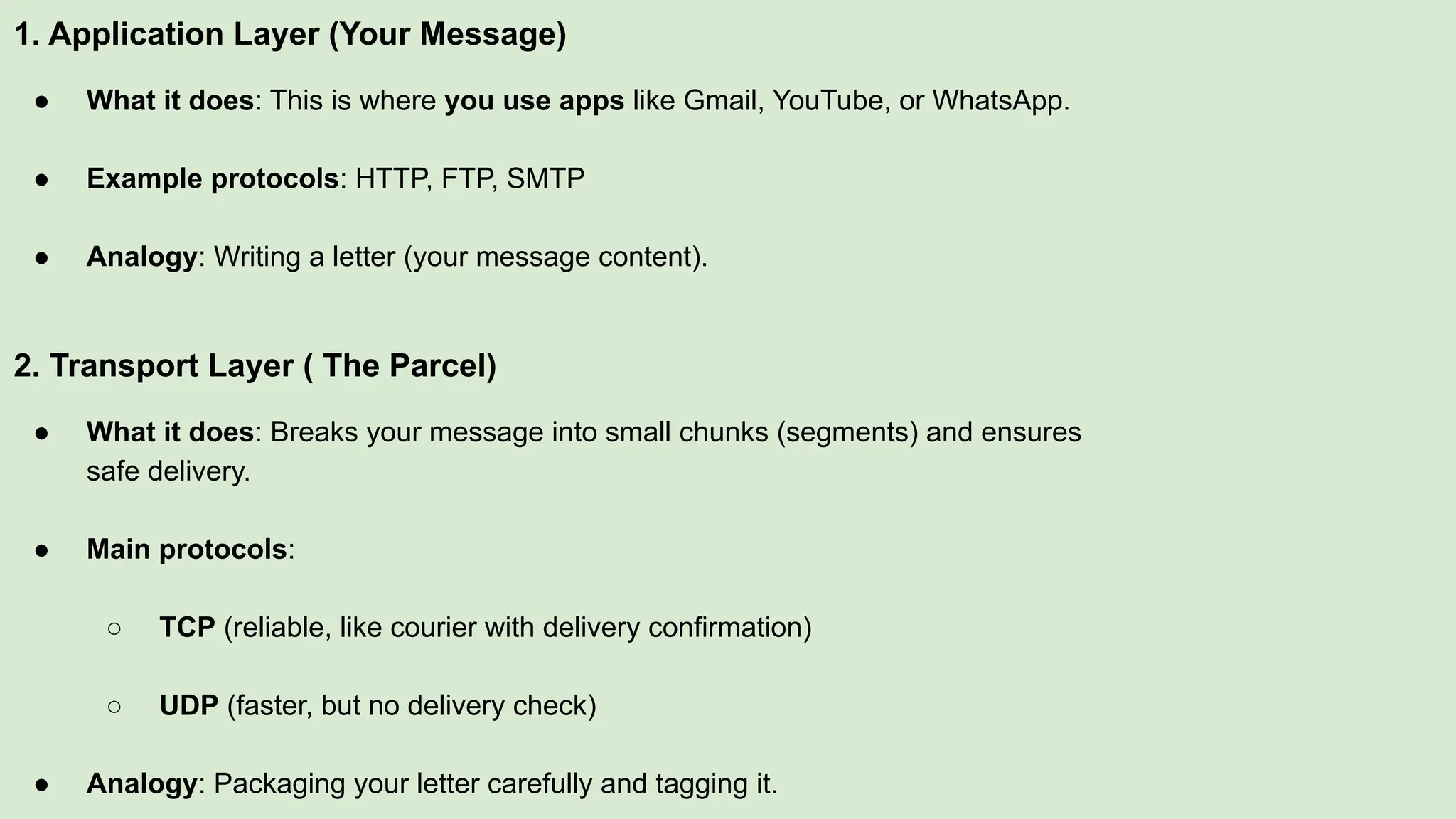
1. Application Layer (Your Message)
● What it does: This is where you use apps like Gmail, YouTube, or WhatsApp.
● Example protocols: HTTP, FTP, SMTP
● Analogy: Writing a letter (your message content).
2. Transport Layer ( The Parcel)
● What it does: Breaks your message into small chunks (segments) and ensures
safe delivery.
● Main protocols:
○ TCP (reliable, like courier with delivery confirmation)
○ UDP (faster, but no delivery check)
● Analogy: Packaging your letter carefully and tagging it.
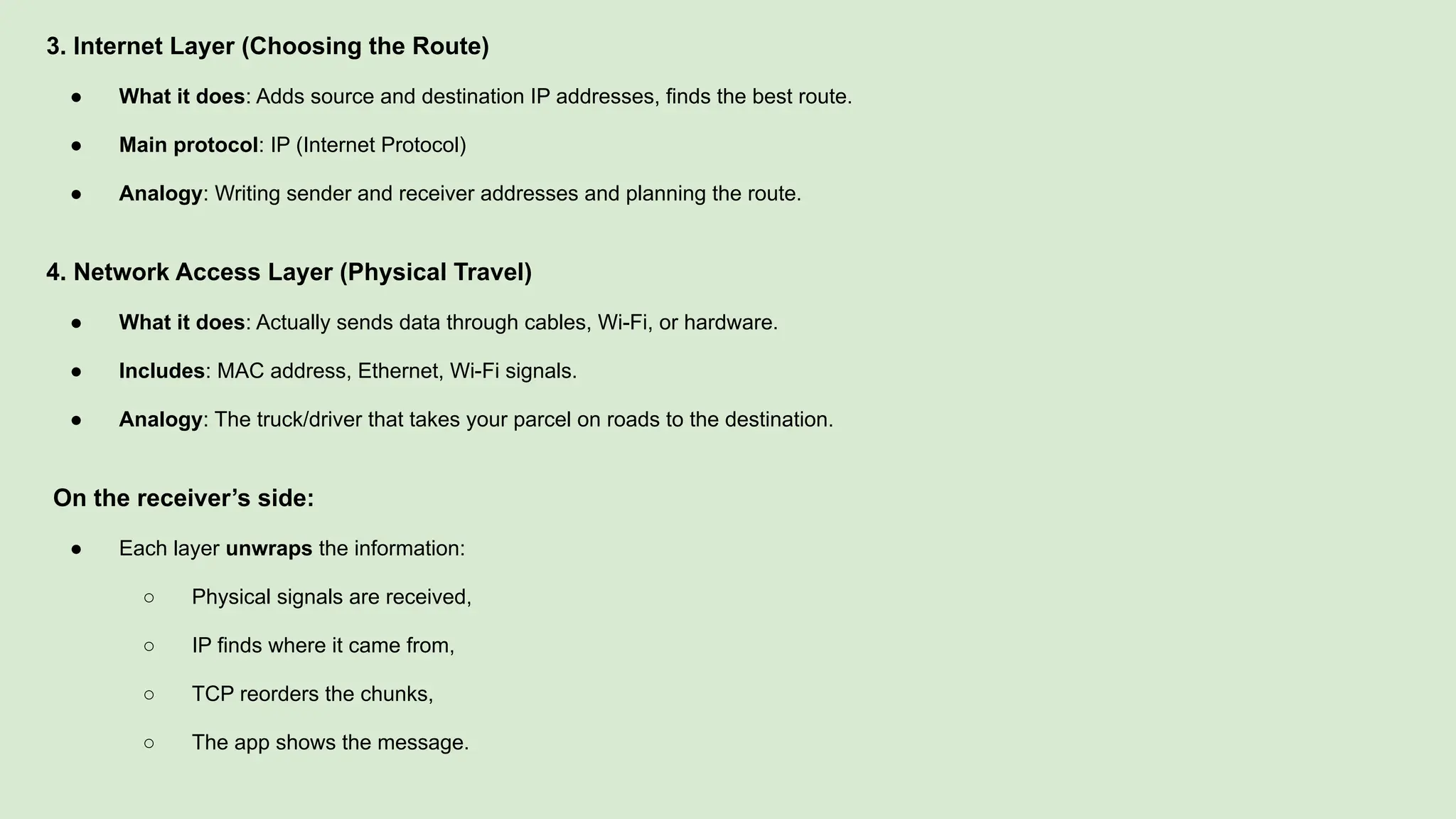
3. Internet Layer (Choosing the Route)
● What it does: Adds source and destination IP addresses, finds the best route.
● Main protocol: IP (Internet Protocol)
● Analogy: Writing sender and receiver addresses and planning the route.
4. Network Access Layer (Physical Travel)
● What it does: Actually sends data through cables, Wi-Fi, or hardware.
● Includes: MAC address, Ethernet, Wi-Fi signals.
● Analogy: The truck/driver that takes your parcel on roads to the destination.
On the receiver’s side:
● Each layer unwraps the information:
○ Physical signals are received,
○ IP finds where it came from,
○ TCP reorders the chunks,
○ The app shows the message.
Characteristics of TCP/IP
● Real-world protocol suite, widely used on the internet.
● Combines OSI layers (e.g., session & presentation are part of application).
● Uses IP addresses to identify devices.
● Supports routing and addressing across networks.
● Enables end-to-end communication using TCP or UDP.
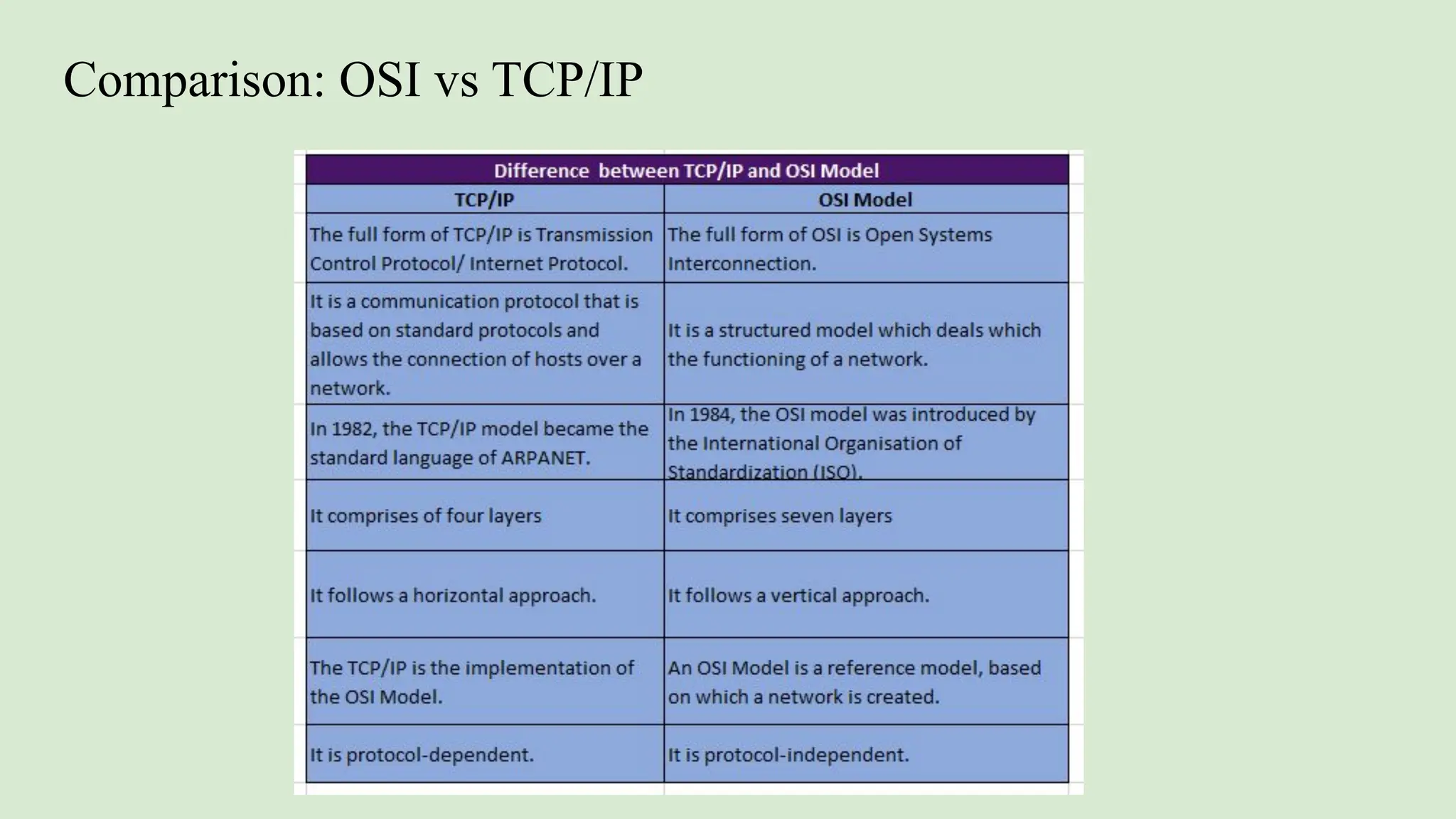
Comparison: OSI vs TCP/IP

I-BCA-IOT-Basic Network Architecture.pdf

  • 1.
    Unit 1: BasicNetwork Architecture Network Goals ; Network Types; Network topologies: Message, Packet and Circuit switching, Architecture, Services-Layered Architecture: OSI Reference Model, TCP/IP Model, Comparison: OSI and TCP /IP model.
  • 2.
    [Start] ↓ [You type amessage in WhatsApp] ↓ [Message is converted into data (0s and 1s)] ↓ [Data is sent over the internet (Wi-Fi or mobile data)] ↓ [Data goes to WhatsApp server] ↓ [Server finds your friend’s phone] ↓ [Message is delivered to your friend's phone] ↓ [Data is converted back to text: "Hi!"] ↓ [Your friend sees the message on WhatsApp] ↓
  • 3.
    A computer networkis a system that connects multiple computers to share resources and information. Goals: ● Resource Sharing: Share hardware (printers), software, or files across computers. ● High Reliability: If one system fails, others continue working. ● Cost Efficiency: Centralized resources reduce cost (e.g., shared printer). ● Communication Medium: Enables emails, video calls, chatting, etc. ● Scalability: Easy to add more computers to the network. ● Security: Allows centralized security control and access management.
  • 5.
    Network Types Based onGeography: ● LAN (Local Area Network): Covers a small area (e.g., office, school). High speed and low cost. ● MAN (Metropolitan Area Network): Covers a city or town. Medium range and cost. ● WAN (Wide Area Network): Covers large areas (e.g., countries). Internet is the biggest WAN. Based on Architecture: ● Peer-to-Peer: All computers are equal. Share files without a server. ● Client-Server: One central server manages resources; other computers (clients) request services. Based on Access: ● Private Network: Used by one organization (e.g., office intranet). ● Public Network: Open to everyone (e.g., Internet).
  • 6.
    ● LAN standsfor Local Area Network ● Connects devices within a limited area (home, office, school) ● Allows sharing of files, printers, and internet ● Example: Your home Wi-Fi network
  • 7.
    LAN (Local AreaNetwork) Switch: Connects your TV, laptop, and printer inside your home. Router: Connects your whole home to the internet.
  • 8.
    Key Features ofa LAN ● Limited Coverage – Confined to one building or floor ● High Data Transfer Speeds – Fast communication between devices ● Resource Sharing – Share printers, files, internet, etc. ● Secure Access – Controlled access and privacy ● Cost-Effective – One internet connection for many devices
  • 9.
    Components of aLAN ● Devices (Nodes): Computers, smartphones, printers, etc. ● Switches: Directs traffic within the LAN ● Routers: Connect LAN to the internet ● Cables/Wi-Fi: Medium to connect devices ● NICs (Network Interface Cards): Enables device connection to network(network port or antenna of your device)
  • 10.
    How LAN Works ●Connection of Devices: Using Ethernet cables or Wi-Fi ● Data Transmission: Data flows through switch to the correct device ● Switches/Routers: Help route internal and external data ● Resource Sharing: Devices share printers, files, internet, etc.
  • 11.
    What is aMAN (Metropolitan Area Network)? ● Covers larger area than LAN but smaller than WAN (typically 5–50 km) ● Connects users within the same city or across nearby cities ● Can serve as an Internet Service Provider (ISP) Example: Cable TV network or high-speed DSL network in a city
  • 12.
    How MAN Works ●Connects multiple LANs across city-wide areas ● Transmission through modems, cables, or optical fiber ● Can be owned by multiple organizations or telecom companies ● Designed for high-speed usage like video streaming or data backup
  • 13.
    Advantages of MAN ●High-speed connectivity over wider areas than LAN ● Can serve multiple customers as an ISP ● Faster than WAN in some cases due to shorter range Disadvantages of MAN ● Costly to set up and maintain ● Less fault tolerant and more network congestion ● Security risks if not properly managed
  • 14.
    What is aWAN (Wide Area Network)? ● Connects computers over very large geographical areas (above 50 km) ● Can span countries or continents ● Typically connects multiple LANs and MANs ● Uses telephone lines, radio waves, satellite links Example: The Internet, corporate networks across branches
  • 15.
    How WAN Works ●Types of WAN: ○ Switched WAN: Like ATM networks ○ Point-to-Point WAN: Like dial-up connections ● Devices used: Optic cables, microwave links, satellites ● Uses satellite communication
  • 16.
    Advantages of WAN ●Connects remote locations ● Provides internet access ● Supports remote work and cloud services ● Scales to multiple users and applications Disadvantages of WAN ● Very expensive to build and manage ● Slower than LAN or MAN (in Kbps to Mbps) ● High latency and propagation delay ● Low fault tolerance, prone to errors and noise latency:The total delay before data starts moving and reaches the destination propagation :The time it takes for data to travel from sender to receiver.
  • 18.
    Network Topologies Topology =Physical layout of network connections ● Bus Topology: ○ All devices share a single communication line (cable). ○ Advantage: Simple and cheap. ○ Disadvantage: A cable failure crashes the whole network. ● Star Topology: ○ All devices connect to a central hub. ○ Advantage: Easy to manage.
  • 19.
    ● Ring Topology: ○Each computer connects to two others in a ring. ○ Advantage: Equal access for all devices. ○ Disadvantage: A break in the ring disrupts the network. ● Mesh Topology: ○ Every device connects to every other device. ○ Advantage: Very reliable. ○ Disadvantage: Very expensive.
  • 20.
    ● Tree Topology: ○Combination of star and bus topologies. ○ Advantage: Good scalability. ○ Disadvantage: Complex wiring. ● Hybrid Topology: ○ Mix of two or more topologies.
  • 21.
    What is Switchingin Networking? ● Switching is the process of transferring data between devices in a network. ● Three types of switching: 1. Circuit Switching 2. Message Switching 3. Packet Switching ● Used in data and voice communication networks
  • 22.
    Message Switching ● Theentire message is sent as a single unit. ● Stored at each intermediate device before forwarding. ● No dedicated path needed. Key Points: ● Known as store-and-forward method. ● Each message has the destination address. ● Suitable for non-real-time communication.
  • 24.
    Store and Forward: Inthis method, each device (called a node) in the network receives the whole message first, stores it, and then sends it to the next device. So, every node must have some storage space. The message is sent only if the next device and the connection to it are ready. If not, the message is stored until it can be sent. This method is called store-and-forward. Message Delivery: Here, the whole information is packed into one message and sent from the sender to the receiver. Each message has a header, which carries details like where the message came from and where it is going.
  • 25.
    Advantages of MessageSwitching: 1. Reduces network traffic: Messages can be stored if the path is busy, which helps avoid congestion. 2. Shares network resources: Many devices can use the same communication path, saving resources. 3. Messages can have priority: Important messages can be sent first by giving them high priority. 4. Flexible message size: Messages can be of any length. 5. No need for a direct connection: The sender and receiver don’t need to be connected at the same time.
  • 26.
    Disadvantages of MessageSwitching: 1. Slow for real-time use: Storing messages causes delays, so it’s not good for things like live calls or video chats. 2. Needs more memory: Each device in the network must have large storage to hold messages. 3. Uncertainty in delivery: It can be hard to know if a message was delivered properly. 4. No fixed path: Since there’s no dedicated connection, it may be less reliable.
  • 27.
    Applications of MessageSwitching: 1. Email Systems: Emails are stored and then forwarded when the receiver is available — just like message switching. 2. Telegraph Systems (historical): Old telegraph systems used message switching to send long messages across countries. 3. Store-and-Forward SMS (Text Messaging): In mobile networks, if your phone is off, the SMS is stored and delivered later when the phone is back online. 4. Computer Networks (non-real-time data): It is used in transferring large files or messages where speed is not the main concern. 5. Military Communication Systems: Messages can be stored safely and sent when the path is clear and secure. 6. Disaster Management Networks: Important alerts can be given high priority and sent even when the network is partially down.
  • 28.
    Circuit switching isa type of network configuration in which a physical path is obtained and dedicated to a single connection between two endpoints in the network for the duration of a dedicated connection. Ordinary voice phone service uses circuit switching. This reserved circuit is used for the duration of a call. As long as the call lasts, the circuit cannot be used for anything else.
  • 30.
    Circuit Switching ● Adedicated communication path is established between sender and receiver. ● The path stays active for the full duration of communication. ● Common in telephone networks. Features ● No delay once path is set. ● Data follows one fixed path. ● Wastes bandwidth if no data is sent.
  • 31.
    Phases of CircuitSwitching Connection Establishment (Setup) ● A path is created between the sender and receiver. ● The two devices say “Hello” and reserve a dedicated line for communication. ● Like making a phone call — the line is busy for others once connected. Data Transfer ● The actual message or voice is sent through the dedicated path. ● The connection stays open and active the whole time. Connection Termination (Teardown) ● When communication is done, one device says “Goodbye.” ● The dedicated path is released for others to use.
  • 32.
    Circuit Switching Used 1.Phone Calls: Used in old telephone systems to keep the connection open for the whole call. 2. Dial-Up Internet: Early internet connections used phone lines (circuit switching) to send data.
  • 33.
    Advantages of CircuitSwitching: 1. Fixed path = no delay: Once a path is set up, data flows without waiting. 2. Reliable: The connection is stable until the communication ends. 3. Good Quality: Great for voice and video because the quality doesn’t drop. 4. Secure: Only the sender and receiver can use the path. 5. Easy to Manage: Network is simple to manage since the path stays fixed.
  • 34.
    Disadvantages of CircuitSwitching: 1. Not Scalable: Hard to manage in big networks with many users. 2. Wastes Resources: The path stays reserved even when no data is being sent. 3. Less Flexible: The line cannot be used for anything else during a call. 4. Costly: Setting up and maintaining dedicated paths is expensive. 5. Breakdowns Affect Everything: If the path breaks, the call or data transfer stops. 6. No Prioritization: All data is treated the same – urgent data can’t be given priority.
  • 35.
    Applications of CircuitSwitching: 1. Traditional Telephone Networks: Used in landline phone systems where a dedicated path is set up for the entire call. 2. Dial-up Internet Connections: Early internet connections used circuit-switched telephone lines to access the internet.
  • 36.
    Packet Switching ● Themessage is divided into packets. ● Packets travel independently and may take different routes. ● Reassembled at the destination using sequence numbers. Key Points: ● Used in the Internet and TCP/IP networks. ● Efficient use of bandwidth. ● Packets may arrive out of order.
  • 37.
    Advantages of PacketSwitching: 1. Better use of bandwidth: No fixed path needed, so network is used more efficiently. 2. Less delay in starting: Data is sent as soon as it’s ready—no need to wait for a full connection. 3. More reliable: If some packets are lost, the receiver can ask for them again. 4. Can handle failures: If one path breaks, packets take another path to reach the destination. 5. Cheaper and easier: Packet switching networks cost less and are simpler to maintain.
  • 38.
    Disadvantages of PacketSwitching: 1. Packets may arrive in the wrong order: Since packets take different paths, they may reach the destination out of sequence. 2. Needs extra info: Each packet must have a number to put them back in the right order. 3. More work for network devices: Routers must decide how to send each packet, which increases complexity. 4. Possible delays: During heavy traffic, packets may wait in queues, causing delays. 5. Not ideal for long, steady data: Circuit switching is better for continuous data like voice or video.
  • 39.
    Types of PacketSwitching: 1. Connection-Oriented (Virtual Circuit): ● A temporary path is set up before sending data. ● All packets follow the same path. ● 3 Phases: ○ Setup: Path is created. ○ Data Transfer: Packets move through this path. ○ Teardown: Path is closed after sending data.
  • 40.
    2.Connectionless: ● No pathis set up before sending. ● Each packet is sent separately with full address. ● Packets may take different paths and arrive out of order. ● Receiver uses TCP to re-order and check all packets.
  • 42.
    HW 1.Difference Between MessageSwitching and Packet Switching 2.Difference Between Packet Switching and Circuit Switching
  • 43.
    Network Architecture: ● Structureand design of a network. ● Defines: ○ How devices are connected ○ Rules (protocols) for communication ○ Services provided (e.g., email, file sharing) Network Services: ● Connection-Oriented: Ensures reliable communication (e.g., TCP). ● Connectionless: No guarantee of delivery (e.g., UDP). ● Reliable: Uses acknowledgment and retransmission. ● Unreliable: No error checking or retransmission.
  • 44.
    What is NetworkArchitecture? ● Network architecture is the design and structure of a computer network. ● It defines hardware, software, communication protocols, and the way devices interact. ● Applies to both LANs and WANs. ● A good architecture ensures efficient communication and resource sharing.
  • 45.
    Components of NetworkArchitecture ● Network Topology: Physical/logical layout of devices. ● Client: Requests resources from a server. ● Router: Chooses best paths and connects networks. ● Switch: Connects devices and directs data. ● Protocols: Rules for communication (e.g., TCP/IP). ● Transmission Media: Cables, fiber optics, Wi-Fi.
  • 46.
    Types of NetworkArchitecture Based on Functionality a. Peer-to-Peer (P2P) Architecture ● All devices (peers) are equal. ● Each device acts as both client and server. ● Direct sharing of files and resources. ● Example: File sharing apps, ● LAN-based games.
  • 47.
    b. Client-Server Architecture ●Devices are either clients or servers. ● Clients request services; servers respond and manage resources. ● More secure and manageable. ● Example: Web servers, database servers.
  • 49.
    Hybrid Network Architecture ●Combination of client-server and P2P. ● Devices can act as both client and server. ● Used in IoT and smart systems.
  • 50.
    Based on Deploymentor Location a. LAN (Local Area Network) ● Covers a small area like a room, building, or campus. ● Fast and secure. b. MAN (Metropolitan Area Network) ● Covers a city or large town. ● Used by ISPs, government offices. c. WAN (Wide Area Network) ● Covers countries or continents. ● Example: The Internet.
  • 51.
    Based on LayeredDesign a. OSI Model (7 Layers) ● Standard model defining network functions. ● Layers: Physical → Application b. TCP/IP Model (4 Layers) ● Real-world model used for the Internet.
  • 52.
    What are NetworkServices? Network services are the basic services and functionalities provided by a computer network to support communication, resource sharing, and system operations. They help users and devices interact, exchange data, and access resources over a network.
  • 53.
    Common Network Services Hereare some key network services: 1. File Sharing ● Allows users to share files across computers. ● Example: Shared folders in LAN. 2. Print Services ● Allows multiple users to use a networked printer. ● Print servers manage jobs and queues. 3. Email Services ● Sending and receiving emails through mail servers. ● Example: Gmail, Outlook (uses SMTP, IMAP, POP protocols).
  • 54.
    4. Web Services ●Accessing websites and web applications via HTTP/HTTPS. ● Example: Web browsing, cloud apps. 5. DNS (Domain Name System) ● Translates domain names (like google.com) into IP addresses. ● Acts like the phonebook of the internet. 6. Authentication Services ● Controls access to the network using usernames, passwords, roles. 7. Remote Access ● Accessing network resources from a different location using VPNs or remote desktop.
  • 55.
    Why Network ServicesAre Important ● Enable communication between devices and users. ● Support productivity with shared tools (printers, apps). ● Manage traffic and resources (IP addresses, data requests). ● Secure and control access to the network. ● Automate tasks, saving time and effort.
  • 56.
    Introduction ● Both TCP/IPand OSI models are used to define how data is transmitted over networks. ● They standardize communication between devices and systems. ● Key Difference: ○ TCP/IP: 5 layers ○ OSI: 7 layers
  • 57.
    Open Systems Interconnection(OSI) is a conceptual model with 7 layers:
  • 62.
    TCP/IP Model Overview Developedbefore OSI, used in real-world networking (e.g., the Internet).
  • 63.
    1. Application Layer(Your Message) ● What it does: This is where you use apps like Gmail, YouTube, or WhatsApp. ● Example protocols: HTTP, FTP, SMTP ● Analogy: Writing a letter (your message content). 2. Transport Layer ( The Parcel) ● What it does: Breaks your message into small chunks (segments) and ensures safe delivery. ● Main protocols: ○ TCP (reliable, like courier with delivery confirmation) ○ UDP (faster, but no delivery check) ● Analogy: Packaging your letter carefully and tagging it.
  • 64.
    3. Internet Layer(Choosing the Route) ● What it does: Adds source and destination IP addresses, finds the best route. ● Main protocol: IP (Internet Protocol) ● Analogy: Writing sender and receiver addresses and planning the route. 4. Network Access Layer (Physical Travel) ● What it does: Actually sends data through cables, Wi-Fi, or hardware. ● Includes: MAC address, Ethernet, Wi-Fi signals. ● Analogy: The truck/driver that takes your parcel on roads to the destination. On the receiver’s side: ● Each layer unwraps the information: ○ Physical signals are received, ○ IP finds where it came from, ○ TCP reorders the chunks, ○ The app shows the message.
  • 65.
    Characteristics of TCP/IP ●Real-world protocol suite, widely used on the internet. ● Combines OSI layers (e.g., session & presentation are part of application). ● Uses IP addresses to identify devices. ● Supports routing and addressing across networks. ● Enables end-to-end communication using TCP or UDP.
  • 66.