PARTITIONING
An Essential Part of OS Installation
MARILOU D. JAMERO
Teacher III
ACTIVITY 1.
EXIT PASS TICKET
Direction.
• The class will be divided into two (10 students per group).
• Each group will be given the 10 steps of OS installation.
• Each member will get one sheet from the provided material.

• Arrange yourselves from left to right showing the correct steps of OS
installation.
• The last member will then raise the DONE card if he/she thinks the process is
final and correct.
• The 1st
group to get the correct process will have an automatic exit pass.
LET’S CHECK
• Prepare your installers or bootable device
• Insert the installation disk or flash drive
• Restart your computer
• Wait for the startup screen to appear
• Press and hold Del of F12 to enter the BIOS page
• Set the Boot Order
• Select your bootable device
• Save your settings and exit the BIOS
• Create disk partition
• Follow the on-screen prompts
LESSON OBJECTIVES
1. Describe disk partitioning and explain its importance
2. Compute the specific size of each disk based with end-
user requirements
3. Perform Operating System installation complying the disk
partitioning requirement of the end-users
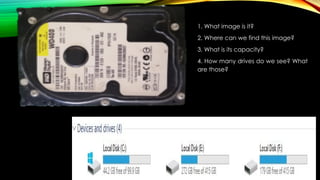
1. What image is it?
2. Where can we find this image?
3. What is its capacity?
4. How many drives do we see? What
are those?
ACTIVITY 2. COMPLETE ME EVEN
YOU LIKE OR DISLIKE ME
Direction.
• You will be given like or dislike flash card.
• You have to raise the LIKE card if you agree with the
word/s to fill in into the blank in order to complete
the paragraph.
WHAT IS HARD DISK?
A Hard Disk is a main ______________ (primary / secondary)
storage
located _______ (outside/ inside) the computer case.
It has the ___________ (smallest / largest) space or memory
among storage devices.
It is _______________ (magnetic / optical),
_________________ (Volatile/ non-volatile)
and stored data __________________ (temporarily /
permanently).
This means that data ___________________ (lost / retained)
in the disk even when the power is off.
secondary
inside
largest
magnetic
Non-volatile
permanently
retained
WHAT IS DISK PARTITIONING?
•Partitioning - dividing, segmenting or slicing
something into smaller parts, pieces or section.
•Disk Partitioning - dividing the hard disk into
multiple and smaller drives or regions logically,
each region is called partition which can be
managed separately. This step should be done
before any file system can be created or any
files can be saved.
GUIDE QUESTION
1. Why is it necessary to partition the disk?
Note: putting some cash in one place, then fire or thieves
broke
2. How should we allocate each drive?
3. How much should be allocated for each drive?
Note:
Disk partitioning is about equity not equality, whichever needs
most should be given bigger size. (Ex. division of property in
the family)
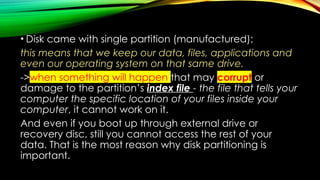
• Disk came with single partition (manufactured);
this means that we keep our data, files, applications and
even our operating system on that same drive.
->when something will happen that may corrupt or
damage to the partition’s index file - the file that tells your
computer the specific location of your files inside your
computer, it cannot work on it.
And even if you boot up through external drive or
recovery disc, still you cannot access the rest of your
data. That is the most reason why disk partitioning is
important.
• every partition of hard disk is treated as separate
entity.
• -with this, you will organize your files on separate
partitions,
• -this will protect your files because it can be easily
backed up using the other disk.
• - you will be less likely losing your data on accident.
• - if you need to reformat your computer and reinstall
your operating system, you won’t need to bother
about restoring your backup data.
HOW TO COMPUTE THE SIZE OF
DISK DURING DISK PARTITIONING?
Example #1
Let’s say that your computer has a 512GB hard disk
capacity and you need to make two partitions, with the
following requirements:
Drive C: = 200 GB
Drive D: = Remaining Unallocated Disk
Note: Your computer needs 500MB for System Reserved
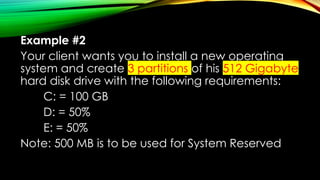
Example #2
Your client wants you to install a new operating
system and create 3 partitions of his 512 Gigabyte
hard disk drive with the following requirements:
C: = 100 GB
D: = 50%
E: = 50%
Note: 500 MB is to be used for System Reserved
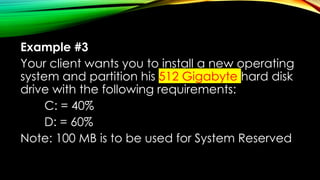
Example #3
Your client wants you to install a new operating
system and partition his 512 Gigabyte hard disk
drive with the following requirements:
C: = 40%
D: = 60%
Note: 100 MB is to be used for System Reserved
ACTIVITY 3.
STOP BY IN STATION
Direction.
•The class will be divided into 5 groups (4
students per group).
•Every group should go to the assigned station
to answer/ do the task for 3 minutes each
station then move to other station.
•Bring your accomplished task sheet.
TIMER STARTS NOW
Activity 3.
Stop by in Station
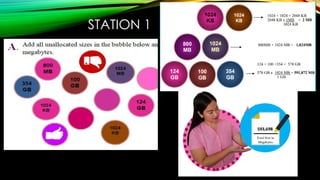
STATION 1
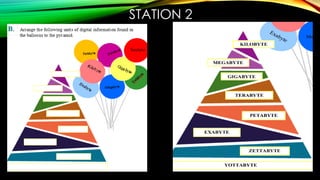
STATION 2
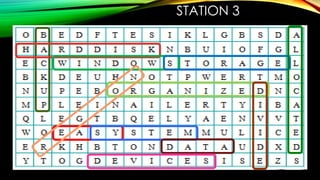
STATION 3
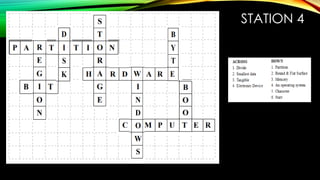
STATION 4
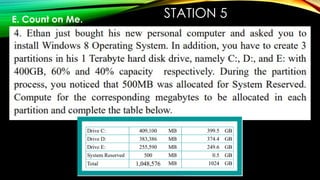
STATION 5
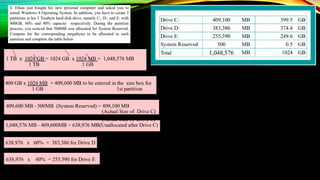
E. Count on Me.
Ethan just bought his new personal computer and asked you to
install Windows 8 Operating System. In addition, you have to
create 3 partitions in his 1 Terabyte hard disk drive, namely C:,
D:, and E: with 400GB, 60% and 40% capacity respectively.
During the partition process, you noticed that 500MB was
allocated for System Reserved. Compute for the corresponding
megabytes to be allocated in each partition and complete the
table below.
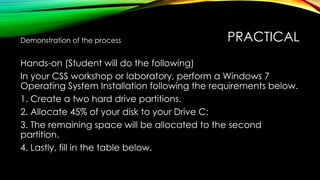
PRACTICAL
Demonstration of the process
Hands-on (Student will do the following)
In your CSS workshop or laboratory, perform a Windows 7
Operating System Installation following the requirements below.
1. Create a two hard drive partitions.
2. Allocate 45% of your disk to your Drive C:
3. The remaining space will be allocated to the second
partition.
4. Lastly, fill in the table below.
ACTIVITY 4. PARKING WALL /
REFLECTION WALL.
• Write a reflection or a question in a metacards on
how do you feel about the activities and post it in
the REFLECTION WALL.
• Or you may, write some questions relative to our
lesson today for more clarifications in the PARKING
WALL
DISK PARTITIONING IS LIKE TIME MANAGEMENT,
WE HAVE TO LEARN TO
SPEND EXACT TIME
FOR DIFFERENT THINGS.
Marilou Jamero
QUIZ TIME
 10 item Multiple Choice
 Use ¼ sheet of paper
 Answer the following questions by
writing only the letter of your choice
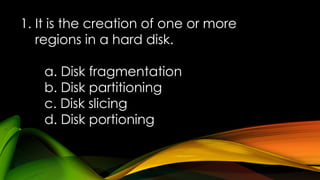
1. It is the creation of one or more
regions in a hard disk.
a. Disk fragmentation
b. Disk partitioning
c. Disk slicing
d. Disk portioning
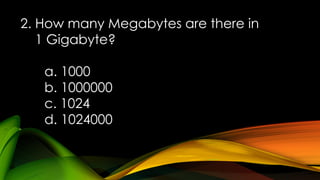
2. How many Megabytes are there in
1 Gigabyte?
a. 1000
b. 1000000
c. 1024
d. 1024000
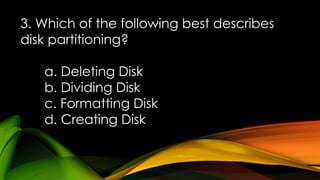
3. Which of the following best describes
disk partitioning?
a. Deleting Disk
b. Dividing Disk
c. Formatting Disk
d. Creating Disk
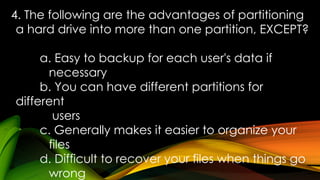
4. The following are the advantages of partitioning
a hard drive into more than one partition, EXCEPT?
a. Easy to backup for each user's data if
necessary
b. You can have different partitions for
different
users
c. Generally makes it easier to organize your
files
d. Difficult to recover your files when things go
wrong
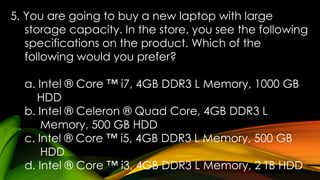
5. You are going to buy a new laptop with large
storage capacity. In the store, you see the following
specifications on the product. Which of the
following would you prefer?
a. Intel ® Core ™ i7, 4GB DDR3 L Memory, 1000 GB
HDD
b. Intel ® Celeron ® Quad Core, 4GB DDR3 L
Memory, 500 GB HDD
c. Intel ® Core ™ i5, 4GB DDR3 L Memory, 500 GB
HDD
d. Intel ® Core ™ i3, 4GB DDR3 L Memory, 2 TB HDD
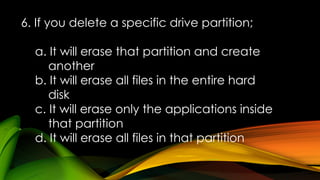
6. If you delete a specific drive partition;
a. It will erase that partition and create
another
b. It will erase all files in the entire hard
disk
c. It will erase only the applications inside
that partition
d. It will erase all files in that partition
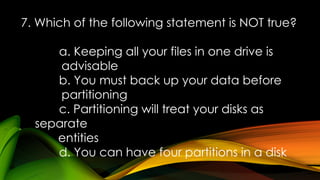
7. Which of the following statement is NOT true?
a. Keeping all your files in one drive is
advisable
b. You must back up your data before
partitioning
c. Partitioning will treat your disks as
separate
entities
d. You can have four partitions in a disk
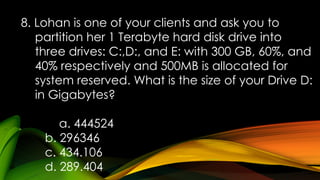
8. Lohan is one of your clients and ask you to
partition her 1 Terabyte hard disk drive into
three drives: C:,D:, and E: with 300 GB, 60%, and
40% respectively and 500MB is allocated for
system reserved. What is the size of your Drive D:
in Gigabytes?
a. 444524
b. 296346
c. 434.106
d. 289.404
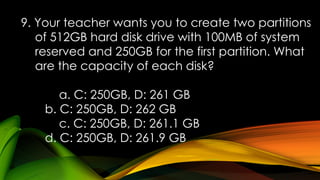
9. Your teacher wants you to create two partitions
of 512GB hard disk drive with 100MB of system
reserved and 250GB for the first partition. What
are the capacity of each disk?
a. C: 250GB, D: 261 GB
b. C: 250GB, D: 262 GB
c. C: 250GB, D: 261.1 GB
d. C: 250GB, D: 261.9 GB
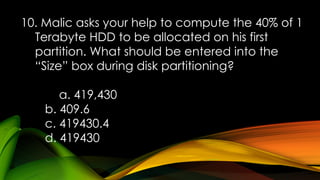
10. Malic asks your help to compute the 40% of 1
Terabyte HDD to be allocated on his first
partition. What should be entered into the
“Size” box during disk partitioning?
a. 419,430
b. 409.6
c. 419430.4
d. 419430
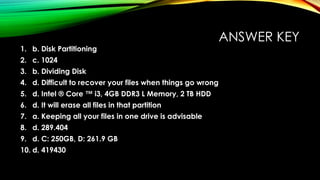
ANSWER KEY
1. b. Disk Partitioning
2. c. 1024
3. b. Dividing Disk
4. d. Difficult to recover your files when things go wrong
5. d. Intel ® Core ™ i3, 4GB DDR3 L Memory, 2 TB HDD
6. d. It will erase all files in that partition
7. a. Keeping all your files in one drive is advisable
8. d. 289.404
9. d. C: 250GB, D: 261.9 GB
10. d. 419430
Thank You

OS Installation with Disk partitioningppt.pptx

  • 1.
    PARTITIONING An Essential Partof OS Installation MARILOU D. JAMERO Teacher III
  • 2.
    ACTIVITY 1. EXIT PASSTICKET Direction. • The class will be divided into two (10 students per group). • Each group will be given the 10 steps of OS installation. • Each member will get one sheet from the provided material. • Arrange yourselves from left to right showing the correct steps of OS installation. • The last member will then raise the DONE card if he/she thinks the process is final and correct. • The 1st group to get the correct process will have an automatic exit pass.
  • 3.
    LET’S CHECK • Prepareyour installers or bootable device • Insert the installation disk or flash drive • Restart your computer • Wait for the startup screen to appear • Press and hold Del of F12 to enter the BIOS page • Set the Boot Order • Select your bootable device • Save your settings and exit the BIOS • Create disk partition • Follow the on-screen prompts
  • 4.
    LESSON OBJECTIVES 1. Describedisk partitioning and explain its importance 2. Compute the specific size of each disk based with end- user requirements 3. Perform Operating System installation complying the disk partitioning requirement of the end-users
  • 5.
    1. What imageis it? 2. Where can we find this image? 3. What is its capacity? 4. How many drives do we see? What are those?
  • 6.
    ACTIVITY 2. COMPLETEME EVEN YOU LIKE OR DISLIKE ME Direction. • You will be given like or dislike flash card. • You have to raise the LIKE card if you agree with the word/s to fill in into the blank in order to complete the paragraph.
  • 7.
    WHAT IS HARDDISK? A Hard Disk is a main ______________ (primary / secondary) storage located _______ (outside/ inside) the computer case. It has the ___________ (smallest / largest) space or memory among storage devices. It is _______________ (magnetic / optical), _________________ (Volatile/ non-volatile) and stored data __________________ (temporarily / permanently). This means that data ___________________ (lost / retained) in the disk even when the power is off. secondary inside largest magnetic Non-volatile permanently retained
  • 8.
    WHAT IS DISKPARTITIONING? •Partitioning - dividing, segmenting or slicing something into smaller parts, pieces or section. •Disk Partitioning - dividing the hard disk into multiple and smaller drives or regions logically, each region is called partition which can be managed separately. This step should be done before any file system can be created or any files can be saved.
  • 9.
    GUIDE QUESTION 1. Whyis it necessary to partition the disk? Note: putting some cash in one place, then fire or thieves broke 2. How should we allocate each drive? 3. How much should be allocated for each drive? Note: Disk partitioning is about equity not equality, whichever needs most should be given bigger size. (Ex. division of property in the family)
  • 10.
    • Disk camewith single partition (manufactured); this means that we keep our data, files, applications and even our operating system on that same drive. ->when something will happen that may corrupt or damage to the partition’s index file - the file that tells your computer the specific location of your files inside your computer, it cannot work on it. And even if you boot up through external drive or recovery disc, still you cannot access the rest of your data. That is the most reason why disk partitioning is important.
  • 11.
    • every partitionof hard disk is treated as separate entity. • -with this, you will organize your files on separate partitions, • -this will protect your files because it can be easily backed up using the other disk. • - you will be less likely losing your data on accident. • - if you need to reformat your computer and reinstall your operating system, you won’t need to bother about restoring your backup data.
  • 12.
    HOW TO COMPUTETHE SIZE OF DISK DURING DISK PARTITIONING? Example #1 Let’s say that your computer has a 512GB hard disk capacity and you need to make two partitions, with the following requirements: Drive C: = 200 GB Drive D: = Remaining Unallocated Disk Note: Your computer needs 500MB for System Reserved
  • 13.
    Example #2 Your clientwants you to install a new operating system and create 3 partitions of his 512 Gigabyte hard disk drive with the following requirements: C: = 100 GB D: = 50% E: = 50% Note: 500 MB is to be used for System Reserved
  • 14.
    Example #3 Your clientwants you to install a new operating system and partition his 512 Gigabyte hard disk drive with the following requirements: C: = 40% D: = 60% Note: 100 MB is to be used for System Reserved
  • 15.
    ACTIVITY 3. STOP BYIN STATION Direction. •The class will be divided into 5 groups (4 students per group). •Every group should go to the assigned station to answer/ do the task for 3 minutes each station then move to other station. •Bring your accomplished task sheet.
  • 16.
    TIMER STARTS NOW Activity3. Stop by in Station
  • 17.
  • 18.
  • 19.
  • 20.
  • 21.
    STATION 5 E. Counton Me. Ethan just bought his new personal computer and asked you to install Windows 8 Operating System. In addition, you have to create 3 partitions in his 1 Terabyte hard disk drive, namely C:, D:, and E: with 400GB, 60% and 40% capacity respectively. During the partition process, you noticed that 500MB was allocated for System Reserved. Compute for the corresponding megabytes to be allocated in each partition and complete the table below.
  • 23.
    PRACTICAL Demonstration of theprocess Hands-on (Student will do the following) In your CSS workshop or laboratory, perform a Windows 7 Operating System Installation following the requirements below. 1. Create a two hard drive partitions. 2. Allocate 45% of your disk to your Drive C: 3. The remaining space will be allocated to the second partition. 4. Lastly, fill in the table below.
  • 24.
    ACTIVITY 4. PARKINGWALL / REFLECTION WALL. • Write a reflection or a question in a metacards on how do you feel about the activities and post it in the REFLECTION WALL. • Or you may, write some questions relative to our lesson today for more clarifications in the PARKING WALL
  • 25.
    DISK PARTITIONING ISLIKE TIME MANAGEMENT, WE HAVE TO LEARN TO SPEND EXACT TIME FOR DIFFERENT THINGS. Marilou Jamero
  • 26.
    QUIZ TIME  10item Multiple Choice  Use ¼ sheet of paper  Answer the following questions by writing only the letter of your choice
  • 27.
    1. It isthe creation of one or more regions in a hard disk. a. Disk fragmentation b. Disk partitioning c. Disk slicing d. Disk portioning
  • 28.
    2. How manyMegabytes are there in 1 Gigabyte? a. 1000 b. 1000000 c. 1024 d. 1024000
  • 29.
    3. Which ofthe following best describes disk partitioning? a. Deleting Disk b. Dividing Disk c. Formatting Disk d. Creating Disk
  • 30.
    4. The followingare the advantages of partitioning a hard drive into more than one partition, EXCEPT? a. Easy to backup for each user's data if necessary b. You can have different partitions for different users c. Generally makes it easier to organize your files d. Difficult to recover your files when things go wrong
  • 31.
    5. You aregoing to buy a new laptop with large storage capacity. In the store, you see the following specifications on the product. Which of the following would you prefer? a. Intel ® Core ™ i7, 4GB DDR3 L Memory, 1000 GB HDD b. Intel ® Celeron ® Quad Core, 4GB DDR3 L Memory, 500 GB HDD c. Intel ® Core ™ i5, 4GB DDR3 L Memory, 500 GB HDD d. Intel ® Core ™ i3, 4GB DDR3 L Memory, 2 TB HDD
  • 32.
    6. If youdelete a specific drive partition; a. It will erase that partition and create another b. It will erase all files in the entire hard disk c. It will erase only the applications inside that partition d. It will erase all files in that partition
  • 33.
    7. Which ofthe following statement is NOT true? a. Keeping all your files in one drive is advisable b. You must back up your data before partitioning c. Partitioning will treat your disks as separate entities d. You can have four partitions in a disk
  • 34.
    8. Lohan isone of your clients and ask you to partition her 1 Terabyte hard disk drive into three drives: C:,D:, and E: with 300 GB, 60%, and 40% respectively and 500MB is allocated for system reserved. What is the size of your Drive D: in Gigabytes? a. 444524 b. 296346 c. 434.106 d. 289.404
  • 35.
    9. Your teacherwants you to create two partitions of 512GB hard disk drive with 100MB of system reserved and 250GB for the first partition. What are the capacity of each disk? a. C: 250GB, D: 261 GB b. C: 250GB, D: 262 GB c. C: 250GB, D: 261.1 GB d. C: 250GB, D: 261.9 GB
  • 36.
    10. Malic asksyour help to compute the 40% of 1 Terabyte HDD to be allocated on his first partition. What should be entered into the “Size” box during disk partitioning? a. 419,430 b. 409.6 c. 419430.4 d. 419430
  • 37.
    ANSWER KEY 1. b.Disk Partitioning 2. c. 1024 3. b. Dividing Disk 4. d. Difficult to recover your files when things go wrong 5. d. Intel ® Core ™ i3, 4GB DDR3 L Memory, 2 TB HDD 6. d. It will erase all files in that partition 7. a. Keeping all your files in one drive is advisable 8. d. 289.404 9. d. C: 250GB, D: 261.9 GB 10. d. 419430
  • 38.