1
Department of Computer Science and Engineering - AIML
Operating Systems – 21CS44
Course Coordinator:
Prof. Yogesh N
Assistant Professor
Dept. of CSD
ATMECE, Mysuru
2
Department of Computer Science and Design
Module 1 – Introduction to operating systems
System structures
Session 5
• Distributed Systems
• Special Purpose Systems
• Multimedia Systems
• Handheld Systems
• Computing Environments
• Traditional Computing
• Client-Server Computing
• Peer-to-Peer Computing
• Web-Based Computing
3
Department of Computer Science and Engineering - AIML
Distributed Systems
• A distributed system is a collection of systems that are networked to provide the users with access to the
various resources in the network. Access to a shared resource increases computation speed, functionality,
data availability, and reliability.
• A network is a communication path between two or more systems. Networks vary by the protocols
used(TCP/IP,UDP,FTP etc.), the distances between nodes, and the transport media(copper wires, fiber-optic,
wireless).
• TCP/IP is the most common network protocol. The operating systems support of protocols also varies. Most
operating systems support TCP/IP, including the Windows and UNIX operating systems.
• Networks are characterized based on the distances between their nodes. A local-area network (LAN)
connects computers within a room, a floor, or a building. A wide-area network (WAN) usually links
buildings, cities, or countries. A global company may have a WAN to connect its offices worldwide. These
networks may run one protocol or several protocols.
4
Department of Computer Science and Engineering - AIML
Distributed Systems
• A metropolitan-area network (MAN) connects buildings within a city. BlueTooth and 802.11 devices use
wireless technology to communicate over a distance of several feet, in essence creating a small-area network
such as might be found in a home.
• The transportation media to carry networks are also
varied. They include copper wires, fiber strands, and
wireless transmissions between satellites, microwave
dishes, and radios. When computing devices are
connected to cellular phones, they create a network.
5
Department of Computer Science and Engineering - AIML
Special Purpose Systems
• Multimedia Systems
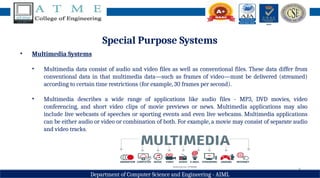
• Multimedia data consist of audio and video files as well as conventional files. These data differ from
conventional data in that multimedia data—such as frames of video—must be delivered (streamed)
according to certain time restrictions (for example, 30 frames per second).
• Multimedia describes a wide range of applications like audio files - MP3, DVD movies, video
conferencing, and short video clips of movie previews or news. Multimedia applications may also
include live webcasts of speeches or sporting events and even live webcams. Multimedia applications
can be either audio or video or combination of both. For example, a movie may consist of separate audio
and video tracks.
6
Department of Computer Science and Engineering - AIML
Special Purpose Systems
• Handheld Systems
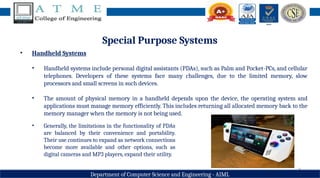
• Handheld systems include personal digital assistants (PDAs), such as Palm and Pocket-PCs, and cellular
telephones. Developers of these systems face many challenges, due to the limited memory, slow
processors and small screens in such devices.
• The amount of physical memory in a handheld depends upon the device, the operating system and
applications must manage memory efficiently. This includes returning all allocated memory back to the
memory manager when the memory is not being used.
• Generally, the limitations in the functionality of PDAs
are balanced by their convenience and portability.
Their use continues to expand as network connections
become more available and other options, such as
digital cameras and MP3 players, expand their utility.
7
Department of Computer Science and Engineering - AIML
Computing Environments
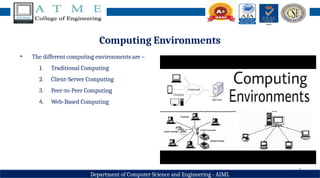
• The different computing environments are –
1. Traditional Computing
2. Client-Server Computing
3. Peer-to-Peer Computing
4. Web-Based Computing
8
Department of Computer Science and Engineering - AIML
Computing Environments - Traditional Computing
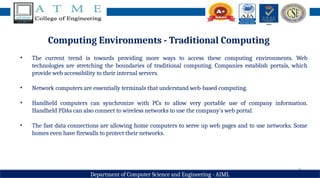
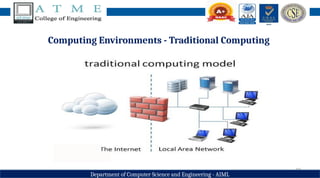
• The current trend is towards providing more ways to access these computing environments. Web
technologies are stretching the boundaries of traditional computing. Companies establish portals, which
provide web accessibility to their internal servers.
• Network computers are essentially terminals that understand web-based computing.
• Handheld computers can synchronize with PCs to allow very portable use of company information.
Handheld PDAs can also connect to wireless networks to use the company's web portal.
• The fast data connections are allowing home computers to serve up web pages and to use networks. Some
homes even have firewalls to protect their networks.
9
Department of Computer Science and Engineering - AIML
Computing Environments - Traditional Computing
• Batch system processed jobs in bulk, with predetermined input (from files or other sources of data).
• Interactive systems waited for input from users. To optimize the use of the computing resources, multiple
users shared time on these systems.
• Time-sharing systems used a timer and scheduling algorithms to rapidly cycle processes through the CPU,
giving each user a share of the resources.
• The same scheduling technique is still in use on workstations and servers, but frequently the processes are
all owned by the same user (or a single user and the operating system).
• User processes, and system processes that provide services to the user, are managed so that each frequently
gets a slice of computer time.
10
Department of Computer Science and Engineering - AIML
Computing Environments - Traditional Computing
11
Department of Computer Science and Engineering - AIML
Computing Environments - Client-Server Computing
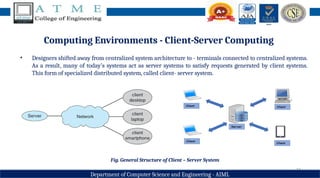
• Designers shifted away from centralized system architecture to - terminals connected to centralized systems.
As a result, many of today’s systems act as server systems to satisfy requests generated by client systems.
This form of specialized distributed system, called client- server system.
Fig. General Structure of Client – Server System
12
Department of Computer Science and Engineering - AIML
Computing Environments - Client-Server Computing
• Server systems can be broadly categorized as compute servers and file servers:
• The compute-server system provides an interface to which a client can send a request to perform an
action (for example, read data); in response, the server executes the action and sends back results to the
client. A server running a database that responds to client requests for data is an example of such a
system.
• The file-server system provides a file-system interface where clients can create, update, read, and
delete files. An example of such a system is a web server that delivers files to clients running the web
browsers.
13
Department of Computer Science and Engineering - AIML
Computing Environments - Peer-to-Peer Computing
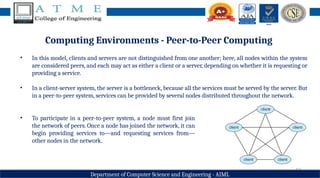
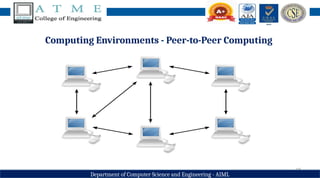
• In this model, clients and servers are not distinguished from one another; here, all nodes within the system
are considered peers, and each may act as either a client or a server, depending on whether it is requesting or
providing a service.
• In a client-server system, the server is a bottleneck, because all the services must be served by the server. But
in a peer-to-peer system, services can be provided by several nodes distributed throughout the network.
• To participate in a peer-to-peer system, a node must first join
the network of peers. Once a node has joined the network, it can
begin providing services to—and requesting services from—
other nodes in the network.
14
Department of Computer Science and Engineering - AIML
Computing Environments - Peer-to-Peer Computing
• Determining what services are available is accomplished in one of two general ways:
• When a node joins a network, it registers its service with a centralized lookup service on the network.
Any node desiring a specific service first contacts this centralized lookup service to determine which
node provides the service. The remainder of the communication takes place between the client and the
service provider.
• A peer acting as a client must know, which node provides a desired service by broadcasting a request for
the service to all other nodes in the network. The node (or nodes) providing that service responds to the
peer making the request. To support this approach, a discovery protocol must be provided that allows
peers to discover services provided by other peers in the network.
15
Department of Computer Science and Engineering - AIML
Computing Environments - Peer-to-Peer Computing
16
Department of Computer Science and Engineering - AIML
Computing Environments - Web-Based Computing
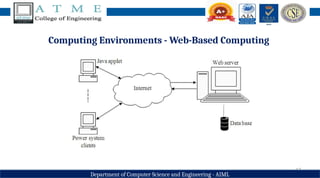
• Web computing has increased the importance on networking. Devices that were not previously networked
now include wired or wireless access. Devices that were networked now have faster network connectivity.
• The implementation of web-based computing has given rise to new categories of devices, such as load
balancers, which distribute network connections among a pool of similar servers. Operating systems like
Windows 95, which acted as web clients, have evolved into Linux and Windows XP, which can act as web
servers as well as clients. Generally, the Web has increased the complexity of devices, because their users
require them to be web-enabled.
• The design of an operating system is a major task. It is important that the goals of the new system be well
defined before the design of OS begins. These goals form the basis for choices among various algorithms and
strategies.
17
Department of Computer Science and Engineering - AIML
Computing Environments - Web-Based Computing
18
Department of Computer Science and Engineering - AIML
Summary
• In today’s session, you all have gone through the following topics
• Distributed Systems
• Special Purpose Systems
• Multimedia Systems
• Handheld Systems
• Computing Environments
• Traditional Computing
• Client-Server Computing
• Peer-to-Peer Computing
• Web-Based Computing
19
Department of Computer Science and Engineering - AIML
Discussion and Interaction
20
Department of Computer Science and Engineering - AIML
Topics for Next Session
Module 1: Introduction to operating systems, System structures
Session 6
• Operating System Services
• User – Operating System Interface
• System Calls
21
Department of Computer Science and Engineering - AIML

Operating System Module 1 Session 5.pptx

  • 1.
    1 Department of ComputerScience and Engineering - AIML Operating Systems – 21CS44 Course Coordinator: Prof. Yogesh N Assistant Professor Dept. of CSD ATMECE, Mysuru
  • 2.
    2 Department of ComputerScience and Design Module 1 – Introduction to operating systems System structures Session 5 • Distributed Systems • Special Purpose Systems • Multimedia Systems • Handheld Systems • Computing Environments • Traditional Computing • Client-Server Computing • Peer-to-Peer Computing • Web-Based Computing
  • 3.
    3 Department of ComputerScience and Engineering - AIML Distributed Systems • A distributed system is a collection of systems that are networked to provide the users with access to the various resources in the network. Access to a shared resource increases computation speed, functionality, data availability, and reliability. • A network is a communication path between two or more systems. Networks vary by the protocols used(TCP/IP,UDP,FTP etc.), the distances between nodes, and the transport media(copper wires, fiber-optic, wireless). • TCP/IP is the most common network protocol. The operating systems support of protocols also varies. Most operating systems support TCP/IP, including the Windows and UNIX operating systems. • Networks are characterized based on the distances between their nodes. A local-area network (LAN) connects computers within a room, a floor, or a building. A wide-area network (WAN) usually links buildings, cities, or countries. A global company may have a WAN to connect its offices worldwide. These networks may run one protocol or several protocols.
  • 4.
    4 Department of ComputerScience and Engineering - AIML Distributed Systems • A metropolitan-area network (MAN) connects buildings within a city. BlueTooth and 802.11 devices use wireless technology to communicate over a distance of several feet, in essence creating a small-area network such as might be found in a home. • The transportation media to carry networks are also varied. They include copper wires, fiber strands, and wireless transmissions between satellites, microwave dishes, and radios. When computing devices are connected to cellular phones, they create a network.
  • 5.
    5 Department of ComputerScience and Engineering - AIML Special Purpose Systems • Multimedia Systems • Multimedia data consist of audio and video files as well as conventional files. These data differ from conventional data in that multimedia data—such as frames of video—must be delivered (streamed) according to certain time restrictions (for example, 30 frames per second). • Multimedia describes a wide range of applications like audio files - MP3, DVD movies, video conferencing, and short video clips of movie previews or news. Multimedia applications may also include live webcasts of speeches or sporting events and even live webcams. Multimedia applications can be either audio or video or combination of both. For example, a movie may consist of separate audio and video tracks.
  • 6.
    6 Department of ComputerScience and Engineering - AIML Special Purpose Systems • Handheld Systems • Handheld systems include personal digital assistants (PDAs), such as Palm and Pocket-PCs, and cellular telephones. Developers of these systems face many challenges, due to the limited memory, slow processors and small screens in such devices. • The amount of physical memory in a handheld depends upon the device, the operating system and applications must manage memory efficiently. This includes returning all allocated memory back to the memory manager when the memory is not being used. • Generally, the limitations in the functionality of PDAs are balanced by their convenience and portability. Their use continues to expand as network connections become more available and other options, such as digital cameras and MP3 players, expand their utility.
  • 7.
    7 Department of ComputerScience and Engineering - AIML Computing Environments • The different computing environments are – 1. Traditional Computing 2. Client-Server Computing 3. Peer-to-Peer Computing 4. Web-Based Computing
  • 8.
    8 Department of ComputerScience and Engineering - AIML Computing Environments - Traditional Computing • The current trend is towards providing more ways to access these computing environments. Web technologies are stretching the boundaries of traditional computing. Companies establish portals, which provide web accessibility to their internal servers. • Network computers are essentially terminals that understand web-based computing. • Handheld computers can synchronize with PCs to allow very portable use of company information. Handheld PDAs can also connect to wireless networks to use the company's web portal. • The fast data connections are allowing home computers to serve up web pages and to use networks. Some homes even have firewalls to protect their networks.
  • 9.
    9 Department of ComputerScience and Engineering - AIML Computing Environments - Traditional Computing • Batch system processed jobs in bulk, with predetermined input (from files or other sources of data). • Interactive systems waited for input from users. To optimize the use of the computing resources, multiple users shared time on these systems. • Time-sharing systems used a timer and scheduling algorithms to rapidly cycle processes through the CPU, giving each user a share of the resources. • The same scheduling technique is still in use on workstations and servers, but frequently the processes are all owned by the same user (or a single user and the operating system). • User processes, and system processes that provide services to the user, are managed so that each frequently gets a slice of computer time.
  • 10.
    10 Department of ComputerScience and Engineering - AIML Computing Environments - Traditional Computing
  • 11.
    11 Department of ComputerScience and Engineering - AIML Computing Environments - Client-Server Computing • Designers shifted away from centralized system architecture to - terminals connected to centralized systems. As a result, many of today’s systems act as server systems to satisfy requests generated by client systems. This form of specialized distributed system, called client- server system. Fig. General Structure of Client – Server System
  • 12.
    12 Department of ComputerScience and Engineering - AIML Computing Environments - Client-Server Computing • Server systems can be broadly categorized as compute servers and file servers: • The compute-server system provides an interface to which a client can send a request to perform an action (for example, read data); in response, the server executes the action and sends back results to the client. A server running a database that responds to client requests for data is an example of such a system. • The file-server system provides a file-system interface where clients can create, update, read, and delete files. An example of such a system is a web server that delivers files to clients running the web browsers.
  • 13.
    13 Department of ComputerScience and Engineering - AIML Computing Environments - Peer-to-Peer Computing • In this model, clients and servers are not distinguished from one another; here, all nodes within the system are considered peers, and each may act as either a client or a server, depending on whether it is requesting or providing a service. • In a client-server system, the server is a bottleneck, because all the services must be served by the server. But in a peer-to-peer system, services can be provided by several nodes distributed throughout the network. • To participate in a peer-to-peer system, a node must first join the network of peers. Once a node has joined the network, it can begin providing services to—and requesting services from— other nodes in the network.
  • 14.
    14 Department of ComputerScience and Engineering - AIML Computing Environments - Peer-to-Peer Computing • Determining what services are available is accomplished in one of two general ways: • When a node joins a network, it registers its service with a centralized lookup service on the network. Any node desiring a specific service first contacts this centralized lookup service to determine which node provides the service. The remainder of the communication takes place between the client and the service provider. • A peer acting as a client must know, which node provides a desired service by broadcasting a request for the service to all other nodes in the network. The node (or nodes) providing that service responds to the peer making the request. To support this approach, a discovery protocol must be provided that allows peers to discover services provided by other peers in the network.
  • 15.
    15 Department of ComputerScience and Engineering - AIML Computing Environments - Peer-to-Peer Computing
  • 16.
    16 Department of ComputerScience and Engineering - AIML Computing Environments - Web-Based Computing • Web computing has increased the importance on networking. Devices that were not previously networked now include wired or wireless access. Devices that were networked now have faster network connectivity. • The implementation of web-based computing has given rise to new categories of devices, such as load balancers, which distribute network connections among a pool of similar servers. Operating systems like Windows 95, which acted as web clients, have evolved into Linux and Windows XP, which can act as web servers as well as clients. Generally, the Web has increased the complexity of devices, because their users require them to be web-enabled. • The design of an operating system is a major task. It is important that the goals of the new system be well defined before the design of OS begins. These goals form the basis for choices among various algorithms and strategies.
  • 17.
    17 Department of ComputerScience and Engineering - AIML Computing Environments - Web-Based Computing
  • 18.
    18 Department of ComputerScience and Engineering - AIML Summary • In today’s session, you all have gone through the following topics • Distributed Systems • Special Purpose Systems • Multimedia Systems • Handheld Systems • Computing Environments • Traditional Computing • Client-Server Computing • Peer-to-Peer Computing • Web-Based Computing
  • 19.
    19 Department of ComputerScience and Engineering - AIML Discussion and Interaction
  • 20.
    20 Department of ComputerScience and Engineering - AIML Topics for Next Session Module 1: Introduction to operating systems, System structures Session 6 • Operating System Services • User – Operating System Interface • System Calls
  • 21.
    21 Department of ComputerScience and Engineering - AIML