•Operating Systems
• 20PCAC13
Text Book:
Operating Systems – A Concept Based Approach
- Dhananjay M.Dhamdhere
M.Priyavani,MCA,DCHN,M.Phil.
Welcome
Dear Students!!!
Assistant Professor,
Department of Computer Applications (PG),
V.V.Vanniapermal College for Women,
Virudhunagar – 626001.
Mrs.M.Priyavani,MCA,DCHN,M.Phil.,
M.Priyavani,MCA,DCHN,M.Phil.
3
Chapter-1
Introduction and Overview
M.Priyavani,MCA,DCHN,M.Phil.
INTRODUCTION
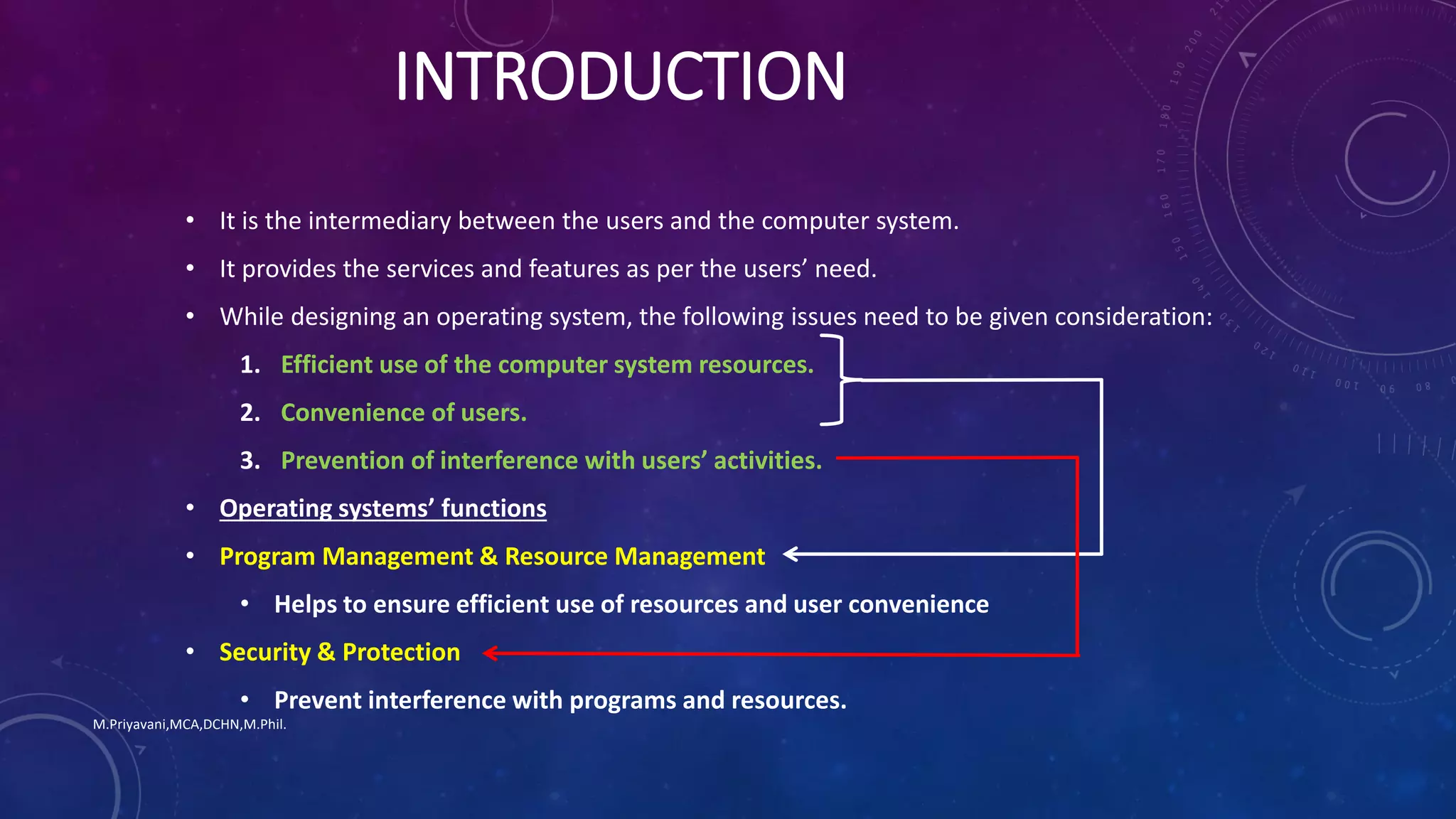
• It is the intermediary between the users and the computer system.
• It provides the services and features as per the users’ need.
• While designing an operating system, the following issues need to be given consideration:
1. Efficient use of the computer system resources.
2. Convenience of users.
3. Prevention of interference with users’ activities.
• Operating systems’ functions
• Program Management & Resource Management
• Helps to ensure efficient use of resources and user convenience
• Security & Protection
• Prevent interference with programs and resources.
M.Priyavani,MCA,DCHN,M.Phil.
1.1 ABSTRACT VIEWS OF AN OPERATING SYSTEM
• A user perceives an OS as simply a means of achieving an intended use of a
computer system.
• Example: a student – for internet access, a programmer – to develop
programs, …
• These are called abstract views – it includes some elements of reality but
ignores other elements.
M.Priyavani,MCA,DCHN,M.Phil.
A DESIGNER’S ABSTRACT VIEW OF AN OS
User Interface
• Accept commands to execute programs and use resources & services provided by
the OS.
• It is either a command line interface (Linux) or graphical user interface (Windows)
Non-kernel Routines
• Implement user commands concerning execution of programs and use of
computer’s resources.
• Invoked by the user interface.
Kernal
• Is the core of the OS.
• Controls the operations of the computer.
• Provides a set of functions and services to use the CPU, memory & other
resources.
• Invoked by non-kernel routines and by user programs.
M.Priyavani,MCA,DCHN,M.Phil.
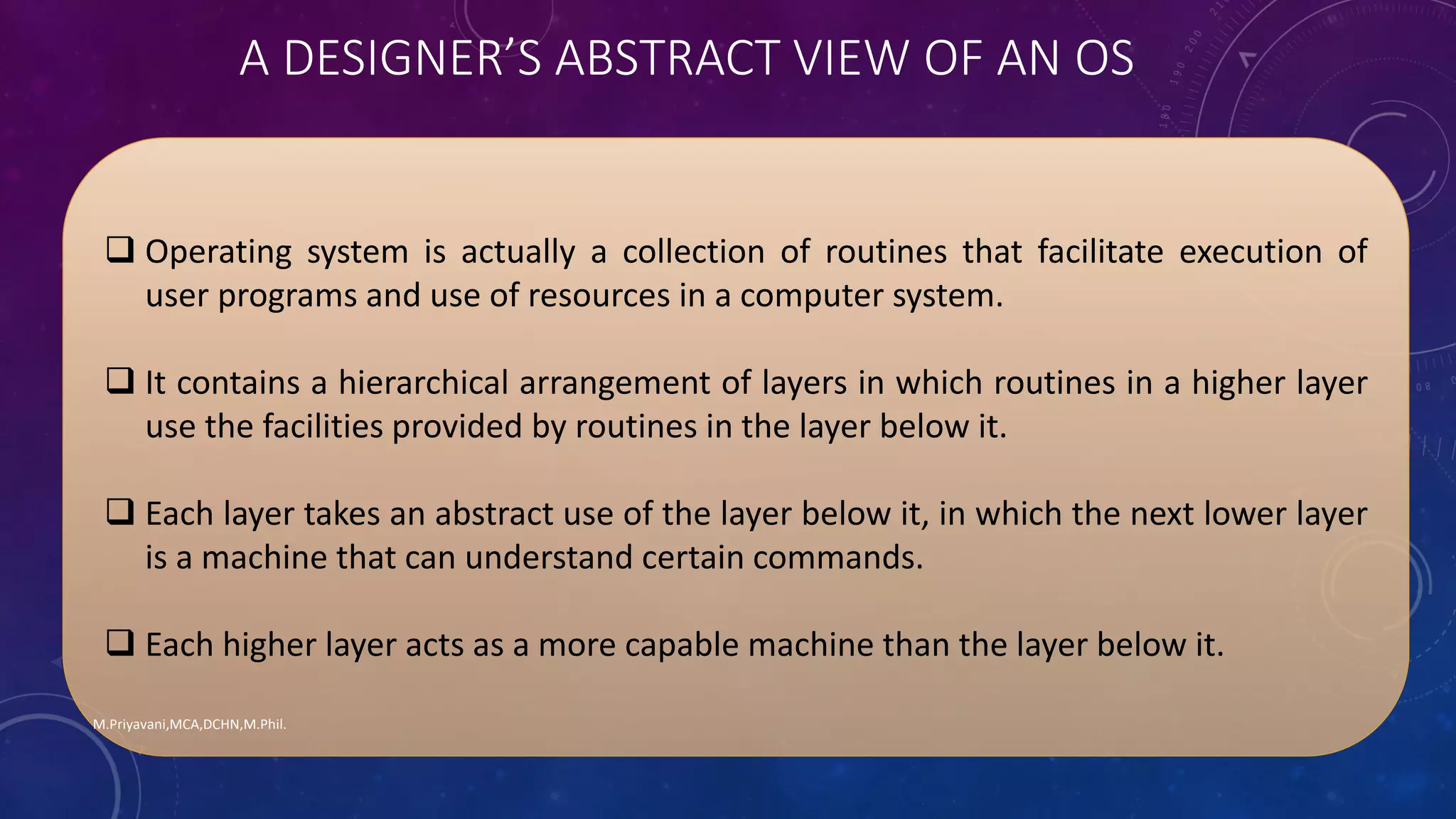
 Operating system is actually a collection of routines that facilitate execution of
user programs and use of resources in a computer system.
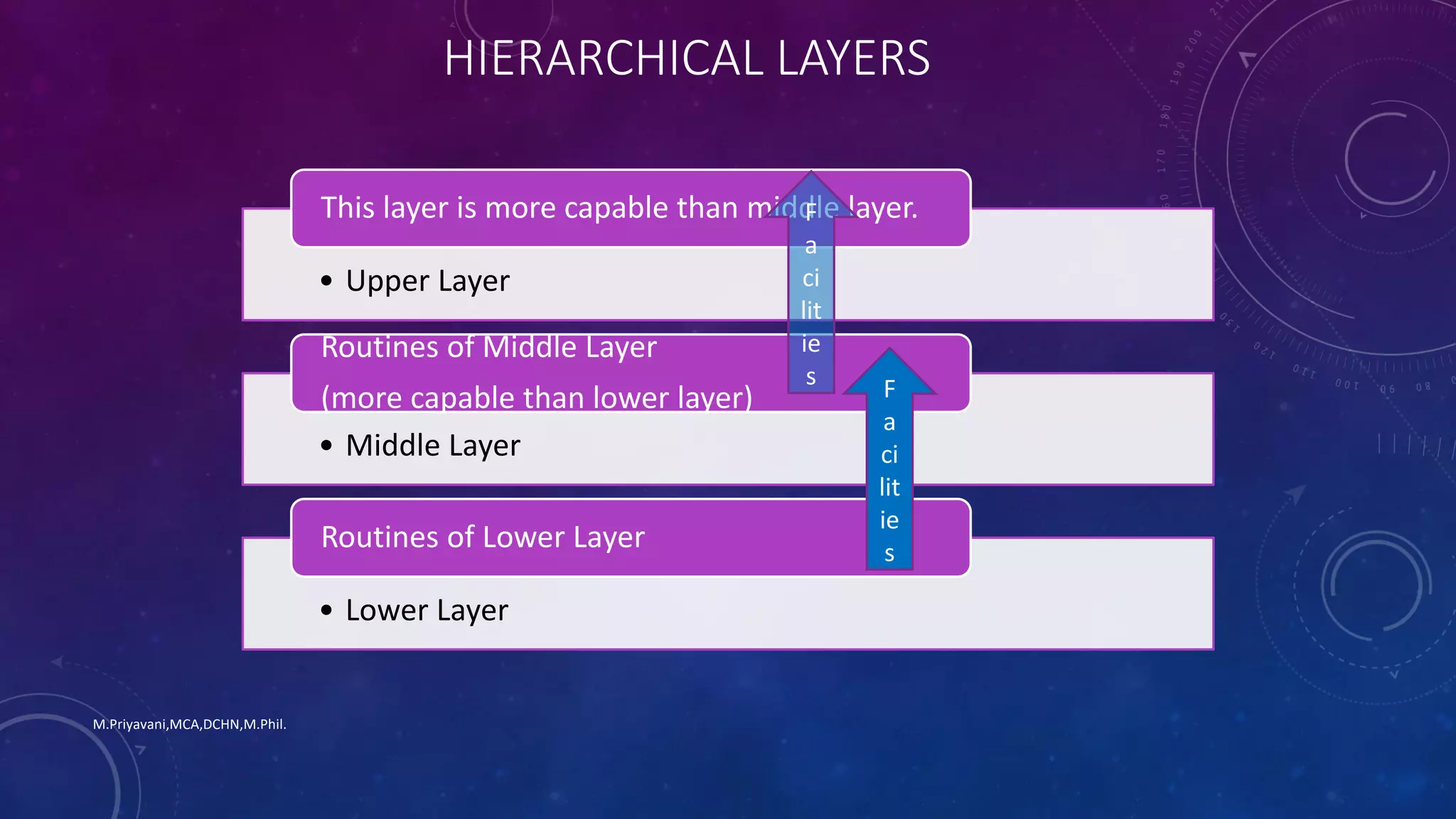
 It contains a hierarchical arrangement of layers in which routines in a higher layer
use the facilities provided by routines in the layer below it.
 Each layer takes an abstract use of the layer below it, in which the next lower layer
is a machine that can understand certain commands.
 Each higher layer acts as a more capable machine than the layer below it.
M.Priyavani,MCA,DCHN,M.Phil.
A DESIGNER’S ABSTRACT VIEW OF AN OS
M.Priyavani,MCA,DCHN,M.Phil.
• Upper Layer
This layer is more capable than middle layer.
• Middle Layer
Routines of Middle Layer
(more capable than lower layer)
• Lower Layer
Routines of Lower Layer
F
a
ci
lit
ie
s
HIERARCHICAL LAYERS
F
a
ci
lit
ie
s
 Managing complexity: Viewing the OS as a collection of layers is useful in
managing complexity during design and study of the system.
 For example, an abstract view of how an OS organizes execution of user
programs focuses only on handling of programs, which simplifies the study of
the OS by not showing how the OS handles other resources like memory or I/O
devices.
 Presenting a Generic Scheme: An abstraction is used to present a generic scheme
that has many variants in practice.
 For example, the user interface in an abstraction with CLI & GUI as 2 of its many
variants.
M.Priyavani,MCA,DCHN,M.Phil.
KEY BENEFITS OF ABSTRACT VIEW OF OS
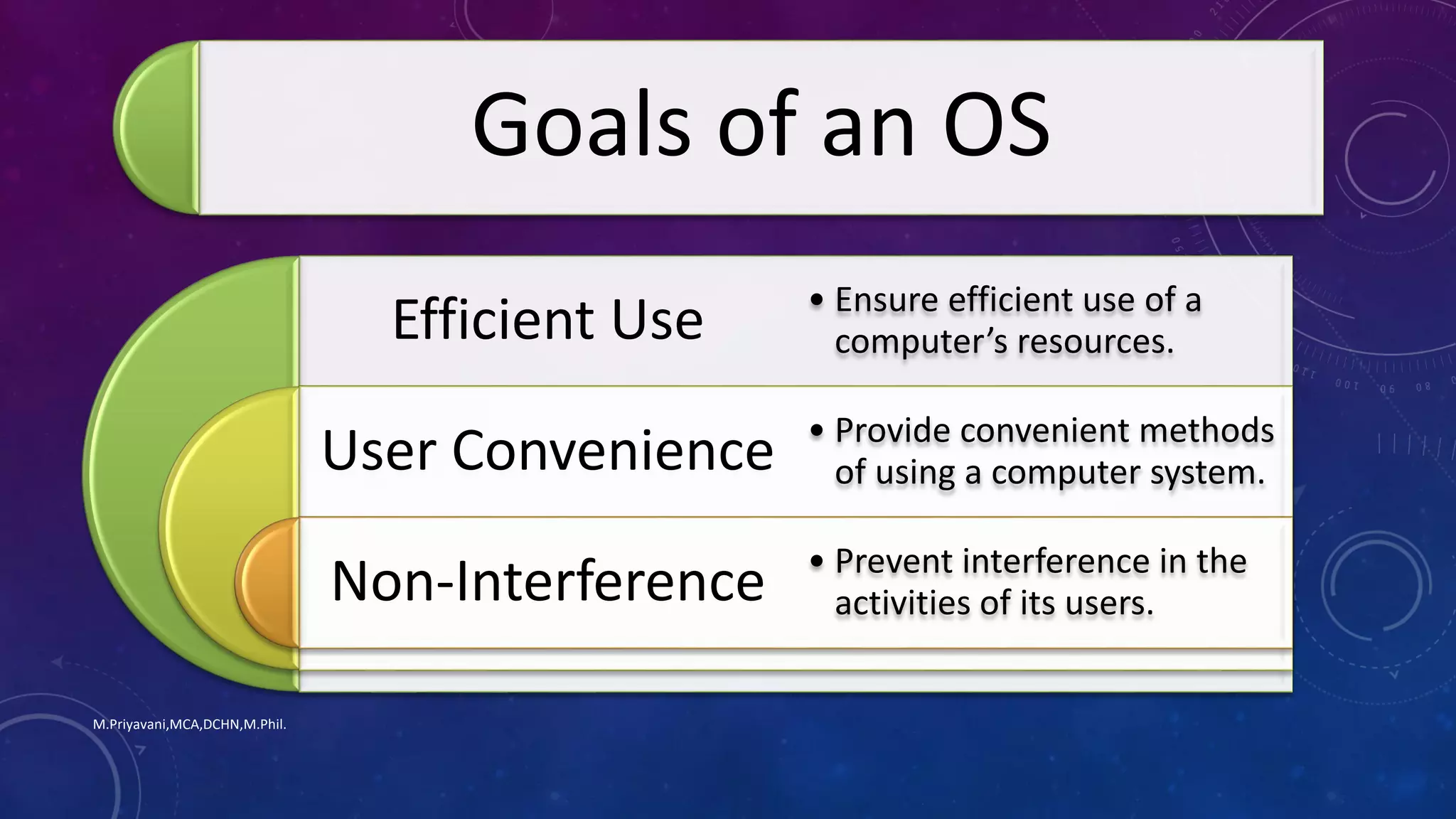
Goals of an operating system
M.Priyavani,MCA,DCHN,M.Phil.
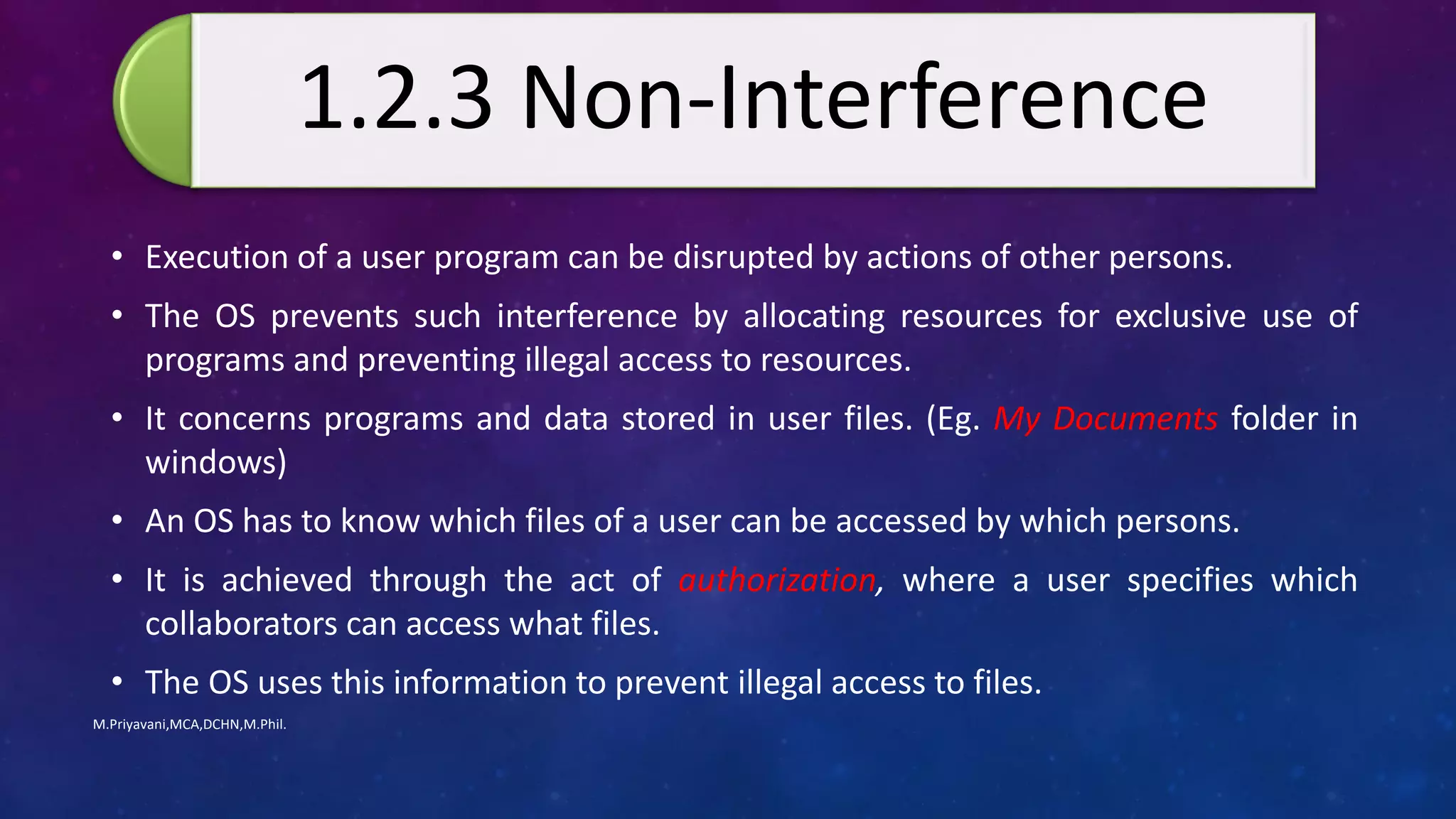
Goals of an OS
Efficient Use
User Convenience
Non-Interference
• Ensure efficient use of a
computer’s resources.
• Provide convenient methods
of using a computer system.
• Prevent interference in the
activities of its users.
M.Priyavani,MCA,DCHN,M.Phil.
• The two conflicting goals of the OS are
• Efficient use of the computer’s resources
• User convenience
• These two goals sometimes conflict as below:
• Prompt service can be provided through exclusive use of a computer; however, efficient use
requires sharing of a computer’s resources among many users
• An OS designer decides which of the two goals is more important under what conditions
• That is why we have so many operating systems!
1.2.1 Efficient Use
What? • An OS must ensure efficient use of its resources like
memory, CPU and I/O devices.
• Poor efficiency will result if a process doesn’t use a
resource allocated to it.
• Since the allocated device can’t be used by another
process which need it, that process can’t be
executed, hence resources allocated remain idle.
M.Priyavani,MCA,DCHN,M.Phil.
Efficient Use
Why?
• OS itself consumes some CPU and memory
resources during its own operation, and this
constitutes an overhead.
• This overhead also reduces the resources
available to user programs.
• To achieve good efficiency, the OS must minimize
the wastage of resources by programs and also
minimize its own overhead.
M.Priyavani,MCA,DCHN,M.Phil.
Efficient Use
How?
• Efficient use of resources can
be obtained by monitoring
use of resources and
• performing corrective
actions when necessary.
M.Priyavani,MCA,DCHN,M.Phil.
Early operating systems
• Had command line interfaces.
• Required user to type in a command.
Recent operating systems
• Graphical User Interfaces were evolved.
• Used icons to represent program and files.
• Interpreted mouse clicks as commands.
M.Priyavani,MCA,DCHN,M.Phil.
1.2.2 User Convenience
• Fulfilment of necessity.
• Good service
• User friendly interfaces.
• New programming model.
• Web oriented features.
• Evolution
• Ability to execute programs, use the file system.
• Speedy response to computational requests.
• Easy to use commands, GUI
• Concurrent programming
• Means to set up web-enabled servers.
• Add new features, use new computer
technologies.
M.Priyavani,MCA,DCHN,M.Phil.
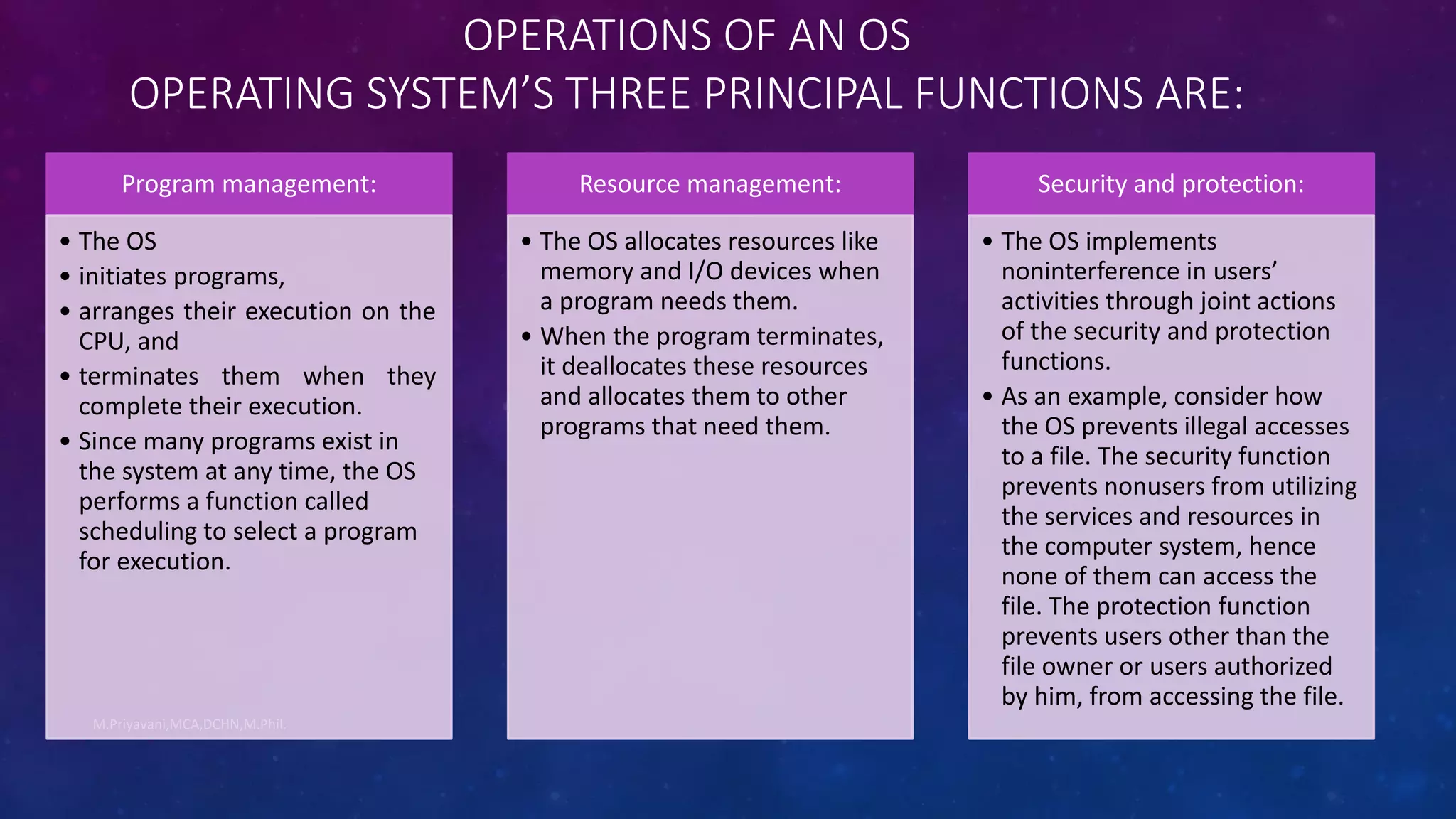
• Execution of a user program can be disrupted by actions of other persons.
• The OS prevents such interference by allocating resources for exclusive use of
programs and preventing illegal access to resources.
• It concerns programs and data stored in user files. (Eg. My Documents folder in
windows)
• An OS has to know which files of a user can be accessed by which persons.
• It is achieved through the act of authorization, where a user specifies which
collaborators can access what files.
• The OS uses this information to prevent illegal access to files.
M.Priyavani,MCA,DCHN,M.Phil.
1.2.3 Non-Interference
OPERATIONS OF AN OS
OPERATING SYSTEM’S THREE PRINCIPAL FUNCTIONS ARE:
M.Priyavani,MCA,DCHN,M.Phil.
Program management:
• The OS
• initiates programs,
• arranges their execution on the
CPU, and
• terminates them when they
complete their execution.
• Since many programs exist in
the system at any time, the OS
performs a function called
scheduling to select a program
for execution.
Resource management:
• The OS allocates resources like
memory and I/O devices when
a program needs them.
• When the program terminates,
it deallocates these resources
and allocates them to other
programs that need them.
Security and protection:
• The OS implements
noninterference in users’
activities through joint actions
of the security and protection
functions.
• As an example, consider how
the OS prevents illegal accesses
to a file. The security function
prevents nonusers from utilizing
the services and resources in
the computer system, hence
none of them can access the
file. The protection function
prevents users other than the
file owner or users authorized
by him, from accessing the file.
M.Priyavani,MCA,DCHN,M.Phil.
• Modern CPUs have the capability to execute program instructions at a very high rate.
• An OS interleave execution of several programs on a CPU and provide good user service.
• The key function in achieving interleaved execution of programs is scheduling.
• Scheduling decides which program should be given the CPU at any time.
M.Priyavani,MCA,DCHN,M.Phil.
 Scheduler is an OS routine that performs scheduling.
 It maintains a list of programs waiting to execute on the CPU.
 It selects one program for execution from the list.
 In operating systems that provide fair service to all programs, the scheduler also specifies how long the program can
be allowed to use the CPU.
 The OS takes away the CPU from a program after it has executed for the specified period of time, and gives it to
another program.
 This action is called preemption.
 A program that loses the CPU because of preemption is put back into the list of programs waiting to execute on the
CPU.
M.Priyavani,MCA,DCHN,M.Phil.
 The scheduling policy employed by an OS can influence both efficient use of the CPU and user service.
 If a program is preempted after it has executed for only a short period of time, the overhead of scheduling actions
would be high because of frequent preemption.
 However, each program would suffer only a short delay before it gets an opportunity to use the CPU.
 It would result in good user service.
 If preemption is performed after a program has executed for a longer period of time, scheduling overhead would be
lesser.
 But programs would suffer longer delays.
 So user service would be poorer.
M.Priyavani,MCA,DCHN,M.Phil.
 Resource allocations and deallocations can be performed by using a resource table.
 Each entry in the table contains
 the name and address of a resource unit and
 its present status, indicating whether it is free or allocated to some program.
M.Priyavani,MCA,DCHN,M.Phil.
Two resource allocation strategies are popular.
Resource partitioning approach:
• The OS decides a priori what resources should be allocated to each user program.
• For example, it may decide that a program should be allocated 1 MB of memory, 1000 disk blocks, and a
monitor.
• It divides the resources in the system into many resource partitions.
• It allocates one resource partition to each user program when its execution is to be initiated.
Advantages of Resource partitioning
 It is simple to implement,
 It incurs less overhead;
Drawbacks:
 It lacks flexibility.
 Resources are wasted if a resource partition contains more resources than what a program needs.
 The OS cannot execute a program if its requirements exceed the resources available in a resource partition.
 This is true even if free resources exist in another partition.
M.Priyavani,MCA,DCHN,M.Phil.
Pool-based approach :
• The OS allocates resources from a common pool of resources.
• It consults the resource table when a program makes a request for a resource,
and allocates the resource if it is free.
• It incurs the overhead of allocating and deallocating resources when
requested.
• However, it avoids both problems faced by the resource partitioning approach
— an allocated resource is not wasted, and
— a resource requirement can be met if a free resource exists.
M.Priyavani,MCA,DCHN,M.Phil.
• A virtual resource is a fictitious resource.
• It is an illusion supported by an OS through use of a real resource.
• An OS may use the same real resource to support several virtual resources.
• This way, it can give the impression of having a larger number of resources
than it actually does.
• Each use of a virtual resource results in the use of an appropriate real
resource.
• In that sense, a virtual resource is an abstract view of a resource taken by a
program.
• Use of virtual resources started with the use of virtual devices.
• To prevent mutual interference between programs, it was a good idea to
allocate a device exclusively for use by one program.
• However, a computer system did not possess many real devices, so virtual
devices were used.
M.Priyavani,MCA,DCHN,M.Phil.
• An OS would create a virtual device when a user needed an I/O
device.
• Virtual devices are used in contemporary operating systems as
well.
• A print server is a common example of a virtual device.
• When a program wishes to print a file, the print server simply
copies the file into the print queue.
• The program requesting the print goes on with its operation as if
the printing had been performed.
• The print server continuously examines the print queue and
prints the files it finds in the queue.
M.Priyavani,MCA,DCHN,M.Phil.
• Most operating systems provide a virtual resource called virtual memory,
which is an illusion of a memory that is larger in size than the real
memory of a computer.
• Its use enables a programmer to execute a program whose size may
exceed the size of real memory.
• Some operating systems create virtual machines (VMs) so that each
machine can be allocated to a user.
• The advantage of this approach is twofold.
• Allocation of a virtual machine to each user eliminates mutual
interference between users.
• It also allows each user to select an OS of his choice to operate his virtual
machine.
• In effect, this arrangement permits users to use different operating
systems on the same computer system simultaneously.
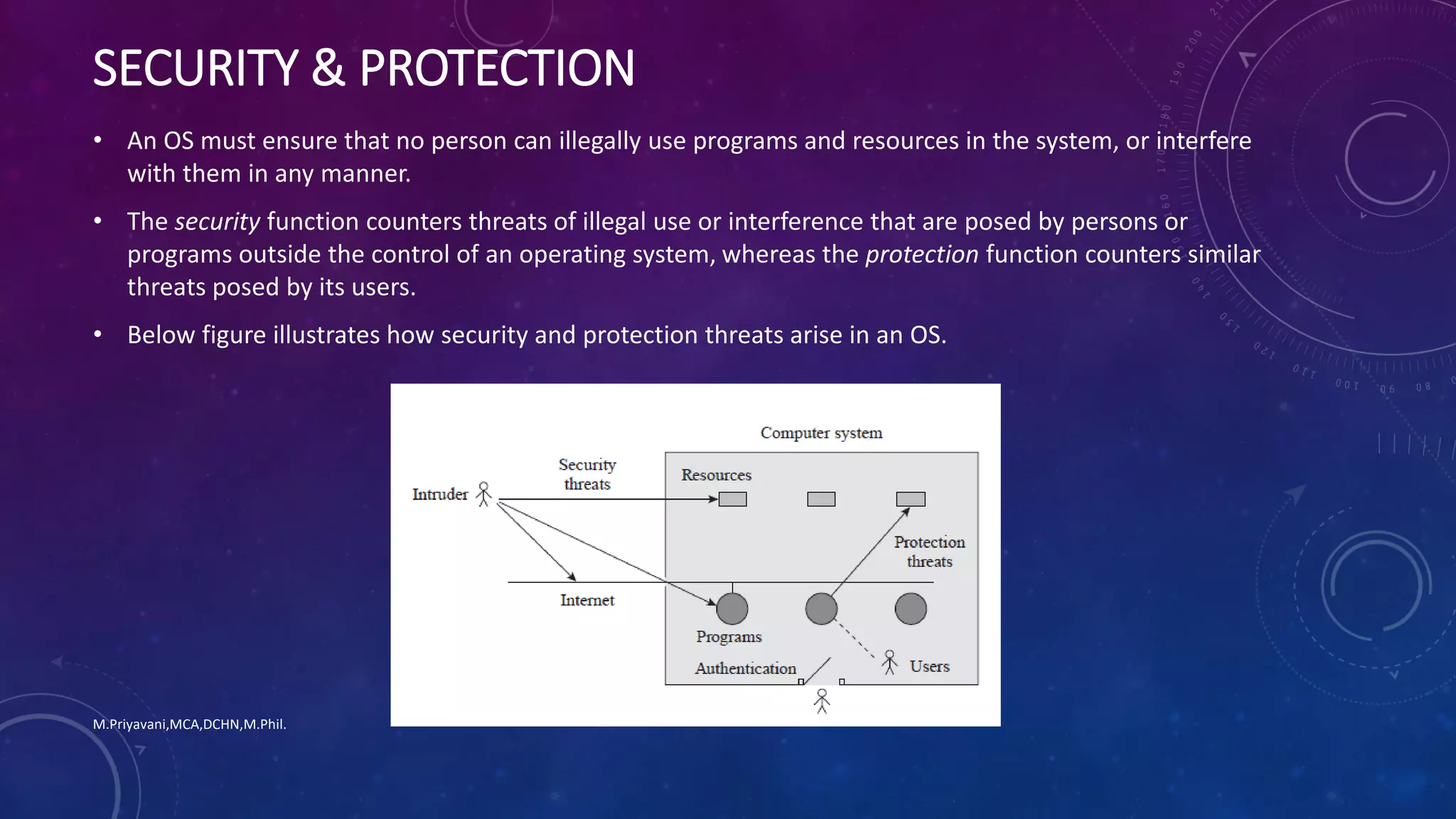
SECURITY & PROTECTION
• An OS must ensure that no person can illegally use programs and resources in the system, or interfere
with them in any manner.
• The security function counters threats of illegal use or interference that are posed by persons or
programs outside the control of an operating system, whereas the protection function counters similar
threats posed by its users.
• Below figure illustrates how security and protection threats arise in an OS.
M.Priyavani,MCA,DCHN,M.Phil.
SECURITY & PROTECTION
• In a classical stand-alone environment, a computer system functions in complete isolation.
• In such a system, the security and protection issues can be handled easily.
• Recall that an OS maintains information that helps in implementing the security and protection
functions (see Table 1.2).
• The identity of a person wishing to use a computer system is verified through a password when the
person logs in.
• This action, which is called authentication, ensures that no person other than a registered user can use
a computer system.
• Consequently, security threats do not arise in the system if the authentication procedure is fool-proof.
• In this environment, the forms of interference mentioned earlier in Section 1.2.3 are all protection
threats.
• The OS thwarts disruption of program executions and OS services with the help of hardware features
such as memory protection.
• It thwarts interference with files by allowing a user to access a file only if he owns it or has been
authorized by the file’s owner to access it.
M.Priyavani,MCA,DCHN,M.Phil.
SECURITY & PROTECTION
• When a computer system is connected to the Internet, and a user downloads a program from the
Internet, there is a danger that the downloaded program may interfere with other programs or
resources in the system.
• This is a security threat because the interference is caused by some person outside the system, called
an intruder, who either wrote the downloaded program, or modified it, so that it would interfere with
other programs.
• Such security threats are posed either through a Trojan horse, which is a program that has a known
legitimate function and a well-disguised malicious function, or a virus, which is a piece of code with a
malicious function that attaches itself to other programs in the system and spreads to other systems
when such programs are copied.
• Another class of security threats is posed by programs called worms, which replicate by themselves
through holes in security setups of operating systems. Worms can replicate at unimaginably high rates
and cause widespread havoc. The Code Red worm of 2001 spread to a quarter of a million computer
systems in 9 hours.
M.Priyavani,MCA,DCHN,M.Phil.
SECURITY & PROTECTION
• Operating systems address security threats through a variety of means by using sophisticated
authentication techniques, by plugging security holes when they are discovered, by ensuring that
programs cannot be modified while they are copied over the Internet, and by using Internet firewalls to
filter out unwanted Internet traffic through a computer system.
• Users are expected to contribute to security by using passwords that are impossible to guess and by
exercising caution while downloading programs from the Internet.
M.Priyavani,MCA,DCHN,M.Phil.
End of Chapter-1

OS Chapter1

  • 1.
    •Operating Systems • 20PCAC13 TextBook: Operating Systems – A Concept Based Approach - Dhananjay M.Dhamdhere M.Priyavani,MCA,DCHN,M.Phil.
  • 2.
    Welcome Dear Students!!! Assistant Professor, Departmentof Computer Applications (PG), V.V.Vanniapermal College for Women, Virudhunagar – 626001. Mrs.M.Priyavani,MCA,DCHN,M.Phil., M.Priyavani,MCA,DCHN,M.Phil.
  • 3.
  • 4.
    INTRODUCTION • It isthe intermediary between the users and the computer system. • It provides the services and features as per the users’ need. • While designing an operating system, the following issues need to be given consideration: 1. Efficient use of the computer system resources. 2. Convenience of users. 3. Prevention of interference with users’ activities. • Operating systems’ functions • Program Management & Resource Management • Helps to ensure efficient use of resources and user convenience • Security & Protection • Prevent interference with programs and resources. M.Priyavani,MCA,DCHN,M.Phil.
  • 5.
    1.1 ABSTRACT VIEWSOF AN OPERATING SYSTEM • A user perceives an OS as simply a means of achieving an intended use of a computer system. • Example: a student – for internet access, a programmer – to develop programs, … • These are called abstract views – it includes some elements of reality but ignores other elements. M.Priyavani,MCA,DCHN,M.Phil.
  • 6.
    A DESIGNER’S ABSTRACTVIEW OF AN OS User Interface • Accept commands to execute programs and use resources & services provided by the OS. • It is either a command line interface (Linux) or graphical user interface (Windows) Non-kernel Routines • Implement user commands concerning execution of programs and use of computer’s resources. • Invoked by the user interface. Kernal • Is the core of the OS. • Controls the operations of the computer. • Provides a set of functions and services to use the CPU, memory & other resources. • Invoked by non-kernel routines and by user programs. M.Priyavani,MCA,DCHN,M.Phil.
  • 7.
     Operating systemis actually a collection of routines that facilitate execution of user programs and use of resources in a computer system.  It contains a hierarchical arrangement of layers in which routines in a higher layer use the facilities provided by routines in the layer below it.  Each layer takes an abstract use of the layer below it, in which the next lower layer is a machine that can understand certain commands.  Each higher layer acts as a more capable machine than the layer below it. M.Priyavani,MCA,DCHN,M.Phil. A DESIGNER’S ABSTRACT VIEW OF AN OS
  • 8.
    M.Priyavani,MCA,DCHN,M.Phil. • Upper Layer Thislayer is more capable than middle layer. • Middle Layer Routines of Middle Layer (more capable than lower layer) • Lower Layer Routines of Lower Layer F a ci lit ie s HIERARCHICAL LAYERS F a ci lit ie s
  • 9.
     Managing complexity:Viewing the OS as a collection of layers is useful in managing complexity during design and study of the system.  For example, an abstract view of how an OS organizes execution of user programs focuses only on handling of programs, which simplifies the study of the OS by not showing how the OS handles other resources like memory or I/O devices.  Presenting a Generic Scheme: An abstraction is used to present a generic scheme that has many variants in practice.  For example, the user interface in an abstraction with CLI & GUI as 2 of its many variants. M.Priyavani,MCA,DCHN,M.Phil. KEY BENEFITS OF ABSTRACT VIEW OF OS
  • 10.
    Goals of anoperating system M.Priyavani,MCA,DCHN,M.Phil.
  • 11.
    Goals of anOS Efficient Use User Convenience Non-Interference • Ensure efficient use of a computer’s resources. • Provide convenient methods of using a computer system. • Prevent interference in the activities of its users. M.Priyavani,MCA,DCHN,M.Phil.
  • 12.
    M.Priyavani,MCA,DCHN,M.Phil. • The twoconflicting goals of the OS are • Efficient use of the computer’s resources • User convenience • These two goals sometimes conflict as below: • Prompt service can be provided through exclusive use of a computer; however, efficient use requires sharing of a computer’s resources among many users • An OS designer decides which of the two goals is more important under what conditions • That is why we have so many operating systems!
  • 13.
    1.2.1 Efficient Use What?• An OS must ensure efficient use of its resources like memory, CPU and I/O devices. • Poor efficiency will result if a process doesn’t use a resource allocated to it. • Since the allocated device can’t be used by another process which need it, that process can’t be executed, hence resources allocated remain idle. M.Priyavani,MCA,DCHN,M.Phil.
  • 14.
    Efficient Use Why? • OSitself consumes some CPU and memory resources during its own operation, and this constitutes an overhead. • This overhead also reduces the resources available to user programs. • To achieve good efficiency, the OS must minimize the wastage of resources by programs and also minimize its own overhead. M.Priyavani,MCA,DCHN,M.Phil.
  • 15.
    Efficient Use How? • Efficientuse of resources can be obtained by monitoring use of resources and • performing corrective actions when necessary. M.Priyavani,MCA,DCHN,M.Phil.
  • 16.
    Early operating systems •Had command line interfaces. • Required user to type in a command. Recent operating systems • Graphical User Interfaces were evolved. • Used icons to represent program and files. • Interpreted mouse clicks as commands. M.Priyavani,MCA,DCHN,M.Phil. 1.2.2 User Convenience
  • 17.
    • Fulfilment ofnecessity. • Good service • User friendly interfaces. • New programming model. • Web oriented features. • Evolution • Ability to execute programs, use the file system. • Speedy response to computational requests. • Easy to use commands, GUI • Concurrent programming • Means to set up web-enabled servers. • Add new features, use new computer technologies. M.Priyavani,MCA,DCHN,M.Phil.
  • 18.
    • Execution ofa user program can be disrupted by actions of other persons. • The OS prevents such interference by allocating resources for exclusive use of programs and preventing illegal access to resources. • It concerns programs and data stored in user files. (Eg. My Documents folder in windows) • An OS has to know which files of a user can be accessed by which persons. • It is achieved through the act of authorization, where a user specifies which collaborators can access what files. • The OS uses this information to prevent illegal access to files. M.Priyavani,MCA,DCHN,M.Phil. 1.2.3 Non-Interference
  • 19.
    OPERATIONS OF ANOS OPERATING SYSTEM’S THREE PRINCIPAL FUNCTIONS ARE: M.Priyavani,MCA,DCHN,M.Phil. Program management: • The OS • initiates programs, • arranges their execution on the CPU, and • terminates them when they complete their execution. • Since many programs exist in the system at any time, the OS performs a function called scheduling to select a program for execution. Resource management: • The OS allocates resources like memory and I/O devices when a program needs them. • When the program terminates, it deallocates these resources and allocates them to other programs that need them. Security and protection: • The OS implements noninterference in users’ activities through joint actions of the security and protection functions. • As an example, consider how the OS prevents illegal accesses to a file. The security function prevents nonusers from utilizing the services and resources in the computer system, hence none of them can access the file. The protection function prevents users other than the file owner or users authorized by him, from accessing the file.
  • 20.
    M.Priyavani,MCA,DCHN,M.Phil. • Modern CPUshave the capability to execute program instructions at a very high rate. • An OS interleave execution of several programs on a CPU and provide good user service. • The key function in achieving interleaved execution of programs is scheduling. • Scheduling decides which program should be given the CPU at any time.
  • 21.
    M.Priyavani,MCA,DCHN,M.Phil.  Scheduler isan OS routine that performs scheduling.  It maintains a list of programs waiting to execute on the CPU.  It selects one program for execution from the list.  In operating systems that provide fair service to all programs, the scheduler also specifies how long the program can be allowed to use the CPU.  The OS takes away the CPU from a program after it has executed for the specified period of time, and gives it to another program.  This action is called preemption.  A program that loses the CPU because of preemption is put back into the list of programs waiting to execute on the CPU.
  • 22.
    M.Priyavani,MCA,DCHN,M.Phil.  The schedulingpolicy employed by an OS can influence both efficient use of the CPU and user service.  If a program is preempted after it has executed for only a short period of time, the overhead of scheduling actions would be high because of frequent preemption.  However, each program would suffer only a short delay before it gets an opportunity to use the CPU.  It would result in good user service.  If preemption is performed after a program has executed for a longer period of time, scheduling overhead would be lesser.  But programs would suffer longer delays.  So user service would be poorer.
  • 23.
    M.Priyavani,MCA,DCHN,M.Phil.  Resource allocationsand deallocations can be performed by using a resource table.  Each entry in the table contains  the name and address of a resource unit and  its present status, indicating whether it is free or allocated to some program.
  • 24.
    M.Priyavani,MCA,DCHN,M.Phil. Two resource allocationstrategies are popular. Resource partitioning approach: • The OS decides a priori what resources should be allocated to each user program. • For example, it may decide that a program should be allocated 1 MB of memory, 1000 disk blocks, and a monitor. • It divides the resources in the system into many resource partitions. • It allocates one resource partition to each user program when its execution is to be initiated. Advantages of Resource partitioning  It is simple to implement,  It incurs less overhead; Drawbacks:  It lacks flexibility.  Resources are wasted if a resource partition contains more resources than what a program needs.  The OS cannot execute a program if its requirements exceed the resources available in a resource partition.  This is true even if free resources exist in another partition.
  • 25.
    M.Priyavani,MCA,DCHN,M.Phil. Pool-based approach : •The OS allocates resources from a common pool of resources. • It consults the resource table when a program makes a request for a resource, and allocates the resource if it is free. • It incurs the overhead of allocating and deallocating resources when requested. • However, it avoids both problems faced by the resource partitioning approach — an allocated resource is not wasted, and — a resource requirement can be met if a free resource exists.
  • 26.
    M.Priyavani,MCA,DCHN,M.Phil. • A virtualresource is a fictitious resource. • It is an illusion supported by an OS through use of a real resource. • An OS may use the same real resource to support several virtual resources. • This way, it can give the impression of having a larger number of resources than it actually does. • Each use of a virtual resource results in the use of an appropriate real resource. • In that sense, a virtual resource is an abstract view of a resource taken by a program. • Use of virtual resources started with the use of virtual devices. • To prevent mutual interference between programs, it was a good idea to allocate a device exclusively for use by one program. • However, a computer system did not possess many real devices, so virtual devices were used.
  • 27.
    M.Priyavani,MCA,DCHN,M.Phil. • An OSwould create a virtual device when a user needed an I/O device. • Virtual devices are used in contemporary operating systems as well. • A print server is a common example of a virtual device. • When a program wishes to print a file, the print server simply copies the file into the print queue. • The program requesting the print goes on with its operation as if the printing had been performed. • The print server continuously examines the print queue and prints the files it finds in the queue.
  • 28.
    M.Priyavani,MCA,DCHN,M.Phil. • Most operatingsystems provide a virtual resource called virtual memory, which is an illusion of a memory that is larger in size than the real memory of a computer. • Its use enables a programmer to execute a program whose size may exceed the size of real memory. • Some operating systems create virtual machines (VMs) so that each machine can be allocated to a user. • The advantage of this approach is twofold. • Allocation of a virtual machine to each user eliminates mutual interference between users. • It also allows each user to select an OS of his choice to operate his virtual machine. • In effect, this arrangement permits users to use different operating systems on the same computer system simultaneously.
  • 29.
    SECURITY & PROTECTION •An OS must ensure that no person can illegally use programs and resources in the system, or interfere with them in any manner. • The security function counters threats of illegal use or interference that are posed by persons or programs outside the control of an operating system, whereas the protection function counters similar threats posed by its users. • Below figure illustrates how security and protection threats arise in an OS. M.Priyavani,MCA,DCHN,M.Phil.
  • 30.
    SECURITY & PROTECTION •In a classical stand-alone environment, a computer system functions in complete isolation. • In such a system, the security and protection issues can be handled easily. • Recall that an OS maintains information that helps in implementing the security and protection functions (see Table 1.2). • The identity of a person wishing to use a computer system is verified through a password when the person logs in. • This action, which is called authentication, ensures that no person other than a registered user can use a computer system. • Consequently, security threats do not arise in the system if the authentication procedure is fool-proof. • In this environment, the forms of interference mentioned earlier in Section 1.2.3 are all protection threats. • The OS thwarts disruption of program executions and OS services with the help of hardware features such as memory protection. • It thwarts interference with files by allowing a user to access a file only if he owns it or has been authorized by the file’s owner to access it. M.Priyavani,MCA,DCHN,M.Phil.
  • 31.
    SECURITY & PROTECTION •When a computer system is connected to the Internet, and a user downloads a program from the Internet, there is a danger that the downloaded program may interfere with other programs or resources in the system. • This is a security threat because the interference is caused by some person outside the system, called an intruder, who either wrote the downloaded program, or modified it, so that it would interfere with other programs. • Such security threats are posed either through a Trojan horse, which is a program that has a known legitimate function and a well-disguised malicious function, or a virus, which is a piece of code with a malicious function that attaches itself to other programs in the system and spreads to other systems when such programs are copied. • Another class of security threats is posed by programs called worms, which replicate by themselves through holes in security setups of operating systems. Worms can replicate at unimaginably high rates and cause widespread havoc. The Code Red worm of 2001 spread to a quarter of a million computer systems in 9 hours. M.Priyavani,MCA,DCHN,M.Phil.
  • 32.
    SECURITY & PROTECTION •Operating systems address security threats through a variety of means by using sophisticated authentication techniques, by plugging security holes when they are discovered, by ensuring that programs cannot be modified while they are copied over the Internet, and by using Internet firewalls to filter out unwanted Internet traffic through a computer system. • Users are expected to contribute to security by using passwords that are impossible to guess and by exercising caution while downloading programs from the Internet. M.Priyavani,MCA,DCHN,M.Phil. End of Chapter-1