Oracle Service Bus – Lesson 5
Name – Rakesh Gujjarlapudi

Email Address – rakesh_gujj@yahoo.com


Leveraging Web Service Manager to Enforce Security Policy
1. Introduction

  Use Oracle Service Bus and SOA Composite to
      Invoke a Proxy Service requiring User Name Token authentication from a SOA Composite
      Propagate Identity of the authenticated user from Oracle Service Bus to the SOA Composite by
         specifying a SAML OWSM Policy

  Use OSB to mediate security to standardized on UserNameToken as the corporate authentication
  protocol.

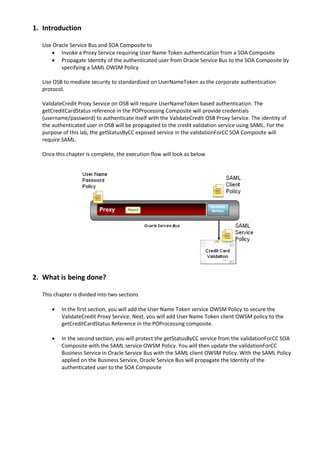
  ValidateCredit Proxy Service on OSB will require UserNameToken based authentication. The
  getCreditCardStatus reference in the POProcessing Composite will provide credentials
  (username/password) to authenticate itself with the ValidateCredit OSB Proxy Service. The identity of
  the authenticated user in OSB will be propagated to the credit validation service using SAML. For the
  purpose of this lab, the getStatusByCC exposed service in the validationForCC SOA Composite will
  require SAML.

  Once this chapter is complete, the execution flow will look as below


2. What is being done?

  This chapter is divided into two sections

         In the first section, you will add the User Name Token service OWSM Policy to secure the
          ValidateCredit Proxy Service. Next, you will add User Name Token client OWSM policy to the
          getCreditCardStatus Reference in the POProcessing composite.

         In the second section, you will protect the getStatusByCC service from the validationForCC SOA
          Composite with the SAML service OWSM Policy. You will then update the validationForCC
          Business Service in Oracle Service Bus with the SAML client OWSM Policy. With the SAML Policy
          applied on the Business Service, Oracle Service Bus will propagate the Identity of the
          authenticated user to the SOA Composite
3. Setup

  Before you process with the lab you must complete the following steps to setup OWSM and create the
  required user.

  Register Keystore using Enterprise Manager. This step is required so OSB test console or SOA reference
  can use the OWSM csf-key to look up the username/password to send the ValidateCredit Proxy Service
  secured with the UserNameToken OWSM policy.

  Setup default keystore - Copy sample keystore file, default-keystore.jks to
  domain home’s fmwconfig directory, /$mwhome/user_projects/domains/soa-osb/config/fmwconfig

  Navigate to EM
  Expand Weblogic Domain as shown below and click on soa_osb_domain Domain


  Expand Weblogic Domain, expand Security and click on Security Provider Configuration as shown below


  In the Security Provider Configuration, find Keystore under Web Services Manager Authentication
  Providers. Expand Keystore and Click Configure
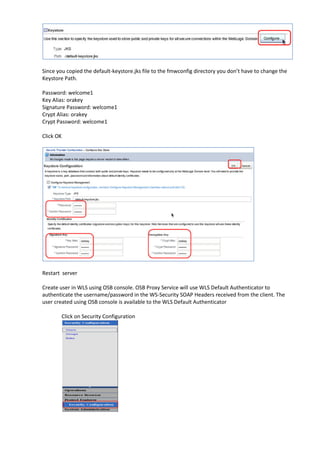
Since you copied the default-keystore.jks file to the fmwconfig directory you don’t have to change the
Keystore Path.

Password: welcome1
Key Alias: orakey
Signature Password: welcome1
Crypt Alias: orakey
Crypt Password: welcome1

Click OK


Restart server

Create user in WLS using OSB console. OSB Proxy Service will use WLS Default Authenticator to
authenticate the username/password in the WS-Security SOAP Headers received from the client. The
user created using OSB console is available to the WLS Default Authenticator

        Click on Security Configuration
Click Add New


        Add User Name: joe Password: welcome1. Click Save


Add csf-key for user joe created in step 2. This step is required so the OSB test console/SOA reference
can lookup the username/password using the csf-key.

        In Enterprise Manager, select soa_osb_domain Weblogic Domain. Expand Security and select
        Credentials as shown below.
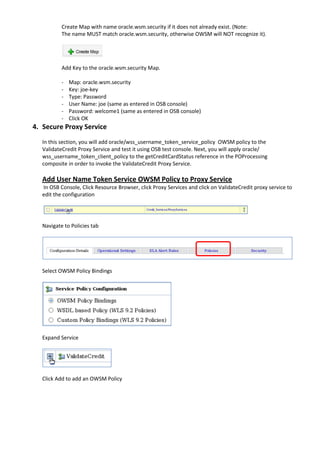
Create Map with name oracle.wsm.security if it does not already exist. (Note:
          The name MUST match oracle.wsm.security, otherwise OWSM will NOT recognize it).


          Add Key to the oracle.wsm.security Map.

          -   Map: oracle.wsm.security
          -   Key: joe-key
          -   Type: Password
          -   User Name: joe (same as entered in OSB console)
          -   Password: welcome1 (same as entered in OSB console)
          -   Click OK
4. Secure Proxy Service
  In this section, you will add oracle/wss_username_token_service_policy OWSM policy to the
  ValidateCredit Proxy Service and test it using OSB test console. Next, you will apply oracle/
  wss_username_token_client_policy to the getCreditCardStatus reference in the POProcessing
  composite in order to invoke the ValidateCredit Proxy Service.

  Add User Name Token Service OWSM Policy to Proxy Service
  In OSB Console, Click Resource Browser, click Proxy Services and click on ValidateCredit proxy service to
  edit the configuration


  Navigate to Policies tab


  Select OWSM Policy Bindings


  Expand Service


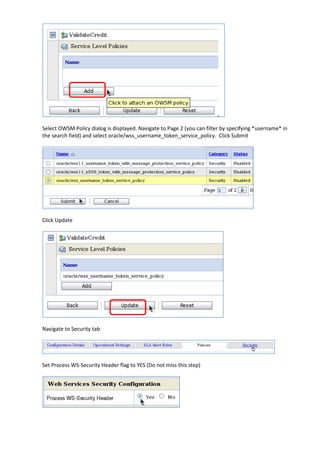
  Click Add to add an OWSM Policy
Select OWSM Policy dialog is displayed. Navigate to Page 2 (you can filter by specifying *username* in
the search field) and select oracle/wss_username_token_service_policy. Click Submit


Click Update


Navigate to Security tab


Set Process WS-Security Header flag to YES (Do not miss this step)
Click Update at the bottom of the page


Click Activate to activate the changes made in this session


Click Submit to confirm session activation


Positive Test
Navigate to Proxy Services (Click Resource Browser, Click Proxy Services)


Click on      for the ValidateCredit Proxy Service to test it
Paste the following into the Payload field in the Test Console

<cca:creditcardStatusRequest
xmlns:cca="http://www.globalcompany.com/ns/CCAuthorizationService">
<cca:CCNumber>1234-1234-1234-1234</cca:CCNumber>
</cca:creditcardStatusRequest>

Since the ValidateCredit Proxy Service has the User Name Token OWSM policy you will see a Security
section in the Test Console with an oracle/wss_username_token_client_policy with a csf-key property.
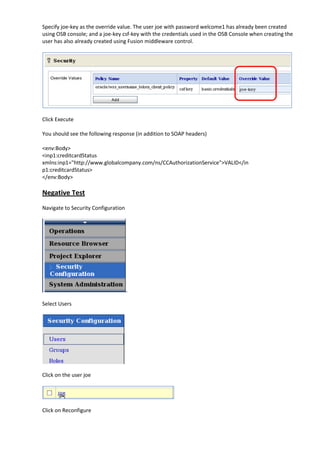
Specify joe-key as the override value. The user joe with password welcome1 has already been created
using OSB console; and a joe-key csf-key with the credentials used in the OSB Console when creating the
user has also already created using Fusion middleware control.


Click Execute

You should see the following response (in addition to SOAP headers)

<env:Body>
<inp1:creditcardStatus
xmlns:inp1="http://www.globalcompany.com/ns/CCAuthorizationService">VALID</in
p1:creditcardStatus>
</env:Body>

Negative Test
Navigate to Security Configuration


Select Users


Click on the user joe


Click on Reconfigure
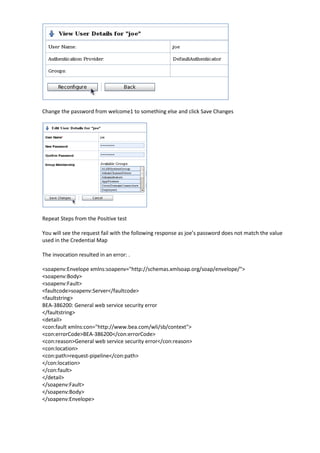
Change the password from welcome1 to something else and click Save Changes


Repeat Steps from the Positive test

You will see the request fail with the following response as joe’s password does not match the value
used in the Credential Map

The invocation resulted in an error: .

<soapenv:Envelope xmlns:soapenv="http://schemas.xmlsoap.org/soap/envelope/">
<soapenv:Body>
<soapenv:Fault>
<faultcode>soapenv:Server</faultcode>
<faultstring>
BEA-386200: General web service security error
</faultstring>
<detail>
<con:fault xmlns:con="http://www.bea.com/wli/sb/context">
<con:errorCode>BEA-386200</con:errorCode>
<con:reason>General web service security error</con:reason>
<con:location>
<con:path>request-pipeline</con:path>
</con:location>
</con:fault>
</detail>
</soapenv:Fault>
</soapenv:Body>
</soapenv:Envelope>
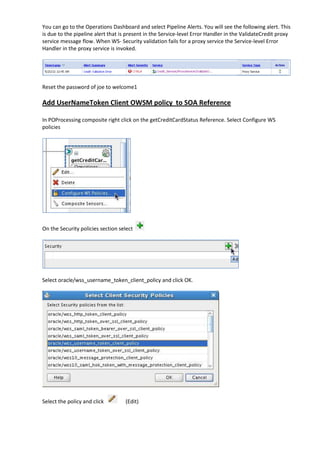
You can go to the Operations Dashboard and select Pipeline Alerts. You will see the following alert. This
is due to the pipeline alert that is present in the Service-level Error Handler in the ValidateCredit proxy
service message flow. When WS- Security validation fails for a proxy service the Service-level Error
Handler in the proxy service is invoked.


Reset the password of joe to welcome1

Add UserNameToken Client OWSM policy to SOA Reference

In POProcessing composite right click on the getCreditCardStatus Reference. Select Configure WS
policies


On the Security policies section select


Select oracle/wss_username_token_client_policy and click OK.


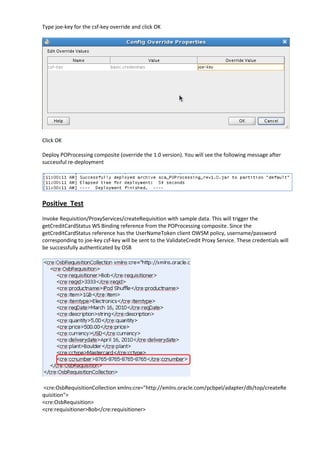
Select the policy and click        (Edit)
Type joe-key for the csf-key override and click OK


Click OK

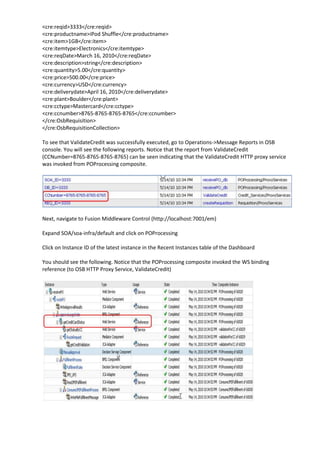
Deploy POProcessing composite (override the 1.0 version). You will see the following message after
successful re-deployment


Positive Test
Invoke Requisition/ProxyServices/createRequisition with sample data. This will trigger the
getCreditCardStatus WS Binding reference from the POProcessing composite. Since the
getCreditCardStatus reference has the UserNameToken client OWSM policy, username/password
corresponding to joe-key csf-key will be sent to the ValidateCredit Proxy Service. These credentials will
be successfully authenticated by OSB


<cre:OsbRequisitionCollection xmlns:cre="http://xmlns.oracle.com/pcbpel/adapter/db/top/createRe
quisition">
<cre:OsbRequisition>
<cre:requisitioner>Bob</cre:requisitioner>
<cre:reqid>3333</cre:reqid>
<cre:productname>iPod Shuffle</cre:productname>
<cre:item>1GB</cre:item>
<cre:itemtype>Electronics</cre:itemtype>
<cre:reqDate>March 16, 2010</cre:reqDate>
<cre:description>string</cre:description>
<cre:quantity>5.00</cre:quantity>
<cre:price>500.00</cre:price>
<cre:currency>USD</cre:currency>
<cre:deliverydate>April 16, 2010</cre:deliverydate>
<cre:plant>Boulder</cre:plant>
<cre:cctype>Mastercard</cre:cctype>
<cre:ccnumber>8765-8765-8765-8765</cre:ccnumber>
</cre:OsbRequisition>
</cre:OsbRequisitionCollection>

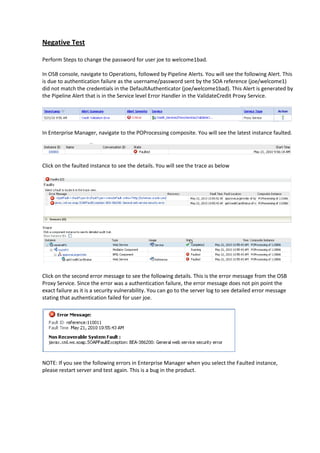
To see that ValidateCredit was successfully executed, go to Operations->Message Reports in OSB
console. You will see the following reports. Notice that the report from ValidateCredit
(CCNumber=8765-8765-8765-8765) can be seen indicating that the ValidateCredit HTTP proxy service
was invoked from POProcessing composite.


Next, navigate to Fusion Middleware Control (http://localhost:7001/em)

Expand SOA/soa-infra/default and click on POProcessing

Click on Instance ID of the latest instance in the Recent Instances table of the Dashboard

You should see the following. Notice that the POProcessing composite invoked the WS binding
reference (to OSB HTTP Proxy Service, ValidateCredit)
Negative Test

Perform Steps to change the password for user joe to welcome1bad.

In OSB console, navigate to Operations, followed by Pipeline Alerts. You will see the following Alert. This
is due to authentication failure as the username/password sent by the SOA reference (joe/welcome1)
did not match the credentials in the DefaultAuthenticator (joe/welcome1bad). This Alert is generated by
the Pipeline Alert that is in the Service level Error Handler in the ValidateCredit Proxy Service.


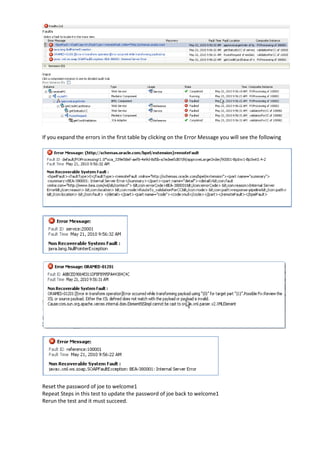
In Enterprise Manager, navigate to the POProcessing composite. You will see the latest instance faulted.


Click on the faulted instance to see the details. You will see the trace as below


Click on the second error message to see the following details. This is the error message from the OSB
Proxy Service. Since the error was a authentication failure, the error message does not pin point the
exact failure as it is a security vulnerability. You can go to the server log to see detailed error message
stating that authentication failed for user joe.


NOTE: If you see the following errors in Enterprise Manager when you select the Faulted instance,
please restart server and test again. This is a bug in the product.
If you expand the errors in the first table by clicking on the Error Message you will see the following


Reset the password of joe to welcome1
Repeat Steps in this test to update the password of joe back to welcome1
Rerun the test and it must succeed.
5. Propagate Identity from OSB to Composite

  In this section, you will propagate the identity of the user authenticated in Oracle Service Bus to the SOA
  Composite. You will perform the following steps.

         Protect the getStatusByCC service from the validationForCC SOA Composite with the
          oracle/wss10_saml_token_service_policy service OWSM Policy
         Update the validationForCC Business Service in Oracle Service Bus with the
         oracle/wss10_saml_token_client_policy client OWSM Policy
         Test

  Add SAML Service OWSM Policy to SOA Composite Service
  Navigate to Fusion middleware control (http://localhost:7001/em)

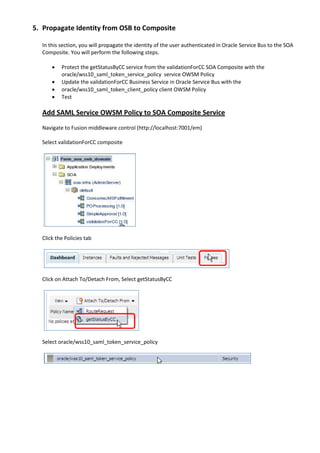
  Select validationForCC composite


  Click the Policies tab


  Click on Attach To/Detach From, Select getStatusByCC


  Select oracle/wss10_saml_token_service_policy
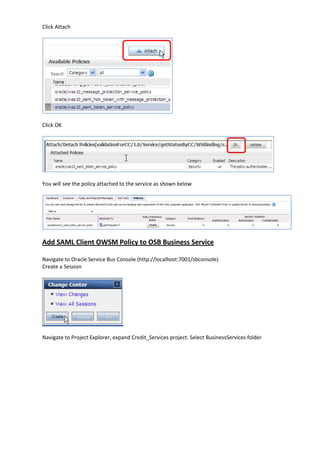
Click Attach


Click OK


You will see the policy attached to the service as shown below


Add SAML Client OWSM Policy to OSB Business Service

Navigate to Oracle Service Bus Console (http://localhost:7001/sbconsole)
Create a Session


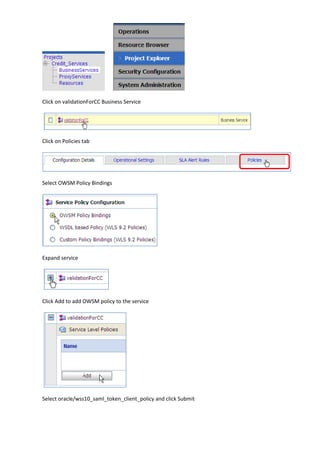
Navigate to Project Explorer, expand Credit_Services project. Select BusinessServices folder
Click on validationForCC Business Service


Click on Policies tab


Select OWSM Policy Bindings


Expand service


Click Add to add OWSM policy to the service


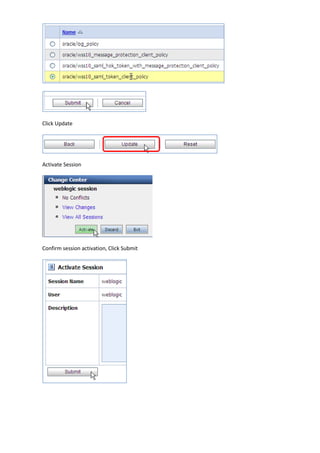
Select oracle/wss10_saml_token_client_policy and click Submit
Click Update


Activate Session


Confirm session activation, Click Submit
Test
Navigate to Proxy Services (Click Resource Browser, Click Proxy Services)

Click on         for the ValidateCredit Proxy Service to test it


Paste the following into the Payload field in the Test Console

<cca:creditcardStatusRequest xmlns:cca="http://www.globalcompany.com/ns/CCAuthorizationService ">
<cca:CCNumber>1234-1234-1234-1234</cca:CCNumber>
</cca:creditcardStatusRequest>

Specify joe-key as the override value for csf-key property of the
oracle/wss_username_token_client_policy.


Click Execute
You should see the following response (in addition to SOAP headers)

<env:Body>
<inp1:creditcardStatus xmlns:inp1="http://www.globalcompany.com/ns/CCAuthorizationServic
e">VALID</inp1:creditcardStatus>
</env:Body>

Navigate to validationForCC composite in Enterprise Manager and click on the latest instance from the
Recent Instances table. You should see the following. This indicates the service was successfully invoked
with SAML identity propagated

Oracle OSB Security Enforcement with OWSM

  • 1.
    Oracle Service Bus– Lesson 5 Name – Rakesh Gujjarlapudi Email Address – rakesh_gujj@yahoo.com Leveraging Web Service Manager to Enforce Security Policy
  • 2.
    1. Introduction Use Oracle Service Bus and SOA Composite to  Invoke a Proxy Service requiring User Name Token authentication from a SOA Composite  Propagate Identity of the authenticated user from Oracle Service Bus to the SOA Composite by specifying a SAML OWSM Policy Use OSB to mediate security to standardized on UserNameToken as the corporate authentication protocol. ValidateCredit Proxy Service on OSB will require UserNameToken based authentication. The getCreditCardStatus reference in the POProcessing Composite will provide credentials (username/password) to authenticate itself with the ValidateCredit OSB Proxy Service. The identity of the authenticated user in OSB will be propagated to the credit validation service using SAML. For the purpose of this lab, the getStatusByCC exposed service in the validationForCC SOA Composite will require SAML. Once this chapter is complete, the execution flow will look as below 2. What is being done? This chapter is divided into two sections  In the first section, you will add the User Name Token service OWSM Policy to secure the ValidateCredit Proxy Service. Next, you will add User Name Token client OWSM policy to the getCreditCardStatus Reference in the POProcessing composite.  In the second section, you will protect the getStatusByCC service from the validationForCC SOA Composite with the SAML service OWSM Policy. You will then update the validationForCC Business Service in Oracle Service Bus with the SAML client OWSM Policy. With the SAML Policy applied on the Business Service, Oracle Service Bus will propagate the Identity of the authenticated user to the SOA Composite
  • 3.
    3. Setup Before you process with the lab you must complete the following steps to setup OWSM and create the required user. Register Keystore using Enterprise Manager. This step is required so OSB test console or SOA reference can use the OWSM csf-key to look up the username/password to send the ValidateCredit Proxy Service secured with the UserNameToken OWSM policy. Setup default keystore - Copy sample keystore file, default-keystore.jks to domain home’s fmwconfig directory, /$mwhome/user_projects/domains/soa-osb/config/fmwconfig Navigate to EM Expand Weblogic Domain as shown below and click on soa_osb_domain Domain Expand Weblogic Domain, expand Security and click on Security Provider Configuration as shown below In the Security Provider Configuration, find Keystore under Web Services Manager Authentication Providers. Expand Keystore and Click Configure
  • 4.
    Since you copiedthe default-keystore.jks file to the fmwconfig directory you don’t have to change the Keystore Path. Password: welcome1 Key Alias: orakey Signature Password: welcome1 Crypt Alias: orakey Crypt Password: welcome1 Click OK Restart server Create user in WLS using OSB console. OSB Proxy Service will use WLS Default Authenticator to authenticate the username/password in the WS-Security SOAP Headers received from the client. The user created using OSB console is available to the WLS Default Authenticator Click on Security Configuration
  • 5.
    Click Add New Add User Name: joe Password: welcome1. Click Save Add csf-key for user joe created in step 2. This step is required so the OSB test console/SOA reference can lookup the username/password using the csf-key. In Enterprise Manager, select soa_osb_domain Weblogic Domain. Expand Security and select Credentials as shown below.
  • 6.
    Create Map withname oracle.wsm.security if it does not already exist. (Note: The name MUST match oracle.wsm.security, otherwise OWSM will NOT recognize it). Add Key to the oracle.wsm.security Map. - Map: oracle.wsm.security - Key: joe-key - Type: Password - User Name: joe (same as entered in OSB console) - Password: welcome1 (same as entered in OSB console) - Click OK 4. Secure Proxy Service In this section, you will add oracle/wss_username_token_service_policy OWSM policy to the ValidateCredit Proxy Service and test it using OSB test console. Next, you will apply oracle/ wss_username_token_client_policy to the getCreditCardStatus reference in the POProcessing composite in order to invoke the ValidateCredit Proxy Service. Add User Name Token Service OWSM Policy to Proxy Service In OSB Console, Click Resource Browser, click Proxy Services and click on ValidateCredit proxy service to edit the configuration Navigate to Policies tab Select OWSM Policy Bindings Expand Service Click Add to add an OWSM Policy
  • 7.
    Select OWSM Policydialog is displayed. Navigate to Page 2 (you can filter by specifying *username* in the search field) and select oracle/wss_username_token_service_policy. Click Submit Click Update Navigate to Security tab Set Process WS-Security Header flag to YES (Do not miss this step)
  • 8.
    Click Update atthe bottom of the page Click Activate to activate the changes made in this session Click Submit to confirm session activation Positive Test Navigate to Proxy Services (Click Resource Browser, Click Proxy Services) Click on for the ValidateCredit Proxy Service to test it Paste the following into the Payload field in the Test Console <cca:creditcardStatusRequest xmlns:cca="http://www.globalcompany.com/ns/CCAuthorizationService"> <cca:CCNumber>1234-1234-1234-1234</cca:CCNumber> </cca:creditcardStatusRequest> Since the ValidateCredit Proxy Service has the User Name Token OWSM policy you will see a Security section in the Test Console with an oracle/wss_username_token_client_policy with a csf-key property.
  • 9.
    Specify joe-key asthe override value. The user joe with password welcome1 has already been created using OSB console; and a joe-key csf-key with the credentials used in the OSB Console when creating the user has also already created using Fusion middleware control. Click Execute You should see the following response (in addition to SOAP headers) <env:Body> <inp1:creditcardStatus xmlns:inp1="http://www.globalcompany.com/ns/CCAuthorizationService">VALID</in p1:creditcardStatus> </env:Body> Negative Test Navigate to Security Configuration Select Users Click on the user joe Click on Reconfigure
  • 10.
    Change the passwordfrom welcome1 to something else and click Save Changes Repeat Steps from the Positive test You will see the request fail with the following response as joe’s password does not match the value used in the Credential Map The invocation resulted in an error: . <soapenv:Envelope xmlns:soapenv="http://schemas.xmlsoap.org/soap/envelope/"> <soapenv:Body> <soapenv:Fault> <faultcode>soapenv:Server</faultcode> <faultstring> BEA-386200: General web service security error </faultstring> <detail> <con:fault xmlns:con="http://www.bea.com/wli/sb/context"> <con:errorCode>BEA-386200</con:errorCode> <con:reason>General web service security error</con:reason> <con:location> <con:path>request-pipeline</con:path> </con:location> </con:fault> </detail> </soapenv:Fault> </soapenv:Body> </soapenv:Envelope>
  • 11.
    You can goto the Operations Dashboard and select Pipeline Alerts. You will see the following alert. This is due to the pipeline alert that is present in the Service-level Error Handler in the ValidateCredit proxy service message flow. When WS- Security validation fails for a proxy service the Service-level Error Handler in the proxy service is invoked. Reset the password of joe to welcome1 Add UserNameToken Client OWSM policy to SOA Reference In POProcessing composite right click on the getCreditCardStatus Reference. Select Configure WS policies On the Security policies section select Select oracle/wss_username_token_client_policy and click OK. Select the policy and click (Edit)
  • 12.
    Type joe-key forthe csf-key override and click OK Click OK Deploy POProcessing composite (override the 1.0 version). You will see the following message after successful re-deployment Positive Test Invoke Requisition/ProxyServices/createRequisition with sample data. This will trigger the getCreditCardStatus WS Binding reference from the POProcessing composite. Since the getCreditCardStatus reference has the UserNameToken client OWSM policy, username/password corresponding to joe-key csf-key will be sent to the ValidateCredit Proxy Service. These credentials will be successfully authenticated by OSB <cre:OsbRequisitionCollection xmlns:cre="http://xmlns.oracle.com/pcbpel/adapter/db/top/createRe quisition"> <cre:OsbRequisition> <cre:requisitioner>Bob</cre:requisitioner>
  • 13.
    <cre:reqid>3333</cre:reqid> <cre:productname>iPod Shuffle</cre:productname> <cre:item>1GB</cre:item> <cre:itemtype>Electronics</cre:itemtype> <cre:reqDate>March 16,2010</cre:reqDate> <cre:description>string</cre:description> <cre:quantity>5.00</cre:quantity> <cre:price>500.00</cre:price> <cre:currency>USD</cre:currency> <cre:deliverydate>April 16, 2010</cre:deliverydate> <cre:plant>Boulder</cre:plant> <cre:cctype>Mastercard</cre:cctype> <cre:ccnumber>8765-8765-8765-8765</cre:ccnumber> </cre:OsbRequisition> </cre:OsbRequisitionCollection> To see that ValidateCredit was successfully executed, go to Operations->Message Reports in OSB console. You will see the following reports. Notice that the report from ValidateCredit (CCNumber=8765-8765-8765-8765) can be seen indicating that the ValidateCredit HTTP proxy service was invoked from POProcessing composite. Next, navigate to Fusion Middleware Control (http://localhost:7001/em) Expand SOA/soa-infra/default and click on POProcessing Click on Instance ID of the latest instance in the Recent Instances table of the Dashboard You should see the following. Notice that the POProcessing composite invoked the WS binding reference (to OSB HTTP Proxy Service, ValidateCredit)
  • 14.
    Negative Test Perform Stepsto change the password for user joe to welcome1bad. In OSB console, navigate to Operations, followed by Pipeline Alerts. You will see the following Alert. This is due to authentication failure as the username/password sent by the SOA reference (joe/welcome1) did not match the credentials in the DefaultAuthenticator (joe/welcome1bad). This Alert is generated by the Pipeline Alert that is in the Service level Error Handler in the ValidateCredit Proxy Service. In Enterprise Manager, navigate to the POProcessing composite. You will see the latest instance faulted. Click on the faulted instance to see the details. You will see the trace as below Click on the second error message to see the following details. This is the error message from the OSB Proxy Service. Since the error was a authentication failure, the error message does not pin point the exact failure as it is a security vulnerability. You can go to the server log to see detailed error message stating that authentication failed for user joe. NOTE: If you see the following errors in Enterprise Manager when you select the Faulted instance, please restart server and test again. This is a bug in the product.
  • 15.
    If you expandthe errors in the first table by clicking on the Error Message you will see the following Reset the password of joe to welcome1 Repeat Steps in this test to update the password of joe back to welcome1 Rerun the test and it must succeed.
  • 16.
    5. Propagate Identityfrom OSB to Composite In this section, you will propagate the identity of the user authenticated in Oracle Service Bus to the SOA Composite. You will perform the following steps.  Protect the getStatusByCC service from the validationForCC SOA Composite with the oracle/wss10_saml_token_service_policy service OWSM Policy  Update the validationForCC Business Service in Oracle Service Bus with the  oracle/wss10_saml_token_client_policy client OWSM Policy  Test Add SAML Service OWSM Policy to SOA Composite Service Navigate to Fusion middleware control (http://localhost:7001/em) Select validationForCC composite Click the Policies tab Click on Attach To/Detach From, Select getStatusByCC Select oracle/wss10_saml_token_service_policy
  • 17.
    Click Attach Click OK Youwill see the policy attached to the service as shown below Add SAML Client OWSM Policy to OSB Business Service Navigate to Oracle Service Bus Console (http://localhost:7001/sbconsole) Create a Session Navigate to Project Explorer, expand Credit_Services project. Select BusinessServices folder
  • 18.
    Click on validationForCCBusiness Service Click on Policies tab Select OWSM Policy Bindings Expand service Click Add to add OWSM policy to the service Select oracle/wss10_saml_token_client_policy and click Submit
  • 19.
    Click Update Activate Session Confirmsession activation, Click Submit
  • 20.
    Test Navigate to ProxyServices (Click Resource Browser, Click Proxy Services) Click on for the ValidateCredit Proxy Service to test it Paste the following into the Payload field in the Test Console <cca:creditcardStatusRequest xmlns:cca="http://www.globalcompany.com/ns/CCAuthorizationService "> <cca:CCNumber>1234-1234-1234-1234</cca:CCNumber> </cca:creditcardStatusRequest> Specify joe-key as the override value for csf-key property of the oracle/wss_username_token_client_policy. Click Execute You should see the following response (in addition to SOAP headers) <env:Body> <inp1:creditcardStatus xmlns:inp1="http://www.globalcompany.com/ns/CCAuthorizationServic e">VALID</inp1:creditcardStatus> </env:Body> Navigate to validationForCC composite in Enterprise Manager and click on the latest instance from the Recent Instances table. You should see the following. This indicates the service was successfully invoked with SAML identity propagated