Web Service Connection
with ETL Validator
Using WS Security
SOAP Services:
• SOAP Services are commonly used as a mechanism to
integrate applications internally as well as between
applications on the Cloud
• The most common mechanism for securing SOAP Services is
WS Security. Cloud applications such as Workday and Oracle
CRMOD use WS Security.
• ETL Validator supports SOAP Services as a Data Source with
WS Security
Pre-Requisites:
• Have the WSDL file handy on your local machine
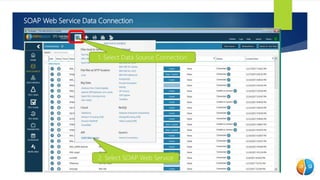
SOAP Web Service Data Connection
1. Select Data Source Connection
2. Select SOAP Web Service
SOAP Web Service Data
Connection Contd…
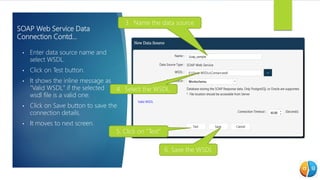
• Enter data source name and
select WSDL.
• Click on Test button.
• It shows the inline message as
"Valid WSDL" if the selected
wsdl file is a valid one.
• Click on Save button to save the
connection details.
• It moves to next screen.
3. Name the data source
4. Select the WSDL.
6. Save the WSDL
5. Click on “Test”
SOAP Web Service Data Connection Contd…
•
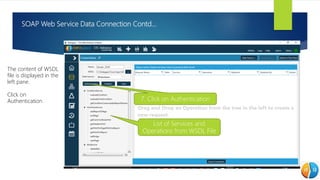
• The content of WSDL
file is displayed in the
left pane.
• Click on
Authentication 7. Click on Authentication
List of Services and
Operations from WSDL File
Create Authentication
(WS Security)
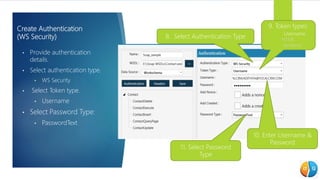
• Provide authentication
details.
• Select authentication type.
• WS Security
• Select Token type.
• Username
• Select Password Type:
• PasswordText
8. Select Authentication Type
9. Token types:
Username
NTML
Kerberos
10. Enter Username &
Password
11. Select Password
Type
Create Authentication (WS Security) Contd…
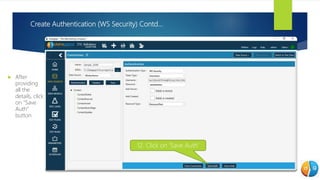
 After
providing
all the
details, click
on "Save
Auth"
button.
12. Click on ‘Save Auth’
Create Authentication (WS Security) Contd…
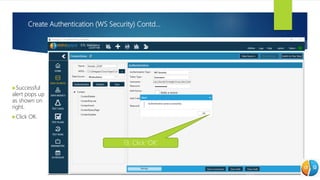
Successful
alert pops up
as shown on
right.
Click OK.
13. Click ‘OK’
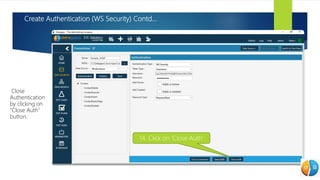
Create Authentication (WS Security) Contd…
• Close
Authentication
by clicking on
"Close Auth"
button.
14. Click on ‘Close Auth’
Connection Established, what’s next?
• Create a SOAP Request
• To map the SOAP Response to flattened table structure.
• Create Web Service Test Plan
• To extract data from the SOAP Requests.
• Create Query Compare Test Case
• To compare the data extracted by Web Service Test Plan with another database.
• Create Component Test Case
• To compare the data extracted by Web Service Test Plan with another source/target such
as flat files, tables etc.

Web Service Connection - using WS Security

  • 1.
    Web Service Connection withETL Validator Using WS Security
  • 2.
    SOAP Services: • SOAPServices are commonly used as a mechanism to integrate applications internally as well as between applications on the Cloud • The most common mechanism for securing SOAP Services is WS Security. Cloud applications such as Workday and Oracle CRMOD use WS Security. • ETL Validator supports SOAP Services as a Data Source with WS Security
  • 3.
    Pre-Requisites: • Have theWSDL file handy on your local machine
  • 4.
    SOAP Web ServiceData Connection 1. Select Data Source Connection 2. Select SOAP Web Service
  • 5.
    SOAP Web ServiceData Connection Contd… • Enter data source name and select WSDL. • Click on Test button. • It shows the inline message as "Valid WSDL" if the selected wsdl file is a valid one. • Click on Save button to save the connection details. • It moves to next screen. 3. Name the data source 4. Select the WSDL. 6. Save the WSDL 5. Click on “Test”
  • 6.
    SOAP Web ServiceData Connection Contd… • • The content of WSDL file is displayed in the left pane. • Click on Authentication 7. Click on Authentication List of Services and Operations from WSDL File
  • 7.
    Create Authentication (WS Security) •Provide authentication details. • Select authentication type. • WS Security • Select Token type. • Username • Select Password Type: • PasswordText 8. Select Authentication Type 9. Token types: Username NTML Kerberos 10. Enter Username & Password 11. Select Password Type
  • 8.
    Create Authentication (WSSecurity) Contd…  After providing all the details, click on "Save Auth" button. 12. Click on ‘Save Auth’
  • 9.
    Create Authentication (WSSecurity) Contd… Successful alert pops up as shown on right. Click OK. 13. Click ‘OK’
  • 10.
    Create Authentication (WSSecurity) Contd… • Close Authentication by clicking on "Close Auth" button. 14. Click on ‘Close Auth’
  • 11.
    Connection Established, what’snext? • Create a SOAP Request • To map the SOAP Response to flattened table structure. • Create Web Service Test Plan • To extract data from the SOAP Requests. • Create Query Compare Test Case • To compare the data extracted by Web Service Test Plan with another database. • Create Component Test Case • To compare the data extracted by Web Service Test Plan with another source/target such as flat files, tables etc.