Implementing Identity Management without losing your Identity Mahesh Vallampati
About the Speaker Mahesh Vallampati Career Senior Practice Manager at SmartDog Services Senior Sales Consulting Manager at Hotsos (2 years) Director of DBA Services at Eagle Global Logistics (2 years) Practice Manager at Oracle in Consulting(9 years) Papers Several papers presented at User Groups Published in Oracle Magazine Education Master’s in Electrical Engineering, Texas A&M University
Upfront What you will learn How to manage a successful Identity Management Project? What are the dependencies? Key Issues you need to watch out for What you won’t learn Identity Management Concepts Identity Management Commands If at all you must fail, fail early
Agenda Getting Ready for IM with E-Biz Patching and Version Dependencies Identity Management Server Installation Integration with other Directories Deployment Considerations Operational Considerations Cloning Consideration
Getting Ready for IM with E-Biz
Project Planning Overestimate effort instead of getting it right You are going to exceed budget Plan for cloning issues Get a good PM Involve everybody Is not just a technology project Have a robust cutover plan Have a tested rollback plan
10 IM Project Considerations  This is from Oracle itself Set Realistic Targets  Choose the Right Technology  Focus on Business Value  Support Your Customer – The Application Owner  Understand The Scale of Investment  Address Data Quality Up Front  Monitor and Protect the Health of Your I&AM Solution  Create Skills Based Work Teams  Consolidate Ownership of I&AM  Provide Strong Project Management and Architecture  Resources
Project Considerations Set Realistic Targets What are you trying to achieve? Understand the scale of investment License Costs Hardware Costs Training Costs Operational Costs What is the payoff? Is it really worth the benefit of having to remember using only one password?
Skill Issues Identity Management is another name for Directory Services Typically managed by the network/security team Historically products in this space have had strong GUI management and administration capabilities Oracle GUI management and administration capabilities are slightly harder to learn Lot more UNIX scripts and commands Lot of cryptic commands
Skill Issues A few questions you need to ask Is my DBA team the best team to operate this environment? Is it the right priority of work? More important than backup/recovery and performance An alternative Approach Teaming the network/security team and DBA team in this effort Send them to training together so they can educate each other on the capabilities of the solution Oracle OID may be integrated with Active Directory or other Directory service The Oracle OID Team (typically the DBA team) and the Directory services team need to be on the same page
Enter High Availability Identity Management can become the single point of failure for application availability Imagine explaining to a business user that the Application is available but they can’t login because identity management server crashed Standby and RAC brings an additional layer of complexity Remember the database components of Identity Management use 10.1.0.5.0
Other security considerations Some companies may have a higher requirement of security considerations e.g. Financial Services Companies The requirement may be to Secure Socket Layer enable both the Identity Management Application Server and the E-Business Suite This consideration could add additional layer of complexity to the project
Patching and Version Dependences
Latest Supported Configuration ATG Rollup 6 Oracle Application Server 10.1.4.0.1 11.5.10.2
Patching and version dependencies ATG Rollup Patch 6 May involve upgrading other family packs Can become a pre-requisite for other critical patches Treat ATG RUP6 as a sub-project in itself Ideally, do it as a separate project before you embark on the Single Sign On Project Identify patch tree and get all the patches you need in ATG RUP6 adds a lot of feature functionality for the DBA
Can I get away without ATG RUP6? You probably could. Oracle Support policy  Indicates if you have an issue in a prior supported configuration  And no prior solution exists You have to upgrade You will probably need ATG RUP6 anyway Might as well get it over with
Desktop ADI Single Sign On Architecture does not support Desktop ADI Desktop ADI is a favorite tool of the GL Department What do we do? Reports Manager is the new solution replacing Desktop ADI Reports Manager needs to be installed and tested and configured Very similar to Web ADI but has got more features An important feature of Desktop ADI on drill down excel reports was released later as a patch
A workaround – Desktop ADI There are ways to configure OID and Oracle Applications to support Desktop ADI Not clean Could cause audit issues Difficult to Support May need to create generic id’s Duplicate Id’s for users One for SSO One for Desktop ADI
Recommended Patching Sequence ATG Rollup Patch 6 Install corresponding supporting family packs for other modules Install Single Sign On Patch Install Reports Manager Get users trained on Reports Manager Retire Desktop ADI Install DBMS_LDAP on the E-Business Database Configure Oracle Applications to use SSL (Optional)
Identity Management Server Installation
Identity Mgmt. Server Installation Read the manual thoroughly before starting There are some “gotchas” on some of the components Some components can only be installed and configured by the installer  Install the software a few times to get comfortable with the installation Understand the various components of the installation Components Configuration files Log Files Debug Files Trace Files
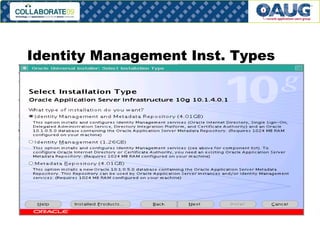
Identity Management Inst. Types
Identity Mgmt. Server Installation During installation, it is possible to select an option to connect to OID using only SSL Choose this option as it is a more secure option Remember, the HTTP Server is still non-SSL You need to do a separate configuration for that Can be a little bit more involved You will also need Oracle Wallet Manager
Oracle Certificate Authority A component of identity management that is needed for secure exchange of information between identity entities Ensure that you install it during installation Installing it later in the same AS Home is not possible A separate home has to be created and linked to the Identity Management Server Creates additional layer of complexity during troubleshooting
LDAP Commands Get comfortable with the ldap commands You will be using a lot of them with different options ldap commands are not friendly Keep a log of all ldap commands you use It will help later
Identity Mgmt. Diagnostics Oracle has several diagnostics script for troubleshooting identity management issues Download the scripts, install and play with them Understand how to generate various log files and diagnostic files and where these are all located Keep a log of these too They will come in handy when troubleshooting
Integration with Other Directories
Integration with Other Directories Typically, OID will have to integrate with say Microsoft Active Directory iPlanet Novell Directory Services Understand the Directory Hierarchy (namespace) on these systems A typical namespace is as follows. dc=identity, dc=oracle,dc=com The hierarchy is then identity.oracle.com Integration between OID and other directories can be easier if namespaces map OID installation allows a custom namespace to be specified during installation
Integration with other Directories Every Directory has a hierarchy for traversing the Directory Tree Work with the directory team on understanding how the directory is set up A lot of times the existing directory of reference may have to be cleaned up Users may be mixed up with resources like printers Another sub-project The existing directory may have custom fields for resource classification which may impact security settings for E-Business users Example, a contractor flag and lockout policy may have to be enforced
Integration with Other Directories Directory Services are mission critical services Directory Test System may have their own private domains to isolate them for the overall network This may impact your ability to connect and test the systems In some cases, we have seen that there are no test directory servers They just have a standby server
Integration with Other Directories If you had chosen SSL to connect to OID, the integration between OID and the Directory will have to have a secure handshake Digital Certificates will have to be exchanged between OID and the Directory Typically, Verisign will be the digital certificate of choice These certificates will have to be procured and registered
Directory Plug In For a long time, the Plug-In for Directory Integration was the PL/SQL plug-in We encountered some stability issues in the PL/SQL plug-in We then used the Java Plug-In and it was stable This implies that you have to understand how these plug-ins work and integrate The plug-in passes passwords to other directory services and provides authentication services
Deployment Considerations
First Time Integration First Time Login When enabling Single-Sign on for the first time, users will be asked to login with the old E-Business passwords and the Single Sign on password This is to link the id’s from FND_USER to the new directory userid This will cause some confusion for the users The URL to login will change Bookmarks need to be updated A lot of support calls during go live
Operational Considerations
Backup and Recovery Weekly “Cold” Backup Identity Management caches information for performance The best method to backup the Identity Management Infrastructure is as follows Shutdown all Identity Management Services cleanly Shutdown the server Bring the server backup Do a cold backup Do a shutdown again Startup the Server Bring back services up
Single Sign On is down When Single Sign On goes down, it is typically a Sev.1 issue First things is see if you can quickly identify from the log files what the issue is Have a script to backup the log files and all needed troubleshooting log files Shutdown the Services Shutdown the Server Bring back the Server Usually, during startup you will see a lot of information around issues Use these to trouble shoot the issues Open a Sev.1 SR with Oracle
Cloning Considerations
Cloning Considerations Enabling Single Sign On has additional implications while cloning Additional configuration changes around profile options Some outside the scope of auto-config When you have a lot of Development and test instances It is possible to have multiple dev and test instances share one OID/Single Sign On Instance
Cloning Considerations A standard trick used by DBA’s and Sys-admins is to require password resets after clones This help users to have a different password for non-PROD instances so they don’t get confused and do the right thing in the wrong instance or vice-versa Single Sign On complicates this because there is only one password for Single Sign On from a Production Directory Server Some companies have elected to disable Single Sign On and enabling Local Sign On as a part of the cloning process
Walk Through of a Single Sign On Implementation Document / Project Plan
Walkthrough
Summary
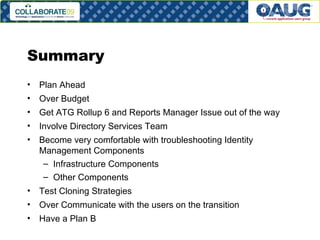
Summary Plan Ahead Over Budget Get ATG Rollup 6 and Reports Manager Issue out of the way Involve Directory Services Team Become very comfortable with troubleshooting Identity Management Components Infrastructure Components Other Components Test Cloning Strategies Over Communicate with the users on the transition Have a Plan B

Oracle 11i OID AD Integration

  • 1.
    Implementing Identity Managementwithout losing your Identity Mahesh Vallampati
  • 2.
    About the SpeakerMahesh Vallampati Career Senior Practice Manager at SmartDog Services Senior Sales Consulting Manager at Hotsos (2 years) Director of DBA Services at Eagle Global Logistics (2 years) Practice Manager at Oracle in Consulting(9 years) Papers Several papers presented at User Groups Published in Oracle Magazine Education Master’s in Electrical Engineering, Texas A&M University
  • 3.
    Upfront What youwill learn How to manage a successful Identity Management Project? What are the dependencies? Key Issues you need to watch out for What you won’t learn Identity Management Concepts Identity Management Commands If at all you must fail, fail early
  • 4.
    Agenda Getting Readyfor IM with E-Biz Patching and Version Dependencies Identity Management Server Installation Integration with other Directories Deployment Considerations Operational Considerations Cloning Consideration
  • 5.
    Getting Ready forIM with E-Biz
  • 6.
    Project Planning Overestimateeffort instead of getting it right You are going to exceed budget Plan for cloning issues Get a good PM Involve everybody Is not just a technology project Have a robust cutover plan Have a tested rollback plan
  • 7.
    10 IM ProjectConsiderations This is from Oracle itself Set Realistic Targets Choose the Right Technology Focus on Business Value Support Your Customer – The Application Owner Understand The Scale of Investment Address Data Quality Up Front Monitor and Protect the Health of Your I&AM Solution Create Skills Based Work Teams Consolidate Ownership of I&AM Provide Strong Project Management and Architecture Resources
  • 8.
    Project Considerations SetRealistic Targets What are you trying to achieve? Understand the scale of investment License Costs Hardware Costs Training Costs Operational Costs What is the payoff? Is it really worth the benefit of having to remember using only one password?
  • 9.
    Skill Issues IdentityManagement is another name for Directory Services Typically managed by the network/security team Historically products in this space have had strong GUI management and administration capabilities Oracle GUI management and administration capabilities are slightly harder to learn Lot more UNIX scripts and commands Lot of cryptic commands
  • 10.
    Skill Issues Afew questions you need to ask Is my DBA team the best team to operate this environment? Is it the right priority of work? More important than backup/recovery and performance An alternative Approach Teaming the network/security team and DBA team in this effort Send them to training together so they can educate each other on the capabilities of the solution Oracle OID may be integrated with Active Directory or other Directory service The Oracle OID Team (typically the DBA team) and the Directory services team need to be on the same page
  • 11.
    Enter High AvailabilityIdentity Management can become the single point of failure for application availability Imagine explaining to a business user that the Application is available but they can’t login because identity management server crashed Standby and RAC brings an additional layer of complexity Remember the database components of Identity Management use 10.1.0.5.0
  • 12.
    Other security considerationsSome companies may have a higher requirement of security considerations e.g. Financial Services Companies The requirement may be to Secure Socket Layer enable both the Identity Management Application Server and the E-Business Suite This consideration could add additional layer of complexity to the project
  • 13.
  • 14.
    Latest Supported ConfigurationATG Rollup 6 Oracle Application Server 10.1.4.0.1 11.5.10.2
  • 15.
    Patching and versiondependencies ATG Rollup Patch 6 May involve upgrading other family packs Can become a pre-requisite for other critical patches Treat ATG RUP6 as a sub-project in itself Ideally, do it as a separate project before you embark on the Single Sign On Project Identify patch tree and get all the patches you need in ATG RUP6 adds a lot of feature functionality for the DBA
  • 16.
    Can I getaway without ATG RUP6? You probably could. Oracle Support policy Indicates if you have an issue in a prior supported configuration And no prior solution exists You have to upgrade You will probably need ATG RUP6 anyway Might as well get it over with
  • 17.
    Desktop ADI SingleSign On Architecture does not support Desktop ADI Desktop ADI is a favorite tool of the GL Department What do we do? Reports Manager is the new solution replacing Desktop ADI Reports Manager needs to be installed and tested and configured Very similar to Web ADI but has got more features An important feature of Desktop ADI on drill down excel reports was released later as a patch
  • 18.
    A workaround –Desktop ADI There are ways to configure OID and Oracle Applications to support Desktop ADI Not clean Could cause audit issues Difficult to Support May need to create generic id’s Duplicate Id’s for users One for SSO One for Desktop ADI
  • 19.
    Recommended Patching SequenceATG Rollup Patch 6 Install corresponding supporting family packs for other modules Install Single Sign On Patch Install Reports Manager Get users trained on Reports Manager Retire Desktop ADI Install DBMS_LDAP on the E-Business Database Configure Oracle Applications to use SSL (Optional)
  • 20.
  • 21.
    Identity Mgmt. ServerInstallation Read the manual thoroughly before starting There are some “gotchas” on some of the components Some components can only be installed and configured by the installer Install the software a few times to get comfortable with the installation Understand the various components of the installation Components Configuration files Log Files Debug Files Trace Files
  • 22.
  • 23.
    Identity Mgmt. ServerInstallation During installation, it is possible to select an option to connect to OID using only SSL Choose this option as it is a more secure option Remember, the HTTP Server is still non-SSL You need to do a separate configuration for that Can be a little bit more involved You will also need Oracle Wallet Manager
  • 24.
    Oracle Certificate AuthorityA component of identity management that is needed for secure exchange of information between identity entities Ensure that you install it during installation Installing it later in the same AS Home is not possible A separate home has to be created and linked to the Identity Management Server Creates additional layer of complexity during troubleshooting
  • 25.
    LDAP Commands Getcomfortable with the ldap commands You will be using a lot of them with different options ldap commands are not friendly Keep a log of all ldap commands you use It will help later
  • 26.
    Identity Mgmt. DiagnosticsOracle has several diagnostics script for troubleshooting identity management issues Download the scripts, install and play with them Understand how to generate various log files and diagnostic files and where these are all located Keep a log of these too They will come in handy when troubleshooting
  • 27.
  • 28.
    Integration with OtherDirectories Typically, OID will have to integrate with say Microsoft Active Directory iPlanet Novell Directory Services Understand the Directory Hierarchy (namespace) on these systems A typical namespace is as follows. dc=identity, dc=oracle,dc=com The hierarchy is then identity.oracle.com Integration between OID and other directories can be easier if namespaces map OID installation allows a custom namespace to be specified during installation
  • 29.
    Integration with otherDirectories Every Directory has a hierarchy for traversing the Directory Tree Work with the directory team on understanding how the directory is set up A lot of times the existing directory of reference may have to be cleaned up Users may be mixed up with resources like printers Another sub-project The existing directory may have custom fields for resource classification which may impact security settings for E-Business users Example, a contractor flag and lockout policy may have to be enforced
  • 30.
    Integration with OtherDirectories Directory Services are mission critical services Directory Test System may have their own private domains to isolate them for the overall network This may impact your ability to connect and test the systems In some cases, we have seen that there are no test directory servers They just have a standby server
  • 31.
    Integration with OtherDirectories If you had chosen SSL to connect to OID, the integration between OID and the Directory will have to have a secure handshake Digital Certificates will have to be exchanged between OID and the Directory Typically, Verisign will be the digital certificate of choice These certificates will have to be procured and registered
  • 32.
    Directory Plug InFor a long time, the Plug-In for Directory Integration was the PL/SQL plug-in We encountered some stability issues in the PL/SQL plug-in We then used the Java Plug-In and it was stable This implies that you have to understand how these plug-ins work and integrate The plug-in passes passwords to other directory services and provides authentication services
  • 33.
  • 34.
    First Time IntegrationFirst Time Login When enabling Single-Sign on for the first time, users will be asked to login with the old E-Business passwords and the Single Sign on password This is to link the id’s from FND_USER to the new directory userid This will cause some confusion for the users The URL to login will change Bookmarks need to be updated A lot of support calls during go live
  • 35.
  • 36.
    Backup and RecoveryWeekly “Cold” Backup Identity Management caches information for performance The best method to backup the Identity Management Infrastructure is as follows Shutdown all Identity Management Services cleanly Shutdown the server Bring the server backup Do a cold backup Do a shutdown again Startup the Server Bring back services up
  • 37.
    Single Sign Onis down When Single Sign On goes down, it is typically a Sev.1 issue First things is see if you can quickly identify from the log files what the issue is Have a script to backup the log files and all needed troubleshooting log files Shutdown the Services Shutdown the Server Bring back the Server Usually, during startup you will see a lot of information around issues Use these to trouble shoot the issues Open a Sev.1 SR with Oracle
  • 38.
  • 39.
    Cloning Considerations EnablingSingle Sign On has additional implications while cloning Additional configuration changes around profile options Some outside the scope of auto-config When you have a lot of Development and test instances It is possible to have multiple dev and test instances share one OID/Single Sign On Instance
  • 40.
    Cloning Considerations Astandard trick used by DBA’s and Sys-admins is to require password resets after clones This help users to have a different password for non-PROD instances so they don’t get confused and do the right thing in the wrong instance or vice-versa Single Sign On complicates this because there is only one password for Single Sign On from a Production Directory Server Some companies have elected to disable Single Sign On and enabling Local Sign On as a part of the cloning process
  • 41.
    Walk Through ofa Single Sign On Implementation Document / Project Plan
  • 42.
  • 43.
  • 44.
    Summary Plan AheadOver Budget Get ATG Rollup 6 and Reports Manager Issue out of the way Involve Directory Services Team Become very comfortable with troubleshooting Identity Management Components Infrastructure Components Other Components Test Cloning Strategies Over Communicate with the users on the transition Have a Plan B