Optimized RenderingTechniques for
MobileVR
Roberto Lopez Mendez
DevGAMM 2016 – Moscow
Senior Software Engineer, ARM
13/05/2016
©ARM20162
Agenda
 Ice Cave Demo
 ImprovingVR quality & performance
 The concept of local cubemap
 Dynamic soft shadows and reflections based on local cubemaps
 Stereo reflections inVR
©ARM20163
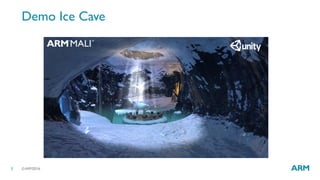
Demo Ice Cave
©ARM 20164
Quality and Performance forVR
Optimized Rendering Techniques
Based On Local Cubemaps
©ARM20165
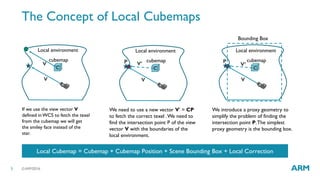
The Concept of Local Cubemaps
V
cubemap
C
Local environment
If we use the view vector V
defined inWCS to fetch the texel
from the cubemap we will get
the smiley face instead of the
star.
V
cubemap
C
Local environment
We need to use a new vector V’ = CP
to fetch the correct texel .We need to
find the intersection point P of the view
vector V with the boundaries of the
local environment.
V
cubemap
C
Local environment
We introduce a proxy geometry to
simplify the problem of finding the
intersection point P.The simplest
proxy geometry is the bounding box.
Local Cubemap = Cubemap + Cubemap Position + Scene Bounding Box + Local Correction
V V’P
Bounding Box
V’
P
©ARM 20166
Dynamic Soft Shadows Based on
Local Cubemaps
©ARM20167
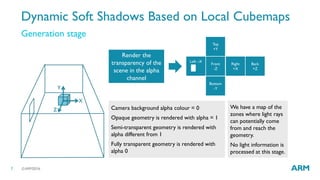
Dynamic Soft Shadows Based on Local Cubemaps
Generation stage
X
Y
Z
Front
-Z
Left –X
Back
+Z
Right
+X
Top
+Y
Bottom
-Y
Camera background alpha colour = 0
Opaque geometry is rendered with alpha = 1
Semi-transparent geometry is rendered with
alpha different from 1
Fully transparent geometry is rendered with
alpha 0
Render the
transparency of the
scene in the alpha
channel
We have a map of the
zones where light rays
can potentially come
from and reach the
geometry.
No light information is
processed at this stage.
©ARM20168
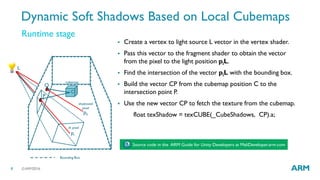
Runtime stage
 Create a vertex to light source L vector in the vertex shader.
 Pass this vector to the fragment shader to obtain the vector
from the pixel to the light position piL.
 Find the intersection of the vector piL with the bounding box.
 Build the vector CP from the cubemap position C to the
intersection point P.
 Use the new vector CP to fetch the texture from the cubemap.
float texShadow = texCUBE(_CubeShadows, CP).a;
L
pi
C
P
pk
Q
Bounding Box
lit pixel
shadowed
pixel
cubemap
Source code in the ARM Guide for Unity Developers at MaliDeveloper.arm.com
Dynamic Soft Shadows Based on Local Cubemaps
©ARM20169
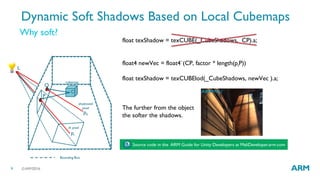
float texShadow = texCUBE(_CubeShadows, CP).a;
float4 newVec = float4`(CP, factor * length(piP))
float texShadow = texCUBElod(_CubeShadows, newVec ).a;
Why soft?
Dynamic Soft Shadows Based on Local Cubemaps
L
pi
C
P
pk
Q
Bounding Box
lit pixel
shadowed
pixel
cubemap
Source code in the ARM Guide for Unity Developers at MaliDeveloper.arm.com
The further from the object
the softer the shadows.
©ARM201610
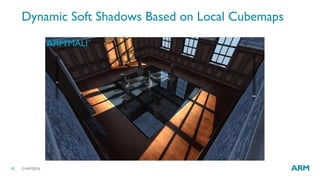
Dynamic Soft Shadows Based on Local Cubemaps
©ARM201611
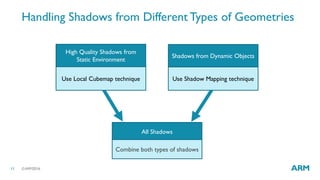
Handling Shadows from Different Types of Geometries
High Quality Shadows from
Static Environment
Use Local Cubemap technique Use Shadow Mapping technique
All Shadows
Combine both types of shadows
Shadows from Dynamic Objects
©ARM201612
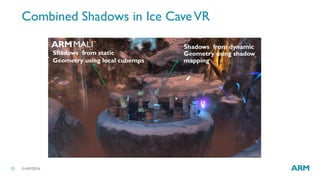
Combined Shadows in Ice CaveVR
Shadows from dynamic
Geometry using shadow
mapping
Shadows from static
Geometry using local cubemps
©ARM 201613
Reflections Based on
Local Cubemaps
©ARM201614
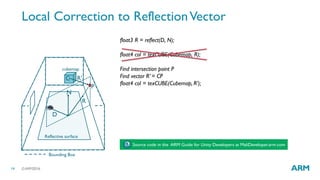
Local Correction to ReflectionVector
float3 R = reflect(D, N);
float4 col = texCUBE(Cubemap, R);
Find intersection point P
Find vector R’ = CP
float4 col = texCUBE(Cubemap, R’);
Source code in the ARM Guide for Unity Developers at MaliDeveloper.arm.com
D
N
R
R’
P
C
Reflective surface
cubemap
Bounding Box
©ARM201615
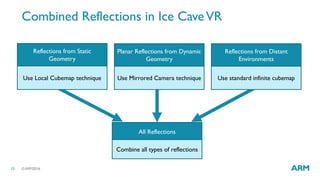
Combined Reflections in Ice CaveVR
Reflections from Static
Geometry
Use Local Cubemap technique Use Mirrored Camera technique
All Reflections
Combine all types of reflections
Planar Reflections from Dynamic
Geometry
Use standard infinite cubemap
Reflections from Distant
Environments
©ARM201616
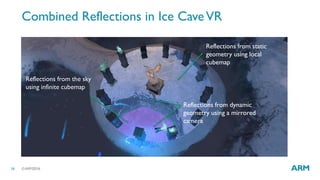
Combined Reflections in Ice CaveVR
Reflections from static
geometry using local
cubemap
Reflections from the sky
using infinite cubemap
Reflections from dynamic
geometry using a mirrored
camera
©ARM 201617
Stereo Reflections in Unity
©ARM201618
Why Stereo Reflections?
 Using the same texture for right/left eyes reflections inVR looks plain and
breaks the sensation of full immersion.
©ARM201619
Implementing Stereo Reflections in Unity
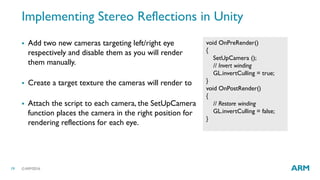
 Add two new cameras targeting left/right eye
respectively and disable them as you will render
them manually.
 Create a target texture the cameras will render to
 Attach the script to each camera, the SetUpCamera
function places the camera in the right position for
rendering reflections for each eye.
void OnPreRender()
{
SetUpCamera ();
// Invert winding
GL.invertCulling = true;
}
void OnPostRender()
{
// Restore winding
GL.invertCulling = false;
}
©ARM201620
Implementing Stereo Reflections in Unity
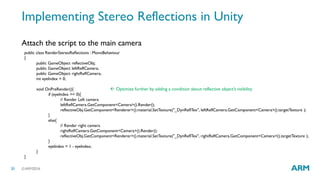
Attach the script to the main camera
public class RenderStereoReflections : MonoBehaviour
{
public GameObject reflectiveObj;
public GameObject leftReflCamera;
public GameObject rightReflCamera;
int eyeIndex = 0;
void OnPreRender(){
if (eyeIndex == 0){
// Render Left camera
leftReflCamera.GetComponent<Camera>().Render();
reflectiveObj.GetComponent<Renderer>().material.SetTexture("_DynReflTex", leftReflCamera.GetComponent<Camera>().targetTexture );
}
else{
// Render right camera
rightReflCamera.GetComponent<Camera>().Render();
reflectiveObj.GetComponent<Renderer>().material.SetTexture("_DynReflTex", rightReflCamera.GetComponent<Camera>().targetTexture );
}
eyeIndex = 1 - eyeIndex;
}
}
 Optimize further by adding a condition about reflective object’s visibility
©ARM201621
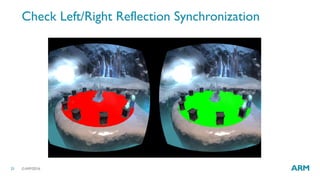
Check Left/Right Reflection Synchronization
©ARM201622
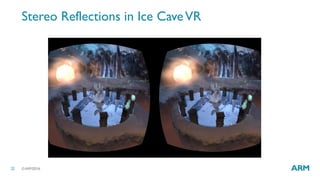
Stereo Reflections in Ice CaveVR
©ARM201623
Wrap Up
 The use of techniques based on local
cubemap allows rendering high
quality and efficient shadows and
reflections from static geometry.
These methods can be combined
with other runtime rendering
techniques to render reflections
from dynamic objects.
 Stereo reflections inVR improve
user experience
 Check out The ARM Guide for Unity
Developers for very efficient
rendering techniques to make the
most out of Unity when developing
mobileVR games
https://community.arm.com/groups/arm-mali-
graphics/blog/2016/03/10/combined-reflections-
stereo-reflections-in-vr
ARM Guide for Unity Developers at MaliDeveloper.arm.com
The trademarks featured in this presentation are registered and/or unregistered trademarks of ARM Limited (or its
subsidiaries) in the EU and/or elsewhere. All rights reserved. All other marks featured may be trademarks of their
respective owners.
Copyright © 2016 ARM Limited
Thank you!
©ARM201625
 Find out more about techniques based on local cubemaps at:
• https://community.arm.com/groups/arm-mali-graphics/blog/2016/03/10/combined-reflections-stereo-
reflections-in-vr
• http://malideveloper.arm.com/documentation/developer-guides/arm-guide-unity-enhancing-mobile-games/
• http://community.arm.com/groups/arm-mali-graphics/blog/2015/04/13/dynamic-soft-shadows-based-on-local-
cubemap
• http://community.arm.com/groups/arm-mali-graphics/blog/2014/08/07/reflections-based-on-local-cubemaps
• http://community.arm.com/groups/arm-mali-graphics/blog/2015/04/13/refraction-based-on-local-cubemaps
• http://community.arm.com/groups/arm-mali-graphics/blog/2015/05/21/the-power-of-local-cubemaps-at-unite-
apac-and-the-taoyuan-effect
To Find Out More….

Optimized Rendering Techniques for Mobile VR

  • 1.
    Optimized RenderingTechniques for MobileVR RobertoLopez Mendez DevGAMM 2016 – Moscow Senior Software Engineer, ARM 13/05/2016
  • 2.
    ©ARM20162 Agenda  Ice CaveDemo  ImprovingVR quality & performance  The concept of local cubemap  Dynamic soft shadows and reflections based on local cubemaps  Stereo reflections inVR
  • 3.
  • 4.
    ©ARM 20164 Quality andPerformance forVR Optimized Rendering Techniques Based On Local Cubemaps
  • 5.
    ©ARM20165 The Concept ofLocal Cubemaps V cubemap C Local environment If we use the view vector V defined inWCS to fetch the texel from the cubemap we will get the smiley face instead of the star. V cubemap C Local environment We need to use a new vector V’ = CP to fetch the correct texel .We need to find the intersection point P of the view vector V with the boundaries of the local environment. V cubemap C Local environment We introduce a proxy geometry to simplify the problem of finding the intersection point P.The simplest proxy geometry is the bounding box. Local Cubemap = Cubemap + Cubemap Position + Scene Bounding Box + Local Correction V V’P Bounding Box V’ P
  • 6.
    ©ARM 20166 Dynamic SoftShadows Based on Local Cubemaps
  • 7.
    ©ARM20167 Dynamic Soft ShadowsBased on Local Cubemaps Generation stage X Y Z Front -Z Left –X Back +Z Right +X Top +Y Bottom -Y Camera background alpha colour = 0 Opaque geometry is rendered with alpha = 1 Semi-transparent geometry is rendered with alpha different from 1 Fully transparent geometry is rendered with alpha 0 Render the transparency of the scene in the alpha channel We have a map of the zones where light rays can potentially come from and reach the geometry. No light information is processed at this stage.
  • 8.
    ©ARM20168 Runtime stage  Createa vertex to light source L vector in the vertex shader.  Pass this vector to the fragment shader to obtain the vector from the pixel to the light position piL.  Find the intersection of the vector piL with the bounding box.  Build the vector CP from the cubemap position C to the intersection point P.  Use the new vector CP to fetch the texture from the cubemap. float texShadow = texCUBE(_CubeShadows, CP).a; L pi C P pk Q Bounding Box lit pixel shadowed pixel cubemap Source code in the ARM Guide for Unity Developers at MaliDeveloper.arm.com Dynamic Soft Shadows Based on Local Cubemaps
  • 9.
    ©ARM20169 float texShadow =texCUBE(_CubeShadows, CP).a; float4 newVec = float4`(CP, factor * length(piP)) float texShadow = texCUBElod(_CubeShadows, newVec ).a; Why soft? Dynamic Soft Shadows Based on Local Cubemaps L pi C P pk Q Bounding Box lit pixel shadowed pixel cubemap Source code in the ARM Guide for Unity Developers at MaliDeveloper.arm.com The further from the object the softer the shadows.
  • 10.
    ©ARM201610 Dynamic Soft ShadowsBased on Local Cubemaps
  • 11.
    ©ARM201611 Handling Shadows fromDifferent Types of Geometries High Quality Shadows from Static Environment Use Local Cubemap technique Use Shadow Mapping technique All Shadows Combine both types of shadows Shadows from Dynamic Objects
  • 12.
    ©ARM201612 Combined Shadows inIce CaveVR Shadows from dynamic Geometry using shadow mapping Shadows from static Geometry using local cubemps
  • 13.
  • 14.
    ©ARM201614 Local Correction toReflectionVector float3 R = reflect(D, N); float4 col = texCUBE(Cubemap, R); Find intersection point P Find vector R’ = CP float4 col = texCUBE(Cubemap, R’); Source code in the ARM Guide for Unity Developers at MaliDeveloper.arm.com D N R R’ P C Reflective surface cubemap Bounding Box
  • 15.
    ©ARM201615 Combined Reflections inIce CaveVR Reflections from Static Geometry Use Local Cubemap technique Use Mirrored Camera technique All Reflections Combine all types of reflections Planar Reflections from Dynamic Geometry Use standard infinite cubemap Reflections from Distant Environments
  • 16.
    ©ARM201616 Combined Reflections inIce CaveVR Reflections from static geometry using local cubemap Reflections from the sky using infinite cubemap Reflections from dynamic geometry using a mirrored camera
  • 17.
  • 18.
    ©ARM201618 Why Stereo Reflections? Using the same texture for right/left eyes reflections inVR looks plain and breaks the sensation of full immersion.
  • 19.
    ©ARM201619 Implementing Stereo Reflectionsin Unity  Add two new cameras targeting left/right eye respectively and disable them as you will render them manually.  Create a target texture the cameras will render to  Attach the script to each camera, the SetUpCamera function places the camera in the right position for rendering reflections for each eye. void OnPreRender() { SetUpCamera (); // Invert winding GL.invertCulling = true; } void OnPostRender() { // Restore winding GL.invertCulling = false; }
  • 20.
    ©ARM201620 Implementing Stereo Reflectionsin Unity Attach the script to the main camera public class RenderStereoReflections : MonoBehaviour { public GameObject reflectiveObj; public GameObject leftReflCamera; public GameObject rightReflCamera; int eyeIndex = 0; void OnPreRender(){ if (eyeIndex == 0){ // Render Left camera leftReflCamera.GetComponent<Camera>().Render(); reflectiveObj.GetComponent<Renderer>().material.SetTexture("_DynReflTex", leftReflCamera.GetComponent<Camera>().targetTexture ); } else{ // Render right camera rightReflCamera.GetComponent<Camera>().Render(); reflectiveObj.GetComponent<Renderer>().material.SetTexture("_DynReflTex", rightReflCamera.GetComponent<Camera>().targetTexture ); } eyeIndex = 1 - eyeIndex; } }  Optimize further by adding a condition about reflective object’s visibility
  • 21.
  • 22.
  • 23.
    ©ARM201623 Wrap Up  Theuse of techniques based on local cubemap allows rendering high quality and efficient shadows and reflections from static geometry. These methods can be combined with other runtime rendering techniques to render reflections from dynamic objects.  Stereo reflections inVR improve user experience  Check out The ARM Guide for Unity Developers for very efficient rendering techniques to make the most out of Unity when developing mobileVR games https://community.arm.com/groups/arm-mali- graphics/blog/2016/03/10/combined-reflections- stereo-reflections-in-vr ARM Guide for Unity Developers at MaliDeveloper.arm.com
  • 24.
    The trademarks featuredin this presentation are registered and/or unregistered trademarks of ARM Limited (or its subsidiaries) in the EU and/or elsewhere. All rights reserved. All other marks featured may be trademarks of their respective owners. Copyright © 2016 ARM Limited Thank you!
  • 25.
    ©ARM201625  Find outmore about techniques based on local cubemaps at: • https://community.arm.com/groups/arm-mali-graphics/blog/2016/03/10/combined-reflections-stereo- reflections-in-vr • http://malideveloper.arm.com/documentation/developer-guides/arm-guide-unity-enhancing-mobile-games/ • http://community.arm.com/groups/arm-mali-graphics/blog/2015/04/13/dynamic-soft-shadows-based-on-local- cubemap • http://community.arm.com/groups/arm-mali-graphics/blog/2014/08/07/reflections-based-on-local-cubemaps • http://community.arm.com/groups/arm-mali-graphics/blog/2015/04/13/refraction-based-on-local-cubemaps • http://community.arm.com/groups/arm-mali-graphics/blog/2015/05/21/the-power-of-local-cubemaps-at-unite- apac-and-the-taoyuan-effect To Find Out More….