Presenters:
Awais Hammed
Pir Syed M
Ayaz Farid
Interrupts and Exceptions
Outline:
 What Are Interrupts?
 Why Interrupts?
 Instruction Cycle And Interrupts
 Classes Of Interrupts
 Types Of Interrupts
Difference b/w Interrupts and Exceptions
 How They Are Handled?
Interrupts:
An interrupt is usually defined as an event
that alters the sequence of instructions
executed by a processor.
 A Suspension of a process such as the
execution of a computer program, caused by
an event external to that process, and
performed in such a way that the process can
be resumed.
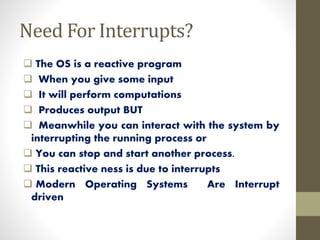
Need For Interrupts?
 The OS is a reactive program
 When you give some input
 It will perform computations
 Produces output BUT
 Meanwhile you can interact with the system by
interrupting the running process or
 You can stop and start another process.
 This reactive ness is due to interrupts
 Modern Operating Systems Are Interrupt
driven
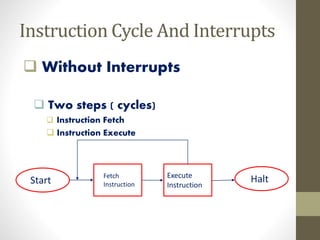
Instruction Cycle And Interrupts
 Without Interrupts
 Two steps ( cycles)
 Instruction Fetch
 Instruction Execute
Start
Fetch
Instruction
Execute
Instruction
Halt
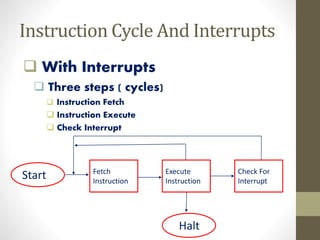
Instruction Cycle And Interrupts
 With Interrupts
 Three steps ( cycles)
 Instruction Fetch
 Instruction Execute
 Check Interrupt
Start Fetch
Instruction
Execute
Instruction
Check For
Interrupt
Halt
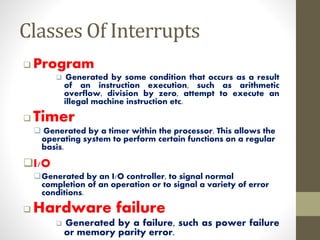
Classes Of Interrupts
 Program
 Generated by some condition that occurs as a result
of an instruction execution, such as arithmetic
overflow, division by zero, attempt to execute an
illegal machine instruction etc.
 Timer
 Generated by a timer within the processor. This allows the
operating system to perform certain functions on a regular
basis.
I/O
Generated by an I/O controller, to signal normal
completion of an operation or to signal a variety of error
conditions.
 Hardware failure
 Generated by a failure, such as power failure
or memory parity error.
Types Of Interrupts
 Synchronous interrupts
 Asynchronous interrupts
• are produced by the CPU control unit while executing
instructions and are called synchronous because the
control unit issues them only after terminating the
execution of an instruction.
Synchronous interrupts
Asynchronous interrupts
• are generated by other hardware devices at arbitrary
times with respect to the CPU clock signals.
Differenceb/w Interruptsand Exceptions
 Exceptions are caused by software executing
instructions
 a page fault, or an attempted write to a read- only page
 an expected exception is a “trap”, unexpected is a “fault”
Interrupts are caused by hardware devices
 device finishes I/O
 timer fires
How Interrupts Are Handled?
Different routines handle different interrupts – called
Interrupt Service Routines (ISR).
When CPU is interrupted
 It stops what it was doing, and context is saved.
 A generic routine called Interrupt Handling Routine (IHR) is
run which
 Examines the nature of interrupt
 Calls the corresponding Interrupt Service Routine (ISR) -- stored in
lower part of memory.
After servicing the interrupt, the saved address is loaded
again to PC to resume the process again.
Any questions ???
Interrupts ppt

Interrupts ppt

  • 2.
  • 3.
  • 4.
    Outline:  What AreInterrupts?  Why Interrupts?  Instruction Cycle And Interrupts  Classes Of Interrupts  Types Of Interrupts Difference b/w Interrupts and Exceptions  How They Are Handled?
  • 5.
    Interrupts: An interrupt isusually defined as an event that alters the sequence of instructions executed by a processor.  A Suspension of a process such as the execution of a computer program, caused by an event external to that process, and performed in such a way that the process can be resumed.
  • 6.
    Need For Interrupts? The OS is a reactive program  When you give some input  It will perform computations  Produces output BUT  Meanwhile you can interact with the system by interrupting the running process or  You can stop and start another process.  This reactive ness is due to interrupts  Modern Operating Systems Are Interrupt driven
  • 7.
    Instruction Cycle AndInterrupts  Without Interrupts  Two steps ( cycles)  Instruction Fetch  Instruction Execute Start Fetch Instruction Execute Instruction Halt
  • 8.
    Instruction Cycle AndInterrupts  With Interrupts  Three steps ( cycles)  Instruction Fetch  Instruction Execute  Check Interrupt Start Fetch Instruction Execute Instruction Check For Interrupt Halt
  • 9.
    Classes Of Interrupts Program  Generated by some condition that occurs as a result of an instruction execution, such as arithmetic overflow, division by zero, attempt to execute an illegal machine instruction etc.  Timer  Generated by a timer within the processor. This allows the operating system to perform certain functions on a regular basis. I/O Generated by an I/O controller, to signal normal completion of an operation or to signal a variety of error conditions.  Hardware failure  Generated by a failure, such as power failure or memory parity error.
  • 10.
    Types Of Interrupts Synchronous interrupts  Asynchronous interrupts
  • 11.
    • are producedby the CPU control unit while executing instructions and are called synchronous because the control unit issues them only after terminating the execution of an instruction. Synchronous interrupts
  • 12.
    Asynchronous interrupts • aregenerated by other hardware devices at arbitrary times with respect to the CPU clock signals.
  • 13.
    Differenceb/w Interruptsand Exceptions Exceptions are caused by software executing instructions  a page fault, or an attempted write to a read- only page  an expected exception is a “trap”, unexpected is a “fault” Interrupts are caused by hardware devices  device finishes I/O  timer fires
  • 14.
    How Interrupts AreHandled? Different routines handle different interrupts – called Interrupt Service Routines (ISR). When CPU is interrupted  It stops what it was doing, and context is saved.  A generic routine called Interrupt Handling Routine (IHR) is run which  Examines the nature of interrupt  Calls the corresponding Interrupt Service Routine (ISR) -- stored in lower part of memory. After servicing the interrupt, the saved address is loaded again to PC to resume the process again.
  • 15.