Operating Systems
CPU Scheduling
Prepared By
Dr.M.Sivakumar
Assistant Professor
Department of Networking and Communications
SRM Institute of Science and Technology, Kattankulathur
CPU Scheduling
• Basic Concepts, Scheduling Criteria
• Scheduling Algorithms,
• Thread Scheduling
• Multiple-Processor Scheduling,
• Real-Time CPU Scheduling.
• Deadlocks: System Model, Deadlock Characterization,
• Methods for Handling Deadlocks, Deadlock Prevention, Deadlock
Avoidance, Deadlock Detection, Recovery from Deadlock
Dr.M.Sivakumar, AP/NWC, SRMIST 3
Basic Concepts
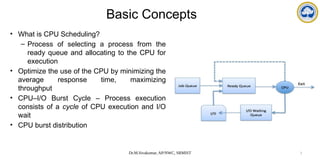
• What is CPU Scheduling?
– Process of selecting a process from the
ready queue and allocating to the CPU for
execution
• Optimize the use of the CPU by minimizing the
average response time, maximizing
throughput
• CPU–I/O Burst Cycle – Process execution
consists of a cycle of CPU execution and I/O
wait
• CPU burst distribution
Dr.M.Sivakumar, AP/NWC, SRMIST 4
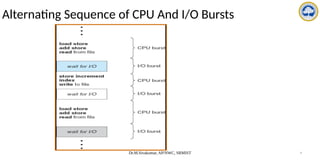
Alternating Sequence of CPU And I/O Bursts
Dr.M.Sivakumar, AP/NWC, SRMIST 5
CPU Scheduler
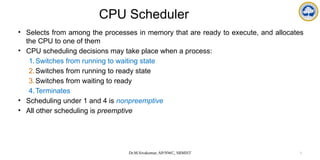
• Selects from among the processes in memory that are ready to execute, and allocates
the CPU to one of them
• CPU scheduling decisions may take place when a process:
1.Switches from running to waiting state
2.Switches from running to ready state
3.Switches from waiting to ready
4.Terminates
• Scheduling under 1 and 4 is nonpreemptive
• All other scheduling is preemptive
Dr.M.Sivakumar, AP/NWC, SRMIST 6
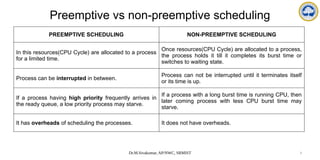
Preemptive vs non-preemptive scheduling
PREEMPTIVE SCHEDULING NON-PREEMPTIVE SCHEDULING
In this resources(CPU Cycle) are allocated to a process
for a limited time.
Once resources(CPU Cycle) are allocated to a process,
the process holds it till it completes its burst time or
switches to waiting state.
Process can be interrupted in between.
Process can not be interrupted until it terminates itself
or its time is up.
If a process having high priority frequently arrives in
the ready queue, a low priority process may starve.
If a process with a long burst time is running CPU, then
later coming process with less CPU burst time may
starve.
It has overheads of scheduling the processes. It does not have overheads.
Dr.M.Sivakumar, AP/NWC, SRMIST 7
Dispatcher
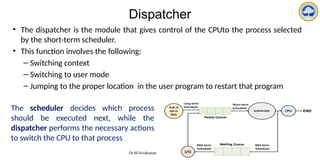
• The dispatcher is the module that gives control of the CPUto the process selected
by the short-term scheduler.
• This function involves the following:
– Switching context
– Switching to user mode
– Jumping to the proper location in the user program to restart that program
The scheduler decides which process
should be executed next, while the
dispatcher performs the necessary actions
to switch the CPU to that process
Dr.M.Sivakumar, AP/NWC, SRMIST 8
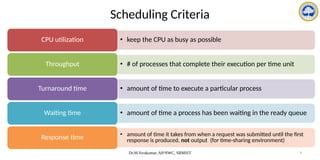
Scheduling Criteria
• keep the CPU as busy as possible
CPU utilization
• # of processes that complete their execution per time unit
Throughput
• amount of time to execute a particular process
Turnaround time
• amount of time a process has been waiting in the ready queue
Waiting time
• amount of time it takes from when a request was submitted until the first
response is produced, not output (for time-sharing environment)
Response time
Dr.M.Sivakumar, AP/NWC, SRMIST 9
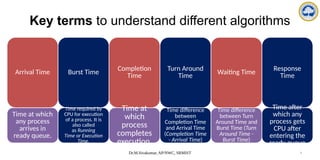
Key terms to understand different algorithms
Arrival Time
Time at which
any process
arrives in
ready queue.
Burst Time
Time required by
CPU for execution
of a process. It is
also called
as Running
Time or Execution
Time.
Completion
Time
Time at
which
process
completes
execution.
Turn Around
Time
Time difference
between
Completion Time
and Arrival Time
(Completion Time
- Arrival Time)
Waiting Time
Time difference
between Turn
Around Time and
Burst Time (Turn
Around Time -
Burst Time)
Response
Time
Time after
which any
process gets
CPU after
entering the
ready queue
Dr.M.Sivakumar, AP/NWC, SRMIST 10
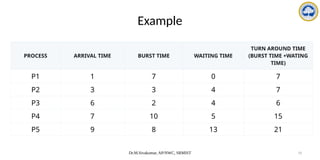
Example
PROCESS ARRIVAL TIME BURST TIME WAITING TIME
TURN AROUND TIME
(BURST TIME +WATING
TIME)
P1 1 7 0 7
P2 3 3 4 7
P3 6 2 4 6
P4 7 10 5 15
P5 9 8 13 21
Dr.M.Sivakumar, AP/NWC, SRMIST 11
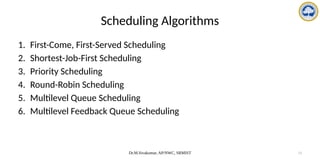
Scheduling Algorithms
1. First-Come, First-Served Scheduling
2. Shortest-Job-First Scheduling
3. Priority Scheduling
4. Round-Robin Scheduling
5. Multilevel Queue Scheduling
6. Multilevel Feedback Queue Scheduling
Dr.M.Sivakumar, AP/NWC, SRMIST 12
CPU Scheduling Algorithms
1. First-Come, First-Served Scheduling
2. Shortest-Job-First Scheduling
3. Priority Scheduling
4. Round-Robin Scheduling
5. Multilevel Queue Scheduling
6. Multilevel Feedback Queue Scheduling
Dr.M.Sivakumar, AP/NWC, SRMIST 13
Scheduling Algorithms
1. First-Come, First-Served (FCFS): The CPU executes the processes in the order
they arrive.
2. Shortest Job First (SJF): The CPU executes the process with the shortest burst time
first.
3. Round Robin (RR): The CPU executes each process for a fixed time slice, and then
switches to the next process in a circular order.
4. Priority Scheduling: The CPU executes the process with the highest priority first.
5. Multilevel Queue: The processes are divided into different queues based on their
priority, and each queue has its own scheduling algorithm.
6. Multilevel Feedback Queue: Similar to multilevel queue, but with the added feature
that processes can move between queues based on their behavior.
Dr.M.Sivakumar, AP/NWC, SRMIST 14
First-Come, First-Served (FCFS) Scheduling
• Simplest CPU-scheduling algorithm
• The process that requests the CPU first is allocated the CPU first
• When a process enters the ready queue, its PCB is linked onto the tail of the
queue
• When the CPU is free, it is allocated to the process at the head of the queue
• The running process is then removed from the queue
• Drawbacks:
– the average waiting time under the FCFS policy is often quite long
Dr.M.Sivakumar, AP/NWC, SRMIST 15
FCFS Example
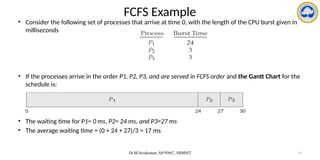
• Consider the following set of processes that arrive at time 0, with the length of the CPU burst given in
milliseconds
• If the processes arrive in the order P1, P2, P3, and are served in FCFS order and the Gantt Chart for the
schedule is:
• The waiting time for P1= 0 ms, P2= 24 ms, and P3=27 ms
• The average waiting time = (0 + 24 + 27)/3 = 17 ms
Dr.M.Sivakumar, AP/NWC, SRMIST 16
FCFS Example
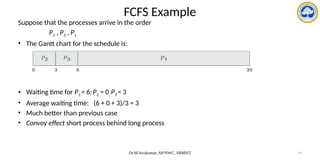
Suppose that the processes arrive in the order
P2 , P3 , P1
• The Gantt chart for the schedule is:
• Waiting time for P1 = 6;P2 = 0; P3 = 3
• Average waiting time: (6 + 0 + 3)/3 = 3
• Much better than previous case
• Convoy effect short process behind long process
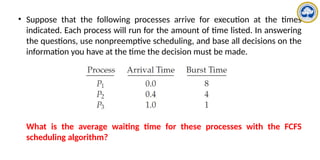
• Suppose that the following processes arrive for execution at the times
indicated. Each process will run for the amount of time listed. In answering
the questions, use nonpreemptive scheduling, and base all decisions on the
information you have at the time the decision must be made.
What is the average waiting time for these processes with the FCFS
scheduling algorithm?
Dr.M.Sivakumar, AP/NWC, SRMIST 18
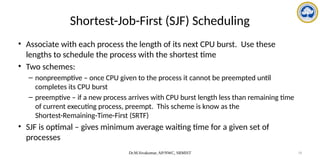
Shortest-Job-First (SJF) Scheduling
• Associate with each process the length of its next CPU burst. Use these
lengths to schedule the process with the shortest time
• Two schemes:
– nonpreemptive – once CPU given to the process it cannot be preempted until
completes its CPU burst
– preemptive – if a new process arrives with CPU burst length less than remaining time
of current executing process, preempt. This scheme is know as the
Shortest-Remaining-Time-First (SRTF)
• SJF is optimal – gives minimum average waiting time for a given set of
processes
Dr.M.Sivakumar, AP/NWC, SRMIST 19
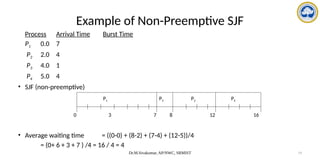
Process Arrival Time Burst Time
P1 0.0 7
P2 2.0 4
P3 4.0 1
P4 5.0 4
• SJF (non-preemptive)
• Average waiting time = ((0-0) + (8-2) + (7-4) + (12-5))/4
= (0+ 6 + 3 + 7 ) /4 = 16 / 4 = 4
Example of Non-Preemptive SJF
P1 P3 P2
7
3 16
0
P4
8 12
Dr.M.Sivakumar, AP/NWC, SRMIST 20
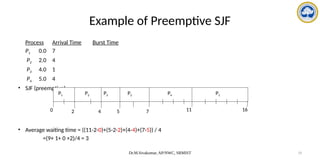
Example of Preemptive SJF
Process Arrival Time Burst Time
P1 0.0 7
P2 2.0 4
P3 4.0 1
P4 5.0 4
• SJF (preemptive)
• Average waiting time = ((11-2-0)+(5-2-2)+(4-4)+(7-5)) / 4
=(9+ 1+ 0 +2)/4 = 3
P1 P3
P2
4
2 11
0
P4
5 7
P2 P1
16
Dr.M.Sivakumar, AP/NWC, SRMIST 21
Example Preemptive SJF
• consider the following four processes, with the length of the CPU burst given in milliseconds:
• preemptive SJF schedule is as depicted in the following Gantt chart:
• The average waiting time = [(10-1-0) + (1-1) + (17-2) + (5-3)] / 4
= (9+0+15+2)/4 = 26/4 = 6.5 ms
Dr.M.Sivakumar, AP/NWC, SRMIST 22
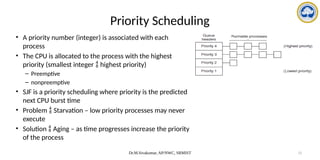
Priority Scheduling
• A priority number (integer) is associated with each
process
• The CPU is allocated to the process with the highest
priority (smallest integer  highest priority)
– Preemptive
– nonpreemptive
• SJF is a priority scheduling where priority is the predicted
next CPU burst time
• Problem  Starvation – low priority processes may never
execute
• Solution  Aging – as time progresses increase the priority
of the process
Dr.M.Sivakumar, AP/NWC, SRMIST 23
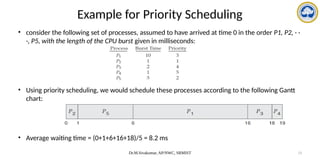
Example for Priority Scheduling
• consider the following set of processes, assumed to have arrived at time 0 in the order P1, P2, · ·
·, P5, with the length of the CPU burst given in milliseconds:
• Using priority scheduling, we would schedule these processes according to the following Gantt
chart:
• Average waiting time = (0+1+6+16+18)/5 = 8.2 ms
Dr.M.Sivakumar, AP/NWC, SRMIST 24
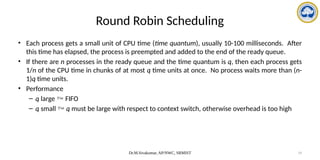
Round Robin Scheduling
• Each process gets a small unit of CPU time (time quantum), usually 10-100 milliseconds. After
this time has elapsed, the process is preempted and added to the end of the ready queue.
• If there are n processes in the ready queue and the time quantum is q, then each process gets
1/n of the CPU time in chunks of at most q time units at once. No process waits more than (n-
1)q time units.
• Performance
– q large  FIFO
– q small  q must be large with respect to context switch, otherwise overhead is too high
Dr.M.Sivakumar, AP/NWC, SRMIST 25
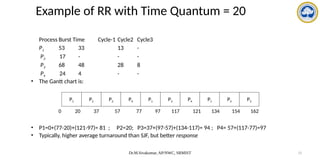
Example of RR with Time Quantum = 20
Process Burst Time Cycle-1 Cycle2 Cycle3
P1 53 33 13 -
P2 17 - - -
P3 68 48 28 8
P4 24 4 - -
• The Gantt chart is:
• P1=0+(77-20)+(121-97)= 81 ; P2=20; P3=37+(97-57)+(134-117)= 94 ; P4= 57+(117-77)=97
• Typically, higher average turnaround than SJF, but better response
P1 P2 P3 P4 P1 P3 P4 P1 P3 P3
0 20 37 57 77 97 117 121 134 154 162
Dr.M.Sivakumar, AP/NWC, SRMIST 26
Example of RR with Time Quantum = 4
• Consider the following set of processes that arrive at time 0, with the length of the CPU burst
given in milliseconds:
• The resulting RR schedule is as follows:
• The average waiting time = [(10-4) + 4 + 7] / 4 = 17/4 = 5.66 ms
Dr.M.Sivakumar, AP/NWC, SRMIST 27
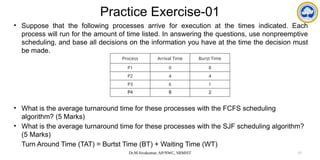
Practice Exercise-01
• Suppose that the following processes arrive for execution at the times indicated. Each
process will run for the amount of time listed. In answering the questions, use nonpreemptive
scheduling, and base all decisions on the information you have at the time the decision must
be made.
• What is the average turnaround time for these processes with the FCFS scheduling
algorithm? (5 Marks)
• What is the average turnaround time for these processes with the SJF scheduling algorithm?
(5 Marks)
Turn Around Time (TAT) = Burtst Time (BT) + Waiting Time (WT)
Process Arrival Time Burst Time
P1 0 8
P2 4 4
P3 6 1
P4 8 2
Dr.M.Sivakumar, AP/NWC, SRMIST 28
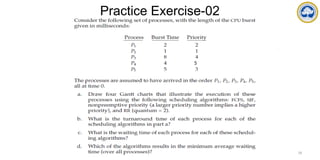
Practice Exercise-02
5
Dr.M.Sivakumar, AP/NWC, SRMIST 29
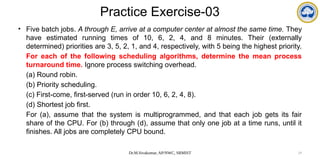
Practice Exercise-03
• Five batch jobs. A through E, arrive at a computer center at almost the same time. They
have estimated running times of 10, 6, 2, 4, and 8 minutes. Their (externally
determined) priorities are 3, 5, 2, 1, and 4, respectively, with 5 being the highest priority.
For each of the following scheduling algorithms, determine the mean process
turnaround time. Ignore process switching overhead.
(a) Round robin.
(b) Priority scheduling.
(c) First-come, first-served (run in order 10, 6, 2, 4, 8).
(d) Shortest job first.
For (a), assume that the system is multiprogrammed, and that each job gets its fair
share of the CPU. For (b) through (d), assume that only one job at a time runs, until it
finishes. All jobs are completely CPU bound.
Dr.M.Sivakumar, AP/NWC, SRMIST 30
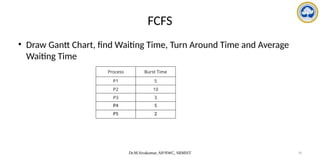
FCFS
• Draw Gantt Chart, find Waiting Time, Turn Around Time and Average
Waiting Time
Process Burst Time
P1 5
P2 10
P3 3
P4 5
P5 2
Dr.M.Sivakumar, AP/NWC, SRMIST 31
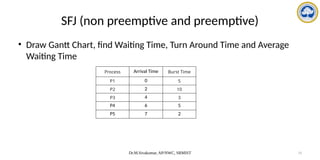
SFJ (non preemptive and preemptive)
• Draw Gantt Chart, find Waiting Time, Turn Around Time and Average
Waiting Time
Process Arrival Time Burst Time
P1 0 5
P2 2 10
P3 4 3
P4 6 5
P5 7 2
Dr.M.Sivakumar, AP/NWC, SRMIST 32
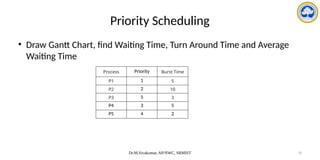
Priority Scheduling
• Draw Gantt Chart, find Waiting Time, Turn Around Time and Average
Waiting Time
Process Priority Burst Time
P1 1 5
P2 2 10
P3 5 3
P4 3 5
P5 4 2
Dr.M.Sivakumar, AP/NWC, SRMIST 33
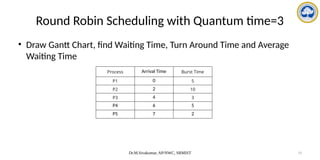
Round Robin Scheduling with Quantum time=3
• Draw Gantt Chart, find Waiting Time, Turn Around Time and Average
Waiting Time
Process Arrival Time Burst Time
P1 0 5
P2 2 10
P3 4 3
P4 6 5
P5 7 2
Dr.M.Sivakumar, AP/NWC, SRMIST 34
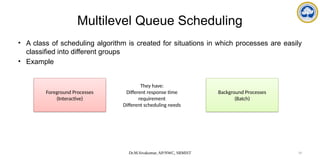
Multilevel Queue Scheduling
• A class of scheduling algorithm is created for situations in which processes are easily
classified into different groups
• Example
Foreground Processes
(Interactive)
They have:
Different response time
requirement
Different scheduling needs
Background Processes
(Batch)
Dr.M.Sivakumar, AP/NWC, SRMIST 35
Multilevel Queue Scheduling
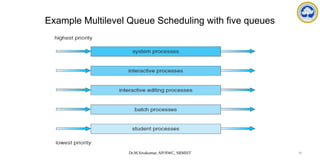
• Processes are permanently assigned to one queue based on some property of the
process, such as:
– Memory size
– Process priority
– Process type
• Each queue has its own scheduling algorithm
• Example
– Foreground queue may be scheduled by RR algorithm and Background queue may
be scheduled by FCFS algorithm
• In addition, there must be a scheduling among queues, which is commonly
implemented by fixed-priority preemptive scheduling
Dr.M.Sivakumar, AP/NWC, SRMIST 36
Example Multilevel Queue Scheduling with five queues
Dr.M.Sivakumar, AP/NWC, SRMIST 37
Multilevel Feedback Queue Scheduling
• Multilevel feedback queue scheduling is a variation of multilevel queue scheduling
• A process can move between different queues based on its behavior and history
• Each queue has a different priority level
• Processes are initially placed in the highest priority queue.
• If a process uses too much CPU time, it may be moved to a lower priority queue
• if a process waits too long in a lower priority queue, it may be moved to a higher
priority queue.
• This approach allows the scheduler to dynamically adjust to changing workloads and
better handle both interactive and batch processes.
Dr.M.Sivakumar, AP/NWC, SRMIST 38
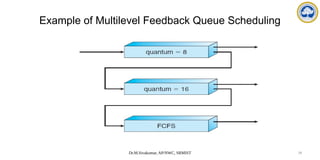
Example of Multilevel Feedback Queue Scheduling
Dr.M.Sivakumar, AP/NWC, SRMIST 39
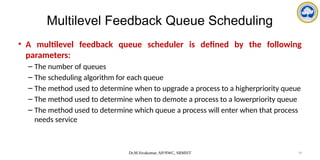
• A multilevel feedback queue scheduler is defined by the following
parameters:
– The number of queues
– The scheduling algorithm for each queue
– The method used to determine when to upgrade a process to a higherpriority queue
– The method used to determine when to demote a process to a lowerpriority queue
– The method used to determine which queue a process will enter when that process
needs service
Multilevel Feedback Queue Scheduling
Thread Scheduling
• What is thread scheduling?
• Contention Scope
• Pthread Scheduling
What is thread scheduling?
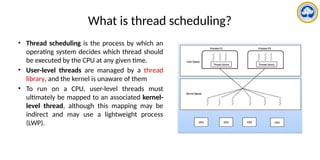
• Thread scheduling is the process by which an
operating system decides which thread should
be executed by the CPU at any given time.
• User-level threads are managed by a thread
library, and the kernel is unaware of them
• To run on a CPU, user-level threads must
ultimately be mapped to an associated kernel-
level thread, although this mapping may be
indirect and may use a lightweight process
(LWP).
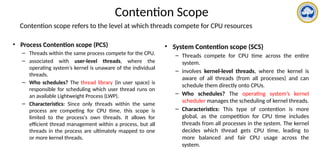
Contention Scope
Contention scope refers to the level at which threads compete for CPU resources
• Process Contention scope (PCS)
– Threads within the same process compete for the CPU.
– associated with user-level threads, where the
operating system's kernel is unaware of the individual
threads.
– Who schedules? The thread library (in user space) is
responsible for scheduling which user thread runs on
an available Lightweight Process (LWP).
– Characteristics: Since only threads within the same
process are competing for CPU time, this scope is
limited to the process's own threads. It allows for
efficient thread management within a process, but all
threads in the process are ultimately mapped to one
or more kernel threads.
• System Contention scope (SCS)
– Threads compete for CPU time across the entire
system.
– involves kernel-level threads, where the kernel is
aware of all threads (from all processes) and can
schedule them directly onto CPUs.
– Who schedules? The operating system’s kernel
scheduler manages the scheduling of kernel threads.
– Characteristics: This type of contention is more
global, as the competition for CPU time includes
threads from all processes in the system. The kernel
decides which thread gets CPU time, leading to
more balanced and fair CPU usage across the
system.
Pthread Scheduling
• It refers to how POSIX Pthreads (Portable Operating System Interface threads) allow programmers to
specify whether a thread uses Process Contention Scope (PCS) or System Contention Scope (SCS)
during thread creation, using the POSIX API?
• Pthread Contention Scope:
– PTHREAD_SCOPE_PROCESS: This value indicates that the thread will be scheduled using Process
Contention Scope (PCS). In this mode, threads within the same process compete for the CPU,
and the scheduling is managed by the thread library.
– PTHREAD_SCOPE_SYSTEM: This value means that the thread will be scheduled using System
Contention Scope (SCS). In this mode, threads compete with all threads across the entire system,
and the OS kernel handles scheduling.
Pthread Scheduling
• Many-to-Many Model:
– In a many-to-many threading model, user-level threads are mapped to a pool of kernel-level
threads, allowing flexible scheduling.
– If PTHREAD_SCOPE_PROCESS is specified, user-level threads are scheduled onto available LWPs
(Lightweight Processes) by the thread library. The number of LWPs is managed by the library,
possibly using scheduler activations (a mechanism that enhances user-level thread management by
allowing the kernel to communicate events related to thread scheduling to the user-level
scheduler).
– If PTHREAD_SCOPE_SYSTEM is used, each user-level thread is directly mapped to a kernel-level
thread (essentially using a one-to-one model), allowing the OS to manage their scheduling directly.
Pthread Scheduling
• Pthread API Functions:
pthread_attr_setscope(pthread_attr_t *attr, int scope)
This function sets the contention scope for a thread. You pass a pointer to the thread
attribute object and specify either PTHREAD_SCOPE_SYSTEM or PTHREAD_SCOPE_PROCESS
to indicate whether the thread should use SCS or PCS, respectively.
pthread_attr_getscope(pthread_attr_t *attr, int *scope)
This function retrieves the current contention scope of a thread. The scope parameter
points to an int variable that will hold the current contention scope value.
• Both functions return a nonzero value if an error occurs.
Pthread scheduling API
#include <pthread.h>
#include <stdio.h>
#define NUM THREADS 5
int main(int argc, char *argv[])
{
int i, scope;
pthread t tid[NUM THREADS];
pthread attr t attr;
/* get the default attributes */
pthread attr init(&attr);
/* first inquire on the current scope */
if (pthread attr getscope(&attr, &scope) != 0)
fprintf(stderr, "Unable to get scheduling scopen");
else {
if (scope == PTHREAD SCOPE PROCESS)
printf("PTHREAD SCOPE PROCESS");
else if (scope == PTHREAD SCOPE SYSTEM)
printf("PTHREAD SCOPE SYSTEM");
else
fprintf(stderr, "Illegal scope value.n");
}
/* set the scheduling algorithm to PCS or SCS */
pthread attr setscope(&attr, PTHREAD SCOPE SYSTEM);
/* create the threads */
for (i = 0; i < NUM THREADS; i++)
pthread create(&tid[i],&attr,runner,NULL);
/* now join on each thread */
for (i = 0; i < NUM THREADS; i++)
pthread join(tid[i], NULL);
}
/* Each thread will begin control in this function */
void *runner(void *param)
{
/* do some work ... */
pthread exit(0);
}
Multiple-Processor Scheduling
• What is multiple-processor scheduling?
• Approaches to Multiple-Processor Scheduling
• Processor Affinity
• Load Balancing
• Multicore Processors
What is multiple-processor scheduling?
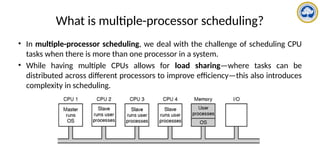
• In multiple-processor scheduling, we deal with the challenge of scheduling CPU
tasks when there is more than one processor in a system.
• While having multiple CPUs allows for load sharing—where tasks can be
distributed across different processors to improve efficiency—this also introduces
complexity in scheduling.
Approaches to Multiple-Processor Scheduling
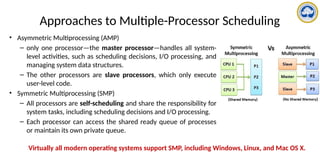
• Asymmetric Multiprocessing (AMP)
– only one processor—the master processor—handles all system-
level activities, such as scheduling decisions, I/O processing, and
managing system data structures.
– The other processors are slave processors, which only execute
user-level code.
• Symmetric Multiprocessing (SMP)
– All processors are self-scheduling and share the responsibility for
system tasks, including scheduling decisions and I/O processing.
– Each processor can access the shared ready queue of processes
or maintain its own private queue.
Virtually all modern operating systems support SMP, including Windows, Linux, and Mac OS X.
Processor Affinity
• If a process P1 runs on CPU 1 and completes its execution partially, when it needs
to run again, the operating system may try to schedule it on CPU 1 again (soft
affinity).
• This is because CPU 1 may still have relevant data in its cache, making it faster for
the process to resume.
• However, if CPU 1 is busy, the process could be moved to another CPU (breaking
soft affinity).
• In Linux, soft affinity is implemented by default, meaning the OS will try to keep
processes running on the same CPU. However, the system call sched_setaffinity()
can be used to enforce hard affinity, binding a process to a specific processor or a
set of processors.
Processor Affinity
• In multiprocessor systems, processor affinity refers to the preference of keeping a process
running on the same processor to enhance performance, especially in relation to cache
memory.
• When a process runs on a specific processor, the most recently accessed data by that process
are stored in the processor's cache. As a result, the next time the process needs to access
memory, it can often retrieve data directly from the cache, speeding up execution.
• Cache Memory Impact:
– Cache Invalidation:
When a process migrates from one processor to another, the cache on the first processor,
which holds the data of the process, becomes invalid (useless), as the process is no longer
running on that processor.
– Cache Repopulation:
The new processor, to which the process is migrated, must now repopulate its cache with
the process's data. This requires fetching the data from main memory, which is much slower
compared to accessing it from the cache.
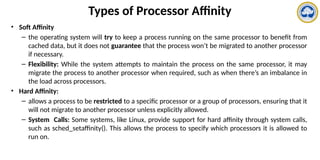
Types of Processor Affinity
• Soft Affinity
– the operating system will try to keep a process running on the same processor to benefit from
cached data, but it does not guarantee that the process won’t be migrated to another processor
if necessary.
– Flexibility: While the system attempts to maintain the process on the same processor, it may
migrate the process to another processor when required, such as when there’s an imbalance in
the load across processors.
• Hard Affinity:
– allows a process to be restricted to a specific processor or a group of processors, ensuring that it
will not migrate to another processor unless explicitly allowed.
– System Calls: Some systems, like Linux, provide support for hard affinity through system calls,
such as sched_setaffinity(). This allows the process to specify which processors it is allowed to
run on.
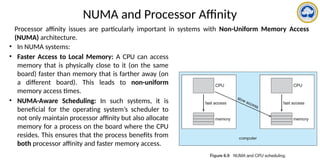
NUMA and Processor Affinity
• In NUMA systems:
• Faster Access to Local Memory: A CPU can access
memory that is physically close to it (on the same
board) faster than memory that is farther away (on
a different board). This leads to non-uniform
memory access times.
• NUMA-Aware Scheduling: In such systems, it is
beneficial for the operating system’s scheduler to
not only maintain processor affinity but also allocate
memory for a process on the board where the CPU
resides. This ensures that the process benefits from
both processor affinity and faster memory access.
Processor affinity issues are particularly important in systems with Non-Uniform Memory Access
(NUMA) architecture.
Load Balancing
• In SMP (Symmetric Multiprocessing) systems, where multiple processors are involved, load
balancing is essential to ensure that all processors are fully utilized.
• Without balancing, some processors might be idle while others are overloaded with tasks,
leading to inefficiency.
• Load balancing aims to distribute the workload evenly across all processors.
• Two Approaches
– Push Migration: A specific task checks all processors periodically and redistributes the load
by moving tasks from busy processors to less busy or idle ones. It's a proactive method of
balancing.
– Pull Migration: When a processor becomes idle, it actively pulls tasks from a busy processor.
This is a reactive way of ensuring all processors are kept busy.
• In Linux, the scheduler periodically checks for load imbalances using both push and pull
migration strategies. If a processor is overloaded, processes may be pushed to other
processors, while idle processors can pull tasks from the queues of busy processors to balance
the load.
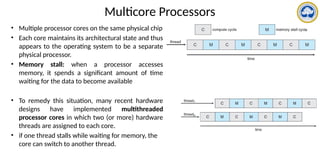
Multicore Processors
• Multiple processor cores on the same physical chip
• Each core maintains its architectural state and thus
appears to the operating system to be a separate
physical processor.
• Memory stall: when a processor accesses
memory, it spends a significant amount of time
waiting for the data to become available
• To remedy this situation, many recent hardware
designs have implemented multithreaded
processor cores in which two (or more) hardware
threads are assigned to each core.
• if one thread stalls while waiting for memory, the
core can switch to another thread.
Multicore Processors
• Two ways to multithread a processing core:
– Coarsegrained : a thread executes on a processor until a long-latency event such as a
memory stall occurs
– Fine-grained multithreading: switches between threads at a much finer level of granularity
• A multicore processor requires two levels of scheduling:
– Operating System Scheduling: The OS interacts with the hardware to schedule threads
across different logical processors, ensuring that processes and threads are effectively
managed according to their priorities and workload.
– Hardware Thread Scheduling: This level involves managing which hardware thread runs on
each core.
REAL-TIME CPU SCHEDULING
Dr.M.Sivakumar, NWC,SRMIST
Topics
• What are real time systems?
• What is Real Time CPU Scheduling?
• Minimizing Latency
• Types
– Priority-Based Scheduling
– Rate-Monotonic Scheduling
– Earliest-Deadline-First Scheduling
– Proportional Share Scheduling
– POSIX Real-Time Scheduling
Dr.M.Sivakumar, NWC,SRMIST
What are real time systems?
• Real-time systems are computer systems designed to perform tasks and respond to events
within a strict timing constraint.
• Examples
– Automotive Systems:
• Anti-lock braking systems (ABS)
• Airbag control systems
• Engine control units (ECU)
– Industrial Control Systems:
• Robotic assembly lines
• Process control systems in chemical plants
• Telecommunications:
• Network routers and switches
• Voice-over-IP (VoIP) systems
• Healthcare:
• Patient monitoring systems
• Medical imaging devices
• Aerospace and Defense:
• Flight control systems
• Missile guidance systems
Dr.M.Sivakumar, NWC,SRMIST
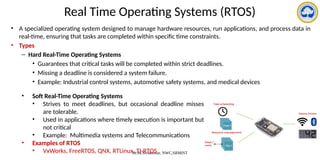
Real Time Operating Systems (RTOS)
• A specialized operating system designed to manage hardware resources, run applications, and process data in
real-time, ensuring that tasks are completed within specific time constraints.
• Types
– Hard Real-Time Operating Systems
• Guarantees that critical tasks will be completed within strict deadlines.
• Missing a deadline is considered a system failure.
• Example: Industrial control systems, automotive safety systems, and medical devices
• Soft Real-Time Operating Systems
• Strives to meet deadlines, but occasional deadline misses
are tolerable.
• Used in applications where timely execution is important but
not critical
• Example: Multimedia systems and Telecommunications
• Examples of RTOS
• VxWorks, FreeRTOS, QNX, RTLinux, TI-RTOS
Dr.M.Sivakumar, NWC,SRMIST
What is Real Time CPU Scheduling?
• It refers to the methods and techniques used to manage the execution
of tasks in a real-time operating system (RTOS) to ensure that high-
priority tasks are completed within their required time constraints
• In real-time systems, tasks are often time-sensitive, meaning they must
be executed within a specific time frame, known as a deadline.
Dr.M.Sivakumar, NWC,SRMIST
Minimizing Latency
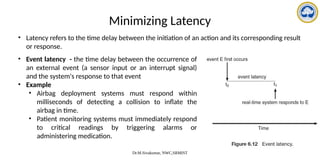
• Latency refers to the time delay between the initiation of an action and its corresponding result
or response.
• Event latency - the time delay between the occurrence of
an external event (a sensor input or an interrupt signal)
and the system's response to that event
• Example
• Airbag deployment systems must respond within
milliseconds of detecting a collision to inflate the
airbag in time.
• Patient monitoring systems must immediately respond
to critical readings by triggering alarms or
administering medication.
Dr.M.Sivakumar, NWC,SRMIST
Minimizing Latency
• Types of latencies
• Interrupt latency
• Dispatch latency
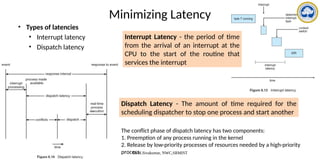
Interrupt Latency - the period of time
from the arrival of an interrupt at the
CPU to the start of the routine that
services the interrupt
Dispatch Latency - The amount of time required for the
scheduling dispatcher to stop one process and start another
The conflict phase of dispatch latency has two components:
1. Preemption of any process running in the kernel
2. Release by low-priority processes of resources needed by a high-priority
process
Dr.M.Sivakumar, NWC,SRMIST
Types of Real Time CPU Scheduling
• Priority-Based Scheduling
• Rate-Monotonic Scheduling
• Earliest-Deadline-First Scheduling
• Proportional Share Scheduling
• POSIX Real-Time Scheduling
Dr.M.Sivakumar, NWC,SRMIST
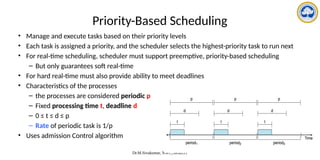
Priority-Based Scheduling
• Manage and execute tasks based on their priority levels
• Each task is assigned a priority, and the scheduler selects the highest-priority task to run next
• For real-time scheduling, scheduler must support preemptive, priority-based scheduling
– But only guarantees soft real-time
• For hard real-time must also provide ability to meet deadlines
• Characteristics of the processes
– the processes are considered periodic p
– Fixed processing time t, deadline d
– 0 ≤ t ≤ d ≤ p
– Rate of periodic task is 1/p
• Uses admission Control algorithm
Dr.M.Sivakumar, NWC,SRMIST
Priority-Based Scheduling
• Each task or process in the system is assigned a priority level, typically a numerical value. Lower
numbers often represent higher priorities (e.g., priority 1 is higher than priority 5).
• If a higher-priority task becomes ready to run while a lower-priority task is executing, the
scheduler preempts the lower-priority task and switches to the higher-priority one. This
ensures that critical tasks are not delayed.
• Static Priority: The priority of each task is fixed and does not change during the task's lifetime.
Example: Rate-Monotonic Scheduling (RMS).
• Dynamic Priority: The priority of tasks can change based on certain criteria, such as deadlines.
Example: Earliest Deadline First (EDF) scheduling.
Dr.M.Sivakumar, NWC,SRMIST
Priority-Based Scheduling
• Let’s consider an example.
• We have two processes, P1 and P2. The periods for P1 and P2 are 50 and 100, respectively—
that is, p1 = 50 and p2 = 100. The processing times are t1 = 20 for P1 and t2 = 35 for P2. The
deadline for each process requires that it complete its CPU burst by the start of its next period.
• Step-01: Check whether it is possible to schedule these tasks so that each meets its deadlines.
• Step-02: Measure the CPU utilization of a process Pi as the ratio of its burst to its period—ti/pi
—the CPU utilization of P1 is 20/50 = 0.40 and that of P2 is 35/100 = 0.35, for a total CPU
utilization of 75 percent.
• Step-03: Therefore, it seems we can schedule these tasks in such a way that both meet their
deadlines and still leave the CPU with available cycles.
Dr.M.Sivakumar, NWC,SRMIST
Rate-Monotonic Scheduling
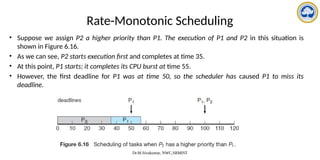
• Suppose we assign P2 a higher priority than P1. The execution of P1 and P2 in this situation is
shown in Figure 6.16.
• As we can see, P2 starts execution first and completes at time 35.
• At this point, P1 starts; it completes its CPU burst at time 55.
• However, the first deadline for P1 was at time 50, so the scheduler has caused P1 to miss its
deadline.
Dr.M.Sivakumar, NWC,SRMIST
Rate-Monotonic Scheduling
• The rate-monotonic scheduling algorithm schedules periodic tasks using a static priority policy
with preemption.
• If a lower-priority process is running and a higher-priority process becomes available to run, it
will preempt the lower-priority process.
• Upon entering the system, each periodic task is assigned a priority inversely based on its
period.
• The shorter the period, the higher the priority; the longer the period, the lower
the priority
• Rate-monotonic scheduling assumes that the processing time of a periodic process is the same
for each CPU burst. That is, every time a process acquires the CPU, the duration of its CPU burst
is the same.
Dr.M.Sivakumar, NWC,SRMIST
Rate-Monotonic Scheduling
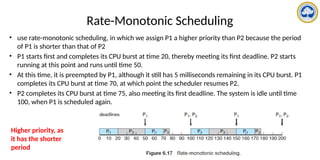
• use rate-monotonic scheduling, in which we assign P1 a higher priority than P2 because the period
of P1 is shorter than that of P2
• P1 starts first and completes its CPU burst at time 20, thereby meeting its first deadline. P2 starts
running at this point and runs until time 50.
• At this time, it is preempted by P1, although it still has 5 milliseconds remaining in its CPU burst. P1
completes its CPU burst at time 70, at which point the scheduler resumes P2.
• P2 completes its CPU burst at time 75, also meeting its first deadline. The system is idle until time
100, when P1 is scheduled again.
Higher priority, as
it has the shorter
period
Dr.M.Sivakumar, NWC,SRMIST
Rate-Monotonic Scheduling
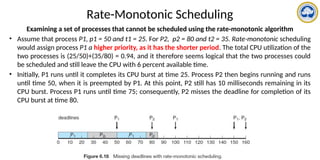
Examining a set of processes that cannot be scheduled using the rate-monotonic algorithm
• Assume that process P1, p1 = 50 and t1 = 25. For P2, p2 = 80 and t2 = 35. Rate-monotonic scheduling
would assign process P1 a higher priority, as it has the shorter period. The total CPU utilization of the
two processes is (25/50)+(35/80) = 0.94, and it therefore seems logical that the two processes could
be scheduled and still leave the CPU with 6 percent available time.
• Initially, P1 runs until it completes its CPU burst at time 25. Process P2 then begins running and runs
until time 50, when it is preempted by P1. At this point, P2 still has 10 milliseconds remaining in its
CPU burst. Process P1 runs until time 75; consequently, P2 misses the deadline for completion of its
CPU burst at time 80.
Dr.M.Sivakumar, NWC,SRMIST
Earliest-Deadline-First Scheduling
• Earliest-deadline-first (EDF) scheduling dynamically assigns priorities
according to deadline.
• The earlier the deadline, the higher the priority; the later the
deadline, the lower the priority
• when a process becomes runnable, it must announce its deadline
requirements to the system
• Priorities may have to be adjusted to reflect the deadline of the newly
runnable process.
Dr.M.Sivakumar, NWC,SRMIST
Earliest-Deadline-First Scheduling
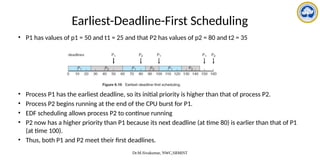
• P1 has values of p1 = 50 and t1 = 25 and that P2 has values of p2 = 80 and t2 = 35
• Process P1 has the earliest deadline, so its initial priority is higher than that of process P2.
• Process P2 begins running at the end of the CPU burst for P1.
• EDF scheduling allows process P2 to continue running
• P2 now has a higher priority than P1 because its next deadline (at time 80) is earlier than that of P1
(at time 100).
• Thus, both P1 and P2 meet their first deadlines.
Dr.M.Sivakumar, NWC,SRMIST
Proportional Share Scheduling
• Proportional share schedulers operate by allocating T shares among all applications.
• An application can receive N shares of time, thus ensuring that the application will have N/T of the
total processor time
• As an example,
– Assume that a total of T = 100 shares is to be divided among three processes, A, B, and C.
– A is assigned 50 shares, B is assigned 15 shares, and C is assigned 20 shares.
– This scheme ensures that A will have 50 percent of total processor time, B will have 15 percent,
and C will have 20 percent.
• Proportional share schedulers must work in conjunction with an admission-control policy to guarantee
that an application receives its allocated shares of time.
• An admission-control policy will admit a client requesting a particular number of shares only if
sufficient shares are available.
• If a new process D requested 30 shares, the admission controller would deny D entry into the system.
Dr.M.Sivakumar, NWC,SRMIST
POSIX Real-Time Scheduling
• POSIX defines two scheduling classes for real-time threads:
– SCHED FIFO
– SCHED RR
• SCHED FIFO
– schedules threads according to a first-come, first-served policy using a FIFO queue
– there is no time slicing among threads of equal priority
– the highest-priority real-time thread at the front of the FIFO queue will be granted the CPU
until it terminates or blocks
• SCHED RR
– uses a round-robin policy
– it provides time slicing among threads of equal priority
Example
• Consider two processes, P1 and P2, where p1 = 50, t1 = 25, p2 = 75,
and t2 = 30.
– How can these two processes be scheduled using rate-monotonic scheduling?
Illustrate your answer using a Gantt chart
– Illustrate the scheduling of these two processes using Earliest-Deadline-First
(EDF) scheduling
DEADLOCK
Dr.M.Sivakumar, AP/NWC, SRMIST 78
Deadlock Topics
• Deadlock Problem
• What is deadlock?
• System Model
• Deadlock Characterization
– Necessary Conditions
– Resource Allocation Graph
• Methods for Handling Deadlocks
Dr.M.Sivakumar, AP/NWC, SRMIST 79
The Deadlock Problem
• A set of blocked processes each holding a resource and waiting to acquire a resource held
by another process in the set.
• Example
– System has 2 disk drives.
– P1 and P2 each hold one disk drive and each needs another one.
• Example
– semaphores A and B, initialized to 1
P0 P1
wait (A); wait(B)
wait (B); wait(A)
Dr.M.Sivakumar, AP/NWC, SRMIST 80
Dr.M.Sivakumar, AP/NWC, SRMIST 81
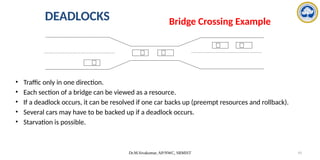
• Traffic only in one direction.
• Each section of a bridge can be viewed as a resource.
• If a deadlock occurs, it can be resolved if one car backs up (preempt resources and rollback).
• Several cars may have to be backed up if a deadlock occurs.
• Starvation is possible.
DEADLOCKS Bridge Crossing Example
Dr.M.Sivakumar, AP/NWC, SRMIST 82
Dr.M.Sivakumar, AP/NWC, SRMIST 83
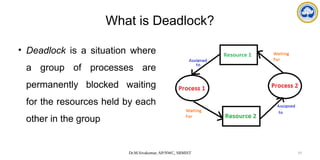
What is Deadlock?
• Deadlock is a situation where
a group of processes are
permanently blocked waiting
for the resources held by each
other in the group
Dr.M.Sivakumar, AP/NWC, SRMIST 84
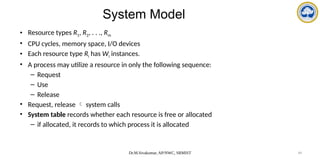
System Model
• Resource types R1, R2, . . ., Rm
• CPU cycles, memory space, I/O devices
• Each resource type Ri has Wi instances.
• A process may utilize a resource in only the following sequence:
– Request
– Use
– Release
• Request, release  system calls
• System table records whether each resource is free or allocated
– if allocated, it records to which process it is allocated
Dr.M.Sivakumar, AP/NWC, SRMIST 85
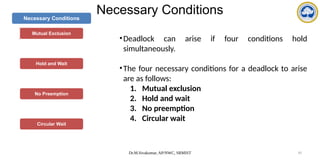
Necessary Conditions
Mutual Exclusion
Hold and Wait
No Preemption
Circular Wait
•Deadlock can arise if four conditions hold
simultaneously.
•The four necessary conditions for a deadlock to arise
are as follows:
1. Mutual exclusion
2. Hold and wait
3. No preemption
4. Circular wait
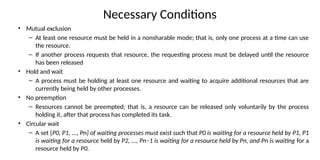
Necessary Conditions
• Mutual exclusion
– At least one resource must be held in a nonsharable mode; that is, only one process at a time can use
the resource.
– If another process requests that resource, the requesting process must be delayed until the resource
has been released
• Hold and wait
– A process must be holding at least one resource and waiting to acquire additional resources that are
currently being held by other processes.
• No preemption
– Resources cannot be preempted; that is, a resource can be released only voluntarily by the process
holding it, after that process has completed its task.
• Circular wait
– A set {P0, P1, ..., Pn} of waiting processes must exist such that P0 is waiting for a resource held by P1, P1
is waiting for a resource held by P2, ..., Pn−1 is waiting for a resource held by Pn, and Pn is waiting for a
resource held by P0.
Dr.M.Sivakumar, AP/NWC, SRMIST 87
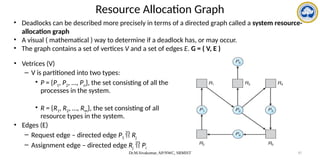
Resource Allocation Graph
• Vetrices (V)
– V is partitioned into two types:
• P = {P1, P2, …, Pn}, the set consisting of all the
processes in the system.
• R = {R1, R2, …, Rm}, the set consisting of all
resource types in the system.
• Edges (E)
– Request edge – directed edge P1  Rj
– Assignment edge – directed edge Rj  Pi
• Deadlocks can be described more precisely in terms of a directed graph called a system resource-
allocation graph
• A visual ( mathematical ) way to determine if a deadlock has, or may occur.
• The graph contains a set of vertices V and a set of edges E. G = ( V, E )
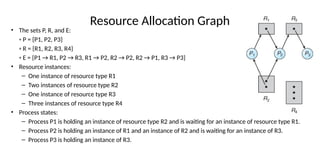
Resource Allocation Graph
• The sets P, R, and E:
◦ P = {P1, P2, P3}
◦ R = {R1, R2, R3, R4}
◦ E = {P1 → R1, P2 → R3, R1 → P2, R2 → P2, R2 → P1, R3 → P3}
• Resource instances:
– One instance of resource type R1
– Two instances of resource type R2
– One instance of resource type R3
– Three instances of resource type R4
• Process states:
– Process P1 is holding an instance of resource type R2 and is waiting for an instance of resource type R1.
– Process P2 is holding an instance of R1 and an instance of R2 and is waiting for an instance of R3.
– Process P3 is holding an instance of R3.
Dr.M.Sivakumar, AP/NWC, SRMIST 89
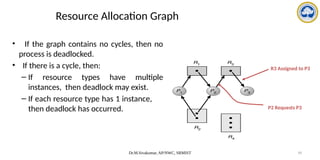
• If the graph contains no cycles, then no
process is deadlocked.
• If there is a cycle, then:
– If resource types have multiple
instances, then deadlock may exist.
– If each resource type has 1 instance,
then deadlock has occurred.
Resource Allocation Graph
P2 Requests P3
R3 Assigned to P3
Dr.M.Sivakumar, AP/NWC, SRMIST 90
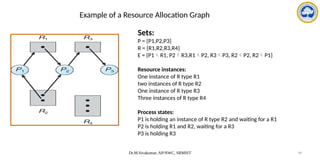
Example of a Resource Allocation Graph
Sets:
P = {P1,P2,P3}
R = {R1,R2,R3,R4}
E = {P1R1, P2R3,R1P2, R3P3, R2P2, R2P1}
Resource instances:
One instance of R type R1
two instances of R type R2
One instance of R type R3
Three instances of R type R4
Process states:
P1 is holding an instance of R type R2 and waiting for a R1
P2 is holding R1 and R2, waiting for a R3
P3 is holding R3
Dr.M.Sivakumar, AP/NWC, SRMIST 91
DEADLOCKS
• If Graph contains no cycles, then no process in the system is deadlocked
• If each resource type has only one instance and there exists a cycle, then
deadlock has occurred
• cycle in a graph is both a necessary & sufficient condition for the
existence of deadlock
• If each resource type has several instances and there exists a cycle, then it
does not necessarily imply that a deadlock has occurred
• cycle in a graph is a necessary but not sufficient condition for the
existence of deadlock
Dr.M.Sivakumar, AP/NWC, SRMIST 92
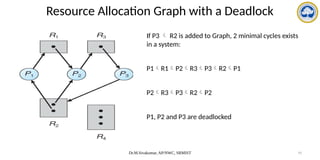
Resource Allocation Graph with a Deadlock
If P3  R2 is added to Graph, 2 minimal cycles exists
in a system:
P1R1P2R3P3R2P1
P2R3P3R2P2
P1, P2 and P3 are deadlocked
Dr.M.Sivakumar, AP/NWC, SRMIST 93
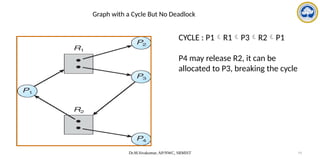
Graph with a Cycle But No Deadlock
CYCLE : P1R1P3R2P1
P4 may release R2, it can be
allocated to P3, breaking the cycle
Dr.M.Sivakumar, AP/NWC, SRMIST 94
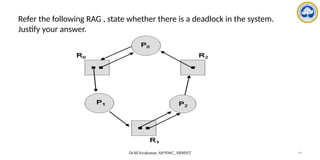
Refer the following RAG , state whether there is a deadlock in the system.
Justify your answer.
Dr.M.Sivakumar, AP/NWC, SRMIST 95
Basic Facts
• If graph contains no cycles  no deadlock.
• If graph contains a cycle 
–if only one instance per resource type, then deadlock.
–if several instances per resource type, possibility of deadlock.
Dr.M.Sivakumar, AP/NWC, SRMIST 96
Methods for Handling Deadlocks
• Deadlock Prevention
• Deadlock Avoidance
• Deadlock Detection & Recover
• Deadlock Ignorance
Dr.M.Sivakumar, AP/NWC, SRMIST 97
Methods for Handling Deadlocks
1. We can use a protocol to prevent or avoid deadlocks, ensuring that the
system will never enter a deadlocked state.
2. We can allow the system to enter a deadlocked state, detect it, and
recover.
3. We can ignore the problem altogether and pretend that deadlocks
never occur in the system. (Linux and Windows)
Dr.M.Sivakumar, AP/NWC, SRMIST 98
Deadlock Prevention
• For a deadlock to occur, each of the four necessary conditions must hold
• By ensuring that at least one of these conditions cannot hold, we can prevent the
occurrence of a deadlock
• Deadlock prevention provides a set of methods to ensure that at least one of the
necessary conditions cannot hold
• These methods prevent deadlocks by constraining how requests for resources
can be made
Dr.M.Sivakumar, AP/NWC, SRMIST 99
Deadlock Prevention
• Mutual Exclusion
– Sharable resources do not require mutually exclusive access and thus cannot be
involved in a deadlock
– Read-only files are a good example of a sharable resource
– If several processes attempt to open a read-only file at the same time, they can be
granted simultaneous access to the file
Dr.M.Sivakumar, AP/NWC, SRMIST 100
Deadlock Prevention
• Hold and wait
– It must be guaranteed that, whenever a process requests a resource, it does not hold
any other resources
– Two protocols:
1. It requires each process to request and be allocated all its resources before it
begins execution
2. It allows a process to request resources only when it has none. A process may
request some resources and use them before it can request any additional
resources, it must release all the resources that it is currently allocated.
Dr.M.Sivakumar, AP/NWC, SRMIST 101
Deadlock Prevention
• Example for Protocol-1
– A process that copies data from a DVD drive to a file on disk, sorts the file, and then
prints the results to a printer.
– If all resources must be requested at the beginning of the process, then the process
must initially request the DVD drive, disk file, and printer.
– It will hold the printer for its entire execution, even though it needs the printer only at
the end.
Dr.M.Sivakumar, AP/NWC, SRMIST 102
Deadlock Prevention
• Example for Protocol-2
– The process to request initially only the DVD drive and disk file.
– It copies from the DVD drive to the disk and then releases both the DVD drive and
the disk file.
– The process must then request the disk file and the printer.
– After copying the disk file to the printer, it releases these two resources and
terminates.
Dr.M.Sivakumar, AP/NWC, SRMIST 103
Deadlock Prevention
• Drawbacks of these protocols
– Resource utilization may be low
– Starvation is possible
Dr.M.Sivakumar, AP/NWC, SRMIST 104
• No Preemption
– If a process that is holding some resources requests another resource that cannot be
immediately allocated to it, then all resources currently being held are released or
preempted.
– Preempted resources are added to the list of resources for which the process is waiting.
– Process will be restarted only when it can regain its old resources, as well as the new
ones that it is requesting.
– This protocol is often applied to resources whose state can be easily saved and restored
later, such as CPU registers and memory space
Deadlock Prevention
Dr.M.Sivakumar, AP/NWC, SRMIST 105
• No Preemption (Alternative Method)
– If a process requests some resources, we first check whether they are available. If they are, we
allocate them
– If they are not, we check whether they are allocated to some other process that is waiting for
additional resources
– If so, we preempt the desired resources from the waiting process and allocate them to the
requesting process
– If the resources are neither available nor held by a waiting process, the requesting process must
wait
– While it is waiting, some of its resources may be preempted, but only if another process requests
them
– A process can be restarted only when it is allocated the new resources it is requesting and
recovers any resources that were preempted while it was waiting
Deadlock Prevention
Dr.M.Sivakumar, AP/NWC, SRMIST 106
• Circular Wait
– To ensure that this condition never holds is to impose a total ordering of all resource
types and to require that each process requests resources in an increasing order of
enumeration
– Let R = {R1, R2, ..., Rm} be the set of resource types
– Define a one-to-one function, F: R→N, where N is the set of natural numbers
– For example, if the set of resource types R includes tape drives, disk drives, and printers,
then the function F might be defined as follows:
F(tape drive) = 1
F(disk drive) = 5
F(printer) = 12
Deadlock Prevention
Dr.M.Sivakumar, AP/NWC, SRMIST 107
• Circular Wait
– Now consider the following protocol to prevent deadlocks:
• Each process can request resources only in an increasing order of enumeration
• That is, a process can initially request any number of instances of a resource type —
say, Ri. After that, the process can request instances of resource type Rj if and only if
F(Rj ) > F(Ri )
• For example, using the function a process that wants to use the tape drive and printer
at the same time must first request the tape drive and then request the printer
• Alternatively, we can require that a process requesting an instance of resource type Rj
must have released any resources Ri such that F(Ri ) ≥ F(Rj )
Deadlock Prevention
Dr.M.Sivakumar, AP/NWC, SRMIST 108
Drawbacks of Deadlock Prevention
• Low device utilization
• Reduced system throughput
Dr.M.Sivakumar, AP/NWC, SRMIST 109
Deadlock Avoidance
• Safe State
• Resource Allocation Graph Algorithm (variant)
• Banger’s Algorithm
Dr.M.Sivakumar, AP/NWC, SRMIST 110
Deadlock Avoidance
• Each process declare the maximum number of resources of each type that it may need
• The deadlock-avoidance algorithm dynamically examines the resource-allocation state to
ensure that there can never be a circular-wait condition
• Resource-allocation state is defined by the number of available and allocated resources, and
the maximum demands of the processes
Requires that the system has some additional information about how resources are to be
requested.
For each request, the system should consider:
• resources currently available
• resources currently allocated to each process and
• future request and release of each process
• to decide whether the current request can be satisfied or must wait to avoid deadlock
Dr.M.Sivakumar, AP/NWC, SRMIST 111
For example
• In a system with 1 tape drive and 1 printer, the system might need to
know that process P will request first the tape drive and then the printer
before releasing both resources, whereas process Q will request first
the printer and then the tape drive.
• With this knowledge of the complete sequence of requests and
releases for each process, the system can decide for each request
whether or not the process should wait in order to avoid a possible
future deadlock
Dr.M.Sivakumar, AP/NWC, SRMIST 112
1. Safe State
• When a process requests an available resource, system must decide if immediate allocation
leaves the system in a safe state
• System is in safe state if there exists a safe sequence <P1, P2, …, Pn> of ALL the processes
For each Pi, the resources that Pi can still request can be satisfied by
currently available resources + resources held by all the Pj, with i > j
• That is:
– If Pi resource needs are not immediately available, then Pi can wait until all Pj have finished
– When Pj is finished, Pi can obtain needed resources, execute, return allocated resources, and
terminate
– When Pi terminates, Pi +1 can obtain its needed resources, and so on
If no safe sequence exists, then the system state is said to be unsafe state (deadlock sate)
Dr.M.Sivakumar, AP/NWC, SRMIST 113
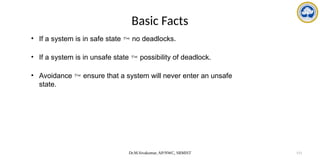
Basic Facts
• If a system is in safe state  no deadlocks.
• If a system is in unsafe state  possibility of deadlock.
• Avoidance  ensure that a system will never enter an unsafe
state.
Dr.M.Sivakumar, AP/NWC, SRMIST 114
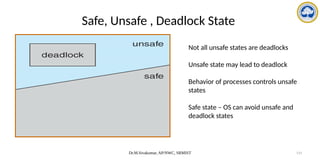
Safe, Unsafe , Deadlock State
Not all unsafe states are deadlocks
Unsafe state may lead to deadlock
Behavior of processes controls unsafe
states
Safe state – OS can avoid unsafe and
deadlock states
Dr.M.Sivakumar, AP/NWC, SRMIST 115
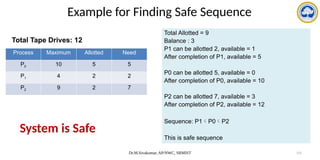
Example for Finding Safe Sequence
Total Tape Drives: 12
Process Maximum Allotted Need
P0 10 5 5
P1 4 2 2
P2 9 2 7
Total Allotted = 9
Balance : 3
P1 can be allotted 2, available = 1
After completion of P1, available = 5
P0 can be allotted 5, available = 0
After completion of P0, available = 10
P2 can be allotted 7, available = 3
After completion of P2, available = 12
Sequence: P1P0P2
This is safe sequence
System is Safe
Dr.M.Sivakumar, AP/NWC, SRMIST 116
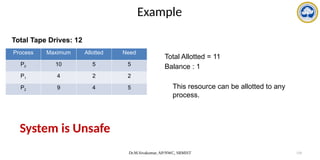
Example
Total Tape Drives: 12
Process Maximum Allotted Need
P0 10 5 5
P1 4 2 2
P2 9 4 5
System is Unsafe
Total Allotted = 11
Balance : 1
This resource can be allotted to any
process.
Dr.M.Sivakumar, AP/NWC, SRMIST 117
2. Resource Allocation Graph Algorithm
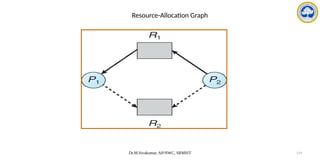
• Claim edge Pi Rj indicated that process Pi may request resource Rj at some time
in future; represented by a dashed line.
• When a process requests a resource, the Claim edge is converted to request edge
• Request edge converted to an assignment edge when the resource is allocated to
the process.
• When a resource is released by a process, assignment edge reconverted to a
claim edge.
• Resources must be claimed a priori in the system (before process starts executing,
all its claim edges must appear in RAG)
Dr.M.Sivakumar, AP/NWC, SRMIST 118
Resource Allocation Graph Algorithm
• Allow the claim edge( )to be added to the graph only if all the edges associated
with the process are claim edges
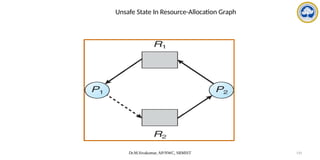
• Pi requests Rj and it is granted only if converting the request edge Pi Rj to an
assignment edge RjPi does not result in the formation of a cycle in RAG
• Check for safety by using a cycle detection algorithm (requires an order of n2
operations, where n is the number of processes in the system)
• If no cycle in a graph, allocation of resource will leave the system in safe state
else allocation will put the system in an unsafe state, therefore the process will
have to wait for its requests to be satisfied
Dr.M.Sivakumar, AP/NWC, SRMIST 119
Resource-Allocation Graph
Dr.M.Sivakumar, AP/NWC, SRMIST 120
Unsafe State In Resource-Allocation Graph
Dr.M.Sivakumar, AP/NWC, SRMIST 121
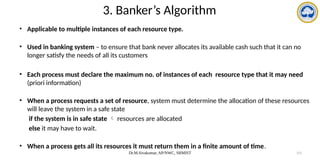
3. Banker’s Algorithm
• Applicable to multiple instances of each resource type.
• Used in banking system – to ensure that bank never allocates its available cash such that it can no
longer satisfy the needs of all its customers
• Each process must declare the maximum no. of instances of each resource type that it may need
(priori information)
• When a process requests a set of resource, system must determine the allocation of these resources
will leave the system in a safe state
if the system is in safe state  resources are allocated
else it may have to wait.
• When a process gets all its resources it must return them in a finite amount of time.
Dr.M.Sivakumar, AP/NWC, SRMIST 122
Data Structures for the Banker’s Algorithm
• Available: Vector of length m. If available [j] = k, there are k instances of resource type
Rj available.
• Max: n x m matrix. If Max [i,j] = k, then process Pi may request at most k instances of
resource type Rj.
• Allocation: n x m matrix. If Allocation[i,j] = k then Pi is currently allocated k instances
of Rj.
• Need: n x m matrix. If Need[i,j] = k, then Pi may need k more instances of Rj to
complete its task.
Need [i,j] = Max[i,j] – Allocation [i,j].
To encode the state of Resource Allocation
Let n = number of processes, and m = number of resources types.
Dr.M.Sivakumar, AP/NWC, SRMIST 123
• Data structures – vary over time in both size and value
• To simplify the process of banker’s alg.
X,Y  vectors of length n
X<=Y only if X[i] <= Y[i] for all i=1,2…n
• Treat each row in the matrices Allocation and Need as vectors namely,
Allocationi – resources currently allocated to Pi
Needi – additional resource that Pi may still request to complete its task
Dr.M.Sivakumar, AP/NWC, SRMIST 124
Safety Algorithm
1. Let Work and Finish be vectors of length m and n, respectively.
Initialize: Work = Available and Finish [i] = false for i = 0, 1, …, n- 1.
2. Find an index i such that both:
(a) Finish [i] == false
(b) Needi  Work
If no such i exists, go to step 4.
3. Work = Work + Allocationi
Finish[i] = true
go to step 2.
4. If Finish [i] == true for all i, then the system is in a safe state.
Safety algorithm may require an order of mxn2
operations to decide whether a state is safe
Dr.M.Sivakumar, AP/NWC, SRMIST 125
Resource-Request Algorithm for Process Pi
Requesti = request vector for process Pi.
If Requesti [j] = k then process Pi wants k instances of resource type Rj.
• If safe  the resources are allocated to Pi.
• If unsafe  Pi must wait, and the old resource-allocation state is restored
Dr.M.Sivakumar, AP/NWC, SRMIST 126
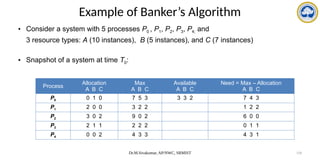
Example of Banker’s Algorithm
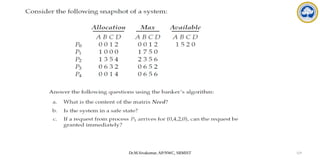
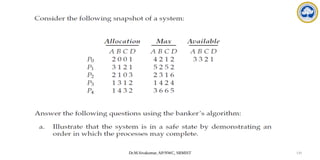
• Consider a system with 5 processes P0 , P1, P2, P3, P4; and
3 resource types: A (10 instances), B (5 instances), and C (7 instances)
• Snapshot of a system at time T0:
Process
Allocation
A B C
Max
A B C
Available
A B C
Need = Max – Allocation
A B C
P0 0 1 0 7 5 3 3 3 2 7 4 3
P1 2 0 0 3 2 2 1 2 2
P2 3 0 2 9 0 2 6 0 0
P3 2 1 1 2 2 2 0 1 1
P4 0 0 2 4 3 3 4 3 1
Dr.M.Sivakumar, AP/NWC, SRMIST 127
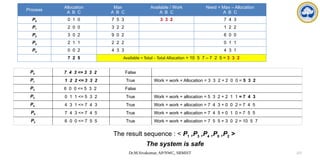
The result sequence : < P1 ,P3 ,P4 ,P0 ,P2 >
The system is safe
P0 7 4 3 <= 3 3 2 False
P1 1 2 2 <= 3 3 2 True Work = work + Allocation = 3 3 2 + 2 0 0 = 5 3 2
P2 6 0 0 <= 5 3 2 False
P3 0 1 1 <= 5 3 2 True Work = work + allocation = 5 3 2 + 2 1 1 = 7 4 3
P4 4 3 1 <= 7 4 3 True Work = work + allocation = 7 4 3 + 0 0 2 = 7 4 5
P0 7 4 3 <= 7 4 5 True Work = work + allocation = 7 4 5 + 0 1 0 = 7 5 5
P2 6 0 0 <= 7 5 5 True Work = work + allocation = 7 5 5 + 3 0 2 = 10 5 7
Process
Allocation
A B C
Max
A B C
Available / Work
A B C
Need = Max – Allocation
A B C
P0 0 1 0 7 5 3 3 3 2 7 4 3
P1 2 0 0 3 2 2 1 2 2
P2 3 0 2 9 0 2 6 0 0
P3 2 1 1 2 2 2 0 1 1
P4 0 0 2 4 3 3 4 3 1
7 2 5 Available = Total – Total Allocation = 10 5 7 – 7 2 5 = 3 3 2
Dr.M.Sivakumar, AP/NWC, SRMIST 128
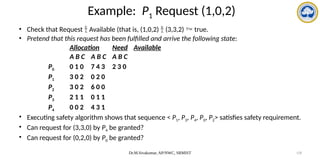
Example: P1 Request (1,0,2)
• Check that Request  Available (that is, (1,0,2)  (3,3,2)  true.
• Pretend that this request has been fulfilled and arrive the following state:
Allocation Need Available
A B C A B C A B C
P0 0 1 0 7 4 3 2 3 0
P1 3 0 2 0 2 0
P2 3 0 2 6 0 0
P3 2 1 1 0 1 1
P4 0 0 2 4 3 1
• Executing safety algorithm shows that sequence < P1, P3, P4, P0, P2> satisfies safety requirement.
• Can request for (3,3,0) by P4 be granted?
• Can request for (0,2,0) by P0 be granted?
Dr.M.Sivakumar, AP/NWC, SRMIST 129
Dr.M.Sivakumar, AP/NWC, SRMIST 130
Dr.M.Sivakumar, AP/NWC, SRMIST 131
Deadlock Detection
• Allow system to enter deadlock state
• Detection algorithm – examines the state of a system to determine whether a deadlock
has occurred
• Recovery scheme
Detection and recovery scheme – requires overhead i.e.,
1) runtime costs of maintaining necessary information and executing detection algorithm
2) Potential losses in recovering from a deadlock
Dr.M.Sivakumar, AP/NWC, SRMIST 132
Single Instance of Each Resource Type
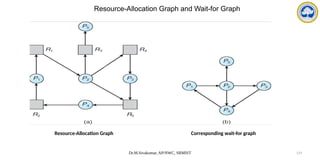
• Maintain wait-for graph (variant of RAG)
– Obtained from RAG by removing the nodes of resource and collapsing the appropriate
edges
– Nodes are processes.
– Pi  Pj if Pi is waiting for Pj to release R that Pi needs.
– Pi  Pj exists if and only if the RAG contains 2 edges PiRq and RqPj
• Periodically invoke an algorithm that searches for a cycle in the graph. If there is a cycle,
there exists a deadlock.
• An algorithm to detect a cycle in a graph requires an order of n2
operations, where n is the
number of vertices in the graph.
Dr.M.Sivakumar, AP/NWC, SRMIST 133
Resource-Allocation Graph and Wait-for Graph
Resource-Allocation Graph Corresponding wait-for graph
Dr.M.Sivakumar, AP/NWC, SRMIST 134
Several Instances of a Resource Type
• Available: A vector of length m indicates the number of available resources of each
type.
• Allocation: An n x m matrix defines the number of resources of each type currently
allocated to each process.
• Request: An n x m matrix indicates the current request of each process. If Request
[ij] = k, then process Pi is requesting k more instances of resource type. Rj.
Dr.M.Sivakumar, AP/NWC, SRMIST 135
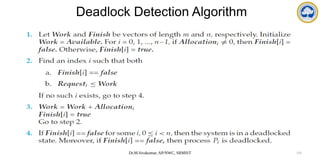
Deadlock Detection Algorithm
Dr.M.Sivakumar, AP/NWC, SRMIST 136
Example of Detection Algorithm
• Five processes P0 through P4;three resource types
A = 7 instances, B = 2 instances, and C =6 instances
• Snapshot at time T0:
Allocation Request Available
A B C A B C A B C
P0 0 1 0 0 0 0 0 0 0
P1 2 0 0 2 0 2
P2 3 0 3 0 0 0
P3 2 1 1 1 0 0
P4 0 0 2 0 0 2
• Sequence <P0, P2, P3, P1, P4> will result in Finish[i] = true for all i.
Dr.M.Sivakumar, AP/NWC, SRMIST 137
Example (Cont.)
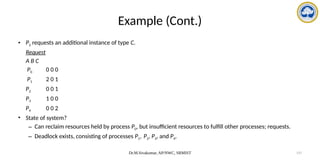
• P2 requests an additional instance of type C.
Request
A B C
P0 0 0 0
P1 2 0 1
P2 0 0 1
P3 1 0 0
P4 0 0 2
• State of system?
– Can reclaim resources held by process P0, but insufficient resources to fulfill other processes; requests.
– Deadlock exists, consisting of processes P1, P2, P3, and P4.
Dr.M.Sivakumar, AP/NWC, SRMIST 138
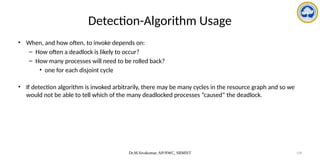
Detection-Algorithm Usage
• When, and how often, to invoke depends on:
– How often a deadlock is likely to occur?
– How many processes will need to be rolled back?
• one for each disjoint cycle
• If detection algorithm is invoked arbitrarily, there may be many cycles in the resource graph and so we
would not be able to tell which of the many deadlocked processes “caused” the deadlock.
Dr.M.Sivakumar, AP/NWC, SRMIST 139
Recovery from Deadlock
1. Process Termination
2. Resource Preemption
Dr.M.Sivakumar, AP/NWC, SRMIST 140
Recovery from Deadlock: 1) Process Termination
• Abort all deadlocked processes.
• Abort one process at a time until the deadlock cycle is eliminated.
• Disadvantages:
1. Considerable overhead, since after each process is aborted, a deadlock detection
algorithm must be invoked
2. When the process is in middle of updating a file and it is terminated, then the file is in
incorrect state
Which process should be terminated?
- process which incur minimum cost
Dr.M.Sivakumar, AP/NWC, SRMIST 141
• Factors to select the process for termination and In which order should we choose
to abort?
– Priority of the process.
– How long process has computed, and how much longer to completion?
– How many Resources and what type of resources the process has used?
– How many resources the process needs to complete?
– How many processes will need to be terminated?
– Is process interactive or batch?
Dr.M.Sivakumar, AP/NWC, SRMIST 142
Recovery from Deadlock: 2) Resource Preemption
• Preempt some resources from processes and gives resources to other processes until the
deadlock cycle is broken
3 issues need to be addressed:
1) Selecting a victim – which resource? and from which process?
- to minimize cost
cost includes the factors such as
a) no. of resources a deadlock process is holding
b) amount of time a deadlocked process has consumed the resources?
2) Rollback – return to some safe state, restart process for that state.
Difficulty – What a safe state is?
Solution – total rollback, Abort the process and then restart
3) Starvation – same process may always be picked as victim
We must ensure that a process can be picked as a victim only a (small) finite number of times
Common solution – include the no. of roll backs in the cost factor.

Operating Systems CPU Scheduling and its Algorithms

  • 1.
    Operating Systems CPU Scheduling PreparedBy Dr.M.Sivakumar Assistant Professor Department of Networking and Communications SRM Institute of Science and Technology, Kattankulathur
  • 2.
    CPU Scheduling • BasicConcepts, Scheduling Criteria • Scheduling Algorithms, • Thread Scheduling • Multiple-Processor Scheduling, • Real-Time CPU Scheduling. • Deadlocks: System Model, Deadlock Characterization, • Methods for Handling Deadlocks, Deadlock Prevention, Deadlock Avoidance, Deadlock Detection, Recovery from Deadlock
  • 3.
    Dr.M.Sivakumar, AP/NWC, SRMIST3 Basic Concepts • What is CPU Scheduling? – Process of selecting a process from the ready queue and allocating to the CPU for execution • Optimize the use of the CPU by minimizing the average response time, maximizing throughput • CPU–I/O Burst Cycle – Process execution consists of a cycle of CPU execution and I/O wait • CPU burst distribution
  • 4.
    Dr.M.Sivakumar, AP/NWC, SRMIST4 Alternating Sequence of CPU And I/O Bursts
  • 5.
    Dr.M.Sivakumar, AP/NWC, SRMIST5 CPU Scheduler • Selects from among the processes in memory that are ready to execute, and allocates the CPU to one of them • CPU scheduling decisions may take place when a process: 1.Switches from running to waiting state 2.Switches from running to ready state 3.Switches from waiting to ready 4.Terminates • Scheduling under 1 and 4 is nonpreemptive • All other scheduling is preemptive
  • 6.
    Dr.M.Sivakumar, AP/NWC, SRMIST6 Preemptive vs non-preemptive scheduling PREEMPTIVE SCHEDULING NON-PREEMPTIVE SCHEDULING In this resources(CPU Cycle) are allocated to a process for a limited time. Once resources(CPU Cycle) are allocated to a process, the process holds it till it completes its burst time or switches to waiting state. Process can be interrupted in between. Process can not be interrupted until it terminates itself or its time is up. If a process having high priority frequently arrives in the ready queue, a low priority process may starve. If a process with a long burst time is running CPU, then later coming process with less CPU burst time may starve. It has overheads of scheduling the processes. It does not have overheads.
  • 7.
    Dr.M.Sivakumar, AP/NWC, SRMIST7 Dispatcher • The dispatcher is the module that gives control of the CPUto the process selected by the short-term scheduler. • This function involves the following: – Switching context – Switching to user mode – Jumping to the proper location in the user program to restart that program The scheduler decides which process should be executed next, while the dispatcher performs the necessary actions to switch the CPU to that process
  • 8.
    Dr.M.Sivakumar, AP/NWC, SRMIST8 Scheduling Criteria • keep the CPU as busy as possible CPU utilization • # of processes that complete their execution per time unit Throughput • amount of time to execute a particular process Turnaround time • amount of time a process has been waiting in the ready queue Waiting time • amount of time it takes from when a request was submitted until the first response is produced, not output (for time-sharing environment) Response time
  • 9.
    Dr.M.Sivakumar, AP/NWC, SRMIST9 Key terms to understand different algorithms Arrival Time Time at which any process arrives in ready queue. Burst Time Time required by CPU for execution of a process. It is also called as Running Time or Execution Time. Completion Time Time at which process completes execution. Turn Around Time Time difference between Completion Time and Arrival Time (Completion Time - Arrival Time) Waiting Time Time difference between Turn Around Time and Burst Time (Turn Around Time - Burst Time) Response Time Time after which any process gets CPU after entering the ready queue
  • 10.
    Dr.M.Sivakumar, AP/NWC, SRMIST10 Example PROCESS ARRIVAL TIME BURST TIME WAITING TIME TURN AROUND TIME (BURST TIME +WATING TIME) P1 1 7 0 7 P2 3 3 4 7 P3 6 2 4 6 P4 7 10 5 15 P5 9 8 13 21
  • 11.
    Dr.M.Sivakumar, AP/NWC, SRMIST11 Scheduling Algorithms 1. First-Come, First-Served Scheduling 2. Shortest-Job-First Scheduling 3. Priority Scheduling 4. Round-Robin Scheduling 5. Multilevel Queue Scheduling 6. Multilevel Feedback Queue Scheduling
  • 12.
    Dr.M.Sivakumar, AP/NWC, SRMIST12 CPU Scheduling Algorithms 1. First-Come, First-Served Scheduling 2. Shortest-Job-First Scheduling 3. Priority Scheduling 4. Round-Robin Scheduling 5. Multilevel Queue Scheduling 6. Multilevel Feedback Queue Scheduling
  • 13.
    Dr.M.Sivakumar, AP/NWC, SRMIST13 Scheduling Algorithms 1. First-Come, First-Served (FCFS): The CPU executes the processes in the order they arrive. 2. Shortest Job First (SJF): The CPU executes the process with the shortest burst time first. 3. Round Robin (RR): The CPU executes each process for a fixed time slice, and then switches to the next process in a circular order. 4. Priority Scheduling: The CPU executes the process with the highest priority first. 5. Multilevel Queue: The processes are divided into different queues based on their priority, and each queue has its own scheduling algorithm. 6. Multilevel Feedback Queue: Similar to multilevel queue, but with the added feature that processes can move between queues based on their behavior.
  • 14.
    Dr.M.Sivakumar, AP/NWC, SRMIST14 First-Come, First-Served (FCFS) Scheduling • Simplest CPU-scheduling algorithm • The process that requests the CPU first is allocated the CPU first • When a process enters the ready queue, its PCB is linked onto the tail of the queue • When the CPU is free, it is allocated to the process at the head of the queue • The running process is then removed from the queue • Drawbacks: – the average waiting time under the FCFS policy is often quite long
  • 15.
    Dr.M.Sivakumar, AP/NWC, SRMIST15 FCFS Example • Consider the following set of processes that arrive at time 0, with the length of the CPU burst given in milliseconds • If the processes arrive in the order P1, P2, P3, and are served in FCFS order and the Gantt Chart for the schedule is: • The waiting time for P1= 0 ms, P2= 24 ms, and P3=27 ms • The average waiting time = (0 + 24 + 27)/3 = 17 ms
  • 16.
    Dr.M.Sivakumar, AP/NWC, SRMIST16 FCFS Example Suppose that the processes arrive in the order P2 , P3 , P1 • The Gantt chart for the schedule is: • Waiting time for P1 = 6;P2 = 0; P3 = 3 • Average waiting time: (6 + 0 + 3)/3 = 3 • Much better than previous case • Convoy effect short process behind long process
  • 17.
    • Suppose thatthe following processes arrive for execution at the times indicated. Each process will run for the amount of time listed. In answering the questions, use nonpreemptive scheduling, and base all decisions on the information you have at the time the decision must be made. What is the average waiting time for these processes with the FCFS scheduling algorithm?
  • 18.
    Dr.M.Sivakumar, AP/NWC, SRMIST18 Shortest-Job-First (SJF) Scheduling • Associate with each process the length of its next CPU burst. Use these lengths to schedule the process with the shortest time • Two schemes: – nonpreemptive – once CPU given to the process it cannot be preempted until completes its CPU burst – preemptive – if a new process arrives with CPU burst length less than remaining time of current executing process, preempt. This scheme is know as the Shortest-Remaining-Time-First (SRTF) • SJF is optimal – gives minimum average waiting time for a given set of processes
  • 19.
    Dr.M.Sivakumar, AP/NWC, SRMIST19 Process Arrival Time Burst Time P1 0.0 7 P2 2.0 4 P3 4.0 1 P4 5.0 4 • SJF (non-preemptive) • Average waiting time = ((0-0) + (8-2) + (7-4) + (12-5))/4 = (0+ 6 + 3 + 7 ) /4 = 16 / 4 = 4 Example of Non-Preemptive SJF P1 P3 P2 7 3 16 0 P4 8 12
  • 20.
    Dr.M.Sivakumar, AP/NWC, SRMIST20 Example of Preemptive SJF Process Arrival Time Burst Time P1 0.0 7 P2 2.0 4 P3 4.0 1 P4 5.0 4 • SJF (preemptive) • Average waiting time = ((11-2-0)+(5-2-2)+(4-4)+(7-5)) / 4 =(9+ 1+ 0 +2)/4 = 3 P1 P3 P2 4 2 11 0 P4 5 7 P2 P1 16
  • 21.
    Dr.M.Sivakumar, AP/NWC, SRMIST21 Example Preemptive SJF • consider the following four processes, with the length of the CPU burst given in milliseconds: • preemptive SJF schedule is as depicted in the following Gantt chart: • The average waiting time = [(10-1-0) + (1-1) + (17-2) + (5-3)] / 4 = (9+0+15+2)/4 = 26/4 = 6.5 ms
  • 22.
    Dr.M.Sivakumar, AP/NWC, SRMIST22 Priority Scheduling • A priority number (integer) is associated with each process • The CPU is allocated to the process with the highest priority (smallest integer  highest priority) – Preemptive – nonpreemptive • SJF is a priority scheduling where priority is the predicted next CPU burst time • Problem  Starvation – low priority processes may never execute • Solution  Aging – as time progresses increase the priority of the process
  • 23.
    Dr.M.Sivakumar, AP/NWC, SRMIST23 Example for Priority Scheduling • consider the following set of processes, assumed to have arrived at time 0 in the order P1, P2, · · ·, P5, with the length of the CPU burst given in milliseconds: • Using priority scheduling, we would schedule these processes according to the following Gantt chart: • Average waiting time = (0+1+6+16+18)/5 = 8.2 ms
  • 24.
    Dr.M.Sivakumar, AP/NWC, SRMIST24 Round Robin Scheduling • Each process gets a small unit of CPU time (time quantum), usually 10-100 milliseconds. After this time has elapsed, the process is preempted and added to the end of the ready queue. • If there are n processes in the ready queue and the time quantum is q, then each process gets 1/n of the CPU time in chunks of at most q time units at once. No process waits more than (n- 1)q time units. • Performance – q large  FIFO – q small  q must be large with respect to context switch, otherwise overhead is too high
  • 25.
    Dr.M.Sivakumar, AP/NWC, SRMIST25 Example of RR with Time Quantum = 20 Process Burst Time Cycle-1 Cycle2 Cycle3 P1 53 33 13 - P2 17 - - - P3 68 48 28 8 P4 24 4 - - • The Gantt chart is: • P1=0+(77-20)+(121-97)= 81 ; P2=20; P3=37+(97-57)+(134-117)= 94 ; P4= 57+(117-77)=97 • Typically, higher average turnaround than SJF, but better response P1 P2 P3 P4 P1 P3 P4 P1 P3 P3 0 20 37 57 77 97 117 121 134 154 162
  • 26.
    Dr.M.Sivakumar, AP/NWC, SRMIST26 Example of RR with Time Quantum = 4 • Consider the following set of processes that arrive at time 0, with the length of the CPU burst given in milliseconds: • The resulting RR schedule is as follows: • The average waiting time = [(10-4) + 4 + 7] / 4 = 17/4 = 5.66 ms
  • 27.
    Dr.M.Sivakumar, AP/NWC, SRMIST27 Practice Exercise-01 • Suppose that the following processes arrive for execution at the times indicated. Each process will run for the amount of time listed. In answering the questions, use nonpreemptive scheduling, and base all decisions on the information you have at the time the decision must be made. • What is the average turnaround time for these processes with the FCFS scheduling algorithm? (5 Marks) • What is the average turnaround time for these processes with the SJF scheduling algorithm? (5 Marks) Turn Around Time (TAT) = Burtst Time (BT) + Waiting Time (WT) Process Arrival Time Burst Time P1 0 8 P2 4 4 P3 6 1 P4 8 2
  • 28.
    Dr.M.Sivakumar, AP/NWC, SRMIST28 Practice Exercise-02 5
  • 29.
    Dr.M.Sivakumar, AP/NWC, SRMIST29 Practice Exercise-03 • Five batch jobs. A through E, arrive at a computer center at almost the same time. They have estimated running times of 10, 6, 2, 4, and 8 minutes. Their (externally determined) priorities are 3, 5, 2, 1, and 4, respectively, with 5 being the highest priority. For each of the following scheduling algorithms, determine the mean process turnaround time. Ignore process switching overhead. (a) Round robin. (b) Priority scheduling. (c) First-come, first-served (run in order 10, 6, 2, 4, 8). (d) Shortest job first. For (a), assume that the system is multiprogrammed, and that each job gets its fair share of the CPU. For (b) through (d), assume that only one job at a time runs, until it finishes. All jobs are completely CPU bound.
  • 30.
    Dr.M.Sivakumar, AP/NWC, SRMIST30 FCFS • Draw Gantt Chart, find Waiting Time, Turn Around Time and Average Waiting Time Process Burst Time P1 5 P2 10 P3 3 P4 5 P5 2
  • 31.
    Dr.M.Sivakumar, AP/NWC, SRMIST31 SFJ (non preemptive and preemptive) • Draw Gantt Chart, find Waiting Time, Turn Around Time and Average Waiting Time Process Arrival Time Burst Time P1 0 5 P2 2 10 P3 4 3 P4 6 5 P5 7 2
  • 32.
    Dr.M.Sivakumar, AP/NWC, SRMIST32 Priority Scheduling • Draw Gantt Chart, find Waiting Time, Turn Around Time and Average Waiting Time Process Priority Burst Time P1 1 5 P2 2 10 P3 5 3 P4 3 5 P5 4 2
  • 33.
    Dr.M.Sivakumar, AP/NWC, SRMIST33 Round Robin Scheduling with Quantum time=3 • Draw Gantt Chart, find Waiting Time, Turn Around Time and Average Waiting Time Process Arrival Time Burst Time P1 0 5 P2 2 10 P3 4 3 P4 6 5 P5 7 2
  • 34.
    Dr.M.Sivakumar, AP/NWC, SRMIST34 Multilevel Queue Scheduling • A class of scheduling algorithm is created for situations in which processes are easily classified into different groups • Example Foreground Processes (Interactive) They have: Different response time requirement Different scheduling needs Background Processes (Batch)
  • 35.
    Dr.M.Sivakumar, AP/NWC, SRMIST35 Multilevel Queue Scheduling • Processes are permanently assigned to one queue based on some property of the process, such as: – Memory size – Process priority – Process type • Each queue has its own scheduling algorithm • Example – Foreground queue may be scheduled by RR algorithm and Background queue may be scheduled by FCFS algorithm • In addition, there must be a scheduling among queues, which is commonly implemented by fixed-priority preemptive scheduling
  • 36.
    Dr.M.Sivakumar, AP/NWC, SRMIST36 Example Multilevel Queue Scheduling with five queues
  • 37.
    Dr.M.Sivakumar, AP/NWC, SRMIST37 Multilevel Feedback Queue Scheduling • Multilevel feedback queue scheduling is a variation of multilevel queue scheduling • A process can move between different queues based on its behavior and history • Each queue has a different priority level • Processes are initially placed in the highest priority queue. • If a process uses too much CPU time, it may be moved to a lower priority queue • if a process waits too long in a lower priority queue, it may be moved to a higher priority queue. • This approach allows the scheduler to dynamically adjust to changing workloads and better handle both interactive and batch processes.
  • 38.
    Dr.M.Sivakumar, AP/NWC, SRMIST38 Example of Multilevel Feedback Queue Scheduling
  • 39.
    Dr.M.Sivakumar, AP/NWC, SRMIST39 • A multilevel feedback queue scheduler is defined by the following parameters: – The number of queues – The scheduling algorithm for each queue – The method used to determine when to upgrade a process to a higherpriority queue – The method used to determine when to demote a process to a lowerpriority queue – The method used to determine which queue a process will enter when that process needs service Multilevel Feedback Queue Scheduling
  • 40.
    Thread Scheduling • Whatis thread scheduling? • Contention Scope • Pthread Scheduling
  • 41.
    What is threadscheduling? • Thread scheduling is the process by which an operating system decides which thread should be executed by the CPU at any given time. • User-level threads are managed by a thread library, and the kernel is unaware of them • To run on a CPU, user-level threads must ultimately be mapped to an associated kernel- level thread, although this mapping may be indirect and may use a lightweight process (LWP).
  • 42.
    Contention Scope Contention scoperefers to the level at which threads compete for CPU resources • Process Contention scope (PCS) – Threads within the same process compete for the CPU. – associated with user-level threads, where the operating system's kernel is unaware of the individual threads. – Who schedules? The thread library (in user space) is responsible for scheduling which user thread runs on an available Lightweight Process (LWP). – Characteristics: Since only threads within the same process are competing for CPU time, this scope is limited to the process's own threads. It allows for efficient thread management within a process, but all threads in the process are ultimately mapped to one or more kernel threads. • System Contention scope (SCS) – Threads compete for CPU time across the entire system. – involves kernel-level threads, where the kernel is aware of all threads (from all processes) and can schedule them directly onto CPUs. – Who schedules? The operating system’s kernel scheduler manages the scheduling of kernel threads. – Characteristics: This type of contention is more global, as the competition for CPU time includes threads from all processes in the system. The kernel decides which thread gets CPU time, leading to more balanced and fair CPU usage across the system.
  • 43.
    Pthread Scheduling • Itrefers to how POSIX Pthreads (Portable Operating System Interface threads) allow programmers to specify whether a thread uses Process Contention Scope (PCS) or System Contention Scope (SCS) during thread creation, using the POSIX API? • Pthread Contention Scope: – PTHREAD_SCOPE_PROCESS: This value indicates that the thread will be scheduled using Process Contention Scope (PCS). In this mode, threads within the same process compete for the CPU, and the scheduling is managed by the thread library. – PTHREAD_SCOPE_SYSTEM: This value means that the thread will be scheduled using System Contention Scope (SCS). In this mode, threads compete with all threads across the entire system, and the OS kernel handles scheduling.
  • 44.
    Pthread Scheduling • Many-to-ManyModel: – In a many-to-many threading model, user-level threads are mapped to a pool of kernel-level threads, allowing flexible scheduling. – If PTHREAD_SCOPE_PROCESS is specified, user-level threads are scheduled onto available LWPs (Lightweight Processes) by the thread library. The number of LWPs is managed by the library, possibly using scheduler activations (a mechanism that enhances user-level thread management by allowing the kernel to communicate events related to thread scheduling to the user-level scheduler). – If PTHREAD_SCOPE_SYSTEM is used, each user-level thread is directly mapped to a kernel-level thread (essentially using a one-to-one model), allowing the OS to manage their scheduling directly.
  • 45.
    Pthread Scheduling • PthreadAPI Functions: pthread_attr_setscope(pthread_attr_t *attr, int scope) This function sets the contention scope for a thread. You pass a pointer to the thread attribute object and specify either PTHREAD_SCOPE_SYSTEM or PTHREAD_SCOPE_PROCESS to indicate whether the thread should use SCS or PCS, respectively. pthread_attr_getscope(pthread_attr_t *attr, int *scope) This function retrieves the current contention scope of a thread. The scope parameter points to an int variable that will hold the current contention scope value. • Both functions return a nonzero value if an error occurs.
  • 46.
    Pthread scheduling API #include<pthread.h> #include <stdio.h> #define NUM THREADS 5 int main(int argc, char *argv[]) { int i, scope; pthread t tid[NUM THREADS]; pthread attr t attr; /* get the default attributes */ pthread attr init(&attr); /* first inquire on the current scope */ if (pthread attr getscope(&attr, &scope) != 0) fprintf(stderr, "Unable to get scheduling scopen"); else { if (scope == PTHREAD SCOPE PROCESS) printf("PTHREAD SCOPE PROCESS"); else if (scope == PTHREAD SCOPE SYSTEM) printf("PTHREAD SCOPE SYSTEM"); else fprintf(stderr, "Illegal scope value.n"); } /* set the scheduling algorithm to PCS or SCS */ pthread attr setscope(&attr, PTHREAD SCOPE SYSTEM); /* create the threads */ for (i = 0; i < NUM THREADS; i++) pthread create(&tid[i],&attr,runner,NULL); /* now join on each thread */ for (i = 0; i < NUM THREADS; i++) pthread join(tid[i], NULL); } /* Each thread will begin control in this function */ void *runner(void *param) { /* do some work ... */ pthread exit(0); }
  • 47.
    Multiple-Processor Scheduling • Whatis multiple-processor scheduling? • Approaches to Multiple-Processor Scheduling • Processor Affinity • Load Balancing • Multicore Processors
  • 48.
    What is multiple-processorscheduling? • In multiple-processor scheduling, we deal with the challenge of scheduling CPU tasks when there is more than one processor in a system. • While having multiple CPUs allows for load sharing—where tasks can be distributed across different processors to improve efficiency—this also introduces complexity in scheduling.
  • 49.
    Approaches to Multiple-ProcessorScheduling • Asymmetric Multiprocessing (AMP) – only one processor—the master processor—handles all system- level activities, such as scheduling decisions, I/O processing, and managing system data structures. – The other processors are slave processors, which only execute user-level code. • Symmetric Multiprocessing (SMP) – All processors are self-scheduling and share the responsibility for system tasks, including scheduling decisions and I/O processing. – Each processor can access the shared ready queue of processes or maintain its own private queue. Virtually all modern operating systems support SMP, including Windows, Linux, and Mac OS X.
  • 50.
    Processor Affinity • Ifa process P1 runs on CPU 1 and completes its execution partially, when it needs to run again, the operating system may try to schedule it on CPU 1 again (soft affinity). • This is because CPU 1 may still have relevant data in its cache, making it faster for the process to resume. • However, if CPU 1 is busy, the process could be moved to another CPU (breaking soft affinity). • In Linux, soft affinity is implemented by default, meaning the OS will try to keep processes running on the same CPU. However, the system call sched_setaffinity() can be used to enforce hard affinity, binding a process to a specific processor or a set of processors.
  • 51.
    Processor Affinity • Inmultiprocessor systems, processor affinity refers to the preference of keeping a process running on the same processor to enhance performance, especially in relation to cache memory. • When a process runs on a specific processor, the most recently accessed data by that process are stored in the processor's cache. As a result, the next time the process needs to access memory, it can often retrieve data directly from the cache, speeding up execution. • Cache Memory Impact: – Cache Invalidation: When a process migrates from one processor to another, the cache on the first processor, which holds the data of the process, becomes invalid (useless), as the process is no longer running on that processor. – Cache Repopulation: The new processor, to which the process is migrated, must now repopulate its cache with the process's data. This requires fetching the data from main memory, which is much slower compared to accessing it from the cache.
  • 52.
    Types of ProcessorAffinity • Soft Affinity – the operating system will try to keep a process running on the same processor to benefit from cached data, but it does not guarantee that the process won’t be migrated to another processor if necessary. – Flexibility: While the system attempts to maintain the process on the same processor, it may migrate the process to another processor when required, such as when there’s an imbalance in the load across processors. • Hard Affinity: – allows a process to be restricted to a specific processor or a group of processors, ensuring that it will not migrate to another processor unless explicitly allowed. – System Calls: Some systems, like Linux, provide support for hard affinity through system calls, such as sched_setaffinity(). This allows the process to specify which processors it is allowed to run on.
  • 53.
    NUMA and ProcessorAffinity • In NUMA systems: • Faster Access to Local Memory: A CPU can access memory that is physically close to it (on the same board) faster than memory that is farther away (on a different board). This leads to non-uniform memory access times. • NUMA-Aware Scheduling: In such systems, it is beneficial for the operating system’s scheduler to not only maintain processor affinity but also allocate memory for a process on the board where the CPU resides. This ensures that the process benefits from both processor affinity and faster memory access. Processor affinity issues are particularly important in systems with Non-Uniform Memory Access (NUMA) architecture.
  • 54.
    Load Balancing • InSMP (Symmetric Multiprocessing) systems, where multiple processors are involved, load balancing is essential to ensure that all processors are fully utilized. • Without balancing, some processors might be idle while others are overloaded with tasks, leading to inefficiency. • Load balancing aims to distribute the workload evenly across all processors. • Two Approaches – Push Migration: A specific task checks all processors periodically and redistributes the load by moving tasks from busy processors to less busy or idle ones. It's a proactive method of balancing. – Pull Migration: When a processor becomes idle, it actively pulls tasks from a busy processor. This is a reactive way of ensuring all processors are kept busy. • In Linux, the scheduler periodically checks for load imbalances using both push and pull migration strategies. If a processor is overloaded, processes may be pushed to other processors, while idle processors can pull tasks from the queues of busy processors to balance the load.
  • 55.
    Multicore Processors • Multipleprocessor cores on the same physical chip • Each core maintains its architectural state and thus appears to the operating system to be a separate physical processor. • Memory stall: when a processor accesses memory, it spends a significant amount of time waiting for the data to become available • To remedy this situation, many recent hardware designs have implemented multithreaded processor cores in which two (or more) hardware threads are assigned to each core. • if one thread stalls while waiting for memory, the core can switch to another thread.
  • 56.
    Multicore Processors • Twoways to multithread a processing core: – Coarsegrained : a thread executes on a processor until a long-latency event such as a memory stall occurs – Fine-grained multithreading: switches between threads at a much finer level of granularity • A multicore processor requires two levels of scheduling: – Operating System Scheduling: The OS interacts with the hardware to schedule threads across different logical processors, ensuring that processes and threads are effectively managed according to their priorities and workload. – Hardware Thread Scheduling: This level involves managing which hardware thread runs on each core.
  • 57.
  • 58.
    Dr.M.Sivakumar, NWC,SRMIST Topics • Whatare real time systems? • What is Real Time CPU Scheduling? • Minimizing Latency • Types – Priority-Based Scheduling – Rate-Monotonic Scheduling – Earliest-Deadline-First Scheduling – Proportional Share Scheduling – POSIX Real-Time Scheduling
  • 59.
    Dr.M.Sivakumar, NWC,SRMIST What arereal time systems? • Real-time systems are computer systems designed to perform tasks and respond to events within a strict timing constraint. • Examples – Automotive Systems: • Anti-lock braking systems (ABS) • Airbag control systems • Engine control units (ECU) – Industrial Control Systems: • Robotic assembly lines • Process control systems in chemical plants • Telecommunications: • Network routers and switches • Voice-over-IP (VoIP) systems • Healthcare: • Patient monitoring systems • Medical imaging devices • Aerospace and Defense: • Flight control systems • Missile guidance systems
  • 60.
    Dr.M.Sivakumar, NWC,SRMIST Real TimeOperating Systems (RTOS) • A specialized operating system designed to manage hardware resources, run applications, and process data in real-time, ensuring that tasks are completed within specific time constraints. • Types – Hard Real-Time Operating Systems • Guarantees that critical tasks will be completed within strict deadlines. • Missing a deadline is considered a system failure. • Example: Industrial control systems, automotive safety systems, and medical devices • Soft Real-Time Operating Systems • Strives to meet deadlines, but occasional deadline misses are tolerable. • Used in applications where timely execution is important but not critical • Example: Multimedia systems and Telecommunications • Examples of RTOS • VxWorks, FreeRTOS, QNX, RTLinux, TI-RTOS
  • 61.
    Dr.M.Sivakumar, NWC,SRMIST What isReal Time CPU Scheduling? • It refers to the methods and techniques used to manage the execution of tasks in a real-time operating system (RTOS) to ensure that high- priority tasks are completed within their required time constraints • In real-time systems, tasks are often time-sensitive, meaning they must be executed within a specific time frame, known as a deadline.
  • 62.
    Dr.M.Sivakumar, NWC,SRMIST Minimizing Latency •Latency refers to the time delay between the initiation of an action and its corresponding result or response. • Event latency - the time delay between the occurrence of an external event (a sensor input or an interrupt signal) and the system's response to that event • Example • Airbag deployment systems must respond within milliseconds of detecting a collision to inflate the airbag in time. • Patient monitoring systems must immediately respond to critical readings by triggering alarms or administering medication.
  • 63.
    Dr.M.Sivakumar, NWC,SRMIST Minimizing Latency •Types of latencies • Interrupt latency • Dispatch latency Interrupt Latency - the period of time from the arrival of an interrupt at the CPU to the start of the routine that services the interrupt Dispatch Latency - The amount of time required for the scheduling dispatcher to stop one process and start another The conflict phase of dispatch latency has two components: 1. Preemption of any process running in the kernel 2. Release by low-priority processes of resources needed by a high-priority process
  • 64.
    Dr.M.Sivakumar, NWC,SRMIST Types ofReal Time CPU Scheduling • Priority-Based Scheduling • Rate-Monotonic Scheduling • Earliest-Deadline-First Scheduling • Proportional Share Scheduling • POSIX Real-Time Scheduling
  • 65.
    Dr.M.Sivakumar, NWC,SRMIST Priority-Based Scheduling •Manage and execute tasks based on their priority levels • Each task is assigned a priority, and the scheduler selects the highest-priority task to run next • For real-time scheduling, scheduler must support preemptive, priority-based scheduling – But only guarantees soft real-time • For hard real-time must also provide ability to meet deadlines • Characteristics of the processes – the processes are considered periodic p – Fixed processing time t, deadline d – 0 ≤ t ≤ d ≤ p – Rate of periodic task is 1/p • Uses admission Control algorithm
  • 66.
    Dr.M.Sivakumar, NWC,SRMIST Priority-Based Scheduling •Each task or process in the system is assigned a priority level, typically a numerical value. Lower numbers often represent higher priorities (e.g., priority 1 is higher than priority 5). • If a higher-priority task becomes ready to run while a lower-priority task is executing, the scheduler preempts the lower-priority task and switches to the higher-priority one. This ensures that critical tasks are not delayed. • Static Priority: The priority of each task is fixed and does not change during the task's lifetime. Example: Rate-Monotonic Scheduling (RMS). • Dynamic Priority: The priority of tasks can change based on certain criteria, such as deadlines. Example: Earliest Deadline First (EDF) scheduling.
  • 67.
    Dr.M.Sivakumar, NWC,SRMIST Priority-Based Scheduling •Let’s consider an example. • We have two processes, P1 and P2. The periods for P1 and P2 are 50 and 100, respectively— that is, p1 = 50 and p2 = 100. The processing times are t1 = 20 for P1 and t2 = 35 for P2. The deadline for each process requires that it complete its CPU burst by the start of its next period. • Step-01: Check whether it is possible to schedule these tasks so that each meets its deadlines. • Step-02: Measure the CPU utilization of a process Pi as the ratio of its burst to its period—ti/pi —the CPU utilization of P1 is 20/50 = 0.40 and that of P2 is 35/100 = 0.35, for a total CPU utilization of 75 percent. • Step-03: Therefore, it seems we can schedule these tasks in such a way that both meet their deadlines and still leave the CPU with available cycles.
  • 68.
    Dr.M.Sivakumar, NWC,SRMIST Rate-Monotonic Scheduling •Suppose we assign P2 a higher priority than P1. The execution of P1 and P2 in this situation is shown in Figure 6.16. • As we can see, P2 starts execution first and completes at time 35. • At this point, P1 starts; it completes its CPU burst at time 55. • However, the first deadline for P1 was at time 50, so the scheduler has caused P1 to miss its deadline.
  • 69.
    Dr.M.Sivakumar, NWC,SRMIST Rate-Monotonic Scheduling •The rate-monotonic scheduling algorithm schedules periodic tasks using a static priority policy with preemption. • If a lower-priority process is running and a higher-priority process becomes available to run, it will preempt the lower-priority process. • Upon entering the system, each periodic task is assigned a priority inversely based on its period. • The shorter the period, the higher the priority; the longer the period, the lower the priority • Rate-monotonic scheduling assumes that the processing time of a periodic process is the same for each CPU burst. That is, every time a process acquires the CPU, the duration of its CPU burst is the same.
  • 70.
    Dr.M.Sivakumar, NWC,SRMIST Rate-Monotonic Scheduling •use rate-monotonic scheduling, in which we assign P1 a higher priority than P2 because the period of P1 is shorter than that of P2 • P1 starts first and completes its CPU burst at time 20, thereby meeting its first deadline. P2 starts running at this point and runs until time 50. • At this time, it is preempted by P1, although it still has 5 milliseconds remaining in its CPU burst. P1 completes its CPU burst at time 70, at which point the scheduler resumes P2. • P2 completes its CPU burst at time 75, also meeting its first deadline. The system is idle until time 100, when P1 is scheduled again. Higher priority, as it has the shorter period
  • 71.
    Dr.M.Sivakumar, NWC,SRMIST Rate-Monotonic Scheduling Examininga set of processes that cannot be scheduled using the rate-monotonic algorithm • Assume that process P1, p1 = 50 and t1 = 25. For P2, p2 = 80 and t2 = 35. Rate-monotonic scheduling would assign process P1 a higher priority, as it has the shorter period. The total CPU utilization of the two processes is (25/50)+(35/80) = 0.94, and it therefore seems logical that the two processes could be scheduled and still leave the CPU with 6 percent available time. • Initially, P1 runs until it completes its CPU burst at time 25. Process P2 then begins running and runs until time 50, when it is preempted by P1. At this point, P2 still has 10 milliseconds remaining in its CPU burst. Process P1 runs until time 75; consequently, P2 misses the deadline for completion of its CPU burst at time 80.
  • 72.
    Dr.M.Sivakumar, NWC,SRMIST Earliest-Deadline-First Scheduling •Earliest-deadline-first (EDF) scheduling dynamically assigns priorities according to deadline. • The earlier the deadline, the higher the priority; the later the deadline, the lower the priority • when a process becomes runnable, it must announce its deadline requirements to the system • Priorities may have to be adjusted to reflect the deadline of the newly runnable process.
  • 73.
    Dr.M.Sivakumar, NWC,SRMIST Earliest-Deadline-First Scheduling •P1 has values of p1 = 50 and t1 = 25 and that P2 has values of p2 = 80 and t2 = 35 • Process P1 has the earliest deadline, so its initial priority is higher than that of process P2. • Process P2 begins running at the end of the CPU burst for P1. • EDF scheduling allows process P2 to continue running • P2 now has a higher priority than P1 because its next deadline (at time 80) is earlier than that of P1 (at time 100). • Thus, both P1 and P2 meet their first deadlines.
  • 74.
    Dr.M.Sivakumar, NWC,SRMIST Proportional ShareScheduling • Proportional share schedulers operate by allocating T shares among all applications. • An application can receive N shares of time, thus ensuring that the application will have N/T of the total processor time • As an example, – Assume that a total of T = 100 shares is to be divided among three processes, A, B, and C. – A is assigned 50 shares, B is assigned 15 shares, and C is assigned 20 shares. – This scheme ensures that A will have 50 percent of total processor time, B will have 15 percent, and C will have 20 percent. • Proportional share schedulers must work in conjunction with an admission-control policy to guarantee that an application receives its allocated shares of time. • An admission-control policy will admit a client requesting a particular number of shares only if sufficient shares are available. • If a new process D requested 30 shares, the admission controller would deny D entry into the system.
  • 75.
    Dr.M.Sivakumar, NWC,SRMIST POSIX Real-TimeScheduling • POSIX defines two scheduling classes for real-time threads: – SCHED FIFO – SCHED RR • SCHED FIFO – schedules threads according to a first-come, first-served policy using a FIFO queue – there is no time slicing among threads of equal priority – the highest-priority real-time thread at the front of the FIFO queue will be granted the CPU until it terminates or blocks • SCHED RR – uses a round-robin policy – it provides time slicing among threads of equal priority
  • 76.
    Example • Consider twoprocesses, P1 and P2, where p1 = 50, t1 = 25, p2 = 75, and t2 = 30. – How can these two processes be scheduled using rate-monotonic scheduling? Illustrate your answer using a Gantt chart – Illustrate the scheduling of these two processes using Earliest-Deadline-First (EDF) scheduling
  • 77.
  • 78.
    Dr.M.Sivakumar, AP/NWC, SRMIST78 Deadlock Topics • Deadlock Problem • What is deadlock? • System Model • Deadlock Characterization – Necessary Conditions – Resource Allocation Graph • Methods for Handling Deadlocks
  • 79.
    Dr.M.Sivakumar, AP/NWC, SRMIST79 The Deadlock Problem • A set of blocked processes each holding a resource and waiting to acquire a resource held by another process in the set. • Example – System has 2 disk drives. – P1 and P2 each hold one disk drive and each needs another one. • Example – semaphores A and B, initialized to 1 P0 P1 wait (A); wait(B) wait (B); wait(A)
  • 80.
  • 81.
    Dr.M.Sivakumar, AP/NWC, SRMIST81 • Traffic only in one direction. • Each section of a bridge can be viewed as a resource. • If a deadlock occurs, it can be resolved if one car backs up (preempt resources and rollback). • Several cars may have to be backed up if a deadlock occurs. • Starvation is possible. DEADLOCKS Bridge Crossing Example
  • 82.
  • 83.
    Dr.M.Sivakumar, AP/NWC, SRMIST83 What is Deadlock? • Deadlock is a situation where a group of processes are permanently blocked waiting for the resources held by each other in the group
  • 84.
    Dr.M.Sivakumar, AP/NWC, SRMIST84 System Model • Resource types R1, R2, . . ., Rm • CPU cycles, memory space, I/O devices • Each resource type Ri has Wi instances. • A process may utilize a resource in only the following sequence: – Request – Use – Release • Request, release  system calls • System table records whether each resource is free or allocated – if allocated, it records to which process it is allocated
  • 85.
    Dr.M.Sivakumar, AP/NWC, SRMIST85 Necessary Conditions Mutual Exclusion Hold and Wait No Preemption Circular Wait •Deadlock can arise if four conditions hold simultaneously. •The four necessary conditions for a deadlock to arise are as follows: 1. Mutual exclusion 2. Hold and wait 3. No preemption 4. Circular wait Necessary Conditions
  • 86.
    Necessary Conditions • Mutualexclusion – At least one resource must be held in a nonsharable mode; that is, only one process at a time can use the resource. – If another process requests that resource, the requesting process must be delayed until the resource has been released • Hold and wait – A process must be holding at least one resource and waiting to acquire additional resources that are currently being held by other processes. • No preemption – Resources cannot be preempted; that is, a resource can be released only voluntarily by the process holding it, after that process has completed its task. • Circular wait – A set {P0, P1, ..., Pn} of waiting processes must exist such that P0 is waiting for a resource held by P1, P1 is waiting for a resource held by P2, ..., Pn−1 is waiting for a resource held by Pn, and Pn is waiting for a resource held by P0.
  • 87.
    Dr.M.Sivakumar, AP/NWC, SRMIST87 Resource Allocation Graph • Vetrices (V) – V is partitioned into two types: • P = {P1, P2, …, Pn}, the set consisting of all the processes in the system. • R = {R1, R2, …, Rm}, the set consisting of all resource types in the system. • Edges (E) – Request edge – directed edge P1  Rj – Assignment edge – directed edge Rj  Pi • Deadlocks can be described more precisely in terms of a directed graph called a system resource- allocation graph • A visual ( mathematical ) way to determine if a deadlock has, or may occur. • The graph contains a set of vertices V and a set of edges E. G = ( V, E )
  • 88.
    Resource Allocation Graph •The sets P, R, and E: ◦ P = {P1, P2, P3} ◦ R = {R1, R2, R3, R4} ◦ E = {P1 → R1, P2 → R3, R1 → P2, R2 → P2, R2 → P1, R3 → P3} • Resource instances: – One instance of resource type R1 – Two instances of resource type R2 – One instance of resource type R3 – Three instances of resource type R4 • Process states: – Process P1 is holding an instance of resource type R2 and is waiting for an instance of resource type R1. – Process P2 is holding an instance of R1 and an instance of R2 and is waiting for an instance of R3. – Process P3 is holding an instance of R3.
  • 89.
    Dr.M.Sivakumar, AP/NWC, SRMIST89 • If the graph contains no cycles, then no process is deadlocked. • If there is a cycle, then: – If resource types have multiple instances, then deadlock may exist. – If each resource type has 1 instance, then deadlock has occurred. Resource Allocation Graph P2 Requests P3 R3 Assigned to P3
  • 90.
    Dr.M.Sivakumar, AP/NWC, SRMIST90 Example of a Resource Allocation Graph Sets: P = {P1,P2,P3} R = {R1,R2,R3,R4} E = {P1R1, P2R3,R1P2, R3P3, R2P2, R2P1} Resource instances: One instance of R type R1 two instances of R type R2 One instance of R type R3 Three instances of R type R4 Process states: P1 is holding an instance of R type R2 and waiting for a R1 P2 is holding R1 and R2, waiting for a R3 P3 is holding R3
  • 91.
    Dr.M.Sivakumar, AP/NWC, SRMIST91 DEADLOCKS • If Graph contains no cycles, then no process in the system is deadlocked • If each resource type has only one instance and there exists a cycle, then deadlock has occurred • cycle in a graph is both a necessary & sufficient condition for the existence of deadlock • If each resource type has several instances and there exists a cycle, then it does not necessarily imply that a deadlock has occurred • cycle in a graph is a necessary but not sufficient condition for the existence of deadlock
  • 92.
    Dr.M.Sivakumar, AP/NWC, SRMIST92 Resource Allocation Graph with a Deadlock If P3  R2 is added to Graph, 2 minimal cycles exists in a system: P1R1P2R3P3R2P1 P2R3P3R2P2 P1, P2 and P3 are deadlocked
  • 93.
    Dr.M.Sivakumar, AP/NWC, SRMIST93 Graph with a Cycle But No Deadlock CYCLE : P1R1P3R2P1 P4 may release R2, it can be allocated to P3, breaking the cycle
  • 94.
    Dr.M.Sivakumar, AP/NWC, SRMIST94 Refer the following RAG , state whether there is a deadlock in the system. Justify your answer.
  • 95.
    Dr.M.Sivakumar, AP/NWC, SRMIST95 Basic Facts • If graph contains no cycles  no deadlock. • If graph contains a cycle  –if only one instance per resource type, then deadlock. –if several instances per resource type, possibility of deadlock.
  • 96.
    Dr.M.Sivakumar, AP/NWC, SRMIST96 Methods for Handling Deadlocks • Deadlock Prevention • Deadlock Avoidance • Deadlock Detection & Recover • Deadlock Ignorance
  • 97.
    Dr.M.Sivakumar, AP/NWC, SRMIST97 Methods for Handling Deadlocks 1. We can use a protocol to prevent or avoid deadlocks, ensuring that the system will never enter a deadlocked state. 2. We can allow the system to enter a deadlocked state, detect it, and recover. 3. We can ignore the problem altogether and pretend that deadlocks never occur in the system. (Linux and Windows)
  • 98.
    Dr.M.Sivakumar, AP/NWC, SRMIST98 Deadlock Prevention • For a deadlock to occur, each of the four necessary conditions must hold • By ensuring that at least one of these conditions cannot hold, we can prevent the occurrence of a deadlock • Deadlock prevention provides a set of methods to ensure that at least one of the necessary conditions cannot hold • These methods prevent deadlocks by constraining how requests for resources can be made
  • 99.
    Dr.M.Sivakumar, AP/NWC, SRMIST99 Deadlock Prevention • Mutual Exclusion – Sharable resources do not require mutually exclusive access and thus cannot be involved in a deadlock – Read-only files are a good example of a sharable resource – If several processes attempt to open a read-only file at the same time, they can be granted simultaneous access to the file
  • 100.
    Dr.M.Sivakumar, AP/NWC, SRMIST100 Deadlock Prevention • Hold and wait – It must be guaranteed that, whenever a process requests a resource, it does not hold any other resources – Two protocols: 1. It requires each process to request and be allocated all its resources before it begins execution 2. It allows a process to request resources only when it has none. A process may request some resources and use them before it can request any additional resources, it must release all the resources that it is currently allocated.
  • 101.
    Dr.M.Sivakumar, AP/NWC, SRMIST101 Deadlock Prevention • Example for Protocol-1 – A process that copies data from a DVD drive to a file on disk, sorts the file, and then prints the results to a printer. – If all resources must be requested at the beginning of the process, then the process must initially request the DVD drive, disk file, and printer. – It will hold the printer for its entire execution, even though it needs the printer only at the end.
  • 102.
    Dr.M.Sivakumar, AP/NWC, SRMIST102 Deadlock Prevention • Example for Protocol-2 – The process to request initially only the DVD drive and disk file. – It copies from the DVD drive to the disk and then releases both the DVD drive and the disk file. – The process must then request the disk file and the printer. – After copying the disk file to the printer, it releases these two resources and terminates.
  • 103.
    Dr.M.Sivakumar, AP/NWC, SRMIST103 Deadlock Prevention • Drawbacks of these protocols – Resource utilization may be low – Starvation is possible
  • 104.
    Dr.M.Sivakumar, AP/NWC, SRMIST104 • No Preemption – If a process that is holding some resources requests another resource that cannot be immediately allocated to it, then all resources currently being held are released or preempted. – Preempted resources are added to the list of resources for which the process is waiting. – Process will be restarted only when it can regain its old resources, as well as the new ones that it is requesting. – This protocol is often applied to resources whose state can be easily saved and restored later, such as CPU registers and memory space Deadlock Prevention
  • 105.
    Dr.M.Sivakumar, AP/NWC, SRMIST105 • No Preemption (Alternative Method) – If a process requests some resources, we first check whether they are available. If they are, we allocate them – If they are not, we check whether they are allocated to some other process that is waiting for additional resources – If so, we preempt the desired resources from the waiting process and allocate them to the requesting process – If the resources are neither available nor held by a waiting process, the requesting process must wait – While it is waiting, some of its resources may be preempted, but only if another process requests them – A process can be restarted only when it is allocated the new resources it is requesting and recovers any resources that were preempted while it was waiting Deadlock Prevention
  • 106.
    Dr.M.Sivakumar, AP/NWC, SRMIST106 • Circular Wait – To ensure that this condition never holds is to impose a total ordering of all resource types and to require that each process requests resources in an increasing order of enumeration – Let R = {R1, R2, ..., Rm} be the set of resource types – Define a one-to-one function, F: R→N, where N is the set of natural numbers – For example, if the set of resource types R includes tape drives, disk drives, and printers, then the function F might be defined as follows: F(tape drive) = 1 F(disk drive) = 5 F(printer) = 12 Deadlock Prevention
  • 107.
    Dr.M.Sivakumar, AP/NWC, SRMIST107 • Circular Wait – Now consider the following protocol to prevent deadlocks: • Each process can request resources only in an increasing order of enumeration • That is, a process can initially request any number of instances of a resource type — say, Ri. After that, the process can request instances of resource type Rj if and only if F(Rj ) > F(Ri ) • For example, using the function a process that wants to use the tape drive and printer at the same time must first request the tape drive and then request the printer • Alternatively, we can require that a process requesting an instance of resource type Rj must have released any resources Ri such that F(Ri ) ≥ F(Rj ) Deadlock Prevention
  • 108.
    Dr.M.Sivakumar, AP/NWC, SRMIST108 Drawbacks of Deadlock Prevention • Low device utilization • Reduced system throughput
  • 109.
    Dr.M.Sivakumar, AP/NWC, SRMIST109 Deadlock Avoidance • Safe State • Resource Allocation Graph Algorithm (variant) • Banger’s Algorithm
  • 110.
    Dr.M.Sivakumar, AP/NWC, SRMIST110 Deadlock Avoidance • Each process declare the maximum number of resources of each type that it may need • The deadlock-avoidance algorithm dynamically examines the resource-allocation state to ensure that there can never be a circular-wait condition • Resource-allocation state is defined by the number of available and allocated resources, and the maximum demands of the processes Requires that the system has some additional information about how resources are to be requested. For each request, the system should consider: • resources currently available • resources currently allocated to each process and • future request and release of each process • to decide whether the current request can be satisfied or must wait to avoid deadlock
  • 111.
    Dr.M.Sivakumar, AP/NWC, SRMIST111 For example • In a system with 1 tape drive and 1 printer, the system might need to know that process P will request first the tape drive and then the printer before releasing both resources, whereas process Q will request first the printer and then the tape drive. • With this knowledge of the complete sequence of requests and releases for each process, the system can decide for each request whether or not the process should wait in order to avoid a possible future deadlock
  • 112.
    Dr.M.Sivakumar, AP/NWC, SRMIST112 1. Safe State • When a process requests an available resource, system must decide if immediate allocation leaves the system in a safe state • System is in safe state if there exists a safe sequence <P1, P2, …, Pn> of ALL the processes For each Pi, the resources that Pi can still request can be satisfied by currently available resources + resources held by all the Pj, with i > j • That is: – If Pi resource needs are not immediately available, then Pi can wait until all Pj have finished – When Pj is finished, Pi can obtain needed resources, execute, return allocated resources, and terminate – When Pi terminates, Pi +1 can obtain its needed resources, and so on If no safe sequence exists, then the system state is said to be unsafe state (deadlock sate)
  • 113.
    Dr.M.Sivakumar, AP/NWC, SRMIST113 Basic Facts • If a system is in safe state  no deadlocks. • If a system is in unsafe state  possibility of deadlock. • Avoidance  ensure that a system will never enter an unsafe state.
  • 114.
    Dr.M.Sivakumar, AP/NWC, SRMIST114 Safe, Unsafe , Deadlock State Not all unsafe states are deadlocks Unsafe state may lead to deadlock Behavior of processes controls unsafe states Safe state – OS can avoid unsafe and deadlock states
  • 115.
    Dr.M.Sivakumar, AP/NWC, SRMIST115 Example for Finding Safe Sequence Total Tape Drives: 12 Process Maximum Allotted Need P0 10 5 5 P1 4 2 2 P2 9 2 7 Total Allotted = 9 Balance : 3 P1 can be allotted 2, available = 1 After completion of P1, available = 5 P0 can be allotted 5, available = 0 After completion of P0, available = 10 P2 can be allotted 7, available = 3 After completion of P2, available = 12 Sequence: P1P0P2 This is safe sequence System is Safe
  • 116.
    Dr.M.Sivakumar, AP/NWC, SRMIST116 Example Total Tape Drives: 12 Process Maximum Allotted Need P0 10 5 5 P1 4 2 2 P2 9 4 5 System is Unsafe Total Allotted = 11 Balance : 1 This resource can be allotted to any process.
  • 117.
    Dr.M.Sivakumar, AP/NWC, SRMIST117 2. Resource Allocation Graph Algorithm • Claim edge Pi Rj indicated that process Pi may request resource Rj at some time in future; represented by a dashed line. • When a process requests a resource, the Claim edge is converted to request edge • Request edge converted to an assignment edge when the resource is allocated to the process. • When a resource is released by a process, assignment edge reconverted to a claim edge. • Resources must be claimed a priori in the system (before process starts executing, all its claim edges must appear in RAG)
  • 118.
    Dr.M.Sivakumar, AP/NWC, SRMIST118 Resource Allocation Graph Algorithm • Allow the claim edge( )to be added to the graph only if all the edges associated with the process are claim edges • Pi requests Rj and it is granted only if converting the request edge Pi Rj to an assignment edge RjPi does not result in the formation of a cycle in RAG • Check for safety by using a cycle detection algorithm (requires an order of n2 operations, where n is the number of processes in the system) • If no cycle in a graph, allocation of resource will leave the system in safe state else allocation will put the system in an unsafe state, therefore the process will have to wait for its requests to be satisfied
  • 119.
    Dr.M.Sivakumar, AP/NWC, SRMIST119 Resource-Allocation Graph
  • 120.
    Dr.M.Sivakumar, AP/NWC, SRMIST120 Unsafe State In Resource-Allocation Graph
  • 121.
    Dr.M.Sivakumar, AP/NWC, SRMIST121 3. Banker’s Algorithm • Applicable to multiple instances of each resource type. • Used in banking system – to ensure that bank never allocates its available cash such that it can no longer satisfy the needs of all its customers • Each process must declare the maximum no. of instances of each resource type that it may need (priori information) • When a process requests a set of resource, system must determine the allocation of these resources will leave the system in a safe state if the system is in safe state  resources are allocated else it may have to wait. • When a process gets all its resources it must return them in a finite amount of time.
  • 122.
    Dr.M.Sivakumar, AP/NWC, SRMIST122 Data Structures for the Banker’s Algorithm • Available: Vector of length m. If available [j] = k, there are k instances of resource type Rj available. • Max: n x m matrix. If Max [i,j] = k, then process Pi may request at most k instances of resource type Rj. • Allocation: n x m matrix. If Allocation[i,j] = k then Pi is currently allocated k instances of Rj. • Need: n x m matrix. If Need[i,j] = k, then Pi may need k more instances of Rj to complete its task. Need [i,j] = Max[i,j] – Allocation [i,j]. To encode the state of Resource Allocation Let n = number of processes, and m = number of resources types.
  • 123.
    Dr.M.Sivakumar, AP/NWC, SRMIST123 • Data structures – vary over time in both size and value • To simplify the process of banker’s alg. X,Y  vectors of length n X<=Y only if X[i] <= Y[i] for all i=1,2…n • Treat each row in the matrices Allocation and Need as vectors namely, Allocationi – resources currently allocated to Pi Needi – additional resource that Pi may still request to complete its task
  • 124.
    Dr.M.Sivakumar, AP/NWC, SRMIST124 Safety Algorithm 1. Let Work and Finish be vectors of length m and n, respectively. Initialize: Work = Available and Finish [i] = false for i = 0, 1, …, n- 1. 2. Find an index i such that both: (a) Finish [i] == false (b) Needi  Work If no such i exists, go to step 4. 3. Work = Work + Allocationi Finish[i] = true go to step 2. 4. If Finish [i] == true for all i, then the system is in a safe state. Safety algorithm may require an order of mxn2 operations to decide whether a state is safe
  • 125.
    Dr.M.Sivakumar, AP/NWC, SRMIST125 Resource-Request Algorithm for Process Pi Requesti = request vector for process Pi. If Requesti [j] = k then process Pi wants k instances of resource type Rj. • If safe  the resources are allocated to Pi. • If unsafe  Pi must wait, and the old resource-allocation state is restored
  • 126.
    Dr.M.Sivakumar, AP/NWC, SRMIST126 Example of Banker’s Algorithm • Consider a system with 5 processes P0 , P1, P2, P3, P4; and 3 resource types: A (10 instances), B (5 instances), and C (7 instances) • Snapshot of a system at time T0: Process Allocation A B C Max A B C Available A B C Need = Max – Allocation A B C P0 0 1 0 7 5 3 3 3 2 7 4 3 P1 2 0 0 3 2 2 1 2 2 P2 3 0 2 9 0 2 6 0 0 P3 2 1 1 2 2 2 0 1 1 P4 0 0 2 4 3 3 4 3 1
  • 127.
    Dr.M.Sivakumar, AP/NWC, SRMIST127 The result sequence : < P1 ,P3 ,P4 ,P0 ,P2 > The system is safe P0 7 4 3 <= 3 3 2 False P1 1 2 2 <= 3 3 2 True Work = work + Allocation = 3 3 2 + 2 0 0 = 5 3 2 P2 6 0 0 <= 5 3 2 False P3 0 1 1 <= 5 3 2 True Work = work + allocation = 5 3 2 + 2 1 1 = 7 4 3 P4 4 3 1 <= 7 4 3 True Work = work + allocation = 7 4 3 + 0 0 2 = 7 4 5 P0 7 4 3 <= 7 4 5 True Work = work + allocation = 7 4 5 + 0 1 0 = 7 5 5 P2 6 0 0 <= 7 5 5 True Work = work + allocation = 7 5 5 + 3 0 2 = 10 5 7 Process Allocation A B C Max A B C Available / Work A B C Need = Max – Allocation A B C P0 0 1 0 7 5 3 3 3 2 7 4 3 P1 2 0 0 3 2 2 1 2 2 P2 3 0 2 9 0 2 6 0 0 P3 2 1 1 2 2 2 0 1 1 P4 0 0 2 4 3 3 4 3 1 7 2 5 Available = Total – Total Allocation = 10 5 7 – 7 2 5 = 3 3 2
  • 128.
    Dr.M.Sivakumar, AP/NWC, SRMIST128 Example: P1 Request (1,0,2) • Check that Request  Available (that is, (1,0,2)  (3,3,2)  true. • Pretend that this request has been fulfilled and arrive the following state: Allocation Need Available A B C A B C A B C P0 0 1 0 7 4 3 2 3 0 P1 3 0 2 0 2 0 P2 3 0 2 6 0 0 P3 2 1 1 0 1 1 P4 0 0 2 4 3 1 • Executing safety algorithm shows that sequence < P1, P3, P4, P0, P2> satisfies safety requirement. • Can request for (3,3,0) by P4 be granted? • Can request for (0,2,0) by P0 be granted?
  • 129.
  • 130.
  • 131.
    Dr.M.Sivakumar, AP/NWC, SRMIST131 Deadlock Detection • Allow system to enter deadlock state • Detection algorithm – examines the state of a system to determine whether a deadlock has occurred • Recovery scheme Detection and recovery scheme – requires overhead i.e., 1) runtime costs of maintaining necessary information and executing detection algorithm 2) Potential losses in recovering from a deadlock
  • 132.
    Dr.M.Sivakumar, AP/NWC, SRMIST132 Single Instance of Each Resource Type • Maintain wait-for graph (variant of RAG) – Obtained from RAG by removing the nodes of resource and collapsing the appropriate edges – Nodes are processes. – Pi  Pj if Pi is waiting for Pj to release R that Pi needs. – Pi  Pj exists if and only if the RAG contains 2 edges PiRq and RqPj • Periodically invoke an algorithm that searches for a cycle in the graph. If there is a cycle, there exists a deadlock. • An algorithm to detect a cycle in a graph requires an order of n2 operations, where n is the number of vertices in the graph.
  • 133.
    Dr.M.Sivakumar, AP/NWC, SRMIST133 Resource-Allocation Graph and Wait-for Graph Resource-Allocation Graph Corresponding wait-for graph
  • 134.
    Dr.M.Sivakumar, AP/NWC, SRMIST134 Several Instances of a Resource Type • Available: A vector of length m indicates the number of available resources of each type. • Allocation: An n x m matrix defines the number of resources of each type currently allocated to each process. • Request: An n x m matrix indicates the current request of each process. If Request [ij] = k, then process Pi is requesting k more instances of resource type. Rj.
  • 135.
    Dr.M.Sivakumar, AP/NWC, SRMIST135 Deadlock Detection Algorithm
  • 136.
    Dr.M.Sivakumar, AP/NWC, SRMIST136 Example of Detection Algorithm • Five processes P0 through P4;three resource types A = 7 instances, B = 2 instances, and C =6 instances • Snapshot at time T0: Allocation Request Available A B C A B C A B C P0 0 1 0 0 0 0 0 0 0 P1 2 0 0 2 0 2 P2 3 0 3 0 0 0 P3 2 1 1 1 0 0 P4 0 0 2 0 0 2 • Sequence <P0, P2, P3, P1, P4> will result in Finish[i] = true for all i.
  • 137.
    Dr.M.Sivakumar, AP/NWC, SRMIST137 Example (Cont.) • P2 requests an additional instance of type C. Request A B C P0 0 0 0 P1 2 0 1 P2 0 0 1 P3 1 0 0 P4 0 0 2 • State of system? – Can reclaim resources held by process P0, but insufficient resources to fulfill other processes; requests. – Deadlock exists, consisting of processes P1, P2, P3, and P4.
  • 138.
    Dr.M.Sivakumar, AP/NWC, SRMIST138 Detection-Algorithm Usage • When, and how often, to invoke depends on: – How often a deadlock is likely to occur? – How many processes will need to be rolled back? • one for each disjoint cycle • If detection algorithm is invoked arbitrarily, there may be many cycles in the resource graph and so we would not be able to tell which of the many deadlocked processes “caused” the deadlock.
  • 139.
    Dr.M.Sivakumar, AP/NWC, SRMIST139 Recovery from Deadlock 1. Process Termination 2. Resource Preemption
  • 140.
    Dr.M.Sivakumar, AP/NWC, SRMIST140 Recovery from Deadlock: 1) Process Termination • Abort all deadlocked processes. • Abort one process at a time until the deadlock cycle is eliminated. • Disadvantages: 1. Considerable overhead, since after each process is aborted, a deadlock detection algorithm must be invoked 2. When the process is in middle of updating a file and it is terminated, then the file is in incorrect state Which process should be terminated? - process which incur minimum cost
  • 141.
    Dr.M.Sivakumar, AP/NWC, SRMIST141 • Factors to select the process for termination and In which order should we choose to abort? – Priority of the process. – How long process has computed, and how much longer to completion? – How many Resources and what type of resources the process has used? – How many resources the process needs to complete? – How many processes will need to be terminated? – Is process interactive or batch?
  • 142.
    Dr.M.Sivakumar, AP/NWC, SRMIST142 Recovery from Deadlock: 2) Resource Preemption • Preempt some resources from processes and gives resources to other processes until the deadlock cycle is broken 3 issues need to be addressed: 1) Selecting a victim – which resource? and from which process? - to minimize cost cost includes the factors such as a) no. of resources a deadlock process is holding b) amount of time a deadlocked process has consumed the resources? 2) Rollback – return to some safe state, restart process for that state. Difficulty – What a safe state is? Solution – total rollback, Abort the process and then restart 3) Starvation – same process may always be picked as victim We must ensure that a process can be picked as a victim only a (small) finite number of times Common solution – include the no. of roll backs in the cost factor.