18CSC311J WEB DESIGN AND DEVELOPMENT
2023-24 EVEN SEMESTER
REGULATION 2018
Prepared by
Dr.M.Sivakumar
AP,NWC, SRMIST, KTR
DEPARTMENT OF NETWORKING AND
COMMUNICATIONS
Prepared by Dr.M.Sivakumar 1
18CSC311J WEB DESIGN AND
DEVELOPMENT
UNIT III
• Overview of JSP
• Servlets: Java Servlet Architecture- Servlet Life Cycle- GET and POST Method
• Creating Dynamic Web pages using JSP
• JSP Standard Tag Library (JSTL)
• Introduction to MySQL
• JDBC Drivers
• Understanding JDBC-ODBC Management
• Resultset, Statements
• Prepared Statement, Callable Statement
Installing and Configuring Apache
Tomcat Web Server
• Install JDK
• Download from http://tomcat.apache.org/
• Run the installation file
• Remember port
• Check the installation by typing
http://localhost:8080/ in the browser
• Move web pages to D:Program FilesApache
Software FoundationTomcat 7.0webapps
folder
Servlets
• Java Servlet Architecture
• Servlet Life Cycle
• Form GET and POST actions
• Session Handling
• Understanding Cookies
Servlets
• Servlet is a Java Class File or a Java Program that
runs on a Web server
• Servlets are used for creating dynamic web applications
by extending the capability of a server
• The javax.servlet and javax.servlet.http are packages
which provides interfaces and classes for creating
servlets
• All the servlets must implement the Servlet interface,
which defines life-cycle methods
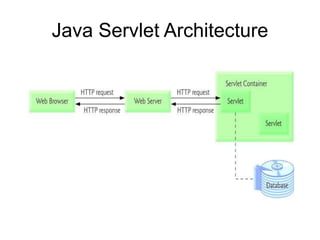
Java Servlet Architecture
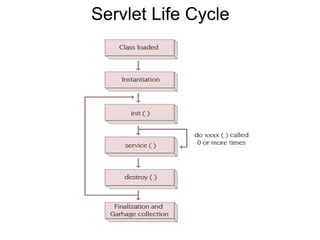
Servlet Life Cycle
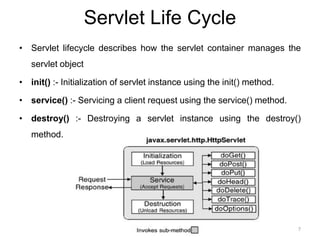
• Servlet lifecycle describes how the servlet container manages the
servlet object
• init() :- Initialization of servlet instance using the init() method.
• service() :- Servicing a client request using the service() method.
• destroy() :- Destroying a servlet instance using the destroy()
method.
7
Servlet Life Cycle
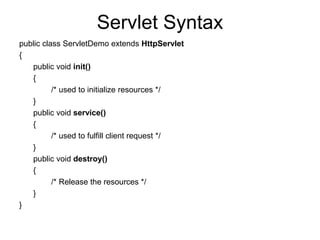
Servlet Syntax
public class ServletDemo extends HttpServlet
{
public void init()
{
/* used to initialize resources */
}
public void service()
{
/* used to fulfill client request */
}
public void destroy()
{
/* Release the resources */
}
}
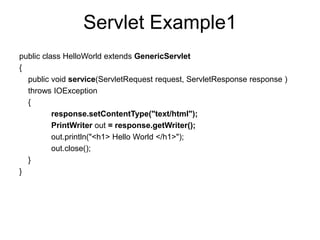
Servlet Example1
public class HelloWorld extends GenericServlet
{
public void service(ServletRequest request, ServletResponse response )
throws IOException
{
response.setContentType("text/html");
PrintWriter out = response.getWriter();
out.println("<h1> Hello World </h1>");
out.close();
}
}
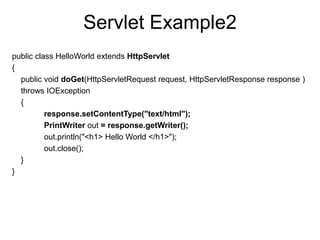
Servlet Example2
public class HelloWorld extends HttpServlet
{
public void doGet(HttpServletRequest request, HttpServletResponse response )
throws IOException
{
response.setContentType("text/html");
PrintWriter out = response.getWriter();
out.println("<h1> Hello World </h1>");
out.close();
}
}
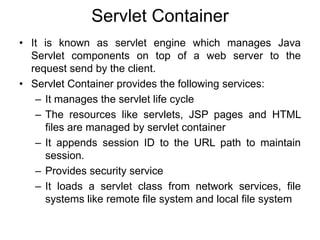
Servlet Container
• It is known as servlet engine which manages Java
Servlet components on top of a web server to the
request send by the client.
• Servlet Container provides the following services:
– It manages the servlet life cycle
– The resources like servlets, JSP pages and HTML
files are managed by servlet container
– It appends session ID to the URL path to maintain
session.
– Provides security service
– It loads a servlet class from network services, file
systems like remote file system and local file system
How web container handles the servlet
request?
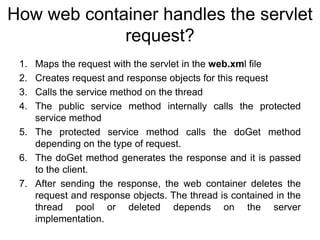
1. Maps the request with the servlet in the web.xml file
2. Creates request and response objects for this request
3. Calls the service method on the thread
4. The public service method internally calls the protected
service method
5. The protected service method calls the doGet method
depending on the type of request.
6. The doGet method generates the response and it is passed
to the client.
7. After sending the response, the web container deletes the
request and response objects. The thread is contained in the
thread pool or deleted depends on the server
implementation.
How Servlet Works?
How Servlet Works?
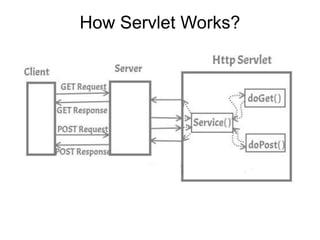
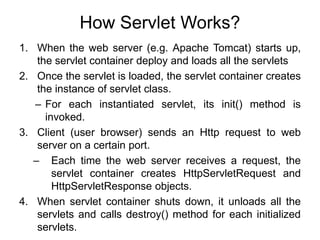
1. When the web server (e.g. Apache Tomcat) starts up,
the servlet container deploy and loads all the servlets
2. Once the servlet is loaded, the servlet container creates
the instance of servlet class.
– For each instantiated servlet, its init() method is
invoked.
3. Client (user browser) sends an Http request to web
server on a certain port.
– Each time the web server receives a request, the
servlet container creates HttpServletRequest and
HttpServletResponse objects.
4. When servlet container shuts down, it unloads all the
servlets and calls destroy() method for each initialized
servlets.
Hierarchy of Packages
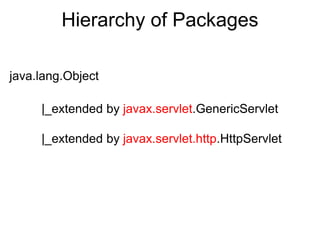
java.lang.Object
|_extended by javax.servlet.GenericServlet
|_extended by javax.servlet.http.HttpServlet
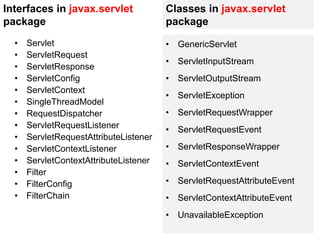
Interfaces in javax.servlet
package
• Servlet
• ServletRequest
• ServletResponse
• ServletConfig
• ServletContext
• SingleThreadModel
• RequestDispatcher
• ServletRequestListener
• ServletRequestAttributeListener
• ServletContextListener
• ServletContextAttributeListener
• Filter
• FilterConfig
• FilterChain
Classes in javax.servlet
package
• GenericServlet
• ServletInputStream
• ServletOutputStream
• ServletException
• ServletRequestWrapper
• ServletRequestEvent
• ServletResponseWrapper
• ServletContextEvent
• ServletRequestAttributeEvent
• ServletContextAttributeEvent
• UnavailableException
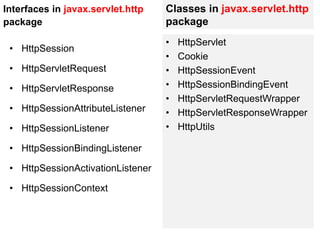
Interfaces in javax.servlet.http
package
• HttpSession
• HttpServletRequest
• HttpServletResponse
• HttpSessionAttributeListener
• HttpSessionListener
• HttpSessionBindingListener
• HttpSessionActivationListener
• HttpSessionContext
Classes in javax.servlet.http
package
• HttpServlet
• Cookie
• HttpSessionEvent
• HttpSessionBindingEvent
• HttpServletRequestWrapper
• HttpServletResponseWrapper
• HttpUtils
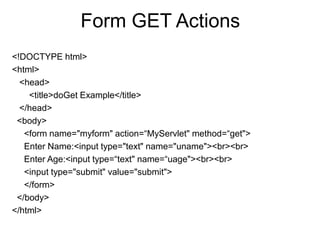
Form GET Actions
<!DOCTYPE html>
<html>
<head>
<title>doGet Example</title>
</head>
<body>
<form name="myform" action=“MyServlet" method=“get">
Enter Name:<input type="text" name="uname"><br><br>
Enter Age:<input type=“text" name=“uage"><br><br>
<input type="submit" value="submit">
</form>
</body>
</html>
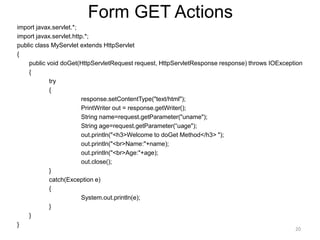
Form GET Actions
import javax.servlet.*;
import javax.servlet.http.*;
public class MyServlet extends HttpServlet
{
public void doGet(HttpServletRequest request, HttpServletResponse response) throws IOException
{
try
{
response.setContentType("text/html");
PrintWriter out = response.getWriter();
String name=request.getParameter("uname");
String age=request.getParameter(“uage");
out.println("<h3>Welcome to doGet Method</h3> ");
out.println("<br>Name:"+name);
out.println("<br>Age:"+age);
out.close();
}
catch(Exception e)
{
System.out.println(e);
}
}
}
20
Form POST Actions
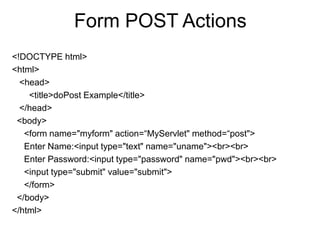
<!DOCTYPE html>
<html>
<head>
<title>doPost Example</title>
</head>
<body>
<form name="myform" action=“MyServlet" method=“post">
Enter Name:<input type="text" name="uname"><br><br>
Enter Password:<input type="password" name="pwd"><br><br>
<input type="submit" value="submit">
</form>
</body>
</html>
Form POST Actions
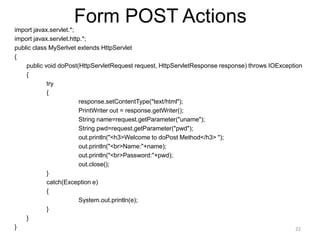
import javax.servlet.*;
import javax.servlet.http.*;
public class MySerlvet extends HttpServlet
{
public void doPost(HttpServletRequest request, HttpServletResponse response) throws IOException
{
try
{
response.setContentType("text/html");
PrintWriter out = response.getWriter();
String name=request.getParameter("uname");
String pwd=request.getParameter("pwd");
out.println("<h3>Welcome to doPost Method</h3> ");
out.println("<br>Name:"+name);
out.println("<br>Password:"+pwd);
out.close();
}
catch(Exception e)
{
System.out.println(e);
}
}
} 22
JSP
• Java Server Pages (JSP) is a server-side programming
technology that enables the creation of dynamic,
platform-independent method for building Web-based
applications.
• JSP have access to the entire family of Java APIs,
including the JDBC API to access enterprise databases.
• JSP technology enables rapid development of web-
based applications
• JSP pages are easier to maintain than a Servlet
• JSP pages are opposite of Servlets as a servlet adds
HTML code inside Java code, while JSP adds Java
code inside HTML using JSP tags
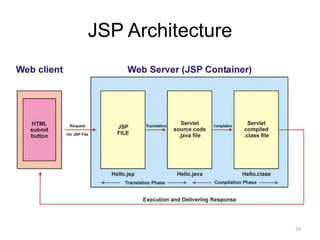
JSP Architecture
24
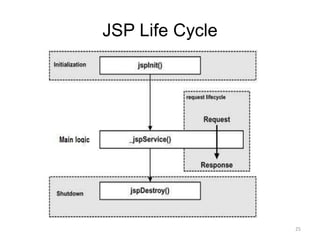
JSP Life Cycle
25
JSP Syntax
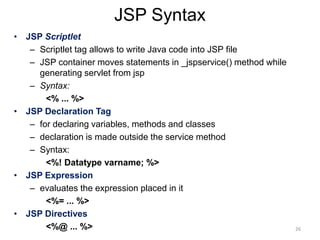
• JSP Scriptlet
– Scriptlet tag allows to write Java code into JSP file
– JSP container moves statements in _jspservice() method while
generating servlet from jsp
– Syntax:
<% ... %>
• JSP Declaration Tag
– for declaring variables, methods and classes
– declaration is made outside the service method
– Syntax:
<%! Datatype varname; %>
• JSP Expression
– evaluates the expression placed in it
<%= ... %>
• JSP Directives
<%@ ... %> 26
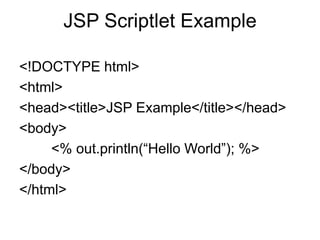
JSP Scriptlet Example
<!DOCTYPE html>
<html>
<head><title>JSP Example</title></head>
<body>
<% out.println(“Hello World”); %>
</body>
</html>
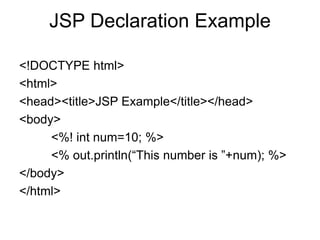
JSP Declaration Example
<!DOCTYPE html>
<html>
<head><title>JSP Example</title></head>
<body>
<%! int num=10; %>
<% out.println(“This number is ”+num); %>
</body>
</html>
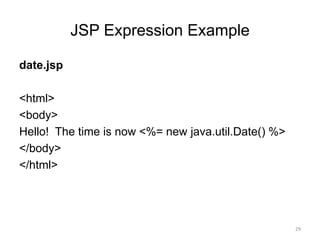
JSP Expression Example
date.jsp
<html>
<body>
Hello! The time is now <%= new java.util.Date() %>
</body>
</html>
29
JSP Implicit Objects
• request
• response
• session
• exception
• application
• PageContext
• Page
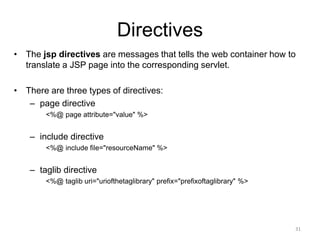
Directives
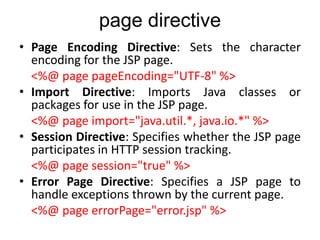
• The jsp directives are messages that tells the web container how to
translate a JSP page into the corresponding servlet.
• There are three types of directives:
– page directive
<%@ page attribute="value" %>
– include directive
<%@ include file="resourceName" %>
– taglib directive
<%@ taglib uri="uriofthetaglibrary" prefix="prefixoftaglibrary" %>
31
page directive
• Attributes of JSP page directive
– import
– contentType
– Session
– errorPage
– Language
– info
– buffer
– isThreadSafe
– pageEncoding
– isErrorPage
32
page directive
• Page Encoding Directive: Sets the character
encoding for the JSP page.
<%@ page pageEncoding="UTF-8" %>
• Import Directive: Imports Java classes or
packages for use in the JSP page.
<%@ page import="java.util.*, java.io.*" %>
• Session Directive: Specifies whether the JSP page
participates in HTTP session tracking.
<%@ page session="true" %>
• Error Page Directive: Specifies a JSP page to
handle exceptions thrown by the current page.
<%@ page errorPage="error.jsp" %>
page directive
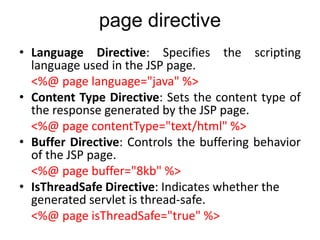
• Language Directive: Specifies the scripting
language used in the JSP page.
<%@ page language="java" %>
• Content Type Directive: Sets the content type of
the response generated by the JSP page.
<%@ page contentType="text/html" %>
• Buffer Directive: Controls the buffering behavior
of the JSP page.
<%@ page buffer="8kb" %>
• IsThreadSafe Directive: Indicates whether the
generated servlet is thread-safe.
<%@ page isThreadSafe="true" %>
page directive
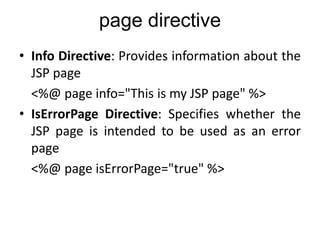
• Info Directive: Provides information about the
JSP page
<%@ page info="This is my JSP page" %>
• IsErrorPage Directive: Specifies whether the
JSP page is intended to be used as an error
page
<%@ page isErrorPage="true" %>
page directive
<!DOCTYPE html>
<html>
<head>
<title>import directive Demo</title>
<head>
<body>
<%@ page import="java.util.Date" %>
Today is: <%= new Date() %>
</body>
</html>
<%-- Text Content Type --%>
<%
out.println("Content-Type: text/plain");
out.println("Hello, this is a plain text response.");
%>
<%-- HTML Content Type --%>
<%
response.setContentType("text/html; charset=UTF-8");
out.println("<br><br>Content-Type: text/html");
out.println("<p>Hello, this is an HTML response.</p>");
%>
<%-- JSON Content Type --%>
<%
response.setContentType("application/json");
out.println("<br><br>Content-Type: application/json");
out.println("{"message": "This is a JSON response."}");
%>
setContentType
<%-- XML Content Type --%>
<%
response.setContentType("application/xml");
out.println("<br><br>Content-Type: application/xml");
out.println("<message>This is an XML response.</message>");
%>
<%-- PDF Content Type --%>
<%
response.setContentType("application/pdf");
out.println("<br><br>Content-Type: application/pdf");
// Code to generate PDF goes here (not included in this example)
%>
<%-- CSV Content Type --%>
<%
response.setContentType("text/csv");
out.println("<br><br>Content-Type: text/csv");
out.println("Name, Age, Country");
out.println("John Doe, 30, USA");
out.println("Jane Smith, 25, Canada");
%>
Include directive
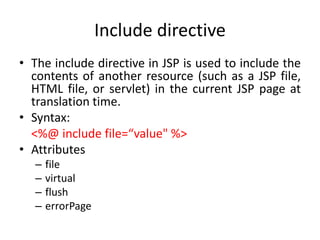
• The include directive in JSP is used to include the
contents of another resource (such as a JSP file,
HTML file, or servlet) in the current JSP page at
translation time.
• Syntax:
<%@ include file=“value" %>
• Attributes
– file
– virtual
– flush
– errorPage
Include directive attributes
• file: This attribute specifies the path of the resource to be
included. It can be a relative or absolute path.
<%@ include file="header.jsp" %>
• virtual: This attribute is an alternative to the file attribute.
It specifies the path of the resource to be included relative
to the root of the web application.
<%@ include virtual="/WEB-INF/include/footer.jsp" %>
• flush: This optional attribute specifies whether the output
buffer should be flushed before including the content.
<%@ include file="header.jsp" flush="false" %>
• errorPage: This attribute specifies the JSP page that should
handle any errors that occur during the include operation.
If an error occurs, the request is forwarded to the specified
error page.
<%@ include file="header.jsp" errorPage="error.jsp" %>
include directive example
header.html
<html>
<head>
<title>K.Ramakrishnan College of Technology</title>
</head>
<body>
<h1>K.Ramakrishnan College of Technology</h1>
footer.html
</body>
</html>
main.jsp
<%@ include file="header.html" %>
<p>Main content</p>
<%@ include file="footer.html" %>
41
taglib directive
• The JavaServer Pages API allows you to define custom JSP
tags that look like HTML or XML tags and a tag library is a
set of user-defined tags that implement custom behavior.
• Syntax:
<%@ taglib uri="uriofthetaglibrary" prefix="prefixoftaglibrary" %>
• uri: This attribute specifies the unique identifier or URI
(Uniform Resource Identifier) of the custom tag library.
• prefix: This attribute specifies the prefix that you will use to
reference the custom tags from the tag library within your
JSP page.
42
taglib example
<%@ taglib uri="http://java.sun.com/jsp/jstl/core" prefix="c" %>
• uri="http://java.sun.com/jsp/jstl/core"
– This specifies the URI of the JSTL (JavaServer Pages Standard Tag
Library) Core tag library.
– This URI uniquely identifies the JSTL Core library.
• prefix="c“
– This specifies the prefix c that will be used to reference tags
from the JSTL Core library within the JSP page.
– For example, if you want to use the <c:forEach> tag from the
JSTL Core library, you would use c:forEach syntax in your JSP
code.
JSP Action Tags
44
• JSP (JavaServer Pages) action tags are XML-
based tags used within JSP pages to provide
dynamic behavior, control flow, and access to
server-side resources.
• These action tags are executed when the JSP
page is translated into a servlet.
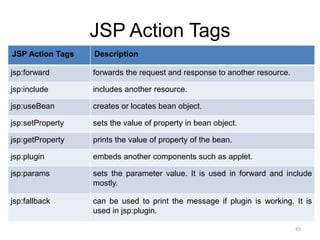
JSP Action Tags
JSP Action Tags Description
jsp:forward forwards the request and response to another resource.
jsp:include includes another resource.
jsp:useBean creates or locates bean object.
jsp:setProperty sets the value of property in bean object.
jsp:getProperty prints the value of property of the bean.
jsp:plugin embeds another components such as applet.
jsp:params sets the parameter value. It is used in forward and include
mostly.
jsp:fallback can be used to print the message if plugin is working. It is
used in jsp:plugin.
45
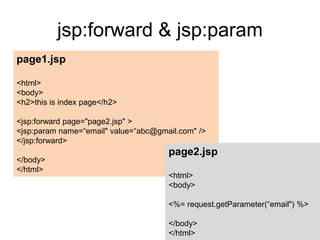
jsp:forward & jsp:param
46
page1.jsp
<html>
<body>
<h2>this is index page</h2>
<jsp:forward page="page2.jsp" >
<jsp:param name=“email" value=“abc@gmail.com" />
</jsp:forward>
</body>
</html>
page2.jsp
<html>
<body>
<%= request.getParameter(“email") %>
</body>
</html>
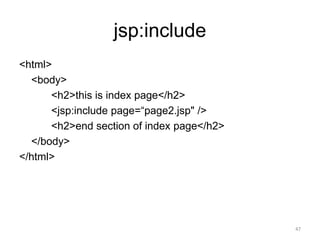
jsp:include
<html>
<body>
<h2>this is index page</h2>
<jsp:include page=“page2.jsp" />
<h2>end section of index page</h2>
</body>
</html>
47
JSTL
• The JSP Standard Tag Library (JSTL)
represents a set of tags to simplify the JSP
development.
• Advantage of JSTL
– Fast Development JSTL provides many tags that
simplifies the JSP.
– Code Reusability We can use the JSTL tags in
various pages.
– No need to use scriptlet tag
<%@ taglib uri=“ “ prefix=“ “ %>
48
JSTL Tag Types
• Core Tags
• Formatting Tags
• XML Tags
• SQL Tags
49
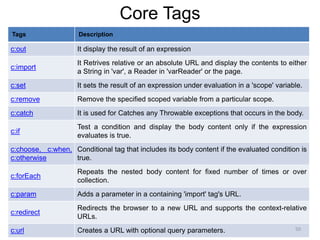
Core Tags
Tags Description
c:out It display the result of an expression
c:import
It Retrives relative or an absolute URL and display the contents to either
a String in 'var', a Reader in 'varReader' or the page.
c:set It sets the result of an expression under evaluation in a 'scope' variable.
c:remove Remove the specified scoped variable from a particular scope.
c:catch It is used for Catches any Throwable exceptions that occurs in the body.
c:if
Test a condition and display the body content only if the expression
evaluates is true.
c:choose, c:when,
c:otherwise
Conditional tag that includes its body content if the evaluated condition is
true.
c:forEach
Repeats the nested body content for fixed number of times or over
collection.
c:param Adds a parameter in a containing 'import' tag's URL.
c:redirect
Redirects the browser to a new URL and supports the context-relative
URLs.
c:url Creates a URL with optional query parameters. 50
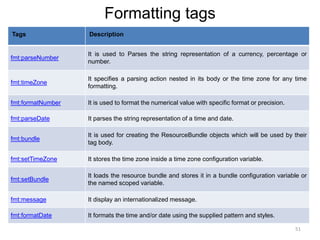
Formatting tags
Tags Description
fmt:parseNumber
It is used to Parses the string representation of a currency, percentage or
number.
fmt:timeZone
It specifies a parsing action nested in its body or the time zone for any time
formatting.
fmt:formatNumber It is used to format the numerical value with specific format or precision.
fmt:parseDate It parses the string representation of a time and date.
fmt:bundle
It is used for creating the ResourceBundle objects which will be used by their
tag body.
fmt:setTimeZone It stores the time zone inside a time zone configuration variable.
fmt:setBundle
It loads the resource bundle and stores it in a bundle configuration variable or
the named scoped variable.
fmt:message It display an internationalized message.
fmt:formatDate It formats the time and/or date using the supplied pattern and styles.
51
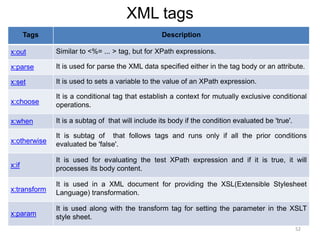
XML tags
Tags Description
x:out Similar to <%= ... > tag, but for XPath expressions.
x:parse It is used for parse the XML data specified either in the tag body or an attribute.
x:set It is used to sets a variable to the value of an XPath expression.
x:choose
It is a conditional tag that establish a context for mutually exclusive conditional
operations.
x:when It is a subtag of that will include its body if the condition evaluated be 'true'.
x:otherwise
It is subtag of that follows tags and runs only if all the prior conditions
evaluated be 'false'.
x:if
It is used for evaluating the test XPath expression and if it is true, it will
processes its body content.
x:transform
It is used in a XML document for providing the XSL(Extensible Stylesheet
Language) transformation.
x:param
It is used along with the transform tag for setting the parameter in the XSLT
style sheet.
52
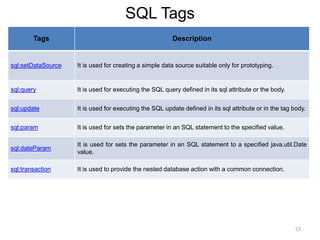
SQL Tags
Tags Description
sql:setDataSource It is used for creating a simple data source suitable only for prototyping.
sql:query It is used for executing the SQL query defined in its sql attribute or the body.
sql:update It is used for executing the SQL update defined in its sql attribute or in the tag body.
sql:param It is used for sets the parameter in an SQL statement to the specified value.
sql:dateParam
It is used for sets the parameter in an SQL statement to a specified java.util.Date
value.
sql:transaction It is used to provide the nested database action with a common connection.
53
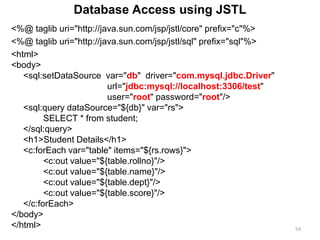
<%@ taglib uri="http://java.sun.com/jsp/jstl/core" prefix="c"%>
<%@ taglib uri="http://java.sun.com/jsp/jstl/sql" prefix="sql"%>
<html>
<body>
<sql:setDataSource var="db" driver="com.mysql.jdbc.Driver"
url="jdbc:mysql://localhost:3306/test"
user="root" password="root"/>
<sql:query dataSource="${db}" var="rs">
SELECT * from student;
</sql:query>
<h1>Student Details</h1>
<c:forEach var="table" items="${rs.rows}">
<c:out value="${table.rollno}"/>
<c:out value="${table.name}"/>
<c:out value="${table.dept}"/>
<c:out value="${table.score}"/>
</c:forEach>
</body>
</html> 54
Database Access using JSTL
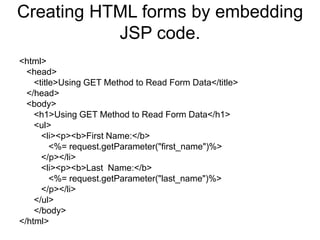
Creating HTML forms by embedding
JSP code.
<html>
<head>
<title>Using GET Method to Read Form Data</title>
</head>
<body>
<h1>Using GET Method to Read Form Data</h1>
<ul>
<li><p><b>First Name:</b>
<%= request.getParameter("first_name")%>
</p></li>
<li><p><b>Last Name:</b>
<%= request.getParameter("last_name")%>
</p></li>
</ul>
</body>
</html>
DATABASE CONNECTIVITY
JDBC perspectives
JDBC program example
JDBC
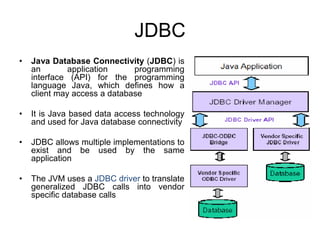
• Java Database Connectivity (JDBC) is
an application programming
interface (API) for the programming
language Java, which defines how a
client may access a database
• It is Java based data access technology
and used for Java database connectivity
• JDBC allows multiple implementations to
exist and be used by the same
application
• The JVM uses a JDBC driver to translate
generalized JDBC calls into vendor
specific database calls
JDBC Architecture
JDBC Architecture
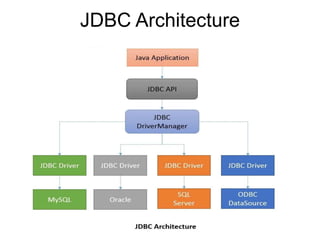
• JDBC API
– JDBC API provides universal data access from the
Java programming language
– Using the JDBC API, you can access virtually any
data source, from relational databases to
spreadsheets and flat files
– The JDBC API is comprised of two packages:
• java.sql
• javax.sql
JDBC Architecture
• JDBC Driver Manager
– The DriverManager class acts as an interface
between user and drivers
– It keeps track of the drivers that are available and
handles establishing a connection between a
database and the appropriate driver
– The DriverManager class maintains a list of Driver
classes that have registered themselves by calling the
method DriverManager.registerDriver()
JDBC Architecture
• JDBC Driver
– A JDBC driver is a software component enabling
a Java application to interact with a database
– JDBC drivers are analogous to ODBC drivers, ADO.NET
data providers, and OLE DB providers
– To connect with individual databases, JDBC (the Java
Database Connectivity API) requires drivers for each
database
– The JDBC driver gives out the connection to the database
and implements the protocol for transferring the query
and result between client and database.
Drivers Types
• Type 1 - JDBC-ODBC Bridge
• Type 2 - Native API Driver
• Type 3 – Network-Protocol Driver
• Type 4 – Database-Protocol Driver
62
Drivers Types
• Type 1 that calls native code of the locally
available ODBC driver.
• Type 2 that calls database vendor native library
on a client side. This code then talks to database
over the network.
• Type 3, the pure-java driver that talks with the
server-side middleware that then talks to the
database.
• Type 4, the pure-java driver that uses database
native protocol.
63
Drivers Types
• Type 1 - JDBC-ODBC Bridge
• Uses a bridging technology to access a database. JDBC-ODBC
bridge is an example. It provides a gateway to the ODBC.
• Type 2 - Native API Driver
• Native API drivers.
• Driver contains Java code that calls native C/C++ methods
provided by the database vendors.
• Type 3 – Network-Protocol Driver
• Generic network API that is then translated into database-specific
access at the server level.
• The JDBC driver on the client uses sockets to call a middleware
application on the server that translates the client requests into an
API specific to the desired driver. Extremely flexible.
• Type 4 – Database-Protocol Driver
• Using network protocols built into the database engine talk directly
to the database using Java sockets. Almost always comes only
from database vendors. 64
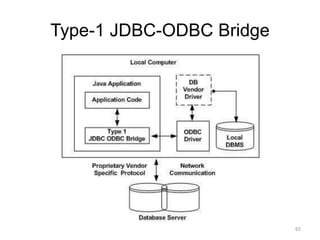
Type-1 JDBC-ODBC Bridge
65
Type-1 JDBC-ODBC Bridge
• Converts JDBC method calls into ODBC function calls
• Platform-dependent
• ODBC must be installed on the computer having the driver
• Sun (now Oracle) provided a JDBC-ODBC Bridge
river: sun.jdbc.odbc.JdbcOdbcDriver.
• Advantages
– Almost any database for which an ODBC driver is installed can be
accessed, and data can be retrieved.
• Disadvantages
– Performance overhead
– The ODBC driver needs to be installed on the client machine.
– Not suitable for applets
– Specific ODBC drivers are not always available on all platforms
– No support from JDK 1.8 (Java 8) onwards.
66
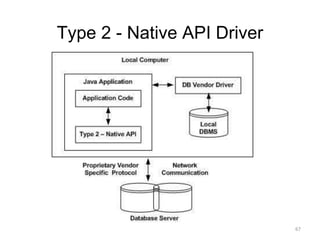
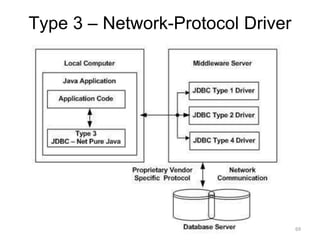
Type 2 - Native API Driver
67
Type 2 - Native API Driver
• It is a database driver implementation that uses the client-side
libraries of the database
• Converts JDBC method calls into native calls of the database
API
• Advantages
– As there is no implementation of JDBC-ODBC bridge, it may
be considerably faster than a Type 1 driver.
• Disadvantages
– The vendor client library needs to be installed on the client
machine.
– Not all databases have a client-side library.
– This driver is platform dependent.
– No Applets support
68
Type 3 – Network-Protocol Driver
69
Type 3 – Network-Protocol Driver
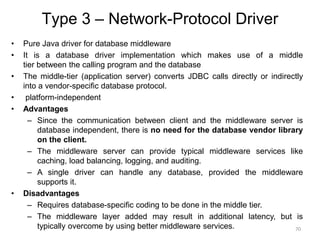
• Pure Java driver for database middleware
• It is a database driver implementation which makes use of a middle
tier between the calling program and the database
• The middle-tier (application server) converts JDBC calls directly or indirectly
into a vendor-specific database protocol.
• platform-independent
• Advantages
– Since the communication between client and the middleware server is
database independent, there is no need for the database vendor library
on the client.
– The middleware server can provide typical middleware services like
caching, load balancing, logging, and auditing.
– A single driver can handle any database, provided the middleware
supports it.
• Disadvantages
– Requires database-specific coding to be done in the middle tier.
– The middleware layer added may result in additional latency, but is
typically overcome by using better middleware services. 70
Type-4 Database-Protocol driver
(Pure Java driver)
71
Type-4 Database-Protocol driver
(Pure Java driver)
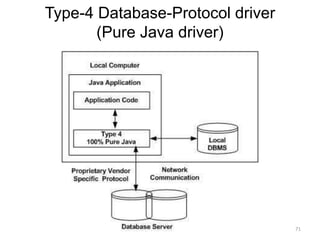
• Database driver implementation that converts JDBC calls directly into a
vendor-specific database protocol
• Written completely in Java
• Platform independent
• Advantages
– These drivers don't translate the requests into an intermediary
format (such as ODBC)
– The client application connects directly to the database server
– The JVM can manage all aspects of the application-to-database
connection
• Disadvantages
– Drivers are database specific, as different database vendors use
widely different network protocols.
72
Which Driver should be Used?
• Type is 4: If you are accessing one type of database,
such as Oracle, Sybase, or IBM
• Type 3: If your Java application is accessing multiple
types of databases at the same time
• Type 2: When a type 3 or type 4 driver is not available
• Type 1: It is typically used for development and testing
purposes only.
Basic steps to use a database in Java
1. Register the Driver class
2. Create connection
3. Create statement
4. Execute queries
5. Close connection
74
JDBC program example-1
import java.sql.*;
public class DatabaseAccess
{
public static void main(String args[]) throws IOException
{
try
{
Class.forName("com.mysql.jdbc.Driver");
Connection conn = DriverManager.getConnection("jdbc:mysql://localhost/test","root","root");
Statement stmt = conn.createStatement();
ResultSet rs = stmt.executeQuery("SELECT * FROM student");
while(rs.next())
{
System.out.println("Roll No: " + rs.getInt(1) + "<br>");
System.out.println("Name: " + rs.getString(2) + "<br>");
}
stmt.close(); conn.close();
}
catch(SQLException se) { se.printStackTrace(); }
}
}
75
JDBC program example-2
import java.sql.*;
class DatabaseInsert
{
public static void main(String args[])
{
try
{
Class.forName("oracle.jdbc.driver.OracleDriver");
Connection
con=DriverManager.getConnection("jdbc:oracle:thin:@localhost:1521:testdb","system","oracle");
PreparedStatement stmt=con.prepareStatement("insert into Emp values(?,?)");
stmt.setInt(1,101);
stmt.setString(2,"Ratan");
int i=stmt.executeUpdate();
System.out.println(i+" records inserted");
con.close();
}
catch(Exception e){System.out.println(e);}
}
}
76
• Class.forName()
– The forName() method of Class class is used to register the driver class.
This method is used to dynamically load the driver class.
• DriverManager class
– The DriverManager class maintains a list of Driver classes that have
registered themselves by calling the method DriverManager.registerDriver().
1. public static Connection getConnection(String url,String
userName,String password):establish the connection with the specified
url, username and password.
• Connection interface
– A Connection is the session between java application and database.
1. public Statement createStatement():creates a statement object that can
be used to execute SQL queries.
2. public void close(): closes the connection and Releases a JDBC
resources immediately.
• Statement interface
– provides methods to execute queries with the database.
1. public ResultSet executeQuery(String sql): is used to execute SELECT
query. It returns the object of ResultSet.
2. public int executeUpdate(String sql): is used to execute specified query,
it may be create, drop, insert, update, delete etc.
• ResultSet interface
– maintains a cursor pointing to a row of a table. Initially, cursor points
to before the first row.
1. public boolean next():is used to move the cursor to the one row
next from the current position.
2. public int getInt(int columnIndex):return the data of specified column
index of the current row as int.
3. public int getInt(String columnName):return the data of specified
column name of the current row as int.
4. public String getString(int columnIndex):return the data of
specified column index of the current row as String.
5. public String getString(String columnName):return the data of
specified column name of the current row as String.
• PreparedStatement interface
– a subinterface of Statement
– It is used to execute parameterized query.
– Eg.: String sql="insert into emp values(?,?,?)";

18CSC311J Web Design and Development UNIT-3

  • 1.
    18CSC311J WEB DESIGNAND DEVELOPMENT 2023-24 EVEN SEMESTER REGULATION 2018 Prepared by Dr.M.Sivakumar AP,NWC, SRMIST, KTR DEPARTMENT OF NETWORKING AND COMMUNICATIONS Prepared by Dr.M.Sivakumar 1
  • 2.
    18CSC311J WEB DESIGNAND DEVELOPMENT UNIT III • Overview of JSP • Servlets: Java Servlet Architecture- Servlet Life Cycle- GET and POST Method • Creating Dynamic Web pages using JSP • JSP Standard Tag Library (JSTL) • Introduction to MySQL • JDBC Drivers • Understanding JDBC-ODBC Management • Resultset, Statements • Prepared Statement, Callable Statement
  • 3.
    Installing and ConfiguringApache Tomcat Web Server • Install JDK • Download from http://tomcat.apache.org/ • Run the installation file • Remember port • Check the installation by typing http://localhost:8080/ in the browser • Move web pages to D:Program FilesApache Software FoundationTomcat 7.0webapps folder
  • 4.
    Servlets • Java ServletArchitecture • Servlet Life Cycle • Form GET and POST actions • Session Handling • Understanding Cookies
  • 5.
    Servlets • Servlet isa Java Class File or a Java Program that runs on a Web server • Servlets are used for creating dynamic web applications by extending the capability of a server • The javax.servlet and javax.servlet.http are packages which provides interfaces and classes for creating servlets • All the servlets must implement the Servlet interface, which defines life-cycle methods
  • 6.
  • 7.
    Servlet Life Cycle •Servlet lifecycle describes how the servlet container manages the servlet object • init() :- Initialization of servlet instance using the init() method. • service() :- Servicing a client request using the service() method. • destroy() :- Destroying a servlet instance using the destroy() method. 7
  • 8.
  • 9.
    Servlet Syntax public classServletDemo extends HttpServlet { public void init() { /* used to initialize resources */ } public void service() { /* used to fulfill client request */ } public void destroy() { /* Release the resources */ } }
  • 10.
    Servlet Example1 public classHelloWorld extends GenericServlet { public void service(ServletRequest request, ServletResponse response ) throws IOException { response.setContentType("text/html"); PrintWriter out = response.getWriter(); out.println("<h1> Hello World </h1>"); out.close(); } }
  • 11.
    Servlet Example2 public classHelloWorld extends HttpServlet { public void doGet(HttpServletRequest request, HttpServletResponse response ) throws IOException { response.setContentType("text/html"); PrintWriter out = response.getWriter(); out.println("<h1> Hello World </h1>"); out.close(); } }
  • 12.
    Servlet Container • Itis known as servlet engine which manages Java Servlet components on top of a web server to the request send by the client. • Servlet Container provides the following services: – It manages the servlet life cycle – The resources like servlets, JSP pages and HTML files are managed by servlet container – It appends session ID to the URL path to maintain session. – Provides security service – It loads a servlet class from network services, file systems like remote file system and local file system
  • 13.
    How web containerhandles the servlet request? 1. Maps the request with the servlet in the web.xml file 2. Creates request and response objects for this request 3. Calls the service method on the thread 4. The public service method internally calls the protected service method 5. The protected service method calls the doGet method depending on the type of request. 6. The doGet method generates the response and it is passed to the client. 7. After sending the response, the web container deletes the request and response objects. The thread is contained in the thread pool or deleted depends on the server implementation.
  • 14.
  • 15.
    How Servlet Works? 1.When the web server (e.g. Apache Tomcat) starts up, the servlet container deploy and loads all the servlets 2. Once the servlet is loaded, the servlet container creates the instance of servlet class. – For each instantiated servlet, its init() method is invoked. 3. Client (user browser) sends an Http request to web server on a certain port. – Each time the web server receives a request, the servlet container creates HttpServletRequest and HttpServletResponse objects. 4. When servlet container shuts down, it unloads all the servlets and calls destroy() method for each initialized servlets.
  • 16.
    Hierarchy of Packages java.lang.Object |_extendedby javax.servlet.GenericServlet |_extended by javax.servlet.http.HttpServlet
  • 17.
    Interfaces in javax.servlet package •Servlet • ServletRequest • ServletResponse • ServletConfig • ServletContext • SingleThreadModel • RequestDispatcher • ServletRequestListener • ServletRequestAttributeListener • ServletContextListener • ServletContextAttributeListener • Filter • FilterConfig • FilterChain Classes in javax.servlet package • GenericServlet • ServletInputStream • ServletOutputStream • ServletException • ServletRequestWrapper • ServletRequestEvent • ServletResponseWrapper • ServletContextEvent • ServletRequestAttributeEvent • ServletContextAttributeEvent • UnavailableException
  • 18.
    Interfaces in javax.servlet.http package •HttpSession • HttpServletRequest • HttpServletResponse • HttpSessionAttributeListener • HttpSessionListener • HttpSessionBindingListener • HttpSessionActivationListener • HttpSessionContext Classes in javax.servlet.http package • HttpServlet • Cookie • HttpSessionEvent • HttpSessionBindingEvent • HttpServletRequestWrapper • HttpServletResponseWrapper • HttpUtils
  • 19.
    Form GET Actions <!DOCTYPEhtml> <html> <head> <title>doGet Example</title> </head> <body> <form name="myform" action=“MyServlet" method=“get"> Enter Name:<input type="text" name="uname"><br><br> Enter Age:<input type=“text" name=“uage"><br><br> <input type="submit" value="submit"> </form> </body> </html>
  • 20.
    Form GET Actions importjavax.servlet.*; import javax.servlet.http.*; public class MyServlet extends HttpServlet { public void doGet(HttpServletRequest request, HttpServletResponse response) throws IOException { try { response.setContentType("text/html"); PrintWriter out = response.getWriter(); String name=request.getParameter("uname"); String age=request.getParameter(“uage"); out.println("<h3>Welcome to doGet Method</h3> "); out.println("<br>Name:"+name); out.println("<br>Age:"+age); out.close(); } catch(Exception e) { System.out.println(e); } } } 20
  • 21.
    Form POST Actions <!DOCTYPEhtml> <html> <head> <title>doPost Example</title> </head> <body> <form name="myform" action=“MyServlet" method=“post"> Enter Name:<input type="text" name="uname"><br><br> Enter Password:<input type="password" name="pwd"><br><br> <input type="submit" value="submit"> </form> </body> </html>
  • 22.
    Form POST Actions importjavax.servlet.*; import javax.servlet.http.*; public class MySerlvet extends HttpServlet { public void doPost(HttpServletRequest request, HttpServletResponse response) throws IOException { try { response.setContentType("text/html"); PrintWriter out = response.getWriter(); String name=request.getParameter("uname"); String pwd=request.getParameter("pwd"); out.println("<h3>Welcome to doPost Method</h3> "); out.println("<br>Name:"+name); out.println("<br>Password:"+pwd); out.close(); } catch(Exception e) { System.out.println(e); } } } 22
  • 23.
    JSP • Java ServerPages (JSP) is a server-side programming technology that enables the creation of dynamic, platform-independent method for building Web-based applications. • JSP have access to the entire family of Java APIs, including the JDBC API to access enterprise databases. • JSP technology enables rapid development of web- based applications • JSP pages are easier to maintain than a Servlet • JSP pages are opposite of Servlets as a servlet adds HTML code inside Java code, while JSP adds Java code inside HTML using JSP tags
  • 24.
  • 25.
  • 26.
    JSP Syntax • JSPScriptlet – Scriptlet tag allows to write Java code into JSP file – JSP container moves statements in _jspservice() method while generating servlet from jsp – Syntax: <% ... %> • JSP Declaration Tag – for declaring variables, methods and classes – declaration is made outside the service method – Syntax: <%! Datatype varname; %> • JSP Expression – evaluates the expression placed in it <%= ... %> • JSP Directives <%@ ... %> 26
  • 27.
    JSP Scriptlet Example <!DOCTYPEhtml> <html> <head><title>JSP Example</title></head> <body> <% out.println(“Hello World”); %> </body> </html>
  • 28.
    JSP Declaration Example <!DOCTYPEhtml> <html> <head><title>JSP Example</title></head> <body> <%! int num=10; %> <% out.println(“This number is ”+num); %> </body> </html>
  • 29.
    JSP Expression Example date.jsp <html> <body> Hello!The time is now <%= new java.util.Date() %> </body> </html> 29
  • 30.
    JSP Implicit Objects •request • response • session • exception • application • PageContext • Page
  • 31.
    Directives • The jspdirectives are messages that tells the web container how to translate a JSP page into the corresponding servlet. • There are three types of directives: – page directive <%@ page attribute="value" %> – include directive <%@ include file="resourceName" %> – taglib directive <%@ taglib uri="uriofthetaglibrary" prefix="prefixoftaglibrary" %> 31
  • 32.
    page directive • Attributesof JSP page directive – import – contentType – Session – errorPage – Language – info – buffer – isThreadSafe – pageEncoding – isErrorPage 32
  • 33.
    page directive • PageEncoding Directive: Sets the character encoding for the JSP page. <%@ page pageEncoding="UTF-8" %> • Import Directive: Imports Java classes or packages for use in the JSP page. <%@ page import="java.util.*, java.io.*" %> • Session Directive: Specifies whether the JSP page participates in HTTP session tracking. <%@ page session="true" %> • Error Page Directive: Specifies a JSP page to handle exceptions thrown by the current page. <%@ page errorPage="error.jsp" %>
  • 34.
    page directive • LanguageDirective: Specifies the scripting language used in the JSP page. <%@ page language="java" %> • Content Type Directive: Sets the content type of the response generated by the JSP page. <%@ page contentType="text/html" %> • Buffer Directive: Controls the buffering behavior of the JSP page. <%@ page buffer="8kb" %> • IsThreadSafe Directive: Indicates whether the generated servlet is thread-safe. <%@ page isThreadSafe="true" %>
  • 35.
    page directive • InfoDirective: Provides information about the JSP page <%@ page info="This is my JSP page" %> • IsErrorPage Directive: Specifies whether the JSP page is intended to be used as an error page <%@ page isErrorPage="true" %>
  • 36.
    page directive <!DOCTYPE html> <html> <head> <title>importdirective Demo</title> <head> <body> <%@ page import="java.util.Date" %> Today is: <%= new Date() %> </body> </html>
  • 37.
    <%-- Text ContentType --%> <% out.println("Content-Type: text/plain"); out.println("Hello, this is a plain text response."); %> <%-- HTML Content Type --%> <% response.setContentType("text/html; charset=UTF-8"); out.println("<br><br>Content-Type: text/html"); out.println("<p>Hello, this is an HTML response.</p>"); %> <%-- JSON Content Type --%> <% response.setContentType("application/json"); out.println("<br><br>Content-Type: application/json"); out.println("{"message": "This is a JSON response."}"); %> setContentType
  • 38.
    <%-- XML ContentType --%> <% response.setContentType("application/xml"); out.println("<br><br>Content-Type: application/xml"); out.println("<message>This is an XML response.</message>"); %> <%-- PDF Content Type --%> <% response.setContentType("application/pdf"); out.println("<br><br>Content-Type: application/pdf"); // Code to generate PDF goes here (not included in this example) %> <%-- CSV Content Type --%> <% response.setContentType("text/csv"); out.println("<br><br>Content-Type: text/csv"); out.println("Name, Age, Country"); out.println("John Doe, 30, USA"); out.println("Jane Smith, 25, Canada"); %>
  • 39.
    Include directive • Theinclude directive in JSP is used to include the contents of another resource (such as a JSP file, HTML file, or servlet) in the current JSP page at translation time. • Syntax: <%@ include file=“value" %> • Attributes – file – virtual – flush – errorPage
  • 40.
    Include directive attributes •file: This attribute specifies the path of the resource to be included. It can be a relative or absolute path. <%@ include file="header.jsp" %> • virtual: This attribute is an alternative to the file attribute. It specifies the path of the resource to be included relative to the root of the web application. <%@ include virtual="/WEB-INF/include/footer.jsp" %> • flush: This optional attribute specifies whether the output buffer should be flushed before including the content. <%@ include file="header.jsp" flush="false" %> • errorPage: This attribute specifies the JSP page that should handle any errors that occur during the include operation. If an error occurs, the request is forwarded to the specified error page. <%@ include file="header.jsp" errorPage="error.jsp" %>
  • 41.
    include directive example header.html <html> <head> <title>K.RamakrishnanCollege of Technology</title> </head> <body> <h1>K.Ramakrishnan College of Technology</h1> footer.html </body> </html> main.jsp <%@ include file="header.html" %> <p>Main content</p> <%@ include file="footer.html" %> 41
  • 42.
    taglib directive • TheJavaServer Pages API allows you to define custom JSP tags that look like HTML or XML tags and a tag library is a set of user-defined tags that implement custom behavior. • Syntax: <%@ taglib uri="uriofthetaglibrary" prefix="prefixoftaglibrary" %> • uri: This attribute specifies the unique identifier or URI (Uniform Resource Identifier) of the custom tag library. • prefix: This attribute specifies the prefix that you will use to reference the custom tags from the tag library within your JSP page. 42
  • 43.
    taglib example <%@ tagliburi="http://java.sun.com/jsp/jstl/core" prefix="c" %> • uri="http://java.sun.com/jsp/jstl/core" – This specifies the URI of the JSTL (JavaServer Pages Standard Tag Library) Core tag library. – This URI uniquely identifies the JSTL Core library. • prefix="c“ – This specifies the prefix c that will be used to reference tags from the JSTL Core library within the JSP page. – For example, if you want to use the <c:forEach> tag from the JSTL Core library, you would use c:forEach syntax in your JSP code.
  • 44.
    JSP Action Tags 44 •JSP (JavaServer Pages) action tags are XML- based tags used within JSP pages to provide dynamic behavior, control flow, and access to server-side resources. • These action tags are executed when the JSP page is translated into a servlet.
  • 45.
    JSP Action Tags JSPAction Tags Description jsp:forward forwards the request and response to another resource. jsp:include includes another resource. jsp:useBean creates or locates bean object. jsp:setProperty sets the value of property in bean object. jsp:getProperty prints the value of property of the bean. jsp:plugin embeds another components such as applet. jsp:params sets the parameter value. It is used in forward and include mostly. jsp:fallback can be used to print the message if plugin is working. It is used in jsp:plugin. 45
  • 46.
    jsp:forward & jsp:param 46 page1.jsp <html> <body> <h2>thisis index page</h2> <jsp:forward page="page2.jsp" > <jsp:param name=“email" value=“abc@gmail.com" /> </jsp:forward> </body> </html> page2.jsp <html> <body> <%= request.getParameter(“email") %> </body> </html>
  • 47.
    jsp:include <html> <body> <h2>this is indexpage</h2> <jsp:include page=“page2.jsp" /> <h2>end section of index page</h2> </body> </html> 47
  • 48.
    JSTL • The JSPStandard Tag Library (JSTL) represents a set of tags to simplify the JSP development. • Advantage of JSTL – Fast Development JSTL provides many tags that simplifies the JSP. – Code Reusability We can use the JSTL tags in various pages. – No need to use scriptlet tag <%@ taglib uri=“ “ prefix=“ “ %> 48
  • 49.
    JSTL Tag Types •Core Tags • Formatting Tags • XML Tags • SQL Tags 49
  • 50.
    Core Tags Tags Description c:outIt display the result of an expression c:import It Retrives relative or an absolute URL and display the contents to either a String in 'var', a Reader in 'varReader' or the page. c:set It sets the result of an expression under evaluation in a 'scope' variable. c:remove Remove the specified scoped variable from a particular scope. c:catch It is used for Catches any Throwable exceptions that occurs in the body. c:if Test a condition and display the body content only if the expression evaluates is true. c:choose, c:when, c:otherwise Conditional tag that includes its body content if the evaluated condition is true. c:forEach Repeats the nested body content for fixed number of times or over collection. c:param Adds a parameter in a containing 'import' tag's URL. c:redirect Redirects the browser to a new URL and supports the context-relative URLs. c:url Creates a URL with optional query parameters. 50
  • 51.
    Formatting tags Tags Description fmt:parseNumber Itis used to Parses the string representation of a currency, percentage or number. fmt:timeZone It specifies a parsing action nested in its body or the time zone for any time formatting. fmt:formatNumber It is used to format the numerical value with specific format or precision. fmt:parseDate It parses the string representation of a time and date. fmt:bundle It is used for creating the ResourceBundle objects which will be used by their tag body. fmt:setTimeZone It stores the time zone inside a time zone configuration variable. fmt:setBundle It loads the resource bundle and stores it in a bundle configuration variable or the named scoped variable. fmt:message It display an internationalized message. fmt:formatDate It formats the time and/or date using the supplied pattern and styles. 51
  • 52.
    XML tags Tags Description x:outSimilar to <%= ... > tag, but for XPath expressions. x:parse It is used for parse the XML data specified either in the tag body or an attribute. x:set It is used to sets a variable to the value of an XPath expression. x:choose It is a conditional tag that establish a context for mutually exclusive conditional operations. x:when It is a subtag of that will include its body if the condition evaluated be 'true'. x:otherwise It is subtag of that follows tags and runs only if all the prior conditions evaluated be 'false'. x:if It is used for evaluating the test XPath expression and if it is true, it will processes its body content. x:transform It is used in a XML document for providing the XSL(Extensible Stylesheet Language) transformation. x:param It is used along with the transform tag for setting the parameter in the XSLT style sheet. 52
  • 53.
    SQL Tags Tags Description sql:setDataSourceIt is used for creating a simple data source suitable only for prototyping. sql:query It is used for executing the SQL query defined in its sql attribute or the body. sql:update It is used for executing the SQL update defined in its sql attribute or in the tag body. sql:param It is used for sets the parameter in an SQL statement to the specified value. sql:dateParam It is used for sets the parameter in an SQL statement to a specified java.util.Date value. sql:transaction It is used to provide the nested database action with a common connection. 53
  • 54.
    <%@ taglib uri="http://java.sun.com/jsp/jstl/core"prefix="c"%> <%@ taglib uri="http://java.sun.com/jsp/jstl/sql" prefix="sql"%> <html> <body> <sql:setDataSource var="db" driver="com.mysql.jdbc.Driver" url="jdbc:mysql://localhost:3306/test" user="root" password="root"/> <sql:query dataSource="${db}" var="rs"> SELECT * from student; </sql:query> <h1>Student Details</h1> <c:forEach var="table" items="${rs.rows}"> <c:out value="${table.rollno}"/> <c:out value="${table.name}"/> <c:out value="${table.dept}"/> <c:out value="${table.score}"/> </c:forEach> </body> </html> 54 Database Access using JSTL
  • 55.
    Creating HTML formsby embedding JSP code. <html> <head> <title>Using GET Method to Read Form Data</title> </head> <body> <h1>Using GET Method to Read Form Data</h1> <ul> <li><p><b>First Name:</b> <%= request.getParameter("first_name")%> </p></li> <li><p><b>Last Name:</b> <%= request.getParameter("last_name")%> </p></li> </ul> </body> </html>
  • 56.
  • 57.
    JDBC • Java DatabaseConnectivity (JDBC) is an application programming interface (API) for the programming language Java, which defines how a client may access a database • It is Java based data access technology and used for Java database connectivity • JDBC allows multiple implementations to exist and be used by the same application • The JVM uses a JDBC driver to translate generalized JDBC calls into vendor specific database calls
  • 58.
  • 59.
    JDBC Architecture • JDBCAPI – JDBC API provides universal data access from the Java programming language – Using the JDBC API, you can access virtually any data source, from relational databases to spreadsheets and flat files – The JDBC API is comprised of two packages: • java.sql • javax.sql
  • 60.
    JDBC Architecture • JDBCDriver Manager – The DriverManager class acts as an interface between user and drivers – It keeps track of the drivers that are available and handles establishing a connection between a database and the appropriate driver – The DriverManager class maintains a list of Driver classes that have registered themselves by calling the method DriverManager.registerDriver()
  • 61.
    JDBC Architecture • JDBCDriver – A JDBC driver is a software component enabling a Java application to interact with a database – JDBC drivers are analogous to ODBC drivers, ADO.NET data providers, and OLE DB providers – To connect with individual databases, JDBC (the Java Database Connectivity API) requires drivers for each database – The JDBC driver gives out the connection to the database and implements the protocol for transferring the query and result between client and database.
  • 62.
    Drivers Types • Type1 - JDBC-ODBC Bridge • Type 2 - Native API Driver • Type 3 – Network-Protocol Driver • Type 4 – Database-Protocol Driver 62
  • 63.
    Drivers Types • Type1 that calls native code of the locally available ODBC driver. • Type 2 that calls database vendor native library on a client side. This code then talks to database over the network. • Type 3, the pure-java driver that talks with the server-side middleware that then talks to the database. • Type 4, the pure-java driver that uses database native protocol. 63
  • 64.
    Drivers Types • Type1 - JDBC-ODBC Bridge • Uses a bridging technology to access a database. JDBC-ODBC bridge is an example. It provides a gateway to the ODBC. • Type 2 - Native API Driver • Native API drivers. • Driver contains Java code that calls native C/C++ methods provided by the database vendors. • Type 3 – Network-Protocol Driver • Generic network API that is then translated into database-specific access at the server level. • The JDBC driver on the client uses sockets to call a middleware application on the server that translates the client requests into an API specific to the desired driver. Extremely flexible. • Type 4 – Database-Protocol Driver • Using network protocols built into the database engine talk directly to the database using Java sockets. Almost always comes only from database vendors. 64
  • 65.
  • 66.
    Type-1 JDBC-ODBC Bridge •Converts JDBC method calls into ODBC function calls • Platform-dependent • ODBC must be installed on the computer having the driver • Sun (now Oracle) provided a JDBC-ODBC Bridge river: sun.jdbc.odbc.JdbcOdbcDriver. • Advantages – Almost any database for which an ODBC driver is installed can be accessed, and data can be retrieved. • Disadvantages – Performance overhead – The ODBC driver needs to be installed on the client machine. – Not suitable for applets – Specific ODBC drivers are not always available on all platforms – No support from JDK 1.8 (Java 8) onwards. 66
  • 67.
    Type 2 -Native API Driver 67
  • 68.
    Type 2 -Native API Driver • It is a database driver implementation that uses the client-side libraries of the database • Converts JDBC method calls into native calls of the database API • Advantages – As there is no implementation of JDBC-ODBC bridge, it may be considerably faster than a Type 1 driver. • Disadvantages – The vendor client library needs to be installed on the client machine. – Not all databases have a client-side library. – This driver is platform dependent. – No Applets support 68
  • 69.
    Type 3 –Network-Protocol Driver 69
  • 70.
    Type 3 –Network-Protocol Driver • Pure Java driver for database middleware • It is a database driver implementation which makes use of a middle tier between the calling program and the database • The middle-tier (application server) converts JDBC calls directly or indirectly into a vendor-specific database protocol. • platform-independent • Advantages – Since the communication between client and the middleware server is database independent, there is no need for the database vendor library on the client. – The middleware server can provide typical middleware services like caching, load balancing, logging, and auditing. – A single driver can handle any database, provided the middleware supports it. • Disadvantages – Requires database-specific coding to be done in the middle tier. – The middleware layer added may result in additional latency, but is typically overcome by using better middleware services. 70
  • 71.
  • 72.
    Type-4 Database-Protocol driver (PureJava driver) • Database driver implementation that converts JDBC calls directly into a vendor-specific database protocol • Written completely in Java • Platform independent • Advantages – These drivers don't translate the requests into an intermediary format (such as ODBC) – The client application connects directly to the database server – The JVM can manage all aspects of the application-to-database connection • Disadvantages – Drivers are database specific, as different database vendors use widely different network protocols. 72
  • 73.
    Which Driver shouldbe Used? • Type is 4: If you are accessing one type of database, such as Oracle, Sybase, or IBM • Type 3: If your Java application is accessing multiple types of databases at the same time • Type 2: When a type 3 or type 4 driver is not available • Type 1: It is typically used for development and testing purposes only.
  • 74.
    Basic steps touse a database in Java 1. Register the Driver class 2. Create connection 3. Create statement 4. Execute queries 5. Close connection 74
  • 75.
    JDBC program example-1 importjava.sql.*; public class DatabaseAccess { public static void main(String args[]) throws IOException { try { Class.forName("com.mysql.jdbc.Driver"); Connection conn = DriverManager.getConnection("jdbc:mysql://localhost/test","root","root"); Statement stmt = conn.createStatement(); ResultSet rs = stmt.executeQuery("SELECT * FROM student"); while(rs.next()) { System.out.println("Roll No: " + rs.getInt(1) + "<br>"); System.out.println("Name: " + rs.getString(2) + "<br>"); } stmt.close(); conn.close(); } catch(SQLException se) { se.printStackTrace(); } } } 75
  • 76.
    JDBC program example-2 importjava.sql.*; class DatabaseInsert { public static void main(String args[]) { try { Class.forName("oracle.jdbc.driver.OracleDriver"); Connection con=DriverManager.getConnection("jdbc:oracle:thin:@localhost:1521:testdb","system","oracle"); PreparedStatement stmt=con.prepareStatement("insert into Emp values(?,?)"); stmt.setInt(1,101); stmt.setString(2,"Ratan"); int i=stmt.executeUpdate(); System.out.println(i+" records inserted"); con.close(); } catch(Exception e){System.out.println(e);} } } 76
  • 77.
    • Class.forName() – TheforName() method of Class class is used to register the driver class. This method is used to dynamically load the driver class. • DriverManager class – The DriverManager class maintains a list of Driver classes that have registered themselves by calling the method DriverManager.registerDriver(). 1. public static Connection getConnection(String url,String userName,String password):establish the connection with the specified url, username and password. • Connection interface – A Connection is the session between java application and database. 1. public Statement createStatement():creates a statement object that can be used to execute SQL queries. 2. public void close(): closes the connection and Releases a JDBC resources immediately. • Statement interface – provides methods to execute queries with the database. 1. public ResultSet executeQuery(String sql): is used to execute SELECT query. It returns the object of ResultSet. 2. public int executeUpdate(String sql): is used to execute specified query, it may be create, drop, insert, update, delete etc.
  • 78.
    • ResultSet interface –maintains a cursor pointing to a row of a table. Initially, cursor points to before the first row. 1. public boolean next():is used to move the cursor to the one row next from the current position. 2. public int getInt(int columnIndex):return the data of specified column index of the current row as int. 3. public int getInt(String columnName):return the data of specified column name of the current row as int. 4. public String getString(int columnIndex):return the data of specified column index of the current row as String. 5. public String getString(String columnName):return the data of specified column name of the current row as String. • PreparedStatement interface – a subinterface of Statement – It is used to execute parameterized query. – Eg.: String sql="insert into emp values(?,?,?)";