I/O Systems
in
OPERATING SYSTEM
Presented by
Shweta
Patel
OBJECTIVES
• Understanding the various I/O devices and their
characteristics.
• Understanding the role of device drivers.
• Understanding the transformation of I/O
request to h/w operation.
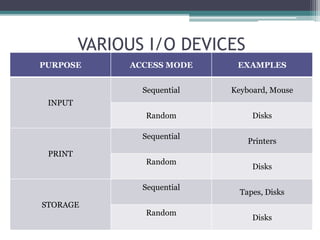
VARIOUS I/O DEVICES
PURPOSE ACCESS MODE EXAMPLES
INPUT
Sequential Keyboard, Mouse
Random Disks
PRINT
Sequential
Printers
Random
Disks
STORAGE
Sequential
Tapes, Disks
Random
Disks
CHARACTERISTICS OF I/O DEVICES
DEVICE DRIVERS
• Program in the operating system , responsible
for managing the h/w device attached to the
system.
• Insulates the applications from having to know
the details about the physical connections ,
protocols and signals required to communicate
with a device.
• The application doesn’t have to know the
physical address of the port.
• In general, n applications can communicate with
m devices using a common device driver.
• Employs a mapping table to communicate with
a specific device.
• If the driver is using more than one device , then
drivers can use resource table.
• To seek a device driver , system calls are used .
Device driver
Mapping table
Resource table
Channel
Device
1
Device
2
Device
3
Device Driver Implementation
TRANSFORMING I/O to H/W OPERATION
Ex. Reading a file from disk
• The application refers the file by the filename.
• A file system maps the file name to identify the
space allocation for the file.
• The first part of the file (c:) identifies the specific
h/w device.
STEPS
▫ Determine device holding file.
▫ Translate name to device representation.
▫ Physically read data from disk into buffer.
▫ Make data available to requesting application .
▫ Return control to process.
LIFE CYCLE OF AN I/O REQUEST
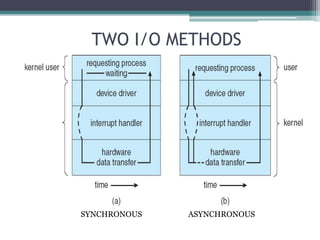
TWO I/O METHODS
SYNCHRONOUS ASYNCHRONOUS
Operating system-INPUT/OUTP (by shweta patel)

Operating system-INPUT/OUTP (by shweta patel)

  • 1.
  • 2.
    OBJECTIVES • Understanding thevarious I/O devices and their characteristics. • Understanding the role of device drivers. • Understanding the transformation of I/O request to h/w operation.
  • 3.
    VARIOUS I/O DEVICES PURPOSEACCESS MODE EXAMPLES INPUT Sequential Keyboard, Mouse Random Disks PRINT Sequential Printers Random Disks STORAGE Sequential Tapes, Disks Random Disks
  • 4.
  • 5.
    DEVICE DRIVERS • Programin the operating system , responsible for managing the h/w device attached to the system. • Insulates the applications from having to know the details about the physical connections , protocols and signals required to communicate with a device. • The application doesn’t have to know the physical address of the port.
  • 6.
    • In general,n applications can communicate with m devices using a common device driver. • Employs a mapping table to communicate with a specific device. • If the driver is using more than one device , then drivers can use resource table. • To seek a device driver , system calls are used .
  • 7.
    Device driver Mapping table Resourcetable Channel Device 1 Device 2 Device 3 Device Driver Implementation
  • 8.
    TRANSFORMING I/O toH/W OPERATION Ex. Reading a file from disk • The application refers the file by the filename. • A file system maps the file name to identify the space allocation for the file. • The first part of the file (c:) identifies the specific h/w device.
  • 9.
    STEPS ▫ Determine deviceholding file. ▫ Translate name to device representation. ▫ Physically read data from disk into buffer. ▫ Make data available to requesting application . ▫ Return control to process.
  • 10.
    LIFE CYCLE OFAN I/O REQUEST
  • 11.