Operating Systems
Software
What is Software?
• Definition:
• Software refers to the set of instructions, data, or programs used to
operate computers and execute specific tasks.
• It is the non-tangible component of computers, contrasted with
hardware, which refers to the physical devices.
• Importance:
• Without software, most hardware would be non-functional. Software
makes computers useful and capable of running various tasks.
Types of Software:
• Application Software:
• These are programs designed to perform specific tasks for
users.
Examples include:
• Productivity Software: Microsoft Office, Google Workspace.
• Web Browsers: Google Chrome, Mozilla Firefox, Microsoft
Edge.
• Media Players: VLC Media Player, Windows Media Player.
• Graphics Software: Adobe Photoshop, GIMP
Types of Software:
• System Software:
• This includes the operating system and all utility programs
that manage computer resources at a low level.
Examples include:
• Operating Systems (OS): Windows, macOS, Linux.Device
• Drivers: Software that allows the OS to communicate with
hardware peripherals.Utilities: Disk management tools,
antivirus programs, etc.
Types of Software:
• Development Software:
• Tools that developers use to create, test, and maintain other
software programs.
Examples include:
• Integrated Development Environments (IDEs): Visual Studio,
Eclipse, PyCharm.
• Code Editors: Sublime Text, Atom, VS Code.
Operating Systems
What is an Operating System?
• An operating system is system software that acts as an intermediary
between computer hardware and the computer user.
• It manages hardware resources and provides services for computer
programs.
• An operating system acts as a communication bridge (interface)
between the user and computer hardware.
• The purpose of an operating system is to provide a platform on which
a user can execute programs in a convenient and efficient manner
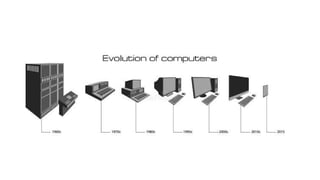
The Evolution of Operating Systems:
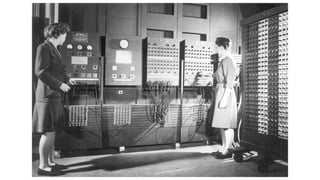
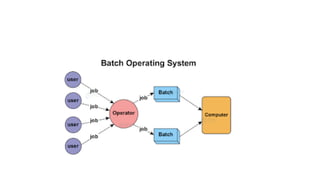
• Early OS (1950s-1960s): Batch processing, no interaction with users.
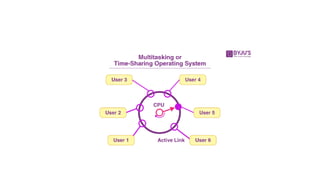
• 1960s-1970s: Introduction of time-sharing systems (e.g., Unix).
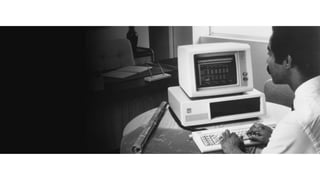
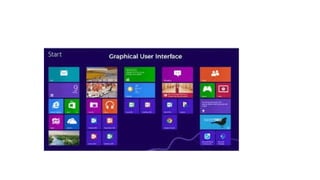
• 1980s: Development of graphical user interfaces (e.g., Apple
Macintosh, Microsoft Windows).
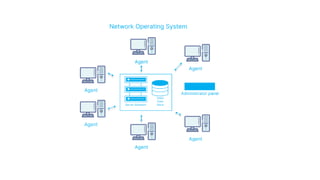
• 1990s-2000s: Growth of mobile operating systems, introduction of
networked OS, and popularization of open-source systems.
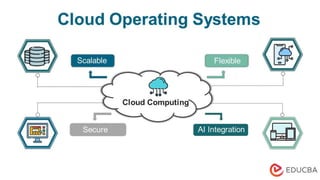
• 2010s-Present: Rise of cloud-based OS, IoT (Internet of Things)
devices with embedded OS, and advancements in real-time and
secure OS.
Functions of an Operating System:
Process Management:
• Handles the creation, scheduling, and termination of processes. It
ensures that each process gets the necessary resources and time on the
CPU.
Memory Management:
• Manages computer memory, allocating space for programs and ensuring
that different programs do not interfere with each other’s memory.
File System Management:
• Manages data storage, including file organization, storage, retrieval,
naming, sharing, and protection of files.
Functions of an Operating System:
Device Management:
• Manages device communication via their respective drivers. It controls hardware
peripherals and allocates their usage among various processes.
Security and Access Control:
• Ensures that unauthorized users do not access the system. It protects data and resources
through authentication (e.g., usernames and passwords).
User Interface:
• Provides a way for users to interact with the computer. It can be command-line-based
(CLI) or graphical (GUI).
Networking:
• Manages network communications, facilitating data exchange between computers over
networks.
Key Components of OS
• A shell is basically an interface present between the kernel and the
user.
• A kernel is the very core of a typical OS.
• A shell is a CLI (command-line interpreter)/ GUI
• A kernel is a type of low-level program that has its interfacing with
the hardware on top of which all the applications run (disks, RAM,
CPU, etc.).

operating system introduction (software)

  • 1.
  • 2.
    What is Software? •Definition: • Software refers to the set of instructions, data, or programs used to operate computers and execute specific tasks. • It is the non-tangible component of computers, contrasted with hardware, which refers to the physical devices. • Importance: • Without software, most hardware would be non-functional. Software makes computers useful and capable of running various tasks.
  • 3.
    Types of Software: •Application Software: • These are programs designed to perform specific tasks for users. Examples include: • Productivity Software: Microsoft Office, Google Workspace. • Web Browsers: Google Chrome, Mozilla Firefox, Microsoft Edge. • Media Players: VLC Media Player, Windows Media Player. • Graphics Software: Adobe Photoshop, GIMP
  • 4.
    Types of Software: •System Software: • This includes the operating system and all utility programs that manage computer resources at a low level. Examples include: • Operating Systems (OS): Windows, macOS, Linux.Device • Drivers: Software that allows the OS to communicate with hardware peripherals.Utilities: Disk management tools, antivirus programs, etc.
  • 5.
    Types of Software: •Development Software: • Tools that developers use to create, test, and maintain other software programs. Examples include: • Integrated Development Environments (IDEs): Visual Studio, Eclipse, PyCharm. • Code Editors: Sublime Text, Atom, VS Code.
  • 6.
  • 8.
    What is anOperating System? • An operating system is system software that acts as an intermediary between computer hardware and the computer user. • It manages hardware resources and provides services for computer programs. • An operating system acts as a communication bridge (interface) between the user and computer hardware. • The purpose of an operating system is to provide a platform on which a user can execute programs in a convenient and efficient manner
  • 11.
    The Evolution ofOperating Systems: • Early OS (1950s-1960s): Batch processing, no interaction with users. • 1960s-1970s: Introduction of time-sharing systems (e.g., Unix). • 1980s: Development of graphical user interfaces (e.g., Apple Macintosh, Microsoft Windows). • 1990s-2000s: Growth of mobile operating systems, introduction of networked OS, and popularization of open-source systems. • 2010s-Present: Rise of cloud-based OS, IoT (Internet of Things) devices with embedded OS, and advancements in real-time and secure OS.
  • 18.
    Functions of anOperating System: Process Management: • Handles the creation, scheduling, and termination of processes. It ensures that each process gets the necessary resources and time on the CPU. Memory Management: • Manages computer memory, allocating space for programs and ensuring that different programs do not interfere with each other’s memory. File System Management: • Manages data storage, including file organization, storage, retrieval, naming, sharing, and protection of files.
  • 19.
    Functions of anOperating System: Device Management: • Manages device communication via their respective drivers. It controls hardware peripherals and allocates their usage among various processes. Security and Access Control: • Ensures that unauthorized users do not access the system. It protects data and resources through authentication (e.g., usernames and passwords). User Interface: • Provides a way for users to interact with the computer. It can be command-line-based (CLI) or graphical (GUI). Networking: • Manages network communications, facilitating data exchange between computers over networks.
  • 20.
    Key Components ofOS • A shell is basically an interface present between the kernel and the user. • A kernel is the very core of a typical OS. • A shell is a CLI (command-line interpreter)/ GUI • A kernel is a type of low-level program that has its interfacing with the hardware on top of which all the applications run (disks, RAM, CPU, etc.).