Continuous Integration
with Puppet
Miguel Zuniga
Arch / Lead / Principal / Speaker
since v. 0.22.2
Agenda
● Continuous Integration
● How puppet can help us on CI?
● Puppet Environments = CI Environments
● Package, Test, Deploy
● Infrastructure as Code
● Puppet and CI
● Q&A
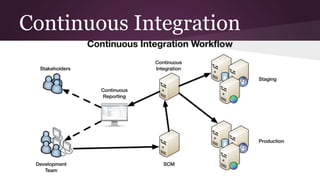
Continuous Integration
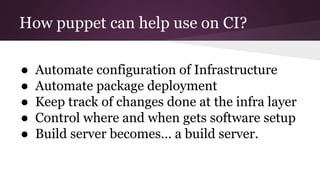
How puppet can help use on CI?
● Automate configuration of Infrastructure
● Automate package deployment
● Keep track of changes done at the infra layer
● Control where and when gets software setup
● Build server becomes… a build server.
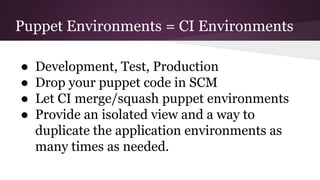
Puppet Environments = CI Environments
● Development, Test, Production
● Drop your puppet code in SCM
● Let CI merge/squash puppet environments
● Provide an isolated view and a way to
duplicate the application environments as
many times as needed.
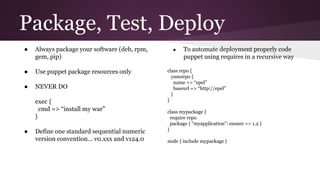
Package, Test, Deploy
● Always package your software (deb, rpm,
gem, pip)
● Use puppet package resources only
● NEVER DO
exec {
cmd => “install my war”
}
● Define one standard sequential numeric
version convention… v0.xxx and v124.0
● To automate deployment properly code
puppet using requires in a recursive way
class repo {
yumrepo {
name => “epel”
baseurl => “http://epel”
}
}
class mypackage {
require repo
package { “myapplication”: ensure => 1.2 }
}
node { include mypackage }
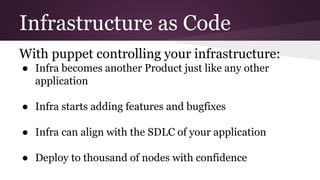
Infrastructure as Code
With puppet controlling your infrastructure:
● Infra becomes another Product just like any other
application
● Infra starts adding features and bugfixes
● Infra can align with the SDLC of your application
● Deploy to thousand of nodes with confidence
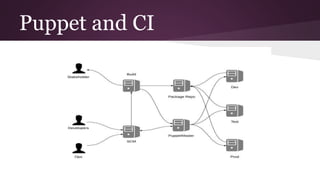
Puppet and CI
Puppet and CI
1. Developers submit application code to SCM
2. Ops submit infrastructure code to SCM
3. Build server pulls the application code, compiles it, creates the package and uploads it to the
repository
4. Build server pulls the infrastructure code, parses it, simulates it and merges the changes against
the target environment
5. Build server instructs the puppet master to pull specific tag of the target environment
6. Puppet master takes care of running the puppet code in the target environment, configure and
deploy the application
7. Testing framework can run once deploy is done.
8. Rinse and repeat
With puppet you are not compiling, packaging and deploying an application…
you are compiling, packaging and deploying your whole environment..
Q&A
Thank you
tweet @mike_zuniga
github.com/mikezuniga
G+ +miguelzuniga
Linkedin /in/miguelzuniga

Continuous Integration with Puppet

  • 1.
  • 2.
    Miguel Zuniga Arch /Lead / Principal / Speaker since v. 0.22.2
  • 3.
    Agenda ● Continuous Integration ●How puppet can help us on CI? ● Puppet Environments = CI Environments ● Package, Test, Deploy ● Infrastructure as Code ● Puppet and CI ● Q&A
  • 4.
  • 5.
    How puppet canhelp use on CI? ● Automate configuration of Infrastructure ● Automate package deployment ● Keep track of changes done at the infra layer ● Control where and when gets software setup ● Build server becomes… a build server.
  • 6.
    Puppet Environments =CI Environments ● Development, Test, Production ● Drop your puppet code in SCM ● Let CI merge/squash puppet environments ● Provide an isolated view and a way to duplicate the application environments as many times as needed.
  • 7.
    Package, Test, Deploy ●Always package your software (deb, rpm, gem, pip) ● Use puppet package resources only ● NEVER DO exec { cmd => “install my war” } ● Define one standard sequential numeric version convention… v0.xxx and v124.0 ● To automate deployment properly code puppet using requires in a recursive way class repo { yumrepo { name => “epel” baseurl => “http://epel” } } class mypackage { require repo package { “myapplication”: ensure => 1.2 } } node { include mypackage }
  • 8.
    Infrastructure as Code Withpuppet controlling your infrastructure: ● Infra becomes another Product just like any other application ● Infra starts adding features and bugfixes ● Infra can align with the SDLC of your application ● Deploy to thousand of nodes with confidence
  • 9.
  • 10.
    Puppet and CI 1.Developers submit application code to SCM 2. Ops submit infrastructure code to SCM 3. Build server pulls the application code, compiles it, creates the package and uploads it to the repository 4. Build server pulls the infrastructure code, parses it, simulates it and merges the changes against the target environment 5. Build server instructs the puppet master to pull specific tag of the target environment 6. Puppet master takes care of running the puppet code in the target environment, configure and deploy the application 7. Testing framework can run once deploy is done. 8. Rinse and repeat With puppet you are not compiling, packaging and deploying an application… you are compiling, packaging and deploying your whole environment..
  • 11.
    Q&A Thank you tweet @mike_zuniga github.com/mikezuniga G++miguelzuniga Linkedin /in/miguelzuniga