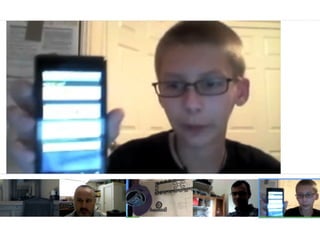
Eating Fruit
Combining robots and apps

         SecondConf 2012
           robotgrrl.com
       @RobotGrrl / +Erin RobotGrrl
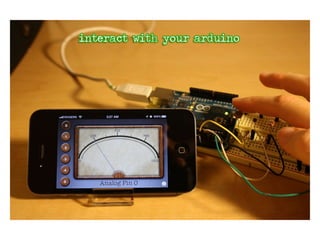
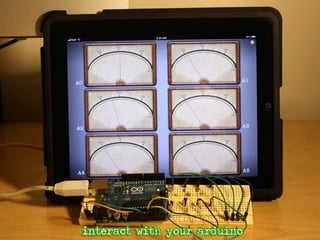
Apps for Arduino
       &
   RoboBrrd
UISlider

IRLSlider
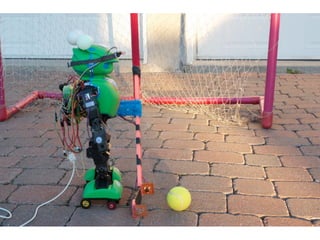
MANOI
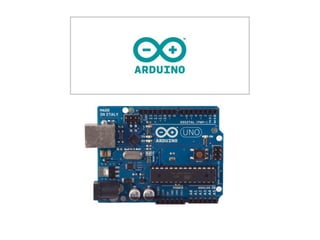
Arduino
• Open source prototyping platform
• Bootloader on ATmega328
• Arduino IDE
• Turn on LEDs, spin motors, sense the
  world

• Use it to interact with things around you
• Projects usually use Arduino in
  combination with software
Apps for Arduino
   If hardware is the heart of a
 project, then software is its soul
Apps for Arduino
• Makes your Arduino work with your
  computer and iOS device

• Incredibly simple concepts
• Action based rather than pin based
• Plug it in, add in the code, and it does it
• Open Source Framework: Matatino
Matatino
•   Connect to a serial device

•   Set baud rate, connection, parity, stop bits

•   RX & TX

•   Wrapper for termios and ioctl commands
Baud
           speed_t newSpeed = 9600;
ioctl(fileDescriptor, IOSSIOSPEED, &newSpeed);

                      8
        options->c_cflag |= CS8;

                     N
        options->c_cflag &= ~PARENB;

                      1
        options->c_cflag &= ~CSTOPB;
io_object_t serialService = IOIteratorNext(serialPortIterator);

! if (serialService != 0) {

  ! ! CFStringRef modemName =
  (CFStringRef)IORegistryEntryCreateCFProperty(serialService,
  CFSTR(kIOTTYDeviceKey), kCFAllocatorDefault, 0);

  ! ! CFStringRef bsdPath =
  (CFStringRef)IORegistryEntryCreateCFProperty(serialService,
  CFSTR(kIOCalloutDeviceKey), kCFAllocatorDefault, 0);

  ! ! CFStringRef serviceType =
  (CFStringRef)IORegistryEntryCreateCFProperty(serialService,
  CFSTR(kIOSerialBSDTypeKey), kCFAllocatorDefault, 0);

  }
Meters
What about iOS?
• MFi? What’s that?
• Redpark apps can’t go into the app store
• Headphone jack is quite slow
• TouchOSC
• Wifi
• BLE didn’t exist in the phones at the time
Wijourno
• Wifi with Bonjour & TCP sockets
• Needs app on the computer running
 • For many home automation projects,
    this isn’t too big of an issue

• No buttons to press to connect
• No IP address to enter to connect
• Zippy
Meters iOS
Feature Creep
• Many of the Arduino users are quite
  technical

• Want lots of features,
  customizability

• Turns out lack of feature creep is
  our best feature
Ideas and Learning
• Users start out using the apps for the
  main purpose

• They get ideas about how it can be
  extended

• Learn about what all this ‘app stuff’ is all
  about

• Eventually implement their idea
Open Source
• Entire Arduino community is built around
  open source

• Make something cool, tell people about it
• Post the design files / source files
• Help others make it
• So, Apps for Arduino are open source!
Contributions
• Spawns new ideas
• Really cool for getting fixes to the code
• People get to add their features that they
  needed!
Prototypability
• Use software to try out different modules
• Example: Sliding potentiometer
• Handy for trying out more expensive
  modules

• Example: speech synthesis
Speech
• Some text-to-speech chips out there
• Or, Pre-record phrases and play them
• Make the same functionality in software
 • Faster, easier, less expensive
• Try it out with your project first
Summary
• Interact with your Arduino projects
• No feature creep
• Actions rather than pins
• Open source
• appsforarduino.com
RoboBrrd
Do-it-yourself educational robotic pet
RoboBrrd
• Ended up not making that many videos
• People enjoyed how it interacted
• Won WyoLum Open Hardware grant
• Design became smaller, and better each
  time
Mechanical Design
• Autodesk Inventor 2013
 • Free for FIRST Robotics mentors &
    students

• Different pieces
• Multiple sub assemblies
• Really cool iPad App
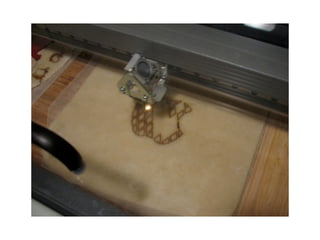
Laser Cutting!
•   Coolest thing on the planet (in my opinion)

•   XYZ table with mirrors

•   Laser tubes 45W/60W/100W

•   Different sizes of cutting area

•   Power, speed, frequency, DPI

•   Vector & Raster modes

•   Use various materials
http://www.evilmadscientist.com/2008/now-thats-an-apple-pie/
Electrical Design
•   gEDA Suite

    •   gschem, pcb, gerbv

    •   Schematics, PCB, Gerber viewer

•   Small-run board fab: OSH Park

    •   High quality boards: purple solder mask & gold
        plating
RoboBrrd Kit
• Takes too long to build RoboBrrd by hand
• Kit with precut pieces will be easier!
• 15 different laser cut pieces
• 1 RoboBrrd Brain Board (Arduino
  compatible)

• Kit version available in upcoming months
• Learn programming, mechanical, and
  electrical

• Aimed towards 10-16 year olds interested
Hats
• Different hats have different behaviours
• Really fun and simple interaction
• Uses NFC
• Tags on hat, sensor inside robot
• First bytes are different
Google+ Hangouts
• Maker Camp on Google+
• Collective action towards a goal
• Press buttons, see RoboBrrd’s actions
• node.js app, with websockets
• Really zippy, lag is hardly noticable
• http://www.youtube.com/watch?
  v=mMwNaA3sgsU
Food
• RoboBrrd eats virtual food
• Big beak, lots of fruit
• Drag and drop
• See RoboBrrd’s actions in real life
Future
• RoboBrrd with Bluetooth Low Energy!
• Interesting uses for education
• Could work with both iOS and Android
• Highly customizable
• Interesting uses for education
Summary
• Robots don’t always have to be as they
  seem

• Design parametrically for future
  modification

• Interaction in different and obvious ways
• Robots with friends is fun!
erin@robotgrrl.com @RobotGrrl   +Erin RobotGrrl
Resources
• robotgrrl.com - my website
• appsforarduino.com - the apps that work
  with arduino

• robobrrd.com - robobrrd’s nest on the
  web

• arduino.cc - all about the arduino
• blog.makezine.com - cool projects
• evilmadscientist.com - cool projects
• adafruit.com/blog - cool projects

Eating Fruit - Combining Robots & Apps

  • 2.
    Eating Fruit Combining robotsand apps SecondConf 2012 robotgrrl.com @RobotGrrl / +Erin RobotGrrl
  • 3.
  • 4.
  • 5.
  • 10.
    Arduino • Open sourceprototyping platform • Bootloader on ATmega328 • Arduino IDE • Turn on LEDs, spin motors, sense the world • Use it to interact with things around you • Projects usually use Arduino in combination with software
  • 11.
    Apps for Arduino If hardware is the heart of a project, then software is its soul
  • 12.
    Apps for Arduino •Makes your Arduino work with your computer and iOS device • Incredibly simple concepts • Action based rather than pin based • Plug it in, add in the code, and it does it • Open Source Framework: Matatino
  • 13.
    Matatino • Connect to a serial device • Set baud rate, connection, parity, stop bits • RX & TX • Wrapper for termios and ioctl commands
  • 14.
    Baud speed_t newSpeed = 9600; ioctl(fileDescriptor, IOSSIOSPEED, &newSpeed); 8 options->c_cflag |= CS8; N options->c_cflag &= ~PARENB; 1 options->c_cflag &= ~CSTOPB;
  • 15.
    io_object_t serialService =IOIteratorNext(serialPortIterator); ! if (serialService != 0) { ! ! CFStringRef modemName = (CFStringRef)IORegistryEntryCreateCFProperty(serialService, CFSTR(kIOTTYDeviceKey), kCFAllocatorDefault, 0); ! ! CFStringRef bsdPath = (CFStringRef)IORegistryEntryCreateCFProperty(serialService, CFSTR(kIOCalloutDeviceKey), kCFAllocatorDefault, 0); ! ! CFStringRef serviceType = (CFStringRef)IORegistryEntryCreateCFProperty(serialService, CFSTR(kIOSerialBSDTypeKey), kCFAllocatorDefault, 0); }
  • 16.
  • 18.
    What about iOS? •MFi? What’s that? • Redpark apps can’t go into the app store • Headphone jack is quite slow • TouchOSC • Wifi • BLE didn’t exist in the phones at the time
  • 19.
    Wijourno • Wifi withBonjour & TCP sockets • Needs app on the computer running • For many home automation projects, this isn’t too big of an issue • No buttons to press to connect • No IP address to enter to connect • Zippy
  • 21.
  • 22.
    Feature Creep • Manyof the Arduino users are quite technical • Want lots of features, customizability • Turns out lack of feature creep is our best feature
  • 23.
    Ideas and Learning •Users start out using the apps for the main purpose • They get ideas about how it can be extended • Learn about what all this ‘app stuff’ is all about • Eventually implement their idea
  • 24.
    Open Source • EntireArduino community is built around open source • Make something cool, tell people about it • Post the design files / source files • Help others make it • So, Apps for Arduino are open source!
  • 25.
    Contributions • Spawns newideas • Really cool for getting fixes to the code • People get to add their features that they needed!
  • 26.
    Prototypability • Use softwareto try out different modules • Example: Sliding potentiometer • Handy for trying out more expensive modules • Example: speech synthesis
  • 27.
    Speech • Some text-to-speechchips out there • Or, Pre-record phrases and play them • Make the same functionality in software • Faster, easier, less expensive • Try it out with your project first
  • 30.
    Summary • Interact withyour Arduino projects • No feature creep • Actions rather than pins • Open source • appsforarduino.com
  • 32.
  • 41.
    RoboBrrd • Ended upnot making that many videos • People enjoyed how it interacted • Won WyoLum Open Hardware grant • Design became smaller, and better each time
  • 42.
    Mechanical Design • AutodeskInventor 2013 • Free for FIRST Robotics mentors & students • Different pieces • Multiple sub assemblies • Really cool iPad App
  • 43.
    Laser Cutting! • Coolest thing on the planet (in my opinion) • XYZ table with mirrors • Laser tubes 45W/60W/100W • Different sizes of cutting area • Power, speed, frequency, DPI • Vector & Raster modes • Use various materials
  • 44.
  • 47.
    Electrical Design • gEDA Suite • gschem, pcb, gerbv • Schematics, PCB, Gerber viewer • Small-run board fab: OSH Park • High quality boards: purple solder mask & gold plating
  • 51.
    RoboBrrd Kit • Takestoo long to build RoboBrrd by hand • Kit with precut pieces will be easier! • 15 different laser cut pieces • 1 RoboBrrd Brain Board (Arduino compatible) • Kit version available in upcoming months • Learn programming, mechanical, and electrical • Aimed towards 10-16 year olds interested
  • 53.
    Hats • Different hatshave different behaviours • Really fun and simple interaction • Uses NFC • Tags on hat, sensor inside robot • First bytes are different
  • 54.
    Google+ Hangouts • MakerCamp on Google+ • Collective action towards a goal • Press buttons, see RoboBrrd’s actions • node.js app, with websockets • Really zippy, lag is hardly noticable • http://www.youtube.com/watch? v=mMwNaA3sgsU
  • 55.
    Food • RoboBrrd eatsvirtual food • Big beak, lots of fruit • Drag and drop • See RoboBrrd’s actions in real life
  • 56.
    Future • RoboBrrd withBluetooth Low Energy! • Interesting uses for education • Could work with both iOS and Android • Highly customizable • Interesting uses for education
  • 57.
    Summary • Robots don’talways have to be as they seem • Design parametrically for future modification • Interaction in different and obvious ways • Robots with friends is fun!
  • 71.
  • 72.
    Resources • robotgrrl.com -my website • appsforarduino.com - the apps that work with arduino • robobrrd.com - robobrrd’s nest on the web • arduino.cc - all about the arduino • blog.makezine.com - cool projects • evilmadscientist.com - cool projects • adafruit.com/blog - cool projects

Editor's Notes

  • #2 \n
  • #3 Hello there! Let’s talk about eating fruit. Or more like, combining robots and apps together to create a blended reality.\n
  • #4 So we will talk about two things: Apps for Arduino and RoboBrrd. In this talk I aim to introduce what these are, describe how they work, and show you them in action. Hopefully by the end of it you will be convinced that robots are cool and will want to try your own experiments!\n
  • #5 [Show slider] Here’s a good way to illustrate the things that I work with. They’re real, physical objects. They almost work like how they work in software (haha). Except these are electrical components that can be used.\n
  • #6 In order to make a robot, many of these components will be used. Especially to be able to sense and interact with the world. Here is my robot MANOI, it is a typical humanoid robot that enjoys dancing more than functioning.\n
  • #7 It has 18 servos, a gyro and accelerometer, and a LED bling necklace that was added in later. MANOI is a hockey player of sorts. {2 more}\n
  • #8 It used light sensors to detect the ball, and thereby shoot the stick. It was also controllable via a Wii nunchuck. {1 more}\n
  • #9 The ping-pong ball LED indicators could be used to light up based off of various sensor readings. What MANOI uses for its brain is an Arduino microcontroller. {Last one}\n
  • #10 This is an Arduino microcontroller.\n
  • #11 One of the popular microprocessor for physical computing type projects is an Arduino. How many people here have heard of an Arduino? It is a great way to get started with learning about hardware. It’s really widespread across many fields, as it has great documentation and a straight-forward IDE.\n
  • #12 This leads into Apps for Arduino. If hardware is the heart of a project, then software is its soul. I think SJ said something similar to this at WWDC’11. He probably wasn’t talking about Arduinos, but it fits.\n
  • #13 \n
  • #14 \n
  • #15 \n
  • #16 \n
  • #17 \n
  • #18 \n
  • #19 Turns out this is a huge question for hobbyists. We do have some options\n
  • #20 \n
  • #21 \n
  • #22 \n
  • #23 So, if you noticed, Meters for Arduino is really simple\n
  • #24 \n
  • #25 \n
  • #26 \n
  • #27 Switching gears a little bit, another cool thing that software can do is\n
  • #28 \n
  • #29 \n
  • #30 [...] Summary next.\n
  • #31 [...] Okay, now onto RoboBrrd!\n
  • #32 \n
  • #33 Now let’s talk about RoboBrrd!\n
  • #34 \n
  • #35 \n
  • #36 \n
  • #37 \n
  • #38 \n
  • #39 \n
  • #40 \n
  • #41 \n
  • #42 \n
  • #43 \n
  • #44 \n
  • #45 \n
  • #46 \n
  • #47 \n
  • #48 \n
  • #49 \n
  • #50 \n
  • #51 [...] This board and all the components will be in the RoboBrrd Kit.\n
  • #52 So let’s talk about the RoboBrrd kit. [...] The main goal with RoboBrrd is to make fun interactive stuff.\n
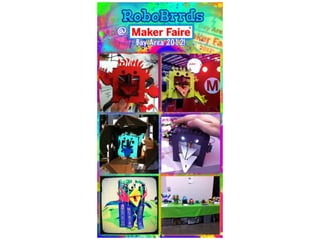
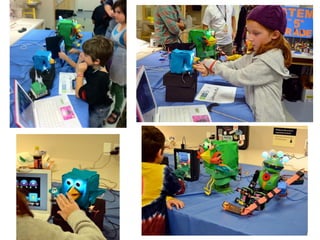
  • #53 How people interact with RoboBrrd is a key element to it. RoboBrrd isn’t like other robots, so interacting with it usually isn’t done on a ‘command’ basis. At Maker Faire a lot of kids enjoy interacting with RoboBrrd. There’s a few different ways to interact with it, let’s dive in.\n
  • #54 \n
  • #55 \n
  • #56 \n
  • #57 \n
  • #58 \n
  • #59 As you can see here, RoboBrrd has many friends.\n
  • #60 Speaking of friends, it’s really important to have a community around that you can share the excitement with. This here is Chris the Carpenter from LetsMakeRobots.com. He’s standing besice a CNC that he created from scratch, to create more robots.\n
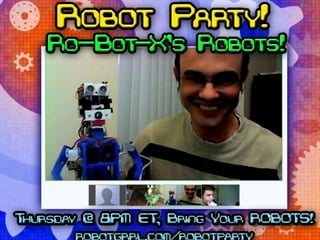
  • #61 Each week I host a Google+ Hangout called the Robot Party! This here is Ro-Bot-X. He builds really cool robots.\n
  • #62 Ro-Bot-X is a pretty crazy robot builder!\n
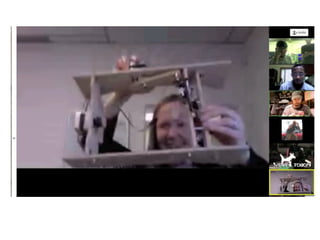
  • #63 We even have a FIRST Lego League team join in sometimes. This here was NEON NOODLES, and they were showing off their Food Factor challenge robot.\n
  • #64 Sometimes we even have really believable robots.\n
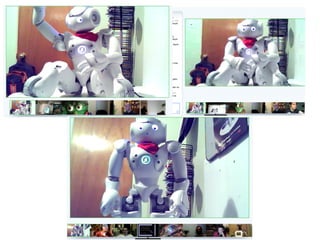
  • #65 Nao 1337 tried to do face detection with Google+ Hangouts. It was a fun idea!\n
  • #66 Here’s an Ostrich Eggbot, it’s a robot that can create designs on large round objects, such as an ostich egg!\n
  • #67 Here is Joey showing off an Android app that he made to do some OpenSCAD calculations. It was pretty cool!\n
  • #68 And here’s another cool robot, OddBot’s Chopsticks robot.\n
  • #69 Here was a party that we had to broadcast the LMR v4 drawing, live! It was pretty crazy, the robot to do the drawing used a pendulum with a light sensor to generate the random numbers, which were then displayed at the top. Oh yeah, and that person was up at 2AM to do this because he’s from Europe!\n
  • #70 Here’s some other cool robots, Super Awesome Sylvia showing off a BOEbot.\n
  • #71 You’re all invited to join us at the Robot Party each week! It’s a lot of fun, and sometimes we all try and remotely control a robot to clean off my desk. It actually works, so how cool is that?!\n
  • #72 Thanks for taking the time to listen to my talk!\n
  • #73 \n