INTERNSHIP PROGRAMME TITLE
EMBEDDED SYSTEM
Under skillDzire for 2 Months.Organized by skillDzire in collaboration with
Andhra Pradesh State Council of Higher Education(APSCHE)
MIRACLE EDUCATIONAL SOCIETY GROUP OF INSTITUTION
(AUTONOMOUS)
Approved by AICTE, Accredited by NAAC&permanently Afflicated by JNTU-GV
VIZIANAGARAM-535216
DEPARTMENT OF ELECTRONICS AND COMMUNICATION ENGINEERING
SUBMITTED BY
B.Vyshnavi
INTRODUCTION
 An embedded system is a small computer
that forms part of a larger system, device or
machine.
 Its purpose is to control the device and to
allow a user to interact with it.
 They tend to have one, or a limited number
of tasks that they can perform.
 Examples of embedded systems include:
central heating systems.
IMPORTANCE OF EMBEDDED SYSTEM
 The purpose of embedded systems is to control a specific function within a
device.
 They are usually designed to only perform this function repeatedly, but
more developed embedded systems can control entire operating systems.
 Some more complex embedded systems can also perform several
different functions, but these are still relatively simple tasks that do not
require a large amount of processing power
ARDUINO UNO IN EMBEDDED SYSTEM
LIST OF ARUDINO PROJECTS
 Object Detection Sensor
 Device operation using switches by Arduino
 Device operation using PC by Arduino
 Robot operation using switches by Arduino
MAJOR PROJECT:(Robot operation using switches by Arduino)
Block Diagram
ABSTRACT
The main aim of this project is to operate the ROBOT
using switches by Arduino.
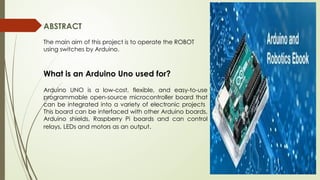
What is an Arduino Uno used for?
Arduino UNO is a low-cost, flexible, and easy-to-use
programmable open-source microcontroller board that
can be integrated into a variety of electronic projects
This board can be interfaced with other Arduino boards,
Arduino shields, Raspberry Pi boards and can control
relays, LEDs and motors as an output.
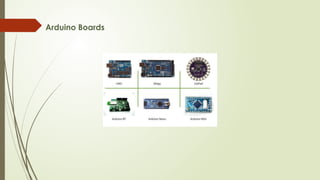
Arduino Boards
Arduino UNO
Introduction to Robots
 Robotics it is man-made mechanical devices that can move by
themselves, whose motion must be planned, sensed, actuated, modeled
and controlled, and whose motion behavior can be influenced by
programming. Robots are the physical agent that perform task by
manipulating the physical world.
 Robots are the physical agent that perform task by manipulating the
physical world.
Robots hardware(components):
 Robots depend on the function of the Sensors, Effectors, Actuators,
Controller and their designs that appropriate for the task.
 They perform various tasks depending on these hardware components that
are given to them and programmed in them
Soft code
int w1=2; int w2=3; int w3=4; int w4=5;
int ow1=6; int ow2=7; int ow3=8; int ow4=9;
int swt1=13; int swt2=12; int swt3=11; int swt4=10;
int swt1st=0; int swt2st=0; int swt3st=0; int swt4st=0;
void setup()
{
pinMode(swt1,INPUT); pinMode(swt2,INPUT); pinMode(swt3,INPUT);
pinMode(swt4,INPUT); pinMode(w1,OUTPUT); pinMode(w2,OUTPUT);
pinMode(w3,OUTPUT); pinMode(w4,OUTPUT); pinMode(ow1,OUTPUT);
pinMode(ow2,OUTPUT); pinMode(ow3,OUTPUT); pinMode(ow4,OUTPUT);
Serial.begin(9600); Serial.println("ROBOT OPERATION");
}
Soft code
void loop()
{
digitalWrite(w1,LOW); digitalWrite(w2,LOW); digitalWrite(w3,LOW);
digitalWrite(w4,LOW); digitalWrite(ow1,LOW); digitalWrite(ow2,LOW);
digitalWrite(ow3,LOW); digitalWrite(ow4,LOW);
swt1st=digitalRead(swt1); swt2st=digitalRead(swt2); swt3st=digitalRead(swt3);
swt4st=digitalRead(swt4);
if(swt1st==0)
{
digitalWrite(w1,HIGH); digitalWrite(w2,HIGH); digitalWrite(w3,HIGH);
digitalWrite(w4,HIGH); Serial.println("ROBOT moving front");
}
Soft code
if(swt2st==0)
{
digitalWrite(ow1,HIGH); digitalWrite(ow2,HIGH); digitalWrite(ow3,HIGH);
digitalWrite(ow4,HIGH);
Serial.println("ROBOT moving back");
}
if(swt3st==0)
{
digitalWrite(w1,HIGH); digitalWrite(w2,HIGH); digitalWrite(w3,HIGH);
digitalWrite(ow4,HIGH); Serial.println("ROBOT moving right");
}
if(swt4st==0)
{
digitalWrite(w3,HIGH); digitalWrite(ow1,HIGH); digitalWrite(ow2,HIGH);
digitalWrite(ow4,HIGH); Serial.println("ROBOT moving left");
}
}
Hardware Connection using Proteus
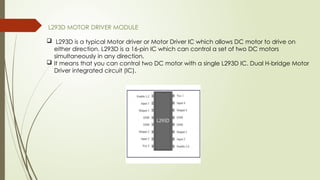
L293D MOTOR DRIVER MODULE
 L293D is a typical Motor driver or Motor Driver IC which allows DC motor to drive on
either direction. L293D is a 16-pin IC which can control a set of two DC motors
simultaneously in any direction.
 It means that you can control two DC motor with a single L293D IC. Dual H-bridge Motor
Driver integrated circuit (IC).
CONCLUSION
By performing embedded internship. I have learned the topic of
MPMC,Embedded C,Arduino UNO, I have design and simulated the
Robot operation using switches by Arduino and verified the output
Arduino is a micro-controller. This small computer is used as the
brain of the robot. It can be programmed to control the way
buttons, motors, switches, lights, and other electronic parts work
together
THANK YOU

EMBEDDED system presentation (PPT1.pptx)

  • 1.
    INTERNSHIP PROGRAMME TITLE EMBEDDEDSYSTEM Under skillDzire for 2 Months.Organized by skillDzire in collaboration with Andhra Pradesh State Council of Higher Education(APSCHE) MIRACLE EDUCATIONAL SOCIETY GROUP OF INSTITUTION (AUTONOMOUS) Approved by AICTE, Accredited by NAAC&permanently Afflicated by JNTU-GV VIZIANAGARAM-535216 DEPARTMENT OF ELECTRONICS AND COMMUNICATION ENGINEERING SUBMITTED BY B.Vyshnavi
  • 3.
    INTRODUCTION  An embeddedsystem is a small computer that forms part of a larger system, device or machine.  Its purpose is to control the device and to allow a user to interact with it.  They tend to have one, or a limited number of tasks that they can perform.  Examples of embedded systems include: central heating systems.
  • 4.
    IMPORTANCE OF EMBEDDEDSYSTEM  The purpose of embedded systems is to control a specific function within a device.  They are usually designed to only perform this function repeatedly, but more developed embedded systems can control entire operating systems.  Some more complex embedded systems can also perform several different functions, but these are still relatively simple tasks that do not require a large amount of processing power
  • 5.
    ARDUINO UNO INEMBEDDED SYSTEM LIST OF ARUDINO PROJECTS  Object Detection Sensor  Device operation using switches by Arduino  Device operation using PC by Arduino  Robot operation using switches by Arduino
  • 6.
    MAJOR PROJECT:(Robot operationusing switches by Arduino) Block Diagram
  • 7.
    ABSTRACT The main aimof this project is to operate the ROBOT using switches by Arduino. What is an Arduino Uno used for? Arduino UNO is a low-cost, flexible, and easy-to-use programmable open-source microcontroller board that can be integrated into a variety of electronic projects This board can be interfaced with other Arduino boards, Arduino shields, Raspberry Pi boards and can control relays, LEDs and motors as an output.
  • 8.
  • 9.
  • 10.
    Introduction to Robots Robotics it is man-made mechanical devices that can move by themselves, whose motion must be planned, sensed, actuated, modeled and controlled, and whose motion behavior can be influenced by programming. Robots are the physical agent that perform task by manipulating the physical world.  Robots are the physical agent that perform task by manipulating the physical world. Robots hardware(components):  Robots depend on the function of the Sensors, Effectors, Actuators, Controller and their designs that appropriate for the task.  They perform various tasks depending on these hardware components that are given to them and programmed in them
  • 12.
    Soft code int w1=2;int w2=3; int w3=4; int w4=5; int ow1=6; int ow2=7; int ow3=8; int ow4=9; int swt1=13; int swt2=12; int swt3=11; int swt4=10; int swt1st=0; int swt2st=0; int swt3st=0; int swt4st=0; void setup() { pinMode(swt1,INPUT); pinMode(swt2,INPUT); pinMode(swt3,INPUT); pinMode(swt4,INPUT); pinMode(w1,OUTPUT); pinMode(w2,OUTPUT); pinMode(w3,OUTPUT); pinMode(w4,OUTPUT); pinMode(ow1,OUTPUT); pinMode(ow2,OUTPUT); pinMode(ow3,OUTPUT); pinMode(ow4,OUTPUT); Serial.begin(9600); Serial.println("ROBOT OPERATION"); }
  • 13.
    Soft code void loop() { digitalWrite(w1,LOW);digitalWrite(w2,LOW); digitalWrite(w3,LOW); digitalWrite(w4,LOW); digitalWrite(ow1,LOW); digitalWrite(ow2,LOW); digitalWrite(ow3,LOW); digitalWrite(ow4,LOW); swt1st=digitalRead(swt1); swt2st=digitalRead(swt2); swt3st=digitalRead(swt3); swt4st=digitalRead(swt4); if(swt1st==0) { digitalWrite(w1,HIGH); digitalWrite(w2,HIGH); digitalWrite(w3,HIGH); digitalWrite(w4,HIGH); Serial.println("ROBOT moving front"); }
  • 14.
    Soft code if(swt2st==0) { digitalWrite(ow1,HIGH); digitalWrite(ow2,HIGH);digitalWrite(ow3,HIGH); digitalWrite(ow4,HIGH); Serial.println("ROBOT moving back"); } if(swt3st==0) { digitalWrite(w1,HIGH); digitalWrite(w2,HIGH); digitalWrite(w3,HIGH); digitalWrite(ow4,HIGH); Serial.println("ROBOT moving right"); } if(swt4st==0) { digitalWrite(w3,HIGH); digitalWrite(ow1,HIGH); digitalWrite(ow2,HIGH); digitalWrite(ow4,HIGH); Serial.println("ROBOT moving left"); } }
  • 15.
  • 16.
    L293D MOTOR DRIVERMODULE  L293D is a typical Motor driver or Motor Driver IC which allows DC motor to drive on either direction. L293D is a 16-pin IC which can control a set of two DC motors simultaneously in any direction.  It means that you can control two DC motor with a single L293D IC. Dual H-bridge Motor Driver integrated circuit (IC).
  • 17.
    CONCLUSION By performing embeddedinternship. I have learned the topic of MPMC,Embedded C,Arduino UNO, I have design and simulated the Robot operation using switches by Arduino and verified the output Arduino is a micro-controller. This small computer is used as the brain of the robot. It can be programmed to control the way buttons, motors, switches, lights, and other electronic parts work together

  • 18.