Docker and Windows Server 2016
Webinar, October 2016
Michael Friis - @friism - michael.friis@docker.com
Docker on Windows Server 2016
• Now 98% of enterprise workloads supported by Docker
• Proven benefits of Docker on Linux available to Windows Server
developers and IT Pros
• One Docker platform and one adoption journey for all enterprise
applications and infrastructure
• Docker CS Engine with Windows Server 2016 at no additional cost
Docker on Windows Server 2016
• Microsoft and Docker formed partnership in 2014
• Windows kernel (both 2016 and Windows 10) now has
containerization primitives
• Microsoft and Docker worked to port Docker Engine to Windows, all in
the open on https://github.com/docker/docker
• Ancillary services like registry, Hub, etc. have multi-arch support,
maintain Linux and Windows Docker images side by side
Choice of base image
windowsservercore: Runs most Windows
Server apps, eg. IIS, SQL Server, full .NET
Framework
nanoserver: New minimal Windows version,
runs IIS and .NET Core
Choice of isolation
Windows Server Containers
Hyper-V Containers
Windows Server 2016 technical details
Infrastructure
Windows Server 2016
Bins/Libs
App
CS Docker Engine
Bins/Libs
App
Bins/Libs
App
Windows
Kernel
Docker
Platform
Specific
Platform
Independent
Comparing OS Architectures
Linux Control Groups
cgroups
Namespaces
Pid, net, ipc, mnt, uts
Layer Capabilities
Union Filesystems:
AUFS, btrfs, vfs,
zfs*,DeviceMapper
Other OS
Functionality
Containerd + runC
Docker Engine
REST Interface
libcontainerd graphlibnetwork plugins
Windows Control Groups
Job objects
Namespaces
Object Namespace,
Process Table,
Networking
Layer Capabilities
Registry, Union like
filesystem extensions
Other OS
Functionality
Compute Services
Docker Client Docker Swarm
Docker
Compose
Docker Registry
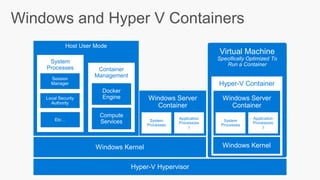
Virtual Machine
Specifically Optimized To
Run a Container
Windows and Hyper V Containers
Hyper-V Hypervisor
Host User Mode
Container
Management
Windows Kernel
Compute
Services
Docker
Engine Windows Server
Container
System
Processes
Application
Process(es
)
System
Processes
Session
Manager
Local Security
Authority
Etc…
Hyper-V Container
Windows Kernel
Windows Server
Container
System
Processes
Application
Process(es
)
Windows Server 2016 and Docker for IT pros
• Eliminate “works on my machine” problem
• Makes maintaining CI machines much simpler
• Docker images and bundles are great interface with Ops
DEVELOPERS IT PRO
BUILD
Development Environments
SHIP
Secure Content & Collaboration
Use Case: Development and test in the cloud
Developers
Version
control
Docker
Trusted Registry
QA / QE
Staging
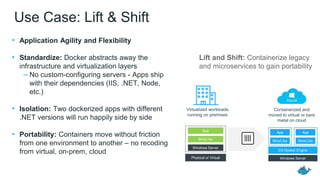
Use Case: Lift & Shift
• Application Agility and Flexibility
• Standardize: Docker abstracts away the
infrastructure and virtualization layers
– No custom-configuring servers - Apps ship
with their dependencies (IIS, .NET, Node,
etc.)
• Isolation: Two dockerized apps with different
.NET versions will run happily side by side
• Portability: Containers move without friction
from one environment to another – no recoding
from virtual, on-prem, cloud
Bins/Libs
App
Windows Server
Bins/Libs
App
Windows Server
CS Docker Engine
Bins/Libs
App
Physical or Virtual
Virtualized workloads
running on premises
Containerized and
moved to virtual or bare
metal on cloud
Lift and Shift: Containerize legacy
and microservices to gain portability
Docker Datacenter
Manage Linux, Windows, x86
11
Developers IT Operations
BUILD
Development Environments
SHIP
Secure Content & Collaboration
RUN
Deploy, Manage, Scale
Docker Datacenter for Windows
Client
Compose
Partner IntegrationsDocker Interfaces
Volume
Plug-ins
Monitoring Logging
Network
Plug-ins
Docker Universal
Control Plane
Docker Trusted
Registry
Windows Server
2016
Commercially supported Docker Engines
Docker Swarm
Docker Datacenter
Content Security
Storage
Drivers
LDAP/
AD
Docker for
Windows
Plug-in for Visual
Studio & VS Code
Linux Any Application
Anywhere
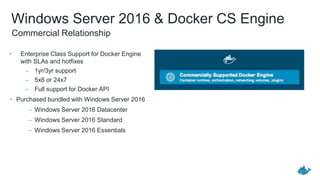
Windows Server 2016 & Docker CS Engine
• Enterprise Class Support for Docker Engine
with SLAs and hotfixes
– 1yr/3yr support
– 5x8 or 24x7
– Full support for Docker API
• Purchased bundled with Windows Server 2016
– Windows Server 2016 Datacenter
– Windows Server 2016 Standard
– Windows Server 2016 Essentials
Commercial Relationship
Demo Time
Get Started with Docker Windows Containers
1.Windows 10 with Anniversary Edition update
– Install Docker for Windows (public beta channel)
– Run Windows Server 2016 in VM
2.Azure
– Windows Server 2016 RTM
– Nanoserver 2016
3.Other (macOS, Linux, older Windows)
– Windows Server 2016 in VM (VirtualBox, VMWare)
Install-PackageProvider -Name NuGet -MinimumVersion 2.8.5.201 -Force
Install-Module -Name DockerMsftProvider -Force
Install-Package -Name docker -ProviderName DockerMsftProvider -Force
Restart-Computer -Force
https://blog.docker.com/2016/09/build-your-first-docker-windows-server-
container/
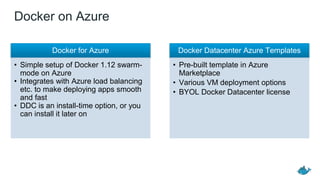
Docker on Azure
Docker for Azure
• Simple setup of Docker 1.12 swarm-
mode on Azure
• Integrates with Azure load balancing
etc. to make deploying apps smooth
and fast
• DDC is an install-time option, or you
can install it later on
Docker Datacenter Azure Templates
• Pre-built template in Azure
Marketplace
• Various VM deployment options
• BYOL Docker Datacenter license
Additional Work with Microsoft
• .NET Core works great in Docker Linux containers
• Microsoft .NET team maintains base images
• .NET Core also for Nano Server and Windowsservercore Docker containers
• To lift and shift older .NET apps, use .NET on windowsservercore Docker
images
.NET Core
• Docker Windows SQL Server container images already available and Linux in
private betaSQL Server
• Plugins for both Visual Studio Code and Visual Studio
• Help with Docker project setup
• Line-by-line debugging
Visual Studio
Tooling
Next Steps…
• Resources:
– https://www.docker.com/microsoft
– https://blog.docker.com/2016/09/dockerforws2016/
– https://blog.docker.com/2016/09/docker-microsoft-partnership/
• Try Windows Server 2016
– https://www.microsoft.com/en-us/evalcenter/evaluate-windows-server-2016
– https://blog.docker.com/2016/09/build-your-first-docker-windows-server-container/
– Run on Azure
• See what others have built
– http://blog.alexellis.io/
– https://blog.sixeyed.com/
– http://stefanscherer.github.io/
• Show us what you’ve built, tweet at @friism and @docker
• Register for our upcoming Webinar, October 25th, 10AM PST
– Containerize Windows Workloads with Image2Docker Tool
THANK YOU

Docker and Microsoft - Windows Server 2016 Technical Deep Dive

  • 1.
    Docker and WindowsServer 2016 Webinar, October 2016 Michael Friis - @friism - michael.friis@docker.com
  • 2.
    Docker on WindowsServer 2016 • Now 98% of enterprise workloads supported by Docker • Proven benefits of Docker on Linux available to Windows Server developers and IT Pros • One Docker platform and one adoption journey for all enterprise applications and infrastructure • Docker CS Engine with Windows Server 2016 at no additional cost
  • 3.
    Docker on WindowsServer 2016 • Microsoft and Docker formed partnership in 2014 • Windows kernel (both 2016 and Windows 10) now has containerization primitives • Microsoft and Docker worked to port Docker Engine to Windows, all in the open on https://github.com/docker/docker • Ancillary services like registry, Hub, etc. have multi-arch support, maintain Linux and Windows Docker images side by side
  • 5.
    Choice of baseimage windowsservercore: Runs most Windows Server apps, eg. IIS, SQL Server, full .NET Framework nanoserver: New minimal Windows version, runs IIS and .NET Core Choice of isolation Windows Server Containers Hyper-V Containers Windows Server 2016 technical details Infrastructure Windows Server 2016 Bins/Libs App CS Docker Engine Bins/Libs App Bins/Libs App Windows Kernel
  • 6.
    Docker Platform Specific Platform Independent Comparing OS Architectures LinuxControl Groups cgroups Namespaces Pid, net, ipc, mnt, uts Layer Capabilities Union Filesystems: AUFS, btrfs, vfs, zfs*,DeviceMapper Other OS Functionality Containerd + runC Docker Engine REST Interface libcontainerd graphlibnetwork plugins Windows Control Groups Job objects Namespaces Object Namespace, Process Table, Networking Layer Capabilities Registry, Union like filesystem extensions Other OS Functionality Compute Services Docker Client Docker Swarm Docker Compose Docker Registry
  • 7.
    Virtual Machine Specifically OptimizedTo Run a Container Windows and Hyper V Containers Hyper-V Hypervisor Host User Mode Container Management Windows Kernel Compute Services Docker Engine Windows Server Container System Processes Application Process(es ) System Processes Session Manager Local Security Authority Etc… Hyper-V Container Windows Kernel Windows Server Container System Processes Application Process(es )
  • 8.
    Windows Server 2016and Docker for IT pros • Eliminate “works on my machine” problem • Makes maintaining CI machines much simpler • Docker images and bundles are great interface with Ops
  • 9.
    DEVELOPERS IT PRO BUILD DevelopmentEnvironments SHIP Secure Content & Collaboration Use Case: Development and test in the cloud Developers Version control Docker Trusted Registry QA / QE Staging
  • 10.
    Use Case: Lift& Shift • Application Agility and Flexibility • Standardize: Docker abstracts away the infrastructure and virtualization layers – No custom-configuring servers - Apps ship with their dependencies (IIS, .NET, Node, etc.) • Isolation: Two dockerized apps with different .NET versions will run happily side by side • Portability: Containers move without friction from one environment to another – no recoding from virtual, on-prem, cloud Bins/Libs App Windows Server Bins/Libs App Windows Server CS Docker Engine Bins/Libs App Physical or Virtual Virtualized workloads running on premises Containerized and moved to virtual or bare metal on cloud Lift and Shift: Containerize legacy and microservices to gain portability
  • 11.
    Docker Datacenter Manage Linux,Windows, x86 11 Developers IT Operations BUILD Development Environments SHIP Secure Content & Collaboration RUN Deploy, Manage, Scale
  • 12.
    Docker Datacenter forWindows Client Compose Partner IntegrationsDocker Interfaces Volume Plug-ins Monitoring Logging Network Plug-ins Docker Universal Control Plane Docker Trusted Registry Windows Server 2016 Commercially supported Docker Engines Docker Swarm Docker Datacenter Content Security Storage Drivers LDAP/ AD Docker for Windows Plug-in for Visual Studio & VS Code Linux Any Application Anywhere
  • 13.
    Windows Server 2016& Docker CS Engine • Enterprise Class Support for Docker Engine with SLAs and hotfixes – 1yr/3yr support – 5x8 or 24x7 – Full support for Docker API • Purchased bundled with Windows Server 2016 – Windows Server 2016 Datacenter – Windows Server 2016 Standard – Windows Server 2016 Essentials Commercial Relationship
  • 14.
  • 15.
    Get Started withDocker Windows Containers 1.Windows 10 with Anniversary Edition update – Install Docker for Windows (public beta channel) – Run Windows Server 2016 in VM 2.Azure – Windows Server 2016 RTM – Nanoserver 2016 3.Other (macOS, Linux, older Windows) – Windows Server 2016 in VM (VirtualBox, VMWare) Install-PackageProvider -Name NuGet -MinimumVersion 2.8.5.201 -Force Install-Module -Name DockerMsftProvider -Force Install-Package -Name docker -ProviderName DockerMsftProvider -Force Restart-Computer -Force https://blog.docker.com/2016/09/build-your-first-docker-windows-server- container/
  • 16.
    Docker on Azure Dockerfor Azure • Simple setup of Docker 1.12 swarm- mode on Azure • Integrates with Azure load balancing etc. to make deploying apps smooth and fast • DDC is an install-time option, or you can install it later on Docker Datacenter Azure Templates • Pre-built template in Azure Marketplace • Various VM deployment options • BYOL Docker Datacenter license
  • 17.
    Additional Work withMicrosoft • .NET Core works great in Docker Linux containers • Microsoft .NET team maintains base images • .NET Core also for Nano Server and Windowsservercore Docker containers • To lift and shift older .NET apps, use .NET on windowsservercore Docker images .NET Core • Docker Windows SQL Server container images already available and Linux in private betaSQL Server • Plugins for both Visual Studio Code and Visual Studio • Help with Docker project setup • Line-by-line debugging Visual Studio Tooling
  • 18.
    Next Steps… • Resources: –https://www.docker.com/microsoft – https://blog.docker.com/2016/09/dockerforws2016/ – https://blog.docker.com/2016/09/docker-microsoft-partnership/ • Try Windows Server 2016 – https://www.microsoft.com/en-us/evalcenter/evaluate-windows-server-2016 – https://blog.docker.com/2016/09/build-your-first-docker-windows-server-container/ – Run on Azure • See what others have built – http://blog.alexellis.io/ – https://blog.sixeyed.com/ – http://stefanscherer.github.io/ • Show us what you’ve built, tweet at @friism and @docker • Register for our upcoming Webinar, October 25th, 10AM PST – Containerize Windows Workloads with Image2Docker Tool
  • 19.