OAuth
What is OAuth?
• OAuth provides a method for clients to access server resources on
behalf of a resource owner (such as a different client or an end- user).
It also provides a process for end-users to authorize third- party
access to their server resources without sharing their credentials
(typically, a username and password pair), using user- agent
redirections.
• Valet key metaphor
OAuth history
• Started around November 2006, while Blaine Cook was working on
the Twitter OpenID implementation.
• OAuth 1.0 was released in October 2007
• Modified as OAuth 1.0a in June 2009 due to security flaw
• OAuth 1.0a published as RFC 5849 in 2010
• Adopted by Twitter, Flickr, Yahoo
OAuth history
OAuth 1.0a quickly appeared to be limited for 3 essential reasons:
1. Signature scheme complex to implement for certain
developers.
2. Impossible to make the tokens expire.
3. No permissions management: couldn’t authorize access only
to certain resources.
OAuth history
• Workgroup was formed in 2010 to start work on OAuth 2.0
• The first OAuth 2.0 draft was published early 2010
• OAuth 2.0 published as RFC 6749 in October 2012
• Facebook and many others implemented it when not final
• Non-backwards compatible
• OAuth 2.0 is more flexible, wide range of non-interoperable
implementations
• Less secure than OAuth 1.0, relying on SSL connections rather than
signatures
Oauth 1.0a Oauth 2.0
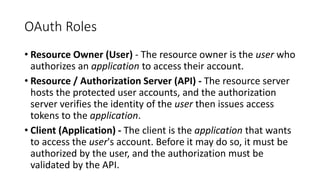
OAuth Roles
• Resource Owner (User) - The resource owner is the user who
authorizes an application to access their account.
• Resource / Authorization Server (API) - The resource server
hosts the protected user accounts, and the authorization
server verifies the identity of the user then issues access
tokens to the application.
• Client (Application) - The client is the application that wants
to access the user's account. Before it may do so, it must be
authorized by the user, and the authorization must be
validated by the API.
Application Registration
• When accessing 3rd party OAuth providers, your application
will need to be registered prior to using their service.
• Provider will then supply “client credentials” needed for
authorization grant
• Client Identifier
• Client Secret
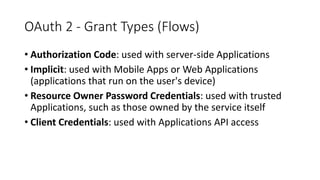
OAuth 2 - Grant Types (Flows)
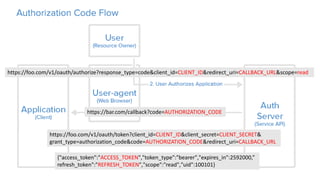
• Authorization Code: used with server-side Applications
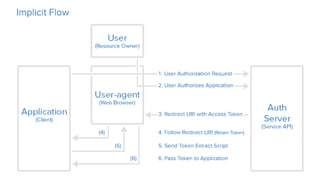
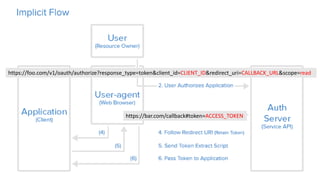
• Implicit: used with Mobile Apps or Web Applications
(applications that run on the user's device)
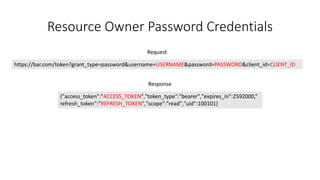
• Resource Owner Password Credentials: used with trusted
Applications, such as those owned by the service itself
• Client Credentials: used with Applications API access
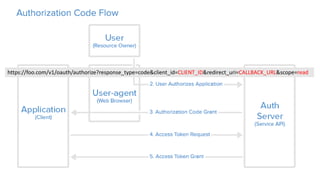
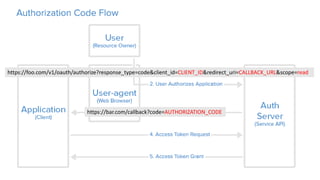
https://foo.com/v1/oauth/authorize?response_type=code&client_id=CLIENT_ID&redirect_uri=CALLBACK_URL&scope=read
https://bar.com/callback?code=AUTHORIZATION_CODE
https://foo.com/v1/oauth/authorize?response_type=code&client_id=CLIENT_ID&redirect_uri=CALLBACK_URL&scope=read
https://bar.com/callback?code=AUTHORIZATION_CODE
https://foo.com/v1/oauth/token?client_id=CLIENT_ID&client_secret=CLIENT_SECRET&
grant_type=authorization_code&code=AUTHORIZATION_CODE&redirect_uri=CALLBACK_URL
{"access_token":"ACCESS_TOKEN","token_type":"bearer","expires_in":2592000,”
refresh_token":"REFRESH_TOKEN","scope":"read","uid":100101}
https://foo.com/v1/oauth/authorize?response_type=token&client_id=CLIENT_ID&redirect_uri=CALLBACK_URL&scope=read
https://bar.com/callback#token=ACCESS_TOKEN
Resource Owner Password Credentials
{"access_token":"ACCESS_TOKEN","token_type":"bearer","expires_in":2592000,”
refresh_token":"REFRESH_TOKEN","scope":"read","uid":100101}
https://bar.com/token?grant_type=password&username=USERNAME&password=PASSWORD&client_id=CLIENT_ID
Request
Response
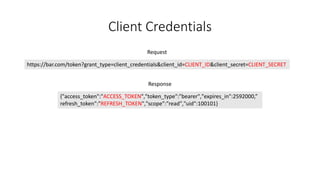
Client Credentials
{"access_token":"ACCESS_TOKEN","token_type":"bearer","expires_in":2592000,”
refresh_token":"REFRESH_TOKEN","scope":"read","uid":100101}
https://bar.com/token?grant_type=client_credentials&client_id=CLIENT_ID&client_secret=CLIENT_SECRET
Request
Response
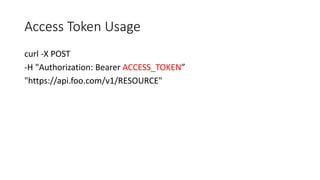
Access Token Usage
curl -X POST
-H "Authorization: Bearer ACCESS_TOKEN”
"https://api.foo.com/v1/RESOURCE"
Refresh Token Flow
{"access_token":"ACCESS_TOKEN","token_type":"bearer","expires_in":2592000,”
refresh_token":"REFRESH_TOKEN","scope":"read","uid":100101}
https://foo.com/v1/oauth/token?grant_type=refresh_token&
client_id=CLIENT_ID&client_secret=CLIENT_SECRET&refresh_token=REFRESH_TOKEN
Request
Response
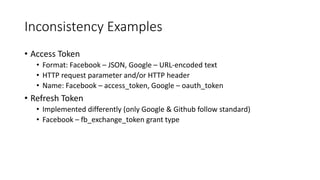
Inconsistency Examples
• Access Token
• Format: Facebook – JSON, Google – URL-encoded text
• HTTP request parameter and/or HTTP header
• Name: Facebook – access_token, Google – oauth_token
• Refresh Token
• Implemented differently (only Google & Github follow standard)
• Facebook – fb_exchange_token grant type
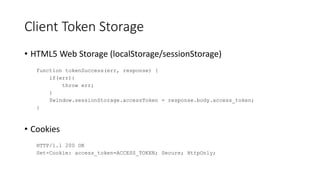
Client Token Storage
• HTML5 Web Storage (localStorage/sessionStorage)
function tokenSuccess(err, response) {
if(err){
throw err;
}
$window.sessionStorage.accessToken = response.body.access_token;
}
• Cookies
HTTP/1.1 200 OK
Set-Cookie: access_token=ACCESS_TOKEN; Secure; HttpOnly;
Client Token Storage
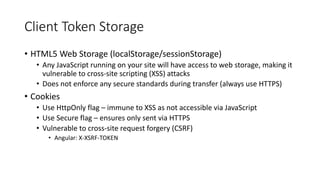
• HTML5 Web Storage (localStorage/sessionStorage)
• Any JavaScript running on your site will have access to web storage, making it
vulnerable to cross-site scripting (XSS) attacks
• Does not enforce any secure standards during transfer (always use HTTPS)
• Cookies
• Use HttpOnly flag – immune to XSS as not accessible via JavaScript
• Use Secure flag – ensures only sent via HTTPS
• Vulnerable to cross-site request forgery (CSRF)
• Angular: X-XSRF-TOKEN
</presentation>

OAuth

Editor's Notes

  • #8 Eran Hammer resigned his role of lead author for the OAuth 2.0 project, withdrew from the IETF working group, and removed his name from the specification. "more complex, less interoperable, less useful, more incomplete, and most importantly, less secure."
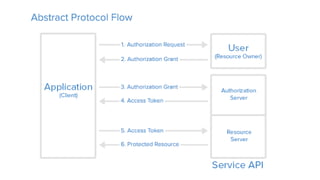
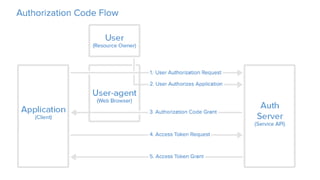
  • #11 1. The application requests authorization to access service resources from the user 2. If the user authorized the request, the application receives an authorization grant 3. The application requests an access token from the authorization server (API) by presenting authentication of its own identity, and the authorization grant 4. If the application identity is authenticated and the authorization grant is valid, the authorization server (API) issues an access token to the application. Authorization is complete. 5. The application requests the resource from the resource server (API) and presents the access token for authentication 6. If the access token is valid, the resource server (API) serves the resource to the application
  • #18 The implicit grant type is used for mobile apps and web applications (i.e. applications that run in a web browser), where the client secret confidentiality is not guaranteed.
  • #19 The implicit grant type is used for mobile apps and web applications (i.e. applications that run in a web browser), where the client secret confidentiality is not guaranteed.
  • #23 The standard proposes a refresh token method but only few providers implement it (Google, Github)