Frameworks for Browser Automation Testing 
Luís A. Bastião Silva 
University of Aveiro 
DETI / IEETA 
bastiao@ua.pt
Outline 
• Motivation 
• Comparison between frameworks 
• Nightwatch.js 
– How it works? 
– How to write tests? 
– How to run the tests? 
• How to use in your project? 
• Demo
What is Browse Automating Tests? 
You can use it also to automate your daily tasks, if you are able to do it.. 
• Launch and automate your browser 
• Fill and submit forms 
• Click and follow links 
• Verify if the output is according of what 
you define.
Motivation 
• Often web developers changes in the interface, 
change the code, we fix bugs and add new 
features. 
• Sometimes it conduct to wrong results 
• Browser Compatibility - break functionality 
• Test with heterogeneous datasets 
4 
.. or in other words, why should I use Browse Automated Testing? 
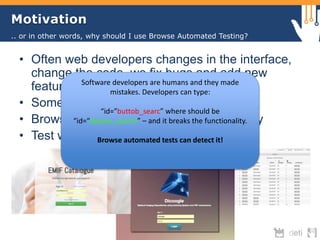
Software developers are humans and they made 
mistakes. Developers can type: 
“id="buttob_searc” where should be 
“id=“button_search” – and it breaks the functionality. 
Browse automated tests can detect it!
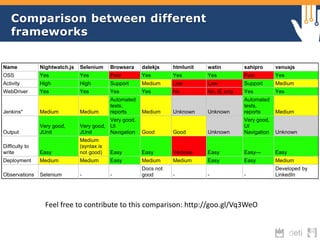
Comparison between different 
frameworks 
Name Nightwatch.js Selenium Browsera dalekjs htmlunit watin sahipro venusjs 
OSS Yes Yes Paid Yes Yes Yes Paid Yes 
Activity High High Support Medium Low Low Support Medium 
WebDriver Yes Yes Yes Yes No No, IE only Yes Yes 
Jenkins* Medium Medium 
Automated 
tests, 
reports Medium Unknown Unknown 
Automated 
tests, 
reports Medium 
Feel free to contribute to this comparison: http://goo.gl/Vq3WeO 
Output 
Very good, 
JUnit 
Very good, 
JUnit 
Very good, 
UI 
Navigation Good Good Unknown 
Very good, 
UI 
Navigation Unknown 
Difficulty to 
write Easy 
Medium 
(syntax is 
not good) Easy Easy Verbose Easy Easy--- Easy 
Deployment Medium Medium Easy Medium Medium Easy Easy Medium 
Observations Selenium - - 
Docs not 
good - - - 
Developed by 
LinkedIn
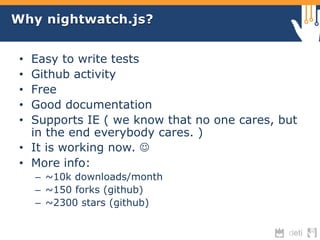
Why nightwatch.js? 
• Easy to write tests 
• Github activity 
• Free 
• Good documentation 
• Supports IE ( we know that no one cares, but 
in the end everybody cares. ) 
• It is working now.  
• More info: 
– ~10k downloads/month 
– ~150 forks (github) 
– ~2300 stars (github)
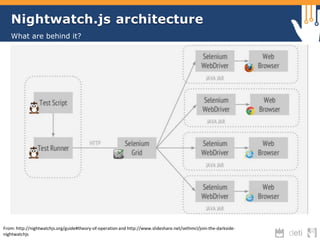
Nightwatch.js architecture 
What are behind it? 
From: http://nightwatchjs.org/guide#theory-of-operation and http://www.slideshare.net/sethmcl/join-the-darkside-nightwatchjs
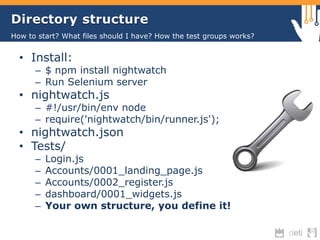
Directory structure 
How to start? What files should I have? How the test groups works? 
• Install: 
– $ npm install nightwatch 
– Run Selenium server 
• nightwatch.js 
– #!/usr/bin/env node 
– require('nightwatch/bin/runner.js'); 
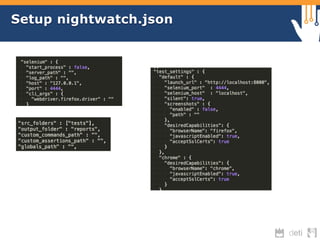
• nightwatch.json 
• Tests/ 
– Login.js 
– Accounts/0001_landing_page.js 
– Accounts/0002_register.js 
– dashboard/0001_widgets.js 
– Your own structure, you define it!
Setup nightwatch.json
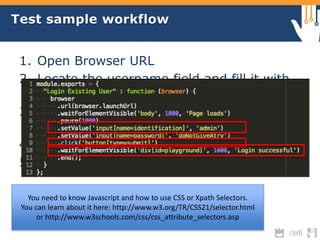
Test sample workflow 
1. Open Browser URL 
2. Locate the username field and fill it with 
“admin” 
3. Find the password field and fill it with 
“doNotGiveATry” 
4. Find the Login button and submit 
5. Verify the output to check if it successes. 
You need to know Javascript and how to use CSS or Xpath Selectors. 
You can learn about it here: http://www.w3.org/TR/CSS21/selector.html 
or http://www.w3schools.com/css/css_attribute_selectors.asp
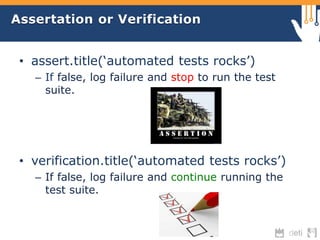
Assertation or Verification 
• assert.title(‘automated tests rocks’) 
– If false, log failure and stop to run the test 
suite. 
• verification.title(‘automated tests rocks’) 
– If false, log failure and continue running the 
test suite.
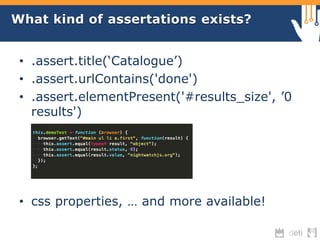
What kind of assertations exists? 
• .assert.title(‘Catalogue’) 
• .assert.urlContains('done') 
• .assert.elementPresent('#results_size', ’0 
results') 
• css properties, … and more available!
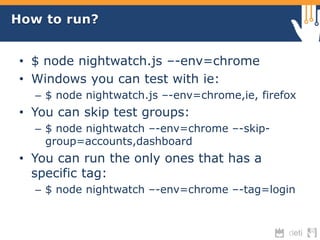
How to run? 
• $ node nightwatch.js –-env=chrome 
• Windows you can test with ie: 
– $ node nightwatch.js –-env=chrome,ie, firefox 
• You can skip test groups: 
– $ node nightwatch –-env=chrome –-skip-group= 
accounts,dashboard 
• You can run the only ones that has a 
specific tag: 
– $ node nightwatch –-env=chrome –-tag=login
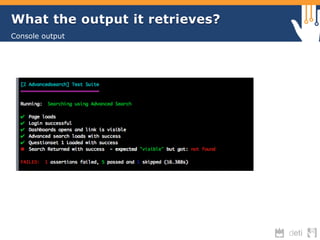
What the output it retrieves? 
Console output
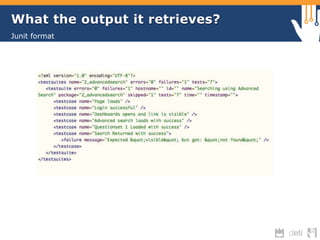
What the output it retrieves? 
Junit format
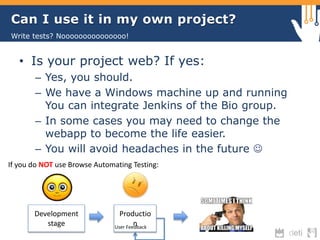
Can I use it in my own project? 
Write tests? Nooooooooooooooo! 
• Is your project web? If yes: 
– Yes, you should. 
– We have a Windows machine up and running 
You can integrate Jenkins of the Bio group. 
– In some cases you may need to change the 
webapp to become the life easier. 
– You will avoid headaches in the future  
If you do NOT use Browse Automating Testing: 
Development 
stage 
Productio 
n User Feedback
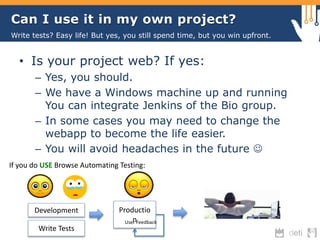
Can I use it in my own project? 
Write tests? Easy life! But yes, you still spend time, but you win upfront. 
• Is your project web? If yes: 
– Yes, you should. 
– We have a Windows machine up and running 
You can integrate Jenkins of the Bio group. 
– In some cases you may need to change the 
webapp to become the life easier. 
– You will avoid headaches in the future  
If you do USE Browse Automating Testing: 
Development Productio 
Usenr Feedback 
Write Tests
Credits & References 
• Ricardo Ribeiro 
– He did the first steps in the nightwatch.js 
– Deployed the full solution in Windows 
environment 
– Write tests for EMIF Catalogue 
• http://nightwatchjs.org/ 
• http://www.slideshare.net/sethmcl/join-the- 
darkside-nightwatchjs 
• It will be available in my slideshare: 
– http://www.slideshare.net/bastiao
See it running… 
• EMIF Catalogue, let’s check the tests
Thanks for your attention! 
Luís A. Bastião Silva 
University of Aveiro 
DETI / IEETA 
bastiao@ua.pt

Browser Automated Testing Frameworks - Nightwatch.js

  • 1.
    Frameworks for BrowserAutomation Testing Luís A. Bastião Silva University of Aveiro DETI / IEETA bastiao@ua.pt
  • 2.
    Outline • Motivation • Comparison between frameworks • Nightwatch.js – How it works? – How to write tests? – How to run the tests? • How to use in your project? • Demo
  • 3.
    What is BrowseAutomating Tests? You can use it also to automate your daily tasks, if you are able to do it.. • Launch and automate your browser • Fill and submit forms • Click and follow links • Verify if the output is according of what you define.
  • 4.
    Motivation • Oftenweb developers changes in the interface, change the code, we fix bugs and add new features. • Sometimes it conduct to wrong results • Browser Compatibility - break functionality • Test with heterogeneous datasets 4 .. or in other words, why should I use Browse Automated Testing? Software developers are humans and they made mistakes. Developers can type: “id="buttob_searc” where should be “id=“button_search” – and it breaks the functionality. Browse automated tests can detect it!
  • 5.
    Comparison between different frameworks Name Nightwatch.js Selenium Browsera dalekjs htmlunit watin sahipro venusjs OSS Yes Yes Paid Yes Yes Yes Paid Yes Activity High High Support Medium Low Low Support Medium WebDriver Yes Yes Yes Yes No No, IE only Yes Yes Jenkins* Medium Medium Automated tests, reports Medium Unknown Unknown Automated tests, reports Medium Feel free to contribute to this comparison: http://goo.gl/Vq3WeO Output Very good, JUnit Very good, JUnit Very good, UI Navigation Good Good Unknown Very good, UI Navigation Unknown Difficulty to write Easy Medium (syntax is not good) Easy Easy Verbose Easy Easy--- Easy Deployment Medium Medium Easy Medium Medium Easy Easy Medium Observations Selenium - - Docs not good - - - Developed by LinkedIn
  • 6.
    Why nightwatch.js? •Easy to write tests • Github activity • Free • Good documentation • Supports IE ( we know that no one cares, but in the end everybody cares. ) • It is working now.  • More info: – ~10k downloads/month – ~150 forks (github) – ~2300 stars (github)
  • 7.
    Nightwatch.js architecture Whatare behind it? From: http://nightwatchjs.org/guide#theory-of-operation and http://www.slideshare.net/sethmcl/join-the-darkside-nightwatchjs
  • 8.
    Directory structure Howto start? What files should I have? How the test groups works? • Install: – $ npm install nightwatch – Run Selenium server • nightwatch.js – #!/usr/bin/env node – require('nightwatch/bin/runner.js'); • nightwatch.json • Tests/ – Login.js – Accounts/0001_landing_page.js – Accounts/0002_register.js – dashboard/0001_widgets.js – Your own structure, you define it!
  • 9.
  • 10.
    Test sample workflow 1. Open Browser URL 2. Locate the username field and fill it with “admin” 3. Find the password field and fill it with “doNotGiveATry” 4. Find the Login button and submit 5. Verify the output to check if it successes. You need to know Javascript and how to use CSS or Xpath Selectors. You can learn about it here: http://www.w3.org/TR/CSS21/selector.html or http://www.w3schools.com/css/css_attribute_selectors.asp
  • 11.
    Assertation or Verification • assert.title(‘automated tests rocks’) – If false, log failure and stop to run the test suite. • verification.title(‘automated tests rocks’) – If false, log failure and continue running the test suite.
  • 12.
    What kind ofassertations exists? • .assert.title(‘Catalogue’) • .assert.urlContains('done') • .assert.elementPresent('#results_size', ’0 results') • css properties, … and more available!
  • 13.
    How to run? • $ node nightwatch.js –-env=chrome • Windows you can test with ie: – $ node nightwatch.js –-env=chrome,ie, firefox • You can skip test groups: – $ node nightwatch –-env=chrome –-skip-group= accounts,dashboard • You can run the only ones that has a specific tag: – $ node nightwatch –-env=chrome –-tag=login
  • 14.
    What the outputit retrieves? Console output
  • 15.
    What the outputit retrieves? Junit format
  • 16.
    Can I useit in my own project? Write tests? Nooooooooooooooo! • Is your project web? If yes: – Yes, you should. – We have a Windows machine up and running You can integrate Jenkins of the Bio group. – In some cases you may need to change the webapp to become the life easier. – You will avoid headaches in the future  If you do NOT use Browse Automating Testing: Development stage Productio n User Feedback
  • 17.
    Can I useit in my own project? Write tests? Easy life! But yes, you still spend time, but you win upfront. • Is your project web? If yes: – Yes, you should. – We have a Windows machine up and running You can integrate Jenkins of the Bio group. – In some cases you may need to change the webapp to become the life easier. – You will avoid headaches in the future  If you do USE Browse Automating Testing: Development Productio Usenr Feedback Write Tests
  • 18.
    Credits & References • Ricardo Ribeiro – He did the first steps in the nightwatch.js – Deployed the full solution in Windows environment – Write tests for EMIF Catalogue • http://nightwatchjs.org/ • http://www.slideshare.net/sethmcl/join-the- darkside-nightwatchjs • It will be available in my slideshare: – http://www.slideshare.net/bastiao
  • 19.
    See it running… • EMIF Catalogue, let’s check the tests
  • 20.
    Thanks for yourattention! Luís A. Bastião Silva University of Aveiro DETI / IEETA bastiao@ua.pt