Node.js and
Selenium WebDriver
A journey from the Java side
19th Nov SF Selenium Meetup @ Airware
Mek Srunyu Stittri
Volkan Gurel
2
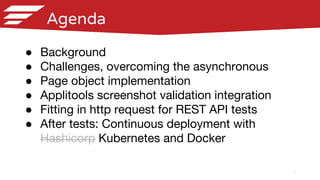
Agenda
● Background
● Challenges, overcoming the asynchronous
● Page object implementation
● Applitools screenshot validation integration
● Fitting in http request for REST API tests
● After tests: Continuous deployment with
Hashicorp Kubernetes and Docker
Background
4
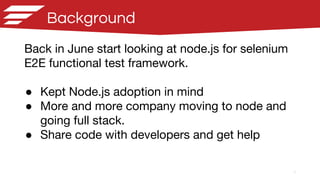
Background
Back in June start looking at node.js for selenium
E2E functional test framework.
● Kept Node.js adoption in mind
● More and more company moving to node and
going full stack.
● Share code with developers and get help
5
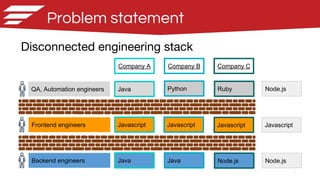
Problem statement
Disconnected engineering stack
QA, Automation engineers
Frontend engineers
Backend engineers
Java
Javascript
Java
Python
Javascript
Java
Ruby
Javascript
Node.js
Company A Company B Company C
Node.js
Javascript
Node.js
6
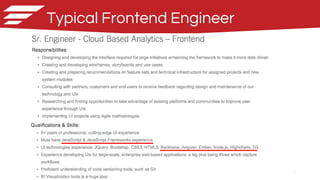
Typical Frontend Engineer
7
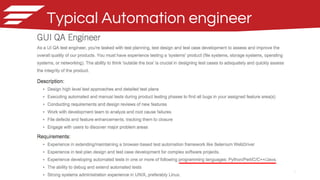
Typical Automation engineer
8
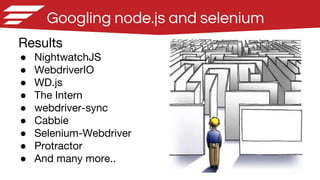
Googling node.js and selenium
Results
● NightwatchJS
● WebdriverIO
● WD.js
● The Intern
● webdriver-sync
● Cabbie
● Selenium-Webdriver
● Protractor
● And many more..
Challenges
Overcoming the Asynchronous
10
Javascript 101
Javascript is Asynchronous
Example
var source = ['foo', 'bar', 'baz'];
var result = [];
setTimeout(function () {
for (var i = 0 ; i < source.length ; i++) {
console.log('Stepping through : ' + source[i]);
result.push(source[i]);
console.log('Current result: ' + result);
}
}, 1000); // Wait 1000 ms to finish operation
console.log('Result: ' + result);
console.log('Finished!!');
Output:
Result: ←------- Empty array ?!?!
Finished!!
Stepping through : foo
Current result: foo
Stepping through : bar
Current result: foo,bar
Stepping through : baz
Current result: foo,bar,baz
11
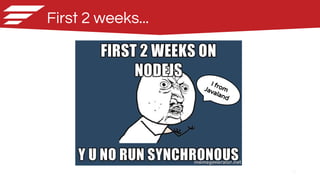
First 2 weeks...
I fromJavaland
12
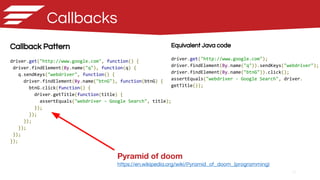
Callbacks
Callback Pattern
driver.get("http://www.google.com", function() {
driver.findElement(By.name("q"), function(q) {
q.sendKeys("webdriver", function() {
driver.findElement(By.name("btnG"), function(btnG) {
btnG.click(function() {
driver.getTitle(function(title) {
assertEquals("webdriver - Google Search", title);
});
});
});
});
});
});
Equivalent Java code
driver.get("http://www.google.com");
driver.findElement(By.name("q")).sendKeys("webdriver");
driver.findElement(By.name("btnG")).click();
assertEquals("webdriver - Google Search", driver.
getTitle());
Pyramid of doom
https://en.wikipedia.org/wiki/Pyramid_of_doom_(programming)
13
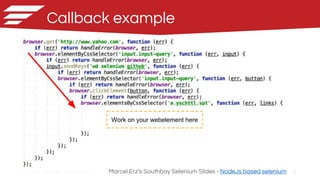
Callback example
Marcel Erz’s Southbay Selenium Slides - NodeJs based selenium
Work on your webelement here
14
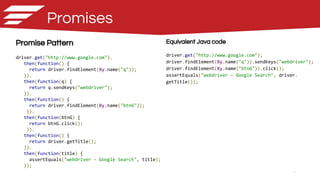
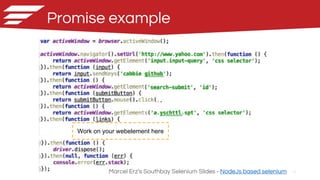
Promises
Promise Pattern
driver.get("http://www.google.com").
then(function() {
return driver.findElement(By.name("q"));
}).
then(function(q) {
return q.sendKeys("webdriver");
}).
then(function() {
return driver.findElement(By.name("btnG"));
}).
then(function(btnG) {
return btnG.click();
}).
then(function() {
return driver.getTitle();
}).
then(function(title) {
assertEquals("webdriver - Google Search", title);
});
Equivalent Java code
driver.get("http://www.google.com");
driver.findElement(By.name("q")).sendKeys("webdriver");
driver.findElement(By.name("btnG")).click();
assertEquals("webdriver - Google Search", driver.
getTitle());
15
Promise example
Marcel Erz’s Southbay Selenium Slides - NodeJs based selenium
Work on your webelement here
16
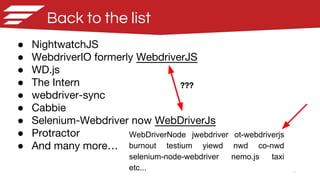
Back to the list
● NightwatchJS
● WebdriverIO formerly WebdriverJS
● WD.js
● The Intern
● webdriver-sync
● Cabbie
● Selenium-Webdriver now WebDriverJs
● Protractor
● And many more…
WebDriverNode jwebdriver ot-webdriverjs
burnout testium yiewd nwd co-nwd
selenium-node-webdriver nemo.js taxi
etc...
???
17
Experimenting with Nightwatch
What Nightwatch offers
● Convenient chain APIs
○ A workaround for dealing with callbacks
● Wraps Selenium JsonWireProtocol
● Some form of page object support
● Some extendability custom
commands
● Saucelabs / Browserstack integration
out of the box
● Pretty good documentation
Nightwatch test
module.exports = {
'Demo test Google' : function (browser) {
browser
.url('http://www.google.com')
.waitForElementVisible('body', 1000)
.setValue('input[type=text]', 'nightwatch')
.waitForElementVisible('button[name=btnG]', 1000)
.click('button[name=btnG]')
.pause(1000)
.assert.containsText('#main', 'Night Watch')
.end();
}
};
18
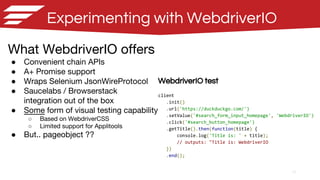
Experimenting with WebdriverIO
WebdriverIO test
client
.init()
.url('https://duckduckgo.com/')
.setValue('#search_form_input_homepage', 'WebdriverIO')
.click('#search_button_homepage')
.getTitle().then(function(title) {
console.log('Title is: ' + title);
// outputs: "Title is: WebdriverIO
})
.end();
What WebdriverIO offers
● Convenient chain APIs
● A+ Promise support
● Wraps Selenium JsonWireProtocol
● Saucelabs / Browserstack
integration out of the box
● Some form of visual testing capability
○ Based on WebdriverCSS
○ Limited support for Applitools
● But.. pageobject ??
19
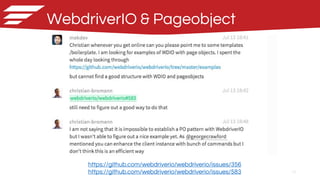
WebdriverIO & Pageobject
https://github.com/webdriverio/webdriverio/issues/356
https://github.com/webdriverio/webdriverio/issues/583
20
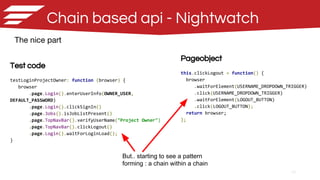
Chain based api - Nightwatch
Pageobject
this.clickLogout = function() {
browser
.waitForElement(USERNAME_DROPDOWN_TRIGGER)
.click(USERNAME_DROPDOWN_TRIGGER)
.waitForElement(LOGOUT_BUTTON)
.click(LOGOUT_BUTTON);
return browser;
};
Test code
testLoginProjectOwner: function (browser) {
browser
.page.Login().enterUserInfo(OWNER_USER,
DEFAULT_PASSWORD)
.page.Login().clickSignIn()
.page.Jobs().isJobListPresent()
.page.TopNavBar().verifyUserName("Project Owner")
.page.TopNavBar().clickLogout()
.page.Login().waitForLoginLoad();
}
The nice part
But.. starting to see a pattern
forming : a chain within a chain
21
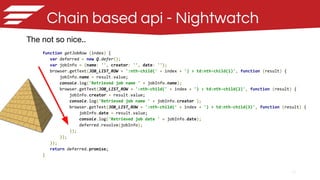
Chain based api - Nightwatch
The not so nice..
browser
.page.Login().enterUserInfo(OWNER_USER,DEFAULT_PASSWORD)
.page.Jobs().getNumberOfJobs(function (result) {
var numberOfJobsBefore = result.value.length;
browser
.page.JobConfig().createJob(jobName)
.page.Jobs().getNumberOfJobs(function (result) {
var numberOfJobsAfter = result.value.length;
Assert.equal(numberOfJobsAfter, numberOfJobsBefore + 1);
browser.page.Jobs().getJobs(function (result) {
for (var i = 0; i <= result.length; i++) {
if (result[i].name === jobName) {
jobInfo = result;
break;
}
}
});
}).perform(function(client, done){
Assert.equal(jobInfo.name, expectedJobName, 'Job name is correct');
Assert.equal(jobInfo.creator, expectedJobCreator, 'Job creator is correct');
browser.page.TopNav().clickLogout()
.end();
});
});
}
Chain breaks once you start to
do something complex that is not
supported in the api
● Datastructure
● Iterating
22
Chain based api - Nightwatch
The not so nice..
function getJobRow (index) {
var deferred = new Q.defer();
var jobInfo = {name: '', creator: '', date: ''};
browser.getText(JOB_LIST_ROW + ':nth-child(' + index + ') > td:nth-child(1)', function (result) {
jobInfo.name = result.value;
console.log('Retrieved job name ' + jobInfo.name);
browser.getText(JOB_LIST_ROW + ':nth-child(' + index + ') > td:nth-child(2)', function (result) {
jobInfo.creator = result.value;
console.log('Retrieved job name ' + jobInfo.creator );
browser.getText(JOB_LIST_ROW + ':nth-child(' + index + ') > td:nth-child(3)', function (result) {
jobInfo.date = result.value;
console.log('Retrieved job date ' + jobInfo.date);
deferred.resolve(jobInfo);
});
});
});
return deferred.promise;
}
23
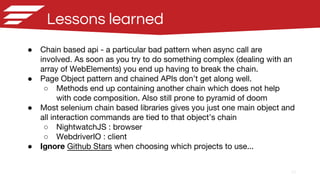
Lessons learned
● Chain based api - a particular bad pattern when async call are
involved. As soon as you try to do something complex (dealing with an
array of WebElements) you end up having to break the chain.
● Page Object pattern and chained APIs don’t get along well.
○ Methods end up containing another chain which does not help
with code composition. Also still prone to pyramid of doom
● Most selenium chain based libraries gives you just one main object and
all interaction commands are tied to that object’s chain
○ NightwatchJS : browser
○ WebdriverIO : client
● Ignore Github Stars when choosing which projects to use...
24
Kinda miss Java synchronous programming
languages at this point
1 month later...
25
selenium-webdriver WebDriverJs
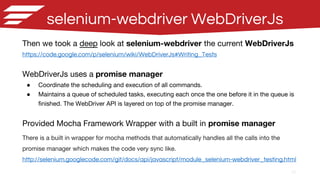
Then we took a deep look at selenium-webdriver the current WebDriverJs
https://code.google.com/p/selenium/wiki/WebDriverJs#Writing_Tests
WebDriverJs uses a promise manager
● Coordinate the scheduling and execution of all commands.
● Maintains a queue of scheduled tasks, executing each once the one before it in the queue is
finished. The WebDriver API is layered on top of the promise manager.
Provided Mocha Framework Wrapper with a built in promise manager
There is a built in wrapper for mocha methods that automatically handles all the calls into the
promise manager which makes the code very sync like.
http://selenium.googlecode.com/git/docs/api/javascript/module_selenium-webdriver_testing.html
26
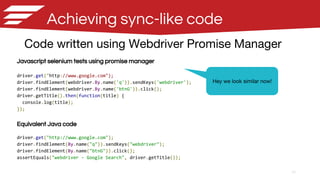
Achieving sync-like code
Code written using Webdriver Promise Manager
Javascript selenium tests using promise manager
driver.get("http://www.google.com");
driver.findElement(webdriver.By.name('q')).sendKeys('webdriver');
driver.findElement(webdriver.By.name('btnG')).click();
driver.getTitle().then(function(title) {
console.log(title);
});
Equivalent Java code
driver.get("http://www.google.com");
driver.findElement(By.name("q")).sendKeys("webdriver");
driver.findElement(By.name("btnG")).click();
assertEquals("webdriver - Google Search", driver.getTitle());
Hey we look similar now!
27
Mocha with selenium wrapper
All callbacks can be omitted and it just works which makes the code very “synchronous” like.
Specifically, you don’t have to chain everything and each individual line of code can do only one
ui action and then some assertion if necessary.
var test = require('selenium-webdriver/testing');
var webdriver = require('selenium-webdriver');
var By = require('selenium-webdriver').By;
var Until = require('selenium-webdriver').until;
test.it('Login and make sure the job menu is there', function() {
driver.get(url, 5000);
driver.findElement(By.css('input#email')).sendKeys('useremail@email.com');
driver.findElement(By.css('input#password')).sendKeys(password);
driver.findElement(By.css('button[type="submit"]')).click();
driver.wait(Until.elementLocated(By.css('li.active > a.jobs')));
var job = driver.findElement(By.css('li.active a.jobs'));
job.getText().then(function (text) {
assert.equal(text, 'Jobs', 'Job link title is correct');
});
});
28
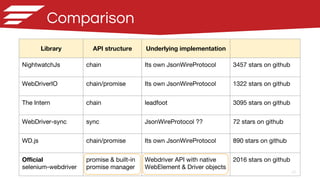
Comparison
Library API structure Underlying implementation
NightwatchJs chain Its own JsonWireProtocol 3457 stars on github
WebDriverIO chain/promise Its own JsonWireProtocol 1322 stars on github
The Intern chain leadfoot 3095 stars on github
WebDriver-sync sync JsonWireProtocol ?? 72 stars on github
WD.js chain/promise Its own JsonWireProtocol 890 stars on github
Official
selenium-webdriver
promise & built-in
promise manager
Webdriver API with native
WebElement & Driver objects
2016 stars on github
Pageobjects
30
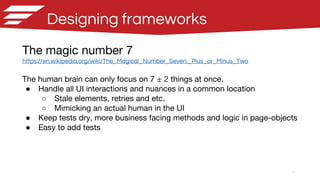
Designing frameworks
The magic number 7
https://en.wikipedia.org/wiki/The_Magical_Number_Seven,_Plus_or_Minus_Two
The human brain can only focus on 7 ± 2 things at once.
● Handle all UI interactions and nuances in a common location
○ Stale elements, retries and etc.
○ Mimicking an actual human in the UI
● Keep tests dry, more business facing methods and logic in page-objects
● Easy to add tests
31
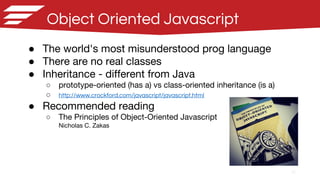
Object Oriented Javascript
● The world's most misunderstood prog language
● There are no real classes
● Inheritance - different from Java
○ prototype-oriented (has a) vs class-oriented inheritance (is a)
○ http://www.crockford.com/javascript/javascript.html
● Recommended reading
○ The Principles of Object-Oriented Javascript
Nicholas C. Zakas
32
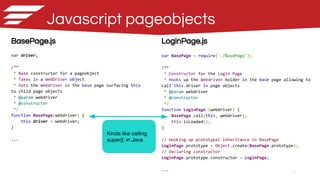
BasePage.js
var driver;
/**
* Base constructor for a pageobject
* Takes in a WebDriver object
* Sets the Webdriver in the base page surfacing this
to child page objects
* @param webdriver
* @constructor
*/
function BasePage(webdriver) {
this.driver = webdriver;
}
...
LoginPage.js
var BasePage = require('./BasePage');
/**
* Constructor for the Login Page
* Hooks up the Webdriver holder in the base page allowing to
call this.driver in page objects
* @param webdriver
* @constructor
*/
function LoginPage (webdriver) {
BasePage.call(this, webdriver);
this.isLoaded();
}
// Hooking up prototypal inheritance to BasePage
LoginPage.prototype = Object.create(BasePage.prototype);
// Declaring constructor
LoginPage.prototype.constructor = LoginPage;
...
Javascript pageobjects
Kinda like calling
super(); in Java
33
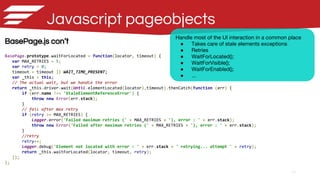
BasePage.js con’t
BasePage.prototype.waitForLocated = function(locator, timeout) {
var MAX_RETRIES = 5;
var retry = 0;
timeout = timeout || WAIT_TIME_PRESENT;
var _this = this;
// The actual wait, but we handle the error
return _this.driver.wait(Until.elementLocated(locator),timeout).thenCatch(function (err) {
if (err.name !== 'StaleElementReferenceError') {
throw new Error(err.stack);
}
// fail after max retry
if (retry >= MAX_RETRIES) {
Logger.error('Failed maximum retries (' + MAX_RETRIES + '), error : ' + err.stack);
throw new Error('Failed after maximum retries (' + MAX_RETRIES + '), error : ' + err.stack);
}
//retry
retry++;
Logger.debug('Element not located with error : ' + err.stack + ' retrying... attempt ' + retry);
return _this.waitForLocated(locator, timeout, retry);
});
};
Javascript pageobjects
Handle most of the UI interaction in a common place
● Takes care of stale elements exceptions
● Retries
● WaitForLocated();
● WaitForVisible();
● WaitForEnabled();
● ...
34
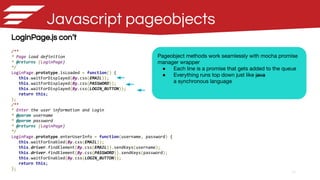
LoginPage.js con’t
/**
* Page load definition
* @returns {LoginPage}
*/
LoginPage.prototype.isLoaded = function() {
this.waitForDisplayed(By.css(EMAIL));
this.waitForDisplayed(By.css(PASSWORD));
this.waitForDisplayed(By.css(LOGIN_BUTTON));
return this;
};
/**
* Enter the user information and login
* @param username
* @param password
* @returns {LoginPage}
*/
LoginPage.prototype.enterUserInfo = function(username, password) {
this.waitForEnabled(By.css(EMAIL));
this.driver.findElement(By.css(EMAIL)).sendKeys(username);
this.driver.findElement(By.css(PASSWORD)).sendKeys(password);
this.waitForEnabled(By.css(LOGIN_BUTTON));
return this;
};
Javascript pageobjects
Pageobject methods work seamlessly with mocha promise
manager wrapper
● Each line is a promise that gets added to the queue
● Everything runs top down just like java
a synchronous language
35
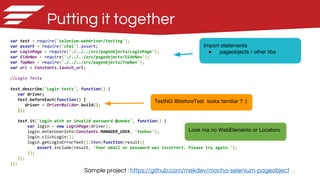
var test = require('selenium-webdriver/testing');
var assert = require('chai').assert;
var LoginPage = require('./../../src/pageobjects/LoginPage');
var SideNav = require('./../../src/pageobjects/SideNav');
var TopNav = require('./../../src/pageobjects/TopNav');
var url = Constants.launch_url;
//Login Tests
test.describe('Login tests', function() {
var driver;
test.beforeEach(function() {
driver = DriverBuilder.build();
});
test.it('Login with an invalid password @smoke', function() {
var login = new LoginPage(driver);
login.enterUserInfo(Constants.MANAGER_USER, 'foobar');
login.clickLogin();
login.getLoginErrorText().then(function(result){
assert.include(result, 'Your email or password was incorrect. Please try again.');
});
});
});
Putting it together
Sample project : https://github.com/mekdev/mocha-selenium-pageobject
Import statements
● pageobjects / other libs
TestNG @beforeTest looks familiar ? :)
Look ma no WebElements or Locators
Visual Validation
37
Visual Validation - Applitools
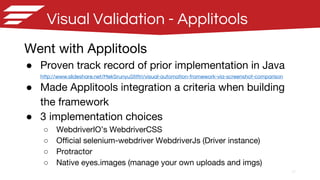
Went with Applitools
● Proven track record of prior implementation in Java
http://www.slideshare.net/MekSrunyuStittri/visual-automation-framework-via-screenshot-comparison
● Made Applitools integration a criteria when building
the framework
● 3 implementation choices
○ WebdriverIO’s WebdriverCSS
○ Official selenium-webdriver WebdriverJs (Driver instance)
○ Protractor
○ Native eyes.images (manage your own uploads and imgs)
38
Trial runs with WebDriverCSS
WebdriverCSS
webdrivercss.init(client, {key: 'your key here'});
client.init()
.url(url)
.webdrivercss('Check #1', {
name : 'Login'
}, function(err, res) {
assert.ifError(err)
})
.setValue('input#email', MANAGER_USER)
.setValue('input#password', PASSWORD)
.click('button[type="submit"]')
.webdrivercss('Check #2', {
name : 'Job page'
}, function(err, res) {
assert.ifError(err)
})
Challenges
● Still stuck in chain API world
● Cannot choose match level
○ Defaults to strict
● One screenshot eqs 1 test not 1 step
● Even harder to do pageobjects
○ .webdrivercss() needs to be chained in
order to capture the screenshot
39
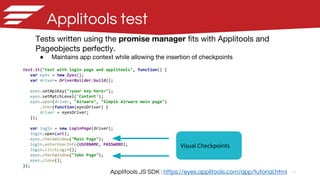
Applitools test
test.it("test with login page and applitools", function() {
var eyes = new Eyes();
var driver= DriverBuilder.build();
eyes.setApiKey("<your key here>");
eyes.setMatchLevel('Content');
eyes.open(driver, "Airware", "Simple Airware main page")
.then(function(eyesDriver) {
driver = eyesDriver;
});
var login = new LoginPage(driver);
login.open(url);
eyes.checkWindow("Main Page");
login.enterUserInfo(USERNAME, PASSWORD);
login.clickLogin();
eyes.checkWindow("Jobs Page");
eyes.close();
});
Tests written using the promise manager fits with Applitools and
Pageobjects perfectly.
● Maintains app context while allowing the insertion of checkpoints
Applitools JS SDK : https://eyes.applitools.com/app/tutorial.html
Visual Checkpoints
40
Sample run
Http REST requests
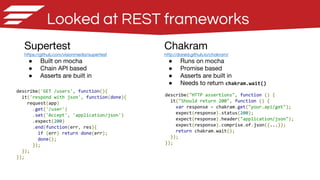
Looked at REST frameworks
Supertest
https://github.com/visionmedia/supertest
● Built on mocha
● Chain API based
● Asserts are built in
Chakram
http://dareid.github.io/chakram/
● Runs on mocha
● Promise based
● Asserts are built in
● Needs to return chakram.wait()
describe('GET /users', function(){
it('respond with json', function(done){
request(app)
.get('/user')
.set('Accept', 'application/json')
.expect(200)
.end(function(err, res){
if (err) return done(err);
done();
});
});
});
describe("HTTP assertions", function () {
it("Should return 200", function () {
var response = chakram.get("your.api/get");
expect(response).status(200);
expect(response).header("application/json");
expect(response).comprise.of.json({...});
return chakram.wait();
});
});
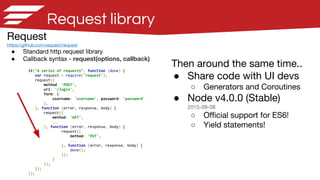
Request library
Request
https://github.com/request/request
● Standard http request library
● Callback syntax - request(options, callback)
it("A series of requests", function (done) {
var request = require('request');
request({
method: 'POST',
uri: '/login',
form: {
username: 'username', password: 'password'
},
}, function (error, response, body) {
request({
method: 'GET',
...
}, function (error, response, body) {
request({
method: 'PUT',
...
}, function (error, response, body) {
done();
});
}
});
});
});
Then around the same time..
● Share code with UI devs
○ Generators and Coroutines
● Node v4.0.0 (Stable)
2015-09-08
○ Official support for ES6!
○ Yield statements!
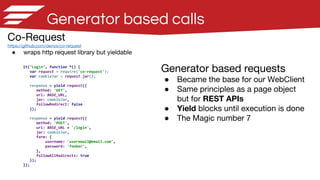
Generator based calls
Co-Request
https://github.com/denys/co-request
● wraps http request library but yieldable
it("Login", function *() {
var request = require('co-request');
var cookieJar = request.jar();
response = yield request({
method: 'GET',
url: BASE_URL,
jar: cookieJar,
followRedirect: false
});
response = yield request({
method: 'POST',
url: BASE_URL + '/login',
jar: cookieJar,
form: {
username: 'useremail@email.com',
password: 'foobar',
},
followAllRedirects: true
});
});
Generator based requests
● Became the base for our WebClient
● Same principles as a page object
but for REST APIs
● Yield blocks until execution is done
● The Magic number 7
45
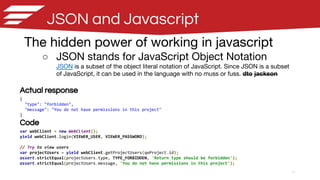
JSON and Javascript
The hidden power of working in javascript
○ JSON stands for JavaScript Object Notation
JSON is a subset of the object literal notation of JavaScript. Since JSON is a subset
of JavaScript, it can be used in the language with no muss or fuss. dto jackson
Actual response
{
"type": "forbidden",
"message": "You do not have permissions in this project"
}
Code
var webClient = new WebClient();
yield webClient.login(VIEWER_USER, VIEWER_PASSWORD);
// Try to view users
var projectUsers = yield webClient.getProjectUsers(qeProject.id);
assert.strictEqual(projectUsers.type, TYPE_FORBIDDEN, 'Return type should be forbidden');
assert.strictEqual(projectUsers.message, 'You do not have permissions in this project');
46
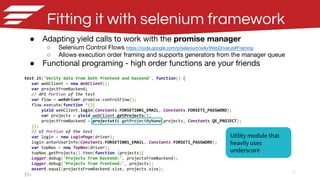
Fitting it with selenium framework
● Adapting yield calls to work with the promise manager
○ Selenium Control Flows https://code.google.com/p/selenium/wiki/WebDriverJs#Framing
○ Allows execution order framing and supports generators from the manager queue
● Functional programing - high order functions are your friends
test.it('Verify data from both frontend and backend', function() {
var webClient = new WebClient();
var projectFromBackend;
// API Portion of the test
var flow = webdriver.promise.controlFlow();
flow.execute(function *(){
yield webClient.login(Constants.FORSETI001_EMAIL, Constants.FORSETI_PASSWORD);
var projects = yield webClient.getProjects();
projectFromBackend = projectutil.getProjectByName(projects, Constants.QE_PROJECT);
});
// UI Portion of the test
var login = new LoginPage(driver);
login.enterUserInfo(Constants.FORSETI001_EMAIL, Constants.FORSETI_PASSWORD);
var topNav = new TopNav(driver);
topNav.getProjects().then(function (projects){
Logger.debug('Projects from backend:', projectsFromBackend);
Logger.debug('Projects from frontend:', projects);
assert.equal(projectsFromBackend.size, projects.size);
});
Utility module that
heavily uses
underscore
47
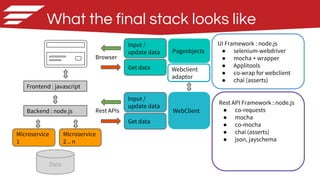
What the final stack looks like
Data
Backend : node.js
Browser
Input /
update data
Get data
Frontend : javascript
Microservice
1
Microservice
2 .. n
Rest APIs
Input /
update data
Get data
UI Framework : node.js
● selenium-webdriver
● mocha + wrapper
● Applitools
● co-wrap for webclient
● chai (asserts)
Rest API Framework : node.js
● co-requests
● mocha
● co-mocha
● chai (asserts)
● json, jayschema
WebClient
Pageobjects
Webclient
adaptor
48
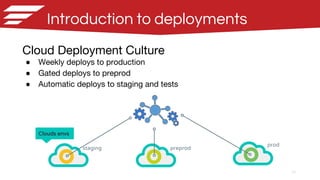
Introduction to deployments
Cloud Deployment Culture
● Weekly deploys to production
● Gated deploys to preprod
● Automatic deploys to staging and tests
staging preprod
prod
Clouds envs
After selenium tests
Continuous deployment with
Kubernetes and Docker
Volkan Gurel - Engineering Manager
50
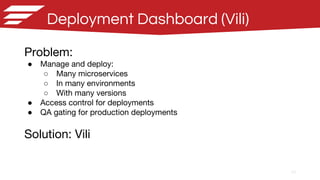
Deployment Dashboard (Vili)
Problem:
● Manage and deploy:
○ Many microservices
○ In many environments
○ With many versions
● Access control for deployments
● QA gating for production deployments
Solution: Vili
51
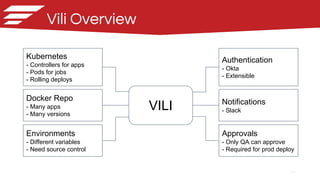
Vili Overview
Kubernetes
- Controllers for apps
- Pods for jobs
- Rolling deploys
Docker Repo
- Many apps
- Many versions
Environments
- Different variables
- Need source control
Notifications
- Slack
Authentication
- Okta
- Extensible
Approvals
- Only QA can approve
- Required for prod deploy
VILI
52
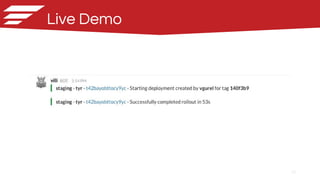
Live Demo
53
Follow the Airware github
repo to be notified:
https://github.com/airware
(About to be) Open Sourced
The Team
● Bj Gopinath - Guidance and support
● Lucas Doyle, Nick Italiano - co and Node.js generators, locator sharing strategy with frontend
● Phil Kates - Countless nights/weekends on infrastructure work
● Eric Johnson - Guidance and support. On coming from Java to Javascript :
“Yeah, probably some unlearning going on. JS is crazy, but I’ve rarely had more fun”
Meetup Folks
● Marcel Erz, Yahoo - Feedback on implementations of Webdriver-sync
● Mary Ann May-Pumphrey - Nightwatch feedback
Special Thanks
Saucelabs
Initial feedback on selenium node.js
● Neil Manvar
● Kristian Meier
● Adam Pilger
● Christian Bromann - WebdriverIO
Applitools
Trial POC with Applitools Javascript bindings and performance
● Moshe Milman
● Matan Carmi
● Adam Carmi
● Ryan Peterson
Q & A
Questions
Thank you

Node.js and Selenium Webdriver, a journey from the Java side

  • 1.
    Node.js and Selenium WebDriver Ajourney from the Java side 19th Nov SF Selenium Meetup @ Airware Mek Srunyu Stittri Volkan Gurel
  • 2.
    2 Agenda ● Background ● Challenges,overcoming the asynchronous ● Page object implementation ● Applitools screenshot validation integration ● Fitting in http request for REST API tests ● After tests: Continuous deployment with Hashicorp Kubernetes and Docker
  • 3.
  • 4.
    4 Background Back in Junestart looking at node.js for selenium E2E functional test framework. ● Kept Node.js adoption in mind ● More and more company moving to node and going full stack. ● Share code with developers and get help
  • 5.
    5 Problem statement Disconnected engineeringstack QA, Automation engineers Frontend engineers Backend engineers Java Javascript Java Python Javascript Java Ruby Javascript Node.js Company A Company B Company C Node.js Javascript Node.js
  • 6.
  • 7.
  • 8.
    8 Googling node.js andselenium Results ● NightwatchJS ● WebdriverIO ● WD.js ● The Intern ● webdriver-sync ● Cabbie ● Selenium-Webdriver ● Protractor ● And many more..
  • 9.
  • 10.
    10 Javascript 101 Javascript isAsynchronous Example var source = ['foo', 'bar', 'baz']; var result = []; setTimeout(function () { for (var i = 0 ; i < source.length ; i++) { console.log('Stepping through : ' + source[i]); result.push(source[i]); console.log('Current result: ' + result); } }, 1000); // Wait 1000 ms to finish operation console.log('Result: ' + result); console.log('Finished!!'); Output: Result: ←------- Empty array ?!?! Finished!! Stepping through : foo Current result: foo Stepping through : bar Current result: foo,bar Stepping through : baz Current result: foo,bar,baz
  • 11.
  • 12.
    12 Callbacks Callback Pattern driver.get("http://www.google.com", function(){ driver.findElement(By.name("q"), function(q) { q.sendKeys("webdriver", function() { driver.findElement(By.name("btnG"), function(btnG) { btnG.click(function() { driver.getTitle(function(title) { assertEquals("webdriver - Google Search", title); }); }); }); }); }); }); Equivalent Java code driver.get("http://www.google.com"); driver.findElement(By.name("q")).sendKeys("webdriver"); driver.findElement(By.name("btnG")).click(); assertEquals("webdriver - Google Search", driver. getTitle()); Pyramid of doom https://en.wikipedia.org/wiki/Pyramid_of_doom_(programming)
  • 13.
    13 Callback example Marcel Erz’sSouthbay Selenium Slides - NodeJs based selenium Work on your webelement here
  • 14.
    14 Promises Promise Pattern driver.get("http://www.google.com"). then(function() { returndriver.findElement(By.name("q")); }). then(function(q) { return q.sendKeys("webdriver"); }). then(function() { return driver.findElement(By.name("btnG")); }). then(function(btnG) { return btnG.click(); }). then(function() { return driver.getTitle(); }). then(function(title) { assertEquals("webdriver - Google Search", title); }); Equivalent Java code driver.get("http://www.google.com"); driver.findElement(By.name("q")).sendKeys("webdriver"); driver.findElement(By.name("btnG")).click(); assertEquals("webdriver - Google Search", driver. getTitle());
  • 15.
    15 Promise example Marcel Erz’sSouthbay Selenium Slides - NodeJs based selenium Work on your webelement here
  • 16.
    16 Back to thelist ● NightwatchJS ● WebdriverIO formerly WebdriverJS ● WD.js ● The Intern ● webdriver-sync ● Cabbie ● Selenium-Webdriver now WebDriverJs ● Protractor ● And many more… WebDriverNode jwebdriver ot-webdriverjs burnout testium yiewd nwd co-nwd selenium-node-webdriver nemo.js taxi etc... ???
  • 17.
    17 Experimenting with Nightwatch WhatNightwatch offers ● Convenient chain APIs ○ A workaround for dealing with callbacks ● Wraps Selenium JsonWireProtocol ● Some form of page object support ● Some extendability custom commands ● Saucelabs / Browserstack integration out of the box ● Pretty good documentation Nightwatch test module.exports = { 'Demo test Google' : function (browser) { browser .url('http://www.google.com') .waitForElementVisible('body', 1000) .setValue('input[type=text]', 'nightwatch') .waitForElementVisible('button[name=btnG]', 1000) .click('button[name=btnG]') .pause(1000) .assert.containsText('#main', 'Night Watch') .end(); } };
  • 18.
    18 Experimenting with WebdriverIO WebdriverIOtest client .init() .url('https://duckduckgo.com/') .setValue('#search_form_input_homepage', 'WebdriverIO') .click('#search_button_homepage') .getTitle().then(function(title) { console.log('Title is: ' + title); // outputs: "Title is: WebdriverIO }) .end(); What WebdriverIO offers ● Convenient chain APIs ● A+ Promise support ● Wraps Selenium JsonWireProtocol ● Saucelabs / Browserstack integration out of the box ● Some form of visual testing capability ○ Based on WebdriverCSS ○ Limited support for Applitools ● But.. pageobject ??
  • 19.
  • 20.
    20 Chain based api- Nightwatch Pageobject this.clickLogout = function() { browser .waitForElement(USERNAME_DROPDOWN_TRIGGER) .click(USERNAME_DROPDOWN_TRIGGER) .waitForElement(LOGOUT_BUTTON) .click(LOGOUT_BUTTON); return browser; }; Test code testLoginProjectOwner: function (browser) { browser .page.Login().enterUserInfo(OWNER_USER, DEFAULT_PASSWORD) .page.Login().clickSignIn() .page.Jobs().isJobListPresent() .page.TopNavBar().verifyUserName("Project Owner") .page.TopNavBar().clickLogout() .page.Login().waitForLoginLoad(); } The nice part But.. starting to see a pattern forming : a chain within a chain
  • 21.
    21 Chain based api- Nightwatch The not so nice.. browser .page.Login().enterUserInfo(OWNER_USER,DEFAULT_PASSWORD) .page.Jobs().getNumberOfJobs(function (result) { var numberOfJobsBefore = result.value.length; browser .page.JobConfig().createJob(jobName) .page.Jobs().getNumberOfJobs(function (result) { var numberOfJobsAfter = result.value.length; Assert.equal(numberOfJobsAfter, numberOfJobsBefore + 1); browser.page.Jobs().getJobs(function (result) { for (var i = 0; i <= result.length; i++) { if (result[i].name === jobName) { jobInfo = result; break; } } }); }).perform(function(client, done){ Assert.equal(jobInfo.name, expectedJobName, 'Job name is correct'); Assert.equal(jobInfo.creator, expectedJobCreator, 'Job creator is correct'); browser.page.TopNav().clickLogout() .end(); }); }); } Chain breaks once you start to do something complex that is not supported in the api ● Datastructure ● Iterating
  • 22.
    22 Chain based api- Nightwatch The not so nice.. function getJobRow (index) { var deferred = new Q.defer(); var jobInfo = {name: '', creator: '', date: ''}; browser.getText(JOB_LIST_ROW + ':nth-child(' + index + ') > td:nth-child(1)', function (result) { jobInfo.name = result.value; console.log('Retrieved job name ' + jobInfo.name); browser.getText(JOB_LIST_ROW + ':nth-child(' + index + ') > td:nth-child(2)', function (result) { jobInfo.creator = result.value; console.log('Retrieved job name ' + jobInfo.creator ); browser.getText(JOB_LIST_ROW + ':nth-child(' + index + ') > td:nth-child(3)', function (result) { jobInfo.date = result.value; console.log('Retrieved job date ' + jobInfo.date); deferred.resolve(jobInfo); }); }); }); return deferred.promise; }
  • 23.
    23 Lessons learned ● Chainbased api - a particular bad pattern when async call are involved. As soon as you try to do something complex (dealing with an array of WebElements) you end up having to break the chain. ● Page Object pattern and chained APIs don’t get along well. ○ Methods end up containing another chain which does not help with code composition. Also still prone to pyramid of doom ● Most selenium chain based libraries gives you just one main object and all interaction commands are tied to that object’s chain ○ NightwatchJS : browser ○ WebdriverIO : client ● Ignore Github Stars when choosing which projects to use...
  • 24.
    24 Kinda miss Javasynchronous programming languages at this point 1 month later...
  • 25.
    25 selenium-webdriver WebDriverJs Then wetook a deep look at selenium-webdriver the current WebDriverJs https://code.google.com/p/selenium/wiki/WebDriverJs#Writing_Tests WebDriverJs uses a promise manager ● Coordinate the scheduling and execution of all commands. ● Maintains a queue of scheduled tasks, executing each once the one before it in the queue is finished. The WebDriver API is layered on top of the promise manager. Provided Mocha Framework Wrapper with a built in promise manager There is a built in wrapper for mocha methods that automatically handles all the calls into the promise manager which makes the code very sync like. http://selenium.googlecode.com/git/docs/api/javascript/module_selenium-webdriver_testing.html
  • 26.
    26 Achieving sync-like code Codewritten using Webdriver Promise Manager Javascript selenium tests using promise manager driver.get("http://www.google.com"); driver.findElement(webdriver.By.name('q')).sendKeys('webdriver'); driver.findElement(webdriver.By.name('btnG')).click(); driver.getTitle().then(function(title) { console.log(title); }); Equivalent Java code driver.get("http://www.google.com"); driver.findElement(By.name("q")).sendKeys("webdriver"); driver.findElement(By.name("btnG")).click(); assertEquals("webdriver - Google Search", driver.getTitle()); Hey we look similar now!
  • 27.
    27 Mocha with seleniumwrapper All callbacks can be omitted and it just works which makes the code very “synchronous” like. Specifically, you don’t have to chain everything and each individual line of code can do only one ui action and then some assertion if necessary. var test = require('selenium-webdriver/testing'); var webdriver = require('selenium-webdriver'); var By = require('selenium-webdriver').By; var Until = require('selenium-webdriver').until; test.it('Login and make sure the job menu is there', function() { driver.get(url, 5000); driver.findElement(By.css('input#email')).sendKeys('useremail@email.com'); driver.findElement(By.css('input#password')).sendKeys(password); driver.findElement(By.css('button[type="submit"]')).click(); driver.wait(Until.elementLocated(By.css('li.active > a.jobs'))); var job = driver.findElement(By.css('li.active a.jobs')); job.getText().then(function (text) { assert.equal(text, 'Jobs', 'Job link title is correct'); }); });
  • 28.
    28 Comparison Library API structureUnderlying implementation NightwatchJs chain Its own JsonWireProtocol 3457 stars on github WebDriverIO chain/promise Its own JsonWireProtocol 1322 stars on github The Intern chain leadfoot 3095 stars on github WebDriver-sync sync JsonWireProtocol ?? 72 stars on github WD.js chain/promise Its own JsonWireProtocol 890 stars on github Official selenium-webdriver promise & built-in promise manager Webdriver API with native WebElement & Driver objects 2016 stars on github
  • 29.
  • 30.
    30 Designing frameworks The magicnumber 7 https://en.wikipedia.org/wiki/The_Magical_Number_Seven,_Plus_or_Minus_Two The human brain can only focus on 7 ± 2 things at once. ● Handle all UI interactions and nuances in a common location ○ Stale elements, retries and etc. ○ Mimicking an actual human in the UI ● Keep tests dry, more business facing methods and logic in page-objects ● Easy to add tests
  • 31.
    31 Object Oriented Javascript ●The world's most misunderstood prog language ● There are no real classes ● Inheritance - different from Java ○ prototype-oriented (has a) vs class-oriented inheritance (is a) ○ http://www.crockford.com/javascript/javascript.html ● Recommended reading ○ The Principles of Object-Oriented Javascript Nicholas C. Zakas
  • 32.
    32 BasePage.js var driver; /** * Baseconstructor for a pageobject * Takes in a WebDriver object * Sets the Webdriver in the base page surfacing this to child page objects * @param webdriver * @constructor */ function BasePage(webdriver) { this.driver = webdriver; } ... LoginPage.js var BasePage = require('./BasePage'); /** * Constructor for the Login Page * Hooks up the Webdriver holder in the base page allowing to call this.driver in page objects * @param webdriver * @constructor */ function LoginPage (webdriver) { BasePage.call(this, webdriver); this.isLoaded(); } // Hooking up prototypal inheritance to BasePage LoginPage.prototype = Object.create(BasePage.prototype); // Declaring constructor LoginPage.prototype.constructor = LoginPage; ... Javascript pageobjects Kinda like calling super(); in Java
  • 33.
    33 BasePage.js con’t BasePage.prototype.waitForLocated =function(locator, timeout) { var MAX_RETRIES = 5; var retry = 0; timeout = timeout || WAIT_TIME_PRESENT; var _this = this; // The actual wait, but we handle the error return _this.driver.wait(Until.elementLocated(locator),timeout).thenCatch(function (err) { if (err.name !== 'StaleElementReferenceError') { throw new Error(err.stack); } // fail after max retry if (retry >= MAX_RETRIES) { Logger.error('Failed maximum retries (' + MAX_RETRIES + '), error : ' + err.stack); throw new Error('Failed after maximum retries (' + MAX_RETRIES + '), error : ' + err.stack); } //retry retry++; Logger.debug('Element not located with error : ' + err.stack + ' retrying... attempt ' + retry); return _this.waitForLocated(locator, timeout, retry); }); }; Javascript pageobjects Handle most of the UI interaction in a common place ● Takes care of stale elements exceptions ● Retries ● WaitForLocated(); ● WaitForVisible(); ● WaitForEnabled(); ● ...
  • 34.
    34 LoginPage.js con’t /** * Pageload definition * @returns {LoginPage} */ LoginPage.prototype.isLoaded = function() { this.waitForDisplayed(By.css(EMAIL)); this.waitForDisplayed(By.css(PASSWORD)); this.waitForDisplayed(By.css(LOGIN_BUTTON)); return this; }; /** * Enter the user information and login * @param username * @param password * @returns {LoginPage} */ LoginPage.prototype.enterUserInfo = function(username, password) { this.waitForEnabled(By.css(EMAIL)); this.driver.findElement(By.css(EMAIL)).sendKeys(username); this.driver.findElement(By.css(PASSWORD)).sendKeys(password); this.waitForEnabled(By.css(LOGIN_BUTTON)); return this; }; Javascript pageobjects Pageobject methods work seamlessly with mocha promise manager wrapper ● Each line is a promise that gets added to the queue ● Everything runs top down just like java a synchronous language
  • 35.
    35 var test =require('selenium-webdriver/testing'); var assert = require('chai').assert; var LoginPage = require('./../../src/pageobjects/LoginPage'); var SideNav = require('./../../src/pageobjects/SideNav'); var TopNav = require('./../../src/pageobjects/TopNav'); var url = Constants.launch_url; //Login Tests test.describe('Login tests', function() { var driver; test.beforeEach(function() { driver = DriverBuilder.build(); }); test.it('Login with an invalid password @smoke', function() { var login = new LoginPage(driver); login.enterUserInfo(Constants.MANAGER_USER, 'foobar'); login.clickLogin(); login.getLoginErrorText().then(function(result){ assert.include(result, 'Your email or password was incorrect. Please try again.'); }); }); }); Putting it together Sample project : https://github.com/mekdev/mocha-selenium-pageobject Import statements ● pageobjects / other libs TestNG @beforeTest looks familiar ? :) Look ma no WebElements or Locators
  • 36.
  • 37.
    37 Visual Validation -Applitools Went with Applitools ● Proven track record of prior implementation in Java http://www.slideshare.net/MekSrunyuStittri/visual-automation-framework-via-screenshot-comparison ● Made Applitools integration a criteria when building the framework ● 3 implementation choices ○ WebdriverIO’s WebdriverCSS ○ Official selenium-webdriver WebdriverJs (Driver instance) ○ Protractor ○ Native eyes.images (manage your own uploads and imgs)
  • 38.
    38 Trial runs withWebDriverCSS WebdriverCSS webdrivercss.init(client, {key: 'your key here'}); client.init() .url(url) .webdrivercss('Check #1', { name : 'Login' }, function(err, res) { assert.ifError(err) }) .setValue('input#email', MANAGER_USER) .setValue('input#password', PASSWORD) .click('button[type="submit"]') .webdrivercss('Check #2', { name : 'Job page' }, function(err, res) { assert.ifError(err) }) Challenges ● Still stuck in chain API world ● Cannot choose match level ○ Defaults to strict ● One screenshot eqs 1 test not 1 step ● Even harder to do pageobjects ○ .webdrivercss() needs to be chained in order to capture the screenshot
  • 39.
    39 Applitools test test.it("test withlogin page and applitools", function() { var eyes = new Eyes(); var driver= DriverBuilder.build(); eyes.setApiKey("<your key here>"); eyes.setMatchLevel('Content'); eyes.open(driver, "Airware", "Simple Airware main page") .then(function(eyesDriver) { driver = eyesDriver; }); var login = new LoginPage(driver); login.open(url); eyes.checkWindow("Main Page"); login.enterUserInfo(USERNAME, PASSWORD); login.clickLogin(); eyes.checkWindow("Jobs Page"); eyes.close(); }); Tests written using the promise manager fits with Applitools and Pageobjects perfectly. ● Maintains app context while allowing the insertion of checkpoints Applitools JS SDK : https://eyes.applitools.com/app/tutorial.html Visual Checkpoints
  • 40.
  • 41.
  • 42.
    Looked at RESTframeworks Supertest https://github.com/visionmedia/supertest ● Built on mocha ● Chain API based ● Asserts are built in Chakram http://dareid.github.io/chakram/ ● Runs on mocha ● Promise based ● Asserts are built in ● Needs to return chakram.wait() describe('GET /users', function(){ it('respond with json', function(done){ request(app) .get('/user') .set('Accept', 'application/json') .expect(200) .end(function(err, res){ if (err) return done(err); done(); }); }); }); describe("HTTP assertions", function () { it("Should return 200", function () { var response = chakram.get("your.api/get"); expect(response).status(200); expect(response).header("application/json"); expect(response).comprise.of.json({...}); return chakram.wait(); }); });
  • 43.
    Request library Request https://github.com/request/request ● Standardhttp request library ● Callback syntax - request(options, callback) it("A series of requests", function (done) { var request = require('request'); request({ method: 'POST', uri: '/login', form: { username: 'username', password: 'password' }, }, function (error, response, body) { request({ method: 'GET', ... }, function (error, response, body) { request({ method: 'PUT', ... }, function (error, response, body) { done(); }); } }); }); }); Then around the same time.. ● Share code with UI devs ○ Generators and Coroutines ● Node v4.0.0 (Stable) 2015-09-08 ○ Official support for ES6! ○ Yield statements!
  • 44.
    Generator based calls Co-Request https://github.com/denys/co-request ●wraps http request library but yieldable it("Login", function *() { var request = require('co-request'); var cookieJar = request.jar(); response = yield request({ method: 'GET', url: BASE_URL, jar: cookieJar, followRedirect: false }); response = yield request({ method: 'POST', url: BASE_URL + '/login', jar: cookieJar, form: { username: 'useremail@email.com', password: 'foobar', }, followAllRedirects: true }); }); Generator based requests ● Became the base for our WebClient ● Same principles as a page object but for REST APIs ● Yield blocks until execution is done ● The Magic number 7
  • 45.
    45 JSON and Javascript Thehidden power of working in javascript ○ JSON stands for JavaScript Object Notation JSON is a subset of the object literal notation of JavaScript. Since JSON is a subset of JavaScript, it can be used in the language with no muss or fuss. dto jackson Actual response { "type": "forbidden", "message": "You do not have permissions in this project" } Code var webClient = new WebClient(); yield webClient.login(VIEWER_USER, VIEWER_PASSWORD); // Try to view users var projectUsers = yield webClient.getProjectUsers(qeProject.id); assert.strictEqual(projectUsers.type, TYPE_FORBIDDEN, 'Return type should be forbidden'); assert.strictEqual(projectUsers.message, 'You do not have permissions in this project');
  • 46.
    46 Fitting it withselenium framework ● Adapting yield calls to work with the promise manager ○ Selenium Control Flows https://code.google.com/p/selenium/wiki/WebDriverJs#Framing ○ Allows execution order framing and supports generators from the manager queue ● Functional programing - high order functions are your friends test.it('Verify data from both frontend and backend', function() { var webClient = new WebClient(); var projectFromBackend; // API Portion of the test var flow = webdriver.promise.controlFlow(); flow.execute(function *(){ yield webClient.login(Constants.FORSETI001_EMAIL, Constants.FORSETI_PASSWORD); var projects = yield webClient.getProjects(); projectFromBackend = projectutil.getProjectByName(projects, Constants.QE_PROJECT); }); // UI Portion of the test var login = new LoginPage(driver); login.enterUserInfo(Constants.FORSETI001_EMAIL, Constants.FORSETI_PASSWORD); var topNav = new TopNav(driver); topNav.getProjects().then(function (projects){ Logger.debug('Projects from backend:', projectsFromBackend); Logger.debug('Projects from frontend:', projects); assert.equal(projectsFromBackend.size, projects.size); }); Utility module that heavily uses underscore
  • 47.
    47 What the finalstack looks like Data Backend : node.js Browser Input / update data Get data Frontend : javascript Microservice 1 Microservice 2 .. n Rest APIs Input / update data Get data UI Framework : node.js ● selenium-webdriver ● mocha + wrapper ● Applitools ● co-wrap for webclient ● chai (asserts) Rest API Framework : node.js ● co-requests ● mocha ● co-mocha ● chai (asserts) ● json, jayschema WebClient Pageobjects Webclient adaptor
  • 48.
    48 Introduction to deployments CloudDeployment Culture ● Weekly deploys to production ● Gated deploys to preprod ● Automatic deploys to staging and tests staging preprod prod Clouds envs
  • 49.
    After selenium tests Continuousdeployment with Kubernetes and Docker Volkan Gurel - Engineering Manager
  • 50.
    50 Deployment Dashboard (Vili) Problem: ●Manage and deploy: ○ Many microservices ○ In many environments ○ With many versions ● Access control for deployments ● QA gating for production deployments Solution: Vili
  • 51.
    51 Vili Overview Kubernetes - Controllersfor apps - Pods for jobs - Rolling deploys Docker Repo - Many apps - Many versions Environments - Different variables - Need source control Notifications - Slack Authentication - Okta - Extensible Approvals - Only QA can approve - Required for prod deploy VILI
  • 52.
  • 53.
    53 Follow the Airwaregithub repo to be notified: https://github.com/airware (About to be) Open Sourced
  • 54.
    The Team ● BjGopinath - Guidance and support ● Lucas Doyle, Nick Italiano - co and Node.js generators, locator sharing strategy with frontend ● Phil Kates - Countless nights/weekends on infrastructure work ● Eric Johnson - Guidance and support. On coming from Java to Javascript : “Yeah, probably some unlearning going on. JS is crazy, but I’ve rarely had more fun” Meetup Folks ● Marcel Erz, Yahoo - Feedback on implementations of Webdriver-sync ● Mary Ann May-Pumphrey - Nightwatch feedback Special Thanks Saucelabs Initial feedback on selenium node.js ● Neil Manvar ● Kristian Meier ● Adam Pilger ● Christian Bromann - WebdriverIO Applitools Trial POC with Applitools Javascript bindings and performance ● Moshe Milman ● Matan Carmi ● Adam Carmi ● Ryan Peterson
  • 55.
  • 56.