Copley Library Resources
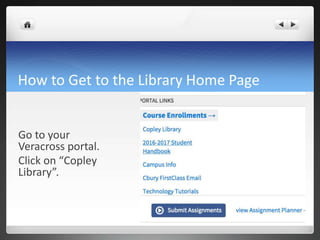
How to Get to the Library Home Page
Go to your
Veracross portal.
Click on “Copley
Library”.
What do you find here?
 How to get to our:
 Electronic research materials (Credo; “Browse all our
databases” for a complete list of our databases)
 Our book collection (Destiny Quest)
 Library Guides to help guide your research
 Images you can use in your research
Resource #1: Credo
Start your research here!
- Get background information on your topic
- Mind Maps can help narrow or expand your topic
- Credo searches our other databases
Resource #2: Electronic Databases
What are electronic databases?
- licensed SCHOLARLY articles, images, books, etc.,
that have been digitized
- they are searchable, so you use these for research
- they are more reliable than what you’ll find on the
Open Web
Resource #3: Where do I find a book?
 Destiny Quest Catalog
 You can search by using title, author, or subject
 The “call number” directs you to the book’s “address”
in the shelves
Resource #4: What is a Library Guide?
 A Library Guide is put together by the librarian and
teachers.
 Its purpose is to help guide your research, to make it
more efficient for you.
 Library Guides typically apply to a specific topic,
subject or class.
Resource #5: Finding Images
 Click on our “Images” link to find images you can use
in your papers
 These images are already purchased by us, so they are
free for us to use without infringing on copyright
 These images have citations all ready for use
What do I find on the Student page of the
Copley Library Guide?
 Library guides broken down by subject
 Tutorials on NoodleTools, Turnitin, Google Drive
 How to find passwords when logging on from off
campus
 Research tips

New Student Orientation

  • 1.
  • 2.
    How to Getto the Library Home Page Go to your Veracross portal. Click on “Copley Library”.
  • 3.
    What do youfind here?  How to get to our:  Electronic research materials (Credo; “Browse all our databases” for a complete list of our databases)  Our book collection (Destiny Quest)  Library Guides to help guide your research  Images you can use in your research
  • 4.
    Resource #1: Credo Startyour research here! - Get background information on your topic - Mind Maps can help narrow or expand your topic - Credo searches our other databases
  • 5.
    Resource #2: ElectronicDatabases What are electronic databases? - licensed SCHOLARLY articles, images, books, etc., that have been digitized - they are searchable, so you use these for research - they are more reliable than what you’ll find on the Open Web
  • 6.
    Resource #3: Wheredo I find a book?  Destiny Quest Catalog  You can search by using title, author, or subject  The “call number” directs you to the book’s “address” in the shelves
  • 7.
    Resource #4: Whatis a Library Guide?  A Library Guide is put together by the librarian and teachers.  Its purpose is to help guide your research, to make it more efficient for you.  Library Guides typically apply to a specific topic, subject or class.
  • 8.
    Resource #5: FindingImages  Click on our “Images” link to find images you can use in your papers  These images are already purchased by us, so they are free for us to use without infringing on copyright  These images have citations all ready for use
  • 9.
    What do Ifind on the Student page of the Copley Library Guide?  Library guides broken down by subject  Tutorials on NoodleTools, Turnitin, Google Drive  How to find passwords when logging on from off campus  Research tips