New Features in
SPI Buyer Direct
RAY GOODMAN
Buyer Direct Rebranding
Merchandise Assortment Planning (MAPS) Module
Forecasting Module
Master Scheduling, SPO and Multi-Echelon Modules
Dynamic Reporting System (DRS) Module
Interface Module
NEW FEATURES 15.0.0
Release Notes
BUYER DIRECT
Rebranding and Infrastructure
Infrastructure
• Application is upgraded to use .Net Framework 4.5
• Allows for support of Windows 8.1 and Windows 10
• Availability
• .Net Framework is distributed with Windows 8.1 and higher
• Windows 7 machines may need to have the .Net Framework 4.5
installed by an administrator user
Rebranding
Direct Tech All Channel Suite is now:
SPI Buyer Direct
Rebranding – Dashboard
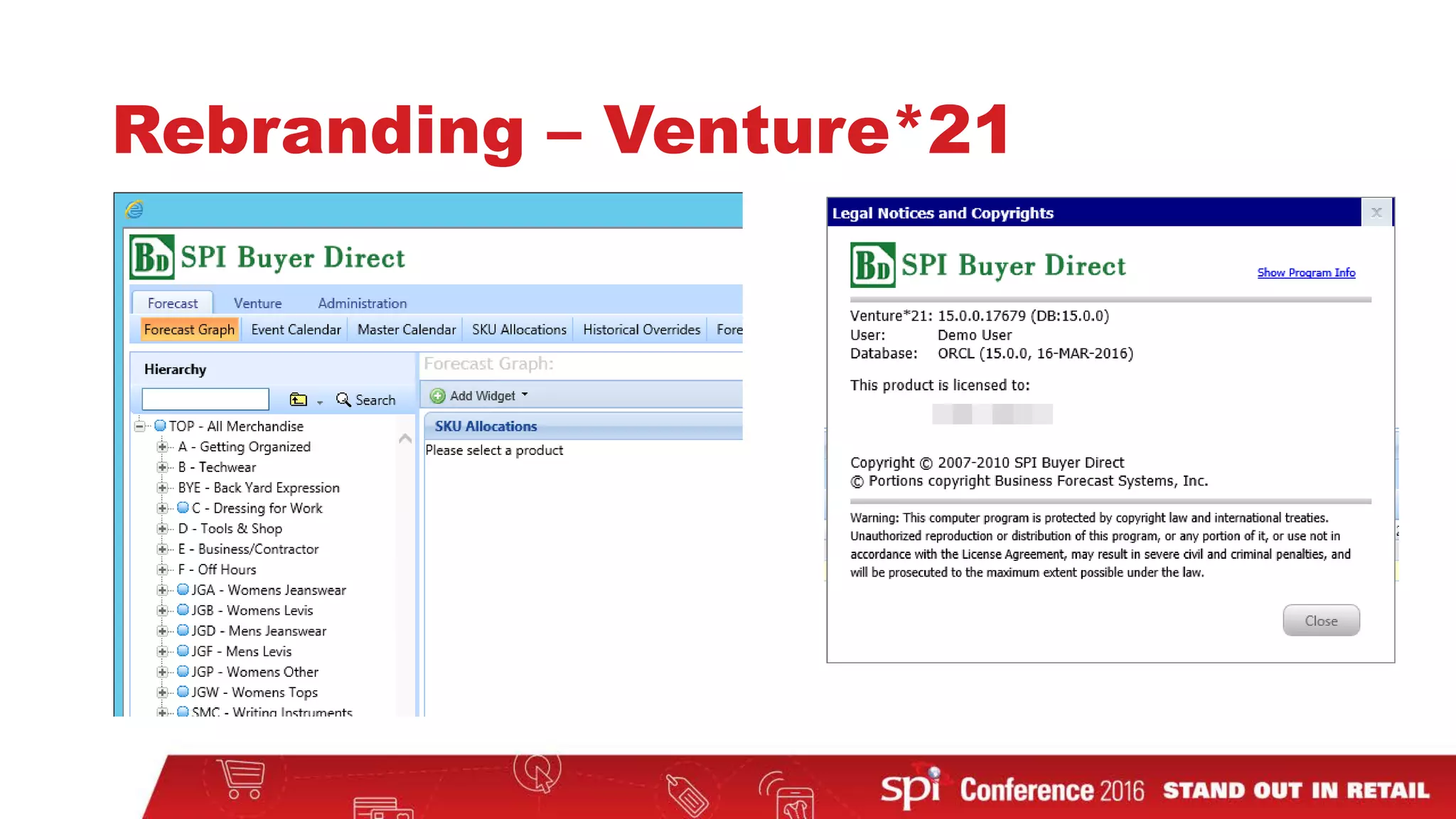
Rebranding – Venture*21
BUYER DIRECT
Merchandise Assortment Planning (MAPS) module
MAPS
• Frequency Percentage
• Budget Items – Target Order $ and Items/Order
MAPS – Frequency Percentage
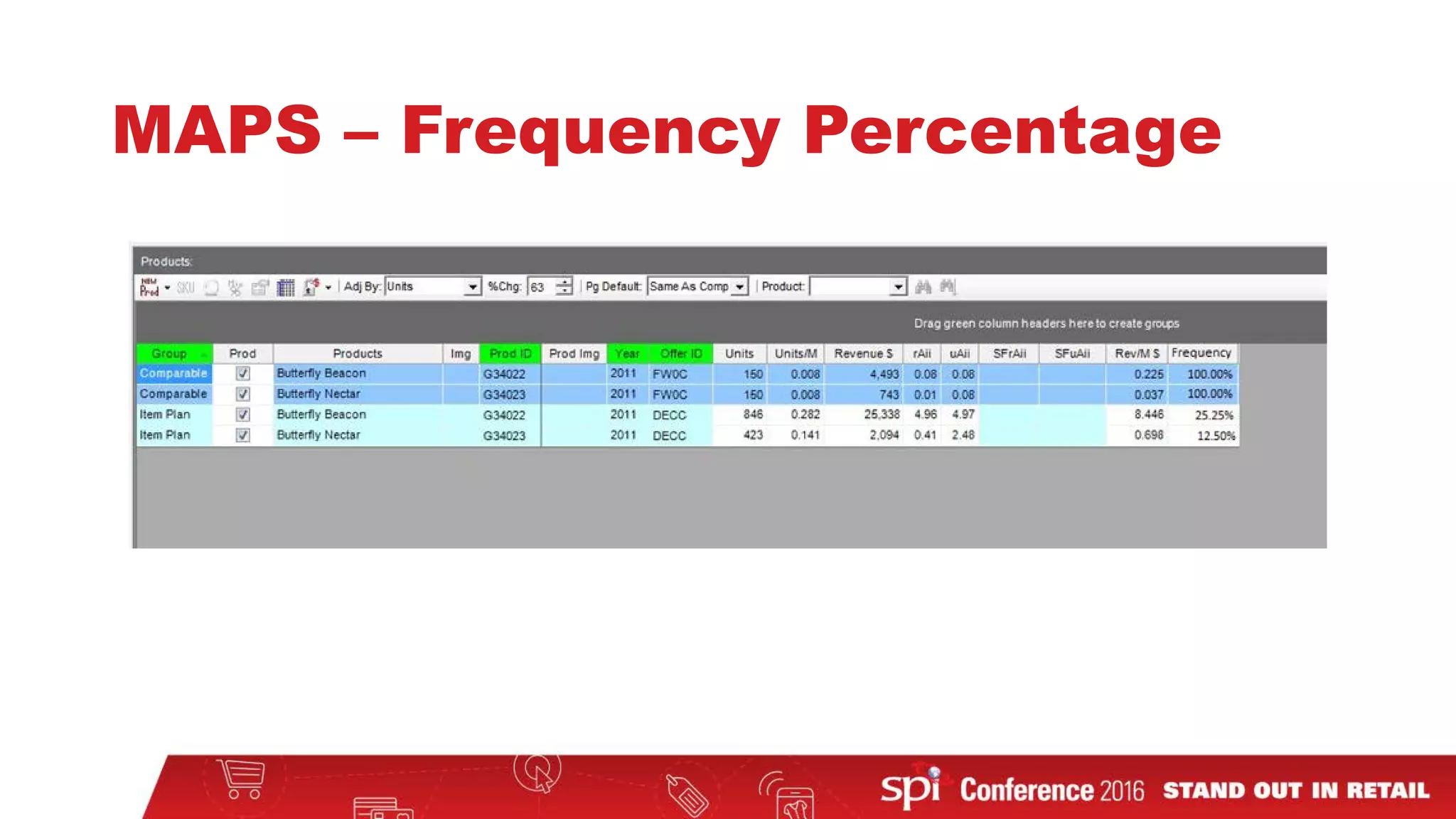
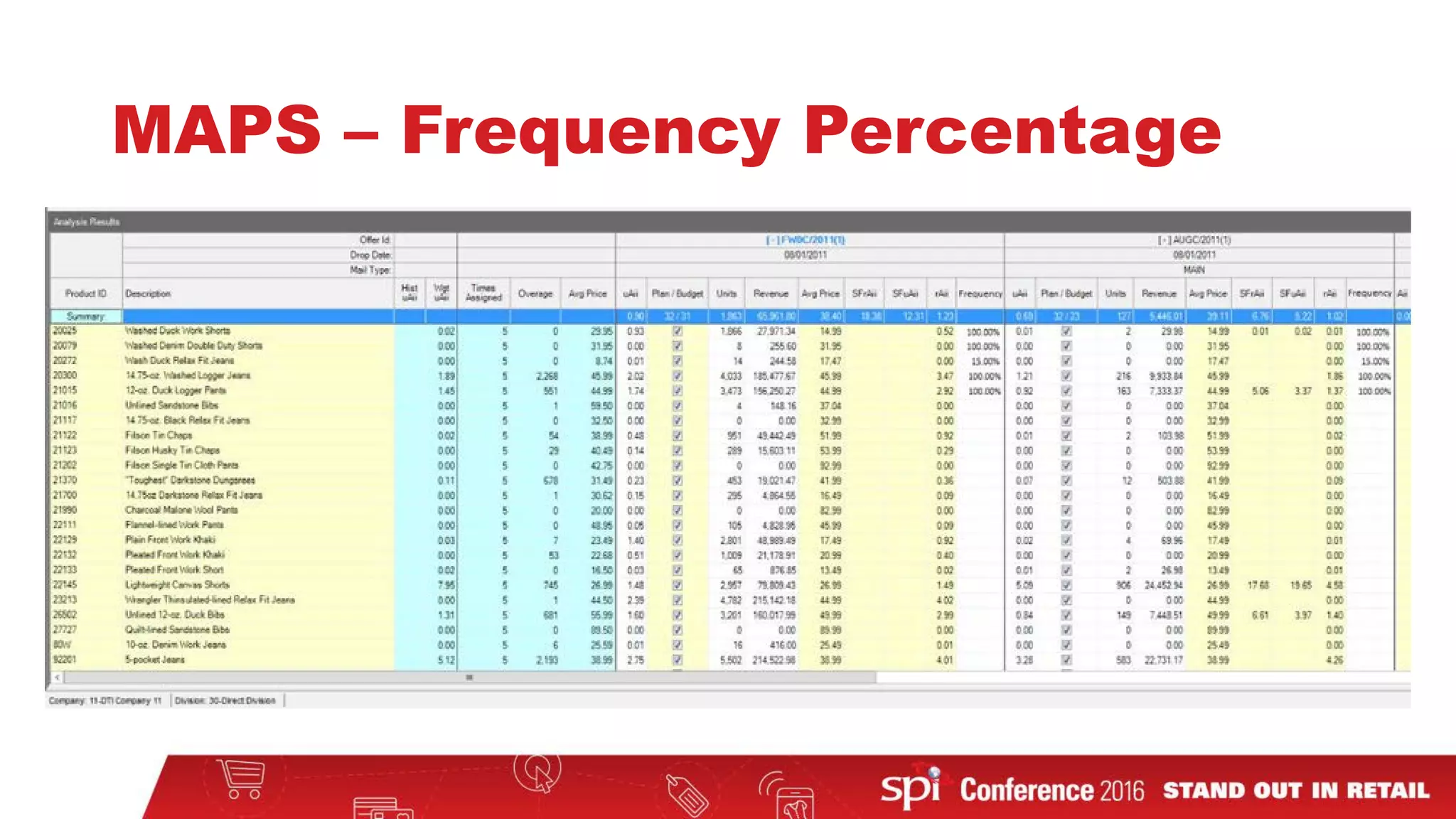
• Frequency Percentage is the percentage of customers that will see
this product offering
• If a mailing has dynamic products, you can adjust for how often a
customer sees a product
• For example:
• Products A is always shown on a page
• Products B and C are only shown to 60% and 40% of customers respectively
• Product A has 100% Frequency Percentage
• Product B has 60% Frequency Percentage
• Product C has 40% Frequency Percentage
MAPS – Frequency Percentage
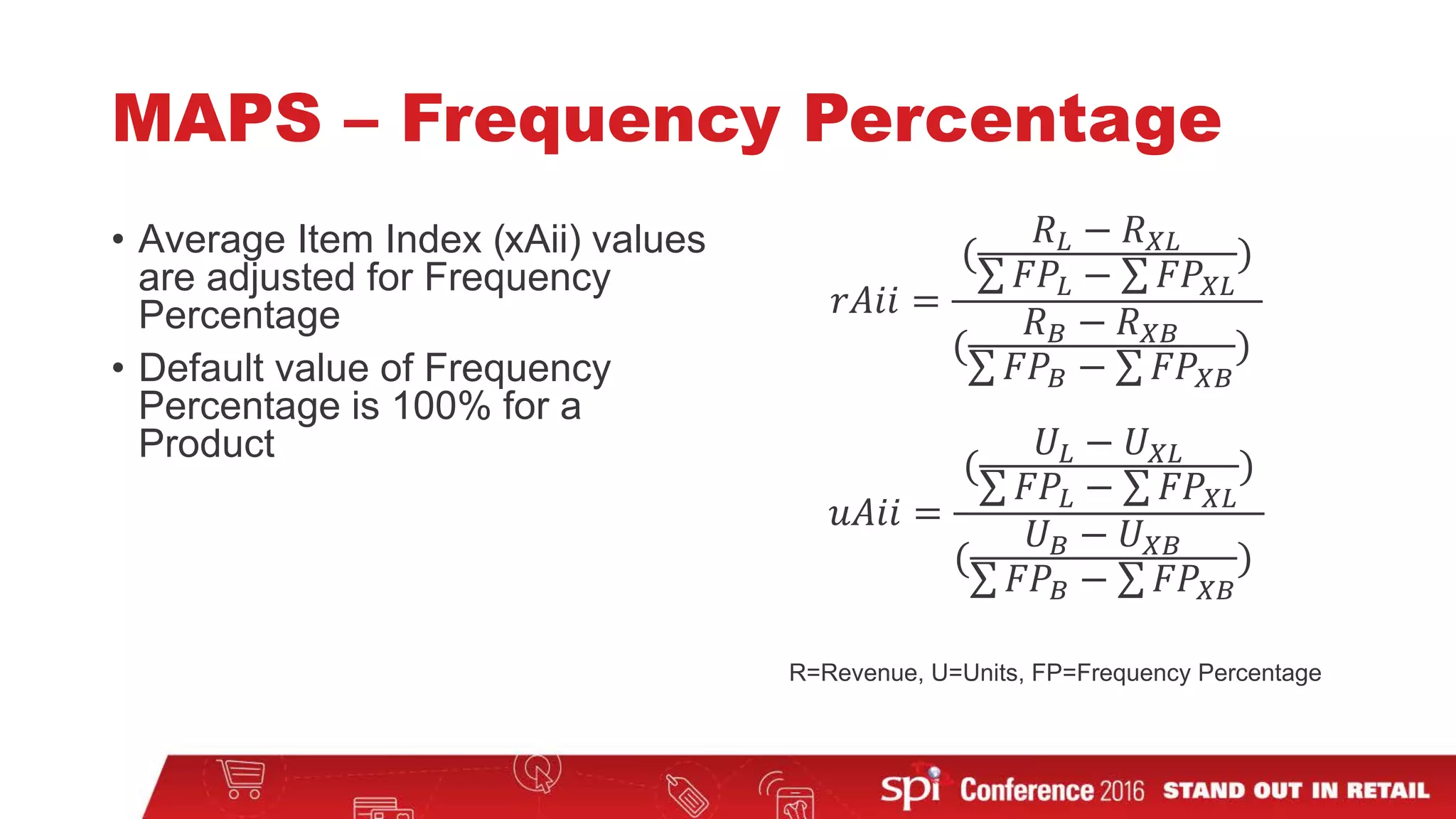
• Average Item Index (xAii) values
are adjusted for Frequency
Percentage
• Default value of Frequency
Percentage is 100% for a
Product
𝑟𝑟𝑟𝑟𝑟𝑟𝑟𝑟 =
(
𝑅𝑅𝐿𝐿 − 𝑅𝑅𝑋𝑋𝑋𝑋
∑ 𝐹𝐹𝐹𝐹𝐿𝐿 − ∑ 𝐹𝐹𝐹𝐹𝑋𝑋𝑋𝑋
)
(
𝑅𝑅𝐵𝐵 − 𝑅𝑅𝑋𝑋𝑋𝑋
∑ 𝐹𝐹𝐹𝐹𝐵𝐵 − ∑ 𝐹𝐹𝐹𝐹𝑋𝑋𝑋𝑋
)
𝑢𝑢𝑢𝑢𝑢𝑢𝑢𝑢 =
(
𝑈𝑈𝐿𝐿 − 𝑈𝑈𝑋𝑋𝑋𝑋
∑ 𝐹𝐹𝐹𝐹𝐿𝐿 − ∑ 𝐹𝐹𝐹𝐹𝑋𝑋𝑋𝑋
)
(
𝑈𝑈𝐵𝐵 − 𝑈𝑈𝑋𝑋𝑋𝑋
∑ 𝐹𝐹𝐹𝐹𝐵𝐵 − ∑ 𝐹𝐹𝐹𝐹𝑋𝑋𝑋𝑋
)
R=Revenue, U=Units, FP=Frequency Percentage
MAPS – Frequency Percentage
MAPS – New Budget Items
BUYER DIRECT
Forecasting module
Forecasting
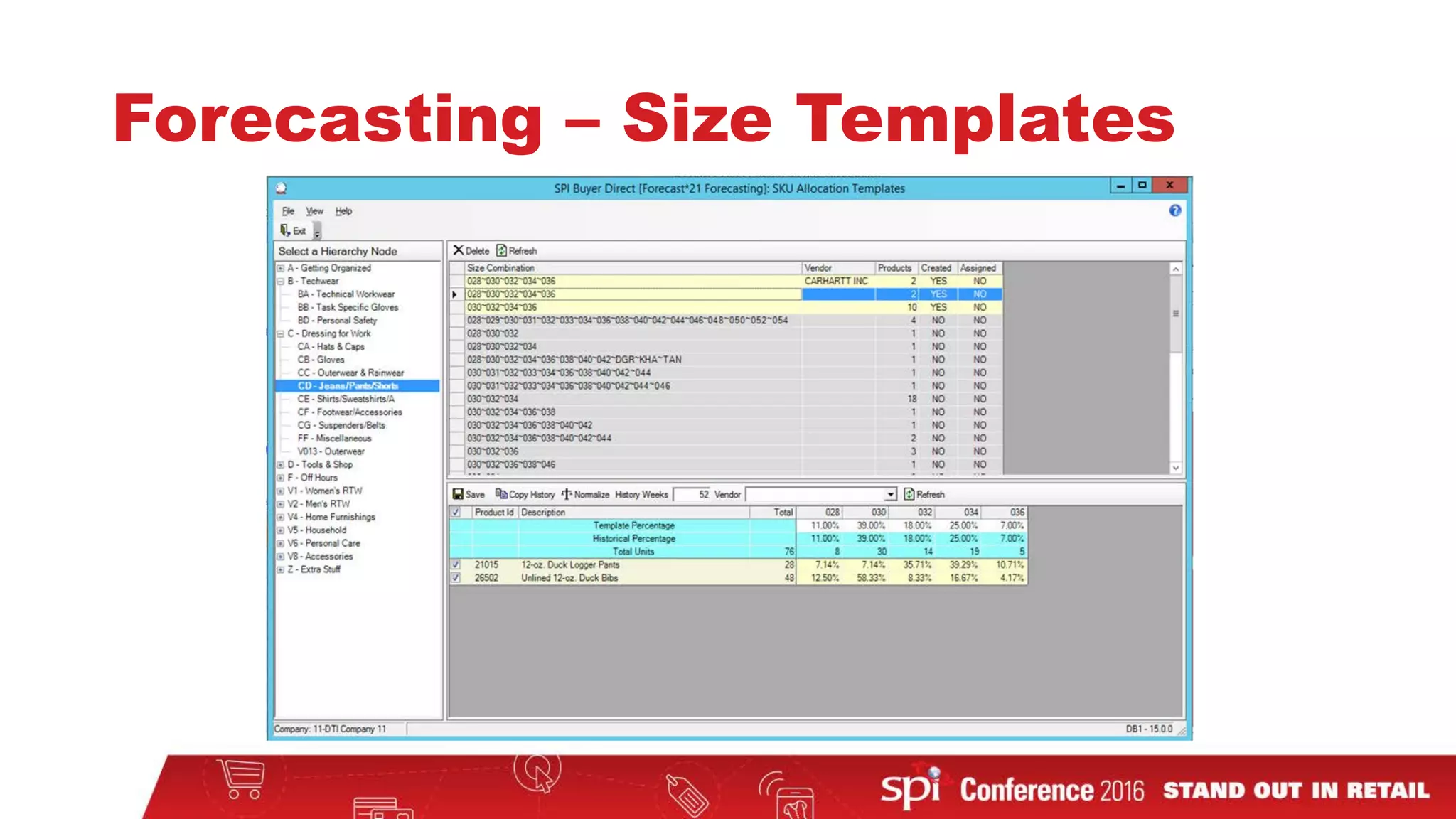
• Size Templates
• User Conference 2015 enhancement
• Like Product Filtering in Product Level Forecasting
• User Conference 2015 enhancement
Forecasting – Size Templates
PLF – Like Product Filtering
BUYER DIRECT
Master Scheduling, Suggested Purchase Order (SPO),
and Multi-Echelon modules
Master Scheduling
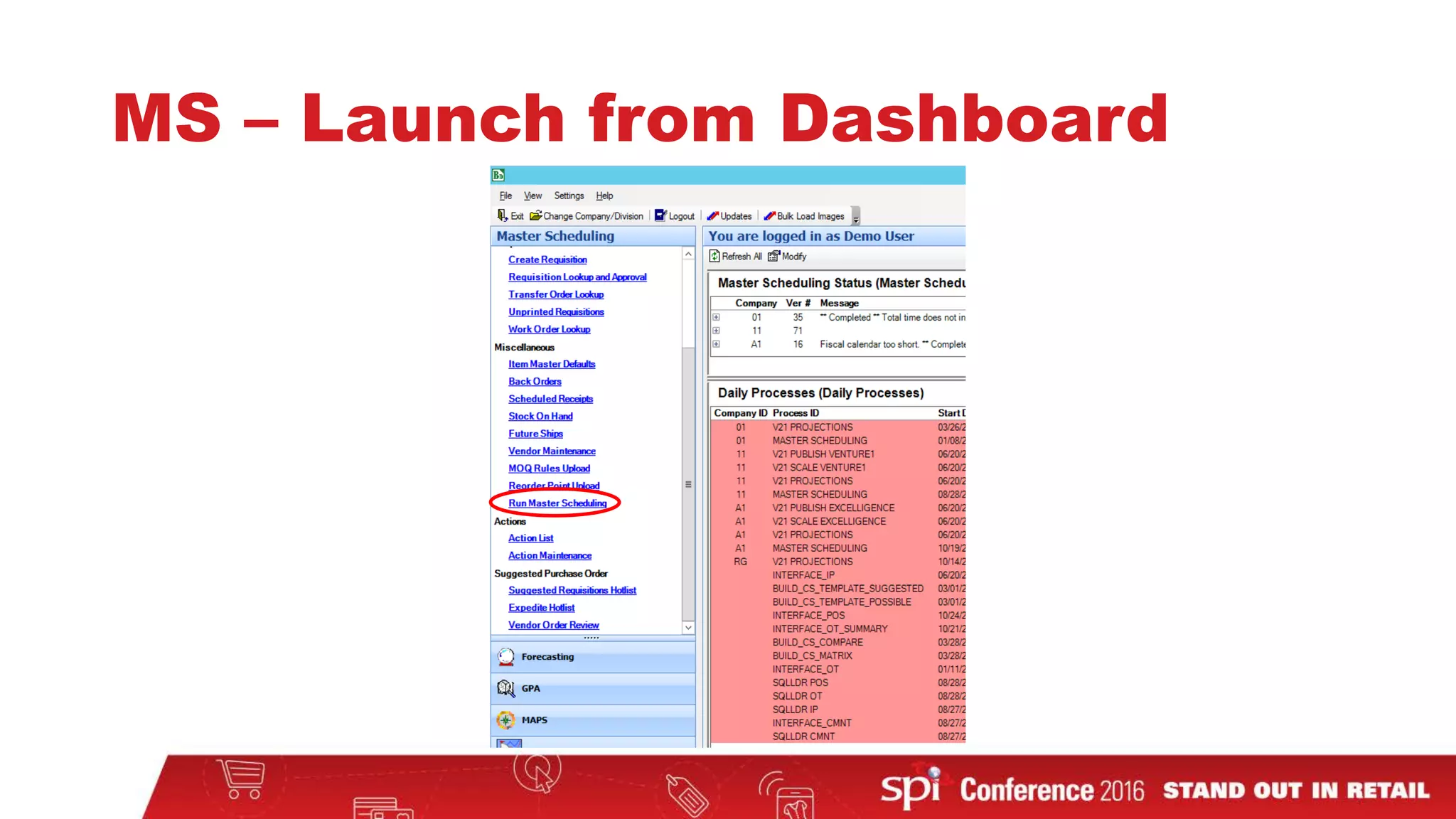
• Master Scheduling – Launch from Dashboard
• 2015 User Conference enhancement
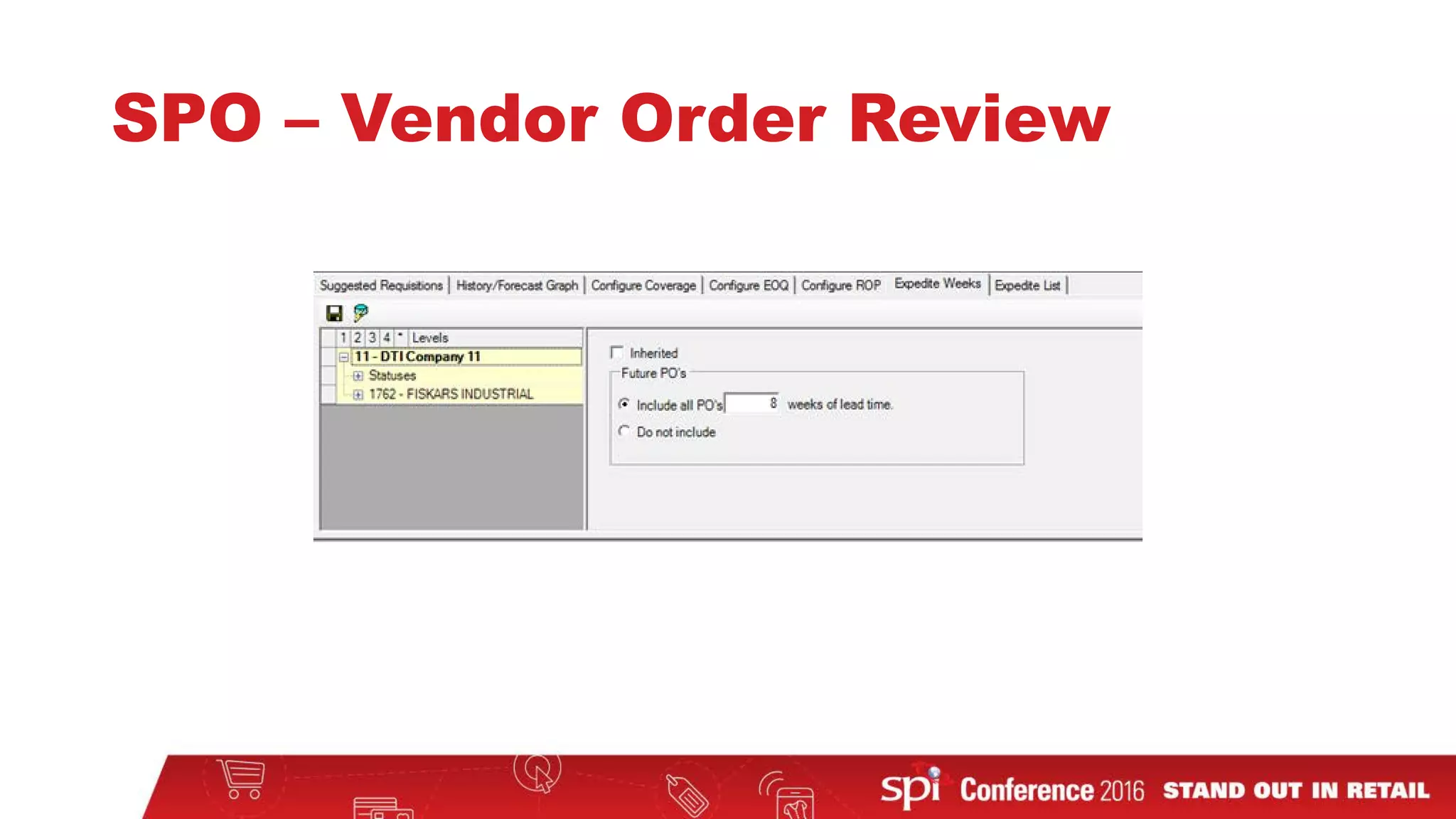
• Suggested Purchase Order (SPO) Expedite Weeks
• Includes 2013 and 2015 User Conference enhancements
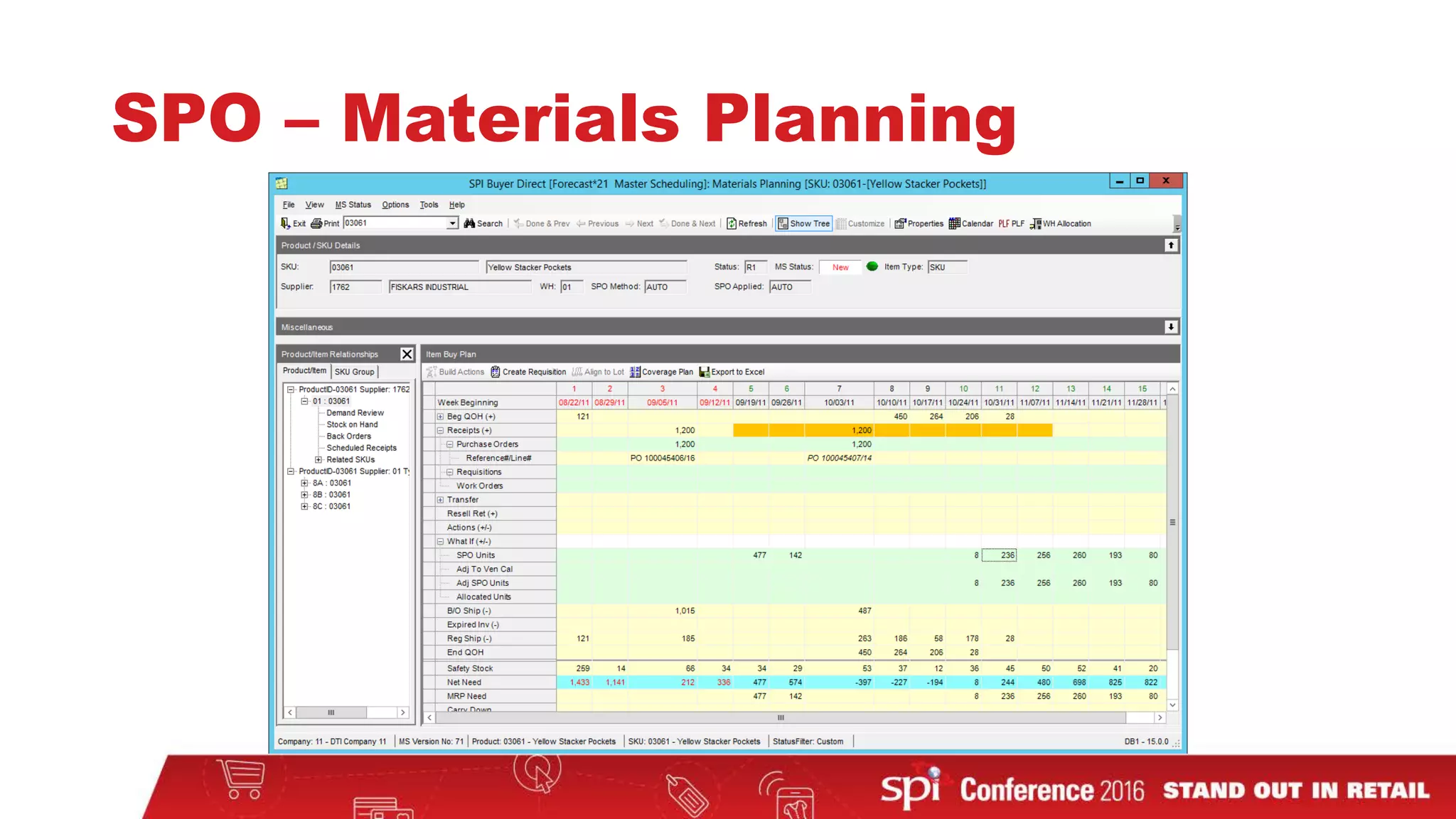
• Show individual Requisitions and Purchase Orders in Materials Planning
• Take into account near future POs in suggestions
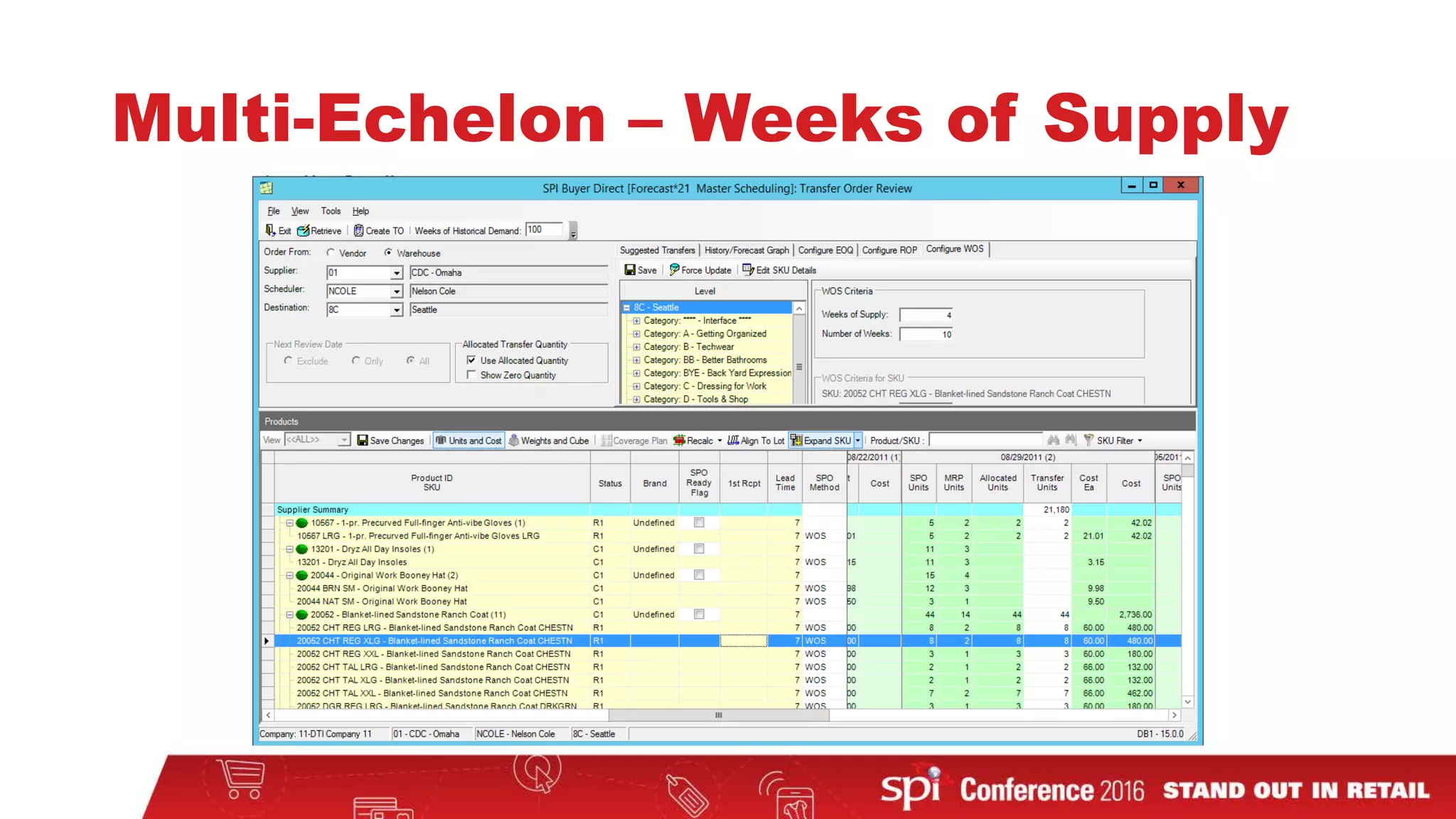
• Multi-Echelon – Weeks of Supply for Transfers
MS – Launch from Dashboard
SPO Expedite Purchase Orders
• Added the ability to identify purchase orders that can be
expedited
• Adjusts suggested orders to account for receipts within a
specified number of weeks of the lead time
• Gives better control over future orders
SPO – Expedite Hotlist
SPO – Expedite Hotlist Options
SPO – Vendor Order Review
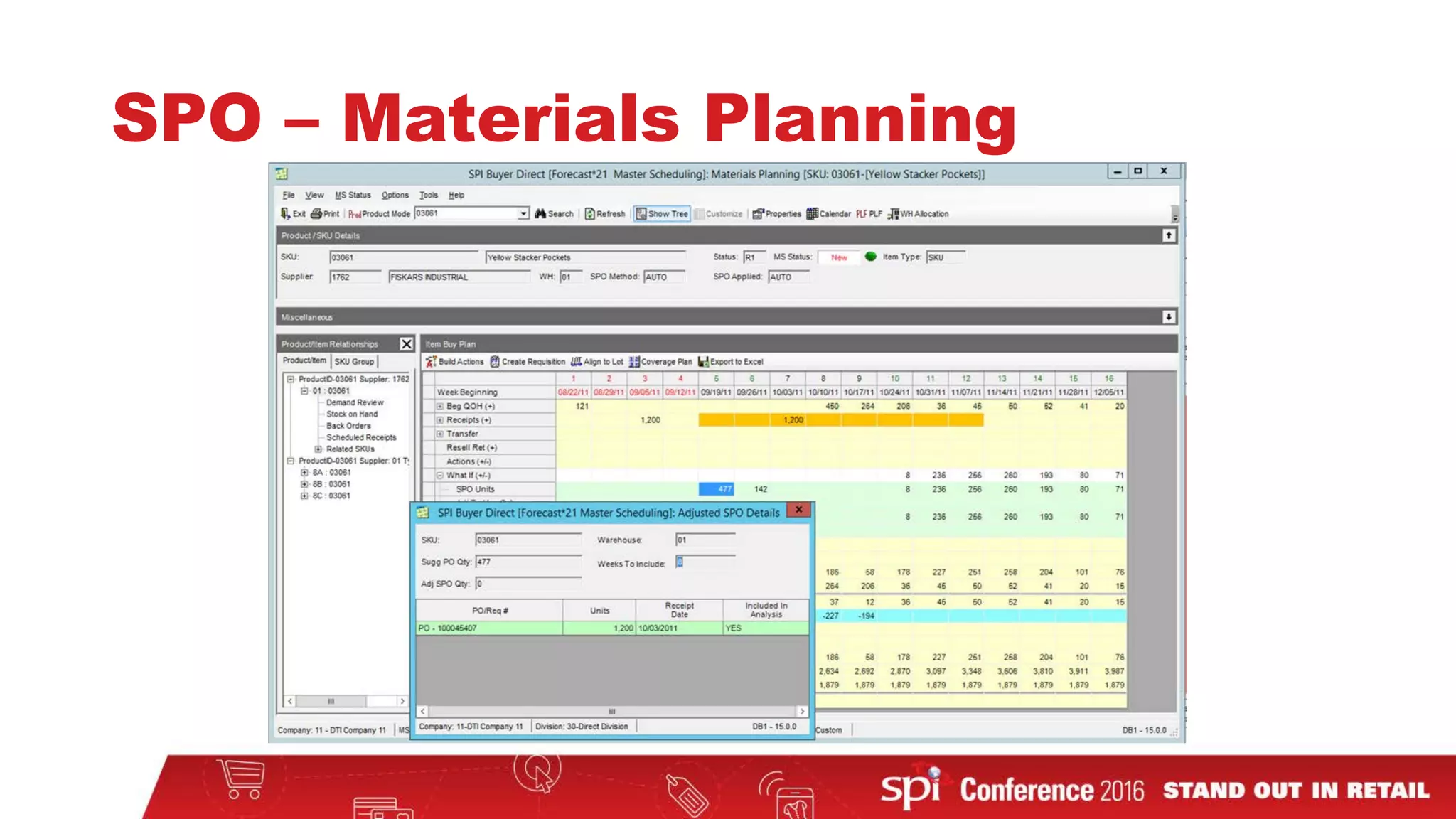
SPO – Materials Planning
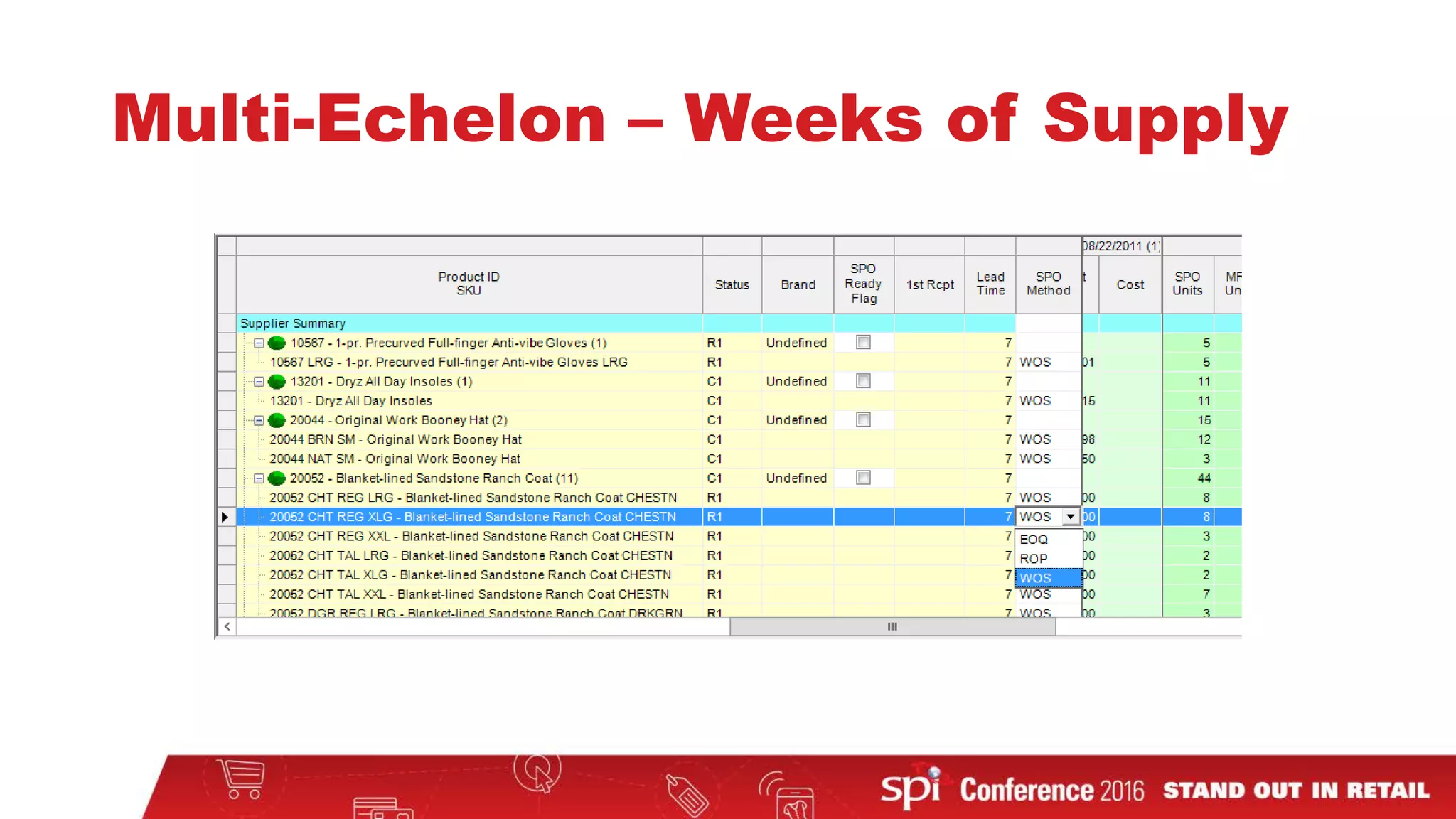
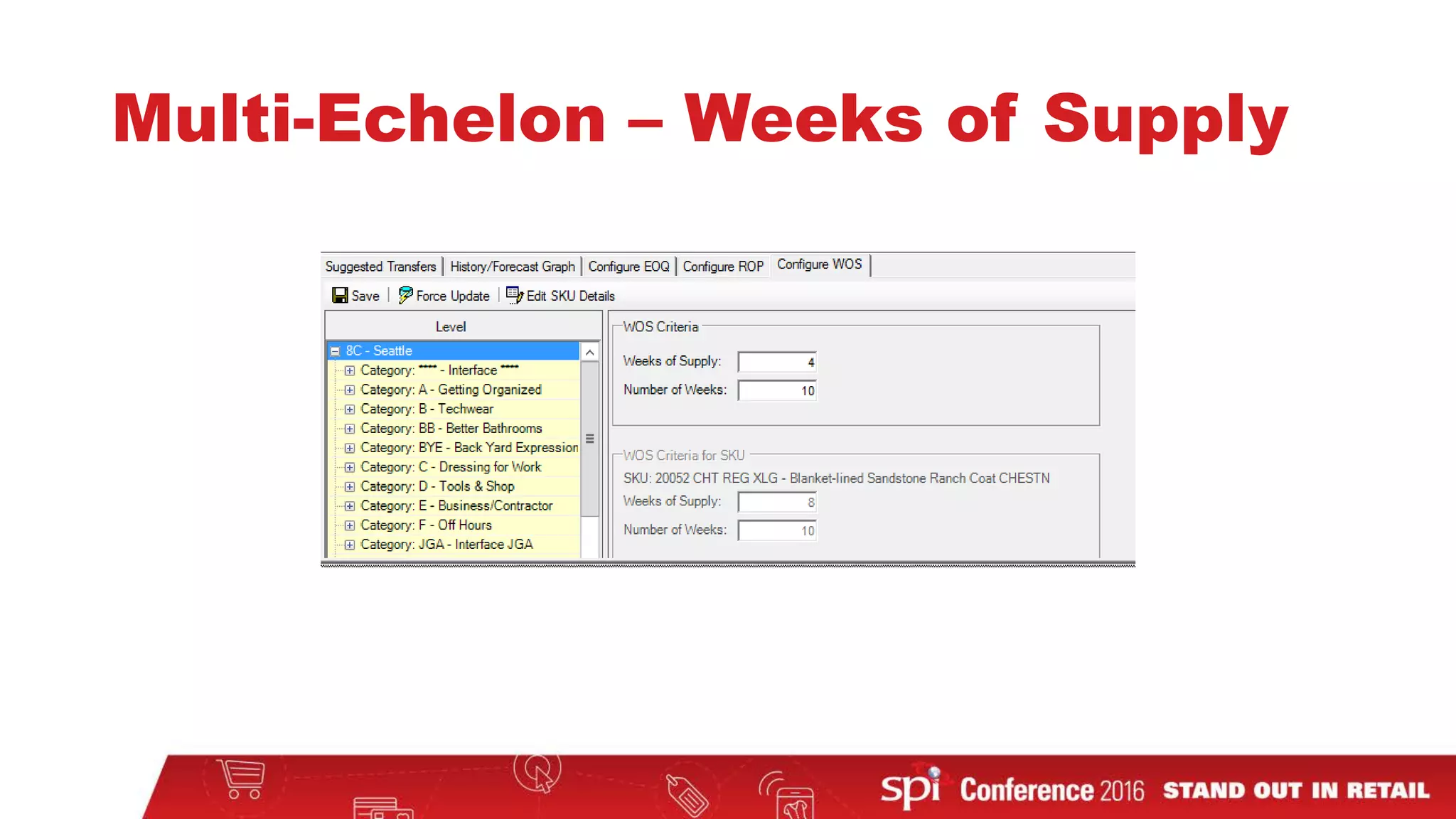
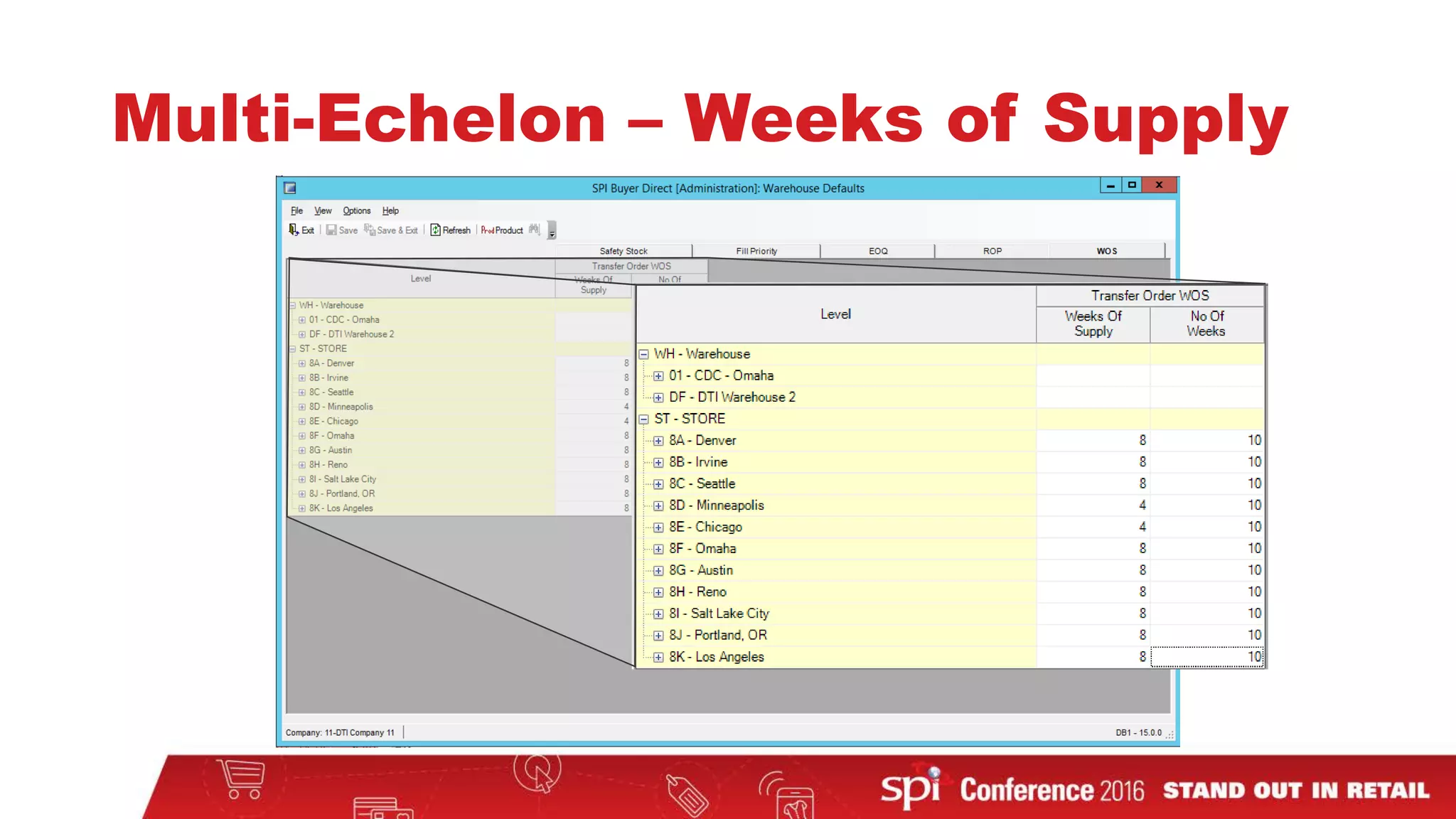
Multi-Echelon – Weeks of Supply
• Added a Transfer SPO Method of Weeks of Supply (WOS)
• Weeks of Supply is controlled by 2 parameters
• How many weeks of supply to maintain (Weeks of Supply)
• Number of weeks to cover in the future (Number of Weeks)
• Maintained on the Transfer Order Review (TOR) screen
• Can be managed on the Warehouse Defaults screen
Multi-Echelon – Weeks of Supply
BUYER DIRECT
Reports Module
Reports
• User Interface Improvements in DRS
• User request at 2015 User Conference
• Upgrade Crystal Report for Windows 8.1/10 compatibility
• New Crystal Reports distributable will need to be installed on every
user’s desktop
DRS User Interface Changes
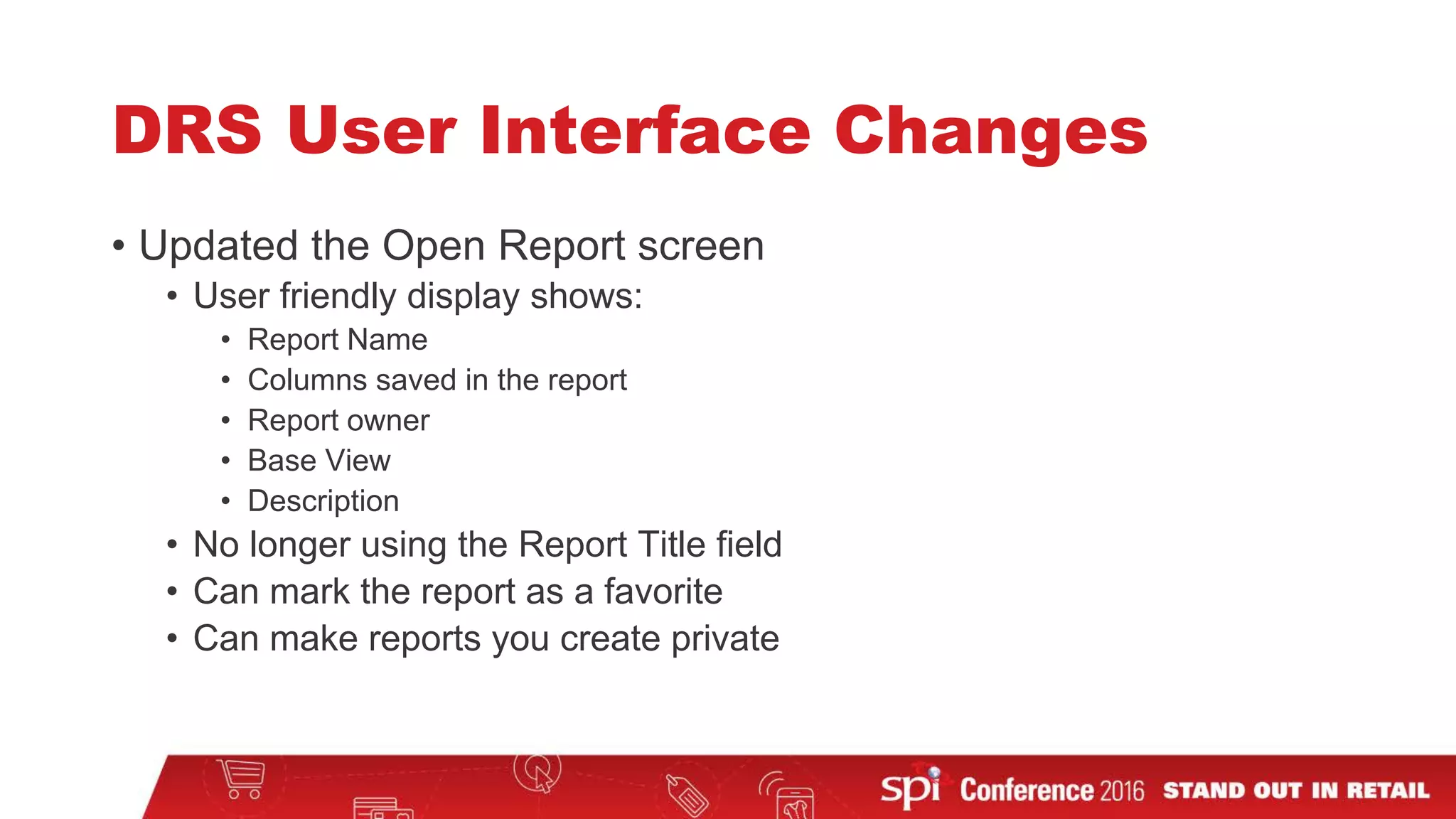
• Updated the Open Report screen
• User friendly display shows:
• Report Name
• Columns saved in the report
• Report owner
• Base View
• Description
• No longer using the Report Title field
• Can mark the report as a favorite
• Can make reports you create private
DRS User Interface Changes
• Added tabs for:
• My Favorite Reports
• My Reports
• Classifications
• Owner
• Base View
• Each tab displays reports generally by Classification
• Saved report names are clearer
• Old: RGOODMAN’s Suggested Req Detail
• New: Suggested Req Detail (Ray)
DRS User Interface Changes
• Simplified the New Report screen
• Allow user to base new report on a base view or table or on
another DRS report
• Allows the user to select the columns to include on the report
• Save the report from the creation screen
DRS User Interface Changes
Upgrade Crystal Reports
• Crystal Reports is upgraded to support Windows 8, 8.1, and 10
• Faster rendering of reports
• To upgrade:
• Push upgrade to each client machine (IT services)
• Application will detect old version and begin upgrade (user)
• Either method requires that the user performing the upgrade be an
administrator.
BUYER DIRECT
Interface Module
Interfaces
• Add Lot Size field to Item Master (IM) interface record
• Field is used for Transfer Order Lot Size (Multi-Echelon
customers)
• Contact your Customer Experience representative for details
Contact Me
•Ray Goodman
Email: ray.goodman@spi.com
Phone: 770-709-3462

New Features in SPI Buyer Direct

  • 1.
    New Features in SPIBuyer Direct RAY GOODMAN
  • 2.
    Buyer Direct Rebranding MerchandiseAssortment Planning (MAPS) Module Forecasting Module Master Scheduling, SPO and Multi-Echelon Modules Dynamic Reporting System (DRS) Module Interface Module NEW FEATURES 15.0.0
  • 3.
  • 4.
  • 5.
    Infrastructure • Application isupgraded to use .Net Framework 4.5 • Allows for support of Windows 8.1 and Windows 10 • Availability • .Net Framework is distributed with Windows 8.1 and higher • Windows 7 machines may need to have the .Net Framework 4.5 installed by an administrator user
  • 6.
    Rebranding Direct Tech AllChannel Suite is now: SPI Buyer Direct
  • 7.
  • 8.
  • 9.
  • 10.
  • 11.
    MAPS • Frequency Percentage •Budget Items – Target Order $ and Items/Order
  • 12.
    MAPS – FrequencyPercentage • Frequency Percentage is the percentage of customers that will see this product offering • If a mailing has dynamic products, you can adjust for how often a customer sees a product • For example: • Products A is always shown on a page • Products B and C are only shown to 60% and 40% of customers respectively • Product A has 100% Frequency Percentage • Product B has 60% Frequency Percentage • Product C has 40% Frequency Percentage
  • 13.
    MAPS – FrequencyPercentage • Average Item Index (xAii) values are adjusted for Frequency Percentage • Default value of Frequency Percentage is 100% for a Product 𝑟𝑟𝑟𝑟𝑟𝑟𝑟𝑟 = ( 𝑅𝑅𝐿𝐿 − 𝑅𝑅𝑋𝑋𝑋𝑋 ∑ 𝐹𝐹𝐹𝐹𝐿𝐿 − ∑ 𝐹𝐹𝐹𝐹𝑋𝑋𝑋𝑋 ) ( 𝑅𝑅𝐵𝐵 − 𝑅𝑅𝑋𝑋𝑋𝑋 ∑ 𝐹𝐹𝐹𝐹𝐵𝐵 − ∑ 𝐹𝐹𝐹𝐹𝑋𝑋𝑋𝑋 ) 𝑢𝑢𝑢𝑢𝑢𝑢𝑢𝑢 = ( 𝑈𝑈𝐿𝐿 − 𝑈𝑈𝑋𝑋𝑋𝑋 ∑ 𝐹𝐹𝐹𝐹𝐿𝐿 − ∑ 𝐹𝐹𝐹𝐹𝑋𝑋𝑋𝑋 ) ( 𝑈𝑈𝐵𝐵 − 𝑈𝑈𝑋𝑋𝑋𝑋 ∑ 𝐹𝐹𝐹𝐹𝐵𝐵 − ∑ 𝐹𝐹𝐹𝐹𝑋𝑋𝑋𝑋 ) R=Revenue, U=Units, FP=Frequency Percentage
  • 14.
  • 15.
  • 16.
    MAPS – NewBudget Items
  • 17.
  • 18.
    Forecasting • Size Templates •User Conference 2015 enhancement • Like Product Filtering in Product Level Forecasting • User Conference 2015 enhancement
  • 19.
  • 20.
  • 21.
  • 22.
  • 23.
  • 24.
    PLF – LikeProduct Filtering
  • 25.
    BUYER DIRECT Master Scheduling,Suggested Purchase Order (SPO), and Multi-Echelon modules
  • 26.
    Master Scheduling • MasterScheduling – Launch from Dashboard • 2015 User Conference enhancement • Suggested Purchase Order (SPO) Expedite Weeks • Includes 2013 and 2015 User Conference enhancements • Show individual Requisitions and Purchase Orders in Materials Planning • Take into account near future POs in suggestions • Multi-Echelon – Weeks of Supply for Transfers
  • 27.
    MS – Launchfrom Dashboard
  • 28.
    MS – Launchfrom Dashboard
  • 29.
    MS – Launchfrom Dashboard
  • 30.
    MS – Launchfrom Dashboard
  • 31.
    SPO Expedite PurchaseOrders • Added the ability to identify purchase orders that can be expedited • Adjusts suggested orders to account for receipts within a specified number of weeks of the lead time • Gives better control over future orders
  • 32.
  • 33.
    SPO – ExpediteHotlist Options
  • 34.
    SPO – VendorOrder Review
  • 35.
    SPO – VendorOrder Review
  • 36.
  • 37.
  • 38.
    Multi-Echelon – Weeksof Supply • Added a Transfer SPO Method of Weeks of Supply (WOS) • Weeks of Supply is controlled by 2 parameters • How many weeks of supply to maintain (Weeks of Supply) • Number of weeks to cover in the future (Number of Weeks) • Maintained on the Transfer Order Review (TOR) screen • Can be managed on the Warehouse Defaults screen
  • 39.
  • 40.
  • 41.
  • 42.
  • 43.
  • 44.
  • 45.
  • 46.
    Reports • User InterfaceImprovements in DRS • User request at 2015 User Conference • Upgrade Crystal Report for Windows 8.1/10 compatibility • New Crystal Reports distributable will need to be installed on every user’s desktop
  • 47.
    DRS User InterfaceChanges • Updated the Open Report screen • User friendly display shows: • Report Name • Columns saved in the report • Report owner • Base View • Description • No longer using the Report Title field • Can mark the report as a favorite • Can make reports you create private
  • 48.
  • 49.
    DRS User InterfaceChanges • Added tabs for: • My Favorite Reports • My Reports • Classifications • Owner • Base View • Each tab displays reports generally by Classification • Saved report names are clearer • Old: RGOODMAN’s Suggested Req Detail • New: Suggested Req Detail (Ray)
  • 50.
    DRS User InterfaceChanges • Simplified the New Report screen • Allow user to base new report on a base view or table or on another DRS report • Allows the user to select the columns to include on the report • Save the report from the creation screen
  • 51.
  • 52.
    Upgrade Crystal Reports •Crystal Reports is upgraded to support Windows 8, 8.1, and 10 • Faster rendering of reports • To upgrade: • Push upgrade to each client machine (IT services) • Application will detect old version and begin upgrade (user) • Either method requires that the user performing the upgrade be an administrator.
  • 53.
  • 54.
    Interfaces • Add LotSize field to Item Master (IM) interface record • Field is used for Transfer Order Lot Size (Multi-Echelon customers) • Contact your Customer Experience representative for details
  • 55.
    Contact Me •Ray Goodman Email:ray.goodman@spi.com Phone: 770-709-3462