CPQ for Isolation Valves
ValveCPQ
www.valvecpq.com
www.configuratorsolutions.com
sales@configuratorsolutions.com
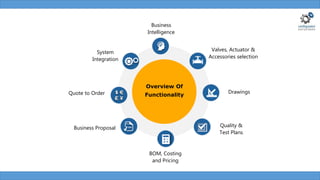
Business Proposal
Valves, Actuator &
Accessories selection
BOM, Costing
and Pricing
System
Integration
Business
Intelligence
Drawings
Quality &
Test Plans
Overview Of
Functionality
Quote to Order
Box
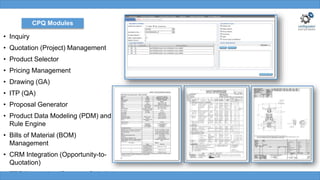
• Inquiry
• Quotation (Project) Management
• Product Selector
• Pricing Management
• Drawing (GA)
• ITP (QA)
• Proposal Generator
• Product Data Modeling (PDM) and
Rule Engine
• Bills of Material (BOM)
Management
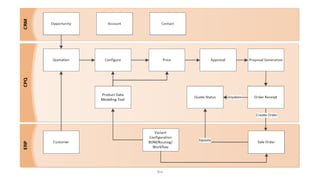
• CRM Integration (Opportunity-to-
Quotation)
• ERP Integration (Quote-to-Order)
CPQ Modules
• Simplify and speed up the Product
Selection process
• Get the pricing with selection of
minimal attributes and automated
workflows
• Import large projects into configurator
from Excel instead of entering line
items one by one
• Manage amendments and generate
high in quality & consistent Proposals
• Manage product updates and BOMs
by Engineering/Sales rather than IT
• Automate Order creation by ERP
integration
• Integrate with CRM system to convert
Opportunity to Quotation
CPQ Features
• Workflows
• Request and Receipt of Cost
Price
• Receipt of Order
• Customer Creation
• BOM creation
• Discount Approval
• Rate Contract Approval
• User approvals
• Quote Reports
• Quotes ON -TIME (%)
• Quoted Value Details
• Quotes Lead Time per valve
• Quote Analysis
• % Of Won Quotes
• Lost Quote Analysis
• Quote Industry Segment
• Project Level ITP, Accessories
• Quotation sharing
• Quality Plans/Factory Note
• Customer specific Templates
• Inquiry Import to Excel
• Default Values and Rules
• Multi-language
• Multi-Currency
• Revision Management and Compar
Revision
• Modeling (PDM) and Rule Engine
• Bills of Material (BOM) Managemen
• ERP Integration (Quote-to-Order)
• CRM Integration
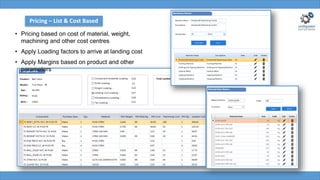
• Pricing based on cost of material, weight,
machining and other cost centres
• Apply Loading factors to arrive at landing cost
• Apply Margins based on product and other
parameters
Pricing – List & Cost Based
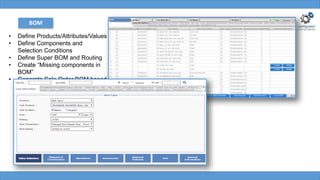
BOM
• Define Products/Attributes/Values
• Define Components and
Selection Conditions
• Define Super BOM and Routing
• Create “Missing components in
BOM”
• Generate Sale Order BOM based
on the selection
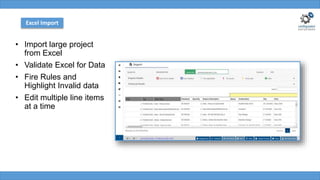
• Import large project
from Excel
• Validate Excel for Data
• Fire Rules and
Highlight Invalid data
• Edit multiple line items
at a time
Excel Import
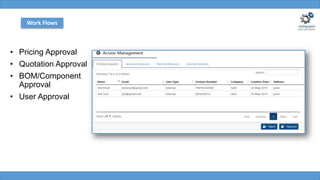
• Pricing Approval
• Quotation Approval
• BOM/Component
Approval
• User Approval
Work Flows
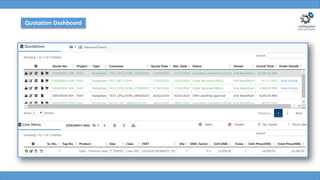
Quotation Dashboard
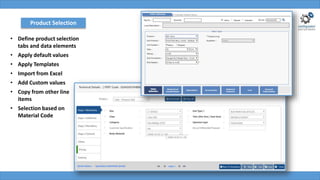
Product Selection
• Define product selection
tabs and data elements
• Apply default values
• Apply Templates
• Import from Excel
• Add Custom values
• Copy from other line
items
• Selection based on
Material Code
PDM
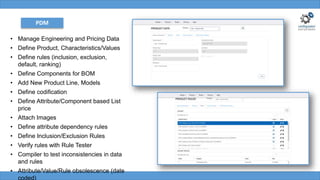
• Manage Engineering and Pricing Data
• Define Product, Characteristics/Values
• Define rules (inclusion, exclusion,
default, ranking)
• Define Components for BOM
• Add New Product Line, Models
• Define codification
• Define Attribute/Component based List
price
• Attach Images
• Define attribute dependency rules
• Define Inclusion/Exclusion Rules
• Verify rules with Rule Tester
• Compiler to test inconsistencies in data
and rules
• Attribute/Value/Rule obsolescence (date
coded)
PDM
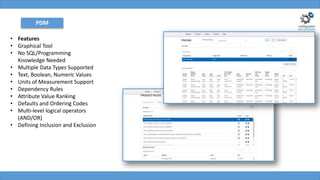
• Features
• Graphical Tool
• No SQL/Programming
Knowledge Needed
• Multiple Data Types Supported
• Text, Boolean, Numeric Values
• Units of Measurement Support
• Dependency Rules
• Attribute Value Ranking
• Defaults and Ordering Codes
• Multi-level logical operators
(AND/OR)
• Defining Inclusion and Exclusion
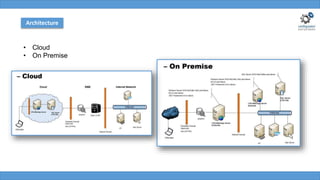
Architecture
• Cloud
• On Premise
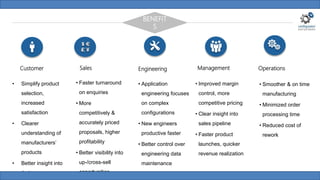
Customer Sales Engineering Management Operations
BENEFIT
S
• Simplify product
selection,
increased
satisfaction
• Clearer
understanding of
manufacturers’
products
• Better insight into
their own
• Faster turnaround
on enquiries
• More
competitively &
accurately priced
proposals, higher
profitability
• Better visibility into
up-/cross-sell
opportunities
• Application
engineering focuses
on complex
configurations
• New engineers
productive faster
• Better control over
engineering data
maintenance
• Improved margin
control, more
competitive pricing
• Clear insight into
sales pipeline
• Faster product
launches, quicker
revenue realization
• Smoother & on time
manufacturing
• Minimized order
processing time
• Reduced cost of
rework
The leading Valve brands in On/Off Segment use our
CPQ solutions
All logos are the property of their respective owners
Clientele
All logos are the property of their respective owners
Clientele
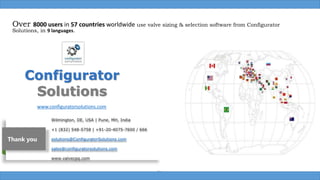
Over 8000 users in 57 countries worldwide use valve sizing & selection software from Configurator
Solutions, in 9 languages.
Box
Wilmington, DE, USA | Pune, MH, India
+1 (832) 548-5758 | +91-20-4075-7600 / 666
solutions@ConfiguratorSolutions.com
sales@configuratorsolutions.com
www.valvecpq.com
Configurator
Solutions
www.configuratorsolutions.com
Thank you

CPQ for Isolation Valves

  • 1.
    CPQ for IsolationValves ValveCPQ www.valvecpq.com www.configuratorsolutions.com sales@configuratorsolutions.com
  • 2.
    Business Proposal Valves, Actuator& Accessories selection BOM, Costing and Pricing System Integration Business Intelligence Drawings Quality & Test Plans Overview Of Functionality Quote to Order
  • 3.
  • 4.
    • Inquiry • Quotation(Project) Management • Product Selector • Pricing Management • Drawing (GA) • ITP (QA) • Proposal Generator • Product Data Modeling (PDM) and Rule Engine • Bills of Material (BOM) Management • CRM Integration (Opportunity-to- Quotation) • ERP Integration (Quote-to-Order) CPQ Modules
  • 5.
    • Simplify andspeed up the Product Selection process • Get the pricing with selection of minimal attributes and automated workflows • Import large projects into configurator from Excel instead of entering line items one by one • Manage amendments and generate high in quality & consistent Proposals • Manage product updates and BOMs by Engineering/Sales rather than IT • Automate Order creation by ERP integration • Integrate with CRM system to convert Opportunity to Quotation CPQ Features • Workflows • Request and Receipt of Cost Price • Receipt of Order • Customer Creation • BOM creation • Discount Approval • Rate Contract Approval • User approvals • Quote Reports • Quotes ON -TIME (%) • Quoted Value Details • Quotes Lead Time per valve • Quote Analysis • % Of Won Quotes • Lost Quote Analysis • Quote Industry Segment • Project Level ITP, Accessories • Quotation sharing • Quality Plans/Factory Note • Customer specific Templates • Inquiry Import to Excel • Default Values and Rules • Multi-language • Multi-Currency • Revision Management and Compar Revision • Modeling (PDM) and Rule Engine • Bills of Material (BOM) Managemen • ERP Integration (Quote-to-Order) • CRM Integration
  • 6.
    • Pricing basedon cost of material, weight, machining and other cost centres • Apply Loading factors to arrive at landing cost • Apply Margins based on product and other parameters Pricing – List & Cost Based
  • 7.
    BOM • Define Products/Attributes/Values •Define Components and Selection Conditions • Define Super BOM and Routing • Create “Missing components in BOM” • Generate Sale Order BOM based on the selection
  • 8.
    • Import largeproject from Excel • Validate Excel for Data • Fire Rules and Highlight Invalid data • Edit multiple line items at a time Excel Import
  • 9.
    • Pricing Approval •Quotation Approval • BOM/Component Approval • User Approval Work Flows
  • 10.
  • 11.
    Product Selection • Defineproduct selection tabs and data elements • Apply default values • Apply Templates • Import from Excel • Add Custom values • Copy from other line items • Selection based on Material Code
  • 12.
    PDM • Manage Engineeringand Pricing Data • Define Product, Characteristics/Values • Define rules (inclusion, exclusion, default, ranking) • Define Components for BOM • Add New Product Line, Models • Define codification • Define Attribute/Component based List price • Attach Images • Define attribute dependency rules • Define Inclusion/Exclusion Rules • Verify rules with Rule Tester • Compiler to test inconsistencies in data and rules • Attribute/Value/Rule obsolescence (date coded)
  • 13.
    PDM • Features • GraphicalTool • No SQL/Programming Knowledge Needed • Multiple Data Types Supported • Text, Boolean, Numeric Values • Units of Measurement Support • Dependency Rules • Attribute Value Ranking • Defaults and Ordering Codes • Multi-level logical operators (AND/OR) • Defining Inclusion and Exclusion
  • 14.
  • 15.
    Customer Sales EngineeringManagement Operations BENEFIT S • Simplify product selection, increased satisfaction • Clearer understanding of manufacturers’ products • Better insight into their own • Faster turnaround on enquiries • More competitively & accurately priced proposals, higher profitability • Better visibility into up-/cross-sell opportunities • Application engineering focuses on complex configurations • New engineers productive faster • Better control over engineering data maintenance • Improved margin control, more competitive pricing • Clear insight into sales pipeline • Faster product launches, quicker revenue realization • Smoother & on time manufacturing • Minimized order processing time • Reduced cost of rework
  • 16.
    The leading Valvebrands in On/Off Segment use our CPQ solutions
  • 17.
    All logos arethe property of their respective owners Clientele
  • 18.
    All logos arethe property of their respective owners Clientele
  • 19.
    Over 8000 usersin 57 countries worldwide use valve sizing & selection software from Configurator Solutions, in 9 languages. Box Wilmington, DE, USA | Pune, MH, India +1 (832) 548-5758 | +91-20-4075-7600 / 666 solutions@ConfiguratorSolutions.com sales@configuratorsolutions.com www.valvecpq.com Configurator Solutions www.configuratorsolutions.com Thank you