U PGRAD E P ATH  TO R 12.1.3   AND  N EW  E NHANCEMENTS  IN R 12.1.3  E-B USINESS  S UITE
Agenda Upgrade Path for R12.1.3.  Discuss about the Interoperability Database versions with the EBS Versions. Provide Updates on R12.1.3 Expose new enablement's on EBS R12.1.3. Discuss Apps-DBA, Developer and End User point of view on the changes.
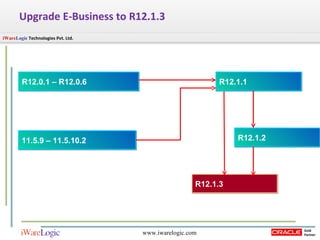
Upgrade E-Business to R12.1.3 R12.0.1 – R12.0.6 R12.1.1 R12.1.2 11.5.9 – 11.5.10.2 R12.1.3
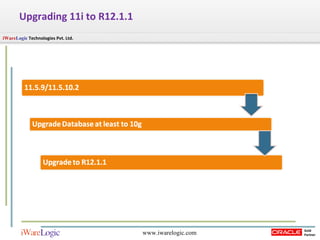
Upgrading 11i to R12.1.1
Upgrading  R12.1.1 to R12.1.3 Preparing for Upgrade Upgrading to R12.1.3 Post – Upgrade Tasks
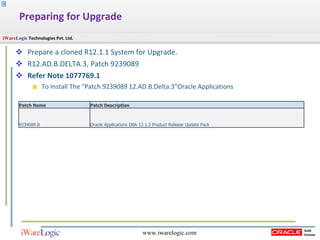
Prepare a cloned R12.1.1 System for Upgrade. R12.AD.B.DELTA.3, Patch 9239089  Refer Note 1077769.1  To Install The "Patch 9239089 12.AD.B.Delta.3"Oracle Applications  Preparing for Upgrade Patch Name  Patch Description 9239089.B Oracle Applications DBA 12.1.3 Product Release Update Pack
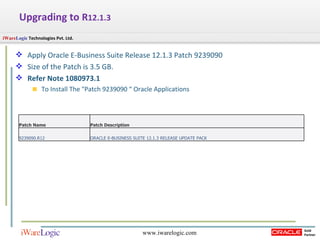
Upgrading to  R 12.1.3 Apply Oracle E-Business Suite Release 12.1.3 Patch 9239090 Size of the Patch is 3.5 GB. Refer Note 1080973.1  To Install The "Patch 9239090 “ Oracle Applications  Patch Name  Patch Description 9239090.R12 ORACLE E-BUSINESS SUITE 12.1.3 RELEASE UPDATE PACK
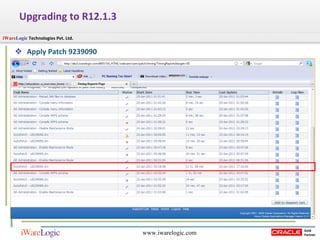
Apply Patch 9239090 Upgrading to R12.1.3
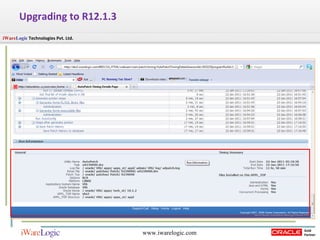
Upgrading to R12.1.3
1. Apply post-install Oracle E-Business Suite Applications Technology patches. (Required)  Apply mandatory Patch 9817770 [R12.ATG_PF.B ] Apply mandatory Patch 9966055 [R12.FND.B] Perform AD Administration Tasks to do following Recreate grants and Synonym for APPS Compile APPS Schema Compile Menu information Compile Flexfield Run Autoconfig Consolidated online help for R12.1.3  Patch 9239095 and follow the instructions in the patch readme file. Post – Upgrade Tasks
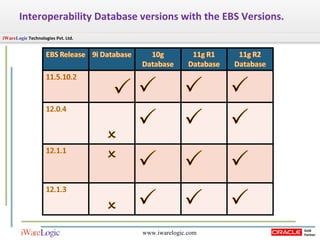
Interoperability Database versions with the EBS Versions.
Updates on R12.1.1    R12.1.3
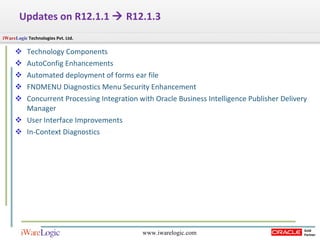
Updates on R12.1.1    R12.1.3 Technology Components AutoConfig Enhancements Automated deployment of forms ear file FNDMENU Diagnostics Menu Security Enhancement Concurrent Processing Integration with Oracle Business Intelligence Publisher Delivery Manager User Interface Improvements In-Context Diagnostics
Technology Components
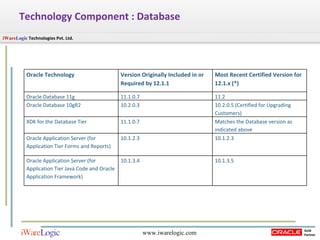
Technology Component : Database Oracle Technology  Version Originally Included in or Required by 12.1.1  Most Recent Certified Version for 12.1.x (*)  Oracle Database 11g  11.1.0.7  11.2  Oracle Database 10gR2  10.2.0.3  10.2.0.5 (Certified for Upgrading Customers)  XDK for the Database Tier  11.1.0.7  Matches the Database version as indicated above  Oracle Application Server (for Application Tier Forms and Reports)  10.1.2.3  10.1.2.3  Oracle Application Server (for Application Tier Java Code and Oracle Application Framework)  10.1.3.4  10.1.3.5
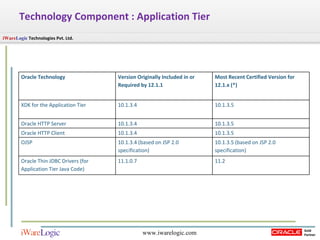
Technology Component : Application Tier Oracle Technology  Version Originally Included in or Required by 12.1.1  Most Recent Certified Version for 12.1.x (*)  XDK for the Application Tier  10.1.3.4  10.1.3.5  Oracle HTTP Server  10.1.3.4  10.1.3.5  Oracle HTTP Client  10.1.3.4  10.1.3.5  OJSP  10.1.3.4 (based on JSP 2.0 specification)  10.1.3.5 (based on JSP 2.0 specification) Oracle Thin JDBC Drivers (for Application Tier Java Code)  11.1.0.7  11.2
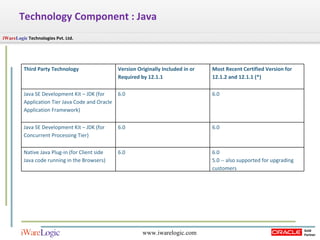
Technology Component : Java Third Party Technology  Version Originally Included in or Required by 12.1.1  Most Recent Certified Version for 12.1.2 and 12.1.1 (*)  Java SE Development Kit – JDK (for Application Tier Java Code and Oracle Application Framework)  6.0  6.0  Java SE Development Kit – JDK (for Concurrent Processing Tier)  6.0  6.0  Native Java Plug-in (for Client side Java code running in the Browsers)  6.0  6.0  5.0 -- also supported for upgrading customers
AutoConfig  Enhancements
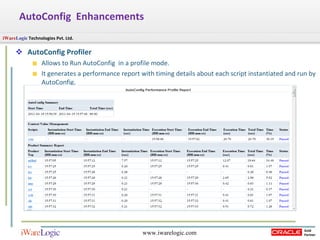
AutoConfig  Enhancements AutoConfig Profiler  Allows to Run AutoConfig  in a profile mode. It generates a performance report with timing details about each script instantiated and run by AutoConfig.
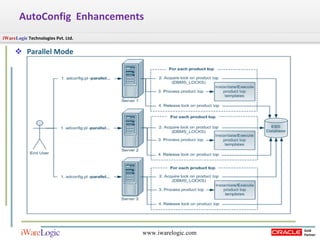
Parallel Mode This is the Method of speeding up your AutoConfig runs. In an R12 E-Business Suite instance, AutoConfig can now be run simultaneously across multiple nodes.  This new feature significantly lowers maintenance downtime for multi-node installations.  AutoConfig  Enhancements
Parallel Mode AutoConfig  Enhancements
Automated Deployment of Forms ear File
Automated Deployment of forms ear file Existing Process with R12.1.1  Previously whenever the forms ear file was patched in the 10.1.2 Oracle Home, customer had to redeploy it manually to the 10.1.3 Oracle Home.  In R12.1.3 The process has been automated assuring that the customer will not experience forms execution problems due to an obsolete forms executable.
FNDMENU Diagnostics
FNDMENU Diagnostics  Menu Security Enhancement This enhancement removes the challenge for the APPS password when trying to access submenus under the Diagnostics menu. This enhancement provides a read-only mode for the Examine menu, the Item Properties window, and the Forms Personalization form.
Concurrent Processing Integration with OBI Publisher Delivery Manager
Concurrent Processing Integration with OBI Publisher Delivery Manager Delivery Manager : It’s a set of java APIs that can be used to send documents via: E-mail, Fax, Print, webDAV ,HTTP/HTTPS, FTP/SFTP or Custom Users can now choose to have the request output delivered using BI Publisher's Delivery Manager.  The output can be automatically emailed, faxed, sent to an IPP printer, or delivered using FTP or SFTP.
User Interface Improvements
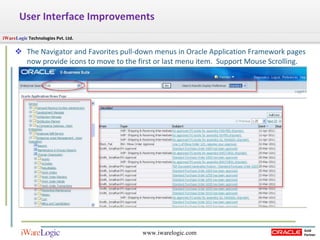
User Interface Improvements The Navigator and Favorites pull-down menus in Oracle Application Framework pages now provide icons to move to the first or last menu item.  Support Mouse Scrolling.
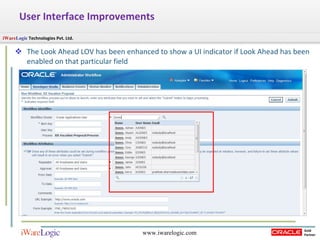
User Interface Improvements The Look Ahead LOV has been enhanced to show a UI indicator if Look Ahead has been enabled on that particular field
In-Context Diagnostics
In-Context Diagnostics In-context Diagnostics uses the inline pop-up feature in Oracle Application Framework to enable a user to enter input for a diagnostic test, execute it, and view the result or report, all from the current product page, without navigating to the Diagnostics screens to run the test.
New Enablements
New Enablement's  Lightweight MLS Flexfield Segment Name Validation Oracle Applications Support for 11g Case Sensitive Database Passwords ADF Integration Support for Timing Report per Application Module
Lightweight MLS
Lightweight MLS It allows additional languages to be enabled without the need to apply the corresponding NLS patches. It enables Oracle E-Business Suite to run multiple languages in the same system, with the various languages being employed by different users as desired Oracle iSetup MLS offers greater flexibility in Release 12.1.3 with the ability to move data across systems with different sets of installed languages.
Lightweight MLS It provides the capability to enter and maintain language data through an English user interface; for example, setup data or customer data such as item or item description. In addition, users can set up custom reports or templates and then generate language reports with the language data.  We can also move to a full translation at any time by applying the NLS patch for the relevant language.
Lightweight MLS Setup Steps From Oracle Applications Manager, go to License Manager and activate the desired language. From the AD Administration Main Menu, choose the 'Maintain Applications Database Entities' option and then the 'Maintain Multi-lingual Tables' task. Run the message synchronization script $FND_TOP/patch/115/sql/AFMSGSYNC.sql This script asks for a language code to be entered, and synchronizes the new language data with the base language in the message dictionary. Shut down and restart the application tier services. Users will now be able to employ the chosen language (from an English UI) to maintain data such as customer names, company names, company addresses, and item descriptions.
Flexfield Segment Name Validation
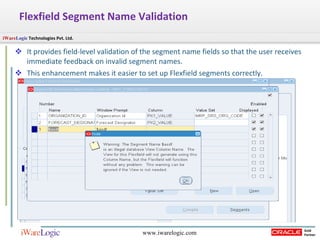
Flexfield Segment Name Validation  It provides field-level validation of the segment name fields so that the user receives immediate feedback on invalid segment names.  This enhancement makes it easier to set up Flexfield segments correctly.
11g Case Sensitive Database Passwords With this release, the Oracle Application Object Library (AOL) is enhanced to support the Oracle Database 11g case-sensitive database passwords feature for database user authentication. Support for case-sensitive database passwords provides for more secure Oracle E-Business Suite schema passwords .  This feature is not enabled by default and its use is optional.
ADF Integration In R12.1.3 it is possible to link to Oracle Application Development Framework (ADF) Release 11g applications deployed on Oracle E-Business Suite home page.
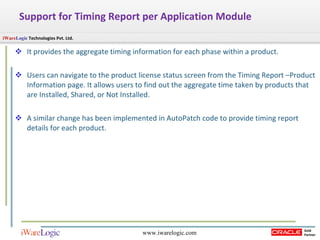
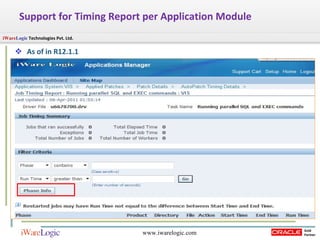
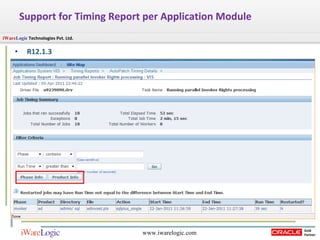
Support for Timing Report per Application Module  It provides the aggregate timing information for each phase within a product. Users can navigate to the product license status screen from the Timing Report –Product Information page. It allows users to find out the aggregate time taken by products that are Installed, Shared, or Not Installed.  A similar change has been implemented in AutoPatch code to provide timing report details for each product.
Support for Timing Report per Application Module As of in R12.1.1
Support for Timing Report per Application Module R12.1.3
R12.1.3 Apps-DBA point of  View changes.
File System  Language Support AutoConfig AD Splice
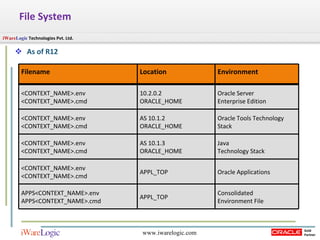
File System  As of R12 Filename Location Environment <CONTEXT_NAME>.env <CONTEXT_NAME>.cmd 10.2.0.2 ORACLE_HOME Oracle Server  Enterprise Edition <CONTEXT_NAME>.env <CONTEXT_NAME>.cmd AS 10.1.2 ORACLE_HOME Oracle Tools Technology Stack <CONTEXT_NAME>.env <CONTEXT_NAME>.cmd AS 10.1.3  ORACLE_HOME Java  Technology Stack <CONTEXT_NAME>.env <CONTEXT_NAME>.cmd APPL_TOP Oracle Applications APPS<CONTEXT_NAME>.env APPS<CONTEXT_NAME>.cmd APPL_TOP Consolidated  Environment File
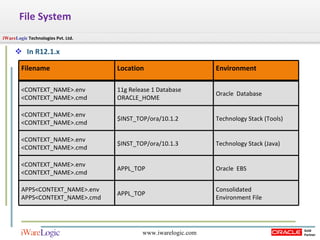
File System In R12.1.x Filename Location Environment <CONTEXT_NAME>.env <CONTEXT_NAME>.cmd 11g Release 1 Database  ORACLE_HOME Oracle  Database <CONTEXT_NAME>.env <CONTEXT_NAME>.cmd $INST_TOP/ora/10.1.2 Technology Stack (Tools) <CONTEXT_NAME>.env <CONTEXT_NAME>.cmd $INST_TOP/ora/10.1.3 Technology Stack (Java) <CONTEXT_NAME>.env <CONTEXT_NAME>.cmd APPL_TOP Oracle  EBS APPS<CONTEXT_NAME>.env APPS<CONTEXT_NAME>.cmd APPL_TOP Consolidated  Environment File
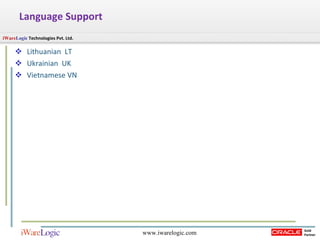
Language Support Lithuanian  LT Ukrainian  UK Vietnamese VN
AutoConfig Profiler Option Perl $AD_TOP/bin/adconfig.pl contextfile=<ctxfile> [product=product_top]  -profile Parallel run option (Improved Performance) Perl $AD_TOP/bin/adconfig.pl contextfile=<ctxfile> [product=product_top]  -parallel
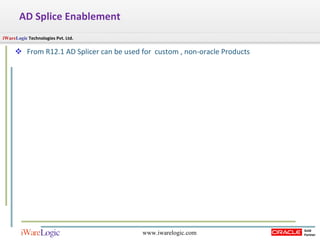
AD Splice Enablement From R12.1 AD Splicer can be used for  custom , non-oracle Products
R12.1.3 DEVELOPER point of  View changes.
Supports Custom and Non-Oracle Applications EBS R12.1.3  supports Customized Application Non-Oracle Applications The Application can be registered using “adsplice” utility.
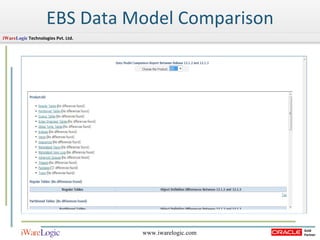
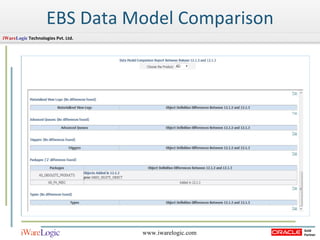
EBS Data Model Comparison
R12.1.3 End-user point of  View changes.
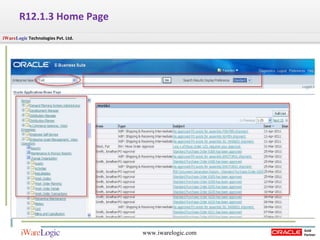
R12.1.3 Home Page
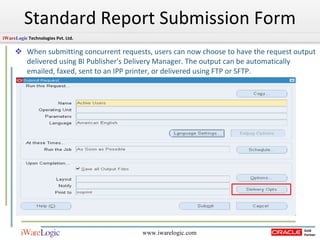
Standard Report Submission Form When submitting concurrent requests, users can now choose to have the request output delivered using BI Publisher's Delivery Manager. The output can be automatically emailed, faxed, sent to an IPP printer, or delivered using FTP or SFTP.
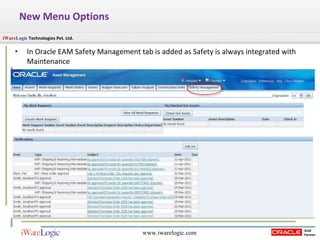
New Menu Options  In Oracle EAM Safety Management tab is added as Safety is always integrated with Maintenance
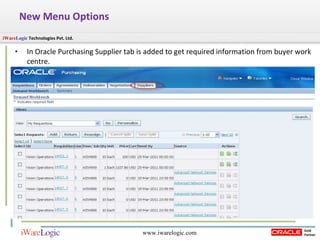
New Menu Options  In Oracle Purchasing Supplier tab is added to get required information from buyer work centre.
References Release Content Document of R12.1.3 Upgrade Advisor: E-Business Suite (EBS) Technology Stack Upgrade from 11.5.10.2 to 12.1.2 [ID 253.1] EBS Data Model Comparison Report Overview [ID 1290886.1] Using Lightweight MLS with Oracle E-Business Suite Release 12.1.3 (Doc ID 1077709.1]
Summary Upgrade Path for R12.1.3.  Interoperability Database versions with the EBS Versions. Updates  and enablement's  on R12.1.3 Apps-DBA, Developer and End User point of view
Questions and Answers Questions Answers
iWare   Logic  Technologies Pvt. Ltd.  Aditi Samruddhi, Baner, Pune,  India - 411045  Email:  [email_address] Website:  www.iwarelogic.com

New Enhancements + Upgrade Path to Oracle EBS R12.1.3

  • 1.
    U PGRAD EP ATH TO R 12.1.3 AND N EW E NHANCEMENTS IN R 12.1.3 E-B USINESS S UITE
  • 2.
    Agenda Upgrade Pathfor R12.1.3. Discuss about the Interoperability Database versions with the EBS Versions. Provide Updates on R12.1.3 Expose new enablement's on EBS R12.1.3. Discuss Apps-DBA, Developer and End User point of view on the changes.
  • 3.
    Upgrade E-Business toR12.1.3 R12.0.1 – R12.0.6 R12.1.1 R12.1.2 11.5.9 – 11.5.10.2 R12.1.3
  • 4.
  • 5.
    Upgrading R12.1.1to R12.1.3 Preparing for Upgrade Upgrading to R12.1.3 Post – Upgrade Tasks
  • 6.
    Prepare a clonedR12.1.1 System for Upgrade. R12.AD.B.DELTA.3, Patch 9239089 Refer Note 1077769.1 To Install The &quot;Patch 9239089 12.AD.B.Delta.3&quot;Oracle Applications Preparing for Upgrade Patch Name Patch Description 9239089.B Oracle Applications DBA 12.1.3 Product Release Update Pack
  • 7.
    Upgrading to R 12.1.3 Apply Oracle E-Business Suite Release 12.1.3 Patch 9239090 Size of the Patch is 3.5 GB. Refer Note 1080973.1 To Install The &quot;Patch 9239090 “ Oracle Applications Patch Name Patch Description 9239090.R12 ORACLE E-BUSINESS SUITE 12.1.3 RELEASE UPDATE PACK
  • 8.
    Apply Patch 9239090Upgrading to R12.1.3
  • 9.
  • 10.
    1. Apply post-installOracle E-Business Suite Applications Technology patches. (Required) Apply mandatory Patch 9817770 [R12.ATG_PF.B ] Apply mandatory Patch 9966055 [R12.FND.B] Perform AD Administration Tasks to do following Recreate grants and Synonym for APPS Compile APPS Schema Compile Menu information Compile Flexfield Run Autoconfig Consolidated online help for R12.1.3  Patch 9239095 and follow the instructions in the patch readme file. Post – Upgrade Tasks
  • 11.
    Interoperability Database versionswith the EBS Versions.
  • 12.
    Updates on R12.1.1  R12.1.3
  • 13.
    Updates on R12.1.1  R12.1.3 Technology Components AutoConfig Enhancements Automated deployment of forms ear file FNDMENU Diagnostics Menu Security Enhancement Concurrent Processing Integration with Oracle Business Intelligence Publisher Delivery Manager User Interface Improvements In-Context Diagnostics
  • 14.
  • 15.
    Technology Component :Database Oracle Technology Version Originally Included in or Required by 12.1.1 Most Recent Certified Version for 12.1.x (*) Oracle Database 11g 11.1.0.7 11.2 Oracle Database 10gR2 10.2.0.3 10.2.0.5 (Certified for Upgrading Customers) XDK for the Database Tier 11.1.0.7 Matches the Database version as indicated above Oracle Application Server (for Application Tier Forms and Reports) 10.1.2.3 10.1.2.3 Oracle Application Server (for Application Tier Java Code and Oracle Application Framework) 10.1.3.4 10.1.3.5
  • 16.
    Technology Component :Application Tier Oracle Technology Version Originally Included in or Required by 12.1.1 Most Recent Certified Version for 12.1.x (*) XDK for the Application Tier 10.1.3.4 10.1.3.5 Oracle HTTP Server 10.1.3.4 10.1.3.5 Oracle HTTP Client 10.1.3.4 10.1.3.5 OJSP 10.1.3.4 (based on JSP 2.0 specification) 10.1.3.5 (based on JSP 2.0 specification) Oracle Thin JDBC Drivers (for Application Tier Java Code) 11.1.0.7 11.2
  • 17.
    Technology Component :Java Third Party Technology Version Originally Included in or Required by 12.1.1 Most Recent Certified Version for 12.1.2 and 12.1.1 (*) Java SE Development Kit – JDK (for Application Tier Java Code and Oracle Application Framework) 6.0 6.0 Java SE Development Kit – JDK (for Concurrent Processing Tier) 6.0 6.0 Native Java Plug-in (for Client side Java code running in the Browsers) 6.0 6.0 5.0 -- also supported for upgrading customers
  • 18.
  • 19.
    AutoConfig EnhancementsAutoConfig Profiler Allows to Run AutoConfig in a profile mode. It generates a performance report with timing details about each script instantiated and run by AutoConfig.
  • 20.
    Parallel Mode Thisis the Method of speeding up your AutoConfig runs. In an R12 E-Business Suite instance, AutoConfig can now be run simultaneously across multiple nodes. This new feature significantly lowers maintenance downtime for multi-node installations. AutoConfig Enhancements
  • 21.
  • 22.
  • 23.
    Automated Deployment offorms ear file Existing Process with R12.1.1 Previously whenever the forms ear file was patched in the 10.1.2 Oracle Home, customer had to redeploy it manually to the 10.1.3 Oracle Home. In R12.1.3 The process has been automated assuring that the customer will not experience forms execution problems due to an obsolete forms executable.
  • 24.
  • 25.
    FNDMENU Diagnostics Menu Security Enhancement This enhancement removes the challenge for the APPS password when trying to access submenus under the Diagnostics menu. This enhancement provides a read-only mode for the Examine menu, the Item Properties window, and the Forms Personalization form.
  • 26.
    Concurrent Processing Integrationwith OBI Publisher Delivery Manager
  • 27.
    Concurrent Processing Integrationwith OBI Publisher Delivery Manager Delivery Manager : It’s a set of java APIs that can be used to send documents via: E-mail, Fax, Print, webDAV ,HTTP/HTTPS, FTP/SFTP or Custom Users can now choose to have the request output delivered using BI Publisher's Delivery Manager. The output can be automatically emailed, faxed, sent to an IPP printer, or delivered using FTP or SFTP.
  • 28.
  • 29.
    User Interface ImprovementsThe Navigator and Favorites pull-down menus in Oracle Application Framework pages now provide icons to move to the first or last menu item. Support Mouse Scrolling.
  • 30.
    User Interface ImprovementsThe Look Ahead LOV has been enhanced to show a UI indicator if Look Ahead has been enabled on that particular field
  • 31.
  • 32.
    In-Context Diagnostics In-contextDiagnostics uses the inline pop-up feature in Oracle Application Framework to enable a user to enter input for a diagnostic test, execute it, and view the result or report, all from the current product page, without navigating to the Diagnostics screens to run the test.
  • 33.
  • 34.
    New Enablement's Lightweight MLS Flexfield Segment Name Validation Oracle Applications Support for 11g Case Sensitive Database Passwords ADF Integration Support for Timing Report per Application Module
  • 35.
  • 36.
    Lightweight MLS Itallows additional languages to be enabled without the need to apply the corresponding NLS patches. It enables Oracle E-Business Suite to run multiple languages in the same system, with the various languages being employed by different users as desired Oracle iSetup MLS offers greater flexibility in Release 12.1.3 with the ability to move data across systems with different sets of installed languages.
  • 37.
    Lightweight MLS Itprovides the capability to enter and maintain language data through an English user interface; for example, setup data or customer data such as item or item description. In addition, users can set up custom reports or templates and then generate language reports with the language data. We can also move to a full translation at any time by applying the NLS patch for the relevant language.
  • 38.
    Lightweight MLS SetupSteps From Oracle Applications Manager, go to License Manager and activate the desired language. From the AD Administration Main Menu, choose the 'Maintain Applications Database Entities' option and then the 'Maintain Multi-lingual Tables' task. Run the message synchronization script $FND_TOP/patch/115/sql/AFMSGSYNC.sql This script asks for a language code to be entered, and synchronizes the new language data with the base language in the message dictionary. Shut down and restart the application tier services. Users will now be able to employ the chosen language (from an English UI) to maintain data such as customer names, company names, company addresses, and item descriptions.
  • 39.
  • 40.
    Flexfield Segment NameValidation It provides field-level validation of the segment name fields so that the user receives immediate feedback on invalid segment names. This enhancement makes it easier to set up Flexfield segments correctly.
  • 41.
    11g Case SensitiveDatabase Passwords With this release, the Oracle Application Object Library (AOL) is enhanced to support the Oracle Database 11g case-sensitive database passwords feature for database user authentication. Support for case-sensitive database passwords provides for more secure Oracle E-Business Suite schema passwords . This feature is not enabled by default and its use is optional.
  • 42.
    ADF Integration InR12.1.3 it is possible to link to Oracle Application Development Framework (ADF) Release 11g applications deployed on Oracle E-Business Suite home page.
  • 43.
    Support for TimingReport per Application Module It provides the aggregate timing information for each phase within a product. Users can navigate to the product license status screen from the Timing Report –Product Information page. It allows users to find out the aggregate time taken by products that are Installed, Shared, or Not Installed. A similar change has been implemented in AutoPatch code to provide timing report details for each product.
  • 44.
    Support for TimingReport per Application Module As of in R12.1.1
  • 45.
    Support for TimingReport per Application Module R12.1.3
  • 46.
    R12.1.3 Apps-DBA pointof View changes.
  • 47.
    File System Language Support AutoConfig AD Splice
  • 48.
    File System As of R12 Filename Location Environment <CONTEXT_NAME>.env <CONTEXT_NAME>.cmd 10.2.0.2 ORACLE_HOME Oracle Server Enterprise Edition <CONTEXT_NAME>.env <CONTEXT_NAME>.cmd AS 10.1.2 ORACLE_HOME Oracle Tools Technology Stack <CONTEXT_NAME>.env <CONTEXT_NAME>.cmd AS 10.1.3 ORACLE_HOME Java Technology Stack <CONTEXT_NAME>.env <CONTEXT_NAME>.cmd APPL_TOP Oracle Applications APPS<CONTEXT_NAME>.env APPS<CONTEXT_NAME>.cmd APPL_TOP Consolidated Environment File
  • 49.
    File System InR12.1.x Filename Location Environment <CONTEXT_NAME>.env <CONTEXT_NAME>.cmd 11g Release 1 Database ORACLE_HOME Oracle Database <CONTEXT_NAME>.env <CONTEXT_NAME>.cmd $INST_TOP/ora/10.1.2 Technology Stack (Tools) <CONTEXT_NAME>.env <CONTEXT_NAME>.cmd $INST_TOP/ora/10.1.3 Technology Stack (Java) <CONTEXT_NAME>.env <CONTEXT_NAME>.cmd APPL_TOP Oracle EBS APPS<CONTEXT_NAME>.env APPS<CONTEXT_NAME>.cmd APPL_TOP Consolidated Environment File
  • 50.
    Language Support Lithuanian LT Ukrainian UK Vietnamese VN
  • 51.
    AutoConfig Profiler OptionPerl $AD_TOP/bin/adconfig.pl contextfile=<ctxfile> [product=product_top] -profile Parallel run option (Improved Performance) Perl $AD_TOP/bin/adconfig.pl contextfile=<ctxfile> [product=product_top] -parallel
  • 52.
    AD Splice EnablementFrom R12.1 AD Splicer can be used for custom , non-oracle Products
  • 53.
    R12.1.3 DEVELOPER pointof View changes.
  • 54.
    Supports Custom andNon-Oracle Applications EBS R12.1.3 supports Customized Application Non-Oracle Applications The Application can be registered using “adsplice” utility.
  • 55.
    EBS Data ModelComparison
  • 56.
    EBS Data ModelComparison
  • 57.
    R12.1.3 End-user pointof View changes.
  • 58.
  • 59.
    Standard Report SubmissionForm When submitting concurrent requests, users can now choose to have the request output delivered using BI Publisher's Delivery Manager. The output can be automatically emailed, faxed, sent to an IPP printer, or delivered using FTP or SFTP.
  • 60.
    New Menu Options In Oracle EAM Safety Management tab is added as Safety is always integrated with Maintenance
  • 61.
    New Menu Options In Oracle Purchasing Supplier tab is added to get required information from buyer work centre.
  • 62.
    References Release ContentDocument of R12.1.3 Upgrade Advisor: E-Business Suite (EBS) Technology Stack Upgrade from 11.5.10.2 to 12.1.2 [ID 253.1] EBS Data Model Comparison Report Overview [ID 1290886.1] Using Lightweight MLS with Oracle E-Business Suite Release 12.1.3 (Doc ID 1077709.1]
  • 63.
    Summary Upgrade Pathfor R12.1.3. Interoperability Database versions with the EBS Versions. Updates and enablement's on R12.1.3 Apps-DBA, Developer and End User point of view
  • 64.
    Questions and AnswersQuestions Answers
  • 65.
    iWare Logic Technologies Pvt. Ltd. Aditi Samruddhi, Baner, Pune, India - 411045 Email: [email_address] Website: www.iwarelogic.com

Editor's Notes

  • #2 EBS Data Model Comparison Report Overview [ID 1290886.1] End to End - Install and Implement Rapid Planning 12.1.3.x [ID 1285459.1]
  • #8 Oracle E-Business Suite Release 12.1.3 Readme [ID 1080973.1]