ORACLE
IT Training Team
© 2022 Value Exchange International Limited. All Rights Reserved. FOR INTERNAL USE ONLY
E-BUSINESS SUITE
In this learning path, we will:
© 2022 Value Exchange International Limited. All Rights Reserved. FOR INTERNAL USE ONLY
Get an overview of Oracle E-Business Suite
Learn to configure Java
Login to Oracle E-Business Suite
Go through System Administration
Learn how to connect to database through SQL Developer
1
2
3
4
5
ORACLE
INTRODUCTION
© 2022 Value Exchange International Limited. All Rights Reserved. FOR INTERNAL USE ONLY
E-BUSINESS SUITE
Oracle E-Business Suite
Introduction
Java Configuration and Java Web
Start (JWS)
Login to Oracle E-Business Suite
Go through System Administration
Connect to database through SQL
Developer
1
2
3
4
5
Oracle E-Business Suite | Introduction
© 2022 Value Exchange International Limited. All Rights Reserved. FOR INTERNAL USE ONLY
• A complete, integrated business intelligence
portfolio
• An adaptable global business platform
• A customer-focused applications strategy
Oracle E-Business Suite is a complete set of
business applications
MANAGE GLOBAL
BUSINESSES
IMPROVE DECISION
MAKING
REDUCE COST
INCREASE
CORPORATE
PERFORMANCE
Oracle Enterprise Resource Planning (ERP)
Oracle Apps / Oracle Applications
Oracle Financials
Oracle E-Business Suite
Introduction
Java Configuration and Java Web
Start (JWS)
Login to Oracle E-Business Suite
Go through System Administration
Connect to database through SQL
Developer
1
2
3
4
5
© 2022 Value Exchange International Limited. All Rights Reserved. FOR INTERNAL USE ONLY
Trusted by 4,895
Companies
- Released in 2001
- One of Oracle Corp’s major product lines
- first full bundle of ERP and CRM applications
SAP
Microsoft
Oracle E-Business Suite | Introduction
Oracle E-Business Suite
Introduction
Java Configuration and Java Web
Start (JWS)
Login to Oracle E-Business Suite
Go through System Administration
Connect to database through SQL
Developer
1
2
3
4
5
Oracle E-Business Suite | Architecture
© 2022 Value Exchange International Limited. All Rights Reserved. FOR INTERNAL USE ONLY
Desktop Tier Application Tier Database Tier
Web
browser
Application
server
Concurrent
Processing
Server
Web
Services
Forms
Services
Database
server
Java app
Services
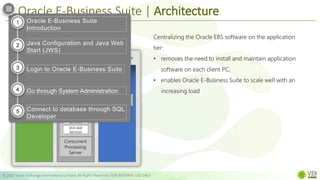
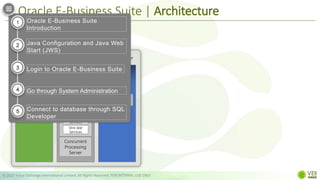
Centralizing the Oracle EBS software on the application
tier:
• removes the need to install and maintain application
software on each client PC,
• enables Oracle E-Business Suite to scale well with an
increasing load
Oracle E-Business Suite
Introduction
Java Configuration and Java Web
Start (JWS)
Login to Oracle E-Business Suite
Go through System Administration
Connect to database through SQL
Developer
1
2
3
4
5
Oracle E-Business Suite | Architecture
© 2022 Value Exchange International Limited. All Rights Reserved. FOR INTERNAL USE ONLY
Desktop Tier Application Tier Database Tier
Web
browser
Database
server
Application
server
Concurrent
Processing
Server
Web
Services
Forms
Services
Java app
Services
Desktop Tier Application Tier Database Tier
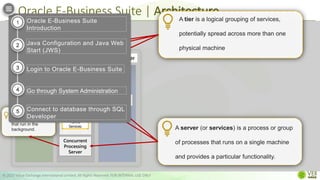
A tier is a logical grouping of services,
potentially spread across more than one
physical machine
A server (or services) is a process or group
of processes that runs on a single machine
and provides a particular functionality.
Application
server
Database
server
Concurrent
Processing
Server
Web Services
Forms
Services
supports data-
intensive programs
that run in the
background.
Oracle E-Business Suite
Introduction
Java Configuration and Java Web
Start (JWS)
Login to Oracle E-Business Suite
Go through System Administration
Connect to database through SQL
Developer
1
2
3
4
5
Oracle E-Business Suite | Architecture
© 2022 Value Exchange International Limited. All Rights Reserved. FOR INTERNAL USE ONLY
Desktop Tier Application Tier Database Tier
Web
browser
Application
server
Concurrent
Processing
Server
Web
Services
Forms
Services
Database
server
Java app
Services
Oracle E-Business Suite
Introduction
Java Configuration and Java Web
Start (JWS)
Login to Oracle E-Business Suite
Go through System Administration
Connect to database through SQL
Developer
1
2
3
4
5
Oracle E-Business Suite | Architecture
© 2022 Value Exchange International Limited. All Rights Reserved. FOR INTERNAL USE ONLY
Application Tier Database Tier
Database
server
Application
server
Concurrent
Processing
Server
Web
Services
Forms
Services
Java app
Services
a.k.a. “client tier”;
• provides the user interface via an add-on component to a standard web
browser.
• interface is provided through HTML and via Java applets
Desktop Tier
Web
browser
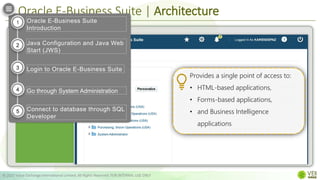
Provides a single point of access to:
• HTML-based applications,
• Forms-based applications,
• and Business Intelligence
applications
Oracle E-Business Suite
Introduction
Java Configuration and Java Web
Start (JWS)
Login to Oracle E-Business Suite
Go through System Administration
Connect to database through SQL
Developer
1
2
3
4
5
Oracle E-Business Suite | Architecture
© 2022 Value Exchange International Limited. All Rights Reserved. FOR INTERNAL USE ONLY
Database
server
Database Tier
Desktop Tier
Web
browser
Application Tier
Application
server
Web
Services
Forms
Services
Java app
Services
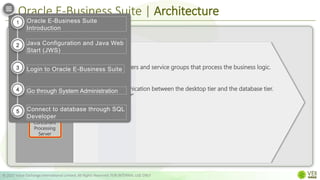
a.k.a. “middle tier”;
• hosts various servers and service groups that process the business logic.
• manages communication between the desktop tier and the database tier.
The “MIDDLE TIER”
Concurrent
Processing
Server
Oracle E-Business Suite
Introduction
Java Configuration and Java Web
Start (JWS)
Login to Oracle E-Business Suite
Go through System Administration
Connect to database through SQL
Developer
1
2
3
4
5
Oracle E-Business Suite | Architecture
© 2022 Value Exchange International Limited. All Rights Reserved. FOR INTERNAL USE ONLY
Database
server
Database Tier
Desktop Tier
Web
browser
Application Tier
Application
server
Web
Services
Forms
Services
Java app
Services
Concurrent
Processing
Server
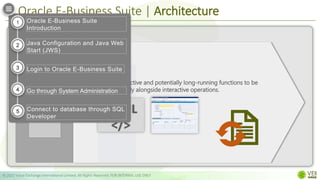
• allows non–interactive and potentially long-running functions to be
executed efficiently alongside interactive operations.
HTML
</>
Oracle E-Business Suite
Introduction
Java Configuration and Java Web
Start (JWS)
Login to Oracle E-Business Suite
Go through System Administration
Connect to database through SQL
Developer
1
2
3
4
5
Oracle E-Business Suite | Architecture
© 2022 Value Exchange International Limited. All Rights Reserved. FOR INTERNAL USE ONLY
Desktop Tier
Web
browser
Application Tier
Application
server
Concurrent
Processing
Server
Web
Services
Forms
Services
Java app
Services
Database
server
Database Tier
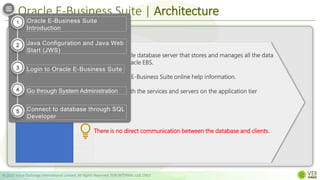
• contains the Oracle database server that stores and manages all the data
maintained by Oracle EBS.
• stores the Oracle E-Business Suite online help information.
• communicates with the services and servers on the application tier
There is no direct communication between the database and clients.
Oracle E-Business Suite
Introduction
Java Configuration and Java Web
Start (JWS)
Login to Oracle E-Business Suite
Go through System Administration
Connect to database through SQL
Developer
1
2
3
4
5
Oracle E-Business Suite | Architecture
© 2022 Value Exchange International Limited. All Rights Reserved. FOR INTERNAL USE ONLY
Desktop Tier
Web
browser
Application Tier
Application
server
Web Services
Forms Services
Java app
Database Tier
Database
server
Wide Area Network
Wide Area Network
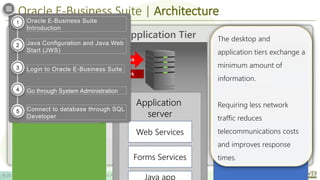
The desktop and
application tiers exchange a
minimum amount of
information.
Requiring less network
traffic reduces
telecommunications costs
and improves response
times.
Oracle E-Business Suite
Introduction
Java Configuration and Java Web
Start (JWS)
Login to Oracle E-Business Suite
Go through System Administration
Connect to database through SQL
Developer
1
2
3
4
5
Oracle E-Business Suite | Architecture
© 2022 Value Exchange International Limited. All Rights Reserved. FOR INTERNAL USE ONLY
Desktop Tier
Web
browser
Application Tier
Application
server
Web Services
Forms Services
Java app
Database Tier
Database
server
Wide Area Network
Wide Area Network
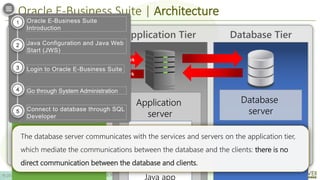
The database server communicates with the services and servers on the application tier,
which mediate the communications between the database and the clients: there is no
direct communication between the database and clients.
Oracle E-Business Suite
Introduction
Java Configuration and Java Web
Start (JWS)
Login to Oracle E-Business Suite
Go through System Administration
Connect to database through SQL
Developer
1
2
3
4
5
ORACLE
INTRODUCTION
© 2022 Value Exchange International Limited. All Rights Reserved. FOR INTERNAL USE ONLY
COMPLETE!
E-BUSINESS SUITE
Oracle E-Business Suite
Introduction
Java Configuration and Java Web
Start (JWS)
Login to Oracle E-Business Suite
Go through System Administration
Connect to database through SQL
Developer
1
2
3
4
5
ORACLE
LOGIN
© 2022 Value Exchange International Limited. All Rights Reserved. FOR INTERNAL USE ONLY
E-BUSINESS SUITE
Oracle E-Business Suite
Introduction
Java Configuration and Java Web
Start (JWS)
Login to Oracle E-Business Suite
Go through System Administration
Connect to database through SQL
Developer
1
2
3
4
5
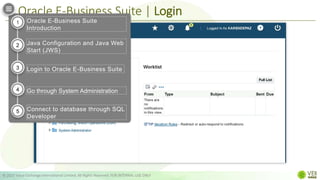
Oracle E-Business Suite | Login
© 2022 Value Exchange International Limited. All Rights Reserved. FOR INTERNAL USE ONLY
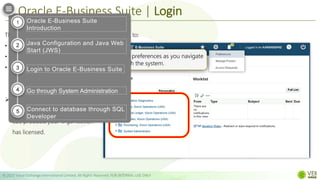
The Home Page provides a single point of access to:
• HTML-based applications,
• Forms-based applications, and
• Business Intelligence applications
 You can access responsibilities
for any of the individual Oracle
EBS products your organization
has licensed.
retains preferences as you navigate
through the system.
Oracle E-Business Suite
Introduction
Java Configuration and Java Web
Start (JWS)
Login to Oracle E-Business Suite
Go through System Administration
Connect to database through SQL
Developer
1
2
3
4
5
Oracle E-Business Suite | Login
© 2022 Value Exchange International Limited. All Rights Reserved. FOR INTERNAL USE ONLY
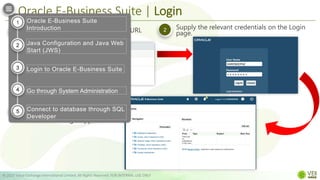
Specify the Oracle EBS Login page URL
in a web browser
Supply the relevant credentials on the Login
page.
1 2
oracle-ebs2.tap-group.com.cn:8000
After your credentials have been
validated, the Oracle E-Business
Suite Home Page appears.
3
KARENDEPAZ
. . . . . . . .
Oracle E-Business Suite
Introduction
Java Configuration and Java Web
Start (JWS)
Login to Oracle E-Business Suite
Go through System Administration
Connect to database through SQL
Developer
1
2
3
4
5
Oracle E-Business Suite | Login
© 2022 Value Exchange International Limited. All Rights Reserved. FOR INTERNAL USE ONLY
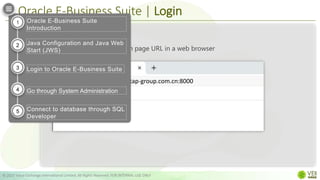
Specify the Oracle EBS Login page URL in a web browser
1
2
3
Step 1
oracle-ebs2.tap-group.com.cn:8000
Oracle E-Business Suite
Introduction
Java Configuration and Java Web
Start (JWS)
Login to Oracle E-Business Suite
Go through System Administration
Connect to database through SQL
Developer
1
2
3
4
5
Oracle E-Business Suite | Login
© 2022 Value Exchange International Limited. All Rights Reserved. FOR INTERNAL USE ONLY
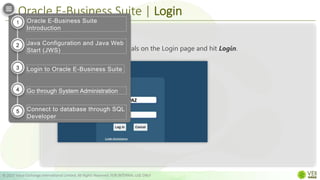
Step 2
1
2
3
Supply the relevant credentials on the Login page and hit Login.
KARENDEPAZ
.....
Oracle E-Business Suite
Introduction
Java Configuration and Java Web
Start (JWS)
Login to Oracle E-Business Suite
Go through System Administration
Connect to database through SQL
Developer
1
2
3
4
5
Oracle E-Business Suite | Login
© 2022 Value Exchange International Limited. All Rights Reserved. FOR INTERNAL USE ONLY
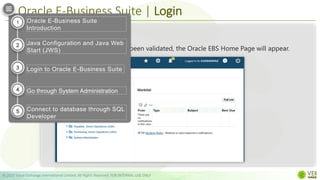
Step 3
1
2
3
After your credentials have been validated, the Oracle EBS Home Page will appear.
Oracle E-Business Suite
Introduction
Java Configuration and Java Web
Start (JWS)
Login to Oracle E-Business Suite
Go through System Administration
Connect to database through SQL
Developer
1
2
3
4
5
Oracle E-Business Suite | Login
© 2022 Value Exchange International Limited. All Rights Reserved. FOR INTERNAL USE ONLY
Oracle E-Business Suite
Introduction
Java Configuration and Java Web
Start (JWS)
Login to Oracle E-Business Suite
Go through System Administration
Connect to database through SQL
Developer
1
2
3
4
5
ORACLE
LOGIN
© 2022 Value Exchange International Limited. All Rights Reserved. FOR INTERNAL USE ONLY
COMPLETE!
E-BUSINESS SUITE
Oracle E-Business Suite
Introduction
Java Configuration and Java Web
Start (JWS)
Login to Oracle E-Business Suite
Go through System Administration
Connect to database through SQL
Developer
1
2
3
4
5
ORACLE
Java Configuration and Java Web Start (JWS)
© 2022 Value Exchange International Limited. All Rights Reserved. FOR INTERNAL USE ONLY
E-BUSINESS SUITE
Oracle E-Business Suite
Introduction
Java Configuration and Java Web
Start (JWS)
Login to Oracle E-Business Suite
Go through System Administration
Connect to database through SQL
Developer
1
2
3
4
5
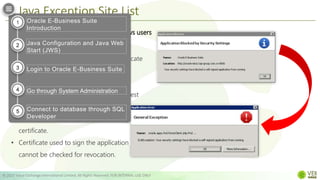
Java Exception Site List
© 2022 Value Exchange International Limited. All Rights Reserved. FOR INTERNAL USE ONLY
Adding a URL to Java’s Exception List allows users
to run Rich Internet Applications (RIAs)
• If application is not signed with a certificate
from trusted certificate authority.
• If application is hosted locally.
• Jar file not having the Permission manifest
attribute.
• Application signed with an expired
certificate.
• Certificate used to sign the application
cannot be checked for revocation.
Oracle E-Business Suite
Introduction
Java Configuration and Java Web
Start (JWS)
Login to Oracle E-Business Suite
Go through System Administration
Connect to database through SQL
Developer
1
2
3
4
5
Java Exception Site List
© 2022 Value Exchange International Limited. All Rights Reserved. FOR INTERNAL USE ONLY
1 Search and Launch Configure Java from the Start
Menu 2 Go to the Security tab
3 Click Edit Site List
4 Click Add > Enter the URL > Click OK
How it works:
Oracle E-Business Suite
Introduction
Java Configuration and Java Web
Start (JWS)
Login to Oracle E-Business Suite
Go through System Administration
Connect to database through SQL
Developer
1
2
3
4
5
Java Exception Site List
© 2022 Value Exchange International Limited. All Rights Reserved. FOR INTERNAL USE ONLY
Search and Launch Configure Java from the Start Menu
1
2
3
Step 1
4
Oracle E-Business Suite
Introduction
Java Configuration and Java Web
Start (JWS)
Login to Oracle E-Business Suite
Go through System Administration
Connect to database through SQL
Developer
1
2
3
4
5
Java Exception Site List
© 2022 Value Exchange International Limited. All Rights Reserved. FOR INTERNAL USE ONLY
Go to the Security tab and click Edit Site List.
Step 2
1
2
3
4
Oracle E-Business Suite
Introduction
Java Configuration and Java Web
Start (JWS)
Login to Oracle E-Business Suite
Go through System Administration
Connect to database through SQL
Developer
1
2
3
4
5
Java Exception Site List
© 2022 Value Exchange International Limited. All Rights Reserved. FOR INTERNAL USE ONLY
Click Add and Enter URL in the space provided. Click OK
Step 3
1
2
3
4
Oracle E-Business Suite
Introduction
Java Configuration and Java Web
Start (JWS)
Login to Oracle E-Business Suite
Go through System Administration
Connect to database through SQL
Developer
1
2
3
4
5
Java Exception Site List
© 2022 Value Exchange International Limited. All Rights Reserved. FOR INTERNAL USE ONLY
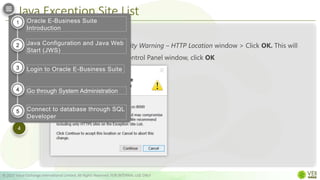
Click Continue on the Security Warning – HTTP Location window > Click OK. This will
take you back to the Java Control Panel window, click OK
Step 4
1
2
3
4
Oracle E-Business Suite
Introduction
Java Configuration and Java Web
Start (JWS)
Login to Oracle E-Business Suite
Go through System Administration
Connect to database through SQL
Developer
1
2
3
4
5
Java Exception Site List | Video
© 2022 Value Exchange International Limited. All Rights Reserved. FOR INTERNAL USE ONLY
Oracle E-Business Suite
Introduction
Java Configuration and Java Web
Start (JWS)
Login to Oracle E-Business Suite
Go through System Administration
Connect to database through SQL
Developer
1
2
3
4
5
Java Configuration
© 2022 Value Exchange International Limited. All Rights Reserved. FOR INTERNAL USE ONLY
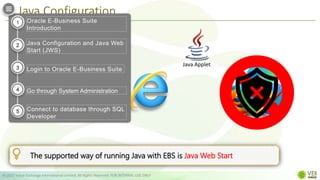
 Web-based (OA Framework/HTML)
model for modules like
iProcurement and iStore
 Oracle Forms/Java based model for
modules like Oracle Financials.
Oracle EBS Interfaces:
The supported way of running Java with EBS is Java Web Start
Java Applet
Oracle E-Business Suite
Introduction
Java Configuration and Java Web
Start (JWS)
Login to Oracle E-Business Suite
Go through System Administration
Connect to database through SQL
Developer
1
2
3
4
5
Java Web Start
© 2022 Value Exchange International Limited. All Rights Reserved. FOR INTERNAL USE ONLY
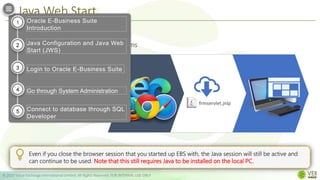
• Runs java independently of the browser.
• More secure way of running Oracle Forms
applications versus java applet
Even if you close the browser session that you started up EBS with, the Java session will still be active and
can continue to be used. Note that this still requires Java to be installed on the local PC.
frmservlet.jnlp
Oracle E-Business Suite
Introduction
Java Configuration and Java Web
Start (JWS)
Login to Oracle E-Business Suite
Go through System Administration
Connect to database through SQL
Developer
1
2
3
4
5
Launching Java Web Start from Different Browsers
© 2022 Value Exchange International Limited. All Rights Reserved. FOR INTERNAL USE ONLY
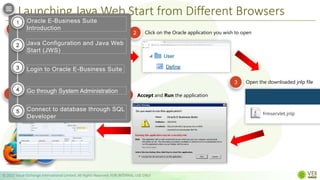
1 Login to Oracle EBS
2 Click on the Oracle application you wish to open
3 Open the downloaded jnlp file
KARENDEPAZ
. . . . . . . .
4 Accept and Run the application
5
frmservlet.jnlp
Oracle E-Business Suite
Introduction
Java Configuration and Java Web
Start (JWS)
Login to Oracle E-Business Suite
Go through System Administration
Connect to database through SQL
Developer
1
2
3
4
5
Launching Java Web Start from Different Browsers
© 2022 Value Exchange International Limited. All Rights Reserved. FOR INTERNAL USE ONLY
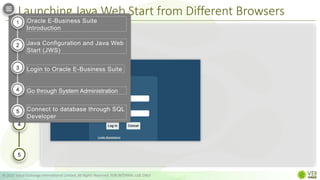
Login to Oracle EBS.
Step 1
1
2
3
4
5
KARENDEPAZ
.....
Oracle E-Business Suite
Introduction
Java Configuration and Java Web
Start (JWS)
Login to Oracle E-Business Suite
Go through System Administration
Connect to database through SQL
Developer
1
2
3
4
5
Launching Java Web Start from Different Browsers
© 2022 Value Exchange International Limited. All Rights Reserved. FOR INTERNAL USE ONLY
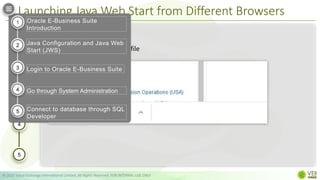
Step 2
1
2
3
4
5
Navigate and click on the Oracle application you wish to open
Oracle E-Business Suite
Introduction
Java Configuration and Java Web
Start (JWS)
Login to Oracle E-Business Suite
Go through System Administration
Connect to database through SQL
Developer
1
2
3
4
5
Launching Java Web Start from Different Browsers
© 2022 Value Exchange International Limited. All Rights Reserved. FOR INTERNAL USE ONLY
Step 3
1
2
3
4
5
Open the downloaded .jnlp file
Oracle E-Business Suite
Introduction
Java Configuration and Java Web
Start (JWS)
Login to Oracle E-Business Suite
Go through System Administration
Connect to database through SQL
Developer
1
2
3
4
5
Launching Java Web Start from Different Browsers
© 2022 Value Exchange International Limited. All Rights Reserved. FOR INTERNAL USE ONLY
Step 4
1
2
3
4
5
Tick the I accept the risk… checkbox and hit Run.
Oracle E-Business Suite
Introduction
Java Configuration and Java Web
Start (JWS)
Login to Oracle E-Business Suite
Go through System Administration
Connect to database through SQL
Developer
1
2
3
4
5
Launching Java Web Start from Different Browsers
© 2022 Value Exchange International Limited. All Rights Reserved. FOR INTERNAL USE ONLY
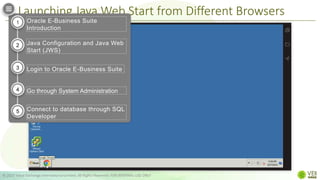
Step 5
1
2
3
4
5
Java form window will open
Oracle E-Business Suite
Introduction
Java Configuration and Java Web
Start (JWS)
Login to Oracle E-Business Suite
Go through System Administration
Connect to database through SQL
Developer
1
2
3
4
5
Launching Java Web Start from Different Browsers
© 2022 Value Exchange International Limited. All Rights Reserved. FOR INTERNAL USE ONLY
Oracle E-Business Suite
Introduction
Java Configuration and Java Web
Start (JWS)
Login to Oracle E-Business Suite
Go through System Administration
Connect to database through SQL
Developer
1
2
3
4
5
ORACLE
Java Configuration and Java Web Start (JWS)
© 2022 Value Exchange International Limited. All Rights Reserved. FOR INTERNAL USE ONLY
COMPLETE!
E-BUSINESS SUITE
Oracle E-Business Suite
Introduction
Java Configuration and Java Web
Start (JWS)
Login to Oracle E-Business Suite
Go through System Administration
Connect to database through SQL
Developer
1
2
3
4
5
ORACLE
System Administration
© 2022 Value Exchange International Limited. All Rights Reserved. FOR INTERNAL USE ONLY
E-BUSINESS SUITE
Oracle E-Business Suite
Introduction
Java Configuration and Java Web
Start (JWS)
Login to Oracle E-Business Suite
Go through System Administration
Connect to database through SQL
Developer
1
2
3
4
5
In this section, we will
© 2022 Value Exchange International Limited. All Rights Reserved. FOR INTERNAL USE ONLY
Define the Users Window fields
Create a new user
Search for a user
View record history
Update a User Profile
1
2
3
4
5
Assign a Responsibility
6
Generate and View Requests
6
Oracle E-Business Suite
Introduction
Java Configuration and Java Web
Start (JWS)
Login to Oracle E-Business Suite
Go through System Administration
Connect to database through SQL
Developer
1
2
3
4
5
ORACLE
User Windows Fields Defined
© 2022 Value Exchange International Limited. All Rights Reserved. FOR INTERNAL USE ONLY
E-BUSINESS SUITE
Oracle E-Business Suite
Introduction
Java Configuration and Java Web
Start (JWS)
Login to Oracle E-Business Suite
Go through System Administration
Connect to database through SQL
Developer
1
2
3
4
5
Users Window Fields Defined
© 2022 Value Exchange International Limited. All Rights Reserved. FOR INTERNAL USE ONLY
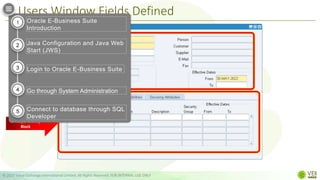
1. Users Block
2. Responsibility
Block
Oracle E-Business Suite
Introduction
Java Configuration and Java Web
Start (JWS)
Login to Oracle E-Business Suite
Go through System Administration
Connect to database through SQL
Developer
1
2
3
4
5
Users Block
© 2022 Value Exchange International Limited. All Rights Reserved. FOR INTERNAL USE ONLY
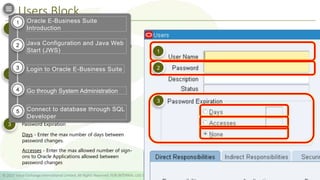
An application user enters this username to sign
on to Oracle Applications
 The username must not contain more than one
word.
 Accepts only alphanumeric characters
1
An application user enters this password along
with the username to sign on to Oracle
Applications.
 must be at least five characters and can extend
up to 100 characters.
 Accepts only alphanumeric characters
2
Password Expiration
3
1
2
3
Days - Enter the max number of days between
password changes.
Accesses - Enter the max allowed number of sign-
ons to Oracle Applications allowed between
password changes
Oracle E-Business Suite
Introduction
Java Configuration and Java Web
Start (JWS)
Login to Oracle E-Business Suite
Go through System Administration
Connect to database through SQL
Developer
1
2
3
4
5
Users Block
© 2022 Value Exchange International Limited. All Rights Reserved. FOR INTERNAL USE ONLY
4
5
6
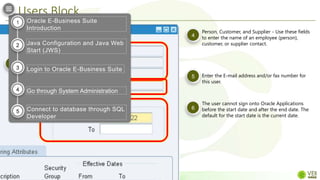
Person, Customer, and Supplier - Use these fields
to enter the name of an employee (person),
customer, or supplier contact.
Enter the E-mail address and/or fax number for
this user.
The user cannot sign onto Oracle Applications
before the start date and after the end date. The
default for the start date is the current date.
5
6
4
Oracle E-Business Suite
Introduction
Java Configuration and Java Web
Start (JWS)
Login to Oracle E-Business Suite
Go through System Administration
Connect to database through SQL
Developer
1
2
3
4
5
Responsibility Block
© 2022 Value Exchange International Limited. All Rights Reserved. FOR INTERNAL USE ONLY
7
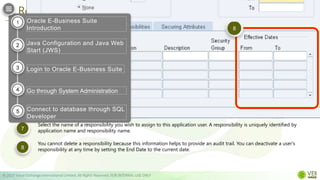
Select the name of a responsibility you wish to assign to this application user. A responsibility is uniquely identified by
application name and responsibility name.
8
You cannot delete a responsibility because this information helps to provide an audit trail. You can deactivate a user's
responsibility at any time by setting the End Date to the current date.
8
7
Oracle E-Business Suite
Introduction
Java Configuration and Java Web
Start (JWS)
Login to Oracle E-Business Suite
Go through System Administration
Connect to database through SQL
Developer
1
2
3
4
5
ORACLE
Create a New User
© 2022 Value Exchange International Limited. All Rights Reserved. FOR INTERNAL USE ONLY
E-BUSINESS SUITE
Oracle E-Business Suite
Introduction
Java Configuration and Java Web
Start (JWS)
Login to Oracle E-Business Suite
Go through System Administration
Connect to database through SQL
Developer
1
2
3
4
5
Create a New User
© 2022 Value Exchange International Limited. All Rights Reserved. FOR INTERNAL USE ONLY
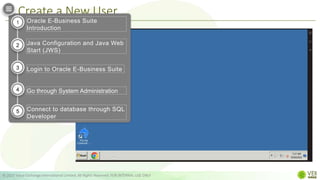
Step 1
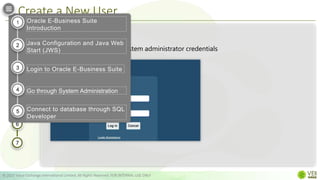
Login to Oracle EBS with system administrator credentials
KARENDEPAZ
.....
1
2
3
4
5
6
7
Oracle E-Business Suite
Introduction
Java Configuration and Java Web
Start (JWS)
Login to Oracle E-Business Suite
Go through System Administration
Connect to database through SQL
Developer
1
2
3
4
5
Create a New User
© 2022 Value Exchange International Limited. All Rights Reserved. FOR INTERNAL USE ONLY
Step 2
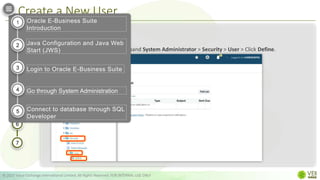
Under Main Menu on the left, expand System Administrator > Security > User > Click Define.
1
2
3
4
5
6
7
Oracle E-Business Suite
Introduction
Java Configuration and Java Web
Start (JWS)
Login to Oracle E-Business Suite
Go through System Administration
Connect to database through SQL
Developer
1
2
3
4
5
Create a New User
© 2022 Value Exchange International Limited. All Rights Reserved. FOR INTERNAL USE ONLY
Step 3
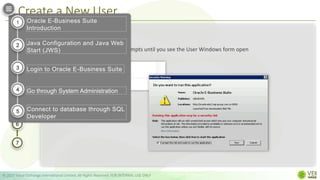
Open the .jnlp file. Follow the prompts until you see the User Windows form open
1
2
3
4
5
6
7
Oracle E-Business Suite
Introduction
Java Configuration and Java Web
Start (JWS)
Login to Oracle E-Business Suite
Go through System Administration
Connect to database through SQL
Developer
1
2
3
4
5
Create a New User
© 2022 Value Exchange International Limited. All Rights Reserved. FOR INTERNAL USE ONLY
Step 4
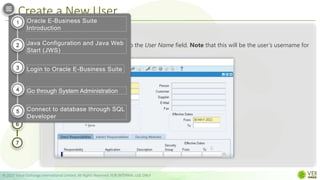
Enter the desired username into the User Name field. Note that this will be the user’s username for
Oracle E-Business Suite
1
2
3
4
5
6
7
KARENDP
Oracle E-Business Suite
Introduction
Java Configuration and Java Web
Start (JWS)
Login to Oracle E-Business Suite
Go through System Administration
Connect to database through SQL
Developer
1
2
3
4
5
Create a New User
© 2022 Value Exchange International Limited. All Rights Reserved. FOR INTERNAL USE ONLY
Step 5
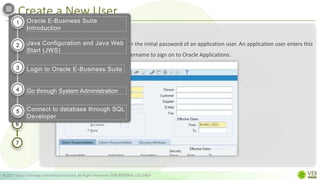
Go to the Password field and enter the initial password of an application user. An application user enters this
password along with her or his username to sign on to Oracle Applications.
1
2
3
4
5
6
7
Oracle E-Business Suite
Introduction
Java Configuration and Java Web
Start (JWS)
Login to Oracle E-Business Suite
Go through System Administration
Connect to database through SQL
Developer
1
2
3
4
5
Create a New User
© 2022 Value Exchange International Limited. All Rights Reserved. FOR INTERNAL USE ONLY
Step 6
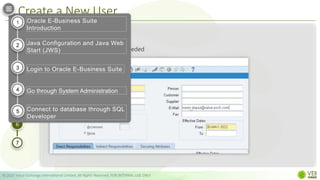
Fill in the rest of the fields, if needed
1
2
3
4
5
6
7
Oracle E-Business Suite
Introduction
Java Configuration and Java Web
Start (JWS)
Login to Oracle E-Business Suite
Go through System Administration
Connect to database through SQL
Developer
1
2
3
4
5
Create a New User
© 2022 Value Exchange International Limited. All Rights Reserved. FOR INTERNAL USE ONLY
Step 7
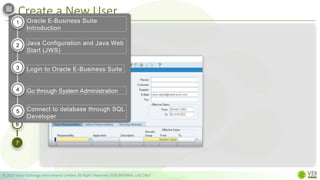
Click the Save button
1
2
3
4
5
6
7
Oracle E-Business Suite
Introduction
Java Configuration and Java Web
Start (JWS)
Login to Oracle E-Business Suite
Go through System Administration
Connect to database through SQL
Developer
1
2
3
4
5
Create a New User
© 2022 Value Exchange International Limited. All Rights Reserved. FOR INTERNAL USE ONLY
Oracle E-Business Suite
Introduction
Java Configuration and Java Web
Start (JWS)
Login to Oracle E-Business Suite
Go through System Administration
Connect to database through SQL
Developer
1
2
3
4
5
Viewing Record History
© 2022 Value Exchange International Limited. All Rights Reserved. FOR INTERNAL USE ONLY
Oracle E-Business Suite
Introduction
Java Configuration and Java Web
Start (JWS)
Login to Oracle E-Business Suite
Go through System Administration
Connect to database through SQL
Developer
1
2
3
4
5
Updating Profile
© 2022 Value Exchange International Limited. All Rights Reserved. FOR INTERNAL USE ONLY
Oracle E-Business Suite
Introduction
Java Configuration and Java Web
Start (JWS)
Login to Oracle E-Business Suite
Go through System Administration
Connect to database through SQL
Developer
1
2
3
4
5
Assigning Responsibility
© 2022 Value Exchange International Limited. All Rights Reserved. FOR INTERNAL USE ONLY
Oracle E-Business Suite
Introduction
Java Configuration and Java Web
Start (JWS)
Login to Oracle E-Business Suite
Go through System Administration
Connect to database through SQL
Developer
1
2
3
4
5
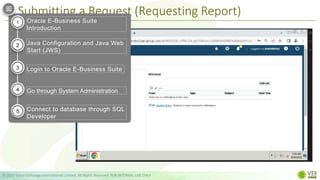
Submitting a Request (Requesting Report)
© 2022 Value Exchange International Limited. All Rights Reserved. FOR INTERNAL USE ONLY
Oracle E-Business Suite
Introduction
Java Configuration and Java Web
Start (JWS)
Login to Oracle E-Business Suite
Go through System Administration
Connect to database through SQL
Developer
1
2
3
4
5
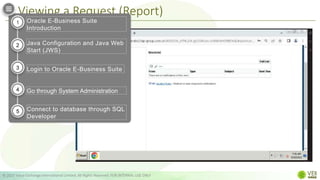
Viewing a Request (Report)
© 2022 Value Exchange International Limited. All Rights Reserved. FOR INTERNAL USE ONLY
Oracle E-Business Suite
Introduction
Java Configuration and Java Web
Start (JWS)
Login to Oracle E-Business Suite
Go through System Administration
Connect to database through SQL
Developer
1
2
3
4
5
ORACLE
System Administration
© 2022 Value Exchange International Limited. All Rights Reserved. FOR INTERNAL USE ONLY
COMPLETE!
E-BUSINESS SUITE
Oracle E-Business Suite
Introduction
Java Configuration and Java Web
Start (JWS)
Login and load Oracle java forms
Go through System Administration
Connect to database through SQL
Developer
1
2
3
4
5
ORACLE
Connecting to Database through Oracle
SQL Developer
© 2022 Value Exchange International Limited. All Rights Reserved. FOR INTERNAL USE ONLY
E-BUSINESS SUITE
Oracle E-Business Suite
Introduction
Java Configuration and Java Web
Start (JWS)
Login to Oracle E-Business Suite
Go through System Administration
Connect to database through SQL
Developer
1
2
3
4
5
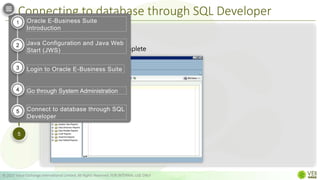
Connecting to database through SQL Developer
© 2022 Value Exchange International Limited. All Rights Reserved. FOR INTERNAL USE ONLY
Step 1
1
2
3
4
5
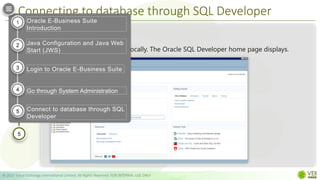
Run Oracle SQL Developer locally. The Oracle SQL Developer home page displays.
Oracle E-Business Suite
Introduction
Java Configuration and Java Web
Start (JWS)
Login to Oracle E-Business Suite
Go through System Administration
Connect to database through SQL
Developer
1
2
3
4
5
Connecting to database through SQL Developer
© 2022 Value Exchange International Limited. All Rights Reserved. FOR INTERNAL USE ONLY
Step 2
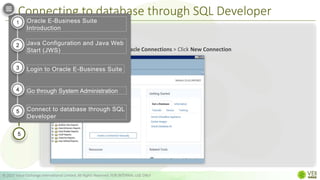
Under Connections, right Click Oracle Connections > Click New Connection
1
2
3
4
5
Oracle E-Business Suite
Introduction
Java Configuration and Java Web
Start (JWS)
Login to Oracle E-Business Suite
Go through System Administration
Connect to database through SQL
Developer
1
2
3
4
5
Connecting to database through SQL Developer
© 2022 Value Exchange International Limited. All Rights Reserved. FOR INTERNAL USE ONLY
Step 3
1
2
3
4
5
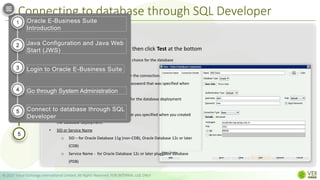
Provide the following information then click Test at the bottom
• Connection Name - Create a name of your choice for the database
connection.
• Username - Name of the database user for the connection.
• Password - Provide the "Administration" password that was specified when
database deployment was created.
• Hostname - Provide the Public IP address for the database deployment
compute node you are connecting to.
• Port - Provide the listener port number that you specified when you created
the database deployment.
• SID or Service Name
o SID – for Oracle Database 11g (non-CDB), Oracle Database 12c or later
(CDB)
o Service Name - for Oracle Database 12c or later pluggable database
(PDB)
Oracle E-Business Suite
Introduction
Java Configuration and Java Web
Start (JWS)
Login to Oracle E-Business Suite
Go through System Administration
Connect to database through SQL
Developer
1
2
3
4
5
Connecting to database through SQL Developer
© 2022 Value Exchange International Limited. All Rights Reserved. FOR INTERNAL USE ONLY
Step 4
1
2
3
4
5
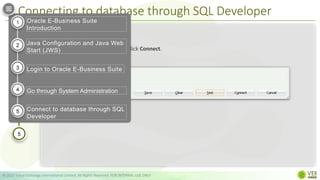
If your test status show success, click Connect.
Oracle E-Business Suite
Introduction
Java Configuration and Java Web
Start (JWS)
Login to Oracle E-Business Suite
Go through System Administration
Connect to database through SQL
Developer
1
2
3
4
5
Connecting to database through SQL Developer
© 2022 Value Exchange International Limited. All Rights Reserved. FOR INTERNAL USE ONLY
Step 5
1
2
3
4
5
Database connection is complete
Oracle E-Business Suite
Introduction
Java Configuration and Java Web
Start (JWS)
Login to Oracle E-Business Suite
Go through System Administration
Connect to database through SQL
Developer
1
2
3
4
5
ORACLE
Connecting to Database through Oracle
SQL Developer
© 2022 Value Exchange International Limited. All Rights Reserved. FOR INTERNAL USE ONLY
COMPLETE!
E-BUSINESS SUITE
Oracle E-Business Suite
Introduction
Java Configuration and Java Web
Start (JWS)
Login to Oracle E-Business Suite
Go through System Administration
Connect to database through SQL
Developer
1
2
3
4
5
ORACLE
THANK YOU
© 2022 Value Exchange International Limited. All Rights Reserved. FOR INTERNAL USE ONLY
E-BUSINESS SUITE

Oracle E-Business Suite

  • 1.
    ORACLE IT Training Team ©2022 Value Exchange International Limited. All Rights Reserved. FOR INTERNAL USE ONLY E-BUSINESS SUITE
  • 2.
    In this learningpath, we will: © 2022 Value Exchange International Limited. All Rights Reserved. FOR INTERNAL USE ONLY Get an overview of Oracle E-Business Suite Learn to configure Java Login to Oracle E-Business Suite Go through System Administration Learn how to connect to database through SQL Developer 1 2 3 4 5
  • 3.
    ORACLE INTRODUCTION © 2022 ValueExchange International Limited. All Rights Reserved. FOR INTERNAL USE ONLY E-BUSINESS SUITE Oracle E-Business Suite Introduction Java Configuration and Java Web Start (JWS) Login to Oracle E-Business Suite Go through System Administration Connect to database through SQL Developer 1 2 3 4 5
  • 4.
    Oracle E-Business Suite| Introduction © 2022 Value Exchange International Limited. All Rights Reserved. FOR INTERNAL USE ONLY • A complete, integrated business intelligence portfolio • An adaptable global business platform • A customer-focused applications strategy Oracle E-Business Suite is a complete set of business applications MANAGE GLOBAL BUSINESSES IMPROVE DECISION MAKING REDUCE COST INCREASE CORPORATE PERFORMANCE Oracle Enterprise Resource Planning (ERP) Oracle Apps / Oracle Applications Oracle Financials Oracle E-Business Suite Introduction Java Configuration and Java Web Start (JWS) Login to Oracle E-Business Suite Go through System Administration Connect to database through SQL Developer 1 2 3 4 5
  • 5.
    © 2022 ValueExchange International Limited. All Rights Reserved. FOR INTERNAL USE ONLY Trusted by 4,895 Companies - Released in 2001 - One of Oracle Corp’s major product lines - first full bundle of ERP and CRM applications SAP Microsoft Oracle E-Business Suite | Introduction Oracle E-Business Suite Introduction Java Configuration and Java Web Start (JWS) Login to Oracle E-Business Suite Go through System Administration Connect to database through SQL Developer 1 2 3 4 5
  • 6.
    Oracle E-Business Suite| Architecture © 2022 Value Exchange International Limited. All Rights Reserved. FOR INTERNAL USE ONLY Desktop Tier Application Tier Database Tier Web browser Application server Concurrent Processing Server Web Services Forms Services Database server Java app Services Centralizing the Oracle EBS software on the application tier: • removes the need to install and maintain application software on each client PC, • enables Oracle E-Business Suite to scale well with an increasing load Oracle E-Business Suite Introduction Java Configuration and Java Web Start (JWS) Login to Oracle E-Business Suite Go through System Administration Connect to database through SQL Developer 1 2 3 4 5
  • 7.
    Oracle E-Business Suite| Architecture © 2022 Value Exchange International Limited. All Rights Reserved. FOR INTERNAL USE ONLY Desktop Tier Application Tier Database Tier Web browser Database server Application server Concurrent Processing Server Web Services Forms Services Java app Services Desktop Tier Application Tier Database Tier A tier is a logical grouping of services, potentially spread across more than one physical machine A server (or services) is a process or group of processes that runs on a single machine and provides a particular functionality. Application server Database server Concurrent Processing Server Web Services Forms Services supports data- intensive programs that run in the background. Oracle E-Business Suite Introduction Java Configuration and Java Web Start (JWS) Login to Oracle E-Business Suite Go through System Administration Connect to database through SQL Developer 1 2 3 4 5
  • 8.
    Oracle E-Business Suite| Architecture © 2022 Value Exchange International Limited. All Rights Reserved. FOR INTERNAL USE ONLY Desktop Tier Application Tier Database Tier Web browser Application server Concurrent Processing Server Web Services Forms Services Database server Java app Services Oracle E-Business Suite Introduction Java Configuration and Java Web Start (JWS) Login to Oracle E-Business Suite Go through System Administration Connect to database through SQL Developer 1 2 3 4 5
  • 9.
    Oracle E-Business Suite| Architecture © 2022 Value Exchange International Limited. All Rights Reserved. FOR INTERNAL USE ONLY Application Tier Database Tier Database server Application server Concurrent Processing Server Web Services Forms Services Java app Services a.k.a. “client tier”; • provides the user interface via an add-on component to a standard web browser. • interface is provided through HTML and via Java applets Desktop Tier Web browser Provides a single point of access to: • HTML-based applications, • Forms-based applications, • and Business Intelligence applications Oracle E-Business Suite Introduction Java Configuration and Java Web Start (JWS) Login to Oracle E-Business Suite Go through System Administration Connect to database through SQL Developer 1 2 3 4 5
  • 10.
    Oracle E-Business Suite| Architecture © 2022 Value Exchange International Limited. All Rights Reserved. FOR INTERNAL USE ONLY Database server Database Tier Desktop Tier Web browser Application Tier Application server Web Services Forms Services Java app Services a.k.a. “middle tier”; • hosts various servers and service groups that process the business logic. • manages communication between the desktop tier and the database tier. The “MIDDLE TIER” Concurrent Processing Server Oracle E-Business Suite Introduction Java Configuration and Java Web Start (JWS) Login to Oracle E-Business Suite Go through System Administration Connect to database through SQL Developer 1 2 3 4 5
  • 11.
    Oracle E-Business Suite| Architecture © 2022 Value Exchange International Limited. All Rights Reserved. FOR INTERNAL USE ONLY Database server Database Tier Desktop Tier Web browser Application Tier Application server Web Services Forms Services Java app Services Concurrent Processing Server • allows non–interactive and potentially long-running functions to be executed efficiently alongside interactive operations. HTML </> Oracle E-Business Suite Introduction Java Configuration and Java Web Start (JWS) Login to Oracle E-Business Suite Go through System Administration Connect to database through SQL Developer 1 2 3 4 5
  • 12.
    Oracle E-Business Suite| Architecture © 2022 Value Exchange International Limited. All Rights Reserved. FOR INTERNAL USE ONLY Desktop Tier Web browser Application Tier Application server Concurrent Processing Server Web Services Forms Services Java app Services Database server Database Tier • contains the Oracle database server that stores and manages all the data maintained by Oracle EBS. • stores the Oracle E-Business Suite online help information. • communicates with the services and servers on the application tier There is no direct communication between the database and clients. Oracle E-Business Suite Introduction Java Configuration and Java Web Start (JWS) Login to Oracle E-Business Suite Go through System Administration Connect to database through SQL Developer 1 2 3 4 5
  • 13.
    Oracle E-Business Suite| Architecture © 2022 Value Exchange International Limited. All Rights Reserved. FOR INTERNAL USE ONLY Desktop Tier Web browser Application Tier Application server Web Services Forms Services Java app Database Tier Database server Wide Area Network Wide Area Network The desktop and application tiers exchange a minimum amount of information. Requiring less network traffic reduces telecommunications costs and improves response times. Oracle E-Business Suite Introduction Java Configuration and Java Web Start (JWS) Login to Oracle E-Business Suite Go through System Administration Connect to database through SQL Developer 1 2 3 4 5
  • 14.
    Oracle E-Business Suite| Architecture © 2022 Value Exchange International Limited. All Rights Reserved. FOR INTERNAL USE ONLY Desktop Tier Web browser Application Tier Application server Web Services Forms Services Java app Database Tier Database server Wide Area Network Wide Area Network The database server communicates with the services and servers on the application tier, which mediate the communications between the database and the clients: there is no direct communication between the database and clients. Oracle E-Business Suite Introduction Java Configuration and Java Web Start (JWS) Login to Oracle E-Business Suite Go through System Administration Connect to database through SQL Developer 1 2 3 4 5
  • 15.
    ORACLE INTRODUCTION © 2022 ValueExchange International Limited. All Rights Reserved. FOR INTERNAL USE ONLY COMPLETE! E-BUSINESS SUITE Oracle E-Business Suite Introduction Java Configuration and Java Web Start (JWS) Login to Oracle E-Business Suite Go through System Administration Connect to database through SQL Developer 1 2 3 4 5
  • 16.
    ORACLE LOGIN © 2022 ValueExchange International Limited. All Rights Reserved. FOR INTERNAL USE ONLY E-BUSINESS SUITE Oracle E-Business Suite Introduction Java Configuration and Java Web Start (JWS) Login to Oracle E-Business Suite Go through System Administration Connect to database through SQL Developer 1 2 3 4 5
  • 17.
    Oracle E-Business Suite| Login © 2022 Value Exchange International Limited. All Rights Reserved. FOR INTERNAL USE ONLY The Home Page provides a single point of access to: • HTML-based applications, • Forms-based applications, and • Business Intelligence applications  You can access responsibilities for any of the individual Oracle EBS products your organization has licensed. retains preferences as you navigate through the system. Oracle E-Business Suite Introduction Java Configuration and Java Web Start (JWS) Login to Oracle E-Business Suite Go through System Administration Connect to database through SQL Developer 1 2 3 4 5
  • 18.
    Oracle E-Business Suite| Login © 2022 Value Exchange International Limited. All Rights Reserved. FOR INTERNAL USE ONLY Specify the Oracle EBS Login page URL in a web browser Supply the relevant credentials on the Login page. 1 2 oracle-ebs2.tap-group.com.cn:8000 After your credentials have been validated, the Oracle E-Business Suite Home Page appears. 3 KARENDEPAZ . . . . . . . . Oracle E-Business Suite Introduction Java Configuration and Java Web Start (JWS) Login to Oracle E-Business Suite Go through System Administration Connect to database through SQL Developer 1 2 3 4 5
  • 19.
    Oracle E-Business Suite| Login © 2022 Value Exchange International Limited. All Rights Reserved. FOR INTERNAL USE ONLY Specify the Oracle EBS Login page URL in a web browser 1 2 3 Step 1 oracle-ebs2.tap-group.com.cn:8000 Oracle E-Business Suite Introduction Java Configuration and Java Web Start (JWS) Login to Oracle E-Business Suite Go through System Administration Connect to database through SQL Developer 1 2 3 4 5
  • 20.
    Oracle E-Business Suite| Login © 2022 Value Exchange International Limited. All Rights Reserved. FOR INTERNAL USE ONLY Step 2 1 2 3 Supply the relevant credentials on the Login page and hit Login. KARENDEPAZ ..... Oracle E-Business Suite Introduction Java Configuration and Java Web Start (JWS) Login to Oracle E-Business Suite Go through System Administration Connect to database through SQL Developer 1 2 3 4 5
  • 21.
    Oracle E-Business Suite| Login © 2022 Value Exchange International Limited. All Rights Reserved. FOR INTERNAL USE ONLY Step 3 1 2 3 After your credentials have been validated, the Oracle EBS Home Page will appear. Oracle E-Business Suite Introduction Java Configuration and Java Web Start (JWS) Login to Oracle E-Business Suite Go through System Administration Connect to database through SQL Developer 1 2 3 4 5
  • 22.
    Oracle E-Business Suite| Login © 2022 Value Exchange International Limited. All Rights Reserved. FOR INTERNAL USE ONLY Oracle E-Business Suite Introduction Java Configuration and Java Web Start (JWS) Login to Oracle E-Business Suite Go through System Administration Connect to database through SQL Developer 1 2 3 4 5
  • 23.
    ORACLE LOGIN © 2022 ValueExchange International Limited. All Rights Reserved. FOR INTERNAL USE ONLY COMPLETE! E-BUSINESS SUITE Oracle E-Business Suite Introduction Java Configuration and Java Web Start (JWS) Login to Oracle E-Business Suite Go through System Administration Connect to database through SQL Developer 1 2 3 4 5
  • 24.
    ORACLE Java Configuration andJava Web Start (JWS) © 2022 Value Exchange International Limited. All Rights Reserved. FOR INTERNAL USE ONLY E-BUSINESS SUITE Oracle E-Business Suite Introduction Java Configuration and Java Web Start (JWS) Login to Oracle E-Business Suite Go through System Administration Connect to database through SQL Developer 1 2 3 4 5
  • 25.
    Java Exception SiteList © 2022 Value Exchange International Limited. All Rights Reserved. FOR INTERNAL USE ONLY Adding a URL to Java’s Exception List allows users to run Rich Internet Applications (RIAs) • If application is not signed with a certificate from trusted certificate authority. • If application is hosted locally. • Jar file not having the Permission manifest attribute. • Application signed with an expired certificate. • Certificate used to sign the application cannot be checked for revocation. Oracle E-Business Suite Introduction Java Configuration and Java Web Start (JWS) Login to Oracle E-Business Suite Go through System Administration Connect to database through SQL Developer 1 2 3 4 5
  • 26.
    Java Exception SiteList © 2022 Value Exchange International Limited. All Rights Reserved. FOR INTERNAL USE ONLY 1 Search and Launch Configure Java from the Start Menu 2 Go to the Security tab 3 Click Edit Site List 4 Click Add > Enter the URL > Click OK How it works: Oracle E-Business Suite Introduction Java Configuration and Java Web Start (JWS) Login to Oracle E-Business Suite Go through System Administration Connect to database through SQL Developer 1 2 3 4 5
  • 27.
    Java Exception SiteList © 2022 Value Exchange International Limited. All Rights Reserved. FOR INTERNAL USE ONLY Search and Launch Configure Java from the Start Menu 1 2 3 Step 1 4 Oracle E-Business Suite Introduction Java Configuration and Java Web Start (JWS) Login to Oracle E-Business Suite Go through System Administration Connect to database through SQL Developer 1 2 3 4 5
  • 28.
    Java Exception SiteList © 2022 Value Exchange International Limited. All Rights Reserved. FOR INTERNAL USE ONLY Go to the Security tab and click Edit Site List. Step 2 1 2 3 4 Oracle E-Business Suite Introduction Java Configuration and Java Web Start (JWS) Login to Oracle E-Business Suite Go through System Administration Connect to database through SQL Developer 1 2 3 4 5
  • 29.
    Java Exception SiteList © 2022 Value Exchange International Limited. All Rights Reserved. FOR INTERNAL USE ONLY Click Add and Enter URL in the space provided. Click OK Step 3 1 2 3 4 Oracle E-Business Suite Introduction Java Configuration and Java Web Start (JWS) Login to Oracle E-Business Suite Go through System Administration Connect to database through SQL Developer 1 2 3 4 5
  • 30.
    Java Exception SiteList © 2022 Value Exchange International Limited. All Rights Reserved. FOR INTERNAL USE ONLY Click Continue on the Security Warning – HTTP Location window > Click OK. This will take you back to the Java Control Panel window, click OK Step 4 1 2 3 4 Oracle E-Business Suite Introduction Java Configuration and Java Web Start (JWS) Login to Oracle E-Business Suite Go through System Administration Connect to database through SQL Developer 1 2 3 4 5
  • 31.
    Java Exception SiteList | Video © 2022 Value Exchange International Limited. All Rights Reserved. FOR INTERNAL USE ONLY Oracle E-Business Suite Introduction Java Configuration and Java Web Start (JWS) Login to Oracle E-Business Suite Go through System Administration Connect to database through SQL Developer 1 2 3 4 5
  • 32.
    Java Configuration © 2022Value Exchange International Limited. All Rights Reserved. FOR INTERNAL USE ONLY  Web-based (OA Framework/HTML) model for modules like iProcurement and iStore  Oracle Forms/Java based model for modules like Oracle Financials. Oracle EBS Interfaces: The supported way of running Java with EBS is Java Web Start Java Applet Oracle E-Business Suite Introduction Java Configuration and Java Web Start (JWS) Login to Oracle E-Business Suite Go through System Administration Connect to database through SQL Developer 1 2 3 4 5
  • 33.
    Java Web Start ©2022 Value Exchange International Limited. All Rights Reserved. FOR INTERNAL USE ONLY • Runs java independently of the browser. • More secure way of running Oracle Forms applications versus java applet Even if you close the browser session that you started up EBS with, the Java session will still be active and can continue to be used. Note that this still requires Java to be installed on the local PC. frmservlet.jnlp Oracle E-Business Suite Introduction Java Configuration and Java Web Start (JWS) Login to Oracle E-Business Suite Go through System Administration Connect to database through SQL Developer 1 2 3 4 5
  • 34.
    Launching Java WebStart from Different Browsers © 2022 Value Exchange International Limited. All Rights Reserved. FOR INTERNAL USE ONLY © 2022 Value Exchange International Limited. All Rights Reserved. FOR INTERNAL USE ONLY 1 Login to Oracle EBS 2 Click on the Oracle application you wish to open 3 Open the downloaded jnlp file KARENDEPAZ . . . . . . . . 4 Accept and Run the application 5 frmservlet.jnlp Oracle E-Business Suite Introduction Java Configuration and Java Web Start (JWS) Login to Oracle E-Business Suite Go through System Administration Connect to database through SQL Developer 1 2 3 4 5
  • 35.
    Launching Java WebStart from Different Browsers © 2022 Value Exchange International Limited. All Rights Reserved. FOR INTERNAL USE ONLY Login to Oracle EBS. Step 1 1 2 3 4 5 KARENDEPAZ ..... Oracle E-Business Suite Introduction Java Configuration and Java Web Start (JWS) Login to Oracle E-Business Suite Go through System Administration Connect to database through SQL Developer 1 2 3 4 5
  • 36.
    Launching Java WebStart from Different Browsers © 2022 Value Exchange International Limited. All Rights Reserved. FOR INTERNAL USE ONLY Step 2 1 2 3 4 5 Navigate and click on the Oracle application you wish to open Oracle E-Business Suite Introduction Java Configuration and Java Web Start (JWS) Login to Oracle E-Business Suite Go through System Administration Connect to database through SQL Developer 1 2 3 4 5
  • 37.
    Launching Java WebStart from Different Browsers © 2022 Value Exchange International Limited. All Rights Reserved. FOR INTERNAL USE ONLY Step 3 1 2 3 4 5 Open the downloaded .jnlp file Oracle E-Business Suite Introduction Java Configuration and Java Web Start (JWS) Login to Oracle E-Business Suite Go through System Administration Connect to database through SQL Developer 1 2 3 4 5
  • 38.
    Launching Java WebStart from Different Browsers © 2022 Value Exchange International Limited. All Rights Reserved. FOR INTERNAL USE ONLY Step 4 1 2 3 4 5 Tick the I accept the risk… checkbox and hit Run. Oracle E-Business Suite Introduction Java Configuration and Java Web Start (JWS) Login to Oracle E-Business Suite Go through System Administration Connect to database through SQL Developer 1 2 3 4 5
  • 39.
    Launching Java WebStart from Different Browsers © 2022 Value Exchange International Limited. All Rights Reserved. FOR INTERNAL USE ONLY Step 5 1 2 3 4 5 Java form window will open Oracle E-Business Suite Introduction Java Configuration and Java Web Start (JWS) Login to Oracle E-Business Suite Go through System Administration Connect to database through SQL Developer 1 2 3 4 5
  • 40.
    Launching Java WebStart from Different Browsers © 2022 Value Exchange International Limited. All Rights Reserved. FOR INTERNAL USE ONLY Oracle E-Business Suite Introduction Java Configuration and Java Web Start (JWS) Login to Oracle E-Business Suite Go through System Administration Connect to database through SQL Developer 1 2 3 4 5
  • 41.
    ORACLE Java Configuration andJava Web Start (JWS) © 2022 Value Exchange International Limited. All Rights Reserved. FOR INTERNAL USE ONLY COMPLETE! E-BUSINESS SUITE Oracle E-Business Suite Introduction Java Configuration and Java Web Start (JWS) Login to Oracle E-Business Suite Go through System Administration Connect to database through SQL Developer 1 2 3 4 5
  • 42.
    ORACLE System Administration © 2022Value Exchange International Limited. All Rights Reserved. FOR INTERNAL USE ONLY E-BUSINESS SUITE Oracle E-Business Suite Introduction Java Configuration and Java Web Start (JWS) Login to Oracle E-Business Suite Go through System Administration Connect to database through SQL Developer 1 2 3 4 5
  • 43.
    In this section,we will © 2022 Value Exchange International Limited. All Rights Reserved. FOR INTERNAL USE ONLY Define the Users Window fields Create a new user Search for a user View record history Update a User Profile 1 2 3 4 5 Assign a Responsibility 6 Generate and View Requests 6 Oracle E-Business Suite Introduction Java Configuration and Java Web Start (JWS) Login to Oracle E-Business Suite Go through System Administration Connect to database through SQL Developer 1 2 3 4 5
  • 44.
    ORACLE User Windows FieldsDefined © 2022 Value Exchange International Limited. All Rights Reserved. FOR INTERNAL USE ONLY E-BUSINESS SUITE Oracle E-Business Suite Introduction Java Configuration and Java Web Start (JWS) Login to Oracle E-Business Suite Go through System Administration Connect to database through SQL Developer 1 2 3 4 5
  • 45.
    Users Window FieldsDefined © 2022 Value Exchange International Limited. All Rights Reserved. FOR INTERNAL USE ONLY 1. Users Block 2. Responsibility Block Oracle E-Business Suite Introduction Java Configuration and Java Web Start (JWS) Login to Oracle E-Business Suite Go through System Administration Connect to database through SQL Developer 1 2 3 4 5
  • 46.
    Users Block © 2022Value Exchange International Limited. All Rights Reserved. FOR INTERNAL USE ONLY An application user enters this username to sign on to Oracle Applications  The username must not contain more than one word.  Accepts only alphanumeric characters 1 An application user enters this password along with the username to sign on to Oracle Applications.  must be at least five characters and can extend up to 100 characters.  Accepts only alphanumeric characters 2 Password Expiration 3 1 2 3 Days - Enter the max number of days between password changes. Accesses - Enter the max allowed number of sign- ons to Oracle Applications allowed between password changes Oracle E-Business Suite Introduction Java Configuration and Java Web Start (JWS) Login to Oracle E-Business Suite Go through System Administration Connect to database through SQL Developer 1 2 3 4 5
  • 47.
    Users Block © 2022Value Exchange International Limited. All Rights Reserved. FOR INTERNAL USE ONLY 4 5 6 Person, Customer, and Supplier - Use these fields to enter the name of an employee (person), customer, or supplier contact. Enter the E-mail address and/or fax number for this user. The user cannot sign onto Oracle Applications before the start date and after the end date. The default for the start date is the current date. 5 6 4 Oracle E-Business Suite Introduction Java Configuration and Java Web Start (JWS) Login to Oracle E-Business Suite Go through System Administration Connect to database through SQL Developer 1 2 3 4 5
  • 48.
    Responsibility Block © 2022Value Exchange International Limited. All Rights Reserved. FOR INTERNAL USE ONLY 7 Select the name of a responsibility you wish to assign to this application user. A responsibility is uniquely identified by application name and responsibility name. 8 You cannot delete a responsibility because this information helps to provide an audit trail. You can deactivate a user's responsibility at any time by setting the End Date to the current date. 8 7 Oracle E-Business Suite Introduction Java Configuration and Java Web Start (JWS) Login to Oracle E-Business Suite Go through System Administration Connect to database through SQL Developer 1 2 3 4 5
  • 49.
    ORACLE Create a NewUser © 2022 Value Exchange International Limited. All Rights Reserved. FOR INTERNAL USE ONLY E-BUSINESS SUITE Oracle E-Business Suite Introduction Java Configuration and Java Web Start (JWS) Login to Oracle E-Business Suite Go through System Administration Connect to database through SQL Developer 1 2 3 4 5
  • 50.
    Create a NewUser © 2022 Value Exchange International Limited. All Rights Reserved. FOR INTERNAL USE ONLY Step 1 Login to Oracle EBS with system administrator credentials KARENDEPAZ ..... 1 2 3 4 5 6 7 Oracle E-Business Suite Introduction Java Configuration and Java Web Start (JWS) Login to Oracle E-Business Suite Go through System Administration Connect to database through SQL Developer 1 2 3 4 5
  • 51.
    Create a NewUser © 2022 Value Exchange International Limited. All Rights Reserved. FOR INTERNAL USE ONLY Step 2 Under Main Menu on the left, expand System Administrator > Security > User > Click Define. 1 2 3 4 5 6 7 Oracle E-Business Suite Introduction Java Configuration and Java Web Start (JWS) Login to Oracle E-Business Suite Go through System Administration Connect to database through SQL Developer 1 2 3 4 5
  • 52.
    Create a NewUser © 2022 Value Exchange International Limited. All Rights Reserved. FOR INTERNAL USE ONLY Step 3 Open the .jnlp file. Follow the prompts until you see the User Windows form open 1 2 3 4 5 6 7 Oracle E-Business Suite Introduction Java Configuration and Java Web Start (JWS) Login to Oracle E-Business Suite Go through System Administration Connect to database through SQL Developer 1 2 3 4 5
  • 53.
    Create a NewUser © 2022 Value Exchange International Limited. All Rights Reserved. FOR INTERNAL USE ONLY Step 4 Enter the desired username into the User Name field. Note that this will be the user’s username for Oracle E-Business Suite 1 2 3 4 5 6 7 KARENDP Oracle E-Business Suite Introduction Java Configuration and Java Web Start (JWS) Login to Oracle E-Business Suite Go through System Administration Connect to database through SQL Developer 1 2 3 4 5
  • 54.
    Create a NewUser © 2022 Value Exchange International Limited. All Rights Reserved. FOR INTERNAL USE ONLY Step 5 Go to the Password field and enter the initial password of an application user. An application user enters this password along with her or his username to sign on to Oracle Applications. 1 2 3 4 5 6 7 Oracle E-Business Suite Introduction Java Configuration and Java Web Start (JWS) Login to Oracle E-Business Suite Go through System Administration Connect to database through SQL Developer 1 2 3 4 5
  • 55.
    Create a NewUser © 2022 Value Exchange International Limited. All Rights Reserved. FOR INTERNAL USE ONLY Step 6 Fill in the rest of the fields, if needed 1 2 3 4 5 6 7 Oracle E-Business Suite Introduction Java Configuration and Java Web Start (JWS) Login to Oracle E-Business Suite Go through System Administration Connect to database through SQL Developer 1 2 3 4 5
  • 56.
    Create a NewUser © 2022 Value Exchange International Limited. All Rights Reserved. FOR INTERNAL USE ONLY Step 7 Click the Save button 1 2 3 4 5 6 7 Oracle E-Business Suite Introduction Java Configuration and Java Web Start (JWS) Login to Oracle E-Business Suite Go through System Administration Connect to database through SQL Developer 1 2 3 4 5
  • 57.
    Create a NewUser © 2022 Value Exchange International Limited. All Rights Reserved. FOR INTERNAL USE ONLY Oracle E-Business Suite Introduction Java Configuration and Java Web Start (JWS) Login to Oracle E-Business Suite Go through System Administration Connect to database through SQL Developer 1 2 3 4 5
  • 58.
    Viewing Record History ©2022 Value Exchange International Limited. All Rights Reserved. FOR INTERNAL USE ONLY Oracle E-Business Suite Introduction Java Configuration and Java Web Start (JWS) Login to Oracle E-Business Suite Go through System Administration Connect to database through SQL Developer 1 2 3 4 5
  • 59.
    Updating Profile © 2022Value Exchange International Limited. All Rights Reserved. FOR INTERNAL USE ONLY Oracle E-Business Suite Introduction Java Configuration and Java Web Start (JWS) Login to Oracle E-Business Suite Go through System Administration Connect to database through SQL Developer 1 2 3 4 5
  • 60.
    Assigning Responsibility © 2022Value Exchange International Limited. All Rights Reserved. FOR INTERNAL USE ONLY Oracle E-Business Suite Introduction Java Configuration and Java Web Start (JWS) Login to Oracle E-Business Suite Go through System Administration Connect to database through SQL Developer 1 2 3 4 5
  • 61.
    Submitting a Request(Requesting Report) © 2022 Value Exchange International Limited. All Rights Reserved. FOR INTERNAL USE ONLY Oracle E-Business Suite Introduction Java Configuration and Java Web Start (JWS) Login to Oracle E-Business Suite Go through System Administration Connect to database through SQL Developer 1 2 3 4 5
  • 62.
    Viewing a Request(Report) © 2022 Value Exchange International Limited. All Rights Reserved. FOR INTERNAL USE ONLY Oracle E-Business Suite Introduction Java Configuration and Java Web Start (JWS) Login to Oracle E-Business Suite Go through System Administration Connect to database through SQL Developer 1 2 3 4 5
  • 63.
    ORACLE System Administration © 2022Value Exchange International Limited. All Rights Reserved. FOR INTERNAL USE ONLY COMPLETE! E-BUSINESS SUITE Oracle E-Business Suite Introduction Java Configuration and Java Web Start (JWS) Login and load Oracle java forms Go through System Administration Connect to database through SQL Developer 1 2 3 4 5
  • 64.
    ORACLE Connecting to Databasethrough Oracle SQL Developer © 2022 Value Exchange International Limited. All Rights Reserved. FOR INTERNAL USE ONLY E-BUSINESS SUITE Oracle E-Business Suite Introduction Java Configuration and Java Web Start (JWS) Login to Oracle E-Business Suite Go through System Administration Connect to database through SQL Developer 1 2 3 4 5
  • 65.
    Connecting to databasethrough SQL Developer © 2022 Value Exchange International Limited. All Rights Reserved. FOR INTERNAL USE ONLY Step 1 1 2 3 4 5 Run Oracle SQL Developer locally. The Oracle SQL Developer home page displays. Oracle E-Business Suite Introduction Java Configuration and Java Web Start (JWS) Login to Oracle E-Business Suite Go through System Administration Connect to database through SQL Developer 1 2 3 4 5
  • 66.
    Connecting to databasethrough SQL Developer © 2022 Value Exchange International Limited. All Rights Reserved. FOR INTERNAL USE ONLY Step 2 Under Connections, right Click Oracle Connections > Click New Connection 1 2 3 4 5 Oracle E-Business Suite Introduction Java Configuration and Java Web Start (JWS) Login to Oracle E-Business Suite Go through System Administration Connect to database through SQL Developer 1 2 3 4 5
  • 67.
    Connecting to databasethrough SQL Developer © 2022 Value Exchange International Limited. All Rights Reserved. FOR INTERNAL USE ONLY Step 3 1 2 3 4 5 Provide the following information then click Test at the bottom • Connection Name - Create a name of your choice for the database connection. • Username - Name of the database user for the connection. • Password - Provide the "Administration" password that was specified when database deployment was created. • Hostname - Provide the Public IP address for the database deployment compute node you are connecting to. • Port - Provide the listener port number that you specified when you created the database deployment. • SID or Service Name o SID – for Oracle Database 11g (non-CDB), Oracle Database 12c or later (CDB) o Service Name - for Oracle Database 12c or later pluggable database (PDB) Oracle E-Business Suite Introduction Java Configuration and Java Web Start (JWS) Login to Oracle E-Business Suite Go through System Administration Connect to database through SQL Developer 1 2 3 4 5
  • 68.
    Connecting to databasethrough SQL Developer © 2022 Value Exchange International Limited. All Rights Reserved. FOR INTERNAL USE ONLY Step 4 1 2 3 4 5 If your test status show success, click Connect. Oracle E-Business Suite Introduction Java Configuration and Java Web Start (JWS) Login to Oracle E-Business Suite Go through System Administration Connect to database through SQL Developer 1 2 3 4 5
  • 69.
    Connecting to databasethrough SQL Developer © 2022 Value Exchange International Limited. All Rights Reserved. FOR INTERNAL USE ONLY Step 5 1 2 3 4 5 Database connection is complete Oracle E-Business Suite Introduction Java Configuration and Java Web Start (JWS) Login to Oracle E-Business Suite Go through System Administration Connect to database through SQL Developer 1 2 3 4 5
  • 70.
    ORACLE Connecting to Databasethrough Oracle SQL Developer © 2022 Value Exchange International Limited. All Rights Reserved. FOR INTERNAL USE ONLY COMPLETE! E-BUSINESS SUITE Oracle E-Business Suite Introduction Java Configuration and Java Web Start (JWS) Login to Oracle E-Business Suite Go through System Administration Connect to database through SQL Developer 1 2 3 4 5
  • 71.
    ORACLE THANK YOU © 2022Value Exchange International Limited. All Rights Reserved. FOR INTERNAL USE ONLY E-BUSINESS SUITE

Editor's Notes

  • #3 In this learning path, you will [CLICK] Get an Overview of Oracle E-Business Suite [CLICK] Learn to configure Java for Oracle E-Business Suite after that [CLICK] we’ll login to Oracle E-business Suite and load oracle forms [CLICK] we’ll also do a bit of System Administration Ang lastly [CLICK] connect to a database through SQL Developer
  • #5 [CLICK] Oracle E-Business Suite or Oracle EBS is a complete set of business applications designed to provide organizations [CLICK] A complete, integrated business intelligence portfolio [CLICK] An adaptable global business platform And [CLICK] A customer-focused applications strategy This set of business applications help organizations [CLICK] manage global businesses, [CLICK] improve decision making, [CLICK] reduce costs and [CLICK] increase corporate performance. Oracle EBS is called different names in the market. It is also known as [CLICK] Oracle Financials [CLICK] Oracle Apps/ Oracle Applications [CLICK] Oracle Enterprise Resource Planning (ERP)
  • #6 Oracle EBS was first released in [CLICK] 2001, and [CLICK] is one of Oracle Corporation's major product lines. It was also Oracle's [CLICK] first full bundle of ERP and CRM applications competing with [CLICK] SAP and [CLICK] Microsoft. To date, it caters to 4,895 companies, including big companies such as IBM, Salesforce, Gartner, and Equifax to name a few.
  • #7 The Oracle EBS Architecture is a framework for multi-level, distributed computing that supports Oracle EBS products. In this model, various servers or services are distributed among three levels, or tiers – the [CLICK] Desktop, [CLICK] Application, and Database . Centralizing the Oracle EBS software on the application tier removes [CLICK] the need to install and maintain application software on each client PC, [CLICK] and also enables Oracle E-Business Suite to scale well with an increasing load
  • #8 Before we proceed further, let’s first define [CLICK] a few terminologies that we’re gonna use in this course. A tier [CLICK] is a logical grouping of services, [CLICK] potentially spread across more than one physical machine. A server [CLICK] on the other hand refers to a process or group of processes that runs on a single machine and provides a particular functionality. For example, [CLICK] Web services process HTTP requests, and [CLICK] Forms services process requests for activities related to Oracle Forms. We also have the Concurrent Processing server [CLICK] which supports data-intensive programs that run in the background.
  • #9 [transition slide] let’s do an overview of each tier and their responsibilities [CLICK]
  • #10 The desktop tier a.k.a client tier is responsible for [CLICK] providing the user interface via an add-on component to a standard web browser. [CLICK] The client interface is provided through HTML for the large number of HTML-based applications, and via Java applets or Java Web Start for the smaller number of Forms-based applications [CLICK] we log in via the Oracle EBS Home Page on a desktop client web browser. [CLICK] The Home Page provides a single point of access to HTML-based applications, Forms-based applications, and Business Intelligence applications.
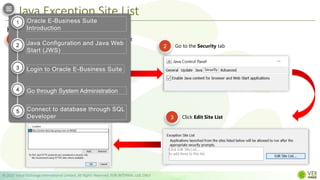
  • #11 Let’s talk about the application tier or the middle tier this time. This tier plays a dual role: First, [CLICK] it hosts the various servers and service groups that process the business logic, 2nd [CLICK] it manages the communication between the desktop tier and the database tier. The application tier is comprised of several service groups or servers. We have [CLICK] web or HTTP services [CLICK] Forms services [CLICK] Java Services And the [CLICK] Concurrent Processing server
  • #12 User interactions with Oracle EBS data can be conducted via HTML-based applications or the more traditional Forms-based applications. However, there are also reporting and data updating programs that need to run either periodically, or on an ad hoc basis. To ensure that these non-interactive and potentially long running functions do not interfere with interactive operations, they are run by the Concurrent Processing server.
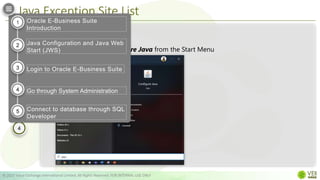
  • #13 The database tier contains the Oracle database server that stores and manages all the data maintained by Oracle E-Business Suite. This includes the various types of file in which the tables, indexes, and other database objects for your system physically reside, as well as the database executables. The database also stores the Oracle E-Business Suite online help information.
  • #14 The connection between the application tier and the desktop tier can operate successfully over [CLICK] a Wide Area Network (WAN). [CLICK] This is because the desktop and application tiers exchange a minimum amount of information, for example only field values that have changed. In a global operation with users at diverse locations, [CLICK] requiring less network traffic reduces telecommunications costs and improves response times.
  • #15 The database server communicates with the services and servers on the application tier, which mediate the communications between the database and the clients. Emphasize: There is no direct communication between the database and clients.
  • #16 This concludes the Introduction to Oracle EBS
  • #18 As mentioned earlier, Oracle EBS Home Page provides a single point of access to HTML based, forms-based, and Business Intelligence applications. From this page you can access responsibilities for any of the individual Oracle EBS products your organization has licensed. When you successfully Login via the EBS Home Page, [CLICK] you will not be prompted for your credentials again, even if you navigate to other tools and products. Oracle EBS also retains preferences [CLICK] as you navigate through the system. For example, if you registered in the Home Page that German is your preferred language, that preference carries over whether you access Forms-based or HTML-based applications.
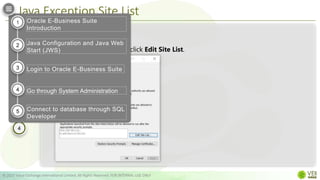
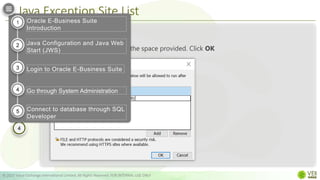
  • #19 [CLICK] You log in to Oracle EBS by specifying the Login page URL in a web browser [CLICK] When the Login page shows up, supply the relevant credentials and hit Login [CLICK] After your credentials have been validated, the Oracle EBS Home Page  appears. [CLICK]
  • #20 [CLICK] You log in to Oracle EBS by specifying the Login page URL in a web browser [CLICK] When the Login page shows up, supply the relevant credentials and hit Login [CLICK] After your credentials have been validated, the Oracle EBS Home Page  appears. [CLICK]
  • #21 [CLICK] You log in to Oracle EBS by specifying the Login page URL in a web browser [CLICK] When the Login page shows up, supply the relevant credentials and hit Login [CLICK] After your credentials have been validated, the Oracle EBS Home Page  appears. [CLICK]
  • #22 [CLICK] You log in to Oracle EBS by specifying the Login page URL in a web browser [CLICK] When the Login page shows up, supply the relevant credentials and hit Login [CLICK] After your credentials have been validated, the Oracle EBS Home Page  appears. [CLICK]
  • #23 [CLICK] You log in to Oracle EBS by specifying the Login page URL in a web browser [CLICK] When the Login page shows up, supply the relevant credentials and hit Login [CLICK] After your credentials have been validated, the Oracle EBS Home Page  appears. [CLICK]
  • #24 This concludes the Introduction to Oracle EBS
  • #26 To be able to open oracle forms, we first need to add the oracle EBS’ URL to java’s Exception site list. [CLICK] Doing so will allow us to run Rich Internet Applications (RIAs) that would normally be blocked by security checks (watch video). Adding URL to Java’s Exception site list is required if[CLICK READ SLIDE] If not done so, a user will get these errors [CLICK] when trying to launch any app that requires java
  • #27 To add a URL to java’s exception site list,
  • #28 [CLICK] You log in to Oracle EBS by specifying the Login page URL in a web browser [CLICK] When the Login page shows up, supply the relevant credentials and hit Login [CLICK] After your credentials have been validated, the Oracle EBS Home Page  appears. [CLICK]
  • #29 [CLICK] You log in to Oracle EBS by specifying the Login page URL in a web browser [CLICK] When the Login page shows up, supply the relevant credentials and hit Login [CLICK] After your credentials have been validated, the Oracle EBS Home Page  appears. [CLICK]
  • #30 [CLICK] You log in to Oracle EBS by specifying the Login page URL in a web browser [CLICK] When the Login page shows up, supply the relevant credentials and hit Login [CLICK] After your credentials have been validated, the Oracle EBS Home Page  appears. [CLICK]
  • #31 [CLICK] You log in to Oracle EBS by specifying the Login page URL in a web browser [CLICK] When the Login page shows up, supply the relevant credentials and hit Login [CLICK] After your credentials have been validated, the Oracle EBS Home Page  appears. [CLICK]
  • #32 VIDEO: Oracle EBS has two interfaces: a web-based model for modules like iProcurement and iStore, and Oracle Forms/Java based model for professional services modules like Oracle Financials. Oracle EBS used to use Java Applets to run the application. Browsers have been deprecating the use of Java Applets for security reasons for the past few years. Currently only IE11 supports Java Applets The supported way of running Java with EBS now is to use what is called Java Web Start. To be able to open oracle forms, we first need to add the oracle EBS URL to java’s security site list. Doing so allows users to run Rich Internet Applications (RIAs) that would normally be blocked by security checks (watch video)
  • #33 Oracle EBS has two interfaces: [CLICK] a web-based model for modules like iProcurement and iStore, and [CLICK] Oracle Forms/Java based model for professional services modules like Oracle Financials. Just a quick background, Oracle EBS used to [CLICK] use Java Applets to run the application. Internet Explorer is the ony browser that allows java applets. Other browsers have been deprecating its use for security reasons. Oracle also has dropped support for Java Applets at the end of March 2019. The supported way of running Java with EBS now is to use what is called Java Web Start To be able to open oracle forms, we first need to add the oracle EBS URL to java’s security site list. Doing so allows users to run Rich Internet Applications (RIAs) that would normally be blocked by security checks (watch video)
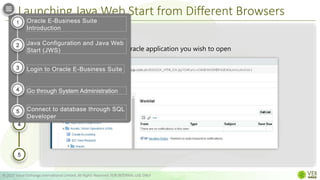
  • #34 Java Web Start differs from Java [CLICK] Applets by running java independently of the browser. [CLICK] It also offers a more secured way of running oracle forms applications and is compatible with any browser. When you start the application from the browser it will download a jnlp file. It will then run Java directly from this file rather than through the browser. This means that no second tab or window needs to be opened. [CLICK] Even if you close the browser session that you started up EBS with, the Java session will still be active and can continuously be used. Note that this still requires that Java 8 be installed on the local PC. FYI: IE will officially retire and won’t be supported on June 15, 2022. 
  • #35 As mentioned earlier. JAVA web start can be run using any browser. The process in launching Oracle forms thru Java Web Start is almost the same for all browsers Click and read slide
  • #36 [CLICK] You log in to Oracle EBS by specifying the Login page URL in a web browser [CLICK] When the Login page shows up, supply the relevant credentials and hit Login [CLICK] After your credentials have been validated, the Oracle EBS Home Page  appears. [CLICK]
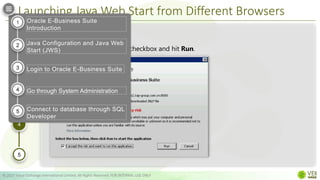
  • #37 [CLICK] You log in to Oracle EBS by specifying the Login page URL in a web browser [CLICK] When the Login page shows up, supply the relevant credentials and hit Login [CLICK] After your credentials have been validated, the Oracle EBS Home Page  appears. [CLICK]
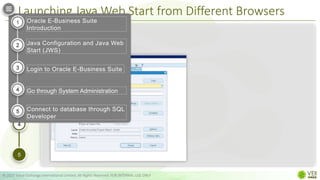
  • #38 [CLICK] You log in to Oracle EBS by specifying the Login page URL in a web browser [CLICK] When the Login page shows up, supply the relevant credentials and hit Login [CLICK] After your credentials have been validated, the Oracle EBS Home Page  appears. [CLICK]
  • #39 [CLICK] You log in to Oracle EBS by specifying the Login page URL in a web browser [CLICK] When the Login page shows up, supply the relevant credentials and hit Login [CLICK] After your credentials have been validated, the Oracle EBS Home Page  appears. [CLICK]
  • #40 [CLICK] You log in to Oracle EBS by specifying the Login page URL in a web browser [CLICK] When the Login page shows up, supply the relevant credentials and hit Login [CLICK] After your credentials have been validated, the Oracle EBS Home Page  appears. [CLICK]
  • #41 Video shows how to launch an oracle form thru JWS using chrome.
  • #42 This concludes the Introduction to Oracle EBS
  • #44 In this section, we will: Click and Read slide
  • #46 Creating a new oracle user profile is done through the Users Window. The Users Window in Oracle EBS is divided into 2 blocks: the Users Block which contains all the user-related information, and the Responsibility Block which contains a list of access assigned to a user.
  • #47 A pop-up window prompts an application user to change her or his password after the maximum number of days you specify has elapsed. Enter the maximum allowed number of sign-ons to Oracle Applications allowed between password changes. A pop-up window prompts an application user to change her or his password after the maximum number of accesses you specify has elapsed.
  • #48 PCS - Enter the last name and first name, separated by a comma, of the employee, customer, or supplier who is using this application username and password. Use the List of Values to select a valid name. Effective Dates The default for the start date is the current date. If you do not enter an end date, the username is valid indefinitely. You cannot delete an application user from Oracle Applications because this information helps to provide an audit trail. You can deactivate an Oracle Applications user at any time by setting the End Date to the current date. If you wish to reactivate a user, change the End Date to a date after the current date, or clear the End Date field.
  • #49 Creating a new user is done through the Users Window. The Users Window in Oracle EBS is divided into 2 blocks: the Users Block which contains all the user-related information, and the Responsibility Block which contains a list of access assigned to a user. If you wish to reactivate the responsibility for the user, change the End Date to a date after the current date, or clear the End Date.
  • #58 video
  • #64 This concludes the Introduction to Oracle EBS
  • #66 [CLICK] You log in to Oracle EBS by specifying the Login page URL in a web browser [CLICK] When the Login page shows up, supply the relevant credentials and hit Login [CLICK] After your credentials have been validated, the Oracle EBS Home Page  appears. [CLICK]
  • #67 [CLICK] You log in to Oracle EBS by specifying the Login page URL in a web browser [CLICK] When the Login page shows up, supply the relevant credentials and hit Login [CLICK] After your credentials have been validated, the Oracle EBS Home Page  appears. [CLICK]
  • #68 [CLICK] You log in to Oracle EBS by specifying the Login page URL in a web browser [CLICK] When the Login page shows up, supply the relevant credentials and hit Login [CLICK] After your credentials have been validated, the Oracle EBS Home Page  appears. [CLICK]
  • #69 [CLICK] You log in to Oracle EBS by specifying the Login page URL in a web browser [CLICK] When the Login page shows up, supply the relevant credentials and hit Login [CLICK] After your credentials have been validated, the Oracle EBS Home Page  appears. [CLICK]
  • #70 [CLICK] You log in to Oracle EBS by specifying the Login page URL in a web browser [CLICK] When the Login page shows up, supply the relevant credentials and hit Login [CLICK] After your credentials have been validated, the Oracle EBS Home Page  appears. [CLICK]
  • #71 This concludes the Introduction to Oracle EBS