Rapid Implementation Spreadsheets in
Oracle ERP/Fusion Cloud
Prithis Das – Dynamique Solutions LLC
Presenter’s background - Prithis Das
• In the Oracle ERP space since 1997
• Founder of Dynamique Solutions LLC, an Oracle Silver Partner – Cloud Standard
• Consulting experience with Big 5 and other major organizations
• Oracle Certified Specialist in all the Oracle ERP Cloud Financials modules
• Oracle Certified Specialist in Oracle E-Business Suite Financials modules
• Chartered Accountant and Management Accountant from India
• Multiple presentations on Oracle technologies at major Oracle events
• Contact:
• Cell: +1.630.3649457
• Email: prithis.das@dynamique.us
• LinkedIn: www.linkedin.com/in/prithisdas/
• Web: www.dynamique.us
Dynamique Solutions LLC
AGENDA
Dynamique Solutions LLC
Agenda
• Rapid Implementation Spreadsheet for General Ledger
• What it does
• Download instructions
• Walkthrough the spreadsheet tabs
• Introduction to the Spreadsheet
• How to prepare the Spreadsheet
• The upload process in action
• Review the upload process
• Review the uploaded configurations
• Post-upload steps
• Pros and cons of the Spreadsheet approach
Dynamique Solutions LLC
INTRODUCTION TO THE RAPID
IMPLEMENTATION SPREADSHEET FOR
GENERAL LEDGER
Oracle ERP Cloud | Release 13
Dynamique Solutions LLC
Rapid Implementation Spreadsheet for GL Release 13
- what it does
Dynamique Solutions LLC
Common Setup Object Basis
Value Sets Segments specified in the spreadsheet
Chart of Accounts Segments specified
Chart of Accounts Instance Segments specified (uses certain defaults)
Segment Values Values specified in the spreadsheet
Account Hierarchies Segments specified in the spreadsheet
Accounting Calendar Calendar data specified in the spreadsheet (uses certain defaults)
Legal Addresses Addresses specified in the spreadsheet
Legal Entities Legal Entities specified
Primary Ledgers Each unique country specified
Data Access Sets Ledgers created
Business Units Business Unit data in the spreadsheet
Locations Addresses specified in the spreadsheet
Rapid Implementation Spreadsheet for GL Release 13
- what it does
Dynamique Solutions LLC
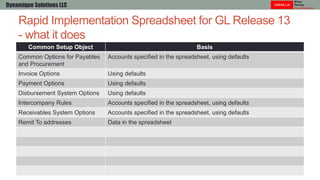
Common Setup Object Basis
Common Options for Payables
and Procurement
Accounts specified in the spreadsheet, using defaults
Invoice Options Using defaults
Payment Options Using defaults
Disbursement System Options Using defaults
Intercompany Rules Accounts specified in the spreadsheet, using defaults
Receivables System Options Accounts specified in the spreadsheet, using defaults
Remit To addresses Data in the spreadsheet
Rapid Implementation Spreadsheet
- download instructions
• Download spreadsheet using the Setup Task:
• “Create Chart of Accounts, Ledger, Legal Entities, and Business Units in Spreadsheet”
• “RapidImplementationForGeneralLedger.xlsm”
Dynamique Solutions LLC
Rapid Implementation Spreadsheet tabs
Dynamique Solutions LLC
Tab Data
Instructions • Instructions for preparing and loading setup data
• Embedded Sample Data spreadsheet
• Explanation of the Setup Objects that will be created
• Recommendations and Best Practices
Rapid Implementation Spreadsheet tabs
Dynamique Solutions LLC
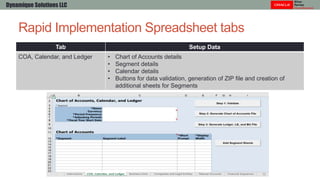
Tab Setup Data
COA, Calendar, and Ledger • Chart of Accounts details
• Segment details
• Calendar details
• Buttons for data validation, generation of ZIP file and creation of
additional sheets for Segments
Rapid Implementation Spreadsheet tabs
Dynamique Solutions LLC
Tab Setup Data
Business Units • BU Name and associated Legal Entity
Rapid Implementation Spreadsheet tabs
Dynamique Solutions LLC
Tab Setup Data
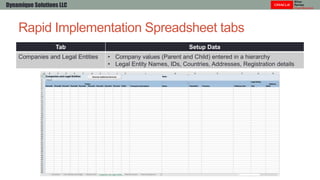
Companies and Legal Entities • Company values (Parent and Child) entered in a hierarchy
• Legal Entity Names, IDs, Countries, Addresses, Registration details
Rapid Implementation Spreadsheet tabs
Dynamique Solutions LLC
Tab Setup Data
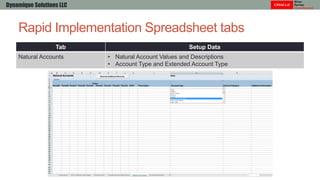
Natural Accounts • Natural Account Values and Descriptions
• Account Type and Extended Account Type
Rapid Implementation Spreadsheet tabs
Dynamique Solutions LLC
Tab Setup Data
Financial Sequences • General Ledger and Subledger Sequence numbers
• Receivables and Payables Document Sequences
HOW TO PREPARE THE RAPID
IMPLEMENTATION SPREADSHEET
Oracle ERP Cloud | Release 13
Dynamique Solutions LLC
How to Prepare the Spreadsheet
- COA, Calendar and Ledger
Dynamique Solutions LLC
How to Prepare the Spreadsheet
- COA, Calendar and Ledger
Dynamique Solutions LLC
Notes:
• No options for Segment separator in COA
• No options for Calendar period display format
How to Prepare the Spreadsheet
- Business Units
Dynamique Solutions LLC
Note:
• Default Legal Entity Name must match the Legal Entity Name on the next tab
How to Prepare the Spreadsheet
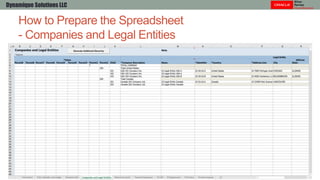
- Companies and Legal Entities
Dynamique Solutions LLC
How to Prepare the Spreadsheet
- Natural Accounts
Dynamique Solutions LLC
How to Prepare the Spreadsheet
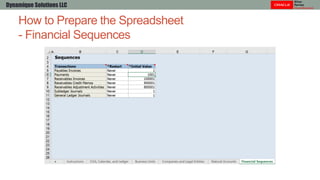
- Financial Sequences
Dynamique Solutions LLC
How to Prepare the Spreadsheet
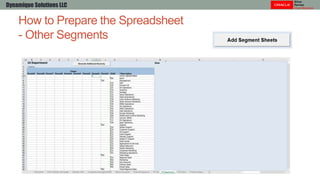
- Other Segments
Dynamique Solutions LLC
How to Prepare the Spreadsheet
- Intercompany Segment
Dynamique Solutions LLC
How to Prepare the Spreadsheet
- Natural Accounts
Dynamique Solutions LLC
• For each child value, you assign an Extended Account Type.
• You can choose from one of the general choices to mark the account value as an Asset, Liability,
Owner’s Equity, Revenue, or Expense account.
• All account values must be assigned account type.
• If the account is used by Rapid Implementation solution to automate the creation of required setup
objects in the various modules of Oracle Fusion Financials, such as ledgers for General Ledger,
common options for Payables, or receipt methods for Receivables, select the appropriate Expanded
Account Type for that child account.
• Examples of expanded account types required for setup objects are Owner’s Equity - Retained
Earnings, Liability - Accounts Payable, and Asset - Accounts Receivable.
• For accounts that are tagged with these more specialized account types, the Financial Category is
defaulted.
• You can override the defaulted Financial Category or leave it out.
• From R13, use these Extended Account Type to automatically create Financial Reports:
• Revenue – Top Revenues Parent Account
• Expense – Top Cost of Sales Parent Account
• Expense – Top Operating Expenses Parent Account
How to Prepare the Spreadsheet
- Natural Accounts critical choices
Dynamique Solutions LLC
Value Description Extended Account Type Financial Category
1xxxx Accounts Receivable Asset – Accounts Receivable Accounts receivable
1xxxx On Account Receipts Asset – On Account Payments Accounts receivable
1xxxx Unapplied Cash Asset – Unapplied Cash Accounts receivable
1xxxx Cash Clearing Asset – Cash Clearing Cash
1xxxx Confirmed Receipts Asset – Confirmed Receipts Accounts receivable
1xxxx Unbilled Receivables Asset – Unbilled Receivables Accounts receivable
1xxxx Prepayments Asset – Prepayments Other assets
1xxxx Asset Clearing Asset – Asset Clearing Property, plant, and
equipment
1xxxx Proceeds of Fixed Assets
Sale Clearing
Asset – Proceeds of Fixed Assets
Sale Clearing
Property, plant, and
equipment
1xxxx Intercompany Receivable Asset – Intercompany Receivable Accounts receivable
How to Prepare the Spreadsheet
- Natural Accounts critical choices
Dynamique Solutions LLC
Value Description Extended Account Type Financial Category
2xxxx Accounts Payable Liability – Accounts Payable Accounts payable
2xxxx Unearned Revenue Liability – Unearned Revenue Deferred sales revenue
2xxxx State Sales and Use Tax
Payable
Liability – Tax Payable Tax liability
2xxxx Intercompany Payable Liability – Intercompany Payable Accounts payable
3xxxx Retained Earnings Owner’s Equity – Retained Earnings Retained earnings
4XXXX Revenues (Parent) Revenue – Top Revenues Parent Account Sales revenue
4xxxx Revenue Revenue – Revenue Sales revenue
4xxxx Autoinvoice Clearing Revenue – Autoinvoice Clearing Sales revenue
5XXXX Cost of Goods Sold
(Parent)
Expense – Top Cost of Sales Parent
Account
Cost of goods sold
5xxxx Conversion Rate Variance Expense – Conversion Rate Variance Cost of goods sold
How to Prepare the Spreadsheet
- Natural Accounts critical choices
Dynamique Solutions LLC
Value Description Extended Account Type Financial Category
6XXXX Operating Expenses
(Parent)
Expense – Top Operating
Expenses Parent Account
Other operating
expenses
6xxxx Miscellaneous Expense – Miscellaneous
Expenses
Miscellaneous
operating expenses
6xxxx Freight Expenses Expense – Freight Freight expenses
7xxxx Discounts given Expense – Discounts Given Other sales expenses
7xxxx Discounts taken Expense – Discount Taken Other operating
expenses
7xxxx Gain on Retirement-
Proceeds of Sale
Expense – Gain/Loss On Fixed
Asset Disposal
Other income
7xxxx Rounding Cross-Currency Expense – Rounding Difference
and Balancing Adjustments
7xxxx Realized Gain/Loss on
Foreign Currency
Expense – Realized Gain/Loss on
Foreign Currency Conversions
Other income
THE UPLOAD PROCESS IN ACTION
Oracle ERP Cloud | Release 13
Dynamique Solutions LLC
The Upload Process
Steps
• Validate the data in the Rapid Implementation Spreadsheet
• Create ZIP files from Rapid Implementation Spreadsheet
• This will create two ZIP files
• Upload Chart of Accounts, using first ZIP file
• Update the Accounting Flexfield with CRITICAL changes
• Intercompany segment label
• Segment delimiter (optional)
• Upload Ledger, Legal Entities and Business Units, using second ZIP file
Dynamique Solutions LLC
The Upload Process
Steps
• Validate the data in the Spreadsheet
Dynamique Solutions LLC
The Upload Process
Steps
• Preview Report tab is created with Financial Reporting Sample Report
Dynamique Solutions LLC
New in
R13
The Upload Process
Steps
• Validate the data in the Spreadsheet
• Create ZIP files
• This will create two ZIP files
• Upload Chart of Accounts, using first ZIP file
• Upload Ledger, Legal Entities and Business Units, using second ZIP file
Dynamique Solutions LLC
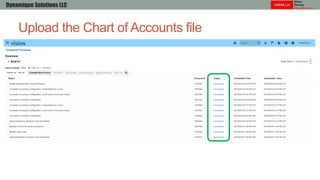
Upload the Chart of Accounts file
Dynamique Solutions LLC
Upload the Chart of Accounts file
Dynamique Solutions LLC
Update Accounting Flexfield Structure - CRITICAL!
Dynamique Solutions LLC
Steps
• Before uploading the Ledger, Business Units and Enterprise Structure, we
will make critical adjustments to the Chart of Accounts Structure
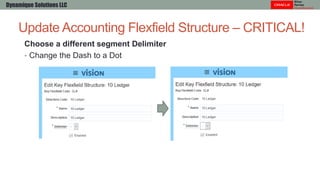
• Choose a different segment Delimiter, if required
• Intercompany segment will be tagged with an Intercompany segment label (Qualifier)
• The Structure will be re-Deployed.
Update Accounting Flexfield Structure – CRITICAL!
Dynamique Solutions LLC
Choose a different segment Delimiter
• Change the Dash to a Dot
Assign the Intercompany segment label
• Change the existing label to “Intercompany Segment”
Update Accounting Flexfield Structure – CRITICAL!
Dynamique Solutions LLC
Update Accounting Flexfield Structure - CRITICAL!
Dynamique Solutions LLC
Re-Deploy the Accounting Flexfield
Upload Ledger, Legal Entities and Business Units
Dynamique Solutions LLC
Upload the Chart of Accounts file
Dynamique Solutions LLC
Upload the Chart of Accounts file
Dynamique Solutions LLC
REVIEW THE UPLOAD PROCESS
Oracle ERP Cloud | Release 13
Dynamique Solutions LLC
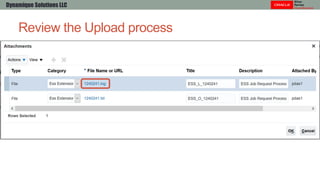
Review the Upload process
Dynamique Solutions LLC
Review the Upload process
Dynamique Solutions LLC
Review the Upload process
Dynamique Solutions LLC
Review the Upload process
Dynamique Solutions LLC
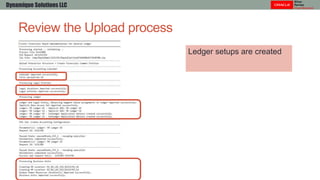
Ledger setups are created
Review the Upload process
Dynamique Solutions LLC
Accounting combinations
are created
Review the Upload process
Dynamique Solutions LLC
Intercompany setups are
created
Review the Upload process
Dynamique Solutions LLC
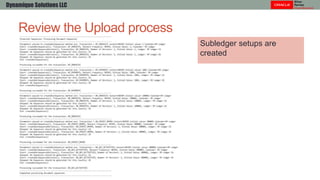
Subledger setups are
created
Review the Upload process
Dynamique Solutions LLC
Subledger setups are
created
Review the Upload process
Dynamique Solutions LLC
Subledger setups are
created
REVIEW THE UPLOADED
CONFIGURATIONS
Oracle ERP Cloud | Release 13
Dynamique Solutions LLC
Review the uploaded configurations -
Legal Structures
Dynamique Solutions LLC
Review the uploaded configurations -
Legal Addresses
Dynamique Solutions LLC
Note: Time zone is not automatically assigned to the Legal address
Review the uploaded configurations -
Legal Addresses
Dynamique Solutions LLC
Note: Time zone is not automatically assigned to the Legal address
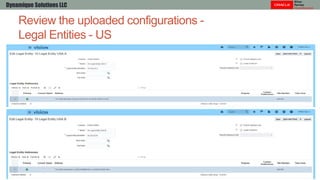
Review the uploaded configurations -
Legal Entities - US
Dynamique Solutions LLC
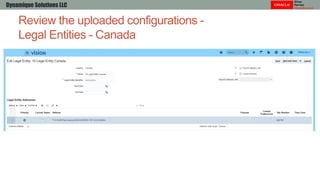
Review the uploaded configurations -
Legal Entities - Canada
Dynamique Solutions LLC
Review the uploaded configurations -
Legal Entity Registrations - US
Dynamique Solutions LLC
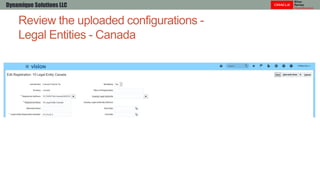
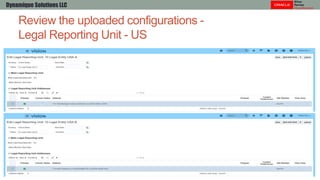
Review the uploaded configurations -
Legal Entities - Canada
Dynamique Solutions LLC
Review the uploaded configurations -
Legal Reporting Unit - US
Dynamique Solutions LLC
Review the uploaded configurations -
Legal Reporting Unit - Canada
Dynamique Solutions LLC
Review the uploaded configurations -
Legal Reporting Unit Registration - US
Dynamique Solutions LLC
Review the uploaded configurations -
Legal Reporting Unit Registration - Canada
Dynamique Solutions LLC
Review the uploaded configurations -
Financial Reporting Structures
Dynamique Solutions LLC
Review the uploaded configurations -
Value Sets
Dynamique Solutions LLC
Review the uploaded configurations -
Value Sets
Dynamique Solutions LLC
Review the uploaded configurations -
Value Set Values
Dynamique Solutions LLC
Review the uploaded configurations -
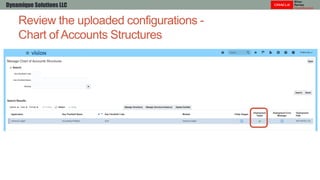
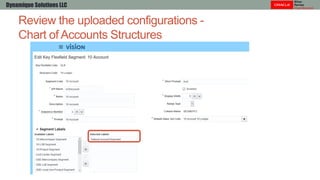
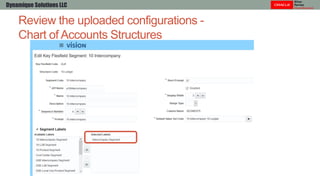
Chart of Accounts Structures
Dynamique Solutions LLC
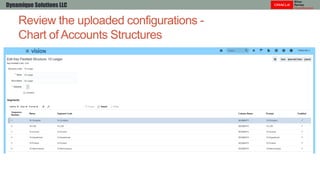
Review the uploaded configurations -
Chart of Accounts Structures
Dynamique Solutions LLC
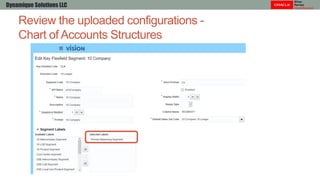
Review the uploaded configurations -
Chart of Accounts Structures
Dynamique Solutions LLC
Review the uploaded configurations -
Chart of Accounts Structures
Dynamique Solutions LLC
Review the uploaded configurations -
Chart of Accounts Structures
Dynamique Solutions LLC
Review the uploaded configurations -
Chart of Accounts Structures
Dynamique Solutions LLC
Review the uploaded configurations -
Chart of Accounts Structures
Dynamique Solutions LLC
Review the uploaded configurations -
Chart of Accounts Structures
Dynamique Solutions LLC
Review the uploaded configurations -
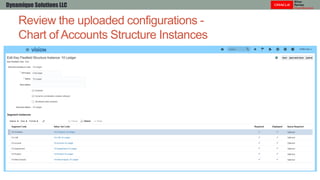
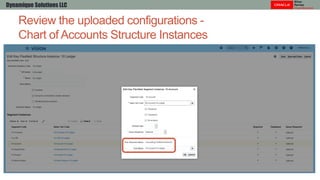
Chart of Accounts Structure Instances
Dynamique Solutions LLC
Review the uploaded configurations -
Chart of Accounts Structure Instances
Dynamique Solutions LLC
Review the uploaded configurations -
Chart of Accounts Structure Instances
Dynamique Solutions LLC
Review the uploaded configurations -
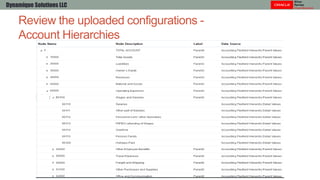
Account Hierarchies
Dynamique Solutions LLC
Review the uploaded configurations -
Account Hierarchies
Dynamique Solutions LLC
Review the uploaded configurations -
Account Hierarchies
Dynamique Solutions LLC
Review the uploaded configurations -
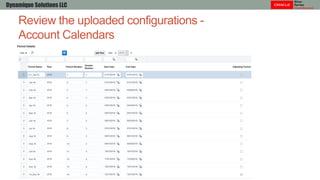
Account Calendars
Dynamique Solutions LLC
Review the uploaded configurations -
Ledgers
Dynamique Solutions LLC
Review the uploaded configurations -
Ledger Options – US Ledger
Dynamique Solutions LLC
Review the uploaded configurations -
Ledger Options – US Ledger
Dynamique Solutions LLC
Review the uploaded configurations -
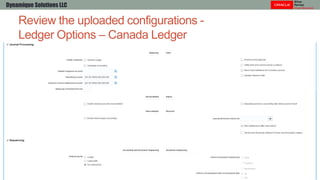
Ledger Options – Canada Ledger
Dynamique Solutions LLC
Review the uploaded configurations -
Ledger Options – Canada Ledger
Dynamique Solutions LLC
Review the uploaded configurations -
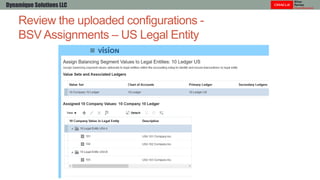
BSV Assignments – US Legal Entity
Dynamique Solutions LLC
Review the uploaded configurations -
BSV Assignments – Canada Legal Entity
Dynamique Solutions LLC
Review the uploaded configurations -
Intercompany Balancing Rules
Dynamique Solutions LLC
Review the uploaded configurations -
Data Access Sets
Dynamique Solutions LLC
Review the uploaded configurations -
Business Units
Dynamique Solutions LLC
Review the uploaded configurations -
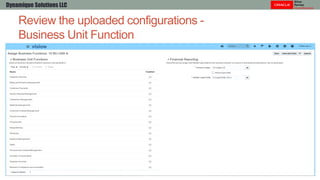
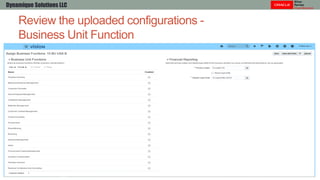
Business Unit Function
Dynamique Solutions LLC
Review the uploaded configurations -
Business Unit Function
Dynamique Solutions LLC
Review the uploaded configurations -
Business Unit Function
Dynamique Solutions LLC
Review the uploaded configurations -
Business Unit Set Assignments
Dynamique Solutions LLC
Review the uploaded configurations -
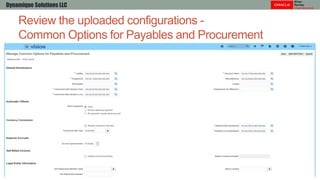
Common Options for Payables and Procurement
Dynamique Solutions LLC
Review the uploaded configurations -
Common Options for Payables and Procurement
Dynamique Solutions LLC
Review the uploaded configurations -
Common Options for Payables and Procurement
Dynamique Solutions LLC
Review the uploaded configurations -
Invoice Options
Dynamique Solutions LLC
Review the uploaded configurations -
Invoice Options
Dynamique Solutions LLC
Review the uploaded configurations -
Payment Options
Dynamique Solutions LLC
Review the uploaded configurations -
Receivables Activities
Dynamique Solutions LLC
Review the uploaded configurations -
Statement Cycles
Dynamique Solutions LLC
Review the uploaded configurations -
Receivables System Options
Dynamique Solutions LLC
Review the uploaded configurations -
Receivables System Options
Dynamique Solutions LLC
Review the uploaded configurations -
AutoAccounting Rules
Dynamique Solutions LLC
Review the uploaded configurations -
AutoAccounting Rules
Dynamique Solutions LLC
Review the uploaded configurations -
AutoAccounting Rules
Dynamique Solutions LLC
Review the uploaded configurations -
Remit to Addresses
Dynamique Solutions LLC
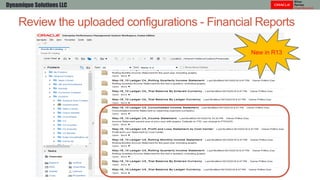
Review the uploaded configurations - Financial Reports
Dynamique Solutions LLC
New in R13
POST-UPLOAD STEPS
Dynamique Solutions LLC
Post-upload Steps
Dynamique Solutions LLC
Steps (not meant to be a complete list, and will vary by project)
• Legislative Data Group and HCM setups
• Accounting Flexfield defaults
• AutoPost criteria and AutoReverse criteria sets
• Secondary Ledgers and Reporting Currency Ledgers
• Subledger level detail setups
• Currency Rate Types
• Additional Intercompany Rules
• Approval Rules for different tasks
• Document sequencing
Questions?
Dynamique Solutions LLC
Rapid Implementation Spreadsheets in
Oracle ERP/Fusion Cloud
Prithis Das – Dynamique Solutions LLC Cell: +1.630.3649457
Email: prithis.das@dynamique.us
LinkedIn: www.linkedin.com/in/prithisdas/
Web: www.dynamique.us
Dynamique Solutions LLC

Rapid implementation Spreadsheets in Oracle ERP Cloud

  • 1.
    Rapid Implementation Spreadsheetsin Oracle ERP/Fusion Cloud Prithis Das – Dynamique Solutions LLC
  • 2.
    Presenter’s background -Prithis Das • In the Oracle ERP space since 1997 • Founder of Dynamique Solutions LLC, an Oracle Silver Partner – Cloud Standard • Consulting experience with Big 5 and other major organizations • Oracle Certified Specialist in all the Oracle ERP Cloud Financials modules • Oracle Certified Specialist in Oracle E-Business Suite Financials modules • Chartered Accountant and Management Accountant from India • Multiple presentations on Oracle technologies at major Oracle events • Contact: • Cell: +1.630.3649457 • Email: prithis.das@dynamique.us • LinkedIn: www.linkedin.com/in/prithisdas/ • Web: www.dynamique.us Dynamique Solutions LLC
  • 3.
  • 4.
    Agenda • Rapid ImplementationSpreadsheet for General Ledger • What it does • Download instructions • Walkthrough the spreadsheet tabs • Introduction to the Spreadsheet • How to prepare the Spreadsheet • The upload process in action • Review the upload process • Review the uploaded configurations • Post-upload steps • Pros and cons of the Spreadsheet approach Dynamique Solutions LLC
  • 5.
    INTRODUCTION TO THERAPID IMPLEMENTATION SPREADSHEET FOR GENERAL LEDGER Oracle ERP Cloud | Release 13 Dynamique Solutions LLC
  • 6.
    Rapid Implementation Spreadsheetfor GL Release 13 - what it does Dynamique Solutions LLC Common Setup Object Basis Value Sets Segments specified in the spreadsheet Chart of Accounts Segments specified Chart of Accounts Instance Segments specified (uses certain defaults) Segment Values Values specified in the spreadsheet Account Hierarchies Segments specified in the spreadsheet Accounting Calendar Calendar data specified in the spreadsheet (uses certain defaults) Legal Addresses Addresses specified in the spreadsheet Legal Entities Legal Entities specified Primary Ledgers Each unique country specified Data Access Sets Ledgers created Business Units Business Unit data in the spreadsheet Locations Addresses specified in the spreadsheet
  • 7.
    Rapid Implementation Spreadsheetfor GL Release 13 - what it does Dynamique Solutions LLC Common Setup Object Basis Common Options for Payables and Procurement Accounts specified in the spreadsheet, using defaults Invoice Options Using defaults Payment Options Using defaults Disbursement System Options Using defaults Intercompany Rules Accounts specified in the spreadsheet, using defaults Receivables System Options Accounts specified in the spreadsheet, using defaults Remit To addresses Data in the spreadsheet
  • 8.
    Rapid Implementation Spreadsheet -download instructions • Download spreadsheet using the Setup Task: • “Create Chart of Accounts, Ledger, Legal Entities, and Business Units in Spreadsheet” • “RapidImplementationForGeneralLedger.xlsm” Dynamique Solutions LLC
  • 9.
    Rapid Implementation Spreadsheettabs Dynamique Solutions LLC Tab Data Instructions • Instructions for preparing and loading setup data • Embedded Sample Data spreadsheet • Explanation of the Setup Objects that will be created • Recommendations and Best Practices
  • 10.
    Rapid Implementation Spreadsheettabs Dynamique Solutions LLC Tab Setup Data COA, Calendar, and Ledger • Chart of Accounts details • Segment details • Calendar details • Buttons for data validation, generation of ZIP file and creation of additional sheets for Segments
  • 11.
    Rapid Implementation Spreadsheettabs Dynamique Solutions LLC Tab Setup Data Business Units • BU Name and associated Legal Entity
  • 12.
    Rapid Implementation Spreadsheettabs Dynamique Solutions LLC Tab Setup Data Companies and Legal Entities • Company values (Parent and Child) entered in a hierarchy • Legal Entity Names, IDs, Countries, Addresses, Registration details
  • 13.
    Rapid Implementation Spreadsheettabs Dynamique Solutions LLC Tab Setup Data Natural Accounts • Natural Account Values and Descriptions • Account Type and Extended Account Type
  • 14.
    Rapid Implementation Spreadsheettabs Dynamique Solutions LLC Tab Setup Data Financial Sequences • General Ledger and Subledger Sequence numbers • Receivables and Payables Document Sequences
  • 15.
    HOW TO PREPARETHE RAPID IMPLEMENTATION SPREADSHEET Oracle ERP Cloud | Release 13 Dynamique Solutions LLC
  • 16.
    How to Preparethe Spreadsheet - COA, Calendar and Ledger Dynamique Solutions LLC
  • 17.
    How to Preparethe Spreadsheet - COA, Calendar and Ledger Dynamique Solutions LLC Notes: • No options for Segment separator in COA • No options for Calendar period display format
  • 18.
    How to Preparethe Spreadsheet - Business Units Dynamique Solutions LLC Note: • Default Legal Entity Name must match the Legal Entity Name on the next tab
  • 19.
    How to Preparethe Spreadsheet - Companies and Legal Entities Dynamique Solutions LLC
  • 20.
    How to Preparethe Spreadsheet - Natural Accounts Dynamique Solutions LLC
  • 21.
    How to Preparethe Spreadsheet - Financial Sequences Dynamique Solutions LLC
  • 22.
    How to Preparethe Spreadsheet - Other Segments Dynamique Solutions LLC
  • 23.
    How to Preparethe Spreadsheet - Intercompany Segment Dynamique Solutions LLC
  • 24.
    How to Preparethe Spreadsheet - Natural Accounts Dynamique Solutions LLC • For each child value, you assign an Extended Account Type. • You can choose from one of the general choices to mark the account value as an Asset, Liability, Owner’s Equity, Revenue, or Expense account. • All account values must be assigned account type. • If the account is used by Rapid Implementation solution to automate the creation of required setup objects in the various modules of Oracle Fusion Financials, such as ledgers for General Ledger, common options for Payables, or receipt methods for Receivables, select the appropriate Expanded Account Type for that child account. • Examples of expanded account types required for setup objects are Owner’s Equity - Retained Earnings, Liability - Accounts Payable, and Asset - Accounts Receivable. • For accounts that are tagged with these more specialized account types, the Financial Category is defaulted. • You can override the defaulted Financial Category or leave it out. • From R13, use these Extended Account Type to automatically create Financial Reports: • Revenue – Top Revenues Parent Account • Expense – Top Cost of Sales Parent Account • Expense – Top Operating Expenses Parent Account
  • 25.
    How to Preparethe Spreadsheet - Natural Accounts critical choices Dynamique Solutions LLC Value Description Extended Account Type Financial Category 1xxxx Accounts Receivable Asset – Accounts Receivable Accounts receivable 1xxxx On Account Receipts Asset – On Account Payments Accounts receivable 1xxxx Unapplied Cash Asset – Unapplied Cash Accounts receivable 1xxxx Cash Clearing Asset – Cash Clearing Cash 1xxxx Confirmed Receipts Asset – Confirmed Receipts Accounts receivable 1xxxx Unbilled Receivables Asset – Unbilled Receivables Accounts receivable 1xxxx Prepayments Asset – Prepayments Other assets 1xxxx Asset Clearing Asset – Asset Clearing Property, plant, and equipment 1xxxx Proceeds of Fixed Assets Sale Clearing Asset – Proceeds of Fixed Assets Sale Clearing Property, plant, and equipment 1xxxx Intercompany Receivable Asset – Intercompany Receivable Accounts receivable
  • 26.
    How to Preparethe Spreadsheet - Natural Accounts critical choices Dynamique Solutions LLC Value Description Extended Account Type Financial Category 2xxxx Accounts Payable Liability – Accounts Payable Accounts payable 2xxxx Unearned Revenue Liability – Unearned Revenue Deferred sales revenue 2xxxx State Sales and Use Tax Payable Liability – Tax Payable Tax liability 2xxxx Intercompany Payable Liability – Intercompany Payable Accounts payable 3xxxx Retained Earnings Owner’s Equity – Retained Earnings Retained earnings 4XXXX Revenues (Parent) Revenue – Top Revenues Parent Account Sales revenue 4xxxx Revenue Revenue – Revenue Sales revenue 4xxxx Autoinvoice Clearing Revenue – Autoinvoice Clearing Sales revenue 5XXXX Cost of Goods Sold (Parent) Expense – Top Cost of Sales Parent Account Cost of goods sold 5xxxx Conversion Rate Variance Expense – Conversion Rate Variance Cost of goods sold
  • 27.
    How to Preparethe Spreadsheet - Natural Accounts critical choices Dynamique Solutions LLC Value Description Extended Account Type Financial Category 6XXXX Operating Expenses (Parent) Expense – Top Operating Expenses Parent Account Other operating expenses 6xxxx Miscellaneous Expense – Miscellaneous Expenses Miscellaneous operating expenses 6xxxx Freight Expenses Expense – Freight Freight expenses 7xxxx Discounts given Expense – Discounts Given Other sales expenses 7xxxx Discounts taken Expense – Discount Taken Other operating expenses 7xxxx Gain on Retirement- Proceeds of Sale Expense – Gain/Loss On Fixed Asset Disposal Other income 7xxxx Rounding Cross-Currency Expense – Rounding Difference and Balancing Adjustments 7xxxx Realized Gain/Loss on Foreign Currency Expense – Realized Gain/Loss on Foreign Currency Conversions Other income
  • 28.
    THE UPLOAD PROCESSIN ACTION Oracle ERP Cloud | Release 13 Dynamique Solutions LLC
  • 29.
    The Upload Process Steps •Validate the data in the Rapid Implementation Spreadsheet • Create ZIP files from Rapid Implementation Spreadsheet • This will create two ZIP files • Upload Chart of Accounts, using first ZIP file • Update the Accounting Flexfield with CRITICAL changes • Intercompany segment label • Segment delimiter (optional) • Upload Ledger, Legal Entities and Business Units, using second ZIP file Dynamique Solutions LLC
  • 30.
    The Upload Process Steps •Validate the data in the Spreadsheet Dynamique Solutions LLC
  • 31.
    The Upload Process Steps •Preview Report tab is created with Financial Reporting Sample Report Dynamique Solutions LLC New in R13
  • 32.
    The Upload Process Steps •Validate the data in the Spreadsheet • Create ZIP files • This will create two ZIP files • Upload Chart of Accounts, using first ZIP file • Upload Ledger, Legal Entities and Business Units, using second ZIP file Dynamique Solutions LLC
  • 33.
    Upload the Chartof Accounts file Dynamique Solutions LLC
  • 34.
    Upload the Chartof Accounts file Dynamique Solutions LLC
  • 35.
    Update Accounting FlexfieldStructure - CRITICAL! Dynamique Solutions LLC Steps • Before uploading the Ledger, Business Units and Enterprise Structure, we will make critical adjustments to the Chart of Accounts Structure • Choose a different segment Delimiter, if required • Intercompany segment will be tagged with an Intercompany segment label (Qualifier) • The Structure will be re-Deployed.
  • 36.
    Update Accounting FlexfieldStructure – CRITICAL! Dynamique Solutions LLC Choose a different segment Delimiter • Change the Dash to a Dot
  • 37.
    Assign the Intercompanysegment label • Change the existing label to “Intercompany Segment” Update Accounting Flexfield Structure – CRITICAL! Dynamique Solutions LLC
  • 38.
    Update Accounting FlexfieldStructure - CRITICAL! Dynamique Solutions LLC Re-Deploy the Accounting Flexfield
  • 39.
    Upload Ledger, LegalEntities and Business Units Dynamique Solutions LLC
  • 40.
    Upload the Chartof Accounts file Dynamique Solutions LLC
  • 41.
    Upload the Chartof Accounts file Dynamique Solutions LLC
  • 42.
    REVIEW THE UPLOADPROCESS Oracle ERP Cloud | Release 13 Dynamique Solutions LLC
  • 43.
    Review the Uploadprocess Dynamique Solutions LLC
  • 44.
    Review the Uploadprocess Dynamique Solutions LLC
  • 45.
    Review the Uploadprocess Dynamique Solutions LLC
  • 46.
    Review the Uploadprocess Dynamique Solutions LLC Ledger setups are created
  • 47.
    Review the Uploadprocess Dynamique Solutions LLC Accounting combinations are created
  • 48.
    Review the Uploadprocess Dynamique Solutions LLC Intercompany setups are created
  • 49.
    Review the Uploadprocess Dynamique Solutions LLC Subledger setups are created
  • 50.
    Review the Uploadprocess Dynamique Solutions LLC Subledger setups are created
  • 51.
    Review the Uploadprocess Dynamique Solutions LLC Subledger setups are created
  • 52.
    REVIEW THE UPLOADED CONFIGURATIONS OracleERP Cloud | Release 13 Dynamique Solutions LLC
  • 53.
    Review the uploadedconfigurations - Legal Structures Dynamique Solutions LLC
  • 54.
    Review the uploadedconfigurations - Legal Addresses Dynamique Solutions LLC Note: Time zone is not automatically assigned to the Legal address
  • 55.
    Review the uploadedconfigurations - Legal Addresses Dynamique Solutions LLC Note: Time zone is not automatically assigned to the Legal address
  • 56.
    Review the uploadedconfigurations - Legal Entities - US Dynamique Solutions LLC
  • 57.
    Review the uploadedconfigurations - Legal Entities - Canada Dynamique Solutions LLC
  • 58.
    Review the uploadedconfigurations - Legal Entity Registrations - US Dynamique Solutions LLC
  • 59.
    Review the uploadedconfigurations - Legal Entities - Canada Dynamique Solutions LLC
  • 60.
    Review the uploadedconfigurations - Legal Reporting Unit - US Dynamique Solutions LLC
  • 61.
    Review the uploadedconfigurations - Legal Reporting Unit - Canada Dynamique Solutions LLC
  • 62.
    Review the uploadedconfigurations - Legal Reporting Unit Registration - US Dynamique Solutions LLC
  • 63.
    Review the uploadedconfigurations - Legal Reporting Unit Registration - Canada Dynamique Solutions LLC
  • 64.
    Review the uploadedconfigurations - Financial Reporting Structures Dynamique Solutions LLC
  • 65.
    Review the uploadedconfigurations - Value Sets Dynamique Solutions LLC
  • 66.
    Review the uploadedconfigurations - Value Sets Dynamique Solutions LLC
  • 67.
    Review the uploadedconfigurations - Value Set Values Dynamique Solutions LLC
  • 68.
    Review the uploadedconfigurations - Chart of Accounts Structures Dynamique Solutions LLC
  • 69.
    Review the uploadedconfigurations - Chart of Accounts Structures Dynamique Solutions LLC
  • 70.
    Review the uploadedconfigurations - Chart of Accounts Structures Dynamique Solutions LLC
  • 71.
    Review the uploadedconfigurations - Chart of Accounts Structures Dynamique Solutions LLC
  • 72.
    Review the uploadedconfigurations - Chart of Accounts Structures Dynamique Solutions LLC
  • 73.
    Review the uploadedconfigurations - Chart of Accounts Structures Dynamique Solutions LLC
  • 74.
    Review the uploadedconfigurations - Chart of Accounts Structures Dynamique Solutions LLC
  • 75.
    Review the uploadedconfigurations - Chart of Accounts Structures Dynamique Solutions LLC
  • 76.
    Review the uploadedconfigurations - Chart of Accounts Structure Instances Dynamique Solutions LLC
  • 77.
    Review the uploadedconfigurations - Chart of Accounts Structure Instances Dynamique Solutions LLC
  • 78.
    Review the uploadedconfigurations - Chart of Accounts Structure Instances Dynamique Solutions LLC
  • 79.
    Review the uploadedconfigurations - Account Hierarchies Dynamique Solutions LLC
  • 80.
    Review the uploadedconfigurations - Account Hierarchies Dynamique Solutions LLC
  • 81.
    Review the uploadedconfigurations - Account Hierarchies Dynamique Solutions LLC
  • 82.
    Review the uploadedconfigurations - Account Calendars Dynamique Solutions LLC
  • 83.
    Review the uploadedconfigurations - Ledgers Dynamique Solutions LLC
  • 84.
    Review the uploadedconfigurations - Ledger Options – US Ledger Dynamique Solutions LLC
  • 85.
    Review the uploadedconfigurations - Ledger Options – US Ledger Dynamique Solutions LLC
  • 86.
    Review the uploadedconfigurations - Ledger Options – Canada Ledger Dynamique Solutions LLC
  • 87.
    Review the uploadedconfigurations - Ledger Options – Canada Ledger Dynamique Solutions LLC
  • 88.
    Review the uploadedconfigurations - BSV Assignments – US Legal Entity Dynamique Solutions LLC
  • 89.
    Review the uploadedconfigurations - BSV Assignments – Canada Legal Entity Dynamique Solutions LLC
  • 90.
    Review the uploadedconfigurations - Intercompany Balancing Rules Dynamique Solutions LLC
  • 91.
    Review the uploadedconfigurations - Data Access Sets Dynamique Solutions LLC
  • 92.
    Review the uploadedconfigurations - Business Units Dynamique Solutions LLC
  • 93.
    Review the uploadedconfigurations - Business Unit Function Dynamique Solutions LLC
  • 94.
    Review the uploadedconfigurations - Business Unit Function Dynamique Solutions LLC
  • 95.
    Review the uploadedconfigurations - Business Unit Function Dynamique Solutions LLC
  • 96.
    Review the uploadedconfigurations - Business Unit Set Assignments Dynamique Solutions LLC
  • 97.
    Review the uploadedconfigurations - Common Options for Payables and Procurement Dynamique Solutions LLC
  • 98.
    Review the uploadedconfigurations - Common Options for Payables and Procurement Dynamique Solutions LLC
  • 99.
    Review the uploadedconfigurations - Common Options for Payables and Procurement Dynamique Solutions LLC
  • 100.
    Review the uploadedconfigurations - Invoice Options Dynamique Solutions LLC
  • 101.
    Review the uploadedconfigurations - Invoice Options Dynamique Solutions LLC
  • 102.
    Review the uploadedconfigurations - Payment Options Dynamique Solutions LLC
  • 103.
    Review the uploadedconfigurations - Receivables Activities Dynamique Solutions LLC
  • 104.
    Review the uploadedconfigurations - Statement Cycles Dynamique Solutions LLC
  • 105.
    Review the uploadedconfigurations - Receivables System Options Dynamique Solutions LLC
  • 106.
    Review the uploadedconfigurations - Receivables System Options Dynamique Solutions LLC
  • 107.
    Review the uploadedconfigurations - AutoAccounting Rules Dynamique Solutions LLC
  • 108.
    Review the uploadedconfigurations - AutoAccounting Rules Dynamique Solutions LLC
  • 109.
    Review the uploadedconfigurations - AutoAccounting Rules Dynamique Solutions LLC
  • 110.
    Review the uploadedconfigurations - Remit to Addresses Dynamique Solutions LLC
  • 111.
    Review the uploadedconfigurations - Financial Reports Dynamique Solutions LLC New in R13
  • 112.
  • 113.
    Post-upload Steps Dynamique SolutionsLLC Steps (not meant to be a complete list, and will vary by project) • Legislative Data Group and HCM setups • Accounting Flexfield defaults • AutoPost criteria and AutoReverse criteria sets • Secondary Ledgers and Reporting Currency Ledgers • Subledger level detail setups • Currency Rate Types • Additional Intercompany Rules • Approval Rules for different tasks • Document sequencing
  • 114.
  • 115.
    Rapid Implementation Spreadsheetsin Oracle ERP/Fusion Cloud Prithis Das – Dynamique Solutions LLC Cell: +1.630.3649457 Email: prithis.das@dynamique.us LinkedIn: www.linkedin.com/in/prithisdas/ Web: www.dynamique.us Dynamique Solutions LLC