Editing Technique and CutsGuideline for editing our Music Video
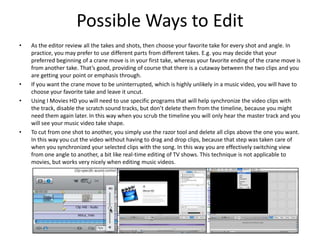
Possible Ways to EditAs the editor review all the takes and shots, then choose your favorite take for every shot and angle. In practice, you may prefer to use different parts from different takes. E.g. you may decide that your preferred beginning of a crane move is in your first take, whereas your favorite ending of the crane move is from another take. That’s good, providing of course that there is a cutaway between the two clips and you are getting your point or emphasis through. If you want the crane move to be uninterrupted, which is highly unlikely in a music video, you will have to choose your favorite take and leave it uncut.Using I Movies HD you will need to use specific programs that will help synchronize the video clips with the track, disable the scratch sound tracks, but don’t delete them from the timeline, because you might need them again later. In this way when you scrub the timeline you will only hear the master track and you will see your music video take shape.To cut from one shot to another, you simply use the razor tool and delete all clips above the one you want. In this way you cut the video without having to drag and drop clips, because that step was taken care of when you synchronized your selected clips with the song. In this way you are effectively switching view from one angle to another, a bit like real-time editing of TV shows. This technique is not applicable to movies, but works very nicely when editing music videos.
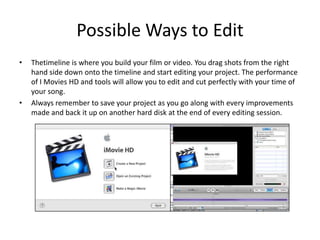
Possible Ways to EditThetimeline is where you build your film or video. You drag shots from the right hand side down onto the timeline and start editing your project. The performance of I Movies HD and tools will allow you to edit and cut perfectly with your time of your song.Always remember to save your project as you go along with every improvements made and back it up on another hard disk at the end of every editing session.

New editing

  • 1.
    Editing Technique andCutsGuideline for editing our Music Video
  • 2.
    Possible Ways toEditAs the editor review all the takes and shots, then choose your favorite take for every shot and angle. In practice, you may prefer to use different parts from different takes. E.g. you may decide that your preferred beginning of a crane move is in your first take, whereas your favorite ending of the crane move is from another take. That’s good, providing of course that there is a cutaway between the two clips and you are getting your point or emphasis through. If you want the crane move to be uninterrupted, which is highly unlikely in a music video, you will have to choose your favorite take and leave it uncut.Using I Movies HD you will need to use specific programs that will help synchronize the video clips with the track, disable the scratch sound tracks, but don’t delete them from the timeline, because you might need them again later. In this way when you scrub the timeline you will only hear the master track and you will see your music video take shape.To cut from one shot to another, you simply use the razor tool and delete all clips above the one you want. In this way you cut the video without having to drag and drop clips, because that step was taken care of when you synchronized your selected clips with the song. In this way you are effectively switching view from one angle to another, a bit like real-time editing of TV shows. This technique is not applicable to movies, but works very nicely when editing music videos.
  • 3.
    Possible Ways toEditThetimeline is where you build your film or video. You drag shots from the right hand side down onto the timeline and start editing your project. The performance of I Movies HD and tools will allow you to edit and cut perfectly with your time of your song.Always remember to save your project as you go along with every improvements made and back it up on another hard disk at the end of every editing session.