Routing Security
Hungary MUM – Budapest – March, 2011
Eng. Wardner Maia
Brazil
2
Name: Wardner Maia
Country: Brazil
Electronic/Telecommunications Engineer
Internet Service Provider since 1995
Training Courses on Wireless since 2002
Mikrotik Certified Trainer since, 2007
Technical Director of company MD Brasil IT & Telecom
Member of board directors of LACNIC ( http://www.lacnic.org )
Introduction
3
MD Brasil Information Technology and Telecommunications
 ISP (Access and Hosting Services)
 Authorized Telecommunications operator in Brazil.
 Mikrotik Distributor and Training Partner.
 Consulting services
www.mdbrasil.com.br / www.mikrotikbrasil.com.br
Introduction
4
Target Audience:
ISP’s and WISP’s running or planning to run OSPF and BGP in their networks.
Objectives:
To understand conceptually the existing threats related to dynamic routing protocols
caused by
 Intentional attacks
 self misconfigurations
 leak of measures to prevent misconfigurations from neighbors AS’s.
To establish a set of Best Common Practices in Mikrotik RouterOS to avoid or minimize
the above risks.
Target audience and Objectives
5
 The widely used routing protocols were created in early days of the Internet when
security risks were not intense. .
 BGP, the protocol that glues together the largest and most complex network ever
created, was born without any security concern.
 The same regarding to OSPF, nowadays the most popular dynamic Internal
Gateway Protocol
 There are tons of known attacks against dynamic routing that can compromise,
confidentiality, integrity and availability on networks of any size. Therefore, the
whole Internet can be affected.
Why Routing Security ?
6
 Security in a wide meaning is not only related to intentional attacks but to incidents
caused by misconfigurations and operating systems bugs.
 In recent past the Internet suffered regional and global problems caused by non-
intentional administrators mistakes. The most notable:
Pakistan Telecom x Youtube
Mikrotik x Cisco bug (long as path bug)
 In the past 2 years we’ve seen several small ISP’s growing up, getting their AS’s and
starting operating their own OSPF/BGP Networks.
 Are those new players well prepared to face the issues related to dynamic
routing weakness ???
Why Routing Security ?
7
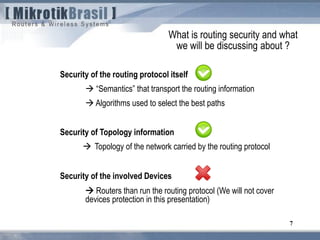
Security of the routing protocol itself
 “Semantics” that transport the routing information
 Algorithms used to select the best paths
Security of Topology information
 Topology of the network carried by the routing protocol
Security of the involved Devices
 Routers than run the routing protocol (We will not cover
devices protection in this presentation)
What is routing security and what
we will be discussing about ?
8
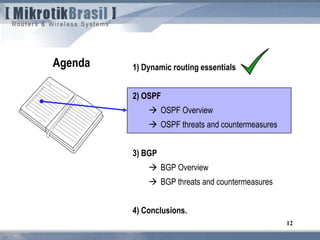
1) Dynamic routing essentials
2) OSPF
 OSPF Overview
 OSPF threats and countermeasures
3) BGP
 BGP Overview
 BGP threats and countermeasures
4) Conclusions.
Agenda
9
1) Dynamic routing essentials
2) OSPF
 OSPF Overview
 OSPF threats and countermeasures
3) BGP
 BGP Overview
 BGP threats and countermeasures
4) Conclusions.
Agenda
10
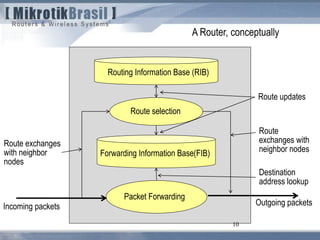
A Router, conceptually
Routing Information Base (RIB)
Route selection
Forwarding Information Base(FIB)
Packet Forwarding
Incoming packets Outgoing packets
Route exchanges
with neighbor
nodes
Route
exchanges with
neighbor nodes
Route updates
Destination
address lookup
11
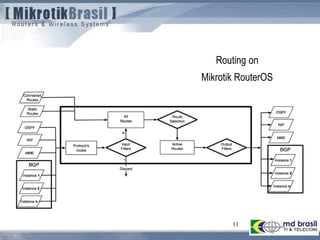
Routing on
Mikrotik RouterOS
12
1) Dynamic routing essentials
2) OSPF
 OSPF Overview
 OSPF threats and countermeasures
3) BGP
 BGP Overview
 BGP threats and countermeasures
4) Conclusions.
Agenda
13
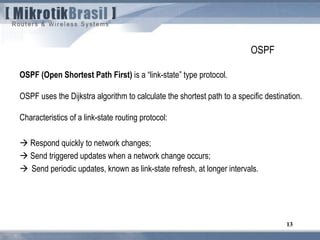
OSPF
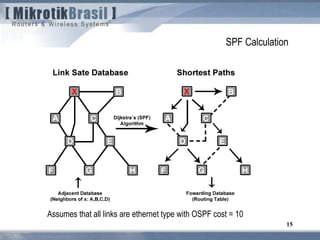
OSPF (Open Shortest Path First) is a “link-state” type protocol.
OSPF uses the Dijkstra algorithm to calculate the shortest path to a specific destination.
Characteristics of a link-state routing protocol:
 Respond quickly to network changes;
 Send triggered updates when a network change occurs;
 Send periodic updates, known as link-state refresh, at longer intervals.
14
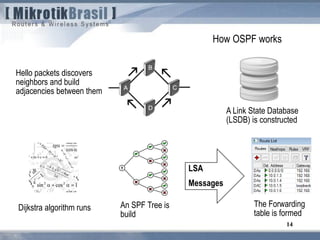
How OSPF works
Hello packets discovers
neighbors and build
adjacencies between them
A Link State Database
(LSDB) is constructed
Dijkstra algorithm runs An SPF Tree is
build
LSA
Messages
The Forwarding
table is formed
SPF Calculation
15
Assumes that all links are ethernet type with OSPF cost = 10
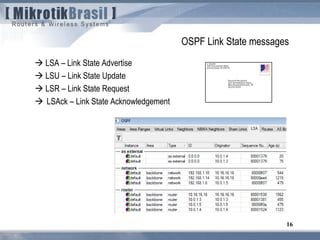
 LSA – Link State Advertise
 LSU – Link State Update
 LSR – Link State Request
 LSAck – Link State Acknowledgement
16
OSPF Link State messages
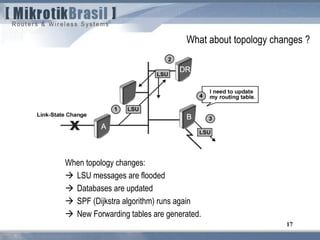
When topology changes:
 LSU messages are flooded
 Databases are updated
 SPF (Dijkstra algorithm) runs again
 New Forwarding tables are generated.
17
What about topology changes ?
18
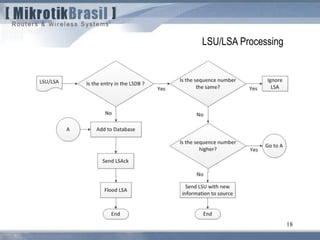
LSU/LSA Processing
19
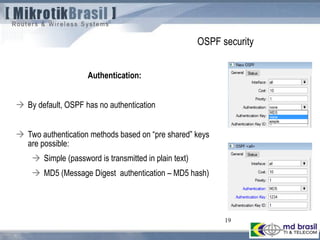
OSPF security
Authentication:
 By default, OSPF has no authentication
 Two authentication methods based on “pre shared” keys
are possible:
 Simple (password is transmitted in plain text)
 MD5 (Message Digest authentication – MD5 hash)
20
Attacking OSPF
Attacks against OSPF
Basically, attacks against OSPF consist on forging Hello, LSA and LSU messages on
behalf of authorized hosts, causing:
 Denial of service
and / or
 Topology changes
Topology changes, leads to other threats like
 Eavesdropping
 Man-in-the-middle attack
22
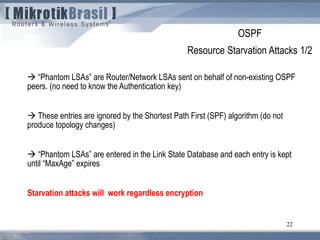
 “Phantom LSAs” are Router/Network LSAs sent on behalf of non-existing OSPF
peers. (no need to know the Authentication key)
 These entries are ignored by the Shortest Path First (SPF) algorithm (do not
produce topology changes)
 “Phantom LSAs” are entered in the Link State Database and each entry is kept
until “MaxAge” expires
Starvation attacks will work regardless encryption
OSPF
Resource Starvation Attacks 1/2
23
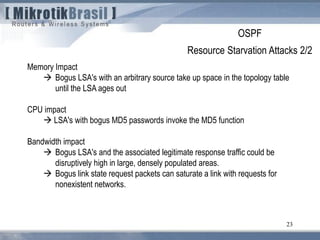
Memory Impact
 Bogus LSA's with an arbitrary source take up space in the topology table
until the LSA ages out
CPU impact
 LSA's with bogus MD5 passwords invoke the MD5 function
Bandwidth impact
 Bogus LSA's and the associated legitimate response traffic could be
disruptively high in large, densely populated areas.
 Bogus link state request packets can saturate a link with requests for
nonexistent networks.
OSPF
Resource Starvation Attacks 2/2
OSPF attacks
Forcing topology changes 1/2
An attacker can force topology changes by introducing false LSA Information
Pre-condition:
 absence of encryption.
 compromised pre shared key.
Impacts of Topology Changes
 Allow Eavesdropping
 Starve/Overload a network
Unstable topology (loops, route-flapping)
25
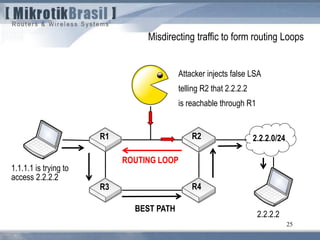
BEST PATH
2.2.2.0/24R1 R2
R3 R4
1.1.1.1 is trying to
access 2.2.2.2
Attacker injects false LSA
telling R2 that 2.2.2.2
is reachable through R1
ROUTING LOOP
2.2.2.2
Misdirecting traffic to form routing Loops
26
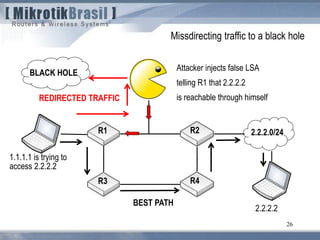
BEST PATH
2.2.2.0/24R1 R2
R3 R4
1.1.1.1 is trying to
access 2.2.2.2
Attacker injects false LSA
telling R1 that 2.2.2.2
is reachable through himselfREDIRECTED TRAFFIC
2.2.2.2
Missdirecting traffic to a black hole
BLACK HOLE
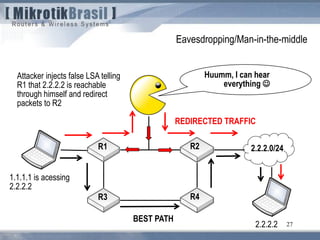
27
BEST PATH
2.2.2.0/24R1 R2
R3 R4
1.1.1.1 is acessing
2.2.2.2
Attacker injects false LSA telling
R1 that 2.2.2.2 is reachable
through himself and redirect
packets to R2
REDIRECTED TRAFFIC
2.2.2.2
Eavesdropping/Man-in-the-middle
Huumm, I can hear
everything 
28
Protecting OSPF
From the point of view of attacker’s location we can divide the possible attacks in;
External attacks
 Attacker is outside of the Autonomous System (AS) boundary
Internal attacks
 Attacker is inside the AS, in the same L2 network segment where OSPF is running
 Attacker is inside the AS, but not in the same L2 network segment.
Protecting OSPF
(from the perspective of attacker’s location)
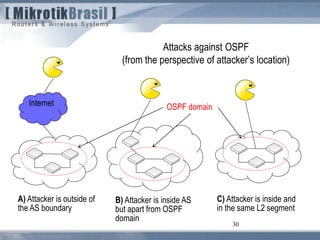
30
Attacks against OSPF
(from the perspective of attacker’s location)
Internet
A) Attacker is outside of
the AS boundary
B) Attacker is inside AS
but apart from OSPF
domain
C) Attacker is inside and
in the same L2 segment
OSPF domain
Attacks against OSPF
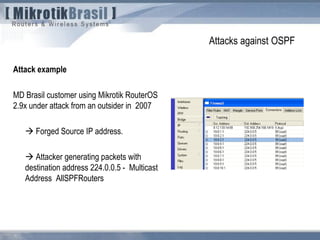
Attack example
MD Brasil customer using Mikrotik RouterOS
2.9x under attack from an outsider in 2007
 Forged Source IP address.
 Attacker generating packets with
destination address 224.0.0.5 - Multicast
Address AllSPFRouters
Attacks against OSPF
A) Attacker is outside of the AS boundary (1/2)
Question: will such attack work ??
On physical point-to-point networks and Broadcast networks the IP destination is
set to the Multicast address “AllSPFRouters” (224.0.0.5) .
On NBMA and all other network types (including virtual links), the majority of OSPF
packets are sent as unicasts, i.e., sent directly to the other end of the adjacency. In
this case, the IP destination is just the Neighbor IP address associated with the
other end of the adjacency (see RFC 2326, section 10).
So, the answer is YES, the attack could work from any point of the Internet !
Attacks against OSPF
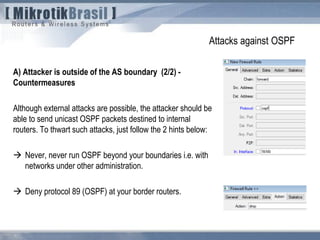
A) Attacker is outside of the AS boundary (2/2) -
Countermeasures
Although external attacks are possible, the attacker should be
able to send unicast OSPF packets destined to internal
routers. To thwart such attacks, just follow the 2 hints below:
 Never, never run OSPF beyond your boundaries i.e. with
networks under other administration.
 Deny protocol 89 (OSPF) at your border routers.
Attacks against OSPF
(from the perspective of attacker’s location)
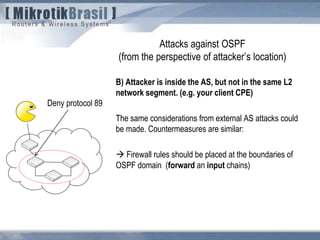
B) Attacker is inside the AS, but not in the same L2
network segment. (e.g. your client CPE)
The same considerations from external AS attacks could
be made. Countermeasures are similar:
 Firewall rules should be placed at the boundaries of
OSPF domain (forward an input chains)
Deny protocol 89
Attacks against OSPF
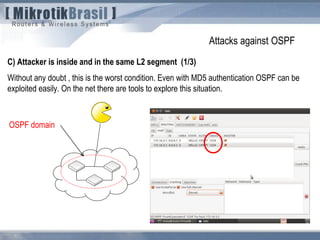
C) Attacker is inside and in the same L2 segment (1/3)
Without any doubt , this is the worst condition. Even with MD5 authentication OSPF can be
exploited easily. On the net there are tools to explore this situation.
OSPF domain
Attacks against OSPF
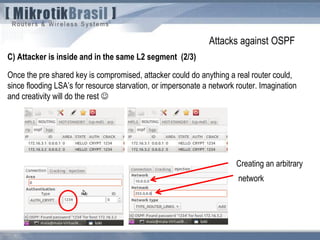
C) Attacker is inside and in the same L2 segment (2/3)
Once the pre shared key is compromised, attacker could do anything a real router could,
since flooding LSA’s for resource starvation, or impersonate a network router. Imagination
and creativity will do the rest 
Creating an arbitrary
network
Attacks against OSPF
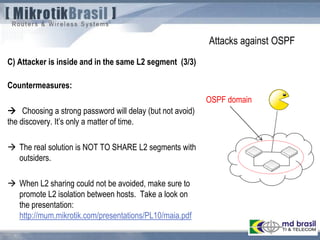
C) Attacker is inside and in the same L2 segment (3/3)
Countermeasures:
 Choosing a strong password will delay (but not avoid)
the discovery. It’s only a matter of time.
 The real solution is NOT TO SHARE L2 segments with
outsiders.
 When L2 sharing could not be avoided, make sure to
promote L2 isolation between hosts. Take a look on
the presentation:
http://mum.mikrotik.com/presentations/PL10/maia.pdf
OSPF domain
38
1) Dynamic routing essentials
2) OSPF
 OSPF Overview
 OSPF threats and countermeasures
3) BGP
 BGP Overview
 BGP threats and countermeasures
4) Conclusions.
Agenda
39
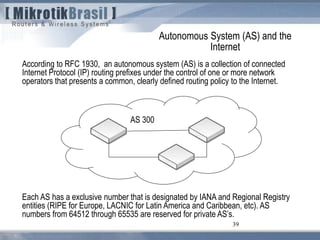
According to RFC 1930, an autonomous system (AS) is a collection of connected
Internet Protocol (IP) routing prefixes under the control of one or more network
operators that presents a common, clearly defined routing policy to the Internet.
Autonomous System (AS) and the
Internet
Each AS has a exclusive number that is designated by IANA and Regional Registry
entities (RIPE for Europe, LACNIC for Latin America and Caribbean, etc). AS
numbers from 64512 through 65535 are reserved for private AS’s.
AS 300
40
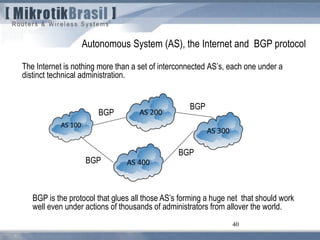
The Internet is nothing more than a set of interconnected AS’s, each one under a
distinct technical administration.
Autonomous System (AS), the Internet and BGP protocol
BGP is the protocol that glues all those AS’s forming a huge net that should work
well even under actions of thousands of administrators from allover the world.
BGP
BGP
BGP
BGP
41
BGP characteristics:
 BGP is a “distance vector” protocol .
 Current version is v4, according to RFC 1771.
 Network prefixes are announced with a list of the AS’s that are in the path to reach
such prefixes.
 Internal topology of the AS doesn’t matter, but only information on how to reach the
prefixes (AS path and next hop)
42
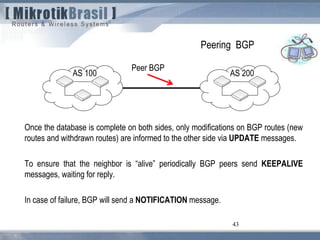
Peering BGP
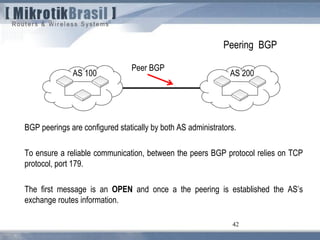
BGP peerings are configured statically by both AS administrators.
To ensure a reliable communication, between the peers BGP protocol relies on TCP
protocol, port 179.
The first message is an OPEN and once a the peering is established the AS’s
exchange routes information.
AS 100 AS 200
Peer BGP
43
Peering BGP
Once the database is complete on both sides, only modifications on BGP routes (new
routes and withdrawn routes) are informed to the other side via UPDATE messages.
To ensure that the neighbor is “alive” periodically BGP peers send KEEPALIVE
messages, waiting for reply.
In case of failure, BGP will send a NOTIFICATION message.
AS 100 AS 200
Peer BGP
44
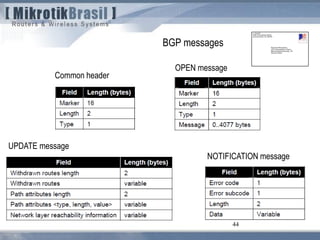
BGP messages
Common header
OPEN message
UPDATE message
NOTIFICATION message
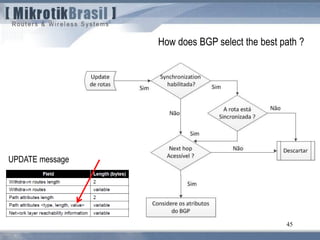
45
How does BGP select the best path ?
UPDATE message
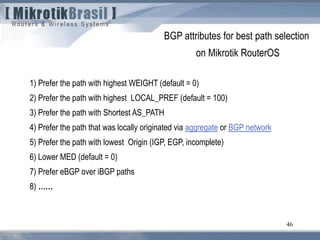
46
BGP attributes for best path selection
on Mikrotik RouterOS
1) Prefer the path with highest WEIGHT (default = 0)
2) Prefer the path with highest LOCAL_PREF (default = 100)
3) Prefer the path with Shortest AS_PATH
4) Prefer the path that was locally originated via aggregate or BGP network
5) Prefer the path with lowest Origin (IGP, EGP, incomplete)
6) Lower MED (default = 0)
7) Prefer eBGP over iBGP paths
8) ……
47
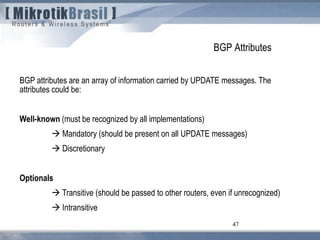
BGP Attributes
BGP attributes are an array of information carried by UPDATE messages. The
attributes could be:
Well-known (must be recognized by all implementations)
 Mandatory (should be present on all UPDATE messages)
 Discretionary
Optionals
 Transitive (should be passed to other routers, even if unrecognized)
 Intransitive
48
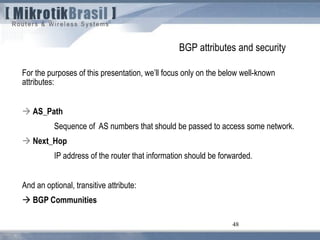
BGP attributes and security
For the purposes of this presentation, we’ll focus only on the below well-known
attributes:
 AS_Path
Sequence of AS numbers that should be passed to access some network.
 Next_Hop
IP address of the router that information should be forwarded.
And an optional, transitive attribute:
 BGP Communities
49
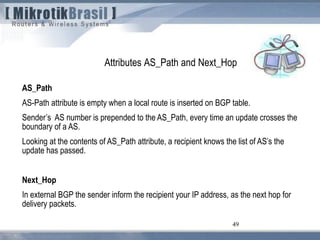
Attributes AS_Path and Next_Hop
AS_Path
AS-Path attribute is empty when a local route is inserted on BGP table.
Sender’s AS number is prepended to the AS_Path, every time an update crosses the
boundary of a AS.
Looking at the contents of AS_Path attribute, a recipient knows the list of AS’s the
update has passed.
Next_Hop
In external BGP the sender inform the recipient your IP address, as the next hop for
delivery packets.
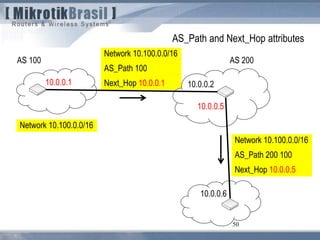
50
AS_Path and Next_Hop attributes
AS 100
Network 10.100.0.0/16
AS_Path 100
Next_Hop 10.0.0.110.0.0.1
AS 200
10.0.0.2
10.0.0.5
10.0.0.6
Network 10.100.0.0/16
AS_Path 200 100
Next_Hop 10.0.0.5
AS 200AS 100
51
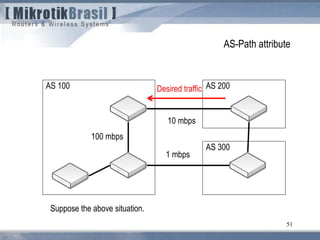
AS-Path attribute
Suppose the above situation.
AS 300
1 mbps
10 mbps
100 mbps
Desired traffic
AS 200AS 100
Network
10.0.0.0/8
52
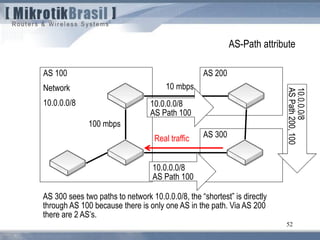
AS-Path attribute
AS 300 sees two paths to network 10.0.0.0/8, the “shortest” is directly
through AS 100 because there is only one AS in the path. Via AS 200
there are 2 AS’s.
AS 300
10 mbps
100 mbps
10.0.0.0/8
AS Path 100
10.0.0.0/8
AS Path 100
Real traffic
AS 200AS 100
Network
10.0.0.0/8
53
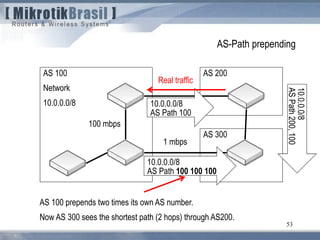
AS-Path prepending
AS 100 prepends two times its own AS number.
Now AS 300 sees the shortest path (2 hops) through AS200.
AS 300
1 mbps
100 mbps
10.0.0.0/8
AS Path 100
10.0.0.0/8
AS Path 100 100 100
Real traffic
54
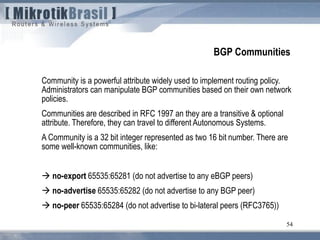
BGP Communities
Community is a powerful attribute widely used to implement routing policy.
Administrators can manipulate BGP communities based on their own network
policies.
Communities are described in RFC 1997 an they are a transitive & optional
attribute. Therefore, they can travel to different Autonomous Systems.
A Community is a 32 bit integer represented as two 16 bit number. There are
some well-known communities, like:
 no-export 65535:65281 (do not advertise to any eBGP peers)
 no-advertise 65535:65282 (do not advertise to any BGP peer)
 no-peer 65535:65284 (do not advertise to bi-lateral peers (RFC3765))
55
BGP Communities
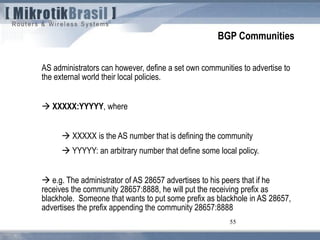
AS administrators can however, define a set own communities to advertise to
the external world their local policies.
 XXXXX:YYYYY, where
 XXXXX is the AS number that is defining the community
 YYYYY: an arbitrary number that define some local policy.
 e.g. The administrator of AS 28657 advertises to his peers that if he
receives the community 28657:8888, he will put the receiving prefix as
blackhole. Someone that wants to put some prefix as blackhole in AS 28657,
advertises the prefix appending the community 28657:8888
56
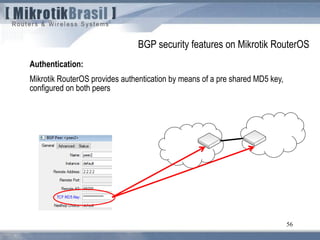
Authentication:
Mikrotik RouterOS provides authentication by means of a pre shared MD5 key,
configured on both peers
BGP security features on Mikrotik RouterOS
57
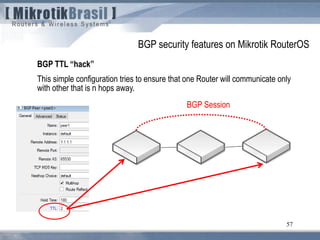
BGP TTL “hack”
This simple configuration tries to ensure that one Router will communicate only
with other that is n hops away.
BGP security features on Mikrotik RouterOS
BGP Session
58
BGP TTL “hack”
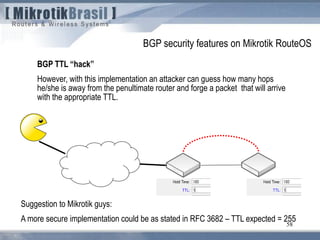
However, with this implementation an attacker can guess how many hops
he/she is away from the penultimate router and forge a packet that will arrive
with the appropriate TTL.
BGP security features on Mikrotik RouteOS
Suggestion to Mikrotik guys:
A more secure implementation could be as stated in RFC 3682 – TTL expected = 255
59
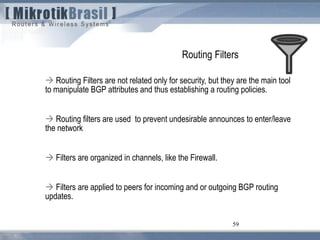
Routing Filters
 Routing Filters are not related only for security, but they are the main tool
to manipulate BGP attributes and thus establishing a routing policies.
 Routing filters are used to prevent undesirable announces to enter/leave
the network
 Filters are organized in channels, like the Firewall.
 Filters are applied to peers for incoming and or outgoing BGP routing
updates.
60
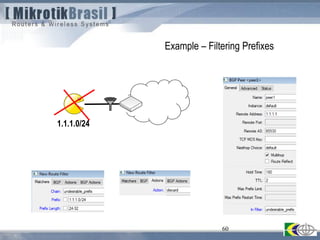
Example – Filtering Prefixes
1.1.1.0/24
61
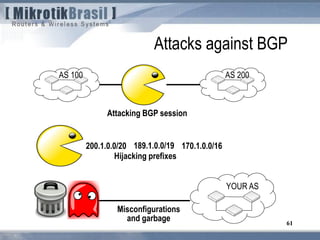
Attacks against BGP
AS 100 AS 200
200.1.0.0/20 170.1.0.0/16189.1.0.0/19
Attacking BGP session
Hijacking prefixes
YOUR AS
Misconfigurations
and garbage
62
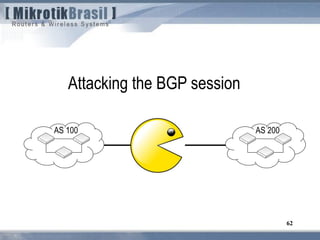
Attacking the BGP session
AS 100 AS 200
63
Attacks against BGP
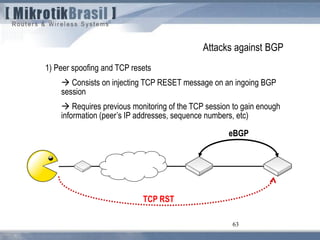
1) Peer spoofing and TCP resets
 Consists on injecting TCP RESET message on an ingoing BGP
session
 Requires previous monitoring of the TCP session to gain enough
information (peer’s IP addresses, sequence numbers, etc)
eBGP
TCP RST
64
Attacks against BGP
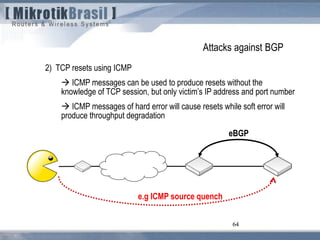
2) TCP resets using ICMP
 ICMP messages can be used to produce resets without the
knowledge of TCP session, but only victim’s IP address and port number
 ICMP messages of hard error will cause resets while soft error will
produce throughput degradation
64
eBGP
e.g ICMP source quench
65
Attacks against BGP
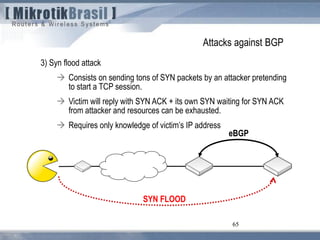
3) Syn flood attack
 Consists on sending tons of SYN packets by an attacker pretending
to start a TCP session.
 Victim will reply with SYN ACK + its own SYN waiting for SYN ACK
from attacker and resources can be exhausted.
 Requires only knowledge of victim’s IP address
65
eBGP
SYN FLOOD
66
Attacks against BGP
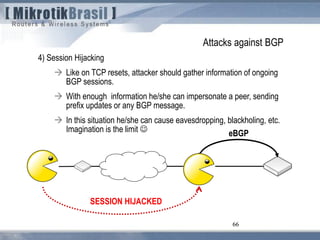
4) Session Hijacking
 Like on TCP resets, attacker should gather information of ongoing
BGP sessions.
 With enough information he/she can impersonate a peer, sending
prefix updates or any BGP message.
 In this situation he/she can cause eavesdropping, blackholing, etc.
Imagination is the limit 
66
eBGP
SESSION HIJACKED
67
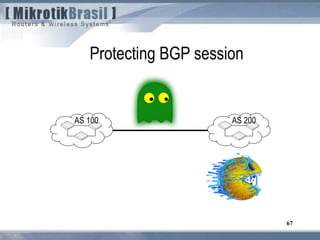
Protecting BGP session
AS 100 AS 200
68
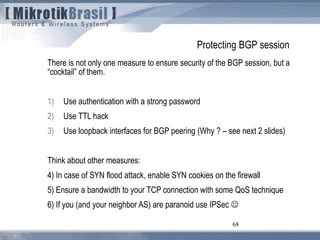
Protecting BGP session
There is not only one measure to ensure security of the BGP session, but a
“cocktail” of them.
1) Use authentication with a strong password
2) Use TTL hack
3) Use loopback interfaces for BGP peering (Why ? – see next 2 slides)
Think about other measures:
4) In case of SYN flood attack, enable SYN cookies on the firewall
5) Ensure a bandwidth to your TCP connection with some QoS technique
6) If you (and your neighbor AS) are paranoid use IPSec 
69
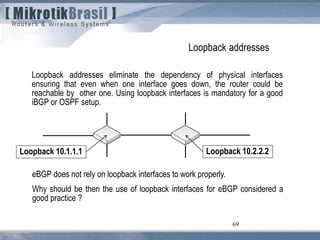
Loopback addresses
Loopback addresses eliminate the dependency of physical interfaces
ensuring that even when one interface goes down, the router could be
reachable by other one. Using loopback interfaces is mandatory for a good
iBGP or OSPF setup.
eBGP does not rely on loopback interfaces to work properly.
Why should be then the use of loopback interfaces for eBGP considered a
good practice ?
Loopback 10.1.1.1 Loopback 10.2.2.2
70
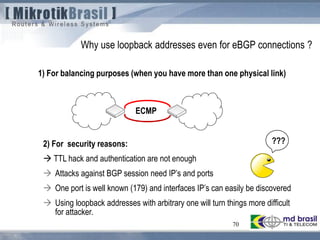
Why use loopback addresses even for eBGP connections ?
1) For balancing purposes (when you have more than one physical link)
2) For security reasons:
 TTL hack and authentication are not enough
 Attacks against BGP session need IP’s and ports
 One port is well known (179) and interfaces IP’s can easily be discovered
 Using loopback addresses with arbitrary one will turn things more difficult
for attacker.
ECMP
???
71
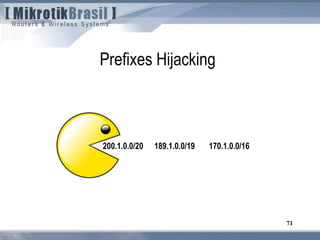
Prefixes Hijacking
200.1.0.0/20 170.1.0.0/16189.1.0.0/19
72
Attacks against BGP
Unallocated Prefix announcements
 Anyone that owns an AS (or has gained control over one by
compromising a BGP router), can announce any prefix !
 Yes, in this moment someone could be announcing your IP blocks
and there is nothing you can do to avoid this.
 Announcing the same prefix will lead to a partial route hijacking
73
Attacks against BGP
Prefix hijacking by route de-aggregation
 To completely hijack the prefix, attackers will announce more specific
prefixes (longer bitmasks)
 More specific routes mean optimal paths and will be chosen. BGP
will widespread them to another peers, allover the Internet.
This issue is not new .
 1997 – The first public problem officially reported
 2008 - YOUTUBE x Pakistan Telecom
74
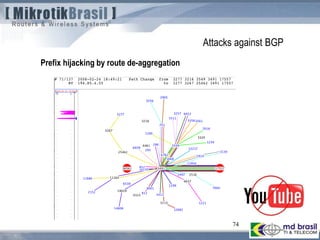
Attacks against BGP
Prefix hijacking by route de-aggregation
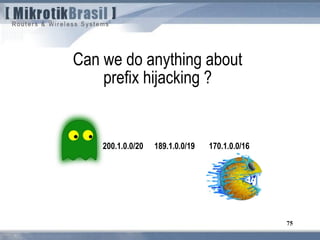
75
Can we do anything about
prefix hijacking ?
200.1.0.0/20 170.1.0.0/16189.1.0.0/19
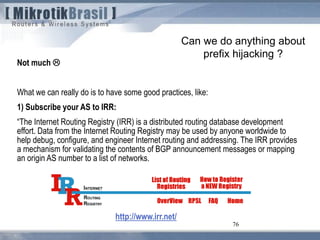
76
Can we do anything about
prefix hijacking ?
Not much 
What we can really do is to have some good practices, like:
1) Subscribe your AS to IRR:
“The Internet Routing Registry (IRR) is a distributed routing database development
effort. Data from the Internet Routing Registry may be used by anyone worldwide to
help debug, configure, and engineer Internet routing and addressing. The IRR provides
a mechanism for validating the contents of BGP announcement messages or mapping
an origin AS number to a list of networks.
http://www.irr.net/
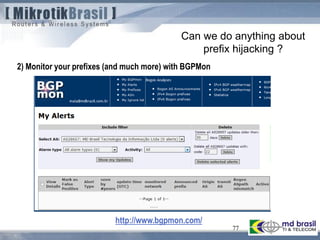
77
Can we do anything about
prefix hijacking ?
2) Monitor your prefixes (and much more) with BGPMon
http://www.bgpmon.com/
78
Misconfigurations from other
administrators and garbage in general
YOUR AS
79
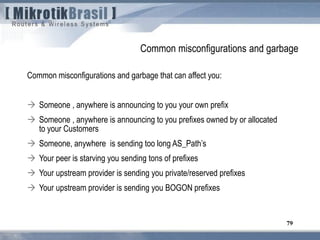
Common misconfigurations and garbage
Common misconfigurations and garbage that can affect you:
 Someone , anywhere is announcing to you your own prefix
 Someone , anywhere is announcing to you prefixes owned by or allocated
to your Customers
 Someone, anywhere is sending too long AS_Path’s
 Your peer is starving you sending tons of prefixes
 Your upstream provider is sending you private/reserved prefixes
 Your upstream provider is sending you BOGON prefixes
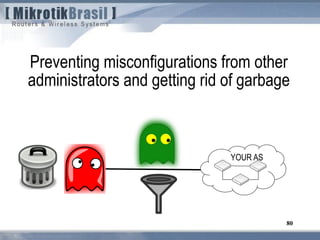
80
Preventing misconfigurations from other
administrators and getting rid of garbage
YOUR AS
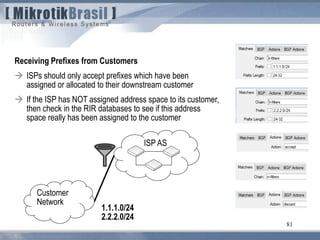
81
Receiving Prefixes from Customers
 ISPs should only accept prefixes which have been
assigned or allocated to their downstream customer
 If the ISP has NOT assigned address space to its customer,
then check in the RIR databases to see if this address
space really has been assigned to the customer
ISP AS
Customer
Network
1.1.1.0/24
2.2.2.0/24
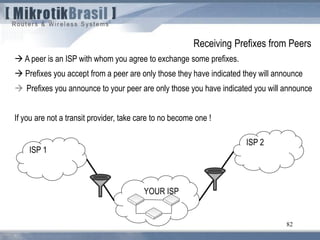
82
 A peer is an ISP with whom you agree to exchange some prefixes.
 Prefixes you accept from a peer are only those they have indicated they will announce
 Prefixes you announce to your peer are only those you have indicated you will announce
If you are not a transit provider, take care to no become one !
YOUR ISP
ISP 1
ISP 2
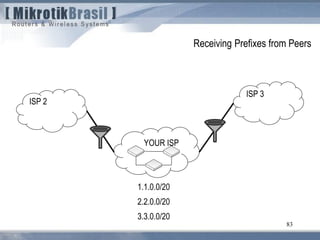
Receiving Prefixes from Peers
83
YOUR ISP
ISP 2
ISP 3
Receiving Prefixes from Peers
1.1.0.0/20
2.2.0.0/20
3.3.0.0/20
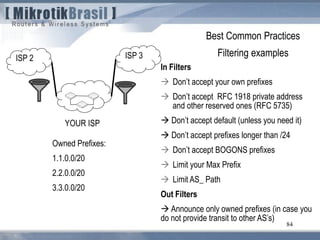
84
YOUR ISP
ISP 2 ISP 3
Best Common Practices
Filtering examples
Owned Prefixes:
1.1.0.0/20
2.2.0.0/20
3.3.0.0/20
In Filters
 Don’t accept your own prefixes
 Don’t accept RFC 1918 private address
and other reserved ones (RFC 5735)
 Don’t accept default (unless you need it)
 Don’t accept prefixes longer than /24
 Don’t accept BOGONS prefixes
 Limit your Max Prefix
 Limit AS_ Path
Out Filters
 Announce only owned prefixes (in case you
do not provide transit to other AS’s)
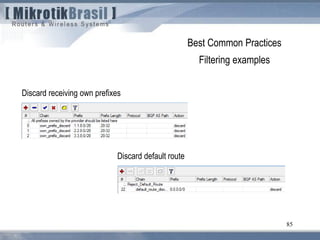
85
Best Common Practices
Filtering examples
Discard receiving own prefixes
Discard default route
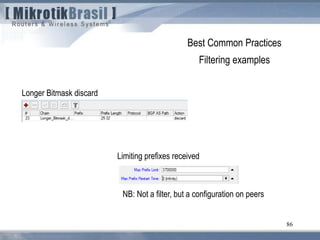
86
Best Common Practices
Filtering examples
Longer Bitmask discard
Limiting prefixes received
NB: Not a filter, but a configuration on peers
87
Best Common Practices
Filtering examples
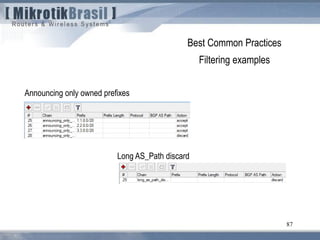
Announcing only owned prefixes
Long AS_Path discard
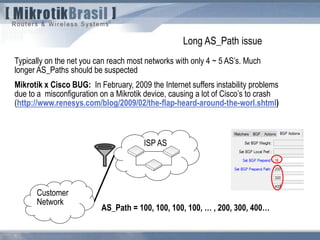
Typically on the net you can reach most networks with only 4 ~ 5 AS’s. Much
longer AS_Paths should be suspected
Mikrotik x Cisco BUG: In February, 2009 the Internet suffers instability problems
due to a misconfiguration on a Mikrotik device, causing a lot of Cisco’s to crash
(http://www.renesys.com/blog/2009/02/the-flap-heard-around-the-worl.shtml)
ISP AS
Customer
Network
AS_Path = 100, 100, 100, 100, … , 200, 300, 400…
Long AS_Path issue
89
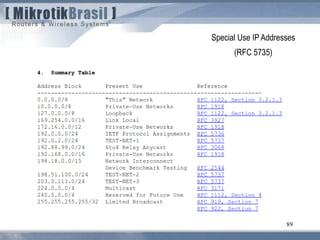
Special Use IP Addresses
(RFC 5735)
90
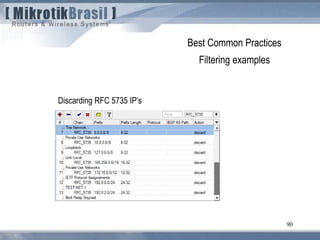
Best Common Practices
Filtering examples
Discarding RFC 5735 IP’s
91
Best Common Practices
Filtering examples
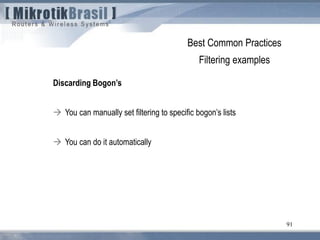
Discarding Bogon’s
 You can manually set filtering to specific bogon’s lists
 You can do it automatically
92
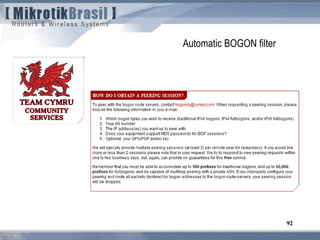
Automatic BOGON filter
93
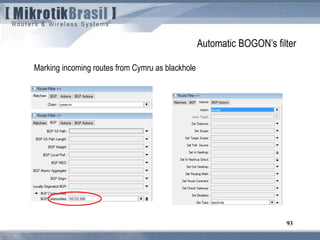
Automatic BOGON’s filter
Marking incoming routes from Cymru as blackhole
94
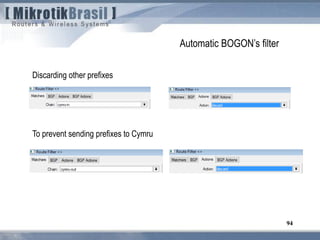
Automatic BOGON’s filter
To prevent sending prefixes to Cymru
Discarding other prefixes
95
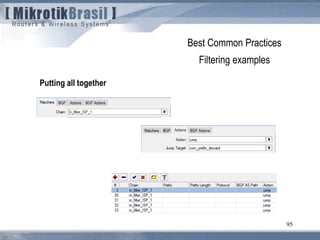
Best Common Practices
Filtering examples
Putting all together
96
1) Dynamic routing essentials
2) OSPF
 OSPF Overview
 OSPF threats and countermeasures
3) BGP
 BGP Overview
 BGP threats and countermeasures
4) Conclusions.
Agenda
97
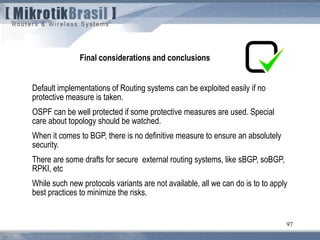
Final considerations and conclusions
Default implementations of Routing systems can be exploited easily if no
protective measure is taken.
OSPF can be well protected if some protective measures are used. Special
care about topology should be watched.
When it comes to BGP, there is no definitive measure to ensure an absolutely
security.
There are some drafts for secure external routing systems, like sBGP, soBGP,
RPKI, etc
While such new protocols variants are not available, all we can do is to to apply
best practices to minimize the risks.
98
References
A Survey of BGP Security - Kevin Butler, Toni Farlley, Patrick McDaniel, Jennifer
Rexford
Beware of BGP Attacks (Nordstrom, et. al.)
BGP Security Vulnerabilities Analysis (draft-ietf-idr-bgp-vuln-01.txt, Murphy)
Best Practices for securing Routing Protocols – Cisco
Border Gateway Protocol Security - Recommendations of the National Institute of
Standards and Technology NSIT – (Rick Kuhn, Kotikalapudi Sriram, Doug Montgomery)
BGP Techniques for Internet Service Providers – Cisco – (Philip Smith)
Burning Asgard – An Introduction to the Tool Loki (Rene Graf, Daniel Mende,
Enno Rey)
Mikrotik Wiki
Extra Slides
100
Routing Filters example
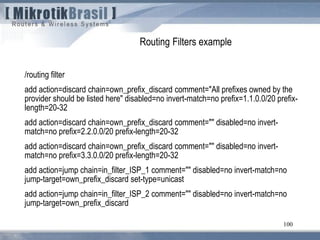
/routing filter
add action=discard chain=own_prefix_discard comment="All prefixes owned by the
provider should be listed here" disabled=no invert-match=no prefix=1.1.0.0/20 prefix-
length=20-32
add action=discard chain=own_prefix_discard comment="" disabled=no invert-
match=no prefix=2.2.0.0/20 prefix-length=20-32
add action=discard chain=own_prefix_discard comment="" disabled=no invert-
match=no prefix=3.3.0.0/20 prefix-length=20-32
add action=jump chain=in_filter_ISP_1 comment="" disabled=no invert-match=no
jump-target=own_prefix_discard set-type=unicast
add action=jump chain=in_filter_ISP_2 comment="" disabled=no invert-match=no
jump-target=own_prefix_discard
101
Routing Filters example
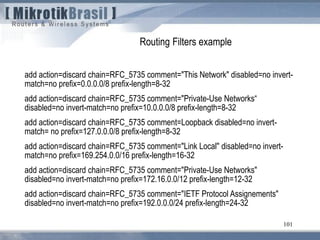
add action=discard chain=RFC_5735 comment="This Network" disabled=no invert-
match=no prefix=0.0.0.0/8 prefix-length=8-32
add action=discard chain=RFC_5735 comment="Private-Use Networks“
disabled=no invert-match=no prefix=10.0.0.0/8 prefix-length=8-32
add action=discard chain=RFC_5735 comment=Loopback disabled=no invert-
match= no prefix=127.0.0.0/8 prefix-length=8-32
add action=discard chain=RFC_5735 comment="Link Local" disabled=no invert-
match=no prefix=169.254.0.0/16 prefix-length=16-32
add action=discard chain=RFC_5735 comment="Private-Use Networks"
disabled=no invert-match=no prefix=172.16.0.0/12 prefix-length=12-32
add action=discard chain=RFC_5735 comment="IETF Protocol Assignements"
disabled=no invert-match=no prefix=192.0.0.0/24 prefix-length=24-32
102
Routing Filters example
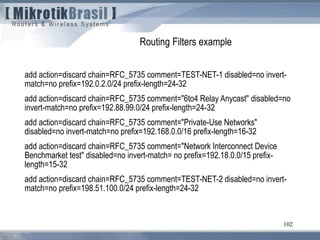
add action=discard chain=RFC_5735 comment=TEST-NET-1 disabled=no invert-
match=no prefix=192.0.2.0/24 prefix-length=24-32
add action=discard chain=RFC_5735 comment="6to4 Relay Anycast" disabled=no
invert-match=no prefix=192.88.99.0/24 prefix-length=24-32
add action=discard chain=RFC_5735 comment="Private-Use Networks"
disabled=no invert-match=no prefix=192.168.0.0/16 prefix-length=16-32
add action=discard chain=RFC_5735 comment="Network Interconnect Device
Benchmarket test" disabled=no invert-match= no prefix=192.18.0.0/15 prefix-
length=15-32
add action=discard chain=RFC_5735 comment=TEST-NET-2 disabled=no invert-
match=no prefix=198.51.100.0/24 prefix-length=24-32
103
Routing Filters example
add action=discard chain=RFC_5735 comment=TEST-NET-3 disabled=no invert-
match=no prefix=203.0.113.0/24 prefix-length=24-32
add action=discard chain=RFC_5735 comment=Multicast disabled=no invert-
match=
no prefix=224.0.0.0/4 prefix-length=4-32
add action=discard chain=RFC_5735 comment="Reserved for future use"
disabled=
no invert-match=no prefix=240.0.0.0/4 prefix-length=4-32
add action=discard chain=RFC_5735 comment="Limited Broadcast" disabled=no
104
Routing Filters example
add action=discard chain=default_route_discard comment=Reject_Default_Route
disabled=no invert-match=no prefix=0.0.0.0/0
add action=discard chain=Longer_Bitmask_discard comment="" disabled=no invert-
match=no prefix-length=25-32
add action=passthrough bgp-as-path-length=22 chain="" comment="" disabled=no
invert-match=no
add action=accept chain=announcing_only_owned_prefixes comment="“
disabled=no invert-match=no prefix=1.1.0.0/20
add action=accept chain=announcing_only_owned_prefixes comment=""
disabled=no invert-match=no prefix=2.2.0.0/20
add action=accept chain=announcing_only_owned_prefixes comment=""
disabled=no invert-match=no prefix=3.3.0.0/20
add action=discard chain=announcing_only_owned_prefixes comment="" disabled=
no invert-match=no
105
OSPF built in security features
OSPF “Fight back” feature
“Every LSA that is circulating in the OSPF network with wrong information will be
corrected by its owner.”
Common perception could suggest that:
 Fight Back corrects the damage of most attacks
 Many theoretical attacks are not worth the effort just to cause a brief
topology change
Is such perception absolutely true ?
OSPF attacks
Forcing topology changes 2/2
Even, having the authentication key in hands, won’t be the attack frustrated by Fight
Back feature ?
 When a legitimate owner receives a malicious copy of its own LSAs:
 Since the malicious LSA has higher sequence number, and a copy of the LSA is
already present in the LSDB and this copy was not received by flooding but installed by
the router itself,
 Then Flood the malicious LSA and AFTER check ownership.
After checking, router will try to update the malicious LSA
 RFC 2328 specifies a MinLSInterval of 5 seconds which routers cannot inject two
same LSA’s, but will flood immediately any LSA received.
So, If the malicious LSAs are injected with a rate higher than MinLSInterval, fight back
won’t work !
107
From RFC 3682 (suggests a TTL “hack” of 255, instead of 1)
5.1. TTL (Hop Limit) Spoofing
“The approach described here is based on the observation that a TTL (or Hop Limit)
value of 255 is non-trivial to spoof, since as the packet passes through routers
Towards the destination, the TTL is decremented by one. As a result, when a router
receives a packet, it may not be able to determine if the packet's IP address is valid,
but it can determine how many router hops away it is (again, assuming none of the
routers in the path are compromised in such a way that they would reset the packet's
TTL). Note, however, that while engineering a packet's TTL such that it has a
particular value when sourced from an arbitrary location is difficult (but not mpossible),
engineering a TTL value of 255 from non-directly connected locations is not possible
(again, assuming none of the directly connected neighbors are compromised, the
packet hasn't been tunneled to the decapsulator, and the intervening routers are
operating in accordance with RFC 791 [RFC791]).
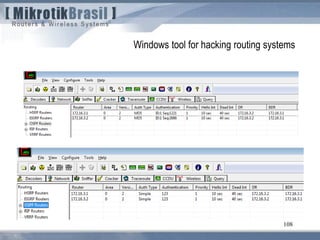
Windows tool for hacking routing systems
108
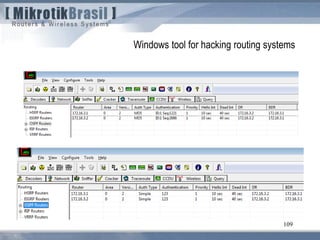
Windows tool for hacking routing systems
109
110
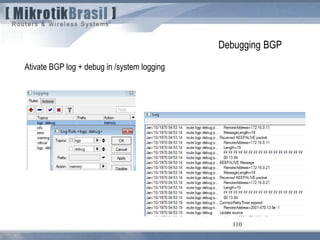
Debugging BGP
Ativate BGP log + debug in /system logging
111
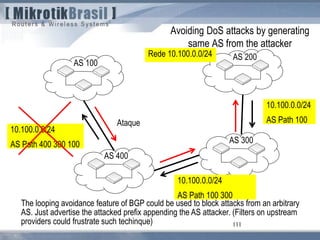
Avoiding DoS attacks by generating
same AS from the attacker
AS 100
AS 200
AS 300
AS 400
Rede 10.100.0.0/24
10.100.0.0/24
AS Path 400 300 100
10.100.0.0/24
AS Path 100
10.100.0.0/24
AS Path 100 300
Ataque
The looping avoidance feature of BGP could be used to block attacks from an arbitrary
AS. Just advertise the attacked prefix appending the AS attacker. (Filters on upstream
providers could frustrate such techinque)
112
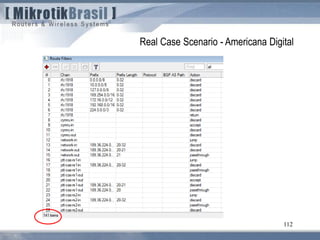
Real Case Scenario - Americana Digital
113
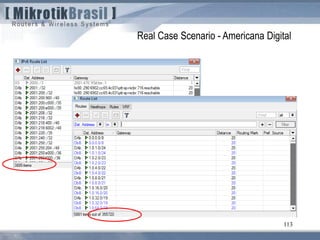
Real Case Scenario - Americana Digital
114
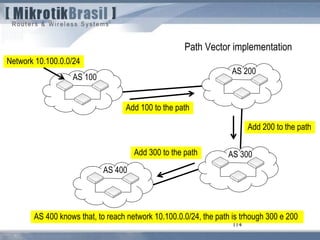
Path Vector implementation
AS 100
AS 200
AS 300
AS 400
Network 10.100.0.0/24
Add 100 to the path
Add 200 to the path
Add 300 to the path
AS 400 knows that, to reach network 10.100.0.0/24, the path is trhough 300 e 200
115
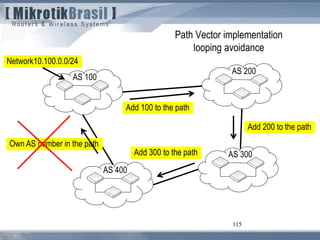
Path Vector implementation
looping avoidance
AS 100
AS 200
AS 300
AS 400
Network10.100.0.0/24
Add 100 to the path
Add 200 to the path
Add 300 to the path
Own AS number in the path
116
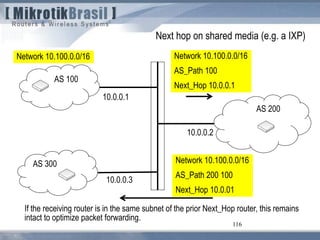
Next hop on shared media (e.g. a IXP)
AS 100
Network 10.100.0.0/16 Network 10.100.0.0/16
AS_Path 100
Next_Hop 10.0.0.1
10.0.0.1
AS 200
10.0.0.2
10.0.0.3
Network 10.100.0.0/16
AS_Path 200 100
Next_Hop 10.0.01
AS 300
If the receiving router is in the same subnet of the prior Next_Hop router, this remains
intact to optimize packet forwarding.
117
Questions ?
Wardner Maia – maia@mikrotikbrasil.com.br
118
Köszönöm
Egészségére !
Wardner Maia – maia@mikrotikbrasil.com.br

Routing security - Budapest 2011

  • 1.
    Routing Security Hungary MUM– Budapest – March, 2011 Eng. Wardner Maia Brazil
  • 2.
    2 Name: Wardner Maia Country:Brazil Electronic/Telecommunications Engineer Internet Service Provider since 1995 Training Courses on Wireless since 2002 Mikrotik Certified Trainer since, 2007 Technical Director of company MD Brasil IT & Telecom Member of board directors of LACNIC ( http://www.lacnic.org ) Introduction
  • 3.
    3 MD Brasil InformationTechnology and Telecommunications  ISP (Access and Hosting Services)  Authorized Telecommunications operator in Brazil.  Mikrotik Distributor and Training Partner.  Consulting services www.mdbrasil.com.br / www.mikrotikbrasil.com.br Introduction
  • 4.
    4 Target Audience: ISP’s andWISP’s running or planning to run OSPF and BGP in their networks. Objectives: To understand conceptually the existing threats related to dynamic routing protocols caused by  Intentional attacks  self misconfigurations  leak of measures to prevent misconfigurations from neighbors AS’s. To establish a set of Best Common Practices in Mikrotik RouterOS to avoid or minimize the above risks. Target audience and Objectives
  • 5.
    5  The widelyused routing protocols were created in early days of the Internet when security risks were not intense. .  BGP, the protocol that glues together the largest and most complex network ever created, was born without any security concern.  The same regarding to OSPF, nowadays the most popular dynamic Internal Gateway Protocol  There are tons of known attacks against dynamic routing that can compromise, confidentiality, integrity and availability on networks of any size. Therefore, the whole Internet can be affected. Why Routing Security ?
  • 6.
    6  Security ina wide meaning is not only related to intentional attacks but to incidents caused by misconfigurations and operating systems bugs.  In recent past the Internet suffered regional and global problems caused by non- intentional administrators mistakes. The most notable: Pakistan Telecom x Youtube Mikrotik x Cisco bug (long as path bug)  In the past 2 years we’ve seen several small ISP’s growing up, getting their AS’s and starting operating their own OSPF/BGP Networks.  Are those new players well prepared to face the issues related to dynamic routing weakness ??? Why Routing Security ?
  • 7.
    7 Security of therouting protocol itself  “Semantics” that transport the routing information  Algorithms used to select the best paths Security of Topology information  Topology of the network carried by the routing protocol Security of the involved Devices  Routers than run the routing protocol (We will not cover devices protection in this presentation) What is routing security and what we will be discussing about ?
  • 8.
    8 1) Dynamic routingessentials 2) OSPF  OSPF Overview  OSPF threats and countermeasures 3) BGP  BGP Overview  BGP threats and countermeasures 4) Conclusions. Agenda
  • 9.
    9 1) Dynamic routingessentials 2) OSPF  OSPF Overview  OSPF threats and countermeasures 3) BGP  BGP Overview  BGP threats and countermeasures 4) Conclusions. Agenda
  • 10.
    10 A Router, conceptually RoutingInformation Base (RIB) Route selection Forwarding Information Base(FIB) Packet Forwarding Incoming packets Outgoing packets Route exchanges with neighbor nodes Route exchanges with neighbor nodes Route updates Destination address lookup
  • 11.
  • 12.
    12 1) Dynamic routingessentials 2) OSPF  OSPF Overview  OSPF threats and countermeasures 3) BGP  BGP Overview  BGP threats and countermeasures 4) Conclusions. Agenda
  • 13.
    13 OSPF OSPF (Open ShortestPath First) is a “link-state” type protocol. OSPF uses the Dijkstra algorithm to calculate the shortest path to a specific destination. Characteristics of a link-state routing protocol:  Respond quickly to network changes;  Send triggered updates when a network change occurs;  Send periodic updates, known as link-state refresh, at longer intervals.
  • 14.
    14 How OSPF works Hellopackets discovers neighbors and build adjacencies between them A Link State Database (LSDB) is constructed Dijkstra algorithm runs An SPF Tree is build LSA Messages The Forwarding table is formed
  • 15.
    SPF Calculation 15 Assumes thatall links are ethernet type with OSPF cost = 10
  • 16.
     LSA –Link State Advertise  LSU – Link State Update  LSR – Link State Request  LSAck – Link State Acknowledgement 16 OSPF Link State messages
  • 17.
    When topology changes: LSU messages are flooded  Databases are updated  SPF (Dijkstra algorithm) runs again  New Forwarding tables are generated. 17 What about topology changes ?
  • 18.
  • 19.
    19 OSPF security Authentication:  Bydefault, OSPF has no authentication  Two authentication methods based on “pre shared” keys are possible:  Simple (password is transmitted in plain text)  MD5 (Message Digest authentication – MD5 hash)
  • 20.
  • 21.
    Attacks against OSPF Basically,attacks against OSPF consist on forging Hello, LSA and LSU messages on behalf of authorized hosts, causing:  Denial of service and / or  Topology changes Topology changes, leads to other threats like  Eavesdropping  Man-in-the-middle attack
  • 22.
    22  “Phantom LSAs”are Router/Network LSAs sent on behalf of non-existing OSPF peers. (no need to know the Authentication key)  These entries are ignored by the Shortest Path First (SPF) algorithm (do not produce topology changes)  “Phantom LSAs” are entered in the Link State Database and each entry is kept until “MaxAge” expires Starvation attacks will work regardless encryption OSPF Resource Starvation Attacks 1/2
  • 23.
    23 Memory Impact  BogusLSA's with an arbitrary source take up space in the topology table until the LSA ages out CPU impact  LSA's with bogus MD5 passwords invoke the MD5 function Bandwidth impact  Bogus LSA's and the associated legitimate response traffic could be disruptively high in large, densely populated areas.  Bogus link state request packets can saturate a link with requests for nonexistent networks. OSPF Resource Starvation Attacks 2/2
  • 24.
    OSPF attacks Forcing topologychanges 1/2 An attacker can force topology changes by introducing false LSA Information Pre-condition:  absence of encryption.  compromised pre shared key. Impacts of Topology Changes  Allow Eavesdropping  Starve/Overload a network Unstable topology (loops, route-flapping)
  • 25.
    25 BEST PATH 2.2.2.0/24R1 R2 R3R4 1.1.1.1 is trying to access 2.2.2.2 Attacker injects false LSA telling R2 that 2.2.2.2 is reachable through R1 ROUTING LOOP 2.2.2.2 Misdirecting traffic to form routing Loops
  • 26.
    26 BEST PATH 2.2.2.0/24R1 R2 R3R4 1.1.1.1 is trying to access 2.2.2.2 Attacker injects false LSA telling R1 that 2.2.2.2 is reachable through himselfREDIRECTED TRAFFIC 2.2.2.2 Missdirecting traffic to a black hole BLACK HOLE
  • 27.
    27 BEST PATH 2.2.2.0/24R1 R2 R3R4 1.1.1.1 is acessing 2.2.2.2 Attacker injects false LSA telling R1 that 2.2.2.2 is reachable through himself and redirect packets to R2 REDIRECTED TRAFFIC 2.2.2.2 Eavesdropping/Man-in-the-middle Huumm, I can hear everything 
  • 28.
  • 29.
    From the pointof view of attacker’s location we can divide the possible attacks in; External attacks  Attacker is outside of the Autonomous System (AS) boundary Internal attacks  Attacker is inside the AS, in the same L2 network segment where OSPF is running  Attacker is inside the AS, but not in the same L2 network segment. Protecting OSPF (from the perspective of attacker’s location)
  • 30.
    30 Attacks against OSPF (fromthe perspective of attacker’s location) Internet A) Attacker is outside of the AS boundary B) Attacker is inside AS but apart from OSPF domain C) Attacker is inside and in the same L2 segment OSPF domain
  • 31.
    Attacks against OSPF Attackexample MD Brasil customer using Mikrotik RouterOS 2.9x under attack from an outsider in 2007  Forged Source IP address.  Attacker generating packets with destination address 224.0.0.5 - Multicast Address AllSPFRouters
  • 32.
    Attacks against OSPF A)Attacker is outside of the AS boundary (1/2) Question: will such attack work ?? On physical point-to-point networks and Broadcast networks the IP destination is set to the Multicast address “AllSPFRouters” (224.0.0.5) . On NBMA and all other network types (including virtual links), the majority of OSPF packets are sent as unicasts, i.e., sent directly to the other end of the adjacency. In this case, the IP destination is just the Neighbor IP address associated with the other end of the adjacency (see RFC 2326, section 10). So, the answer is YES, the attack could work from any point of the Internet !
  • 33.
    Attacks against OSPF A)Attacker is outside of the AS boundary (2/2) - Countermeasures Although external attacks are possible, the attacker should be able to send unicast OSPF packets destined to internal routers. To thwart such attacks, just follow the 2 hints below:  Never, never run OSPF beyond your boundaries i.e. with networks under other administration.  Deny protocol 89 (OSPF) at your border routers.
  • 34.
    Attacks against OSPF (fromthe perspective of attacker’s location) B) Attacker is inside the AS, but not in the same L2 network segment. (e.g. your client CPE) The same considerations from external AS attacks could be made. Countermeasures are similar:  Firewall rules should be placed at the boundaries of OSPF domain (forward an input chains) Deny protocol 89
  • 35.
    Attacks against OSPF C)Attacker is inside and in the same L2 segment (1/3) Without any doubt , this is the worst condition. Even with MD5 authentication OSPF can be exploited easily. On the net there are tools to explore this situation. OSPF domain
  • 36.
    Attacks against OSPF C)Attacker is inside and in the same L2 segment (2/3) Once the pre shared key is compromised, attacker could do anything a real router could, since flooding LSA’s for resource starvation, or impersonate a network router. Imagination and creativity will do the rest  Creating an arbitrary network
  • 37.
    Attacks against OSPF C)Attacker is inside and in the same L2 segment (3/3) Countermeasures:  Choosing a strong password will delay (but not avoid) the discovery. It’s only a matter of time.  The real solution is NOT TO SHARE L2 segments with outsiders.  When L2 sharing could not be avoided, make sure to promote L2 isolation between hosts. Take a look on the presentation: http://mum.mikrotik.com/presentations/PL10/maia.pdf OSPF domain
  • 38.
    38 1) Dynamic routingessentials 2) OSPF  OSPF Overview  OSPF threats and countermeasures 3) BGP  BGP Overview  BGP threats and countermeasures 4) Conclusions. Agenda
  • 39.
    39 According to RFC1930, an autonomous system (AS) is a collection of connected Internet Protocol (IP) routing prefixes under the control of one or more network operators that presents a common, clearly defined routing policy to the Internet. Autonomous System (AS) and the Internet Each AS has a exclusive number that is designated by IANA and Regional Registry entities (RIPE for Europe, LACNIC for Latin America and Caribbean, etc). AS numbers from 64512 through 65535 are reserved for private AS’s. AS 300
  • 40.
    40 The Internet isnothing more than a set of interconnected AS’s, each one under a distinct technical administration. Autonomous System (AS), the Internet and BGP protocol BGP is the protocol that glues all those AS’s forming a huge net that should work well even under actions of thousands of administrators from allover the world. BGP BGP BGP BGP
  • 41.
    41 BGP characteristics:  BGPis a “distance vector” protocol .  Current version is v4, according to RFC 1771.  Network prefixes are announced with a list of the AS’s that are in the path to reach such prefixes.  Internal topology of the AS doesn’t matter, but only information on how to reach the prefixes (AS path and next hop)
  • 42.
    42 Peering BGP BGP peeringsare configured statically by both AS administrators. To ensure a reliable communication, between the peers BGP protocol relies on TCP protocol, port 179. The first message is an OPEN and once a the peering is established the AS’s exchange routes information. AS 100 AS 200 Peer BGP
  • 43.
    43 Peering BGP Once thedatabase is complete on both sides, only modifications on BGP routes (new routes and withdrawn routes) are informed to the other side via UPDATE messages. To ensure that the neighbor is “alive” periodically BGP peers send KEEPALIVE messages, waiting for reply. In case of failure, BGP will send a NOTIFICATION message. AS 100 AS 200 Peer BGP
  • 44.
    44 BGP messages Common header OPENmessage UPDATE message NOTIFICATION message
  • 45.
    45 How does BGPselect the best path ? UPDATE message
  • 46.
    46 BGP attributes forbest path selection on Mikrotik RouterOS 1) Prefer the path with highest WEIGHT (default = 0) 2) Prefer the path with highest LOCAL_PREF (default = 100) 3) Prefer the path with Shortest AS_PATH 4) Prefer the path that was locally originated via aggregate or BGP network 5) Prefer the path with lowest Origin (IGP, EGP, incomplete) 6) Lower MED (default = 0) 7) Prefer eBGP over iBGP paths 8) ……
  • 47.
    47 BGP Attributes BGP attributesare an array of information carried by UPDATE messages. The attributes could be: Well-known (must be recognized by all implementations)  Mandatory (should be present on all UPDATE messages)  Discretionary Optionals  Transitive (should be passed to other routers, even if unrecognized)  Intransitive
  • 48.
    48 BGP attributes andsecurity For the purposes of this presentation, we’ll focus only on the below well-known attributes:  AS_Path Sequence of AS numbers that should be passed to access some network.  Next_Hop IP address of the router that information should be forwarded. And an optional, transitive attribute:  BGP Communities
  • 49.
    49 Attributes AS_Path andNext_Hop AS_Path AS-Path attribute is empty when a local route is inserted on BGP table. Sender’s AS number is prepended to the AS_Path, every time an update crosses the boundary of a AS. Looking at the contents of AS_Path attribute, a recipient knows the list of AS’s the update has passed. Next_Hop In external BGP the sender inform the recipient your IP address, as the next hop for delivery packets.
  • 50.
    50 AS_Path and Next_Hopattributes AS 100 Network 10.100.0.0/16 Network 10.100.0.0/16 AS_Path 100 Next_Hop 10.0.0.110.0.0.1 AS 200 10.0.0.2 10.0.0.5 10.0.0.6 Network 10.100.0.0/16 AS_Path 200 100 Next_Hop 10.0.0.5
  • 51.
    AS 200AS 100 51 AS-Pathattribute Suppose the above situation. AS 300 1 mbps 10 mbps 100 mbps Desired traffic
  • 52.
    AS 200AS 100 Network 10.0.0.0/8 52 AS-Pathattribute AS 300 sees two paths to network 10.0.0.0/8, the “shortest” is directly through AS 100 because there is only one AS in the path. Via AS 200 there are 2 AS’s. AS 300 10 mbps 100 mbps 10.0.0.0/8 AS Path 100 10.0.0.0/8 AS Path 100 Real traffic
  • 53.
    AS 200AS 100 Network 10.0.0.0/8 53 AS-Pathprepending AS 100 prepends two times its own AS number. Now AS 300 sees the shortest path (2 hops) through AS200. AS 300 1 mbps 100 mbps 10.0.0.0/8 AS Path 100 10.0.0.0/8 AS Path 100 100 100 Real traffic
  • 54.
    54 BGP Communities Community isa powerful attribute widely used to implement routing policy. Administrators can manipulate BGP communities based on their own network policies. Communities are described in RFC 1997 an they are a transitive & optional attribute. Therefore, they can travel to different Autonomous Systems. A Community is a 32 bit integer represented as two 16 bit number. There are some well-known communities, like:  no-export 65535:65281 (do not advertise to any eBGP peers)  no-advertise 65535:65282 (do not advertise to any BGP peer)  no-peer 65535:65284 (do not advertise to bi-lateral peers (RFC3765))
  • 55.
    55 BGP Communities AS administratorscan however, define a set own communities to advertise to the external world their local policies.  XXXXX:YYYYY, where  XXXXX is the AS number that is defining the community  YYYYY: an arbitrary number that define some local policy.  e.g. The administrator of AS 28657 advertises to his peers that if he receives the community 28657:8888, he will put the receiving prefix as blackhole. Someone that wants to put some prefix as blackhole in AS 28657, advertises the prefix appending the community 28657:8888
  • 56.
    56 Authentication: Mikrotik RouterOS providesauthentication by means of a pre shared MD5 key, configured on both peers BGP security features on Mikrotik RouterOS
  • 57.
    57 BGP TTL “hack” Thissimple configuration tries to ensure that one Router will communicate only with other that is n hops away. BGP security features on Mikrotik RouterOS BGP Session
  • 58.
    58 BGP TTL “hack” However,with this implementation an attacker can guess how many hops he/she is away from the penultimate router and forge a packet that will arrive with the appropriate TTL. BGP security features on Mikrotik RouteOS Suggestion to Mikrotik guys: A more secure implementation could be as stated in RFC 3682 – TTL expected = 255
  • 59.
    59 Routing Filters  RoutingFilters are not related only for security, but they are the main tool to manipulate BGP attributes and thus establishing a routing policies.  Routing filters are used to prevent undesirable announces to enter/leave the network  Filters are organized in channels, like the Firewall.  Filters are applied to peers for incoming and or outgoing BGP routing updates.
  • 60.
    60 Example – FilteringPrefixes 1.1.1.0/24
  • 61.
    61 Attacks against BGP AS100 AS 200 200.1.0.0/20 170.1.0.0/16189.1.0.0/19 Attacking BGP session Hijacking prefixes YOUR AS Misconfigurations and garbage
  • 62.
    62 Attacking the BGPsession AS 100 AS 200
  • 63.
    63 Attacks against BGP 1)Peer spoofing and TCP resets  Consists on injecting TCP RESET message on an ingoing BGP session  Requires previous monitoring of the TCP session to gain enough information (peer’s IP addresses, sequence numbers, etc) eBGP TCP RST
  • 64.
    64 Attacks against BGP 2)TCP resets using ICMP  ICMP messages can be used to produce resets without the knowledge of TCP session, but only victim’s IP address and port number  ICMP messages of hard error will cause resets while soft error will produce throughput degradation 64 eBGP e.g ICMP source quench
  • 65.
    65 Attacks against BGP 3)Syn flood attack  Consists on sending tons of SYN packets by an attacker pretending to start a TCP session.  Victim will reply with SYN ACK + its own SYN waiting for SYN ACK from attacker and resources can be exhausted.  Requires only knowledge of victim’s IP address 65 eBGP SYN FLOOD
  • 66.
    66 Attacks against BGP 4)Session Hijacking  Like on TCP resets, attacker should gather information of ongoing BGP sessions.  With enough information he/she can impersonate a peer, sending prefix updates or any BGP message.  In this situation he/she can cause eavesdropping, blackholing, etc. Imagination is the limit  66 eBGP SESSION HIJACKED
  • 67.
  • 68.
    68 Protecting BGP session Thereis not only one measure to ensure security of the BGP session, but a “cocktail” of them. 1) Use authentication with a strong password 2) Use TTL hack 3) Use loopback interfaces for BGP peering (Why ? – see next 2 slides) Think about other measures: 4) In case of SYN flood attack, enable SYN cookies on the firewall 5) Ensure a bandwidth to your TCP connection with some QoS technique 6) If you (and your neighbor AS) are paranoid use IPSec 
  • 69.
    69 Loopback addresses Loopback addresseseliminate the dependency of physical interfaces ensuring that even when one interface goes down, the router could be reachable by other one. Using loopback interfaces is mandatory for a good iBGP or OSPF setup. eBGP does not rely on loopback interfaces to work properly. Why should be then the use of loopback interfaces for eBGP considered a good practice ? Loopback 10.1.1.1 Loopback 10.2.2.2
  • 70.
    70 Why use loopbackaddresses even for eBGP connections ? 1) For balancing purposes (when you have more than one physical link) 2) For security reasons:  TTL hack and authentication are not enough  Attacks against BGP session need IP’s and ports  One port is well known (179) and interfaces IP’s can easily be discovered  Using loopback addresses with arbitrary one will turn things more difficult for attacker. ECMP ???
  • 71.
  • 72.
    72 Attacks against BGP UnallocatedPrefix announcements  Anyone that owns an AS (or has gained control over one by compromising a BGP router), can announce any prefix !  Yes, in this moment someone could be announcing your IP blocks and there is nothing you can do to avoid this.  Announcing the same prefix will lead to a partial route hijacking
  • 73.
    73 Attacks against BGP Prefixhijacking by route de-aggregation  To completely hijack the prefix, attackers will announce more specific prefixes (longer bitmasks)  More specific routes mean optimal paths and will be chosen. BGP will widespread them to another peers, allover the Internet. This issue is not new .  1997 – The first public problem officially reported  2008 - YOUTUBE x Pakistan Telecom
  • 74.
    74 Attacks against BGP Prefixhijacking by route de-aggregation
  • 75.
    75 Can we doanything about prefix hijacking ? 200.1.0.0/20 170.1.0.0/16189.1.0.0/19
  • 76.
    76 Can we doanything about prefix hijacking ? Not much  What we can really do is to have some good practices, like: 1) Subscribe your AS to IRR: “The Internet Routing Registry (IRR) is a distributed routing database development effort. Data from the Internet Routing Registry may be used by anyone worldwide to help debug, configure, and engineer Internet routing and addressing. The IRR provides a mechanism for validating the contents of BGP announcement messages or mapping an origin AS number to a list of networks. http://www.irr.net/
  • 77.
    77 Can we doanything about prefix hijacking ? 2) Monitor your prefixes (and much more) with BGPMon http://www.bgpmon.com/
  • 78.
    78 Misconfigurations from other administratorsand garbage in general YOUR AS
  • 79.
    79 Common misconfigurations andgarbage Common misconfigurations and garbage that can affect you:  Someone , anywhere is announcing to you your own prefix  Someone , anywhere is announcing to you prefixes owned by or allocated to your Customers  Someone, anywhere is sending too long AS_Path’s  Your peer is starving you sending tons of prefixes  Your upstream provider is sending you private/reserved prefixes  Your upstream provider is sending you BOGON prefixes
  • 80.
    80 Preventing misconfigurations fromother administrators and getting rid of garbage YOUR AS
  • 81.
    81 Receiving Prefixes fromCustomers  ISPs should only accept prefixes which have been assigned or allocated to their downstream customer  If the ISP has NOT assigned address space to its customer, then check in the RIR databases to see if this address space really has been assigned to the customer ISP AS Customer Network 1.1.1.0/24 2.2.2.0/24
  • 82.
    82  A peeris an ISP with whom you agree to exchange some prefixes.  Prefixes you accept from a peer are only those they have indicated they will announce  Prefixes you announce to your peer are only those you have indicated you will announce If you are not a transit provider, take care to no become one ! YOUR ISP ISP 1 ISP 2 Receiving Prefixes from Peers
  • 83.
    83 YOUR ISP ISP 2 ISP3 Receiving Prefixes from Peers 1.1.0.0/20 2.2.0.0/20 3.3.0.0/20
  • 84.
    84 YOUR ISP ISP 2ISP 3 Best Common Practices Filtering examples Owned Prefixes: 1.1.0.0/20 2.2.0.0/20 3.3.0.0/20 In Filters  Don’t accept your own prefixes  Don’t accept RFC 1918 private address and other reserved ones (RFC 5735)  Don’t accept default (unless you need it)  Don’t accept prefixes longer than /24  Don’t accept BOGONS prefixes  Limit your Max Prefix  Limit AS_ Path Out Filters  Announce only owned prefixes (in case you do not provide transit to other AS’s)
  • 85.
    85 Best Common Practices Filteringexamples Discard receiving own prefixes Discard default route
  • 86.
    86 Best Common Practices Filteringexamples Longer Bitmask discard Limiting prefixes received NB: Not a filter, but a configuration on peers
  • 87.
    87 Best Common Practices Filteringexamples Announcing only owned prefixes Long AS_Path discard
  • 88.
    Typically on thenet you can reach most networks with only 4 ~ 5 AS’s. Much longer AS_Paths should be suspected Mikrotik x Cisco BUG: In February, 2009 the Internet suffers instability problems due to a misconfiguration on a Mikrotik device, causing a lot of Cisco’s to crash (http://www.renesys.com/blog/2009/02/the-flap-heard-around-the-worl.shtml) ISP AS Customer Network AS_Path = 100, 100, 100, 100, … , 200, 300, 400… Long AS_Path issue
  • 89.
    89 Special Use IPAddresses (RFC 5735)
  • 90.
    90 Best Common Practices Filteringexamples Discarding RFC 5735 IP’s
  • 91.
    91 Best Common Practices Filteringexamples Discarding Bogon’s  You can manually set filtering to specific bogon’s lists  You can do it automatically
  • 92.
  • 93.
    93 Automatic BOGON’s filter Markingincoming routes from Cymru as blackhole
  • 94.
    94 Automatic BOGON’s filter Toprevent sending prefixes to Cymru Discarding other prefixes
  • 95.
    95 Best Common Practices Filteringexamples Putting all together
  • 96.
    96 1) Dynamic routingessentials 2) OSPF  OSPF Overview  OSPF threats and countermeasures 3) BGP  BGP Overview  BGP threats and countermeasures 4) Conclusions. Agenda
  • 97.
    97 Final considerations andconclusions Default implementations of Routing systems can be exploited easily if no protective measure is taken. OSPF can be well protected if some protective measures are used. Special care about topology should be watched. When it comes to BGP, there is no definitive measure to ensure an absolutely security. There are some drafts for secure external routing systems, like sBGP, soBGP, RPKI, etc While such new protocols variants are not available, all we can do is to to apply best practices to minimize the risks.
  • 98.
    98 References A Survey ofBGP Security - Kevin Butler, Toni Farlley, Patrick McDaniel, Jennifer Rexford Beware of BGP Attacks (Nordstrom, et. al.) BGP Security Vulnerabilities Analysis (draft-ietf-idr-bgp-vuln-01.txt, Murphy) Best Practices for securing Routing Protocols – Cisco Border Gateway Protocol Security - Recommendations of the National Institute of Standards and Technology NSIT – (Rick Kuhn, Kotikalapudi Sriram, Doug Montgomery) BGP Techniques for Internet Service Providers – Cisco – (Philip Smith) Burning Asgard – An Introduction to the Tool Loki (Rene Graf, Daniel Mende, Enno Rey) Mikrotik Wiki
  • 99.
  • 100.
    100 Routing Filters example /routingfilter add action=discard chain=own_prefix_discard comment="All prefixes owned by the provider should be listed here" disabled=no invert-match=no prefix=1.1.0.0/20 prefix- length=20-32 add action=discard chain=own_prefix_discard comment="" disabled=no invert- match=no prefix=2.2.0.0/20 prefix-length=20-32 add action=discard chain=own_prefix_discard comment="" disabled=no invert- match=no prefix=3.3.0.0/20 prefix-length=20-32 add action=jump chain=in_filter_ISP_1 comment="" disabled=no invert-match=no jump-target=own_prefix_discard set-type=unicast add action=jump chain=in_filter_ISP_2 comment="" disabled=no invert-match=no jump-target=own_prefix_discard
  • 101.
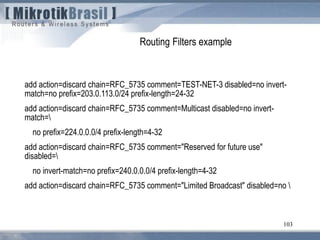
    101 Routing Filters example addaction=discard chain=RFC_5735 comment="This Network" disabled=no invert- match=no prefix=0.0.0.0/8 prefix-length=8-32 add action=discard chain=RFC_5735 comment="Private-Use Networks“ disabled=no invert-match=no prefix=10.0.0.0/8 prefix-length=8-32 add action=discard chain=RFC_5735 comment=Loopback disabled=no invert- match= no prefix=127.0.0.0/8 prefix-length=8-32 add action=discard chain=RFC_5735 comment="Link Local" disabled=no invert- match=no prefix=169.254.0.0/16 prefix-length=16-32 add action=discard chain=RFC_5735 comment="Private-Use Networks" disabled=no invert-match=no prefix=172.16.0.0/12 prefix-length=12-32 add action=discard chain=RFC_5735 comment="IETF Protocol Assignements" disabled=no invert-match=no prefix=192.0.0.0/24 prefix-length=24-32
  • 102.
    102 Routing Filters example addaction=discard chain=RFC_5735 comment=TEST-NET-1 disabled=no invert- match=no prefix=192.0.2.0/24 prefix-length=24-32 add action=discard chain=RFC_5735 comment="6to4 Relay Anycast" disabled=no invert-match=no prefix=192.88.99.0/24 prefix-length=24-32 add action=discard chain=RFC_5735 comment="Private-Use Networks" disabled=no invert-match=no prefix=192.168.0.0/16 prefix-length=16-32 add action=discard chain=RFC_5735 comment="Network Interconnect Device Benchmarket test" disabled=no invert-match= no prefix=192.18.0.0/15 prefix- length=15-32 add action=discard chain=RFC_5735 comment=TEST-NET-2 disabled=no invert- match=no prefix=198.51.100.0/24 prefix-length=24-32
  • 103.
    103 Routing Filters example addaction=discard chain=RFC_5735 comment=TEST-NET-3 disabled=no invert- match=no prefix=203.0.113.0/24 prefix-length=24-32 add action=discard chain=RFC_5735 comment=Multicast disabled=no invert- match= no prefix=224.0.0.0/4 prefix-length=4-32 add action=discard chain=RFC_5735 comment="Reserved for future use" disabled= no invert-match=no prefix=240.0.0.0/4 prefix-length=4-32 add action=discard chain=RFC_5735 comment="Limited Broadcast" disabled=no
  • 104.
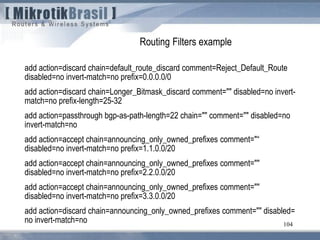
    104 Routing Filters example addaction=discard chain=default_route_discard comment=Reject_Default_Route disabled=no invert-match=no prefix=0.0.0.0/0 add action=discard chain=Longer_Bitmask_discard comment="" disabled=no invert- match=no prefix-length=25-32 add action=passthrough bgp-as-path-length=22 chain="" comment="" disabled=no invert-match=no add action=accept chain=announcing_only_owned_prefixes comment="“ disabled=no invert-match=no prefix=1.1.0.0/20 add action=accept chain=announcing_only_owned_prefixes comment="" disabled=no invert-match=no prefix=2.2.0.0/20 add action=accept chain=announcing_only_owned_prefixes comment="" disabled=no invert-match=no prefix=3.3.0.0/20 add action=discard chain=announcing_only_owned_prefixes comment="" disabled= no invert-match=no
  • 105.
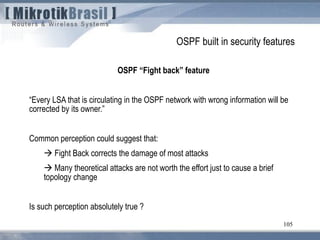
    105 OSPF built insecurity features OSPF “Fight back” feature “Every LSA that is circulating in the OSPF network with wrong information will be corrected by its owner.” Common perception could suggest that:  Fight Back corrects the damage of most attacks  Many theoretical attacks are not worth the effort just to cause a brief topology change Is such perception absolutely true ?
  • 106.
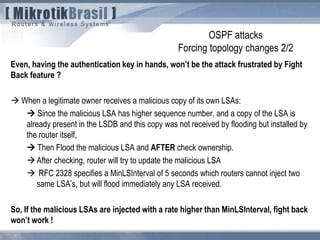
    OSPF attacks Forcing topologychanges 2/2 Even, having the authentication key in hands, won’t be the attack frustrated by Fight Back feature ?  When a legitimate owner receives a malicious copy of its own LSAs:  Since the malicious LSA has higher sequence number, and a copy of the LSA is already present in the LSDB and this copy was not received by flooding but installed by the router itself,  Then Flood the malicious LSA and AFTER check ownership. After checking, router will try to update the malicious LSA  RFC 2328 specifies a MinLSInterval of 5 seconds which routers cannot inject two same LSA’s, but will flood immediately any LSA received. So, If the malicious LSAs are injected with a rate higher than MinLSInterval, fight back won’t work !
  • 107.
    107 From RFC 3682(suggests a TTL “hack” of 255, instead of 1) 5.1. TTL (Hop Limit) Spoofing “The approach described here is based on the observation that a TTL (or Hop Limit) value of 255 is non-trivial to spoof, since as the packet passes through routers Towards the destination, the TTL is decremented by one. As a result, when a router receives a packet, it may not be able to determine if the packet's IP address is valid, but it can determine how many router hops away it is (again, assuming none of the routers in the path are compromised in such a way that they would reset the packet's TTL). Note, however, that while engineering a packet's TTL such that it has a particular value when sourced from an arbitrary location is difficult (but not mpossible), engineering a TTL value of 255 from non-directly connected locations is not possible (again, assuming none of the directly connected neighbors are compromised, the packet hasn't been tunneled to the decapsulator, and the intervening routers are operating in accordance with RFC 791 [RFC791]).
  • 108.
    Windows tool forhacking routing systems 108
  • 109.
    Windows tool forhacking routing systems 109
  • 110.
    110 Debugging BGP Ativate BGPlog + debug in /system logging
  • 111.
    111 Avoiding DoS attacksby generating same AS from the attacker AS 100 AS 200 AS 300 AS 400 Rede 10.100.0.0/24 10.100.0.0/24 AS Path 400 300 100 10.100.0.0/24 AS Path 100 10.100.0.0/24 AS Path 100 300 Ataque The looping avoidance feature of BGP could be used to block attacks from an arbitrary AS. Just advertise the attacked prefix appending the AS attacker. (Filters on upstream providers could frustrate such techinque)
  • 112.
    112 Real Case Scenario- Americana Digital
  • 113.
    113 Real Case Scenario- Americana Digital
  • 114.
    114 Path Vector implementation AS100 AS 200 AS 300 AS 400 Network 10.100.0.0/24 Add 100 to the path Add 200 to the path Add 300 to the path AS 400 knows that, to reach network 10.100.0.0/24, the path is trhough 300 e 200
  • 115.
    115 Path Vector implementation loopingavoidance AS 100 AS 200 AS 300 AS 400 Network10.100.0.0/24 Add 100 to the path Add 200 to the path Add 300 to the path Own AS number in the path
  • 116.
    116 Next hop onshared media (e.g. a IXP) AS 100 Network 10.100.0.0/16 Network 10.100.0.0/16 AS_Path 100 Next_Hop 10.0.0.1 10.0.0.1 AS 200 10.0.0.2 10.0.0.3 Network 10.100.0.0/16 AS_Path 200 100 Next_Hop 10.0.01 AS 300 If the receiving router is in the same subnet of the prior Next_Hop router, this remains intact to optimize packet forwarding.
  • 117.
    117 Questions ? Wardner Maia– maia@mikrotikbrasil.com.br
  • 118.
    118 Köszönöm Egészségére ! Wardner Maia– maia@mikrotikbrasil.com.br