

Router Simulation System for
mitigating Network Security
attacks
Rohan Choudhari
BE(IT)
AEC,Beed
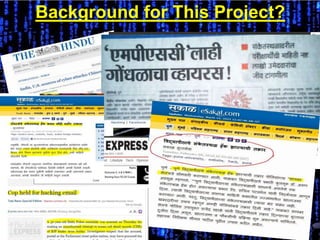
Background for This Project?
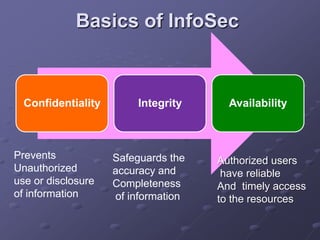
Basics of InfoSec
Confidentiality Integrity Availability
Prevents
Unauthorized
use or disclosure
of information
Safeguards the
accuracy and
Completeness
of information
Authorized users
have reliable
And timely access
to the resources
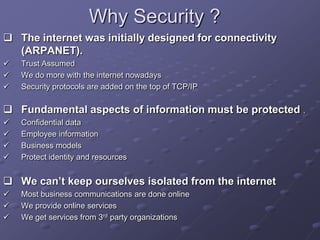
Why Security ?
 The internet was initially designed for connectivity
(ARPANET).
 Trust Assumed
 We do more with the internet nowadays
 Security protocols are added on the top of TCP/IP
 Fundamental aspects of information must be protected .
 Confidential data
 Employee information
 Business models
 Protect identity and resources
 We can’t keep ourselves isolated from the internet
 Most business communications are done online
 We provide online services
 We get services from 3rd party organizations
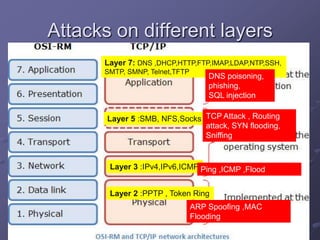
Attacks on different layers
Layer 7: DNS ,DHCP,HTTP,FTP,IMAP,LDAP,NTP,SSH,
SMTP, SMNP, Telnet,TFTP
Layer 5 :SMB, NFS,Socks
Layer 3 :IPv4,IPv6,ICMP
Layer 2 :PPTP , Token Ring
DNS poisoning,
phishing,
SQL injection
TCP Attack , Routing
attack, SYN flooding,
Sniffing
Ping ,ICMP ,Flood
ARP Spoofing ,MAC
Flooding
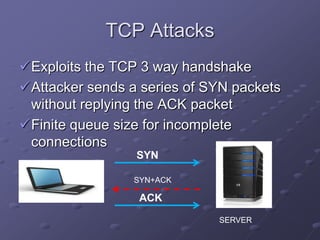
TCP Attacks
Exploits the TCP 3 way handshake
Attacker sends a series of SYN packets
without replying the ACK packet
Finite queue size for incomplete
connections
SYN
ACK
SYN+ACK
SERVER
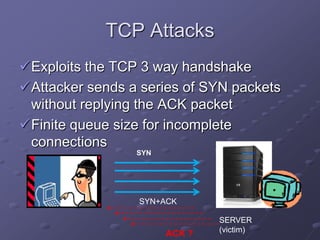
TCP Attacks
Exploits the TCP 3 way handshake
Attacker sends a series of SYN packets
without replying the ACK packet
Finite queue size for incomplete
connections
SYN
SYN+ACK
SERVER
(victim)ACK ?
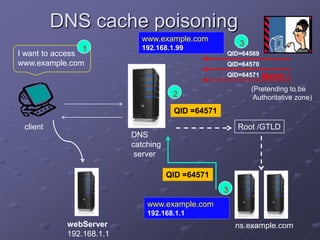
DNS cache poisoning
client
I want to access
www.example.com
DNS
catching
server
1
2
QID =64571
Root /GTLD
ns.example.comwebServer
192.168.1.1
3
3
www.example.com
192.168.1.1
QID =64571
QID=64569
QID=64570
QID=64571 Match !
(Pretending to be
Authoritative zone)
www.example.com
192.168.1.99
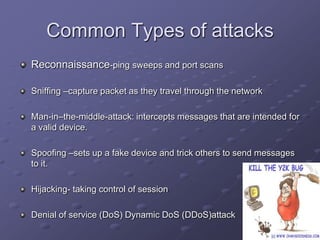
Common Types of attacks
Reconnaissance-ping sweeps and port scans
Sniffing –capture packet as they travel through the network
Man-in–the-middle-attack: intercepts messages that are intended for
a valid device.
Spoofing –sets up a fake device and trick others to send messages
to it.
Hijacking- taking control of session
Denial of service (DoS) Dynamic DoS (DDoS)attack
Trusted Network
Standard defensive-oriented technologies
 Firewall-first line of defense
 Intrusion Detection
 Build TRUST on top of the TCP/IP Infrastructure
 Strong authentication
 Two factor authentication
 Something you have + something you know
 Public key infrastructure (PKI)
Access control
Access control –
ability to permit or deny the use of an object by a subject
It provide 3 essential services (known as
AAA)-
 Authentication-(who can login)
 Authorization - (what authorized users can do )
 Accountability –(identifies what a user did )
Important Steps to Security
• Password Protection
• Protecting the network by filtering Network Access and Traffic (i.e. Firewall)
• Running Security Audits
• Examine and monitor log files
• Use commonense: avoid dumpster divers and social engineers
Firewalls
A firewall is a computer, hardware, or even a piece of software that sits between
your network and the Internet, the firewall attempts to regulate and control the flow
of information preventing an array of potential attacks.
 A router utilizing Network Address Translation(NAT)
 Software firewalls such as Zone Alarm, Kerio Firewall,
Outpost, etc.
 Hardware firewalls such as Sonic’s SOHO firewall.
 Operating system firewalls Ex.Window XP’s built in filtering .
Virtual Private Network
Creates a secure tunnel over a public network
 Client-to-firewall , router-to-router , firewall-to-
firewall
VPN protocol standards:
 PPTP-(Point-to-Point Tunneling protocol)
 L2F -(Layer to Forwarding Protocol)
 L2TP-(Layer to tunneling Protocol)
 IPSec(Internet Protocol Security)
Significance of this project
It makes your computer a router !
 And a Gateway router too!!
Benefits:
 Test new configurations
New routing policies
New protocols
 Don’t disturb the production network
 Use cheap PCs instead of expensive routers.
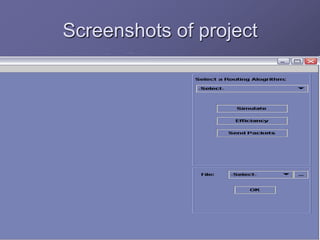
Screenshots of project
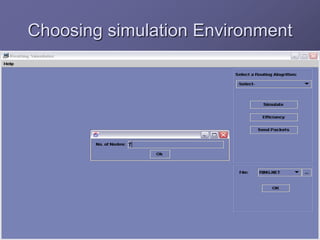
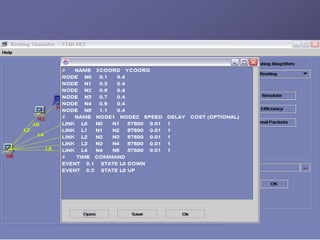
Choosing simulation Environment
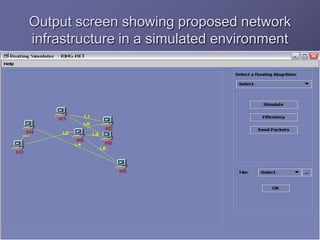
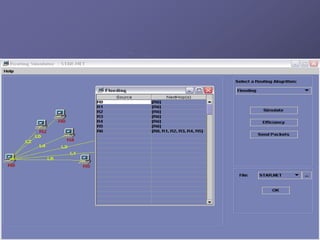
Output screen showing proposed network
infrastructure in a simulated environment
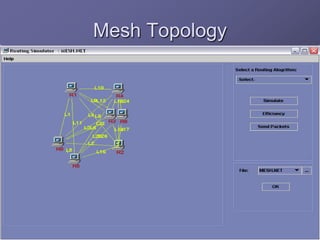
Mesh Topology
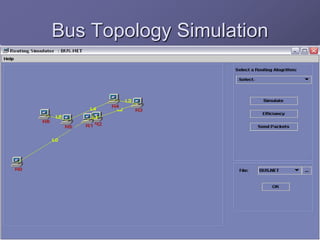
Bus Topology Simulation
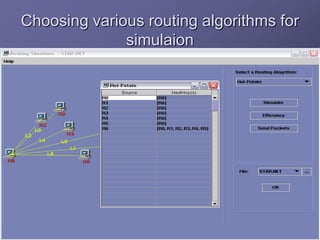
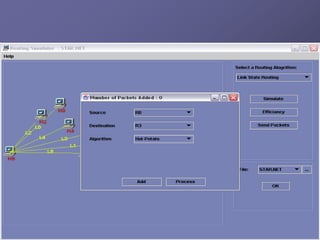
Choosing various routing algorithms for
simulaion
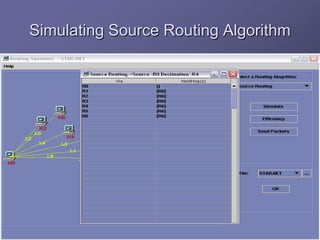
Simulating Source Routing Algorithm
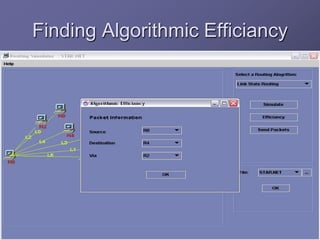
Finding Algorithmic Efficiancy
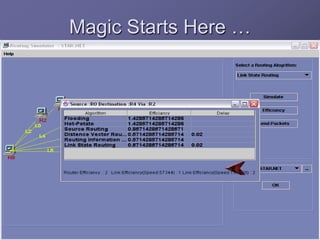
Magic Starts Here …
conclusion
The Simulator takes the configurations of
the subnet as Input and gives the different
statistics of the routers and links. By
changing the routing algorithms and the
different network configurations and
recording the results we obtain the optimal
algorithm. The optimal algorithm for a
particular network is obtained by analyzing
the results obtained. Simulation helps to
achieve an optimal path that reduces the
cost of routing and helps to maintain
network efficiency very easily.
Conclusion And Future Scope
The smaller networks can be analyzed and the
results can be employed in larger networks to
make routing efficient and economic. As the
Simulator has provision for the crashing of
routers, it gives an idea of which path is followed
when a crash occurs. It can be employed in real
networks to increase the performance of routers
and links. As it not feasible in real networks to
test algorithms and then implement a best one,
Routing Simulation System can be helpful in
maintaining Network Security. Hence it is
useful for people who provide networking
services and those who design networks.
Thank You !
Rohan Choudhari
BE(IT)
AEC,Beed

network security / information security

  • 1.
    Router Simulation Systemfor mitigating Network Security attacks Rohan Choudhari BE(IT) AEC,Beed
  • 2.
  • 3.
    Basics of InfoSec ConfidentialityIntegrity Availability Prevents Unauthorized use or disclosure of information Safeguards the accuracy and Completeness of information Authorized users have reliable And timely access to the resources
  • 4.
    Why Security ? The internet was initially designed for connectivity (ARPANET).  Trust Assumed  We do more with the internet nowadays  Security protocols are added on the top of TCP/IP  Fundamental aspects of information must be protected .  Confidential data  Employee information  Business models  Protect identity and resources  We can’t keep ourselves isolated from the internet  Most business communications are done online  We provide online services  We get services from 3rd party organizations
  • 5.
    Attacks on differentlayers Layer 7: DNS ,DHCP,HTTP,FTP,IMAP,LDAP,NTP,SSH, SMTP, SMNP, Telnet,TFTP Layer 5 :SMB, NFS,Socks Layer 3 :IPv4,IPv6,ICMP Layer 2 :PPTP , Token Ring DNS poisoning, phishing, SQL injection TCP Attack , Routing attack, SYN flooding, Sniffing Ping ,ICMP ,Flood ARP Spoofing ,MAC Flooding
  • 6.
    TCP Attacks Exploits theTCP 3 way handshake Attacker sends a series of SYN packets without replying the ACK packet Finite queue size for incomplete connections SYN ACK SYN+ACK SERVER
  • 7.
    TCP Attacks Exploits theTCP 3 way handshake Attacker sends a series of SYN packets without replying the ACK packet Finite queue size for incomplete connections SYN SYN+ACK SERVER (victim)ACK ?
  • 8.
    DNS cache poisoning client Iwant to access www.example.com DNS catching server 1 2 QID =64571 Root /GTLD ns.example.comwebServer 192.168.1.1 3 3 www.example.com 192.168.1.1 QID =64571 QID=64569 QID=64570 QID=64571 Match ! (Pretending to be Authoritative zone) www.example.com 192.168.1.99
  • 9.
    Common Types ofattacks Reconnaissance-ping sweeps and port scans Sniffing –capture packet as they travel through the network Man-in–the-middle-attack: intercepts messages that are intended for a valid device. Spoofing –sets up a fake device and trick others to send messages to it. Hijacking- taking control of session Denial of service (DoS) Dynamic DoS (DDoS)attack
  • 10.
    Trusted Network Standard defensive-orientedtechnologies  Firewall-first line of defense  Intrusion Detection  Build TRUST on top of the TCP/IP Infrastructure  Strong authentication  Two factor authentication  Something you have + something you know  Public key infrastructure (PKI)
  • 11.
    Access control Access control– ability to permit or deny the use of an object by a subject It provide 3 essential services (known as AAA)-  Authentication-(who can login)  Authorization - (what authorized users can do )  Accountability –(identifies what a user did )
  • 12.
    Important Steps toSecurity • Password Protection • Protecting the network by filtering Network Access and Traffic (i.e. Firewall) • Running Security Audits • Examine and monitor log files • Use commonense: avoid dumpster divers and social engineers
  • 13.
    Firewalls A firewall isa computer, hardware, or even a piece of software that sits between your network and the Internet, the firewall attempts to regulate and control the flow of information preventing an array of potential attacks.  A router utilizing Network Address Translation(NAT)  Software firewalls such as Zone Alarm, Kerio Firewall, Outpost, etc.  Hardware firewalls such as Sonic’s SOHO firewall.  Operating system firewalls Ex.Window XP’s built in filtering .
  • 14.
    Virtual Private Network Createsa secure tunnel over a public network  Client-to-firewall , router-to-router , firewall-to- firewall VPN protocol standards:  PPTP-(Point-to-Point Tunneling protocol)  L2F -(Layer to Forwarding Protocol)  L2TP-(Layer to tunneling Protocol)  IPSec(Internet Protocol Security)
  • 16.
    Significance of thisproject It makes your computer a router !  And a Gateway router too!! Benefits:  Test new configurations New routing policies New protocols  Don’t disturb the production network  Use cheap PCs instead of expensive routers.
  • 17.
  • 18.
  • 19.
    Output screen showingproposed network infrastructure in a simulated environment
  • 20.
  • 21.
  • 23.
    Choosing various routingalgorithms for simulaion
  • 24.
  • 25.
  • 26.
  • 29.
    conclusion The Simulator takesthe configurations of the subnet as Input and gives the different statistics of the routers and links. By changing the routing algorithms and the different network configurations and recording the results we obtain the optimal algorithm. The optimal algorithm for a particular network is obtained by analyzing the results obtained. Simulation helps to achieve an optimal path that reduces the cost of routing and helps to maintain network efficiency very easily.
  • 30.
    Conclusion And FutureScope The smaller networks can be analyzed and the results can be employed in larger networks to make routing efficient and economic. As the Simulator has provision for the crashing of routers, it gives an idea of which path is followed when a crash occurs. It can be employed in real networks to increase the performance of routers and links. As it not feasible in real networks to test algorithms and then implement a best one, Routing Simulation System can be helpful in maintaining Network Security. Hence it is useful for people who provide networking services and those who design networks.
  • 31.
    Thank You ! RohanChoudhari BE(IT) AEC,Beed