Network Operating Systems
Kazunori Sugiura
(uhyo@sfc.wide.ad.jp)
Sept. 5th, 2002
Theme of my lecture today
• Technology based on the Internet
environment
– Computer Technology
– Network technology
• Computers and network operating
systems
– Introduction to UNIX operating system
• Let’s install and configure FreeBSD
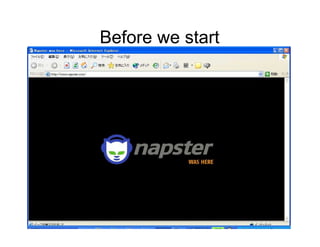
Before we start
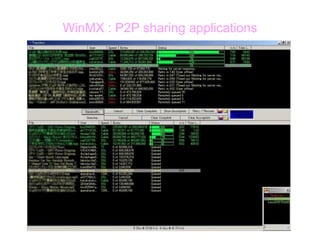
WinMX : P2P sharing applications
What is Napster?
• Peer to Peer File
sharing application
– Audio files
– Videos
– Misc. files
• Final court denies
continuation of the
service
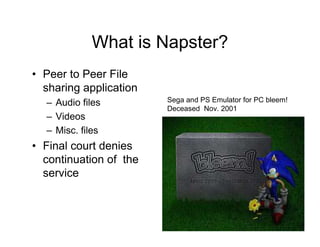
Sega and PS Emulator for PC bleem!
Deceased Nov. 2001
Contents and copyrights
• Digital House appliances Forum, 2002
• Digital information are easy to copy
– Network enables sharing of the information
• Digital copyright protection
– CSS (Contents scramble system)
– AEA (Advanced Encryption standard)
– CPPM (Content Protection for Prerecorded Media)
– CPRM (Content Protection for Recordable Media)
– DTCP (Digital Transmission Content Protection)
– DDCP (High-bandwidth Digital Content Protection )
Lawsuits in Florida
• AT&T Broadband is providing 100%
broadband service to white residents while
African American citizen residents applies
only 1%. Federal Communications Act in
1934, and Telecommunications Act in
1996 prohibits discrimination of any kind in
ways of communication servicing.
• As of Sept. 1st 2002
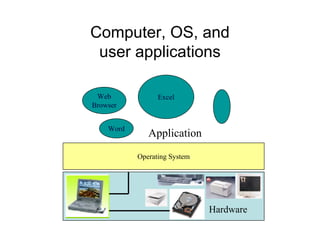
What is an Operating system?
• 2 kinds of a software
– Application Software
• Word processors, database manager, compiler,
web browser
– System Software
• Operating system itself
• Bridges between the hardware and users
Computer, OS, and
user applications
Web
Browser
Excel
Word
Application
Operating System
Hardware
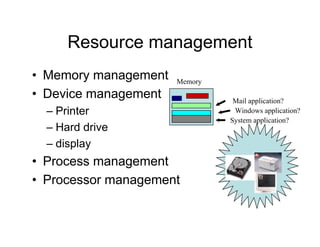
Resource management
• Memory management
• Device management
– Printer
– Hard drive
– display
• Process management
• Processor management
Memory
System application?
Windows application?
Mail application?
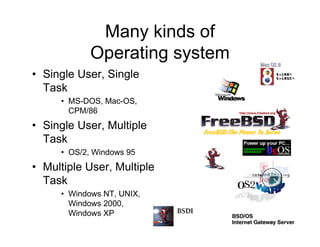
Many kinds of
Operating system
• Single User, Single
Task
• MS-DOS, Mac-OS,
CPM/86
• Single User, Multiple
Task
• OS/2, Windows 95
• Multiple User, Multiple
Task
• Windows NT, UNIX,
Windows 2000,
Windows XP
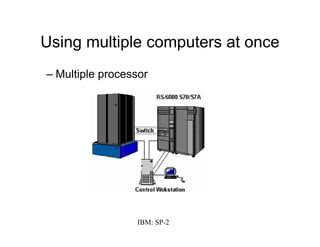
Using multiple computers at once
– Multiple processor
IBM: SP-2
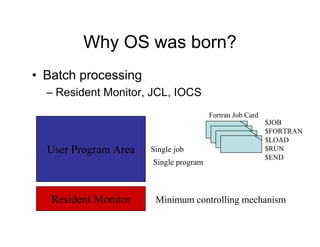
Why OS was born?
• Batch processing
– Resident Monitor, JCL, IOCS
Resident Monitor
User Program Area Single job
Single program
Minimum controlling mechanism
Fortran Job Card
$JOB
$FORTRAN
$LOAD
$RUN
$END
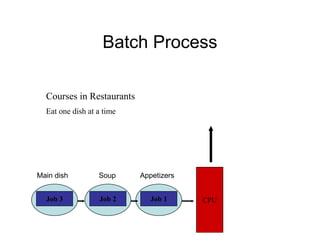
Batch Process
CPUJob 3 Job 2 Job 1
Courses in Restaurants
Eat one dish at a time
AppetizersSoupMain dish
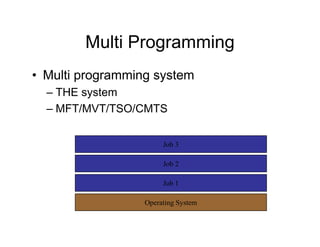
Multi Programming
• Multi programming system
– THE system
– MFT/MVT/TSO/CMTS
Operating System
Job 1
Job 2
Job 3
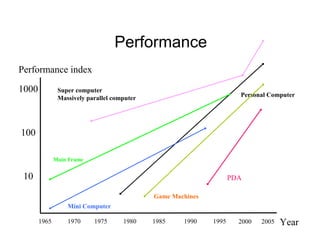
Performance
10
100
1000
Performance index
199019851980197519701965 1995 Year
Personal Computer
Mini Computer
Main Frame
Super computer
Massively parallel computer
Game Machines
PDA
2000 2005
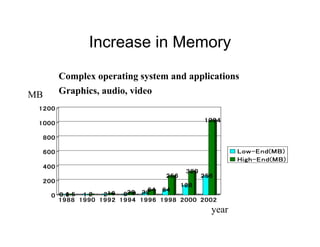
Increase in Memory
0.60.60.60.61.51.51.51.5 1111 2222 222216161616 888832323232 3232323264646464 64646464
256256256256
128128128128
320320320320
256256256256
1024102410241024
0000
200200200200
400400400400
600600600600
800800800800
1000100010001000
1200120012001200
1988198819881988 1990199019901990 1992199219921992 1994199419941994 1996199619961996 1998199819981998 2000200020002000 2002200220022002
Low-End(MB)Low-End(MB)Low-End(MB)Low-End(MB)
High-End(MB)High-End(MB)High-End(MB)High-End(MB)
Complex operating system and applications
Graphics, audio, videoMB
year
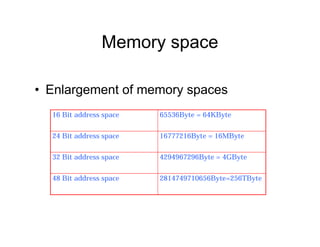
Memory space
• Enlargement of memory spaces
16 Bit address space 65536Byte = 64KByte
24 Bit address space 16777216Byte = 16MByte
32 Bit address space 4294967296Byte = 4GByte
48 Bit address space 2814749710656Byte=256TByte
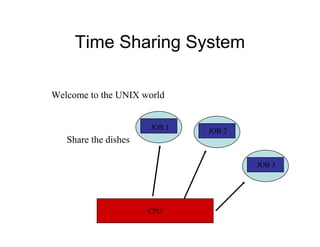
Time Sharing System
CPU
Share the dishes
JOB 1
JOB 2
JOB 3
Welcome to the UNIX world
History of UNIX
• Development of TSS @ Multix
– TSS development :AT&T, GE, MIT
• 1976 Bell Lab. UNIX Version 6
– Mini Computer
– DEC: PDP-9(16bit, 256K)
– Small TSS
– Free source code for the Software
– Abstraction based on the file system
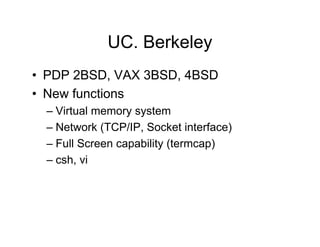
UC. Berkeley
• PDP 2BSD, VAX 3BSD, 4BSD
• New functions
– Virtual memory system
– Network (TCP/IP, Socket interface)
– Full Screen capability (termcap)
– csh, vi
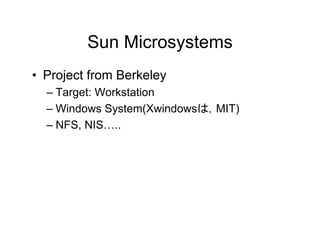
Sun Microsystems
• Project from Berkeley
– Target: Workstation
– Windows System(Xwindowsは,MIT)
– NFS, NIS…..
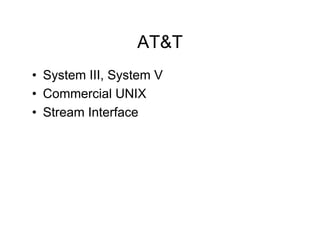
AT&T
• System III, System V
• Commercial UNIX
• Stream Interface
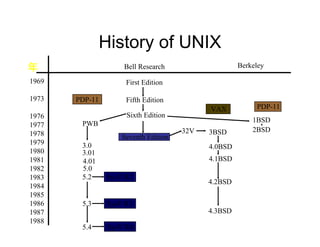
History of UNIX
1969
1973
1976
1977
1978
1979
1980
1981
1982
1983
1984
1985
1986
1987
1988
Bell Research
First Edition
Fifth Edition
Sixth Edition
Seventh Edition
Berkeley
1BSD
PDP-11
2BSD
VAX
3BSD
4.0BSD
4.1BSD
4.2BSD
4.3BSD
32V
PDP-11
PWB
3.0
3.01
4.01
5.0
5.2 SysV R2
5.3
5.4
SysV R3
SysV R4
年
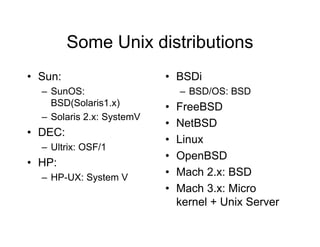
Some Unix distributions
• Sun:
– SunOS:
BSD(Solaris1.x)
– Solaris 2.x: SystemV
• DEC:
– Ultrix: OSF/1
• HP:
– HP-UX: System V
• BSDi
– BSD/OS: BSD
• FreeBSD
• NetBSD
• Linux
• OpenBSD
• Mach 2.x: BSD
• Mach 3.x: Micro
kernel + Unix Server
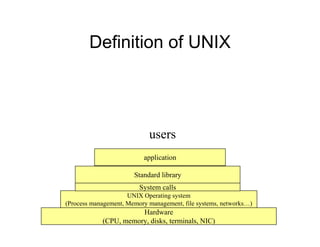
Definition of UNIX
Hardware
(CPU, memory, disks, terminals, NIC)
UNIX Operating system
(Process management, Memory management, file systems, networks…)
Standard library
application
users
System calls
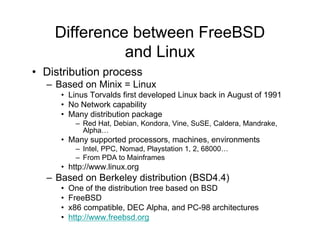
Difference between FreeBSD
and Linux
• Distribution process
– Based on Minix = Linux
• Linus Torvalds first developed Linux back in August of 1991
• No Network capability
• Many distribution package
– Red Hat, Debian, Kondora, Vine, SuSE, Caldera, Mandrake,
Alpha…
• Many supported processors, machines, environments
– Intel, PPC, Nomad, Playstation 1, 2, 68000…
– From PDA to Mainframes
• http://www.linux.org
– Based on Berkeley distribution (BSD4.4)
• One of the distribution tree based on BSD
• FreeBSD
• x86 compatible, DEC Alpha, and PC-98 architectures
• http://www.freebsd.org
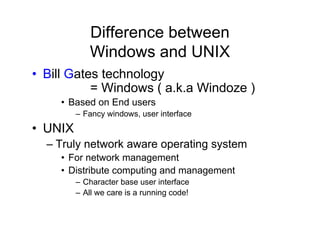
Difference between
Windows and UNIX
• Bill Gates technology
= Windows ( a.k.a Windoze )
• Based on End users
– Fancy windows, user interface
• UNIX
– Truly network aware operating system
• For network management
• Distribute computing and management
– Character base user interface
– All we care is a running code!
Current FreeBSD
distribution
• Current release
– 4.6.2 release
– 5.0 release
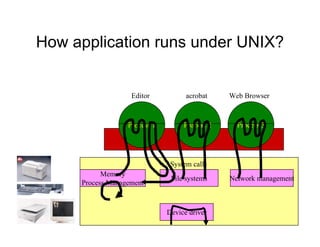
How application runs under UNIX?
Device driver
Memory
Process Management
Network managementFile systems
Process 1 Process 2 Process 3
Editor acrobat Web Browser
System calls
Interrupts
• When you…
– Type your keyboard
– Move your mouse
– Access hard drive
• Interrupts from software
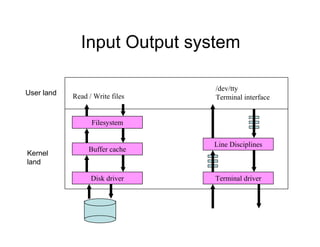
Input Output system
Disk driver
Buffer cache
Filesystem
Terminal driver
Line Disciplines
Read / Write files
/dev/tty
Terminal interface
User land
Kernel
land
dmesg command
cpu0: SUNW,UltraSPARC-II (upaid 0 impl 0x11 ver 0x20 clock 296 MHz)
SunOS Release 5.6 Version Generic_105181-08 [UNIX(R) System V Release 4.0]
Copyright (c) 1983-1997, Sun Microsystems, Inc.
mem = 655360K (0x28000000)
avail mem = 647847936
root nexus = Sun Ultra 30 UPA/PCI (UltraSPARC-II 296MHz)
glm0: Rev. 3 Symbios 53c875 found.
PCI-device: scsi@3, glm #0
glm0 is /pci@1f,4000/scsi@3
sd0 at glm0: target 0 lun 0
sd0 is /pci@1f,4000/scsi@3/sd@0,0
<SUN4.2G cyl 3880 alt 2 hd 16 sec 135>
root on /pci@1f,4000/scsi@3/disk@0,0:a fstype ufs
PCI-device: ebus@1, ebus #0
keyboard is </pci@1f,4000/ebus@1/su@14,3083f8> major <37> minor <0>
mouse is </pci@1f,4000/ebus@1/su@14,3062f8> major <37> minor <1>
stdin is </pci@1f,4000/ebus@1/su@14,3083f8> major <37> minor <0>
SUNW,ffb0 at root: UPA 0x1e 0x0
SUNW,ffb0 is /SUNW,ffb@1e,0
stdout is </SUNW,ffb@1e,0> major <34> minor <0>
NOTICE: alt1: Alteon PCI NIC found
NOTICE: alt1: Using system MAC address 8:0:20:91:b5:87
PCI-device: ethernet@2, alt #1
pci12ae,11 is /pci@1f,4000/ethernet@2
NOTICE: alt1: Gigabit Ethernet link is up
dump on /dev/dsk/c0t0d0s1 size 524832K
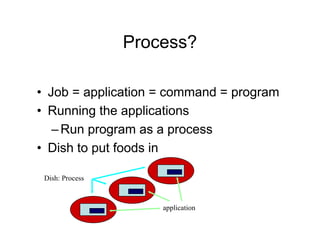
Process?
• Job = application = command = program
• Running the applications
–Run program as a process
• Dish to put foods in
Dish: Process
application
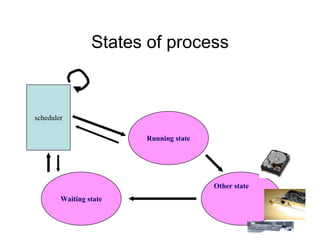
States of process
Running state
Waiting state
Other state
scheduler
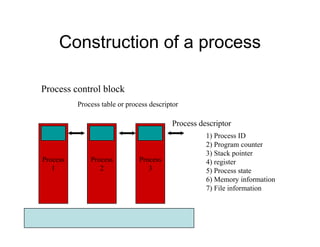
Construction of a process
Process
1
Process
2
Process
3
Process descriptor
Process control block
Process table or process descriptor
1) Process ID
2) Program counter
3) Stack pointer
4) register
5) Process state
6) Memory information
7) File information
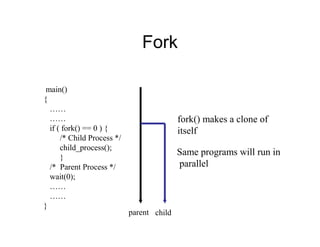
Fork
main()
{
……
……
if ( fork() == 0 ) {
/* Child Process */
child_process();
}
/* Parent Process */
wait(0);
……
……
}
parent
fork() makes a clone of
itself
Same programs will run in
parallel
child
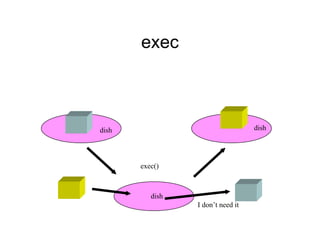
exec
exec()
I don’t need it
dish dish
dish
How PC Boots up?
• Tie up your own boot
• POST
– Power On Self Test
• When you power on the computer
• Clears the CPU memory register
• Sets the CPU program counter to F000
• Reads the program fixed in f000 from the BIOS
• Which is the check program for basic systems
• Checks system bus
• Checks its own memory
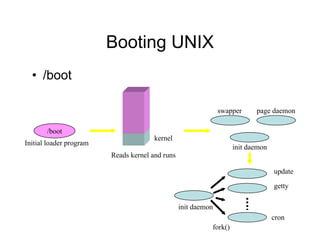
Booting UNIX
• /boot
/boot
Initial loader program
kernel
Reads kernel and runs
swapper
init daemon
page daemon
init daemon
fork()
update
getty
cron
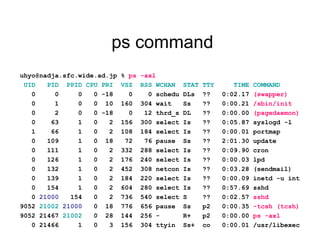
ps command
uhyo@nadja.sfc.wide.ad.jp % ps -axl
UID PID PPID CPU PRI VSZ RSS WCHAN STAT TTY TIME COMMAND
0 0 0 0 -18 0 0 schedu DLs ?? 0:02.17 (swapper)
0 1 0 0 10 160 304 wait Ss ?? 0:00.21 /sbin/init
0 2 0 0 -18 0 12 thrd_s DL ?? 0:00.00 (pagedaemon)
0 63 1 0 2 156 300 select Is ?? 0:05.87 syslogd -l
1 66 1 0 2 108 184 select Is ?? 0:00.01 portmap
0 109 1 0 18 72 76 pause Ss ?? 2:01.30 update
0 111 1 0 2 332 288 select Is ?? 0:09.90 cron
0 126 1 0 2 176 240 select Is ?? 0:00.03 lpd
0 132 1 0 2 452 308 netcon Is ?? 0:03.28 (sendmail)
0 139 1 0 2 184 220 select Is ?? 0:00.09 inetd -u int
0 154 1 0 2 604 280 select Is ?? 0:57.69 sshd
0 21000 154 0 2 736 540 select S ?? 0:02.57 sshd
9052 21002 21000 0 18 776 656 pause Ss p2 0:00.35 -tcsh (tcsh)
9052 21467 21002 0 28 144 256 - R+ p2 0:00.00 ps -axl
0 21466 1 0 3 156 304 ttyin Ss+ co 0:00.01 /usr/libexec
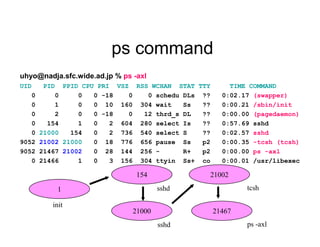
ps command
uhyo@nadja.sfc.wide.ad.jp % ps -axl
UID PID PPID CPU PRI VSZ RSS WCHAN STAT TTY TIME COMMAND
0 0 0 0 -18 0 0 schedu DLs ?? 0:02.17 (swapper)
0 1 0 0 10 160 304 wait Ss ?? 0:00.21 /sbin/init
0 2 0 0 -18 0 12 thrd_s DL ?? 0:00.00 (pagedaemon)
0 154 1 0 2 604 280 select Is ?? 0:57.69 sshd
0 21000 154 0 2 736 540 select S ?? 0:02.57 sshd
9052 21002 21000 0 18 776 656 pause Ss p2 0:00.35 -tcsh (tcsh)
9052 21467 21002 0 28 144 256 - R+ p2 0:00.00 ps -axl
0 21466 1 0 3 156 304 ttyin Ss+ co 0:00.01 /usr/libexec
1
154
21000
21002
21467
init
sshd
sshd
tcsh
ps -axl
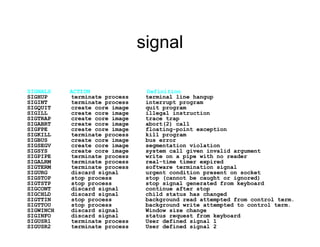
signal
SIGNALS ACTION Definition
SIGHUP terminate process terminal line hangup
SIGINT terminate process interrupt program
SIGQUIT create core image quit program
SIGILL create core image illegal instruction
SIGTRAP create core image trace trap
SIGABRT create core image abort(2) call
SIGFPE create core image floating-point exception
SIGKILL terminate process kill program
SIGBUS create core image bus error
SIGSEGV create core image segmentation violation
SIGSYS create core image system call given invalid argument
SIGPIPE terminate process write on a pipe with no reader
SIGALRM terminate process real-time timer expired
SIGTERM terminate process software termination signal
SIGURG discard signal urgent condition present on socket
SIGSTOP stop process stop (cannot be caught or ignored)
SIGTSTP stop process stop signal generated from keyboard
SIGCONT discard signal continue after stop
SIGCHLD discard signal child status has changed
SIGTTIN stop process background read attempted from control term.
SIGTTOU stop process background write attempted to control term.
SIGWINCH discard signal Window size change
SIGINFO discard signal status request from keyboard
SIGUSR1 terminate process User defined signal 1
SIGUSR2 terminate process User defined signal 2
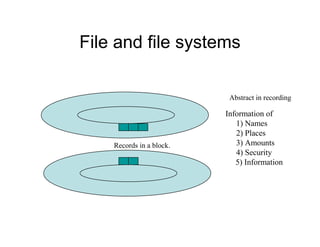
File and file systems
Abstract in recording
Records in a block.
Information of
1) Names
2) Places
3) Amounts
4) Security
5) Information
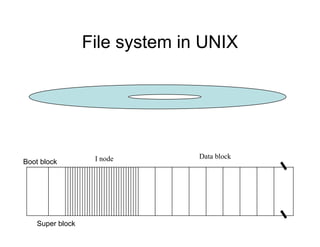
File system in UNIX
I node Data block
Boot block
Super block
File system
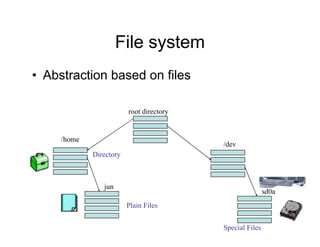
• Abstraction based on files
root directory
/dev
/home
jun
sd0a
Plain Files
Directory
Special Files
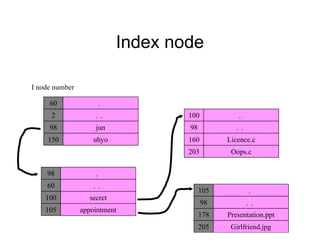
Index node
60 .
2
98
150
..
jun
uhyo
I node number
98 .
60
100
105
..
secret
appointment
100 .
98
160
203
..
Licence.c
Oops.c
105 .
98
178
205
..
Presentation.ppt
Girlfriend.jpg
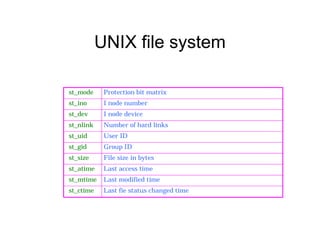
UNIX file system
st_mode Protection bit matrix
st_ino I node number
st_dev I node device
st_nlink Number of hard links
st_uid User ID
st_gid Group ID
st_size File size in bytes
st_atime Last access time
st_mtime Last modified time
st_ctime Last fie status changed time
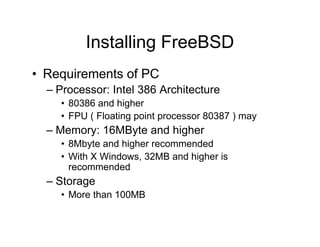
Installing FreeBSD
• Requirements of PC
– Processor: Intel 386 Architecture
• 80386 and higher
• FPU ( Floating point processor 80387 ) may
– Memory: 16MByte and higher
• 8Mbyte and higher recommended
• With X Windows, 32MB and higher is
recommended
– Storage
• More than 100MB
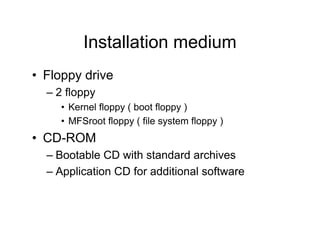
Installation medium
• Floppy drive
– 2 floppy
• Kernel floppy ( boot floppy )
• MFSroot floppy ( file system floppy )
• CD-ROM
– Bootable CD with standard archives
– Application CD for additional software
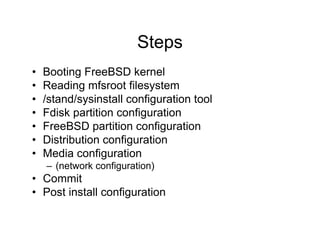
Steps
• Booting FreeBSD kernel
• Reading mfsroot filesystem
• /stand/sysinstall configuration tool
• Fdisk partition configuration
• FreeBSD partition configuration
• Distribution configuration
• Media configuration
– (network configuration)
• Commit
• Post install configuration
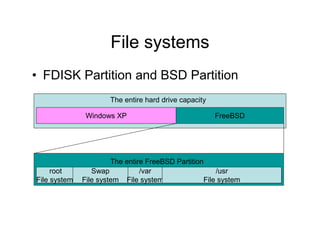
File systems
• FDISK Partition and BSD Partition
Windows XP FreeBSD
The entire hard drive capacity
root
File system
Swap
File system
/var
File system
/usr
File system
The entire FreeBSD Partition
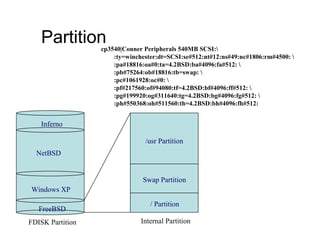
Partition
FreeBSD
Windows XP
NetBSD
Inferno
FDISK Partition
/ Partition
Swap Partition
/usr Partition
Internal Partition
cp3540|Conner Peripherals 540MB SCSI:
:ty=winchester:dt=SCSI:se#512:nt#12:ns#49:nc#1806:rm#4500: 
:pa#18816:oa#0:ta=4.2BSD:ba#4096:fa#512: 
:pb#75264:ob#18816:tb=swap: 
:pc#1061928:oc#0: 
:pf#217560:of#94080:tf=4.2BSD:bf#4096:ff#512: 
:pg#199920:og#311640:tg=4.2BSD:bg#4096:fg#512: 
:ph#550368:oh#511560:th=4.2BSD:bh#4096:fh#512:
Distribution package
• Developer
• X-Developer
• Kern-Developer
• X-Kern-Developer
• User
• X-User
• Minimal
• Custom
Installation via network
• Network interface to connect to the
network
• IP address, netmask, Default router
• Destination distribution server
Post installation configuration
• Pre packaged software installation
• Password and user configuration
• Time zone configuration
• X window configuration
• Start up service configuration
Important files and commands
• /etc/rc.conf
• /etc/defaults directory
• /etc/inetd.conf and /etc/services
• /etc/X11/XF86Config
• .cshrc files
• /usr/src/sys files
Updating releases
• CVSUP update
– FreeBSD-current release
• Accessing cvsup server
Using DVTS
• Changing the kernel configuration
• Installing the package
User Interface
• Systematic operating system
– Especially used for network and computer
engineers
What’s for the next lecture
• We will discuss about the network and
computer infrastructure in USP
• The importance of configuring the better
infrastructure for USP and
• Collaboration of some of our projects in
Japan and USP

Network operating systems

  • 1.
    Network Operating Systems KazunoriSugiura (uhyo@sfc.wide.ad.jp) Sept. 5th, 2002
  • 2.
    Theme of mylecture today • Technology based on the Internet environment – Computer Technology – Network technology • Computers and network operating systems – Introduction to UNIX operating system • Let’s install and configure FreeBSD
  • 3.
  • 4.
    WinMX : P2Psharing applications
  • 5.
    What is Napster? •Peer to Peer File sharing application – Audio files – Videos – Misc. files • Final court denies continuation of the service Sega and PS Emulator for PC bleem! Deceased Nov. 2001
  • 6.
    Contents and copyrights •Digital House appliances Forum, 2002 • Digital information are easy to copy – Network enables sharing of the information • Digital copyright protection – CSS (Contents scramble system) – AEA (Advanced Encryption standard) – CPPM (Content Protection for Prerecorded Media) – CPRM (Content Protection for Recordable Media) – DTCP (Digital Transmission Content Protection) – DDCP (High-bandwidth Digital Content Protection )
  • 7.
    Lawsuits in Florida •AT&T Broadband is providing 100% broadband service to white residents while African American citizen residents applies only 1%. Federal Communications Act in 1934, and Telecommunications Act in 1996 prohibits discrimination of any kind in ways of communication servicing. • As of Sept. 1st 2002
  • 8.
    What is anOperating system? • 2 kinds of a software – Application Software • Word processors, database manager, compiler, web browser – System Software • Operating system itself • Bridges between the hardware and users
  • 9.
    Computer, OS, and userapplications Web Browser Excel Word Application Operating System Hardware
  • 10.
    Resource management • Memorymanagement • Device management – Printer – Hard drive – display • Process management • Processor management Memory System application? Windows application? Mail application?
  • 11.
    Many kinds of Operatingsystem • Single User, Single Task • MS-DOS, Mac-OS, CPM/86 • Single User, Multiple Task • OS/2, Windows 95 • Multiple User, Multiple Task • Windows NT, UNIX, Windows 2000, Windows XP
  • 12.
    Using multiple computersat once – Multiple processor IBM: SP-2
  • 13.
    Why OS wasborn? • Batch processing – Resident Monitor, JCL, IOCS Resident Monitor User Program Area Single job Single program Minimum controlling mechanism Fortran Job Card $JOB $FORTRAN $LOAD $RUN $END
  • 14.
    Batch Process CPUJob 3Job 2 Job 1 Courses in Restaurants Eat one dish at a time AppetizersSoupMain dish
  • 15.
    Multi Programming • Multiprogramming system – THE system – MFT/MVT/TSO/CMTS Operating System Job 1 Job 2 Job 3
  • 16.
    Performance 10 100 1000 Performance index 199019851980197519701965 1995Year Personal Computer Mini Computer Main Frame Super computer Massively parallel computer Game Machines PDA 2000 2005
  • 17.
    Increase in Memory 0.60.60.60.61.51.51.51.51111 2222 222216161616 888832323232 3232323264646464 64646464 256256256256 128128128128 320320320320 256256256256 1024102410241024 0000 200200200200 400400400400 600600600600 800800800800 1000100010001000 1200120012001200 1988198819881988 1990199019901990 1992199219921992 1994199419941994 1996199619961996 1998199819981998 2000200020002000 2002200220022002 Low-End(MB)Low-End(MB)Low-End(MB)Low-End(MB) High-End(MB)High-End(MB)High-End(MB)High-End(MB) Complex operating system and applications Graphics, audio, videoMB year
  • 18.
    Memory space • Enlargementof memory spaces 16 Bit address space 65536Byte = 64KByte 24 Bit address space 16777216Byte = 16MByte 32 Bit address space 4294967296Byte = 4GByte 48 Bit address space 2814749710656Byte=256TByte
  • 19.
    Time Sharing System CPU Sharethe dishes JOB 1 JOB 2 JOB 3 Welcome to the UNIX world
  • 20.
    History of UNIX •Development of TSS @ Multix – TSS development :AT&T, GE, MIT • 1976 Bell Lab. UNIX Version 6 – Mini Computer – DEC: PDP-9(16bit, 256K) – Small TSS – Free source code for the Software – Abstraction based on the file system
  • 21.
    UC. Berkeley • PDP2BSD, VAX 3BSD, 4BSD • New functions – Virtual memory system – Network (TCP/IP, Socket interface) – Full Screen capability (termcap) – csh, vi
  • 22.
    Sun Microsystems • Projectfrom Berkeley – Target: Workstation – Windows System(Xwindowsは,MIT) – NFS, NIS…..
  • 23.
    AT&T • System III,System V • Commercial UNIX • Stream Interface
  • 24.
    History of UNIX 1969 1973 1976 1977 1978 1979 1980 1981 1982 1983 1984 1985 1986 1987 1988 BellResearch First Edition Fifth Edition Sixth Edition Seventh Edition Berkeley 1BSD PDP-11 2BSD VAX 3BSD 4.0BSD 4.1BSD 4.2BSD 4.3BSD 32V PDP-11 PWB 3.0 3.01 4.01 5.0 5.2 SysV R2 5.3 5.4 SysV R3 SysV R4 年
  • 25.
    Some Unix distributions •Sun: – SunOS: BSD(Solaris1.x) – Solaris 2.x: SystemV • DEC: – Ultrix: OSF/1 • HP: – HP-UX: System V • BSDi – BSD/OS: BSD • FreeBSD • NetBSD • Linux • OpenBSD • Mach 2.x: BSD • Mach 3.x: Micro kernel + Unix Server
  • 26.
    Definition of UNIX Hardware (CPU,memory, disks, terminals, NIC) UNIX Operating system (Process management, Memory management, file systems, networks…) Standard library application users System calls
  • 27.
    Difference between FreeBSD andLinux • Distribution process – Based on Minix = Linux • Linus Torvalds first developed Linux back in August of 1991 • No Network capability • Many distribution package – Red Hat, Debian, Kondora, Vine, SuSE, Caldera, Mandrake, Alpha… • Many supported processors, machines, environments – Intel, PPC, Nomad, Playstation 1, 2, 68000… – From PDA to Mainframes • http://www.linux.org – Based on Berkeley distribution (BSD4.4) • One of the distribution tree based on BSD • FreeBSD • x86 compatible, DEC Alpha, and PC-98 architectures • http://www.freebsd.org
  • 28.
    Difference between Windows andUNIX • Bill Gates technology = Windows ( a.k.a Windoze ) • Based on End users – Fancy windows, user interface • UNIX – Truly network aware operating system • For network management • Distribute computing and management – Character base user interface – All we care is a running code!
  • 29.
    Current FreeBSD distribution • Currentrelease – 4.6.2 release – 5.0 release
  • 30.
    How application runsunder UNIX? Device driver Memory Process Management Network managementFile systems Process 1 Process 2 Process 3 Editor acrobat Web Browser System calls
  • 31.
    Interrupts • When you… –Type your keyboard – Move your mouse – Access hard drive • Interrupts from software
  • 32.
    Input Output system Diskdriver Buffer cache Filesystem Terminal driver Line Disciplines Read / Write files /dev/tty Terminal interface User land Kernel land
  • 33.
    dmesg command cpu0: SUNW,UltraSPARC-II(upaid 0 impl 0x11 ver 0x20 clock 296 MHz) SunOS Release 5.6 Version Generic_105181-08 [UNIX(R) System V Release 4.0] Copyright (c) 1983-1997, Sun Microsystems, Inc. mem = 655360K (0x28000000) avail mem = 647847936 root nexus = Sun Ultra 30 UPA/PCI (UltraSPARC-II 296MHz) glm0: Rev. 3 Symbios 53c875 found. PCI-device: scsi@3, glm #0 glm0 is /pci@1f,4000/scsi@3 sd0 at glm0: target 0 lun 0 sd0 is /pci@1f,4000/scsi@3/sd@0,0 <SUN4.2G cyl 3880 alt 2 hd 16 sec 135> root on /pci@1f,4000/scsi@3/disk@0,0:a fstype ufs PCI-device: ebus@1, ebus #0 keyboard is </pci@1f,4000/ebus@1/su@14,3083f8> major <37> minor <0> mouse is </pci@1f,4000/ebus@1/su@14,3062f8> major <37> minor <1> stdin is </pci@1f,4000/ebus@1/su@14,3083f8> major <37> minor <0> SUNW,ffb0 at root: UPA 0x1e 0x0 SUNW,ffb0 is /SUNW,ffb@1e,0 stdout is </SUNW,ffb@1e,0> major <34> minor <0> NOTICE: alt1: Alteon PCI NIC found NOTICE: alt1: Using system MAC address 8:0:20:91:b5:87 PCI-device: ethernet@2, alt #1 pci12ae,11 is /pci@1f,4000/ethernet@2 NOTICE: alt1: Gigabit Ethernet link is up dump on /dev/dsk/c0t0d0s1 size 524832K
  • 34.
    Process? • Job =application = command = program • Running the applications –Run program as a process • Dish to put foods in Dish: Process application
  • 35.
    States of process Runningstate Waiting state Other state scheduler
  • 36.
    Construction of aprocess Process 1 Process 2 Process 3 Process descriptor Process control block Process table or process descriptor 1) Process ID 2) Program counter 3) Stack pointer 4) register 5) Process state 6) Memory information 7) File information
  • 37.
    Fork main() { …… …… if ( fork()== 0 ) { /* Child Process */ child_process(); } /* Parent Process */ wait(0); …… …… } parent fork() makes a clone of itself Same programs will run in parallel child
  • 38.
    exec exec() I don’t needit dish dish dish
  • 39.
    How PC Bootsup? • Tie up your own boot • POST – Power On Self Test • When you power on the computer • Clears the CPU memory register • Sets the CPU program counter to F000 • Reads the program fixed in f000 from the BIOS • Which is the check program for basic systems • Checks system bus • Checks its own memory
  • 40.
    Booting UNIX • /boot /boot Initialloader program kernel Reads kernel and runs swapper init daemon page daemon init daemon fork() update getty cron
  • 41.
    ps command uhyo@nadja.sfc.wide.ad.jp %ps -axl UID PID PPID CPU PRI VSZ RSS WCHAN STAT TTY TIME COMMAND 0 0 0 0 -18 0 0 schedu DLs ?? 0:02.17 (swapper) 0 1 0 0 10 160 304 wait Ss ?? 0:00.21 /sbin/init 0 2 0 0 -18 0 12 thrd_s DL ?? 0:00.00 (pagedaemon) 0 63 1 0 2 156 300 select Is ?? 0:05.87 syslogd -l 1 66 1 0 2 108 184 select Is ?? 0:00.01 portmap 0 109 1 0 18 72 76 pause Ss ?? 2:01.30 update 0 111 1 0 2 332 288 select Is ?? 0:09.90 cron 0 126 1 0 2 176 240 select Is ?? 0:00.03 lpd 0 132 1 0 2 452 308 netcon Is ?? 0:03.28 (sendmail) 0 139 1 0 2 184 220 select Is ?? 0:00.09 inetd -u int 0 154 1 0 2 604 280 select Is ?? 0:57.69 sshd 0 21000 154 0 2 736 540 select S ?? 0:02.57 sshd 9052 21002 21000 0 18 776 656 pause Ss p2 0:00.35 -tcsh (tcsh) 9052 21467 21002 0 28 144 256 - R+ p2 0:00.00 ps -axl 0 21466 1 0 3 156 304 ttyin Ss+ co 0:00.01 /usr/libexec
  • 42.
    ps command uhyo@nadja.sfc.wide.ad.jp %ps -axl UID PID PPID CPU PRI VSZ RSS WCHAN STAT TTY TIME COMMAND 0 0 0 0 -18 0 0 schedu DLs ?? 0:02.17 (swapper) 0 1 0 0 10 160 304 wait Ss ?? 0:00.21 /sbin/init 0 2 0 0 -18 0 12 thrd_s DL ?? 0:00.00 (pagedaemon) 0 154 1 0 2 604 280 select Is ?? 0:57.69 sshd 0 21000 154 0 2 736 540 select S ?? 0:02.57 sshd 9052 21002 21000 0 18 776 656 pause Ss p2 0:00.35 -tcsh (tcsh) 9052 21467 21002 0 28 144 256 - R+ p2 0:00.00 ps -axl 0 21466 1 0 3 156 304 ttyin Ss+ co 0:00.01 /usr/libexec 1 154 21000 21002 21467 init sshd sshd tcsh ps -axl
  • 43.
    signal SIGNALS ACTION Definition SIGHUPterminate process terminal line hangup SIGINT terminate process interrupt program SIGQUIT create core image quit program SIGILL create core image illegal instruction SIGTRAP create core image trace trap SIGABRT create core image abort(2) call SIGFPE create core image floating-point exception SIGKILL terminate process kill program SIGBUS create core image bus error SIGSEGV create core image segmentation violation SIGSYS create core image system call given invalid argument SIGPIPE terminate process write on a pipe with no reader SIGALRM terminate process real-time timer expired SIGTERM terminate process software termination signal SIGURG discard signal urgent condition present on socket SIGSTOP stop process stop (cannot be caught or ignored) SIGTSTP stop process stop signal generated from keyboard SIGCONT discard signal continue after stop SIGCHLD discard signal child status has changed SIGTTIN stop process background read attempted from control term. SIGTTOU stop process background write attempted to control term. SIGWINCH discard signal Window size change SIGINFO discard signal status request from keyboard SIGUSR1 terminate process User defined signal 1 SIGUSR2 terminate process User defined signal 2
  • 44.
    File and filesystems Abstract in recording Records in a block. Information of 1) Names 2) Places 3) Amounts 4) Security 5) Information
  • 45.
    File system inUNIX I node Data block Boot block Super block
  • 46.
    File system • Abstractionbased on files root directory /dev /home jun sd0a Plain Files Directory Special Files
  • 47.
    Index node 60 . 2 98 150 .. jun uhyo Inode number 98 . 60 100 105 .. secret appointment 100 . 98 160 203 .. Licence.c Oops.c 105 . 98 178 205 .. Presentation.ppt Girlfriend.jpg
  • 48.
    UNIX file system st_modeProtection bit matrix st_ino I node number st_dev I node device st_nlink Number of hard links st_uid User ID st_gid Group ID st_size File size in bytes st_atime Last access time st_mtime Last modified time st_ctime Last fie status changed time
  • 49.
    Installing FreeBSD • Requirementsof PC – Processor: Intel 386 Architecture • 80386 and higher • FPU ( Floating point processor 80387 ) may – Memory: 16MByte and higher • 8Mbyte and higher recommended • With X Windows, 32MB and higher is recommended – Storage • More than 100MB
  • 50.
    Installation medium • Floppydrive – 2 floppy • Kernel floppy ( boot floppy ) • MFSroot floppy ( file system floppy ) • CD-ROM – Bootable CD with standard archives – Application CD for additional software
  • 51.
    Steps • Booting FreeBSDkernel • Reading mfsroot filesystem • /stand/sysinstall configuration tool • Fdisk partition configuration • FreeBSD partition configuration • Distribution configuration • Media configuration – (network configuration) • Commit • Post install configuration
  • 52.
    File systems • FDISKPartition and BSD Partition Windows XP FreeBSD The entire hard drive capacity root File system Swap File system /var File system /usr File system The entire FreeBSD Partition
  • 53.
    Partition FreeBSD Windows XP NetBSD Inferno FDISK Partition /Partition Swap Partition /usr Partition Internal Partition cp3540|Conner Peripherals 540MB SCSI: :ty=winchester:dt=SCSI:se#512:nt#12:ns#49:nc#1806:rm#4500: :pa#18816:oa#0:ta=4.2BSD:ba#4096:fa#512: :pb#75264:ob#18816:tb=swap: :pc#1061928:oc#0: :pf#217560:of#94080:tf=4.2BSD:bf#4096:ff#512: :pg#199920:og#311640:tg=4.2BSD:bg#4096:fg#512: :ph#550368:oh#511560:th=4.2BSD:bh#4096:fh#512:
  • 54.
    Distribution package • Developer •X-Developer • Kern-Developer • X-Kern-Developer • User • X-User • Minimal • Custom
  • 55.
    Installation via network •Network interface to connect to the network • IP address, netmask, Default router • Destination distribution server
  • 56.
    Post installation configuration •Pre packaged software installation • Password and user configuration • Time zone configuration • X window configuration • Start up service configuration
  • 57.
    Important files andcommands • /etc/rc.conf • /etc/defaults directory • /etc/inetd.conf and /etc/services • /etc/X11/XF86Config • .cshrc files • /usr/src/sys files
  • 58.
    Updating releases • CVSUPupdate – FreeBSD-current release • Accessing cvsup server
  • 59.
    Using DVTS • Changingthe kernel configuration • Installing the package
  • 60.
    User Interface • Systematicoperating system – Especially used for network and computer engineers
  • 61.
    What’s for thenext lecture • We will discuss about the network and computer infrastructure in USP • The importance of configuring the better infrastructure for USP and • Collaboration of some of our projects in Japan and USP