.NET (F Sharp)
Records, Lists, Sequences, Sets, Maps
Dr. Rajeshree Khande
Chapter - 5
• Records,
• Lists
• Sequences
• Sets
• Maps
Record
• A record is similar to a tuple, except it contains named fields.
• A record is defined using the syntax:
• + means the element must occur one or more times.
• Unlike a tuple, a record is explicitly defined as its own type using the type
keyword, and record fields are defined as a semicolon-separated list.
• In many ways, a record can be thought of as a simple class.
type recordName =
{ [ fieldName : dataType ] + }
type website =
{ Title : string;
Url : string }
Record
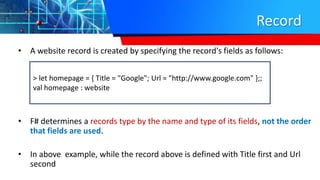
• A website record is created by specifying the record's fields as follows:
• F# determines a records type by the name and type of its fields, not the order
that fields are used.
• In above example, while the record above is defined with Title first and Url
second
> let homepage = { Title = "Google"; Url = "http://www.google.com" };;
val homepage : website
Record
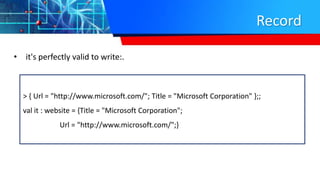
• it's perfectly valid to write:.
> { Url = "http://www.microsoft.com/"; Title = "Microsoft Corporation" };;
val it : website = {Title = "Microsoft Corporation";
Url = "http://www.microsoft.com/";}
Record
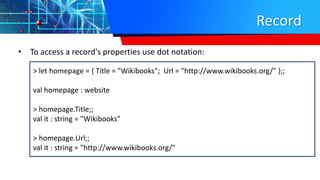
• To access a record's properties use dot notation:
> let homepage = { Title = "Wikibooks"; Url = "http://www.wikibooks.org/" };;
val homepage : website
> homepage.Title;;
val it : string = "Wikibooks"
> homepage.Url;;
val it : string = "http://www.wikibooks.org/"
Example
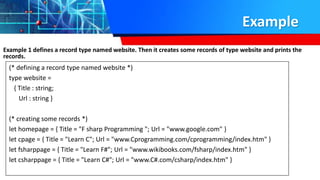
Example 1 defines a record type named website. Then it creates some records of type website and prints the
records.
(* defining a record type named website *)
type website =
{ Title : string;
Url : string }
(* creating some records *)
let homepage = { Title = "F sharp Programming "; Url = "www.google.com" }
let cpage = { Title = "Learn C"; Url = "www.Cprogramming.com/cprogramming/index.htm" }
let fsharppage = { Title = "Learn F#"; Url = "www.wikibooks.com/fsharp/index.htm" }
let csharppage = { Title = "Learn C#"; Url = "www.C#.com/csharp/index.htm" }
Example
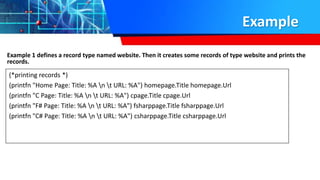
Example 1 defines a record type named website. Then it creates some records of type website and prints the
records.
(*printing records *)
(printfn "Home Page: Title: %A n t URL: %A") homepage.Title homepage.Url
(printfn "C Page: Title: %A n t URL: %A") cpage.Title cpage.Url
(printfn "F# Page: Title: %A n t URL: %A") fsharppage.Title fsharppage.Url
(printfn "C# Page: Title: %A n t URL: %A") csharppage.Title csharppage.Url
Slide Title
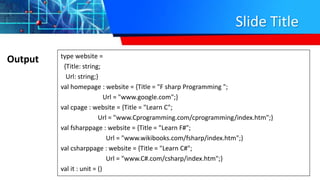
Output type website =
{Title: string;
Url: string;}
val homepage : website = {Title = "F sharp Programming ";
Url = "www.google.com";}
val cpage : website = {Title = "Learn C";
Url = "www.Cprogramming.com/cprogramming/index.htm";}
val fsharppage : website = {Title = "Learn F#";
Url = "www.wikibooks.com/fsharp/index.htm";}
val csharppage : website = {Title = "Learn C#";
Url = "www.C#.com/csharp/index.htm";}
val it : unit = ()
Example 2:
F# program that uses records
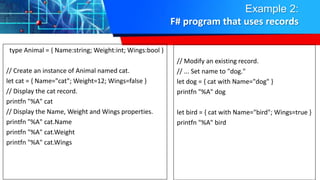
type Animal = { Name:string; Weight:int; Wings:bool }
// Create an instance of Animal named cat.
let cat = { Name="cat"; Weight=12; Wings=false }
// Display the cat record.
printfn "%A" cat
// Display the Name, Weight and Wings properties.
printfn "%A" cat.Name
printfn "%A" cat.Weight
printfn "%A" cat.Wings
// Modify an existing record.
// ... Set name to "dog."
let dog = { cat with Name="dog" }
printfn "%A" dog
let bird = { cat with Name="bird"; Wings=true }
printfn "%A" bird
Example 2:
F# program that uses records
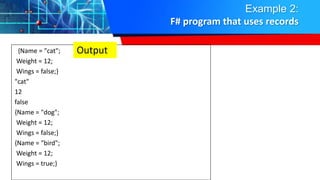
{Name = "cat";
Weight = 12;
Wings = false;}
"cat"
12
false
{Name = "dog";
Weight = 12;
Wings = false;}
{Name = "bird";
Weight = 12;
Wings = true;}
Output
Example 2:
Cloning Records
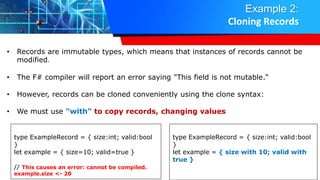
• Records are immutable types, which means that instances of records cannot be
modified.
• The F# compiler will report an error saying "This field is not mutable.“
• However, records can be cloned conveniently using the clone syntax:
• We must use "with" to copy records, changing values
type ExampleRecord = { size:int; valid:bool
}
let example = { size=10; valid=true }
// This causes an error: cannot be compiled.
example.size <- 20
type ExampleRecord = { size:int; valid:bool
}
let example = { size with 10; valid with
true }
Example 2:
Cloning Records
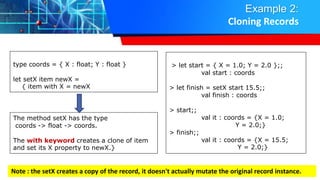
type coords = { X : float; Y : float }
let setX item newX =
{ item with X = newX
The method setX has the type
coords -> float -> coords.
The with keyword creates a clone of item
and set its X property to newX.}
> let start = { X = 1.0; Y = 2.0 };;
val start : coords
> let finish = setX start 15.5;;
val finish : coords
> start;;
val it : coords = {X = 1.0;
Y = 2.0;}
> finish;;
val it : coords = {X = 15.5;
Y = 2.0;}
Note : the setX creates a copy of the record, it doesn't actually mutate the original record instance.
Example 3 :
Creation of Student Record
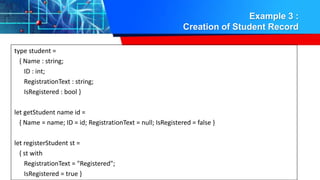
type student =
{ Name : string;
ID : int;
RegistrationText : string;
IsRegistered : bool }
let getStudent name id =
{ Name = name; ID = id; RegistrationText = null; IsRegistered = false }
let registerStudent st =
{ st with
RegistrationText = "Registered";
IsRegistered = true }
Example 3 :
Creation of Student Record
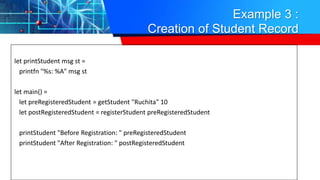
let printStudent msg st =
printfn "%s: %A" msg st
let main() =
let preRegisteredStudent = getStudent "Ruchita" 10
let postRegisteredStudent = registerStudent preRegisteredStudent
printStudent "Before Registration: " preRegisteredStudent
printStudent "After Registration: " postRegisteredStudent
Example 3 :
Creation of Student Record
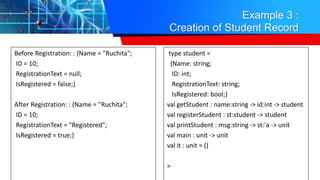
Before Registration: : {Name = "Ruchita";
ID = 10;
RegistrationText = null;
IsRegistered = false;}
After Registration: : {Name = "Ruchita";
ID = 10;
RegistrationText = "Registered";
IsRegistered = true;}
type student =
{Name: string;
ID: int;
RegistrationText: string;
IsRegistered: bool;}
val getStudent : name:string -> id:int -> student
val registerStudent : st:student -> student
val printStudent : msg:string -> st:'a -> unit
val main : unit -> unit
val it : unit = ()
>
Pattern Matching Records
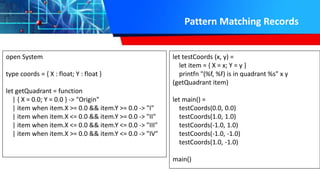
open System
type coords = { X : float; Y : float }
let getQuadrant = function
| { X = 0.0; Y = 0.0 } -> "Origin"
| item when item.X >= 0.0 && item.Y >= 0.0 -> "I"
| item when item.X <= 0.0 && item.Y >= 0.0 -> "II"
| item when item.X <= 0.0 && item.Y <= 0.0 -> "III"
| item when item.X >= 0.0 && item.Y <= 0.0 -> "IV"
let testCoords (x, y) =
let item = { X = x; Y = y }
printfn "(%f, %f) is in quadrant %s" x y
(getQuadrant item)
let main() =
testCoords(0.0, 0.0)
testCoords(1.0, 1.0)
testCoords(-1.0, 1.0)
testCoords(-1.0, -1.0)
testCoords(1.0, -1.0)
main()
Lists Creating And Initializing A List
• A list is an ordered, immutable series of elements of the same type.
• To some extent it is equivalent to a linked list data structure.
• F# module, Microsoft.FSharp.Collections.List, has the common operations on lists.
• F# imports this module automatically and makes it accessible to every F# application.
Lists Creating And Initializing A List
• A list is an ordered, immutable series of elements of the same type.
• To some extent it is equivalent to a linked list data structure.
• F# module, Microsoft.FSharp.Collections.List, has the common operations on
lists.
• F# imports this module automatically and makes it accessible to every F#
application.
Creating and Initializing a List
Following are the various ways of creating lists −
1. Using list literals
2. Using cons (::) operator.
3. Using the List.init method of List module.
4. Using some syntactic constructs called List Comprehensions
Creating and Initializing a List
1. Using list literals
• Most straightforward method is specify a semicolon-delimited sequence of
values in square brackets
• All the values in the list must have the same type:
• Example
let numbers = [1; 2; 3; 4; 5; 6; 7; 8; 9; 10]
Creating and Initializing a List
2. Using cons (::) operator.
• It is very common to build lists up by prepending or consing a value to an
existing list using the :: operator
• Consing creates a new list, but it reuses nodes from the old list, so consing a list
is an extremely efficient O(1) operation.
• Example :
let list2 = 1::2::3::4::5::6::7::8::9::10::[]
let names = ["aaa"; "bbb"; "ccc"; "ddd"]
Creating and Initializing a List
• Example :
>1 :: 2 :: 3 :: [];;
val it : int list = [1; 2; 3]
• [] denotes an empty list
• The :: operator prepends items to a list, returning a
new list
• This operator does not actually mutate lists, it creates
an entirely new list with the prepended element in
the front
> let x = 1 :: 2 :: 3 :: 4 :: [];;
val x : int list
> let y = 12 :: x;;
val y : int list
> x;;
val it : int list = [1; 2; 3; 4]
> y;;
val it : int list = [12; 1; 2; 3; 4]
Creating and Initializing a List
2. Using List.init
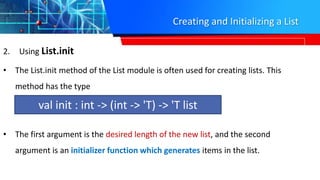
• The List.init method of the List module is often used for creating lists. This
method has the type
• The first argument is the desired length of the new list, and the second
argument is an initializer function which generates items in the list.
val init : int -> (int -> 'T) -> 'T list
Using List.init
2. List.init Example
• > List.init 5 (fun index -> index * 3);;
output
val it : int list = [0; 3; 6; 9; 12]
let list5 = List.init 5 (fun index -> (index, index * index, index * index * index))

.Net (F # ) Records, lists

  • 1.
    .NET (F Sharp) Records,Lists, Sequences, Sets, Maps Dr. Rajeshree Khande
  • 2.
    Chapter - 5 •Records, • Lists • Sequences • Sets • Maps
  • 3.
    Record • A recordis similar to a tuple, except it contains named fields. • A record is defined using the syntax: • + means the element must occur one or more times. • Unlike a tuple, a record is explicitly defined as its own type using the type keyword, and record fields are defined as a semicolon-separated list. • In many ways, a record can be thought of as a simple class. type recordName = { [ fieldName : dataType ] + } type website = { Title : string; Url : string }
  • 4.
    Record • A websiterecord is created by specifying the record's fields as follows: • F# determines a records type by the name and type of its fields, not the order that fields are used. • In above example, while the record above is defined with Title first and Url second > let homepage = { Title = "Google"; Url = "http://www.google.com" };; val homepage : website
  • 5.
    Record • it's perfectlyvalid to write:. > { Url = "http://www.microsoft.com/"; Title = "Microsoft Corporation" };; val it : website = {Title = "Microsoft Corporation"; Url = "http://www.microsoft.com/";}
  • 6.
    Record • To accessa record's properties use dot notation: > let homepage = { Title = "Wikibooks"; Url = "http://www.wikibooks.org/" };; val homepage : website > homepage.Title;; val it : string = "Wikibooks" > homepage.Url;; val it : string = "http://www.wikibooks.org/"
  • 7.
    Example Example 1 definesa record type named website. Then it creates some records of type website and prints the records. (* defining a record type named website *) type website = { Title : string; Url : string } (* creating some records *) let homepage = { Title = "F sharp Programming "; Url = "www.google.com" } let cpage = { Title = "Learn C"; Url = "www.Cprogramming.com/cprogramming/index.htm" } let fsharppage = { Title = "Learn F#"; Url = "www.wikibooks.com/fsharp/index.htm" } let csharppage = { Title = "Learn C#"; Url = "www.C#.com/csharp/index.htm" }
  • 8.
    Example Example 1 definesa record type named website. Then it creates some records of type website and prints the records. (*printing records *) (printfn "Home Page: Title: %A n t URL: %A") homepage.Title homepage.Url (printfn "C Page: Title: %A n t URL: %A") cpage.Title cpage.Url (printfn "F# Page: Title: %A n t URL: %A") fsharppage.Title fsharppage.Url (printfn "C# Page: Title: %A n t URL: %A") csharppage.Title csharppage.Url
  • 9.
    Slide Title Output typewebsite = {Title: string; Url: string;} val homepage : website = {Title = "F sharp Programming "; Url = "www.google.com";} val cpage : website = {Title = "Learn C"; Url = "www.Cprogramming.com/cprogramming/index.htm";} val fsharppage : website = {Title = "Learn F#"; Url = "www.wikibooks.com/fsharp/index.htm";} val csharppage : website = {Title = "Learn C#"; Url = "www.C#.com/csharp/index.htm";} val it : unit = ()
  • 10.
    Example 2: F# programthat uses records type Animal = { Name:string; Weight:int; Wings:bool } // Create an instance of Animal named cat. let cat = { Name="cat"; Weight=12; Wings=false } // Display the cat record. printfn "%A" cat // Display the Name, Weight and Wings properties. printfn "%A" cat.Name printfn "%A" cat.Weight printfn "%A" cat.Wings // Modify an existing record. // ... Set name to "dog." let dog = { cat with Name="dog" } printfn "%A" dog let bird = { cat with Name="bird"; Wings=true } printfn "%A" bird
  • 11.
    Example 2: F# programthat uses records {Name = "cat"; Weight = 12; Wings = false;} "cat" 12 false {Name = "dog"; Weight = 12; Wings = false;} {Name = "bird"; Weight = 12; Wings = true;} Output
  • 12.
    Example 2: Cloning Records •Records are immutable types, which means that instances of records cannot be modified. • The F# compiler will report an error saying "This field is not mutable.“ • However, records can be cloned conveniently using the clone syntax: • We must use "with" to copy records, changing values type ExampleRecord = { size:int; valid:bool } let example = { size=10; valid=true } // This causes an error: cannot be compiled. example.size <- 20 type ExampleRecord = { size:int; valid:bool } let example = { size with 10; valid with true }
  • 13.
    Example 2: Cloning Records typecoords = { X : float; Y : float } let setX item newX = { item with X = newX The method setX has the type coords -> float -> coords. The with keyword creates a clone of item and set its X property to newX.} > let start = { X = 1.0; Y = 2.0 };; val start : coords > let finish = setX start 15.5;; val finish : coords > start;; val it : coords = {X = 1.0; Y = 2.0;} > finish;; val it : coords = {X = 15.5; Y = 2.0;} Note : the setX creates a copy of the record, it doesn't actually mutate the original record instance.
  • 14.
    Example 3 : Creationof Student Record type student = { Name : string; ID : int; RegistrationText : string; IsRegistered : bool } let getStudent name id = { Name = name; ID = id; RegistrationText = null; IsRegistered = false } let registerStudent st = { st with RegistrationText = "Registered"; IsRegistered = true }
  • 15.
    Example 3 : Creationof Student Record let printStudent msg st = printfn "%s: %A" msg st let main() = let preRegisteredStudent = getStudent "Ruchita" 10 let postRegisteredStudent = registerStudent preRegisteredStudent printStudent "Before Registration: " preRegisteredStudent printStudent "After Registration: " postRegisteredStudent
  • 16.
    Example 3 : Creationof Student Record Before Registration: : {Name = "Ruchita"; ID = 10; RegistrationText = null; IsRegistered = false;} After Registration: : {Name = "Ruchita"; ID = 10; RegistrationText = "Registered"; IsRegistered = true;} type student = {Name: string; ID: int; RegistrationText: string; IsRegistered: bool;} val getStudent : name:string -> id:int -> student val registerStudent : st:student -> student val printStudent : msg:string -> st:'a -> unit val main : unit -> unit val it : unit = () >
  • 17.
    Pattern Matching Records openSystem type coords = { X : float; Y : float } let getQuadrant = function | { X = 0.0; Y = 0.0 } -> "Origin" | item when item.X >= 0.0 && item.Y >= 0.0 -> "I" | item when item.X <= 0.0 && item.Y >= 0.0 -> "II" | item when item.X <= 0.0 && item.Y <= 0.0 -> "III" | item when item.X >= 0.0 && item.Y <= 0.0 -> "IV" let testCoords (x, y) = let item = { X = x; Y = y } printfn "(%f, %f) is in quadrant %s" x y (getQuadrant item) let main() = testCoords(0.0, 0.0) testCoords(1.0, 1.0) testCoords(-1.0, 1.0) testCoords(-1.0, -1.0) testCoords(1.0, -1.0) main()
  • 18.
    Lists Creating AndInitializing A List • A list is an ordered, immutable series of elements of the same type. • To some extent it is equivalent to a linked list data structure. • F# module, Microsoft.FSharp.Collections.List, has the common operations on lists. • F# imports this module automatically and makes it accessible to every F# application.
  • 19.
    Lists Creating AndInitializing A List • A list is an ordered, immutable series of elements of the same type. • To some extent it is equivalent to a linked list data structure. • F# module, Microsoft.FSharp.Collections.List, has the common operations on lists. • F# imports this module automatically and makes it accessible to every F# application.
  • 20.
    Creating and Initializinga List Following are the various ways of creating lists − 1. Using list literals 2. Using cons (::) operator. 3. Using the List.init method of List module. 4. Using some syntactic constructs called List Comprehensions
  • 21.
    Creating and Initializinga List 1. Using list literals • Most straightforward method is specify a semicolon-delimited sequence of values in square brackets • All the values in the list must have the same type: • Example let numbers = [1; 2; 3; 4; 5; 6; 7; 8; 9; 10]
  • 22.
    Creating and Initializinga List 2. Using cons (::) operator. • It is very common to build lists up by prepending or consing a value to an existing list using the :: operator • Consing creates a new list, but it reuses nodes from the old list, so consing a list is an extremely efficient O(1) operation. • Example : let list2 = 1::2::3::4::5::6::7::8::9::10::[] let names = ["aaa"; "bbb"; "ccc"; "ddd"]
  • 23.
    Creating and Initializinga List • Example : >1 :: 2 :: 3 :: [];; val it : int list = [1; 2; 3] • [] denotes an empty list • The :: operator prepends items to a list, returning a new list • This operator does not actually mutate lists, it creates an entirely new list with the prepended element in the front > let x = 1 :: 2 :: 3 :: 4 :: [];; val x : int list > let y = 12 :: x;; val y : int list > x;; val it : int list = [1; 2; 3; 4] > y;; val it : int list = [12; 1; 2; 3; 4]
  • 24.
    Creating and Initializinga List 2. Using List.init • The List.init method of the List module is often used for creating lists. This method has the type • The first argument is the desired length of the new list, and the second argument is an initializer function which generates items in the list. val init : int -> (int -> 'T) -> 'T list
  • 25.
    Using List.init 2. List.initExample • > List.init 5 (fun index -> index * 3);; output val it : int list = [0; 3; 6; 9; 12] let list5 = List.init 5 (fun index -> (index, index * index, index * index * index))