Chapter 8
Class-Constructor
of Class
Agenda
• Introduction
• Constructors
• let and do Bindings
• Self Identifiers
• Generic Type Parameters
• Specifying Inheritance
• Members Section
• When to Use Classes, Unions, Records, and
Structures
What is Class?
• Classes are types that represent objects that can have
properties, methods, and events.
• Before an object is created, its properties and functions
should be defined.
• We define properties and methods of an object in a class.
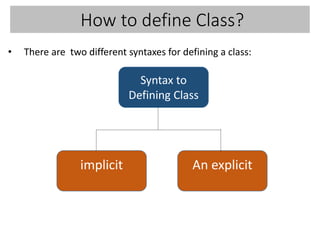
How to define Class?
• There are two different syntaxes for defining a class:
implicit An explicit
Syntax to
Defining Class
Implicit Class Construction
type TypeName optional-type-arguments arguments [ as ident ] =
[ inherit type { as base } ]
[ let-binding | let-rec bindings ] *
[ do-statement ] *
[ abstract-binding | member-binding | interface-implementation ] *
//specify the base class for a class.
declare fields or function values local
to the class.
includes code to be executed upon object
construction.
Example
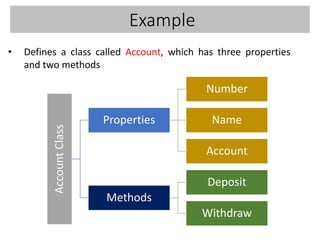
• Defines a class called Account, which has three properties
and two methodsAccountClass
Properties
Number
Name
Account
Methods
Deposit
Withdraw
Example
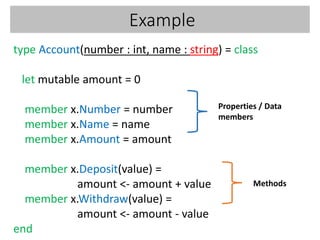
type Account(number : int, name : string) = class
let mutable amount = 0
member x.Number = number
member x.Name = name
member x.Amount = amount
member x.Deposit(value) =
amount <- amount + value
member x.Withdraw(value) =
amount <- amount - value
end
Properties / Data
members
Methods
Example
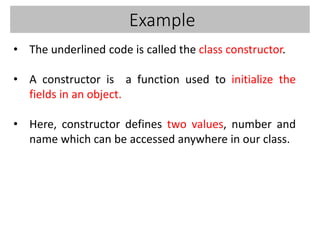
• The underlined code is called the class constructor.
• A constructor is a function used to initialize the
fields in an object.
• Here, constructor defines two values, number and
name which can be accessed anywhere in our class.
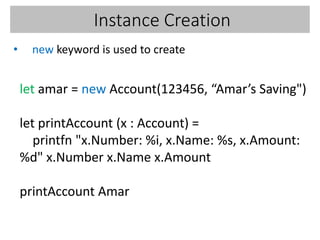
Instance Creation
• new keyword is used to create
let amar = new Account(123456, “Amar’s Saving")
let printAccount (x : Account) =
printfn "x.Number: %i, x.Name: %s, x.Amount:
%d" x.Number x.Name x.Amount
printAccount Amar
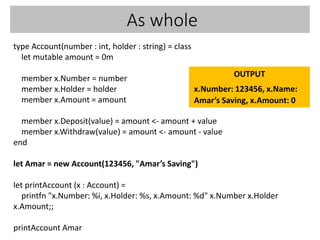
As whole
type Account(number : int, holder : string) = class
let mutable amount = 0m
member x.Number = number
member x.Holder = holder
member x.Amount = amount
member x.Deposit(value) = amount <- amount + value
member x.Withdraw(value) = amount <- amount - value
end
let Amar = new Account(123456, "Amar’s Saving")
let printAccount (x : Account) =
printfn "x.Number: %i, x.Holder: %s, x.Amount: %d" x.Number x.Holder
x.Amount;;
printAccount Amar
OUTPUT
x.Number: 123456, x.Name:
Amar’s Saving, x.Amount: 0
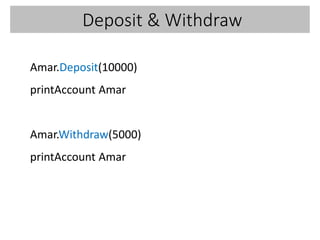
Deposit & Withdraw
Amar.Deposit(10000)
printAccount Amar
Amar.Withdraw(5000)
printAccount Amar
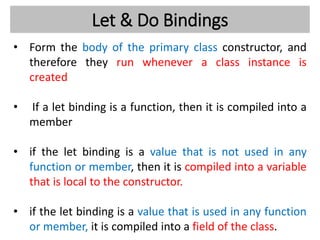
Let & Do Bindings
• Form the body of the primary class constructor, and
therefore they run whenever a class instance is
created
• If a let binding is a function, then it is compiled into a
member
• if the let binding is a value that is not used in any
function or member, then it is compiled into a variable
that is local to the constructor.
• if the let binding is a value that is used in any function
or member, it is compiled into a field of the class.
Let & Do Bindings
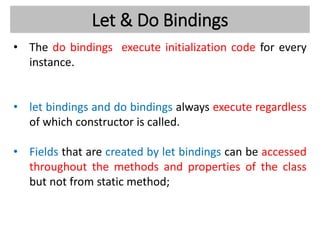
• The do bindings execute initialization code for every
instance.
• let bindings and do bindings always execute regardless
of which constructor is called.
• Fields that are created by let bindings can be accessed
throughout the methods and properties of the class
but not from static method;
Let & Do Bindings
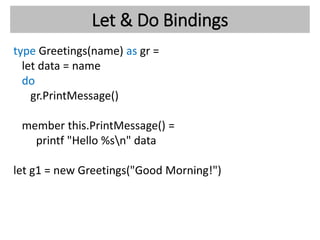
type Greetings(name) as gr =
let data = name
do
gr.PrintMessage()
member this.PrintMessage() =
printf "Hello %sn" data
let g1 = new Greetings("Good Morning!")
Explicit Class Construct :Syntax
type TypeName =
[ inherit type ]
[ val-definitions ]
[ new ( optional-type-arguments arguments ) [ as ident ] =
{ field-initialization }
[ then constructor-statements ]
] *
[ abstract-binding | member-binding | interface-implementation ] *
Creates a line class along with a
constructor that calculates the length of
the line while an object of the class is
created
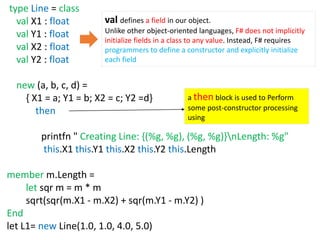
type Line = class
val X1 : float
val Y1 : float
val X2 : float
val Y2 : float
new (a, b, c, d) =
{ X1 = a; Y1 = b; X2 = c; Y2 =d}
then
printfn " Creating Line: {(%g, %g), (%g, %g)}nLength: %g"
this.X1 this.Y1 this.X2 this.Y2 this.Length
member m.Length =
let sqr m = m * m
sqrt(sqr(m.X1 - m.X2) + sqr(m.Y1 - m.Y2) )
End
let L1= new Line(1.0, 1.0, 4.0, 5.0)
val defines a field in our object.
Unlike other object-oriented languages, F# does not implicitly
initialize fields in a class to any value. Instead, F# requires
programmers to define a constructor and explicitly initialize
each field
a then block is used to Perform
some post-constructor processing
using
What is Differences Between
Implicit and Explicit Syntaxes
???
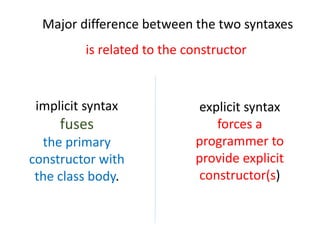
Major difference between the two syntaxes
is related to the constructor
explicit syntax
forces a
programmer to
provide explicit
constructor(s)
implicit syntax
fuses
the primary
constructor with
the class body.
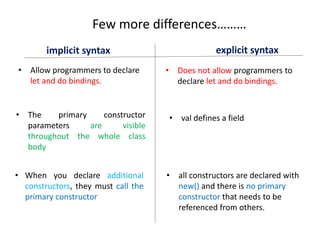
Few more differences………
implicit syntax explicit syntax
• Allow programmers to declare
let and do bindings.
• Does not allow programmers to
declare let and do bindings.
• The primary constructor
parameters are visible
throughout the whole class
body
• val defines a field
• When you declare additional
constructors, they must call the
primary constructor
• all constructors are declared with
new() and there is no primary
constructor that needs to be
referenced from others.
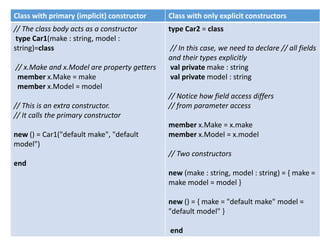
Class with primary (implicit) constructor Class with only explicit constructors
// The class body acts as a constructor
type Car1(make : string, model :
string)=class
// x.Make and x.Model are property getters
member x.Make = make
member x.Model = model
// This is an extra constructor.
// It calls the primary constructor
new () = Car1("default make", "default
model")
end
type Car2 = class
// In this case, we need to declare // all fields
and their types explicitly
val private make : string
val private model : string
// Notice how field access differs
// from parameter access
member x.Make = x.make
member x.Model = x.model
// Two constructors
new (make : string, model : string) = { make =
make model = model }
new () = { make = "default make" model =
"default model" }
end
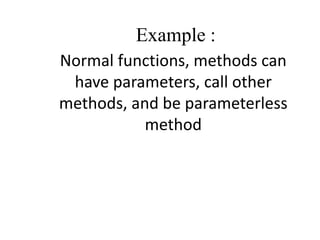
Example :
Normal functions, methods can
have parameters, call other
methods, and be parameterless
method
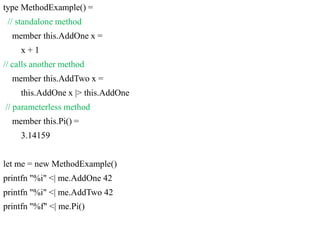
type MethodExample() =
// standalone method
member this.AddOne x =
x + 1
// calls another method
member this.AddTwo x =
this.AddOne x |> this.AddOne
// parameterless method
member this.Pi() =
3.14159
let me = new MethodExample()
printfn "%i" <| me.AddOne 42
printfn "%i" <| me.AddTwo 42
printfn "%f" <| me.Pi()
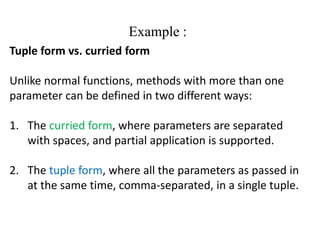
Example :
Tuple form vs. curried form
Unlike normal functions, methods with more than one
parameter can be defined in two different ways:
1. The curried form, where parameters are separated
with spaces, and partial application is supported.
2. The tuple form, where all the parameters as passed in
at the same time, comma-separated, in a single tuple.
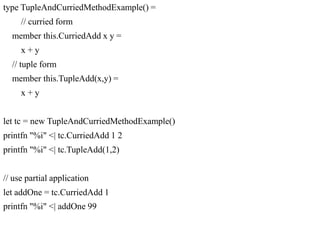
type TupleAndCurriedMethodExample() =
// curried form
member this.CurriedAdd x y =
x + y
// tuple form
member this.TupleAdd(x,y) =
x + y
let tc = new TupleAndCurriedMethodExample()
printfn "%i" <| tc.CurriedAdd 1 2
printfn "%i" <| tc.TupleAdd(1,2)
// use partial application
let addOne = tc.CurriedAdd 1
printfn "%i" <| addOne 99
https://fsharpforfunandprofit.com/posts/classes/

.NET F# Class constructor

  • 1.
  • 2.
    Agenda • Introduction • Constructors •let and do Bindings • Self Identifiers • Generic Type Parameters • Specifying Inheritance • Members Section • When to Use Classes, Unions, Records, and Structures
  • 3.
    What is Class? •Classes are types that represent objects that can have properties, methods, and events. • Before an object is created, its properties and functions should be defined. • We define properties and methods of an object in a class.
  • 4.
    How to defineClass? • There are two different syntaxes for defining a class: implicit An explicit Syntax to Defining Class
  • 5.
    Implicit Class Construction typeTypeName optional-type-arguments arguments [ as ident ] = [ inherit type { as base } ] [ let-binding | let-rec bindings ] * [ do-statement ] * [ abstract-binding | member-binding | interface-implementation ] * //specify the base class for a class. declare fields or function values local to the class. includes code to be executed upon object construction.
  • 6.
    Example • Defines aclass called Account, which has three properties and two methodsAccountClass Properties Number Name Account Methods Deposit Withdraw
  • 7.
    Example type Account(number :int, name : string) = class let mutable amount = 0 member x.Number = number member x.Name = name member x.Amount = amount member x.Deposit(value) = amount <- amount + value member x.Withdraw(value) = amount <- amount - value end Properties / Data members Methods
  • 8.
    Example • The underlinedcode is called the class constructor. • A constructor is a function used to initialize the fields in an object. • Here, constructor defines two values, number and name which can be accessed anywhere in our class.
  • 9.
    Instance Creation • newkeyword is used to create let amar = new Account(123456, “Amar’s Saving") let printAccount (x : Account) = printfn "x.Number: %i, x.Name: %s, x.Amount: %d" x.Number x.Name x.Amount printAccount Amar
  • 10.
    As whole type Account(number: int, holder : string) = class let mutable amount = 0m member x.Number = number member x.Holder = holder member x.Amount = amount member x.Deposit(value) = amount <- amount + value member x.Withdraw(value) = amount <- amount - value end let Amar = new Account(123456, "Amar’s Saving") let printAccount (x : Account) = printfn "x.Number: %i, x.Holder: %s, x.Amount: %d" x.Number x.Holder x.Amount;; printAccount Amar OUTPUT x.Number: 123456, x.Name: Amar’s Saving, x.Amount: 0
  • 11.
    Deposit & Withdraw Amar.Deposit(10000) printAccountAmar Amar.Withdraw(5000) printAccount Amar
  • 12.
    Let & DoBindings • Form the body of the primary class constructor, and therefore they run whenever a class instance is created • If a let binding is a function, then it is compiled into a member • if the let binding is a value that is not used in any function or member, then it is compiled into a variable that is local to the constructor. • if the let binding is a value that is used in any function or member, it is compiled into a field of the class.
  • 13.
    Let & DoBindings • The do bindings execute initialization code for every instance. • let bindings and do bindings always execute regardless of which constructor is called. • Fields that are created by let bindings can be accessed throughout the methods and properties of the class but not from static method;
  • 14.
    Let & DoBindings type Greetings(name) as gr = let data = name do gr.PrintMessage() member this.PrintMessage() = printf "Hello %sn" data let g1 = new Greetings("Good Morning!")
  • 15.
    Explicit Class Construct:Syntax type TypeName = [ inherit type ] [ val-definitions ] [ new ( optional-type-arguments arguments ) [ as ident ] = { field-initialization } [ then constructor-statements ] ] * [ abstract-binding | member-binding | interface-implementation ] *
  • 16.
    Creates a lineclass along with a constructor that calculates the length of the line while an object of the class is created
  • 17.
    type Line =class val X1 : float val Y1 : float val X2 : float val Y2 : float new (a, b, c, d) = { X1 = a; Y1 = b; X2 = c; Y2 =d} then printfn " Creating Line: {(%g, %g), (%g, %g)}nLength: %g" this.X1 this.Y1 this.X2 this.Y2 this.Length member m.Length = let sqr m = m * m sqrt(sqr(m.X1 - m.X2) + sqr(m.Y1 - m.Y2) ) End let L1= new Line(1.0, 1.0, 4.0, 5.0) val defines a field in our object. Unlike other object-oriented languages, F# does not implicitly initialize fields in a class to any value. Instead, F# requires programmers to define a constructor and explicitly initialize each field a then block is used to Perform some post-constructor processing using
  • 18.
    What is DifferencesBetween Implicit and Explicit Syntaxes ???
  • 19.
    Major difference betweenthe two syntaxes is related to the constructor explicit syntax forces a programmer to provide explicit constructor(s) implicit syntax fuses the primary constructor with the class body.
  • 20.
    Few more differences……… implicitsyntax explicit syntax • Allow programmers to declare let and do bindings. • Does not allow programmers to declare let and do bindings. • The primary constructor parameters are visible throughout the whole class body • val defines a field • When you declare additional constructors, they must call the primary constructor • all constructors are declared with new() and there is no primary constructor that needs to be referenced from others.
  • 21.
    Class with primary(implicit) constructor Class with only explicit constructors // The class body acts as a constructor type Car1(make : string, model : string)=class // x.Make and x.Model are property getters member x.Make = make member x.Model = model // This is an extra constructor. // It calls the primary constructor new () = Car1("default make", "default model") end type Car2 = class // In this case, we need to declare // all fields and their types explicitly val private make : string val private model : string // Notice how field access differs // from parameter access member x.Make = x.make member x.Model = x.model // Two constructors new (make : string, model : string) = { make = make model = model } new () = { make = "default make" model = "default model" } end
  • 22.
    Example : Normal functions,methods can have parameters, call other methods, and be parameterless method
  • 23.
    type MethodExample() = //standalone method member this.AddOne x = x + 1 // calls another method member this.AddTwo x = this.AddOne x |> this.AddOne // parameterless method member this.Pi() = 3.14159 let me = new MethodExample() printfn "%i" <| me.AddOne 42 printfn "%i" <| me.AddTwo 42 printfn "%f" <| me.Pi()
  • 24.
    Example : Tuple formvs. curried form Unlike normal functions, methods with more than one parameter can be defined in two different ways: 1. The curried form, where parameters are separated with spaces, and partial application is supported. 2. The tuple form, where all the parameters as passed in at the same time, comma-separated, in a single tuple.
  • 25.
    type TupleAndCurriedMethodExample() = //curried form member this.CurriedAdd x y = x + y // tuple form member this.TupleAdd(x,y) = x + y let tc = new TupleAndCurriedMethodExample() printfn "%i" <| tc.CurriedAdd 1 2 printfn "%i" <| tc.TupleAdd(1,2) // use partial application let addOne = tc.CurriedAdd 1 printfn "%i" <| addOne 99
  • 26.