Classes and Objects in Java
1
Constructors, Overloading, Static
Members
// Circle.java: Contains both Circle class and its user class
//Add Circle class code here
class MyMain
{
public static void main(String args[])
{
Circle aCircle; // creating reference
aCircle = new Circle(); // creating object
aCircle.x = 10; // assigning value to data field
aCircle.y = 20;
aCircle.r = 5;
double area = aCircle.area(); // invoking method
double circumf = aCircle.circumference();
System.out.println("Radius="+aCircle.r+" Area="+area);
System.out.println("Radius="+aCircle.r+" Circumference ="+circumf);
}
}
2
[raj@mundroo]%: java MyMain
Radius=5.0 Area=78.5
Radius=5.0 Circumference =31.400000000000002
Better way of Initialising or Access
Data Members x, y, r
 When there too many items to
update/access and also to develop a
readable code, generally it is done by
defining specific method for each purpose.
 To initialise/Update a value:
◦ aCircle.setX( 10 )
 These methods are informally called as Mutators or
Setters Methods.
 To access a value:
◦ aCircle.getX()
 These methods are informally called as Accessors or
Getters Methods.
3
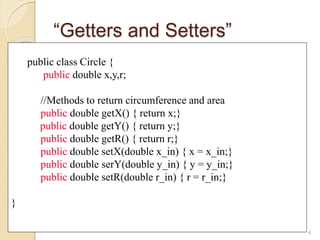
“Getters and Setters”
4
public class Circle {
public double x,y,r;
//Methods to return circumference and area
public double getX() { return x;}
public double getY() { return y;}
public double getR() { return r;}
public double setX(double x_in) { x = x_in;}
public double serY(double y_in) { y = y_in;}
public double setR(double r_in) { r = r_in;}
}
How does this code looks ? More
readable ?
// Circle.java: Contains both Circle class and its user class
//Add Circle class code here
class MyMain
{
public static void main(String args[])
{
Circle aCircle; // creating reference
aCircle = new Circle(); // creating object
aCircle.setX(10);
aCircle.setY(20);
aCircle.setR(5);
double area = aCircle.area(); // invoking method
double circumf = aCircle.circumference();
System.out.println("Radius="+aCircle.getR()+" Area="+area);
System.out.println("Radius="+aCircle.getR()+" Circumference
="+circumf);
}
}
5
$>java MyMain
Radius=5.0 Area=78.5
Radius=5.0 Circumference =31.400000000000002
Object Initialisation
 When objects are created, the initial value of data fields is
unknown unless its users explicitly do so. For example,
◦ ObjectName.DataField1 = 0; // OR
◦ ObjectName.SetDataField1(0);
◦ For example, if you create an object of the class called “Counter”,
it is natural to assume that the counter record-keeping field is
initialised to zero unless otherwise specified differently.
class Counter
{
int CounterIndex;
…
}
Counter counter1 = new Counter();
◦ What is the value of “counter1.CounterIndex” ?
 In Java, this can be achieved though a mechanism called
constructors.
6
What is a Constructor?
 Constructor is a special method that gets invoked
“automatically” at the time of object creation.
 Constructor is normally used for initializing objects
with default values unless different values are
supplied.
 Constructor has the same name as the class
name.
 Constructor cannot return values.
 A class can have more than one constructor as
long as they have different signature (i.e., different
input arguments syntax).
7
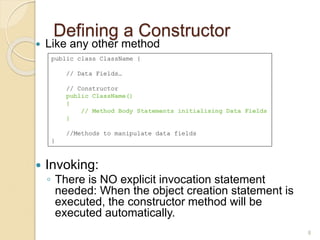
Defining a Constructor
 Like any other method
 Invoking:
◦ There is NO explicit invocation statement
needed: When the object creation statement is
executed, the constructor method will be
executed automatically.
8
public class ClassName {
// Data Fields…
// Constructor
public ClassName()
{
// Method Body Statements initialising Data Fields
}
//Methods to manipulate data fields
}
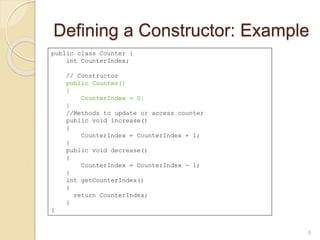
Defining a Constructor: Example
9
public class Counter {
int CounterIndex;
// Constructor
public Counter()
{
CounterIndex = 0;
}
//Methods to update or access counter
public void increase()
{
CounterIndex = CounterIndex + 1;
}
public void decrease()
{
CounterIndex = CounterIndex - 1;
}
int getCounterIndex()
{
return CounterIndex;
}
}
Trace counter value at each
statement and What is the output ?
class MyClass {
public static void main(String args[])
{
Counter counter1 = new Counter();
counter1.increase();
int a = counter1.getCounterIndex();
counter1.increase();
int b = counter1.getCounterIndex();
if ( a > b )
counter1.increase();
else
counter1.decrease();
System.out.println(counter1.getCounterIndex());
}
}
10
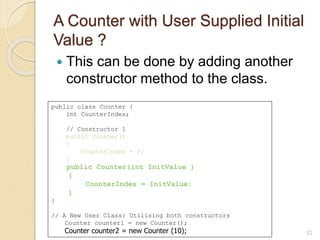
A Counter with User Supplied Initial
Value ?
 This can be done by adding another
constructor method to the class.
11
public class Counter {
int CounterIndex;
// Constructor 1
public Counter()
{
CounterIndex = 0;
}
public Counter(int InitValue )
{
CounterIndex = InitValue;
}
}
// A New User Class: Utilising both constructors
Counter counter1 = new Counter();
Counter counter2 = new Counter (10);
Adding a Multiple-Parameters
Constructor to our Circle Class
12
public class Circle {
public double x,y,r;
// Constructor
public Circle(double centreX, double centreY,
double radius)
{
x = centreX;
y = centreY;
r = radius;
}
//Methods to return circumference and area
public double circumference() { return 2*3.14*r; }
public double area() { return 3.14 * r * r; }
}
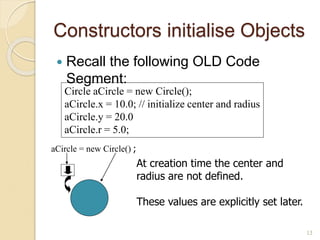
Constructors initialise Objects
 Recall the following OLD Code
Segment:
13
Circle aCircle = new Circle();
aCircle.x = 10.0; // initialize center and radius
aCircle.y = 20.0
aCircle.r = 5.0;
aCircle = new Circle() ;
At creation time the center and
radius are not defined.
These values are explicitly set later.
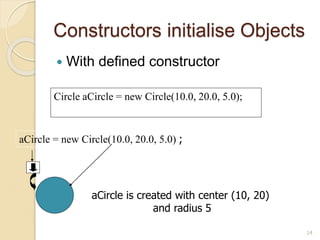
Constructors initialise Objects
 With defined constructor
14
Circle aCircle = new Circle(10.0, 20.0, 5.0);
aCircle = new Circle(10.0, 20.0, 5.0) ;
aCircle is created with center (10, 20)
and radius 5
Multiple Constructors
 Sometimes want to initialize in a number
of different ways, depending on
circumstance.
 This can be supported by having multiple
constructors having different input
arguments.
15
Multiple Constructors
16
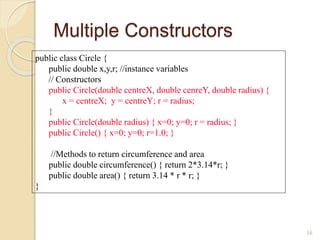
public class Circle {
public double x,y,r; //instance variables
// Constructors
public Circle(double centreX, double cenreY, double radius) {
x = centreX; y = centreY; r = radius;
}
public Circle(double radius) { x=0; y=0; r = radius; }
public Circle() { x=0; y=0; r=1.0; }
//Methods to return circumference and area
public double circumference() { return 2*3.14*r; }
public double area() { return 3.14 * r * r; }
}
Initializing with constructors
17
public class TestCircles {
public static void main(String args[]){
Circle circleA = new Circle( 10.0, 12.0, 20.0);
Circle circleB = new Circle(10.0);
Circle circleC = new Circle();
}
}
circleA = new Circle(10, 12, 20) circleB = new Circle(10)
Centre = (0,0)
Radius=10
circleC = new Circle()
Centre = (0,0)
Radius = 1
Centre = (10,12)
Radius = 20
Method Overloading
 Methods all have the same name.
 Methods are distinguished by their
signature:
◦ name
◦ number of arguments
◦ type of arguments
◦ position of arguments
 That means, a class can also have multiple
usual methods with the same name.
 Not to confuse with method overriding
(coming up)
18
Polymorphism
 Allows a single method or operator
associated with different meaning
depending on the type of data passed to it.
It can be realised through:
◦ Method Overloading
◦ Operator Overloading (Supported in C++, but not
in Java)
 Defining the same method with different
argument types (method overloading) -
polymorphism.
 The method body can have different logic
depending on the type of arguments.
19
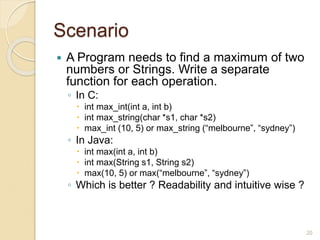
Scenario
 A Program needs to find a maximum of two
numbers or Strings. Write a separate
function for each operation.
◦ In C:
 int max_int(int a, int b)
 int max_string(char *s1, char *s2)
 max_int (10, 5) or max_string (“melbourne”, “sydney”)
◦ In Java:
 int max(int a, int b)
 int max(String s1, String s2)
 max(10, 5) or max(“melbourne”, “sydney”)
◦ Which is better ? Readability and intuitive wise ?
20
A Program with Method Overloading
// Compare.java: a class comparing different items
class Compare {
static int max(int a, int b)
{ if( a > b) return a;
else return b;
}
static String max(String a, String b)
{ if( a.compareTo (b) > 0) return a;
else return b;
}
public static void main(String args[])
{ String s1 = "Melbourne";
String s2 = "Sydney";
String s3 = "Adelaide";
int a = 10;
int b = 20;
System.out.println(max(a, b)); // which number is big
System.out.println(max(s1, s2)); // which city is big
System.out.println(max(s1, s3)); // which city is big
}
} 21
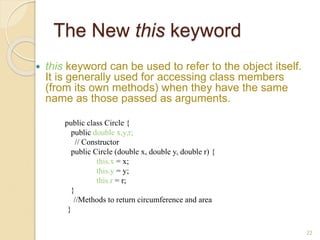
The New this keyword
 this keyword can be used to refer to the object itself.
It is generally used for accessing class members
(from its own methods) when they have the same
name as those passed as arguments.
public class Circle {
public double x,y,r;
// Constructor
public Circle (double x, double y, double r) {
this.x = x;
this.y = y;
this.r = r;
}
//Methods to return circumference and area
}
22
Static Members
 Java supports definition of global methods and
variables that can be accessed without creating
objects of a class. Such members are called Static
members.
 Define a variable by marking with the static
methods.
 This feature is useful when we want to create a
variable common to all instances of a class.
 One of the most common example is to have a
variable that could keep a count of how many
objects of a class have been created.
 Note: Java creates only one copy for a static
variable which can be used even if the class is
never instantiated.
23
Static Variables
 Define using static:
 Access with the class name
(ClassName.StatVarName):
24
public class Circle {
// class variable, one for the Circle class, how many circles
public static int numCircles;
//instance variables,one for each instance of a Circle
public double x,y,r;
// Constructors...
}
nCircles = Circle.numCircles;
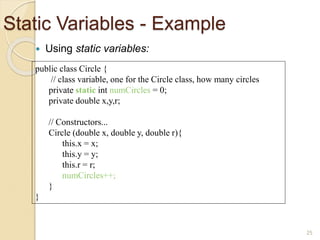
Static Variables - Example
 Using static variables:
25
public class Circle {
// class variable, one for the Circle class, how many circles
private static int numCircles = 0;
private double x,y,r;
// Constructors...
Circle (double x, double y, double r){
this.x = x;
this.y = y;
this.r = r;
numCircles++;
}
}
Class Variables - Example
 Using static variables:
26
public class CountCircles {
public static void main(String args[]){
Circle circleA = new Circle( 10, 12, 20); // numCircles = 1
Circle circleB = new Circle( 5, 3, 10); // numCircles = 2
}
}
circleA = new Circle(10, 12, 20) circleB = new Circle(5, 3, 10)
numCircles
Instance Vs Static Variables
 Instance variables : One copy per object.
Every object has its own instance
variable.
◦ E.g. x, y, r (centre and radius in the circle)
 Static variables : One copy per class.
◦ E.g. numCircles (total number of circle
objects created)
27
Static Methods
 A class can have methods that are defined
as static (e.g., main method).
 Static methods can be accessed without
using objects. Also, there is NO need to
create objects.
 They are prefixed with keyword “static”
 Static methods are generally used to group
related library functions that don’t depend
on data members of its class. For example,
Math library functions.
28
Comparator class with Static
methods
// Comparator.java: A class with static data items comparision methods
class Comparator {
public static int max(int a, int b)
{
if( a > b)
return a;
else
return b;
}
public static String max(String a, String b)
{
if( a.compareTo (b) > 0)
return a;
else
return b;
}
}
class MyClass {
public static void main(String args[])
{
String s1 = "Melbourne";
String s2 = "Sydney";
String s3 = "Adelaide";
int a = 10;
int b = 20;
System.out.println(Comparator.max(a, b)); // which number is big
System.out.println(Comparator.max(s1, s2)); // which city is big
System.out.println(Comparator.max(s1, s3)); // which city is big
}
}
29
Directly accessed using ClassName (NO Objects)
Static methods restrictions
 They can only call other static
methods.
 They can only access static data.
 They cannot refer to “this” or “super”
(more later) in anyway.
30
Summary
 Constructors allow seamless initialization of
objects.
 Classes can have multiple methods with the
same name [Overloading]
 Classes can have static members, which
serve as global members of all objects of a
class.
 Keywords: constructors, polymorphism,
method overloading, this, static variables,
static methods.
31
Overloading vs. Overriding
 Don't confuse the concepts of overloading and overriding
 Overloading deals with multiple methods with the same name
but different signatures
 Overriding deals with two methods, one in a parent class and
one in a child class, that have the same signature
32

Unit 1 Part - 3 constructor Overloading Static.ppt

  • 1.
    Classes and Objectsin Java 1 Constructors, Overloading, Static Members
  • 2.
    // Circle.java: Containsboth Circle class and its user class //Add Circle class code here class MyMain { public static void main(String args[]) { Circle aCircle; // creating reference aCircle = new Circle(); // creating object aCircle.x = 10; // assigning value to data field aCircle.y = 20; aCircle.r = 5; double area = aCircle.area(); // invoking method double circumf = aCircle.circumference(); System.out.println("Radius="+aCircle.r+" Area="+area); System.out.println("Radius="+aCircle.r+" Circumference ="+circumf); } } 2 [raj@mundroo]%: java MyMain Radius=5.0 Area=78.5 Radius=5.0 Circumference =31.400000000000002
  • 3.
    Better way ofInitialising or Access Data Members x, y, r  When there too many items to update/access and also to develop a readable code, generally it is done by defining specific method for each purpose.  To initialise/Update a value: ◦ aCircle.setX( 10 )  These methods are informally called as Mutators or Setters Methods.  To access a value: ◦ aCircle.getX()  These methods are informally called as Accessors or Getters Methods. 3
  • 4.
    “Getters and Setters” 4 publicclass Circle { public double x,y,r; //Methods to return circumference and area public double getX() { return x;} public double getY() { return y;} public double getR() { return r;} public double setX(double x_in) { x = x_in;} public double serY(double y_in) { y = y_in;} public double setR(double r_in) { r = r_in;} }
  • 5.
    How does thiscode looks ? More readable ? // Circle.java: Contains both Circle class and its user class //Add Circle class code here class MyMain { public static void main(String args[]) { Circle aCircle; // creating reference aCircle = new Circle(); // creating object aCircle.setX(10); aCircle.setY(20); aCircle.setR(5); double area = aCircle.area(); // invoking method double circumf = aCircle.circumference(); System.out.println("Radius="+aCircle.getR()+" Area="+area); System.out.println("Radius="+aCircle.getR()+" Circumference ="+circumf); } } 5 $>java MyMain Radius=5.0 Area=78.5 Radius=5.0 Circumference =31.400000000000002
  • 6.
    Object Initialisation  Whenobjects are created, the initial value of data fields is unknown unless its users explicitly do so. For example, ◦ ObjectName.DataField1 = 0; // OR ◦ ObjectName.SetDataField1(0); ◦ For example, if you create an object of the class called “Counter”, it is natural to assume that the counter record-keeping field is initialised to zero unless otherwise specified differently. class Counter { int CounterIndex; … } Counter counter1 = new Counter(); ◦ What is the value of “counter1.CounterIndex” ?  In Java, this can be achieved though a mechanism called constructors. 6
  • 7.
    What is aConstructor?  Constructor is a special method that gets invoked “automatically” at the time of object creation.  Constructor is normally used for initializing objects with default values unless different values are supplied.  Constructor has the same name as the class name.  Constructor cannot return values.  A class can have more than one constructor as long as they have different signature (i.e., different input arguments syntax). 7
  • 8.
    Defining a Constructor Like any other method  Invoking: ◦ There is NO explicit invocation statement needed: When the object creation statement is executed, the constructor method will be executed automatically. 8 public class ClassName { // Data Fields… // Constructor public ClassName() { // Method Body Statements initialising Data Fields } //Methods to manipulate data fields }
  • 9.
    Defining a Constructor:Example 9 public class Counter { int CounterIndex; // Constructor public Counter() { CounterIndex = 0; } //Methods to update or access counter public void increase() { CounterIndex = CounterIndex + 1; } public void decrease() { CounterIndex = CounterIndex - 1; } int getCounterIndex() { return CounterIndex; } }
  • 10.
    Trace counter valueat each statement and What is the output ? class MyClass { public static void main(String args[]) { Counter counter1 = new Counter(); counter1.increase(); int a = counter1.getCounterIndex(); counter1.increase(); int b = counter1.getCounterIndex(); if ( a > b ) counter1.increase(); else counter1.decrease(); System.out.println(counter1.getCounterIndex()); } } 10
  • 11.
    A Counter withUser Supplied Initial Value ?  This can be done by adding another constructor method to the class. 11 public class Counter { int CounterIndex; // Constructor 1 public Counter() { CounterIndex = 0; } public Counter(int InitValue ) { CounterIndex = InitValue; } } // A New User Class: Utilising both constructors Counter counter1 = new Counter(); Counter counter2 = new Counter (10);
  • 12.
    Adding a Multiple-Parameters Constructorto our Circle Class 12 public class Circle { public double x,y,r; // Constructor public Circle(double centreX, double centreY, double radius) { x = centreX; y = centreY; r = radius; } //Methods to return circumference and area public double circumference() { return 2*3.14*r; } public double area() { return 3.14 * r * r; } }
  • 13.
    Constructors initialise Objects Recall the following OLD Code Segment: 13 Circle aCircle = new Circle(); aCircle.x = 10.0; // initialize center and radius aCircle.y = 20.0 aCircle.r = 5.0; aCircle = new Circle() ; At creation time the center and radius are not defined. These values are explicitly set later.
  • 14.
    Constructors initialise Objects With defined constructor 14 Circle aCircle = new Circle(10.0, 20.0, 5.0); aCircle = new Circle(10.0, 20.0, 5.0) ; aCircle is created with center (10, 20) and radius 5
  • 15.
    Multiple Constructors  Sometimeswant to initialize in a number of different ways, depending on circumstance.  This can be supported by having multiple constructors having different input arguments. 15
  • 16.
    Multiple Constructors 16 public classCircle { public double x,y,r; //instance variables // Constructors public Circle(double centreX, double cenreY, double radius) { x = centreX; y = centreY; r = radius; } public Circle(double radius) { x=0; y=0; r = radius; } public Circle() { x=0; y=0; r=1.0; } //Methods to return circumference and area public double circumference() { return 2*3.14*r; } public double area() { return 3.14 * r * r; } }
  • 17.
    Initializing with constructors 17 publicclass TestCircles { public static void main(String args[]){ Circle circleA = new Circle( 10.0, 12.0, 20.0); Circle circleB = new Circle(10.0); Circle circleC = new Circle(); } } circleA = new Circle(10, 12, 20) circleB = new Circle(10) Centre = (0,0) Radius=10 circleC = new Circle() Centre = (0,0) Radius = 1 Centre = (10,12) Radius = 20
  • 18.
    Method Overloading  Methodsall have the same name.  Methods are distinguished by their signature: ◦ name ◦ number of arguments ◦ type of arguments ◦ position of arguments  That means, a class can also have multiple usual methods with the same name.  Not to confuse with method overriding (coming up) 18
  • 19.
    Polymorphism  Allows asingle method or operator associated with different meaning depending on the type of data passed to it. It can be realised through: ◦ Method Overloading ◦ Operator Overloading (Supported in C++, but not in Java)  Defining the same method with different argument types (method overloading) - polymorphism.  The method body can have different logic depending on the type of arguments. 19
  • 20.
    Scenario  A Programneeds to find a maximum of two numbers or Strings. Write a separate function for each operation. ◦ In C:  int max_int(int a, int b)  int max_string(char *s1, char *s2)  max_int (10, 5) or max_string (“melbourne”, “sydney”) ◦ In Java:  int max(int a, int b)  int max(String s1, String s2)  max(10, 5) or max(“melbourne”, “sydney”) ◦ Which is better ? Readability and intuitive wise ? 20
  • 21.
    A Program withMethod Overloading // Compare.java: a class comparing different items class Compare { static int max(int a, int b) { if( a > b) return a; else return b; } static String max(String a, String b) { if( a.compareTo (b) > 0) return a; else return b; } public static void main(String args[]) { String s1 = "Melbourne"; String s2 = "Sydney"; String s3 = "Adelaide"; int a = 10; int b = 20; System.out.println(max(a, b)); // which number is big System.out.println(max(s1, s2)); // which city is big System.out.println(max(s1, s3)); // which city is big } } 21
  • 22.
    The New thiskeyword  this keyword can be used to refer to the object itself. It is generally used for accessing class members (from its own methods) when they have the same name as those passed as arguments. public class Circle { public double x,y,r; // Constructor public Circle (double x, double y, double r) { this.x = x; this.y = y; this.r = r; } //Methods to return circumference and area } 22
  • 23.
    Static Members  Javasupports definition of global methods and variables that can be accessed without creating objects of a class. Such members are called Static members.  Define a variable by marking with the static methods.  This feature is useful when we want to create a variable common to all instances of a class.  One of the most common example is to have a variable that could keep a count of how many objects of a class have been created.  Note: Java creates only one copy for a static variable which can be used even if the class is never instantiated. 23
  • 24.
    Static Variables  Defineusing static:  Access with the class name (ClassName.StatVarName): 24 public class Circle { // class variable, one for the Circle class, how many circles public static int numCircles; //instance variables,one for each instance of a Circle public double x,y,r; // Constructors... } nCircles = Circle.numCircles;
  • 25.
    Static Variables -Example  Using static variables: 25 public class Circle { // class variable, one for the Circle class, how many circles private static int numCircles = 0; private double x,y,r; // Constructors... Circle (double x, double y, double r){ this.x = x; this.y = y; this.r = r; numCircles++; } }
  • 26.
    Class Variables -Example  Using static variables: 26 public class CountCircles { public static void main(String args[]){ Circle circleA = new Circle( 10, 12, 20); // numCircles = 1 Circle circleB = new Circle( 5, 3, 10); // numCircles = 2 } } circleA = new Circle(10, 12, 20) circleB = new Circle(5, 3, 10) numCircles
  • 27.
    Instance Vs StaticVariables  Instance variables : One copy per object. Every object has its own instance variable. ◦ E.g. x, y, r (centre and radius in the circle)  Static variables : One copy per class. ◦ E.g. numCircles (total number of circle objects created) 27
  • 28.
    Static Methods  Aclass can have methods that are defined as static (e.g., main method).  Static methods can be accessed without using objects. Also, there is NO need to create objects.  They are prefixed with keyword “static”  Static methods are generally used to group related library functions that don’t depend on data members of its class. For example, Math library functions. 28
  • 29.
    Comparator class withStatic methods // Comparator.java: A class with static data items comparision methods class Comparator { public static int max(int a, int b) { if( a > b) return a; else return b; } public static String max(String a, String b) { if( a.compareTo (b) > 0) return a; else return b; } } class MyClass { public static void main(String args[]) { String s1 = "Melbourne"; String s2 = "Sydney"; String s3 = "Adelaide"; int a = 10; int b = 20; System.out.println(Comparator.max(a, b)); // which number is big System.out.println(Comparator.max(s1, s2)); // which city is big System.out.println(Comparator.max(s1, s3)); // which city is big } } 29 Directly accessed using ClassName (NO Objects)
  • 30.
    Static methods restrictions They can only call other static methods.  They can only access static data.  They cannot refer to “this” or “super” (more later) in anyway. 30
  • 31.
    Summary  Constructors allowseamless initialization of objects.  Classes can have multiple methods with the same name [Overloading]  Classes can have static members, which serve as global members of all objects of a class.  Keywords: constructors, polymorphism, method overloading, this, static variables, static methods. 31
  • 32.
    Overloading vs. Overriding Don't confuse the concepts of overloading and overriding  Overloading deals with multiple methods with the same name but different signatures  Overriding deals with two methods, one in a parent class and one in a child class, that have the same signature 32