CLASSES AND OBJECTS
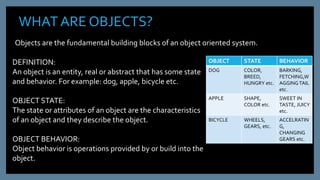
WHAT ARE OBJECTS?
DEFINITION:
An object is an entity, real or abstract that has some state
and behavior. For example: dog, apple, bicycle etc.
OBJECT STATE:
The state or attributes of an object are the characteristics
of an object and they describe the object.
OBJECT BEHAVIOR:
Object behavior is operations provided by or build into the
object.
OBJECT STATE BEHAVIOR
DOG COLOR,
BREED,
HUNGRY etc.
BARKING,
FETCHING,W
AGGINGTAIL
etc.
APPLE SHAPE,
COLOR etc.
SWEET IN
TASTE, JUICY
etc.
BICYCLE WHEELS,
GEARS, etc.
ACCELRATIN
G,
CHANGING
GEARS etc.
Objects are the fundamental building blocks of an object oriented system.
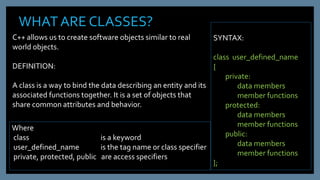
WHAT ARE CLASSES?
SYNTAX:
class user_defined_name
{
private:
data members
member functions
protected:
data members
member functions
public:
data members
member functions
};
C++ allows us to create software objects similar to real
world objects.
DEFINITION:
A class is a way to bind the data describing an entity and its
associated functions together. It is a set of objects that
share common attributes and behavior.
Where
class is a keyword
user_defined_name is the tag name or class specifier
private, protected, public are access specifiers
CLASS : EXAMPLE
class student
{
private:
int roll;
char name[20];
public:
void indata()
{ cin>> roll; gets(name); }
void outdata()
{ cout<< roll<<name;}
}
CLASS SPECIFIER /TAG NAME
KEYWORD :
CLASS
ACCESS SPECIFIER
DATA MEMBERS
MEMBER
FUNCTIONS
ACCESS SPECIFIER
An access specifier determines whether class members are accessible in
various parts of our program.
ACCESS SPECIFIER
PRIVATE
They are not accessible
outside the class. Only
member functions of the
class can use them.They can
not be inherited.
PROTECTED
They are not accessible
outside the class. Only
member functions of the
class can use them. But
they can be inherited.
PUBLIC
They are accessible
outside the class.They
can also be inherited.
NOTE: In the absence of a specifier all the members defined in a class are considered
to be private. Protected access specifier is discussed in detail in the inheritance PPT.
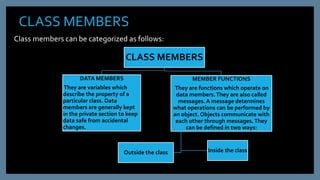
CLASS MEMBERS
Class members can be categorized as follows:
CLASS MEMBERS
DATA MEMBERS
They are variables which
describe the property of a
particular class. Data
members are generally kept
in the private section to keep
data safe from accidental
changes.
MEMBER FUNCTIONS
They are functions which operate on
data members.They are also called
messages. A message determines
what operations can be performed by
an object. Objects communicate with
each other through messages.They
can be defined in two ways:
Inside the classOutside the class
DEFINING MEMBER FUNCTIONS
INSIDE/OUTSIDETHE CLASS
INSIDETHE CLASS: Functions are defined inside the
class only if the function code is small. Such function
definitions are considered inline by default.
class student
{
private:
int roll;
char name[20];
public:
void indata()
{ cin>> roll; gets(name); }
void outdata()
{ cout<< roll<<name;}
}
OUTSIDETHE CLASS: In this case prototype of function
is declared inside the class.
SYNTAX:
return type class_name :: function_name(argument list)
class student
{ private:
int roll;
char name[20];
public:
void indata();
void outdata();
};
void student :: indata()
{ cin>> roll; gets(name); }
void student :: outdata()
{ cout<< roll<<name;}
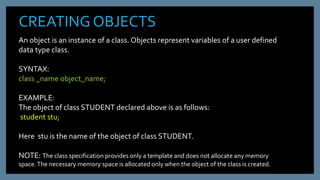
CREATING OBJECTS
An object is an instance of a class. Objects represent variables of a user defined
data type class.
SYNTAX:
class _name object_name;
EXAMPLE:
The object of class STUDENT declared above is as follows:
student stu;
Here stu is the name of the object of class STUDENT.
NOTE: The class specification provides only a template and does not allocate any memory
space.The necessary memory space is allocated only when the object of the class is created.
CREATING OBJECTS Contd…..
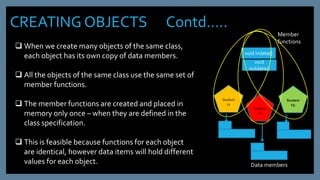
 When we create many objects of the same class,
each object has its own copy of data members.
 All the objects of the same class use the same set of
member functions.
 The member functions are created and placed in
memory only once – when they are defined in the
class specification.
 This is feasible because functions for each object
are identical, however data items will hold different
values for each object.
Student
s1
Student
s1
Student
s3;
void indata()
void
outdata()
Member
functions
Data members
ACCESSING MEMBER FUNCTIONS
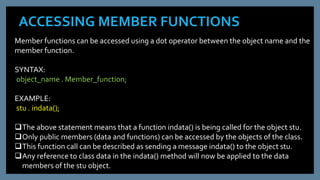
Member functions can be accessed using a dot operator between the object name and the
member function.
SYNTAX:
object_name . Member_function;
EXAMPLE:
stu . indata();
The above statement means that a function indata() is being called for the object stu.
Only public members (data and functions) can be accessed by the objects of the class.
This function call can be described as sending a message indata() to the object stu.
Any reference to class data in the indata() method will now be applied to the data
members of the stu object.
NESTING OF MEMBER FUNCTIONS
When a member function of a class is called by another member function of the same class,
it is called nesting of member functions.
QWAP to create a classTravelPlan
Data Members: PlanCode long
Place char[20]
Number_of_travelers int
Number_of_buses int
Member Functions:
GetPlan() :function to allow the user to input data and call function NewPlan().
NewPlan() : Function to assign the values of Number_of_Buses as per the following:
Number ofTravellers < 20, Number_of_Buses = 1.
Number ofTravellers > 20 and < 40, Number_of_Buses = 2.
Number ofTravellers > 40, Number_of_Buses = 3.
ShowPlan() : A function to display the contents of all the data members.
NESTING OF MEMBER FUNCTIONS Contd….
#include <iostream.h>
#include <conio.h>
#include <string.h>
#include <stdio.h>
classTravelPlan
{
long PlanCode;
char Place[20];
int Number_of_travellers;
int Number_of_buses;
public :
TravelPlan();
void GetPlan();
void NewPlan();
void ShowPlan();
};
voidTravelPlan::ShowPlan()
{
cout<<"nnnn"<<PlanCode;
cout<<"nn"<<Place;
cout<<"nn"<<Number_of_travellers;
cout<<"nn"<<Number_of_buses;
}
void main()
{ clrscr();
TravelPlanTP;
TP.GetPlan();
TP.ShowPlan();
getch(); }
void GetPlan()
{ cin >> PlanCode;
gets(Place);
cin >> Number_of_travellers;
NewPlan(); // function being
//called by the function GetPlan()
}
voidTravelPlan::NewPlan()
{
if (Number_of_travellers < 20)
Number_of_buses = 1;
else if (Number_of_travellers < 40)
Number_of_buses = 2;
else
Number_of_buses = 3;
};
ARRAY OF OBJECTS
An array of objects is stored inside the memory in the same way as a multi-
dimensional array.We can use the usual array accessing methods to access individual
elements and then the dot operator to access the member functions.
#include <iostream.h>
#include <stdio.h>
classTravelPlan
{
long PlanCode;
char Place[20];
int Number_of_travellers;
int Number_of_buses;
public :
TravelPlan();
void GetPlan();
void NewPlan();
void ShowPlan();
};
void GetPlan()
{ cin >> PlanCode;
gets(Place);
cin >> Number_of_travellers;
NewPlan();
}
voidTravelPlan::NewPlan()
{
if (Number_of_travellers < 20)
Number_of_buses = 1;
else if (Number_of_travellers < 40)
Number_of_buses = 2;
else
Number_of_buses = 3;
};
voidTravelPlan::ShowPlan()
{
cout<<"nnnn"<<PlanCode;
cout<<"nn"<<Place;
cout<<"nn"<<Number_of_travellers;
cout<<"nn"<<Number_of_buses;
}
void main()
{ clrscr();
TravelPlanTP [ 10 ]; // Object array
for( int i=0; i<10; i++ )
TP [ i ].GetPlan();
for( int i=0; i<10; i++ )
TP [ i }.ShowPlan();
getch(); }
OBJECTSAS FUNCTIONARGUMENTS
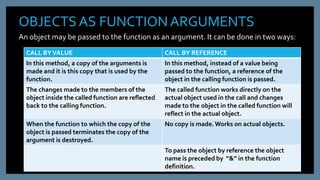
An object may be passed to the function as an argument. It can be done in two ways:
CALL BYVALUE CALL BY REFERENCE
In this method, a copy of the arguments is
made and it is this copy that is used by the
function.
In this method, instead of a value being
passed to the function, a reference of the
object in the calling function is passed.
The changes made to the members of the
object inside the called function are reflected
back to the calling function.
The called function works directly on the
actual object used in the call and changes
made to the object in the called function will
reflect in the actual object.
When the function to which the copy of the
object is passed terminates the copy of the
argument is destroyed.
No copy is made.Works on actual objects.
To pass the object by reference the object
name is preceded by “&” in the function
definition.
OBJECTSAS FUNCTIONARGUMENTS Contd…..
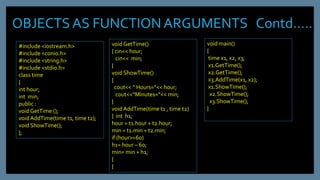
#include <iostream.h>
#include <conio.h>
#include <string.h>
#include <stdio.h>
class time
{
int hour;
int min;
public :
void GetTime ();
void AddTime(time t1, time t2);
void ShowTime();
};
void GetTime()
{ cin<< hour;
cin<< min;
}
void ShowTime()
{
cout<< “ Hours=“<< hour;
cout<<“Minutes=“<< min;
}
void AddTime(time t1 , time t2)
{ int h1;
hour = t1.hour + t2.hour;
min = t1.min + t2.min;
if (hour>=60)
h1= hour – 60;
min= min + h1;
}
}
void main()
{
time x1, x2, x3;
x1.GetTime();
x2.GetTime();
x3.AddTime(x1, x2);
x1.ShowTime();
x2.ShowTime();
x3.ShowTime();
}
RETURNING OBJECTS
When an object is returned by a function, a temporary object is
automatically created which holds the return value.
It is this object that is actually returned by the function. After
the value is returned, this object is destroyed.
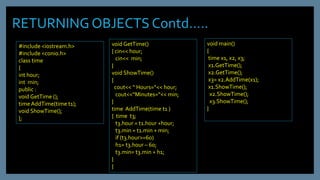
RETURNINGOBJECTS Contd…..
#include <iostream.h>
#include <conio.h>
class time
{
int hour;
int min;
public :
void GetTime ();
time AddTime(time t1);
void ShowTime();
};
void GetTime()
{ cin<< hour;
cin<< min;
}
void ShowTime()
{
cout<< “ Hours=“<< hour;
cout<<“Minutes=“<< min;
}
time AddTime(time t1 )
{ time t3;
t3.hour = t1.hour +hour;
t3.min = t1.min + min;
if (t3.hour>=60)
h1= t3.hour – 60;
t3.min= t3.min + h1;
}
}
void main()
{
time x1, x2, x3;
x1.GetTime();
x2.GetTime();
x3= x2.AddTime(x1);
x1.ShowTime();
x2.ShowTime();
x3.ShowTime();
}
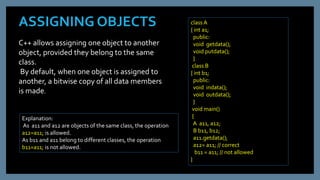
ASSIGNING OBJECTS
C++ allows assigning one object to another
object, provided they belong to the same
class.
By default, when one object is assigned to
another, a bitwise copy of all data members
is made.
class A
{ int a1;
public:
void getdata();
void putdata();
}
class B
{ int b1;
public:
void indata();
void outdata();
}
void main()
{
A a11, a12;
B b11, b12;
a11.getdata();
a12= a11; // correct
b11 = a11; // not allowed
}
Explanation:
As a11 and a12 are objects of the same class, the operation
a12=a11; is allowed.
As b11 and a11 belong to different classes, the operation
b11=a11; is not allowed.

Classes and objects1

  • 1.
  • 2.
    WHAT ARE OBJECTS? DEFINITION: Anobject is an entity, real or abstract that has some state and behavior. For example: dog, apple, bicycle etc. OBJECT STATE: The state or attributes of an object are the characteristics of an object and they describe the object. OBJECT BEHAVIOR: Object behavior is operations provided by or build into the object. OBJECT STATE BEHAVIOR DOG COLOR, BREED, HUNGRY etc. BARKING, FETCHING,W AGGINGTAIL etc. APPLE SHAPE, COLOR etc. SWEET IN TASTE, JUICY etc. BICYCLE WHEELS, GEARS, etc. ACCELRATIN G, CHANGING GEARS etc. Objects are the fundamental building blocks of an object oriented system.
  • 3.
    WHAT ARE CLASSES? SYNTAX: classuser_defined_name { private: data members member functions protected: data members member functions public: data members member functions }; C++ allows us to create software objects similar to real world objects. DEFINITION: A class is a way to bind the data describing an entity and its associated functions together. It is a set of objects that share common attributes and behavior. Where class is a keyword user_defined_name is the tag name or class specifier private, protected, public are access specifiers
  • 4.
    CLASS : EXAMPLE classstudent { private: int roll; char name[20]; public: void indata() { cin>> roll; gets(name); } void outdata() { cout<< roll<<name;} } CLASS SPECIFIER /TAG NAME KEYWORD : CLASS ACCESS SPECIFIER DATA MEMBERS MEMBER FUNCTIONS
  • 5.
    ACCESS SPECIFIER An accessspecifier determines whether class members are accessible in various parts of our program. ACCESS SPECIFIER PRIVATE They are not accessible outside the class. Only member functions of the class can use them.They can not be inherited. PROTECTED They are not accessible outside the class. Only member functions of the class can use them. But they can be inherited. PUBLIC They are accessible outside the class.They can also be inherited. NOTE: In the absence of a specifier all the members defined in a class are considered to be private. Protected access specifier is discussed in detail in the inheritance PPT.
  • 6.
    CLASS MEMBERS Class memberscan be categorized as follows: CLASS MEMBERS DATA MEMBERS They are variables which describe the property of a particular class. Data members are generally kept in the private section to keep data safe from accidental changes. MEMBER FUNCTIONS They are functions which operate on data members.They are also called messages. A message determines what operations can be performed by an object. Objects communicate with each other through messages.They can be defined in two ways: Inside the classOutside the class
  • 7.
    DEFINING MEMBER FUNCTIONS INSIDE/OUTSIDETHECLASS INSIDETHE CLASS: Functions are defined inside the class only if the function code is small. Such function definitions are considered inline by default. class student { private: int roll; char name[20]; public: void indata() { cin>> roll; gets(name); } void outdata() { cout<< roll<<name;} } OUTSIDETHE CLASS: In this case prototype of function is declared inside the class. SYNTAX: return type class_name :: function_name(argument list) class student { private: int roll; char name[20]; public: void indata(); void outdata(); }; void student :: indata() { cin>> roll; gets(name); } void student :: outdata() { cout<< roll<<name;}
  • 8.
    CREATING OBJECTS An objectis an instance of a class. Objects represent variables of a user defined data type class. SYNTAX: class _name object_name; EXAMPLE: The object of class STUDENT declared above is as follows: student stu; Here stu is the name of the object of class STUDENT. NOTE: The class specification provides only a template and does not allocate any memory space.The necessary memory space is allocated only when the object of the class is created.
  • 9.
    CREATING OBJECTS Contd….. When we create many objects of the same class, each object has its own copy of data members.  All the objects of the same class use the same set of member functions.  The member functions are created and placed in memory only once – when they are defined in the class specification.  This is feasible because functions for each object are identical, however data items will hold different values for each object. Student s1 Student s1 Student s3; void indata() void outdata() Member functions Data members
  • 10.
    ACCESSING MEMBER FUNCTIONS Memberfunctions can be accessed using a dot operator between the object name and the member function. SYNTAX: object_name . Member_function; EXAMPLE: stu . indata(); The above statement means that a function indata() is being called for the object stu. Only public members (data and functions) can be accessed by the objects of the class. This function call can be described as sending a message indata() to the object stu. Any reference to class data in the indata() method will now be applied to the data members of the stu object.
  • 11.
    NESTING OF MEMBERFUNCTIONS When a member function of a class is called by another member function of the same class, it is called nesting of member functions. QWAP to create a classTravelPlan Data Members: PlanCode long Place char[20] Number_of_travelers int Number_of_buses int Member Functions: GetPlan() :function to allow the user to input data and call function NewPlan(). NewPlan() : Function to assign the values of Number_of_Buses as per the following: Number ofTravellers < 20, Number_of_Buses = 1. Number ofTravellers > 20 and < 40, Number_of_Buses = 2. Number ofTravellers > 40, Number_of_Buses = 3. ShowPlan() : A function to display the contents of all the data members.
  • 12.
    NESTING OF MEMBERFUNCTIONS Contd…. #include <iostream.h> #include <conio.h> #include <string.h> #include <stdio.h> classTravelPlan { long PlanCode; char Place[20]; int Number_of_travellers; int Number_of_buses; public : TravelPlan(); void GetPlan(); void NewPlan(); void ShowPlan(); }; voidTravelPlan::ShowPlan() { cout<<"nnnn"<<PlanCode; cout<<"nn"<<Place; cout<<"nn"<<Number_of_travellers; cout<<"nn"<<Number_of_buses; } void main() { clrscr(); TravelPlanTP; TP.GetPlan(); TP.ShowPlan(); getch(); } void GetPlan() { cin >> PlanCode; gets(Place); cin >> Number_of_travellers; NewPlan(); // function being //called by the function GetPlan() } voidTravelPlan::NewPlan() { if (Number_of_travellers < 20) Number_of_buses = 1; else if (Number_of_travellers < 40) Number_of_buses = 2; else Number_of_buses = 3; };
  • 13.
    ARRAY OF OBJECTS Anarray of objects is stored inside the memory in the same way as a multi- dimensional array.We can use the usual array accessing methods to access individual elements and then the dot operator to access the member functions. #include <iostream.h> #include <stdio.h> classTravelPlan { long PlanCode; char Place[20]; int Number_of_travellers; int Number_of_buses; public : TravelPlan(); void GetPlan(); void NewPlan(); void ShowPlan(); }; void GetPlan() { cin >> PlanCode; gets(Place); cin >> Number_of_travellers; NewPlan(); } voidTravelPlan::NewPlan() { if (Number_of_travellers < 20) Number_of_buses = 1; else if (Number_of_travellers < 40) Number_of_buses = 2; else Number_of_buses = 3; }; voidTravelPlan::ShowPlan() { cout<<"nnnn"<<PlanCode; cout<<"nn"<<Place; cout<<"nn"<<Number_of_travellers; cout<<"nn"<<Number_of_buses; } void main() { clrscr(); TravelPlanTP [ 10 ]; // Object array for( int i=0; i<10; i++ ) TP [ i ].GetPlan(); for( int i=0; i<10; i++ ) TP [ i }.ShowPlan(); getch(); }
  • 14.
    OBJECTSAS FUNCTIONARGUMENTS An objectmay be passed to the function as an argument. It can be done in two ways: CALL BYVALUE CALL BY REFERENCE In this method, a copy of the arguments is made and it is this copy that is used by the function. In this method, instead of a value being passed to the function, a reference of the object in the calling function is passed. The changes made to the members of the object inside the called function are reflected back to the calling function. The called function works directly on the actual object used in the call and changes made to the object in the called function will reflect in the actual object. When the function to which the copy of the object is passed terminates the copy of the argument is destroyed. No copy is made.Works on actual objects. To pass the object by reference the object name is preceded by “&” in the function definition.
  • 15.
    OBJECTSAS FUNCTIONARGUMENTS Contd….. #include<iostream.h> #include <conio.h> #include <string.h> #include <stdio.h> class time { int hour; int min; public : void GetTime (); void AddTime(time t1, time t2); void ShowTime(); }; void GetTime() { cin<< hour; cin<< min; } void ShowTime() { cout<< “ Hours=“<< hour; cout<<“Minutes=“<< min; } void AddTime(time t1 , time t2) { int h1; hour = t1.hour + t2.hour; min = t1.min + t2.min; if (hour>=60) h1= hour – 60; min= min + h1; } } void main() { time x1, x2, x3; x1.GetTime(); x2.GetTime(); x3.AddTime(x1, x2); x1.ShowTime(); x2.ShowTime(); x3.ShowTime(); }
  • 16.
    RETURNING OBJECTS When anobject is returned by a function, a temporary object is automatically created which holds the return value. It is this object that is actually returned by the function. After the value is returned, this object is destroyed.
  • 17.
    RETURNINGOBJECTS Contd….. #include <iostream.h> #include<conio.h> class time { int hour; int min; public : void GetTime (); time AddTime(time t1); void ShowTime(); }; void GetTime() { cin<< hour; cin<< min; } void ShowTime() { cout<< “ Hours=“<< hour; cout<<“Minutes=“<< min; } time AddTime(time t1 ) { time t3; t3.hour = t1.hour +hour; t3.min = t1.min + min; if (t3.hour>=60) h1= t3.hour – 60; t3.min= t3.min + h1; } } void main() { time x1, x2, x3; x1.GetTime(); x2.GetTime(); x3= x2.AddTime(x1); x1.ShowTime(); x2.ShowTime(); x3.ShowTime(); }
  • 18.
    ASSIGNING OBJECTS C++ allowsassigning one object to another object, provided they belong to the same class. By default, when one object is assigned to another, a bitwise copy of all data members is made. class A { int a1; public: void getdata(); void putdata(); } class B { int b1; public: void indata(); void outdata(); } void main() { A a11, a12; B b11, b12; a11.getdata(); a12= a11; // correct b11 = a11; // not allowed } Explanation: As a11 and a12 are objects of the same class, the operation a12=a11; is allowed. As b11 and a11 belong to different classes, the operation b11=a11; is not allowed.