Department of Computer Science and Engineering
DDCA
Assembly Language Programming in Linux
Working Environment
• CPU – Core 2 Duo, 64bit with 2.3 GHz clock frequency
• OS – Ubuntu 12.04, 64bit
Other tools to be used
• Editor – gedit, a GNU editor
• Assembler – NASM (Netwide Assembler)
• LINKER – LD , a GNU linker
NASM - The Netwide Assembler
•an 80x86 and x86-64 assembler designed for portability and modularity
•supports a range of object file formats - a.out, ELF, OBJ, WIN32, WIN64, etc.
•Default format - binary
•An assembler basically does the following –
–Assign offset address to all memory references (data variables, instructions, labels)
–Convert the assembly language code to machine language
–Check the syntax of the code and report errors if any
–Create an object file
Command to Assemble Code
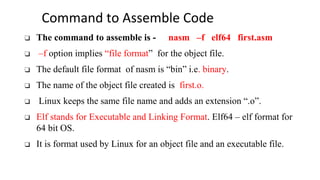
❑ The command to assemble is - nasm –f elf64 first.asm
❑ –f option implies “file format” for the object file.
❑ The default file format of nasm is “bin” i.e. binary.
❑ The name of the object file created is first.o.
❑ Linux keeps the same file name and adds an extension “.o”.
❑ Elf stands for Executable and Linking Format. Elf64 – elf format for
64 bit OS.
❑ It is format used by Linux for an object file and an executable file.
Ld – GNU Linker
• Linker can read, combine and write object files in many different formats.
Elf – executable & linkable file format of object file & executable file –
supported by Linux.
Example:
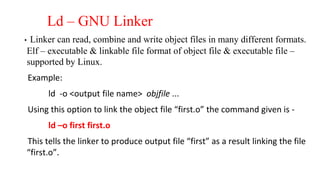
ld -o <output file name> objfile ...
Using this option to link the object file “first.o” the command given is -
ld –o first first.o
This tells the linker to produce output file “first” as a result linking the file
“first.o”.
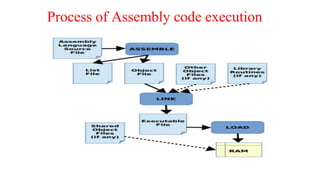
Process of Assembly code execution
Commands to run assembly language
program
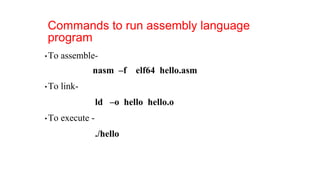
•To assemble-
nasm –f elf64 hello.asm
•To link-
ld –o hello hello.o
•To execute -
./hello
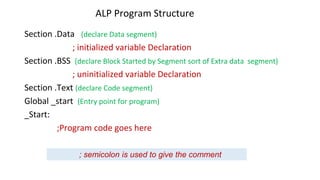
ALP Program Structure
Section .Data (declare Data segment)
; initialized variable Declaration
Section .BSS (declare Block Started by Segment sort of Extra data segment)
; uninitialized variable Declaration
Section .Text (declare Code segment)
Global _start (Entry point for program)
_Start:
;Program code goes here
; semicolon is used to give the comment
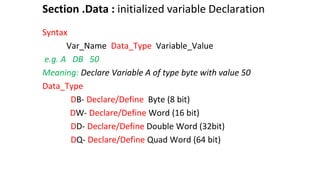
Section .Data : initialized variable Declaration
Syntax
Var_Name Data_Type Variable_Value
e.g. A DB 50
Meaning: Declare Variable A of type byte with value 50
Data_Type
DB- Declare/Define Byte (8 bit)
DW- Declare/Define Word (16 bit)
DD- Declare/Define Double Word (32bit)
DQ- Declare/Define Quad Word (64 bit)
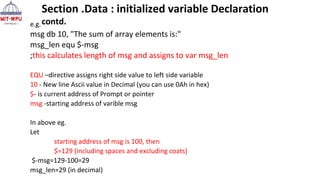
e.g.
msg db 10, "The sum of array elements is:"
msg_len equ $-msg
;this calculates length of msg and assigns to var msg_len
EQU –directive assigns right side value to left side variable
10 - New line Ascii value in Decimal (you can use 0Ah in hex)
$- is current address of Prompt or pointer
msg -starting address of varible msg
In above eg.
Let
starting address of msg is 100, then
$=129 (including spaces and excluding coats)
$-msg=129-100=29
msg_len=29 (in decimal)
Section .Data : initialized variable Declaration
contd.
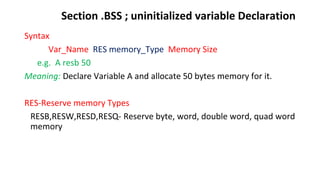
Section .BSS ; uninitialized variable Declaration
Syntax
Var_Name RES memory_Type Memory Size
e.g. A resb 50
Meaning: Declare Variable A and allocate 50 bytes memory for it.
RES-Reserve memory Types
RESB,RESW,RESD,RESQ- Reserve byte, word, double word, quad word
memory
Section .txt: Code of the program
• This is the section in which instructions of the program are written.
• It always starts with
Global _start (Entry point for program)
_Start:
It can have
• Microprocessor instructions
• Write system calls
• Read system calls
• It always ends with Exit system call
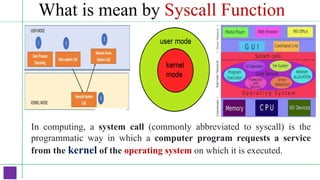
What is mean by Syscall Function
In computing, a system call (commonly abbreviated to syscall) is the
programmatic way in which a computer program requests a service
from the kernel of the operating system on which it is executed.
System Write /Output call (64bit)
Display variable_name contents of specified variable length on monitor
mov rax, 1 ;function number for writing/outputting the data
mov rdi, 1 ;file descriptor Id for standard output device (monitor)
mov rsi, msg ;starting address of the string to be displayed
mov rdx, msglen ;Number of bytes to be displayed
syscall ; system call (inbuilt function)
System Read /Input call (64bit)
Accept input through keyboard and store in variable name for specified
variable length
mov rax, 0 ; function number for reading/ inputting the data
mov rdi, 0 ; file descriptor ID for standard input device (keyboard)
mov rsi, arr ; starting address of variable used to store the data
mov rdx, 8 ; maximum bytes to be read
Syscall ; system call (inbuilt function)
System Exit call (64bit)
function to exit or terminate program
mov rax, 60 ; function number for sys_exit
mov rdi, 0 ; return code for zero error
syscall
section .data
hello db 'Hello world!',10 ; 'Hello world!' plus a linefeed character
helloLen equ $-hello ; Length of the 'Hello world!' string
section .text
global _start
_start:
mov rax,1 ; The system call for write (sys_write)
mov rdi,1 ; File descriptor 1 - standard output
mov rsi,hello ; Put the offset address of hello in rsi
mov rdx,helloLen ; helloLen is a constant, so we don't need to say
; mov rdx,[helloLen] to get it's actual value
syscall ; Call the kernel
mov rax,60 ; The system call for exit (sys_exit)
mov rdi,0 ; Exit with return code of 0 (no error)
syscall
Sample Program: Display message
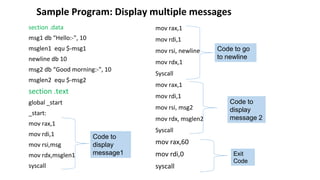
Sample Program: Display multiple messages
section .data
msg1 db “Hello:-", 10
msglen1 equ $-msg1
newline db 10
msg2 db “Good morning:-", 10
msglen2 equ $-msg2
section .text
global _start
_start:
mov rax,1
mov rdi,1
mov rsi,msg
mov rdx,msglen1
syscall
mov rax,1
mov rdi,1
mov rsi, newline
mov rdx,1
Syscall
mov rax,1
mov rdi,1
mov rsi, msg2
mov rdx, msglen2
Syscall
mov rax,60
mov rdi,0
syscall
Code to go
to newline
Code to
display
message1
Code to
display
message 2
Exit
Code
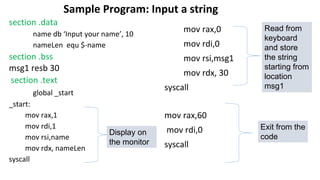
section .data
name db ‘Input your name’, 10
nameLen equ $-name
section .bss
msg1 resb 30
section .text
global _start
_start:
mov rax,1
mov rdi,1
mov rsi,name
mov rdx, nameLen
syscall
mov rax,0
mov rdi,0
mov rsi,msg1
mov rdx, 30
syscall
mov rax,60
mov rdi,0
syscall
Sample Program: Input a string
Read from
keyboard
and store
the string
starting from
location
msg1
Exit from the
code
Display on
the monitor
Write an Assembly Language Program
to display a string: “Enter a string”

NASM Introduction.pptx

  • 1.
    Department of ComputerScience and Engineering DDCA
  • 2.
    Assembly Language Programmingin Linux Working Environment • CPU – Core 2 Duo, 64bit with 2.3 GHz clock frequency • OS – Ubuntu 12.04, 64bit Other tools to be used • Editor – gedit, a GNU editor • Assembler – NASM (Netwide Assembler) • LINKER – LD , a GNU linker
  • 3.
    NASM - TheNetwide Assembler •an 80x86 and x86-64 assembler designed for portability and modularity •supports a range of object file formats - a.out, ELF, OBJ, WIN32, WIN64, etc. •Default format - binary •An assembler basically does the following – –Assign offset address to all memory references (data variables, instructions, labels) –Convert the assembly language code to machine language –Check the syntax of the code and report errors if any –Create an object file
  • 4.
    Command to AssembleCode ❑ The command to assemble is - nasm –f elf64 first.asm ❑ –f option implies “file format” for the object file. ❑ The default file format of nasm is “bin” i.e. binary. ❑ The name of the object file created is first.o. ❑ Linux keeps the same file name and adds an extension “.o”. ❑ Elf stands for Executable and Linking Format. Elf64 – elf format for 64 bit OS. ❑ It is format used by Linux for an object file and an executable file.
  • 5.
    Ld – GNULinker • Linker can read, combine and write object files in many different formats. Elf – executable & linkable file format of object file & executable file – supported by Linux. Example: ld -o <output file name> objfile ... Using this option to link the object file “first.o” the command given is - ld –o first first.o This tells the linker to produce output file “first” as a result linking the file “first.o”.
  • 6.
    Process of Assemblycode execution
  • 7.
    Commands to runassembly language program •To assemble- nasm –f elf64 hello.asm •To link- ld –o hello hello.o •To execute - ./hello
  • 8.
    ALP Program Structure Section.Data (declare Data segment) ; initialized variable Declaration Section .BSS (declare Block Started by Segment sort of Extra data segment) ; uninitialized variable Declaration Section .Text (declare Code segment) Global _start (Entry point for program) _Start: ;Program code goes here ; semicolon is used to give the comment
  • 9.
    Section .Data :initialized variable Declaration Syntax Var_Name Data_Type Variable_Value e.g. A DB 50 Meaning: Declare Variable A of type byte with value 50 Data_Type DB- Declare/Define Byte (8 bit) DW- Declare/Define Word (16 bit) DD- Declare/Define Double Word (32bit) DQ- Declare/Define Quad Word (64 bit)
  • 10.
    e.g. msg db 10,"The sum of array elements is:" msg_len equ $-msg ;this calculates length of msg and assigns to var msg_len EQU –directive assigns right side value to left side variable 10 - New line Ascii value in Decimal (you can use 0Ah in hex) $- is current address of Prompt or pointer msg -starting address of varible msg In above eg. Let starting address of msg is 100, then $=129 (including spaces and excluding coats) $-msg=129-100=29 msg_len=29 (in decimal) Section .Data : initialized variable Declaration contd.
  • 11.
    Section .BSS ;uninitialized variable Declaration Syntax Var_Name RES memory_Type Memory Size e.g. A resb 50 Meaning: Declare Variable A and allocate 50 bytes memory for it. RES-Reserve memory Types RESB,RESW,RESD,RESQ- Reserve byte, word, double word, quad word memory
  • 12.
    Section .txt: Codeof the program • This is the section in which instructions of the program are written. • It always starts with Global _start (Entry point for program) _Start: It can have • Microprocessor instructions • Write system calls • Read system calls • It always ends with Exit system call
  • 13.
    What is meanby Syscall Function In computing, a system call (commonly abbreviated to syscall) is the programmatic way in which a computer program requests a service from the kernel of the operating system on which it is executed.
  • 14.
    System Write /Outputcall (64bit) Display variable_name contents of specified variable length on monitor mov rax, 1 ;function number for writing/outputting the data mov rdi, 1 ;file descriptor Id for standard output device (monitor) mov rsi, msg ;starting address of the string to be displayed mov rdx, msglen ;Number of bytes to be displayed syscall ; system call (inbuilt function)
  • 15.
    System Read /Inputcall (64bit) Accept input through keyboard and store in variable name for specified variable length mov rax, 0 ; function number for reading/ inputting the data mov rdi, 0 ; file descriptor ID for standard input device (keyboard) mov rsi, arr ; starting address of variable used to store the data mov rdx, 8 ; maximum bytes to be read Syscall ; system call (inbuilt function)
  • 16.
    System Exit call(64bit) function to exit or terminate program mov rax, 60 ; function number for sys_exit mov rdi, 0 ; return code for zero error syscall
  • 17.
    section .data hello db'Hello world!',10 ; 'Hello world!' plus a linefeed character helloLen equ $-hello ; Length of the 'Hello world!' string section .text global _start _start: mov rax,1 ; The system call for write (sys_write) mov rdi,1 ; File descriptor 1 - standard output mov rsi,hello ; Put the offset address of hello in rsi mov rdx,helloLen ; helloLen is a constant, so we don't need to say ; mov rdx,[helloLen] to get it's actual value syscall ; Call the kernel mov rax,60 ; The system call for exit (sys_exit) mov rdi,0 ; Exit with return code of 0 (no error) syscall Sample Program: Display message
  • 18.
    Sample Program: Displaymultiple messages section .data msg1 db “Hello:-", 10 msglen1 equ $-msg1 newline db 10 msg2 db “Good morning:-", 10 msglen2 equ $-msg2 section .text global _start _start: mov rax,1 mov rdi,1 mov rsi,msg mov rdx,msglen1 syscall mov rax,1 mov rdi,1 mov rsi, newline mov rdx,1 Syscall mov rax,1 mov rdi,1 mov rsi, msg2 mov rdx, msglen2 Syscall mov rax,60 mov rdi,0 syscall Code to go to newline Code to display message1 Code to display message 2 Exit Code
  • 19.
    section .data name db‘Input your name’, 10 nameLen equ $-name section .bss msg1 resb 30 section .text global _start _start: mov rax,1 mov rdi,1 mov rsi,name mov rdx, nameLen syscall mov rax,0 mov rdi,0 mov rsi,msg1 mov rdx, 30 syscall mov rax,60 mov rdi,0 syscall Sample Program: Input a string Read from keyboard and store the string starting from location msg1 Exit from the code Display on the monitor
  • 20.
    Write an AssemblyLanguage Program to display a string: “Enter a string”