youth VISION $ eye care
Eye physician and vision specialists
sightsaver : OD.Naseema Mattan
Computer vision syndrome
objectives
• Introduction
• What is the computer vision syndrome?
• Prevalence of computer vision syndrome
• PATHOPHYSIOLOGY OF COMPUTER VISION SYNDROME
• Causes of computer vision syndrome and symptoms cvs
• HEV ( HIGH-ENERGY VISIBLE ) Blue Light
• Out coming conditions
• PREVENTION OF COMPUTER VISION SYNDROME
• CONCLUSION
Introduction
Globally, personal computers were one of the commonest office tools. It had become a
necessity in the 21st century and has been regularly used in various institutions such as
government offices, academic institutions, and banking systems , The use of computer
in every workplace has made life easier and increase output .and continuous use of
computer for an extended time causes vision problem called computer vision
syndrome
introduction
• More recently, visual and ocular problems are reported as the most frequently
occurring health problems among computer users.
• In Malaysia, for example, a study conducted by the by National Institute of
Occupational Safety and Health (NIOSH) indicated 61.4% of workers who used
computers in their workplace suffered from lower back pain, shoulder and neck
pain, while 70.6% of them complain of eyestrain.
Computer vision syndrome
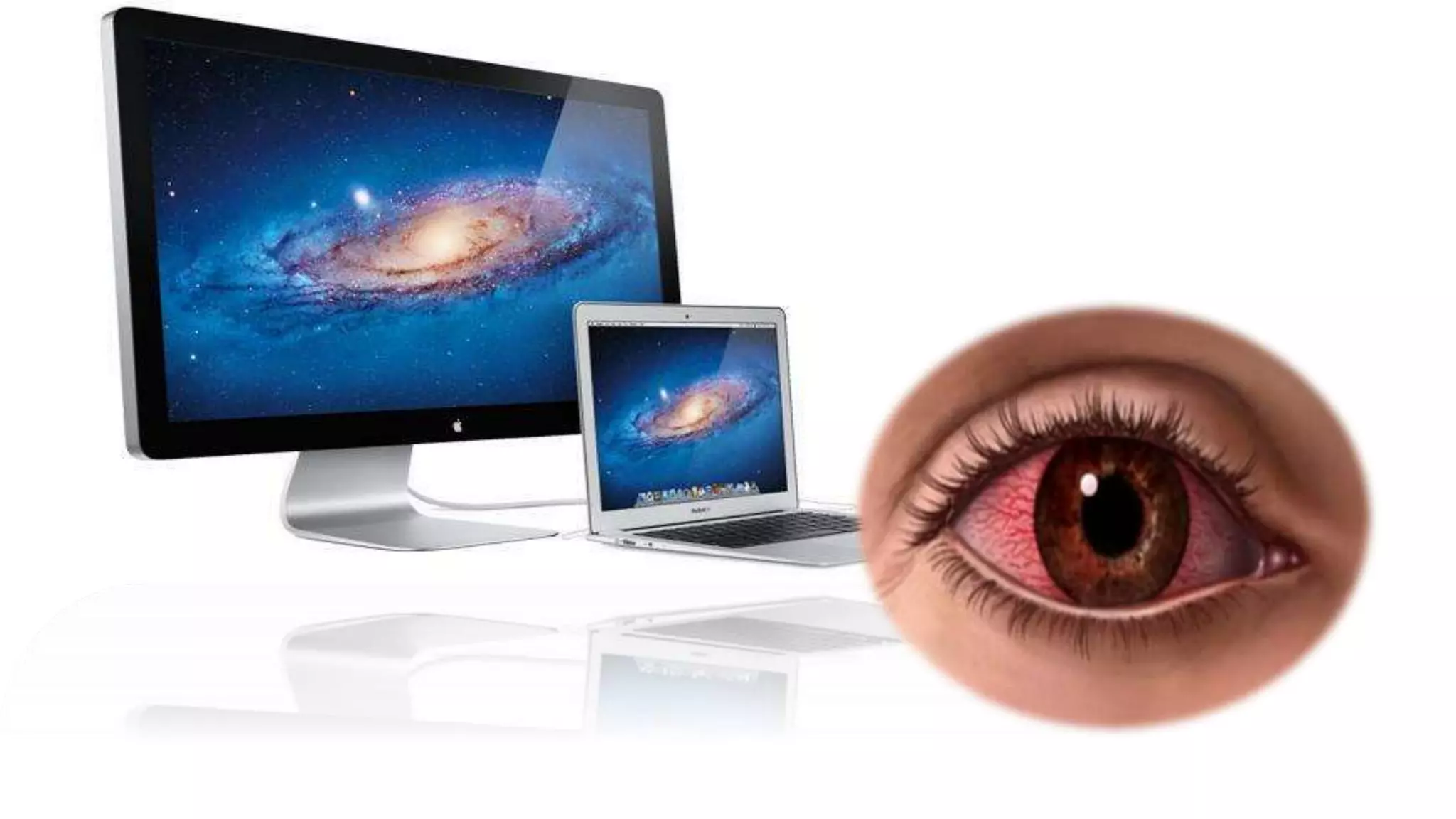
Computer vision syndrome, also referred to as digital eyestrain, encompasses a group
of vision-related problems that result from prolonged computer, tablet, e-reader and
smartphone use, according to the American Optometric Association. With the average
American worker spending seven hours a day on a computer, that’s a lot of screen
time. It is characterized by visual symptoms which result from interaction with
computer display or its environment
Prevalence
• It is estimated that nearly 60 million people suffer from CVS globally, and that a
million new cases occur each year . In the twenty first century personal computers
are one of the commonest office tools, used in almost all institutions/organizations,
for a wide variety of vocational and/or non-vocational purposes. Hence, it is likely
that CVS will continue to create a significant and growing contribution to reduced
productivity at work, whilst also reducing the quality of life of the computer office
worker.
PATHOPHYSIOLOGY OF COMPUTER VISION SYNDROME
The symptoms experienced in computer vision syndrome are caused by three potential mechanisms:
• (i) Extra ocular mechanism,
• (ii) accommodative mechanism,
• (iii) ocular surface mechanism.
• Extraocular mechanism causes musculoskeletal symptoms such as neck stiffness, pain,
headache, backache and shoulder pain. These symptoms are well associated with
improper placement of computer screen which lead to muscles sprain.
• Accommodative mechanism causes blurring of vision, double vision,
presbyopia, myopia and slowness of focus change. In one study
it was reported that a transient myopia was observed in 20% of
computer users at the end of their work shift. Many people
may have slight accommodative but these problems are
worsen in prolonged period of computer usage.
Ocular surface mechanism causes symptoms such as dryness of the eyes,
redness, gritty sensation and burning after extended period of
computer usage. cornea dryness, reduction in blink rate,
increased surface of cornea exposure , reduction of tear
production due to prolonged computer use .
causes Computer Vision Syndrome
 Too close to computer
 Too many hours at the computer
 Blinking less
 Poor posture
 Poor lighting
 Excessive glare
 Less water intake
 Poor nutritional food
 improper viewing distances
 uncorrected vision problems
Symptoms
most common symptoms associated with computer vision syndrome or digital eye strain are:
 Headaches
 Eyes strain or irritating eyes
 Blurry vision and double vision
 Dry eyes or watery eyes
 Neck pain
 shoulder pain
 Back pain
 Tired
 Itching or rubbing
 photophobia
 Burning
 Fb sensation
 Difficulty focusing on work
 Increased myopia (near sightedness)
 Colour vision changes
• The extent to which individuals experience visual symptoms often depends on the level of their visual
abilities and the amount of time spent looking at a digital screen. Uncorrected vision problems
like farsightedness and astigmatism, inadequate eye focusing or eye coordination abilities, and aging
changes of the eyes, such as presbyopia, can all contribute to the development of visual symptoms
when using a computer or digital screen device.
Natural blue light versus artificial blue light
Blue light is actually everywhere. When outside, light from the sun travels
through the atmosphere. the shortest, high energy blue wavelengths collide
with the air molecules causing blue light to scatter everywhere.
This is what makes the sky look blue. In its natural form, your body uses blue
light from the sun to regulate your natural sleep and wake cycles
This is known as your circadian rhythm. Blue light also helps
boost alertness, heighten reaction times, elevate moods, and
increase the feeling of well being.
Artificial sources of blue light include electronic devices such as
cell phones and laptop computers, as well as energy-efficient
fluorescent bulbs and LED lights.
Why should we be concerned about blue light exposure?
• Blue light waves are the among the shortest, highest energy wavelengths in the visible light
spectrum. Because they are shorter, these "Blue" or high energy blue light scatters more
easily than other visible light, it is not as easily focused. When you're looking at computer
screens and other digital devices that emit significant amounts of blue light, this unfocused
visual "noise" This kind of flickering creates a glare that can reduce visual contrast and
affect sharpness and clarity.
• This flickering and glaring may be one of the reasons for eyestrain, headaches, physical and
mental fatigue caused by many hours sitting in front of a computer screen or other
electronic device.
• Our eyes' natural filters do not provide sufficient protection
against blue light rays from the sun, let alone the blue light
emanating from these devices or from blue light emitted from
fluorescent-light tubes. Prolonged exposure to blue light may
cause retinal damage and contribute to age-related macular
degeneration, which can lead to loss of vision.
What are the effects of blue light exposure on our health?
• Blue light can help elevate your mood and boost awareness,
but chronic exposure to blue light at night can lower the
production of melatonin, the hormone that regulates sleep,
and disrupt your circadian rhythm.
• Harvard researchers have linked working the night shift and
exposure to blue light at night to several types of cancer (breast,
prostate, Skin) diabetes, heart disease, obesity and an increased
risk for depression.
• it is also known that exposure to light suppresses the secretion of
melatonin and lower melatonin levels might explain the association
with these types of health problems.
HEV ( HIGH-ENERGY VISIBLE ) Blue Light
• In the case of students on computers and computer professionals, the HEV
light emitted by computers is another serious source of light that can damage
the retina and cause macular degeneration. Over time, too much computer
use has negative effects that add up including development of farsightedness
(hyp), near sightedness (myopia), astigmatism, poor eye-coordination, and
ability-to-focus disorders.
Out coming conditions
• Red eyes
• Dry eyes
• Accommodation insufficiency
• convergence insufficiency
• Refractive errors
• Pterygium
• Pinguecula
• Cataract
• Glaucoma
• Macular disease
• Insomnia
• Hearth diseases
• Depression
• Stroke
• Sleep paralysis
• Cancer
PREVENTION OF COMPUTER VISION SYNDROME
• The most important approach in the management of computer vision syndrome is
eliminating the causative factor leading to the symptoms . Many of the symptoms in
computer vision syndrome can be prevented by proper strategies at the workplace.
The preventive measures include
(i) environmental factor modification and
(ii) proper self eye care by the worker.
Environmental factor modification
• Among the most important modifiable external environmental factors is:
o lighting
o Use of screen filters can reduce glare
o Screen brightness and contrast should be adjusted
o Musculoskeletal problems related to head and eye postures can often be
prevented by proper workstation adjustment
o Proper distance from the screen
o proper adjustment of the image size and proper height of the seat are all
important factors to be considered
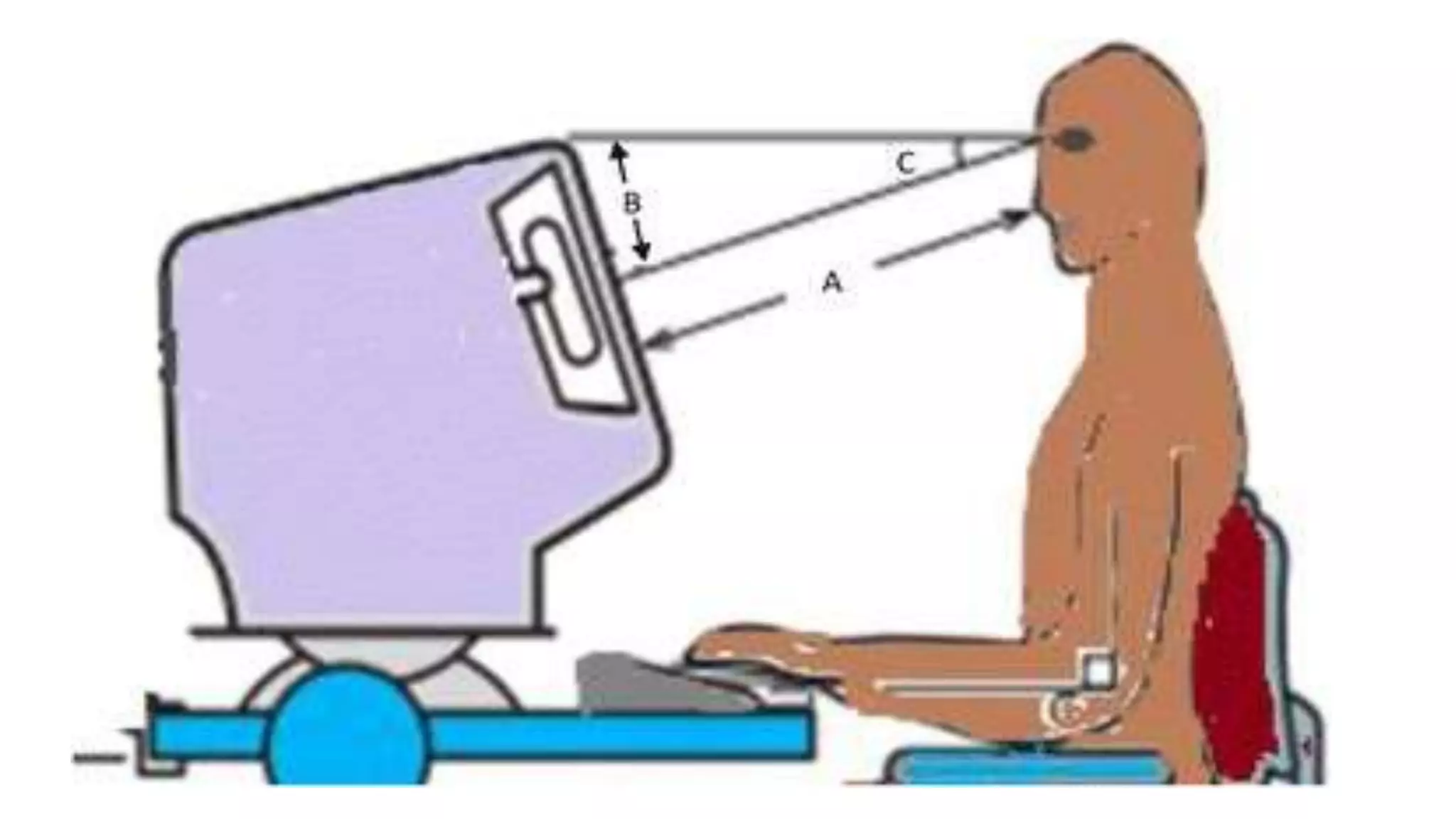
1. the eyes should be about 35-40 inches from the screen .
2. the screen should be placed 10-20 degrees below or that the middle of the screen 5-6 inches below
eye level.
3. Improved physical ergonomics of the computer workstation has been proven to reduce ocular
discomfort and improve performance
Proper eye care
 Taking a short break, stretching the muscles, change of scenery and a quick walk around
the office have been shown to improve productivity and reduce ocular symptoms of
stress.
 Working non stop for more than 4 hours has been associated with eye strain.
 Frequent short break can restore and relax the accommodative system of the eyes and
preventing ocular strain and visual fatigue
Blinking - To minimize your chances of developing dry eye when using a computer,
make an effort to blink frequently
 Rest breaks - To prevent eyestrain, try to rest your eyes when using the computer for long
periods. Rest your eyes for 15 minutes after two hours of continuous computer use
 Eyeglasses or contact lenses prescribed for general use may not be adequate for computer
work. Lenses prescribed to meet the unique visual demands of computer viewing may be
needed. Special lens designs, lens powers or lens tints or coatings may help to maximize
visual abilities and comfort.
Anti reflective and anti glare for computer users
Contact lenses
• Dry eyes secondary to decreased blink rate can be easily managed
by applying lubricating eye drops or artificial tear.
• More nutritional intake
• Drinking more water
• Exercise
• Fresh air
• Workers who have recurrent symptoms of computer vision
syndrome are encouraged to get proper optometrist review and
assessment.
CONCLUSION
• Computer vision syndrome is a new problem that has emerged in this century following increase
usage of computer both at home and at work. There is a correlation between ocular symptoms such
as pain, redness, dryness, blurring of vision, double vision and other head and neck sprains and
computer usage. Prevention remains the main strategy in managing of computer vision syndrome.
Modification in the ergonomics of the working environment, patient education and proper eye care
are important strategies in preventing computer vision syndrome.
Computer vision syndrome

Computer vision syndrome

  • 1.
    youth VISION $eye care Eye physician and vision specialists sightsaver : OD.Naseema Mattan
  • 2.
  • 5.
    objectives • Introduction • Whatis the computer vision syndrome? • Prevalence of computer vision syndrome • PATHOPHYSIOLOGY OF COMPUTER VISION SYNDROME • Causes of computer vision syndrome and symptoms cvs • HEV ( HIGH-ENERGY VISIBLE ) Blue Light • Out coming conditions • PREVENTION OF COMPUTER VISION SYNDROME • CONCLUSION
  • 6.
    Introduction Globally, personal computerswere one of the commonest office tools. It had become a necessity in the 21st century and has been regularly used in various institutions such as government offices, academic institutions, and banking systems , The use of computer in every workplace has made life easier and increase output .and continuous use of computer for an extended time causes vision problem called computer vision syndrome
  • 7.
    introduction • More recently,visual and ocular problems are reported as the most frequently occurring health problems among computer users. • In Malaysia, for example, a study conducted by the by National Institute of Occupational Safety and Health (NIOSH) indicated 61.4% of workers who used computers in their workplace suffered from lower back pain, shoulder and neck pain, while 70.6% of them complain of eyestrain.
  • 8.
    Computer vision syndrome Computervision syndrome, also referred to as digital eyestrain, encompasses a group of vision-related problems that result from prolonged computer, tablet, e-reader and smartphone use, according to the American Optometric Association. With the average American worker spending seven hours a day on a computer, that’s a lot of screen time. It is characterized by visual symptoms which result from interaction with computer display or its environment
  • 9.
    Prevalence • It isestimated that nearly 60 million people suffer from CVS globally, and that a million new cases occur each year . In the twenty first century personal computers are one of the commonest office tools, used in almost all institutions/organizations, for a wide variety of vocational and/or non-vocational purposes. Hence, it is likely that CVS will continue to create a significant and growing contribution to reduced productivity at work, whilst also reducing the quality of life of the computer office worker.
  • 10.
    PATHOPHYSIOLOGY OF COMPUTERVISION SYNDROME The symptoms experienced in computer vision syndrome are caused by three potential mechanisms: • (i) Extra ocular mechanism, • (ii) accommodative mechanism, • (iii) ocular surface mechanism.
  • 11.
    • Extraocular mechanismcauses musculoskeletal symptoms such as neck stiffness, pain, headache, backache and shoulder pain. These symptoms are well associated with improper placement of computer screen which lead to muscles sprain.
  • 12.
    • Accommodative mechanismcauses blurring of vision, double vision, presbyopia, myopia and slowness of focus change. In one study it was reported that a transient myopia was observed in 20% of computer users at the end of their work shift. Many people may have slight accommodative but these problems are worsen in prolonged period of computer usage.
  • 13.
    Ocular surface mechanismcauses symptoms such as dryness of the eyes, redness, gritty sensation and burning after extended period of computer usage. cornea dryness, reduction in blink rate, increased surface of cornea exposure , reduction of tear production due to prolonged computer use .
  • 14.
    causes Computer VisionSyndrome  Too close to computer  Too many hours at the computer  Blinking less  Poor posture  Poor lighting
  • 15.
     Excessive glare Less water intake  Poor nutritional food  improper viewing distances  uncorrected vision problems
  • 16.
    Symptoms most common symptomsassociated with computer vision syndrome or digital eye strain are:  Headaches  Eyes strain or irritating eyes  Blurry vision and double vision  Dry eyes or watery eyes  Neck pain  shoulder pain  Back pain
  • 18.
     Tired  Itchingor rubbing  photophobia  Burning  Fb sensation  Difficulty focusing on work  Increased myopia (near sightedness)  Colour vision changes
  • 20.
    • The extentto which individuals experience visual symptoms often depends on the level of their visual abilities and the amount of time spent looking at a digital screen. Uncorrected vision problems like farsightedness and astigmatism, inadequate eye focusing or eye coordination abilities, and aging changes of the eyes, such as presbyopia, can all contribute to the development of visual symptoms when using a computer or digital screen device.
  • 21.
    Natural blue lightversus artificial blue light Blue light is actually everywhere. When outside, light from the sun travels through the atmosphere. the shortest, high energy blue wavelengths collide with the air molecules causing blue light to scatter everywhere. This is what makes the sky look blue. In its natural form, your body uses blue light from the sun to regulate your natural sleep and wake cycles
  • 22.
    This is knownas your circadian rhythm. Blue light also helps boost alertness, heighten reaction times, elevate moods, and increase the feeling of well being. Artificial sources of blue light include electronic devices such as cell phones and laptop computers, as well as energy-efficient fluorescent bulbs and LED lights.
  • 23.
    Why should webe concerned about blue light exposure? • Blue light waves are the among the shortest, highest energy wavelengths in the visible light spectrum. Because they are shorter, these "Blue" or high energy blue light scatters more easily than other visible light, it is not as easily focused. When you're looking at computer screens and other digital devices that emit significant amounts of blue light, this unfocused visual "noise" This kind of flickering creates a glare that can reduce visual contrast and affect sharpness and clarity. • This flickering and glaring may be one of the reasons for eyestrain, headaches, physical and mental fatigue caused by many hours sitting in front of a computer screen or other electronic device.
  • 24.
    • Our eyes'natural filters do not provide sufficient protection against blue light rays from the sun, let alone the blue light emanating from these devices or from blue light emitted from fluorescent-light tubes. Prolonged exposure to blue light may cause retinal damage and contribute to age-related macular degeneration, which can lead to loss of vision.
  • 25.
    What are theeffects of blue light exposure on our health? • Blue light can help elevate your mood and boost awareness, but chronic exposure to blue light at night can lower the production of melatonin, the hormone that regulates sleep, and disrupt your circadian rhythm.
  • 26.
    • Harvard researchershave linked working the night shift and exposure to blue light at night to several types of cancer (breast, prostate, Skin) diabetes, heart disease, obesity and an increased risk for depression. • it is also known that exposure to light suppresses the secretion of melatonin and lower melatonin levels might explain the association with these types of health problems.
  • 27.
    HEV ( HIGH-ENERGYVISIBLE ) Blue Light • In the case of students on computers and computer professionals, the HEV light emitted by computers is another serious source of light that can damage the retina and cause macular degeneration. Over time, too much computer use has negative effects that add up including development of farsightedness (hyp), near sightedness (myopia), astigmatism, poor eye-coordination, and ability-to-focus disorders.
  • 29.
    Out coming conditions •Red eyes • Dry eyes • Accommodation insufficiency • convergence insufficiency • Refractive errors • Pterygium • Pinguecula • Cataract • Glaucoma • Macular disease
  • 30.
    • Insomnia • Hearthdiseases • Depression • Stroke • Sleep paralysis • Cancer
  • 31.
    PREVENTION OF COMPUTERVISION SYNDROME • The most important approach in the management of computer vision syndrome is eliminating the causative factor leading to the symptoms . Many of the symptoms in computer vision syndrome can be prevented by proper strategies at the workplace. The preventive measures include (i) environmental factor modification and (ii) proper self eye care by the worker.
  • 32.
    Environmental factor modification •Among the most important modifiable external environmental factors is: o lighting o Use of screen filters can reduce glare o Screen brightness and contrast should be adjusted o Musculoskeletal problems related to head and eye postures can often be prevented by proper workstation adjustment o Proper distance from the screen o proper adjustment of the image size and proper height of the seat are all important factors to be considered
  • 33.
    1. the eyesshould be about 35-40 inches from the screen . 2. the screen should be placed 10-20 degrees below or that the middle of the screen 5-6 inches below eye level. 3. Improved physical ergonomics of the computer workstation has been proven to reduce ocular discomfort and improve performance
  • 36.
    Proper eye care Taking a short break, stretching the muscles, change of scenery and a quick walk around the office have been shown to improve productivity and reduce ocular symptoms of stress.  Working non stop for more than 4 hours has been associated with eye strain.  Frequent short break can restore and relax the accommodative system of the eyes and preventing ocular strain and visual fatigue
  • 37.
    Blinking - Tominimize your chances of developing dry eye when using a computer, make an effort to blink frequently  Rest breaks - To prevent eyestrain, try to rest your eyes when using the computer for long periods. Rest your eyes for 15 minutes after two hours of continuous computer use  Eyeglasses or contact lenses prescribed for general use may not be adequate for computer work. Lenses prescribed to meet the unique visual demands of computer viewing may be needed. Special lens designs, lens powers or lens tints or coatings may help to maximize visual abilities and comfort.
  • 38.
    Anti reflective andanti glare for computer users
  • 39.
  • 40.
    • Dry eyessecondary to decreased blink rate can be easily managed by applying lubricating eye drops or artificial tear. • More nutritional intake • Drinking more water • Exercise • Fresh air • Workers who have recurrent symptoms of computer vision syndrome are encouraged to get proper optometrist review and assessment.
  • 43.
    CONCLUSION • Computer visionsyndrome is a new problem that has emerged in this century following increase usage of computer both at home and at work. There is a correlation between ocular symptoms such as pain, redness, dryness, blurring of vision, double vision and other head and neck sprains and computer usage. Prevention remains the main strategy in managing of computer vision syndrome. Modification in the ergonomics of the working environment, patient education and proper eye care are important strategies in preventing computer vision syndrome.