MVVM Light Toolkit
Works Great, Less Complicated
             Tom Fischer
          September 29, 2011
Agenda


∗ Background
  ∗ Enterprise Applications
  ∗ XAML
  ∗ Ramifications
∗ Architecture Considerations
  ∗ Patterns
  ∗ Toolkits
∗ Toolkit Demonstration
  ∗ Sample Application
  ∗ Incorporating MVVM Light
Background:
Enterprise Application Definition

∗ Targets
  ∗ Any type of organization
  ∗ Any type of industry
∗ Not intended for consumers
∗ Function focused, such as, accounting, purchasing,
  sales, etc.
Background:
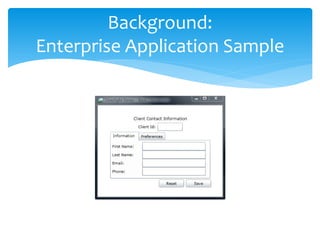
Enterprise Application Sample
Background:
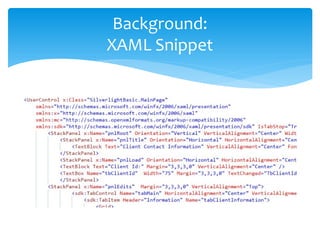
XAML Snippet
Background:
             XAML Definition

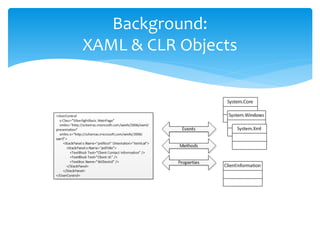
∗ Declarative markup language for .NET API with XML
  nodes equating to CLR objects
∗ Features include
  ∗ Rich eventing support
  ∗ Declarative databinding
  ∗ Developer friendly conventions, such as, the content
    property equals the “inner xml” of many nodes
Background:
XAML & CLR Objects
Background:
                Ramifications


∗ Enterprise applications do not ruthlessly follow well
  trodden UI guidelines; business users know what they
  want
∗ XAML does not mirror ASP.NET or Windows Form
  technologies, blindly adhering to their patterns &
  practices may result in harder to build and maintain
  Silverlight/WPF applications
Architecture Considerations:
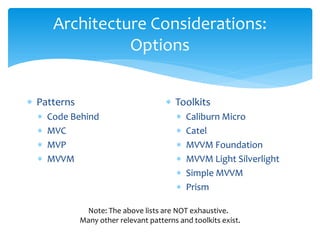
                 Options


∗ Patterns                            ∗ Toolkits
  ∗   Code Behind                        ∗   Caliburn Micro
  ∗   MVC                                ∗   Catel
  ∗   MVP                                ∗   MVVM Foundation
  ∗   MVVM                               ∗   MVVM Light Silverlight
                                         ∗   Simple MVVM
                                         ∗   Prism

              Note: The above lists are NOT exhaustive.
             Many other relevant patterns and toolkits exist.
Architecture Considerations:
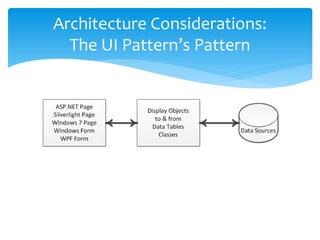
  The UI Pattern’s Pattern
Architecture Considerations:
         UI Pattern Picking


∗ Theoretical considerations
  ∗ Not the same as most software patterns (maybe why
    some call them “frameworks”?)
  ∗ Technology dominates
∗ Practical considerations
  ∗ Application complexity and life span
  ∗ Development team’s abilities and interests
  ∗ Organizational resources and support
Architecture Considerations:
    UI Patterns and Technology

∗ MVC (Model-View-Controller)
  ∗ Conceived when viewers offered very little support for a
    software developer writing presentation code
  ∗ Built with language and platform specific helpers
∗ MVP (Model-View-Presenter)
  ∗ 2nd generation MVC; facilitated testing
  ∗ Response to feature rich viewers
∗ MVVM (Model-View-ViewModel)
  ∗ 3rd generation MVC; reduced coder/designer friction
  ∗ Response to XAML
Architecture Considerations:
          Toolkit Overview


∗ Plugs gap between technology and its use; maybe
  entitled “helper” code!?
∗ Considerations
  ∗ Fit (Simple as possible, but not simpler)
    ∗ How well does it plug the gap?
    ∗ Does it include more than required?
  ∗ Obsolescence susceptibility
    ∗ Handle newer, better technologies
    ∗ Ingest requirement/application changes
Architecture Considerations:
              Prism Toolkit

∗ Overview
  ∗ Supports WPF and Silverlight
  ∗ Available on Microsoft Download Center
      ∗ V4 (11/2010)
∗ Supports MVVM many features, such as,
  ∗   Bootstrapper
  ∗   Dependency Injection (Unity & MEF)
  ∗   Composition (über)
  ∗   Event Aggregator
  ∗   Wiring Commands & Events
Side Note:
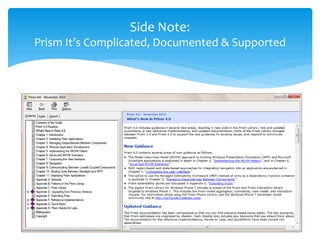
Prism It’s Complicated, Documented & Supported
Architecture Considerations:
         Caliburn Micro Toolkit

∗ Overview
  ∗ Supports WPF, Silverlight and Windows 7
  ∗ Paired down version of Caliburn (10X smaller)
  ∗ Available on CodePlex
      ∗ V1.2 RTW (7/2011)
      ∗ 2,000+ downloads
∗ Supports MVVM and MVP with
  ∗   Bootstrapper
  ∗   Composition
  ∗   Event Aggregator
  ∗   Window Manager
  ∗   Wiring Commands & Events
Architecture Considerations:
        MVVM Light Toolkit


∗ Overview
  ∗ Supports WPF, Silverlight and Windows 7
  ∗ Available on CodePlex
    ∗ V3 SP1 (2/2011)
    ∗ 20,000+ downloads
∗ Supports MVVM with
  ∗ Event Aggregator
  ∗ Service Locator
  ∗ Wiring Commands & Events
Side Note:
What about CSLA.NET, Enterprise Library & Entity Framework?


  ∗ CSLA.NET
     ∗ Solves data access & business logic problems
     ∗ Works with most .NET UI technologies, especially those
       leveraging databinding
     ∗ Not focused on specific UI pattern or technology
  ∗ Enterprise Library
     ∗ Addresses aspect oriented & generic problems
     ∗ Not associated with any UI pattern or technology
  ∗ Entity Framework
     ∗ Handles database exchanges
     ∗ Not associated with any UI pattern or technology
Architecture Considerations:
             Conclusion


∗ MVVM pattern facilitates XAML-based enterprise
  applications
  ∗ Supports commands & databinding
  ∗ Minimizes designer-developer friction
∗ Many toolkits exist supporting MVVM-XAML
  ∗ Offer expected “helpers”
  ∗ Require varying degrees of “buy-in”
Toolkit Demonstration:
               Overview


∗ Work thru a simple client information application with
  Silverlight (out of browser)
∗ Implement three iterations (as projects)
  ∗ 1st Iteration constructed as a basic non-MVVM
  ∗ 2nd Iteration converted to an MVVM to help handle
    additional requirements
  ∗ 3rd Iteration incorporate MVVM Light to fix a few
    architecture issues uncovered in 2nd Iteration
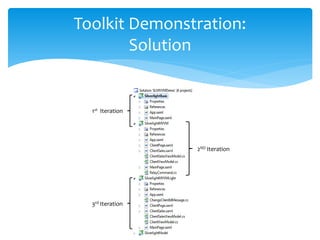
Toolkit Demonstration:
        Solution


  1st Iteration


                  2ND Iteration


  3rd Iteration
Toolkit Demonstration:
      Why MVVM Light Toolkit?


∗ Solves known issues
  ∗ Communications between controls
  ∗ Turning UI events into commands
∗ Avoids unnecessary features (for now), e.g.,
  ∗ Composition
  ∗ Navigation
∗ Reasonably documented and stable
Toolkit Demonstration:
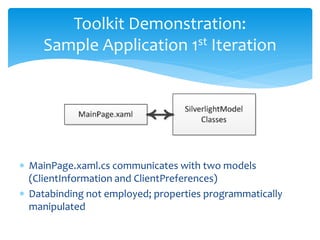
     Sample Application 1st Iteration


∗ MainPage.xaml.cs communicates with two models
  (ClientInformation and ClientPreferences)
∗ Databinding not employed; properties programmatically
  manipulated
Toolkit Demonstration:
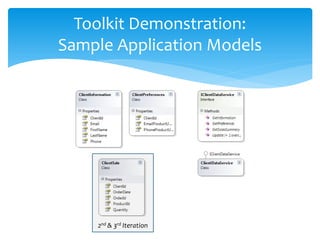
Sample Application Models


    2nd & 3rd Iteration
Toolkit Demonstration:
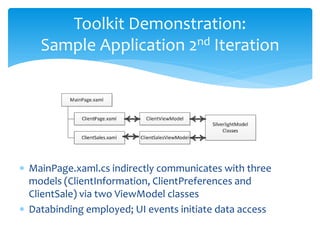
    Sample Application 2nd Iteration


∗ MainPage.xaml.cs indirectly communicates with three
  models (ClientInformation, ClientPreferences and
  ClientSale) via two ViewModel classes
∗ Databinding employed; UI events initiate data access
Toolkit Demonstration:
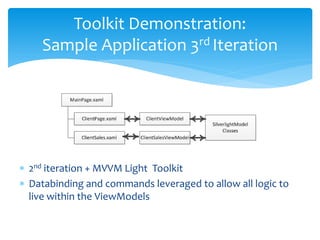
    Sample Application 3rd Iteration


∗ 2nd iteration + MVVM Light Toolkit
∗ Databinding and commands leveraged to allow all logic to
  live within the ViewModels
Toolkit Demonstration:
                 Recap


∗ 1st Iteration – architecture typical of many Windows
  Form-based applications
∗ 2nd Iteration – MVVM pattern applied with a few
  resulting “programming holes”
  ∗ Communications limited between controls
  ∗ Events to commands not fully supported
∗ 3rd Iteration – MVVM Light Toolkit addresses
  shortcomings from the 2nd Iteration
Toolkit Demonstration:
Some Other MVVM Light Features…


 ∗ Ability to dynamically load appropriate ViewModel
   classes (ServiceLocation)
 ∗ Designed to work well with Blend
 ∗ Developer Candy
   ∗ NuGet support
   ∗ Visual Studio templates
   ∗ C# snippets
∗Thanks for attending!
∗Any other questions?

MVVM Light Toolkit Works Great, Less Complicated

  • 1.
    MVVM Light Toolkit WorksGreat, Less Complicated Tom Fischer September 29, 2011
  • 2.
    Agenda ∗ Background ∗ Enterprise Applications ∗ XAML ∗ Ramifications ∗ Architecture Considerations ∗ Patterns ∗ Toolkits ∗ Toolkit Demonstration ∗ Sample Application ∗ Incorporating MVVM Light
  • 3.
    Background: Enterprise Application Definition ∗Targets ∗ Any type of organization ∗ Any type of industry ∗ Not intended for consumers ∗ Function focused, such as, accounting, purchasing, sales, etc.
  • 4.
  • 5.
  • 6.
    Background: XAML Definition ∗ Declarative markup language for .NET API with XML nodes equating to CLR objects ∗ Features include ∗ Rich eventing support ∗ Declarative databinding ∗ Developer friendly conventions, such as, the content property equals the “inner xml” of many nodes
  • 7.
  • 8.
    Background: Ramifications ∗ Enterprise applications do not ruthlessly follow well trodden UI guidelines; business users know what they want ∗ XAML does not mirror ASP.NET or Windows Form technologies, blindly adhering to their patterns & practices may result in harder to build and maintain Silverlight/WPF applications
  • 9.
    Architecture Considerations: Options ∗ Patterns ∗ Toolkits ∗ Code Behind ∗ Caliburn Micro ∗ MVC ∗ Catel ∗ MVP ∗ MVVM Foundation ∗ MVVM ∗ MVVM Light Silverlight ∗ Simple MVVM ∗ Prism Note: The above lists are NOT exhaustive. Many other relevant patterns and toolkits exist.
  • 10.
    Architecture Considerations: The UI Pattern’s Pattern
  • 11.
    Architecture Considerations: UI Pattern Picking ∗ Theoretical considerations ∗ Not the same as most software patterns (maybe why some call them “frameworks”?) ∗ Technology dominates ∗ Practical considerations ∗ Application complexity and life span ∗ Development team’s abilities and interests ∗ Organizational resources and support
  • 12.
    Architecture Considerations: UI Patterns and Technology ∗ MVC (Model-View-Controller) ∗ Conceived when viewers offered very little support for a software developer writing presentation code ∗ Built with language and platform specific helpers ∗ MVP (Model-View-Presenter) ∗ 2nd generation MVC; facilitated testing ∗ Response to feature rich viewers ∗ MVVM (Model-View-ViewModel) ∗ 3rd generation MVC; reduced coder/designer friction ∗ Response to XAML
  • 13.
    Architecture Considerations: Toolkit Overview ∗ Plugs gap between technology and its use; maybe entitled “helper” code!? ∗ Considerations ∗ Fit (Simple as possible, but not simpler) ∗ How well does it plug the gap? ∗ Does it include more than required? ∗ Obsolescence susceptibility ∗ Handle newer, better technologies ∗ Ingest requirement/application changes
  • 14.
    Architecture Considerations: Prism Toolkit ∗ Overview ∗ Supports WPF and Silverlight ∗ Available on Microsoft Download Center ∗ V4 (11/2010) ∗ Supports MVVM many features, such as, ∗ Bootstrapper ∗ Dependency Injection (Unity & MEF) ∗ Composition (über) ∗ Event Aggregator ∗ Wiring Commands & Events
  • 15.
    Side Note: Prism It’sComplicated, Documented & Supported
  • 16.
    Architecture Considerations: Caliburn Micro Toolkit ∗ Overview ∗ Supports WPF, Silverlight and Windows 7 ∗ Paired down version of Caliburn (10X smaller) ∗ Available on CodePlex ∗ V1.2 RTW (7/2011) ∗ 2,000+ downloads ∗ Supports MVVM and MVP with ∗ Bootstrapper ∗ Composition ∗ Event Aggregator ∗ Window Manager ∗ Wiring Commands & Events
  • 17.
    Architecture Considerations: MVVM Light Toolkit ∗ Overview ∗ Supports WPF, Silverlight and Windows 7 ∗ Available on CodePlex ∗ V3 SP1 (2/2011) ∗ 20,000+ downloads ∗ Supports MVVM with ∗ Event Aggregator ∗ Service Locator ∗ Wiring Commands & Events
  • 18.
    Side Note: What aboutCSLA.NET, Enterprise Library & Entity Framework? ∗ CSLA.NET ∗ Solves data access & business logic problems ∗ Works with most .NET UI technologies, especially those leveraging databinding ∗ Not focused on specific UI pattern or technology ∗ Enterprise Library ∗ Addresses aspect oriented & generic problems ∗ Not associated with any UI pattern or technology ∗ Entity Framework ∗ Handles database exchanges ∗ Not associated with any UI pattern or technology
  • 19.
    Architecture Considerations: Conclusion ∗ MVVM pattern facilitates XAML-based enterprise applications ∗ Supports commands & databinding ∗ Minimizes designer-developer friction ∗ Many toolkits exist supporting MVVM-XAML ∗ Offer expected “helpers” ∗ Require varying degrees of “buy-in”
  • 20.
    Toolkit Demonstration: Overview ∗ Work thru a simple client information application with Silverlight (out of browser) ∗ Implement three iterations (as projects) ∗ 1st Iteration constructed as a basic non-MVVM ∗ 2nd Iteration converted to an MVVM to help handle additional requirements ∗ 3rd Iteration incorporate MVVM Light to fix a few architecture issues uncovered in 2nd Iteration
  • 21.
    Toolkit Demonstration: Solution 1st Iteration 2ND Iteration 3rd Iteration
  • 22.
    Toolkit Demonstration: Why MVVM Light Toolkit? ∗ Solves known issues ∗ Communications between controls ∗ Turning UI events into commands ∗ Avoids unnecessary features (for now), e.g., ∗ Composition ∗ Navigation ∗ Reasonably documented and stable
  • 23.
    Toolkit Demonstration: Sample Application 1st Iteration ∗ MainPage.xaml.cs communicates with two models (ClientInformation and ClientPreferences) ∗ Databinding not employed; properties programmatically manipulated
  • 24.
  • 25.
    Toolkit Demonstration: Sample Application 2nd Iteration ∗ MainPage.xaml.cs indirectly communicates with three models (ClientInformation, ClientPreferences and ClientSale) via two ViewModel classes ∗ Databinding employed; UI events initiate data access
  • 26.
    Toolkit Demonstration: Sample Application 3rd Iteration ∗ 2nd iteration + MVVM Light Toolkit ∗ Databinding and commands leveraged to allow all logic to live within the ViewModels
  • 27.
    Toolkit Demonstration: Recap ∗ 1st Iteration – architecture typical of many Windows Form-based applications ∗ 2nd Iteration – MVVM pattern applied with a few resulting “programming holes” ∗ Communications limited between controls ∗ Events to commands not fully supported ∗ 3rd Iteration – MVVM Light Toolkit addresses shortcomings from the 2nd Iteration
  • 28.
    Toolkit Demonstration: Some OtherMVVM Light Features… ∗ Ability to dynamically load appropriate ViewModel classes (ServiceLocation) ∗ Designed to work well with Blend ∗ Developer Candy ∗ NuGet support ∗ Visual Studio templates ∗ C# snippets
  • 29.