Vue.js - part 1
Vue.js - inswave systems, 2018 1
Concept overview
Vue (pronounced /vjuː/, like view) is a progressive framework
for building user interfaces. Unlike other monolithic
frameworks, Vue is designed from the ground up to be
incrementally adoptable. The core library is focused on the
view layer only, and is easy to pick up and integrate with
other libraries or existing projects.
Vue.js - inswave systems, 2018 2
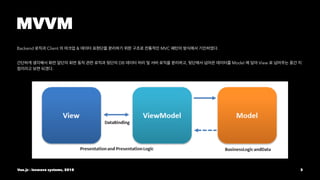
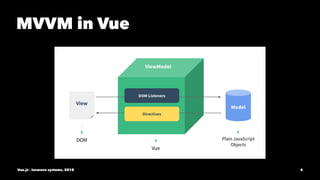
MVVM
Backend Client & MVC .
DB , Model View
.
Vue.js - inswave systems, 2018 3
MVVM in Vue
Vue.js - inswave systems, 2018 4
View Instance - ViewModel
Every Vue application starts by creating a new Vue instance with the Vue
function:
new Vue({
el: '#app',
data: {
message: 'Hello Vue.js!'
}
});
Although not strictly associated with the MVVM pattern, Vue’s design was
partly inspired by it.
Vue.js - inswave systems, 2018 5
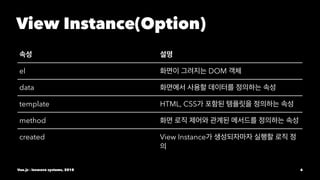
View Instance(Option)
el DOM
data
template HTML, CSS
method
created View Instance
Vue.js - inswave systems, 2018 6
View
The actual DOM that is managed by Vue instances.
vm.$el // The View
Vue.js - inswave systems, 2018 7
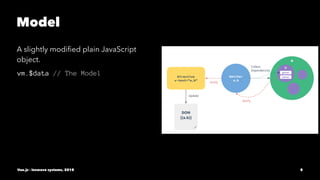
Model
A slightly modified plain JavaScript
object.
vm.$data // The Model
Vue.js - inswave systems, 2018 8
Directive
Prefixed HTML attributes that tell Vue.js to do something about
a DOM element.
<div v-text="message"></div>
Vue.js - inswave systems, 2018 9
Mustache Bindings
You can also use mustache-style bindings, both in text and in
attributes. They are translated into v-text and v-attr directives
under the hood. For example:
<div id="person-{{id}}">Hello {{name}}!</div>
Vue.js - inswave systems, 2018 10
Filters
Filters are functions used to process the raw values before
updating the View. They are denoted by a “pipe” inside
directives or bindings:
<div>{{message | capitalize}}</div>
Vue.js - inswave systems, 2018 11
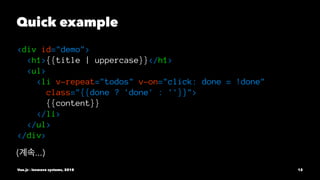
Quick example
<div id="demo">
<h1>{{title | uppercase}}</h1>
<ul>
<li v-repeat="todos" v-on="click: done = !done"
class="{{done ? 'done' : ''}}">
{{content}}
</li>
</ul>
</div>
( ...)
Vue.js - inswave systems, 2018 12
Quick example
var demo = new Vue({
el: '#demo',
data: {
title: 'todos',
todos: [
{done: true, content: 'JavaScript'},
{done: false, content: 'Vue.js'}
]
}
})
Vue.js - inswave systems, 2018 13
View Instance View Instance DOM
.
Vue.js - inswave systems, 2018 14
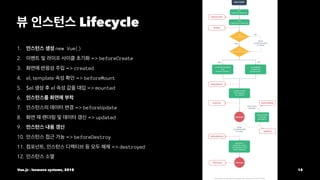
Lifecycle
1. new Vue()
2. => beforeCreate
3. => created
4. el, template => beforeMount
5. $el el => mounted
6.
7. => beforeUpdate
8. => updated
9.
10. => beforeDestroy
11. , => destroyed
12.
Vue.js - inswave systems, 2018 15
Vue.js - inswave systems, 2018 16
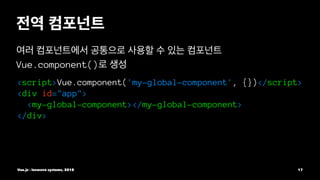
Vue.component()
<script>Vue.component('my-global-component', {})</script>
<div id="app">
<my-global-component></my-global-component>
</div>
Vue.js - inswave systems, 2018 17
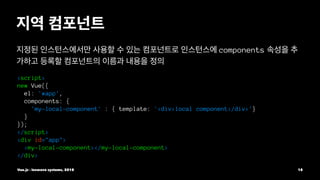
components
<script>
new Vue({
el: '#app',
components: {
'my-local-component' : { template: '<div>local component</div>'}
}
});
</script>
<div id="app">
<my-local-component></my-local-component>
</div>
Vue.js - inswave systems, 2018 18
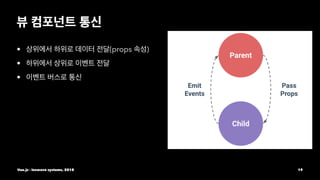
• (props )
•
•
Vue.js - inswave systems, 2018 19
• props
• HTML v-bind:
<script>
Vue.component('child-component', {
props: ['propsdata'],
});
</script>
<child-component v-bind:props =" data ">
</child-component>
Vue.js - inswave systems, 2018 20
<script>
Vue.component('child-component', {
props: ['propsdata'],
template: '<p>{{ propsdata }}</p>'
});
new Vue({
el: '#app',
data: {message:'Hello Vue! passed from Parent Component'}
});
</script>
<div id="app>
<child-component v-bind:propsdata="message"></child-component>
</div>
Vue.js - inswave systems, 2018 21
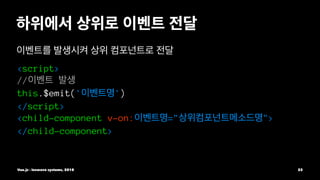
<script>
//
this.$emit(' ')
</script>
<child-component v-on: =" ">
</child-component>
Vue.js - inswave systems, 2018 22
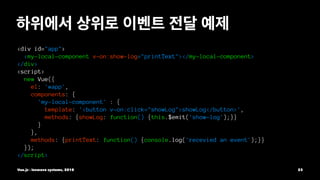
<div id="app">
<my-local-component v-on:show-log="printText"></my-local-component>
</div>
<script>
new Vue({
el: '#app',
components: {
'my-local-component' : {
template: '<button v-on:click="showLog">showLog</button>',
methods: {showLog: function() {this.$emit('show-log');}}
}
},
methods: {printText: function() {console.log('recevied an event');}}
});
</script>
Vue.js - inswave systems, 2018 23
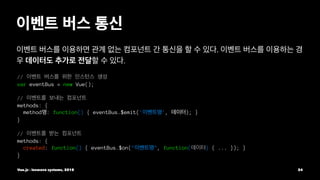
.
.
//
var eventBus = new Vue();
//
methods: {
method : function() { eventBus.$emit(' ', ); }
}
//
methods: {
created: function() { eventBus.$on(" ", function( ) { ... }); }
}
Vue.js - inswave systems, 2018 24
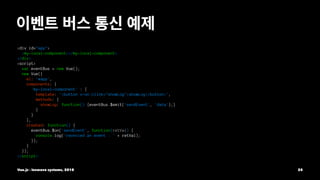
<div id="app">
<my-local-component></my-local-component>
</div>
<script>
var eventBus = new Vue();
new Vue({
el: '#app',
components: {
'my-local-component' : {
template: '<button v-on:click="showLog">showLog</button>',
methods: {
showLog: function() {eventBus.$emit('sendEvent', 'data');}
}
}
},
created: function() {
eventBus.$on('sendEvent', function(retVal) {
console.log('recevied an event : ' + retVal);
});
}
});
</script>
Vue.js - inswave systems, 2018 25
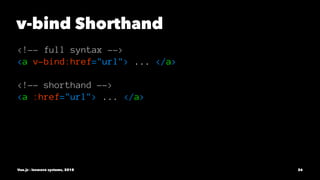
v-bind Shorthand
<!-- full syntax -->
<a v-bind:href="url"> ... </a>
<!-- shorthand -->
<a :href="url"> ... </a>
Vue.js - inswave systems, 2018 26
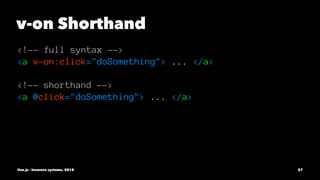
v-on Shorthand
<!-- full syntax -->
<a v-on:click="doSomething"> ... </a>
<!-- shorthand -->
<a @click="doSomething"> ... </a>
Vue.js - inswave systems, 2018 27
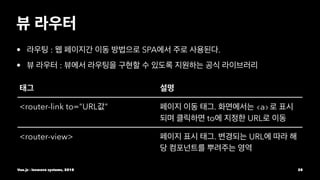
• : SPA .
• :
<router-link to="URL " . <a>
to URL
<router-view> . URL
Vue.js - inswave systems, 2018 28
<div id="app">
<h1> </h1>
<p>
<router-link to="/main"> </router-link>
</p>
<router-view></router-view>
</div>
<script>
var Main = { template : '<div>main</div>' };
var routes = [
{ path: '/main', component: Main }
];
var router = new VueRouter({routes});
var app = new Vue({router}).$mount('#app');
</script>
Vue.js - inswave systems, 2018 29
<router-view> . route children
.
<div id="app"><router-view></router-view></div>
<script>
var User = {template: '<div>User<router-view></router-view></div>';};
var UserProfile = { template: '<p>User Profile Component</p>'};
var routes = [{
path: '/user', component: User,
children: [{path: 'profile',component: UserProfile}]
}];
var router = new VueRouter({routes});
var app = new Vue({router}).$mount('#app');
</script>
Vue.js - inswave systems, 2018 30
name <router-view> . default .
<div id="app">
<router-view name="header"></router-view>
<router-view></router-view>
<router-view name="footer"></router-view>
</div>
<script>
var Header = {template: '<div>Header Component</div>'};
var Footer = {template: '<div>Footer Component</div>'};
var Body = {template: '<div>Body Component</div>'};
var routes = [{path: '/',
components: {default:Body, header:Header, footer:Footer}}];
var router = new VueRouter({routes});
Vue.js - inswave systems, 2018 31
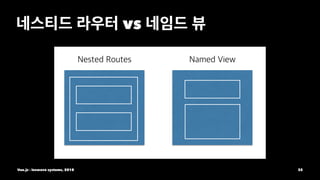
vs
Vue.js - inswave systems, 2018 32
Vue.js - inswave systems, 2018 33

Vue.js part1

  • 1.
    Vue.js - part1 Vue.js - inswave systems, 2018 1
  • 2.
    Concept overview Vue (pronounced/vjuː/, like view) is a progressive framework for building user interfaces. Unlike other monolithic frameworks, Vue is designed from the ground up to be incrementally adoptable. The core library is focused on the view layer only, and is easy to pick up and integrate with other libraries or existing projects. Vue.js - inswave systems, 2018 2
  • 3.
    MVVM Backend Client &MVC . DB , Model View . Vue.js - inswave systems, 2018 3
  • 4.
    MVVM in Vue Vue.js- inswave systems, 2018 4
  • 5.
    View Instance -ViewModel Every Vue application starts by creating a new Vue instance with the Vue function: new Vue({ el: '#app', data: { message: 'Hello Vue.js!' } }); Although not strictly associated with the MVVM pattern, Vue’s design was partly inspired by it. Vue.js - inswave systems, 2018 5
  • 6.
    View Instance(Option) el DOM data templateHTML, CSS method created View Instance Vue.js - inswave systems, 2018 6
  • 7.
    View The actual DOMthat is managed by Vue instances. vm.$el // The View Vue.js - inswave systems, 2018 7
  • 8.
    Model A slightly modifiedplain JavaScript object. vm.$data // The Model Vue.js - inswave systems, 2018 8
  • 9.
    Directive Prefixed HTML attributesthat tell Vue.js to do something about a DOM element. <div v-text="message"></div> Vue.js - inswave systems, 2018 9
  • 10.
    Mustache Bindings You canalso use mustache-style bindings, both in text and in attributes. They are translated into v-text and v-attr directives under the hood. For example: <div id="person-{{id}}">Hello {{name}}!</div> Vue.js - inswave systems, 2018 10
  • 11.
    Filters Filters are functionsused to process the raw values before updating the View. They are denoted by a “pipe” inside directives or bindings: <div>{{message | capitalize}}</div> Vue.js - inswave systems, 2018 11
  • 12.
    Quick example <div id="demo"> <h1>{{title| uppercase}}</h1> <ul> <li v-repeat="todos" v-on="click: done = !done" class="{{done ? 'done' : ''}}"> {{content}} </li> </ul> </div> ( ...) Vue.js - inswave systems, 2018 12
  • 13.
    Quick example var demo= new Vue({ el: '#demo', data: { title: 'todos', todos: [ {done: true, content: 'JavaScript'}, {done: false, content: 'Vue.js'} ] } }) Vue.js - inswave systems, 2018 13
  • 14.
    View Instance ViewInstance DOM . Vue.js - inswave systems, 2018 14
  • 15.
    Lifecycle 1. new Vue() 2.=> beforeCreate 3. => created 4. el, template => beforeMount 5. $el el => mounted 6. 7. => beforeUpdate 8. => updated 9. 10. => beforeDestroy 11. , => destroyed 12. Vue.js - inswave systems, 2018 15
  • 16.
    Vue.js - inswavesystems, 2018 16
  • 17.
  • 18.
    components <script> new Vue({ el: '#app', components:{ 'my-local-component' : { template: '<div>local component</div>'} } }); </script> <div id="app"> <my-local-component></my-local-component> </div> Vue.js - inswave systems, 2018 18
  • 19.
    • (props ) • • Vue.js- inswave systems, 2018 19
  • 20.
    • props • HTMLv-bind: <script> Vue.component('child-component', { props: ['propsdata'], }); </script> <child-component v-bind:props =" data "> </child-component> Vue.js - inswave systems, 2018 20
  • 21.
    <script> Vue.component('child-component', { props: ['propsdata'], template:'<p>{{ propsdata }}</p>' }); new Vue({ el: '#app', data: {message:'Hello Vue! passed from Parent Component'} }); </script> <div id="app> <child-component v-bind:propsdata="message"></child-component> </div> Vue.js - inswave systems, 2018 21
  • 22.
    <script> // this.$emit(' ') </script> <child-component v-on:=" "> </child-component> Vue.js - inswave systems, 2018 22
  • 23.
    <div id="app"> <my-local-component v-on:show-log="printText"></my-local-component> </div> <script> newVue({ el: '#app', components: { 'my-local-component' : { template: '<button v-on:click="showLog">showLog</button>', methods: {showLog: function() {this.$emit('show-log');}} } }, methods: {printText: function() {console.log('recevied an event');}} }); </script> Vue.js - inswave systems, 2018 23
  • 24.
    . . // var eventBus =new Vue(); // methods: { method : function() { eventBus.$emit(' ', ); } } // methods: { created: function() { eventBus.$on(" ", function( ) { ... }); } } Vue.js - inswave systems, 2018 24
  • 25.
    <div id="app"> <my-local-component></my-local-component> </div> <script> var eventBus= new Vue(); new Vue({ el: '#app', components: { 'my-local-component' : { template: '<button v-on:click="showLog">showLog</button>', methods: { showLog: function() {eventBus.$emit('sendEvent', 'data');} } } }, created: function() { eventBus.$on('sendEvent', function(retVal) { console.log('recevied an event : ' + retVal); }); } }); </script> Vue.js - inswave systems, 2018 25
  • 26.
    v-bind Shorthand <!-- fullsyntax --> <a v-bind:href="url"> ... </a> <!-- shorthand --> <a :href="url"> ... </a> Vue.js - inswave systems, 2018 26
  • 27.
    v-on Shorthand <!-- fullsyntax --> <a v-on:click="doSomething"> ... </a> <!-- shorthand --> <a @click="doSomething"> ... </a> Vue.js - inswave systems, 2018 27
  • 28.
    • : SPA. • : <router-link to="URL " . <a> to URL <router-view> . URL Vue.js - inswave systems, 2018 28
  • 29.
    <div id="app"> <h1> </h1> <p> <router-linkto="/main"> </router-link> </p> <router-view></router-view> </div> <script> var Main = { template : '<div>main</div>' }; var routes = [ { path: '/main', component: Main } ]; var router = new VueRouter({routes}); var app = new Vue({router}).$mount('#app'); </script> Vue.js - inswave systems, 2018 29
  • 30.
    <router-view> . routechildren . <div id="app"><router-view></router-view></div> <script> var User = {template: '<div>User<router-view></router-view></div>';}; var UserProfile = { template: '<p>User Profile Component</p>'}; var routes = [{ path: '/user', component: User, children: [{path: 'profile',component: UserProfile}] }]; var router = new VueRouter({routes}); var app = new Vue({router}).$mount('#app'); </script> Vue.js - inswave systems, 2018 30
  • 31.
    name <router-view> .default . <div id="app"> <router-view name="header"></router-view> <router-view></router-view> <router-view name="footer"></router-view> </div> <script> var Header = {template: '<div>Header Component</div>'}; var Footer = {template: '<div>Footer Component</div>'}; var Body = {template: '<div>Body Component</div>'}; var routes = [{path: '/', components: {default:Body, header:Header, footer:Footer}}]; var router = new VueRouter({routes}); Vue.js - inswave systems, 2018 31
  • 32.
    vs Vue.js - inswavesystems, 2018 32
  • 33.
    Vue.js - inswavesystems, 2018 33