Web components
Time to shine?
Tudor Barbu - June 2018
Web Components are a set of features currently being added by the W3C to the
HTML and DOM specifications that allow for the creation of reusable widgets or
components in web documents and web applications.
...and many, many, MANY others!
<input type="text" id="datepicker">
$('#datepicker').datepicker({
showOtherMonths: true,
selectOtherMonths: true
})
● lack of semantics in the markup
● separated HTML and JS
● configuration is stored at a different
location
● the JS needs to run every time a new
calendar element is added
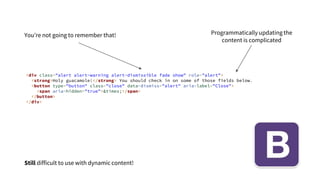
<div class="alert alert-warning alert-dismissible fade show" role="alert">
<strong>Holy guacamole!</strong> You should check in on some of those fields below.
<button type="button" class="close" data-dismiss="alert" aria-label="Close">
<span aria-hidden="true">&times;</span>
</button>
</div>
You’re not going to remember that! Programmatically updating the
content is complicated
Still difficult to use with dynamic content!
<calendar
start-date="06/06/2018"
show-day-of-week="true"></calendar>
<notification
type="danger"
title="Warning"
content="Neah, just testing!"
id="primary-alert"></notification>
const notification = document.getElementById('primary-alert')
notification.setAttribute(
'content',
'Wait, it is actually happening! Please panic!!!'
)
class MyCustomElement extends HTMLElement {
constructor () {
super()
// do not update the DOM here
}
/**
* the element is added to the DOM
*/
connectedCallback () {
}
/**
* the element is removed from the DOM
*/
disconnectedCallback () {
}
/**
* the element is moved to a new document
*/
adoptedCallback () {
}
/**
* a watched attribute changed value
*/
attributeChangedCallback (name, current, previous) {
}
}
Easy peasy :)
window.customElements.define(
'my-custom-element',
MyCustomElement
)
HTML tag
class extending HTMLElement
The TA-DA moment!
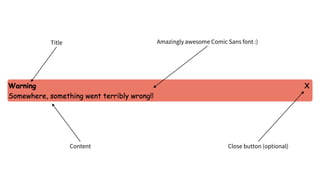
Title Amazingly awesome Comic Sans font :)
Content Close button (optional)
<cstm-notification
title="Warning"
content="Somewhere, something went terribly wrong!!!"
type="danger"
disposable="true">
</cstm-notification>
It’s a good idea to namespace
your components
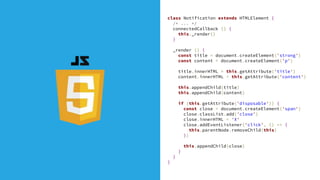
class Notification extends HTMLElement {
/* ... */
connectedCallback () {
this._render()
}
_render () {
const title = document.createElement('strong')
const content = document.createElement('p')
title.innerHTML = this.getAttribute('title')
content.innerHTML = this.getAttribute('content')
this.appendChild(title)
this.appendChild(content)
if (this.getAttribute('disposable')) {
const close = document.createElement('span')
close.classList.add('close')
close.innerHTML = 'X'
close.addEventListener('click', () => {
this.parentNode.removeChild(this)
})
this.appendChild(close)
}
}
}
cstm-notification {
font-family: "Comic Sans MS"; /* on purpose :) */
display: block;
margin: 5px;
padding: 2px;
border-radius: 5px;
}
cstm-notification[type="danger"] {
background-color: #ed7965;
}
cstm-notification {
background-color: #97bbf4;
}
cstm-notification * {
margin: 0;
}
cstm-notification .close {
position: absolute;
top: 10px;
right: 20px;
cursor: pointer;
}
class Notification extends HTMLElement {
static get observedAttributes () {
return ['title', 'content', 'disposable']
}
attributeChangedCallback (name, current, prev) {
this._render()
}
// ...
}
The attributeChangedCallback
● is only fired for observedAttributes
● is fired for each attribute in the
observedAttributes array!!!
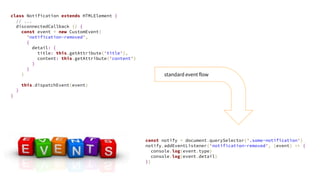
class Notification extends HTMLElement {
// ...
disconnectedCallback () {
const event = new CustomEvent(
'notification-removed',
{
detail: {
title: this.getAttribute('title'),
content: this.getAttribute('content')
}
}
)
this.dispatchEvent(event)
}
}
const notify = document.querySelector('.some-notification')
notify.addEventListener('notification-removed', (event) => {
console.log(event.type)
console.log(event.detail)
})
standard event flow
Encapsulation
A component specific DOM subtree included in
the rendering of a document, outside the main
DOM tree
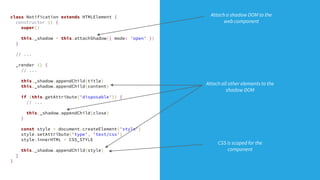
class Notification extends HTMLElement {
constructor () {
super()
this._shadow = this.attachShadow({ mode: 'open' })
}
// ...
_render () {
// ...
this._shadow.appendChild(title)
this._shadow.appendChild(content)
if (this.getAttribute('disposable')) {
// ...
this._shadow.appendChild(close)
}
const style = document.createElement('style')
style.setAttribute('type', 'text/css')
style.innerHTML = CSS_STYLE
this._shadow.appendChild(style)
}
}
Attach all other elements to the
shadow DOM
Attach a shadow DOM to the
web component
CSS is scoped for the
component
* {
margin: 0;
}
:host {
font-family: "Comic Sans MS"; /* on purpose :) */
display: block;
margin: 5px;
padding: 2px;
border-radius: 5px;
background-color: #97bbf4;
}
:host([type="danger"]) {
background-color: #ed7965;
}
.close {
position: absolute;
top: 10px;
right: 20px;
cursor: pointer;
}
the :host selected references
the shadow root
can also be used to match attributes on
the custom element
Global CSS rules *do not* cascade inside the
shadow DOM
Yes No
● fonts
● colors
● other “themeable” properties
● position of internal elements
● hide / show
:host {
/* ... */
background-color: var(--bg-color-default, #97bbf4);
}
:host([type="danger"]) {
background-color: var(--bg-color-danger, #ed7965);
}
.close {
/* ... */
color: var(--color-close, #000);
}
cstm-notification {
--bg-color-danger: pink;
--color-close:#fff;
}
Component definition External CSS file
...ish!
But there are some amazing polyfills and frameworks!
Browser support?
https://www.polymer-project.org/ http://slimjs.com http://x-tag.github.io
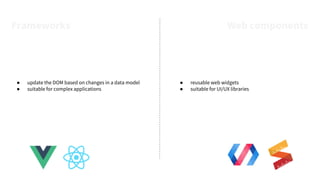
● update the DOM based on changes in a data model
● suitable for complex applications
● reusable web widgets
● suitable for UI/UX libraries
Frameworks Web components
Thank you!
Fancy working with web components?
jobs.schibsted.com
Tudor Barbu
@motanelu
bytes.schibsted.com / @Schibsted_Eng

Web components

  • 1.
    Web components Time toshine? Tudor Barbu - June 2018
  • 2.
    Web Components area set of features currently being added by the W3C to the HTML and DOM specifications that allow for the creation of reusable widgets or components in web documents and web applications.
  • 4.
    ...and many, many,MANY others!
  • 5.
    <input type="text" id="datepicker"> $('#datepicker').datepicker({ showOtherMonths:true, selectOtherMonths: true }) ● lack of semantics in the markup ● separated HTML and JS ● configuration is stored at a different location ● the JS needs to run every time a new calendar element is added
  • 6.
    <div class="alert alert-warningalert-dismissible fade show" role="alert"> <strong>Holy guacamole!</strong> You should check in on some of those fields below. <button type="button" class="close" data-dismiss="alert" aria-label="Close"> <span aria-hidden="true">&times;</span> </button> </div> You’re not going to remember that! Programmatically updating the content is complicated Still difficult to use with dynamic content!
  • 7.
    <calendar start-date="06/06/2018" show-day-of-week="true"></calendar> <notification type="danger" title="Warning" content="Neah, just testing!" id="primary-alert"></notification> constnotification = document.getElementById('primary-alert') notification.setAttribute( 'content', 'Wait, it is actually happening! Please panic!!!' )
  • 8.
    class MyCustomElement extendsHTMLElement { constructor () { super() // do not update the DOM here } /** * the element is added to the DOM */ connectedCallback () { } /** * the element is removed from the DOM */ disconnectedCallback () { } /** * the element is moved to a new document */ adoptedCallback () { } /** * a watched attribute changed value */ attributeChangedCallback (name, current, previous) { } } Easy peasy :)
  • 9.
  • 10.
    Title Amazingly awesomeComic Sans font :) Content Close button (optional)
  • 11.
    <cstm-notification title="Warning" content="Somewhere, something wentterribly wrong!!!" type="danger" disposable="true"> </cstm-notification> It’s a good idea to namespace your components
  • 12.
    class Notification extendsHTMLElement { /* ... */ connectedCallback () { this._render() } _render () { const title = document.createElement('strong') const content = document.createElement('p') title.innerHTML = this.getAttribute('title') content.innerHTML = this.getAttribute('content') this.appendChild(title) this.appendChild(content) if (this.getAttribute('disposable')) { const close = document.createElement('span') close.classList.add('close') close.innerHTML = 'X' close.addEventListener('click', () => { this.parentNode.removeChild(this) }) this.appendChild(close) } } }
  • 13.
    cstm-notification { font-family: "ComicSans MS"; /* on purpose :) */ display: block; margin: 5px; padding: 2px; border-radius: 5px; } cstm-notification[type="danger"] { background-color: #ed7965; } cstm-notification { background-color: #97bbf4; } cstm-notification * { margin: 0; } cstm-notification .close { position: absolute; top: 10px; right: 20px; cursor: pointer; }
  • 15.
    class Notification extendsHTMLElement { static get observedAttributes () { return ['title', 'content', 'disposable'] } attributeChangedCallback (name, current, prev) { this._render() } // ... } The attributeChangedCallback ● is only fired for observedAttributes ● is fired for each attribute in the observedAttributes array!!!
  • 16.
    class Notification extendsHTMLElement { // ... disconnectedCallback () { const event = new CustomEvent( 'notification-removed', { detail: { title: this.getAttribute('title'), content: this.getAttribute('content') } } ) this.dispatchEvent(event) } } const notify = document.querySelector('.some-notification') notify.addEventListener('notification-removed', (event) => { console.log(event.type) console.log(event.detail) }) standard event flow
  • 17.
  • 18.
    A component specificDOM subtree included in the rendering of a document, outside the main DOM tree
  • 19.
    class Notification extendsHTMLElement { constructor () { super() this._shadow = this.attachShadow({ mode: 'open' }) } // ... _render () { // ... this._shadow.appendChild(title) this._shadow.appendChild(content) if (this.getAttribute('disposable')) { // ... this._shadow.appendChild(close) } const style = document.createElement('style') style.setAttribute('type', 'text/css') style.innerHTML = CSS_STYLE this._shadow.appendChild(style) } } Attach all other elements to the shadow DOM Attach a shadow DOM to the web component CSS is scoped for the component
  • 20.
    * { margin: 0; } :host{ font-family: "Comic Sans MS"; /* on purpose :) */ display: block; margin: 5px; padding: 2px; border-radius: 5px; background-color: #97bbf4; } :host([type="danger"]) { background-color: #ed7965; } .close { position: absolute; top: 10px; right: 20px; cursor: pointer; } the :host selected references the shadow root can also be used to match attributes on the custom element
  • 21.
    Global CSS rules*do not* cascade inside the shadow DOM
  • 22.
    Yes No ● fonts ●colors ● other “themeable” properties ● position of internal elements ● hide / show
  • 23.
    :host { /* ...*/ background-color: var(--bg-color-default, #97bbf4); } :host([type="danger"]) { background-color: var(--bg-color-danger, #ed7965); } .close { /* ... */ color: var(--color-close, #000); } cstm-notification { --bg-color-danger: pink; --color-close:#fff; } Component definition External CSS file
  • 24.
    ...ish! But there aresome amazing polyfills and frameworks! Browser support?
  • 25.
  • 26.
    ● update theDOM based on changes in a data model ● suitable for complex applications ● reusable web widgets ● suitable for UI/UX libraries Frameworks Web components
  • 27.
    Thank you! Fancy workingwith web components? jobs.schibsted.com Tudor Barbu @motanelu bytes.schibsted.com / @Schibsted_Eng