Wicket Programming
© copyright : spiraltrain@gmail.com
Course Schedule
• Wicket Intro
• Core Concepts
• Components
• Forms and Models
• Validation
• Wicket and Ajax
• Data Components
• jQuery Integration
• New Features
2
• What is Wicket?
• Component Orientation
• Wicket Features
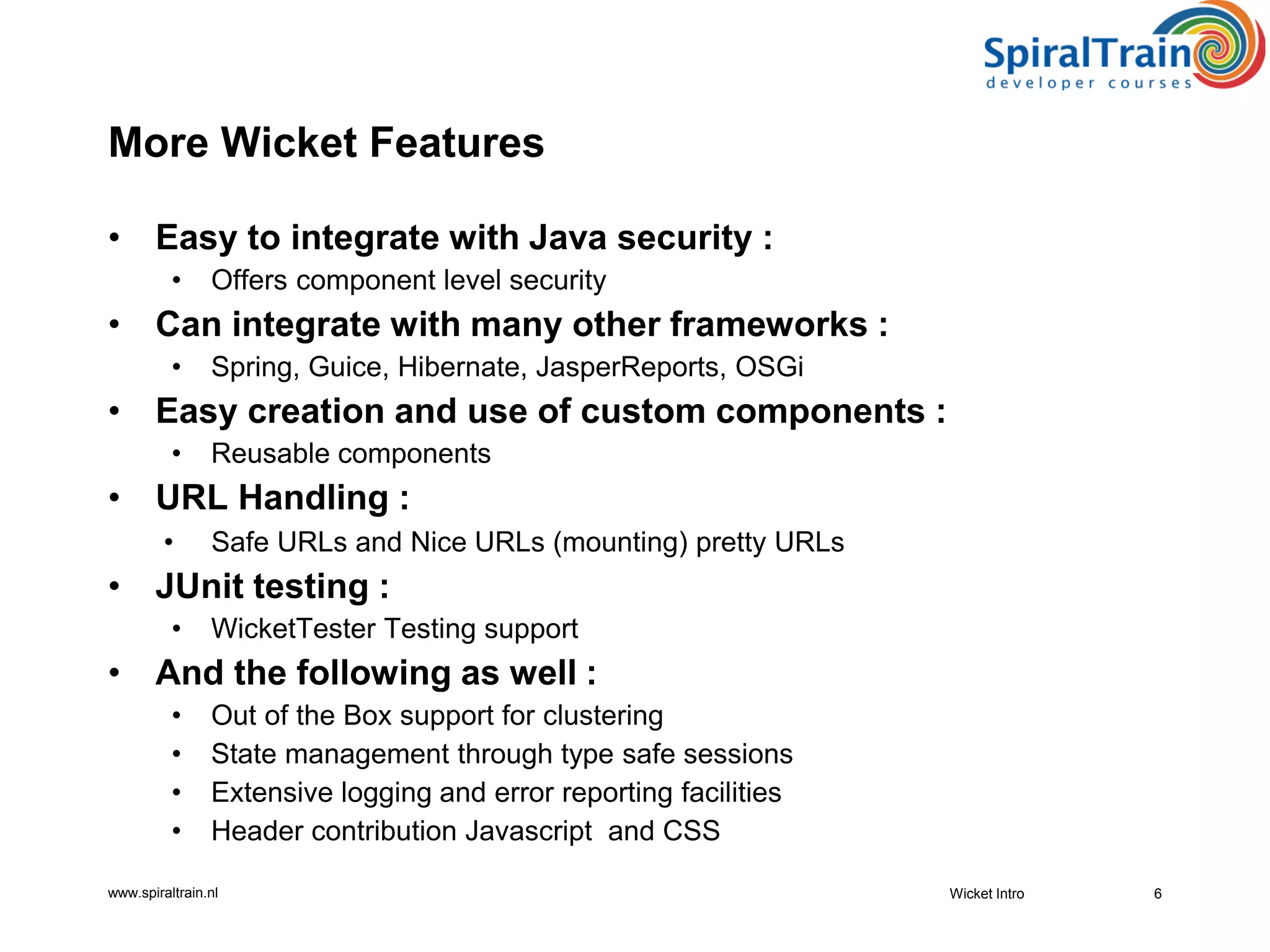
• More Wicket Features
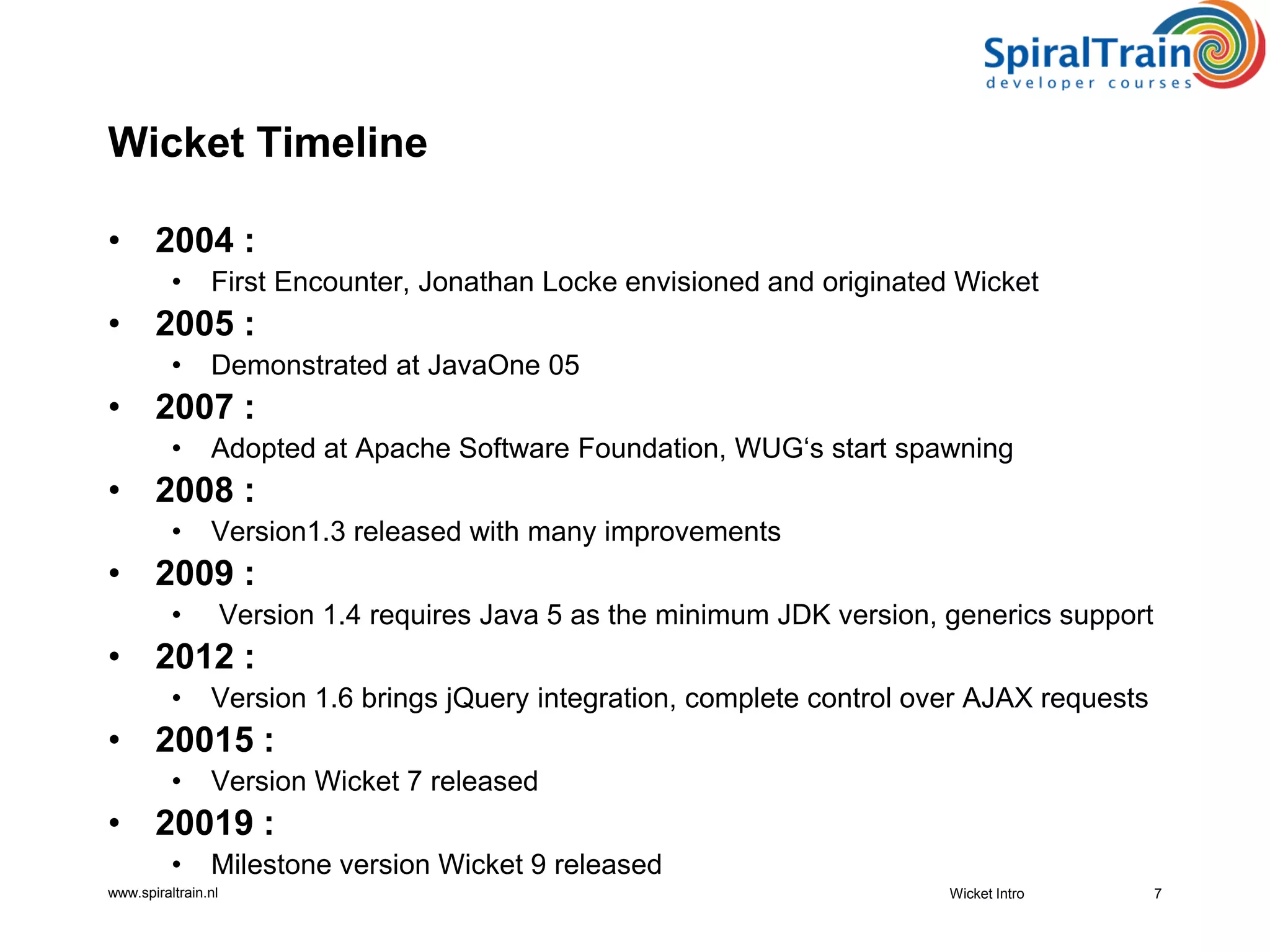
• Wicket Timeline
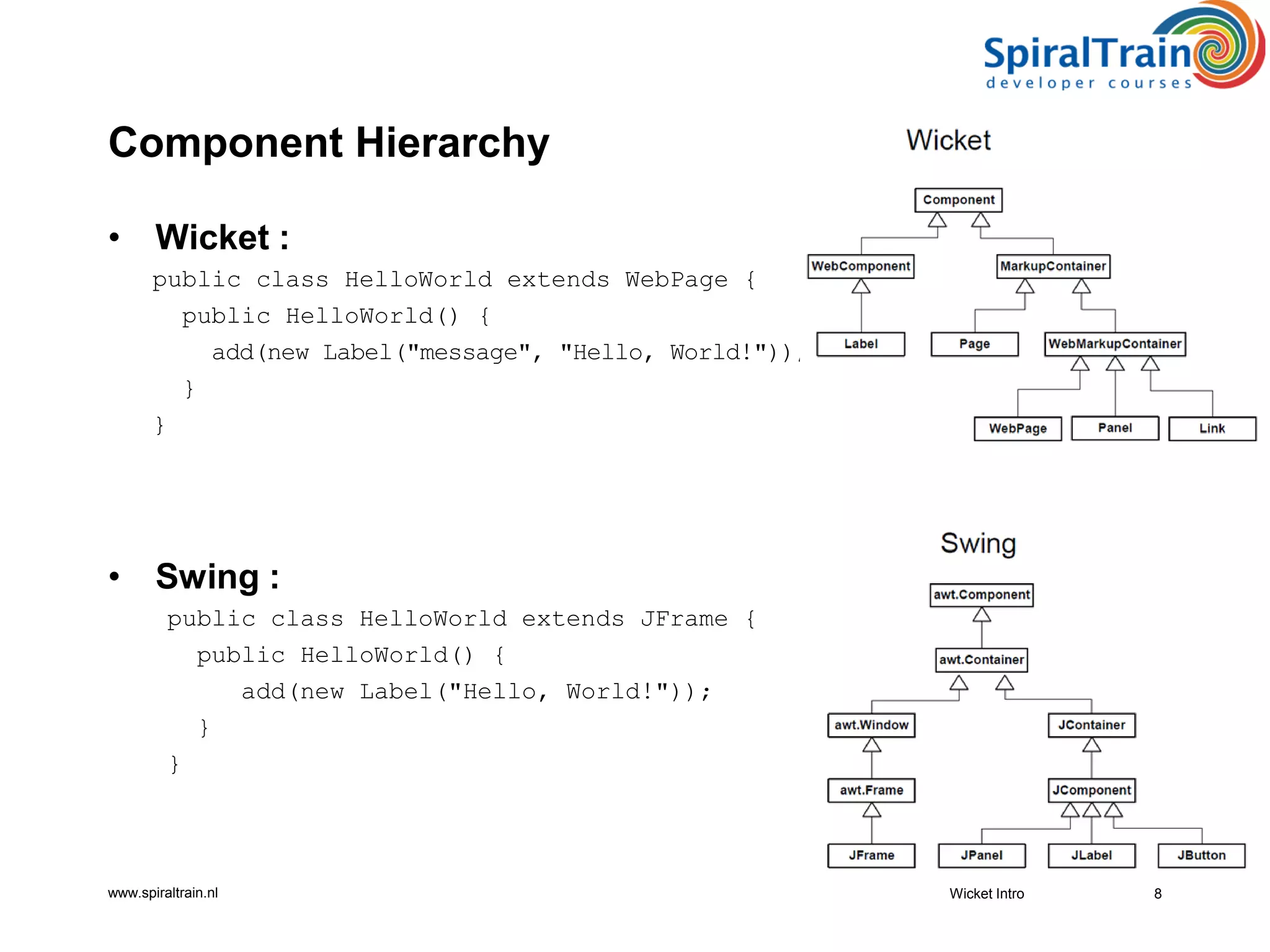
• Component Hierarchy
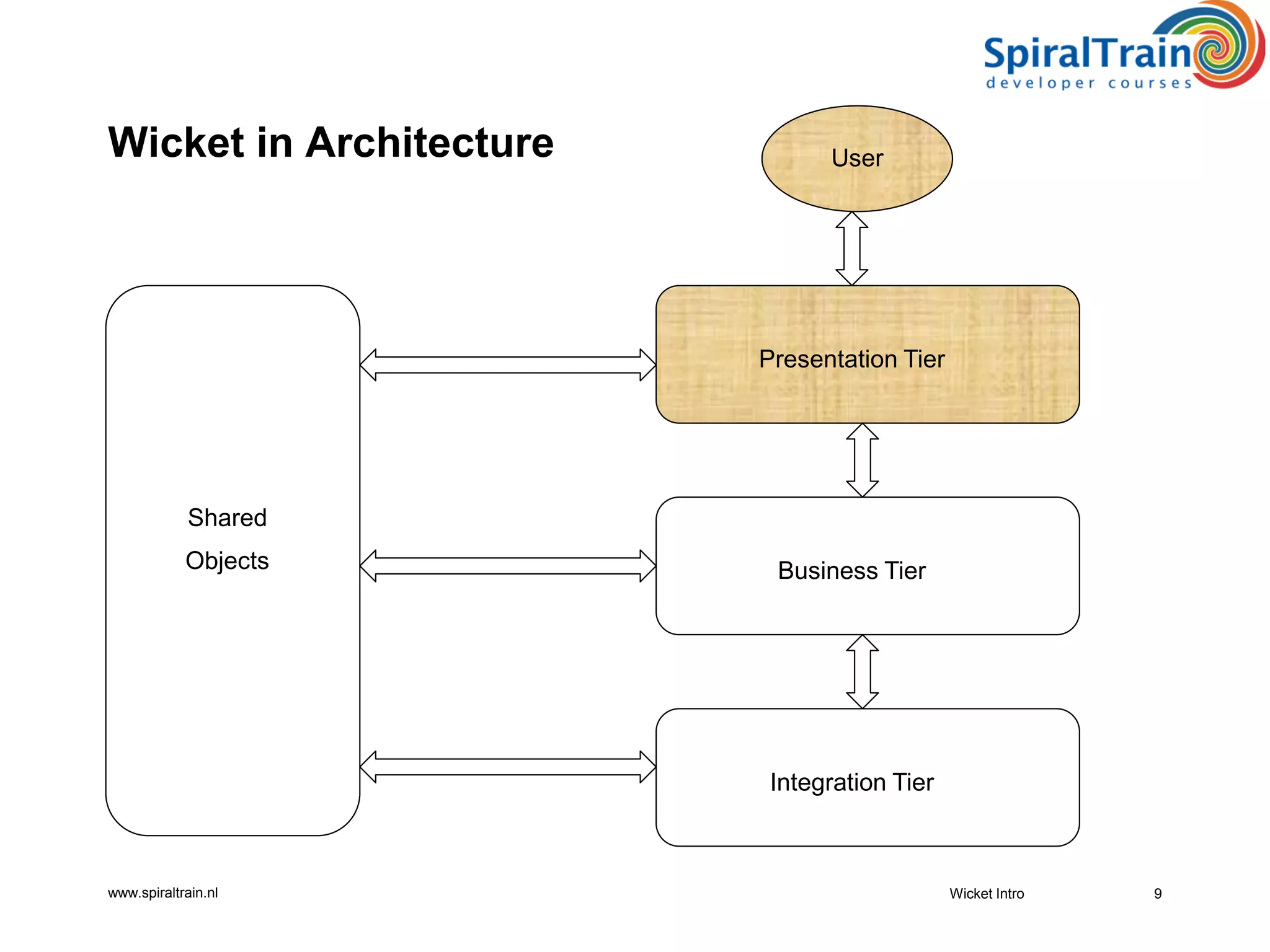
• Wicket in Architecture
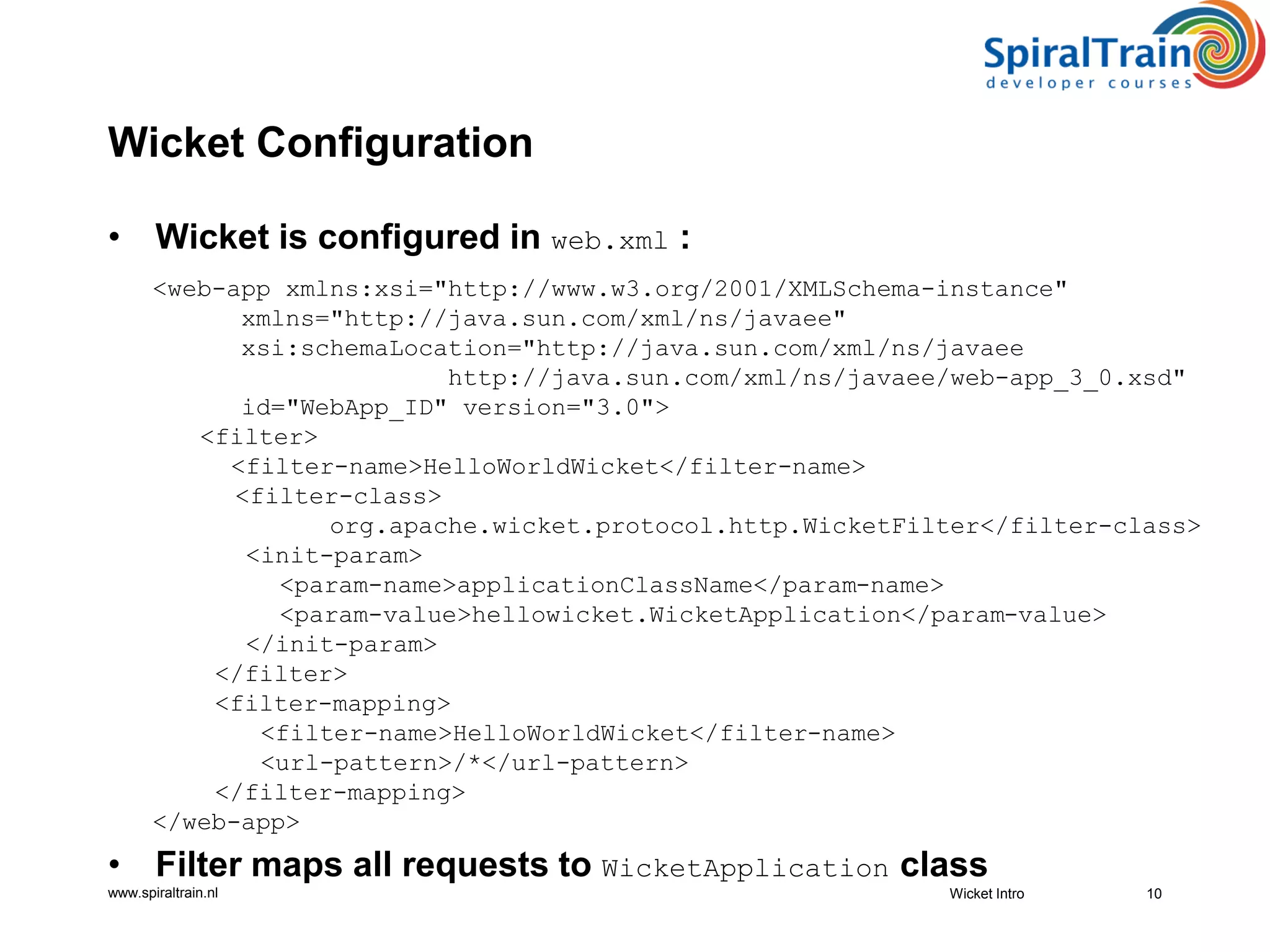
• Wicket Configuration
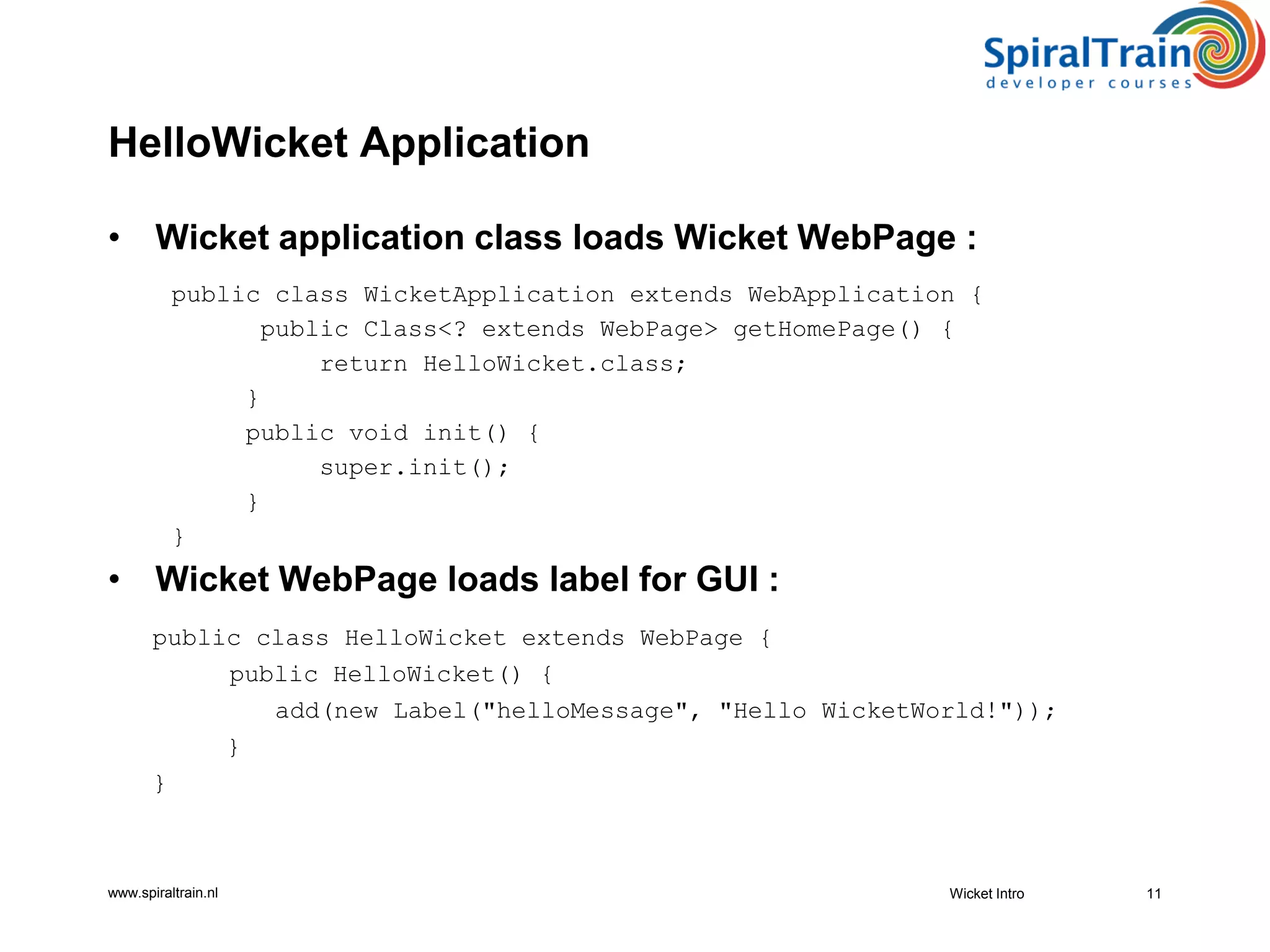
• Hello Wicket Application
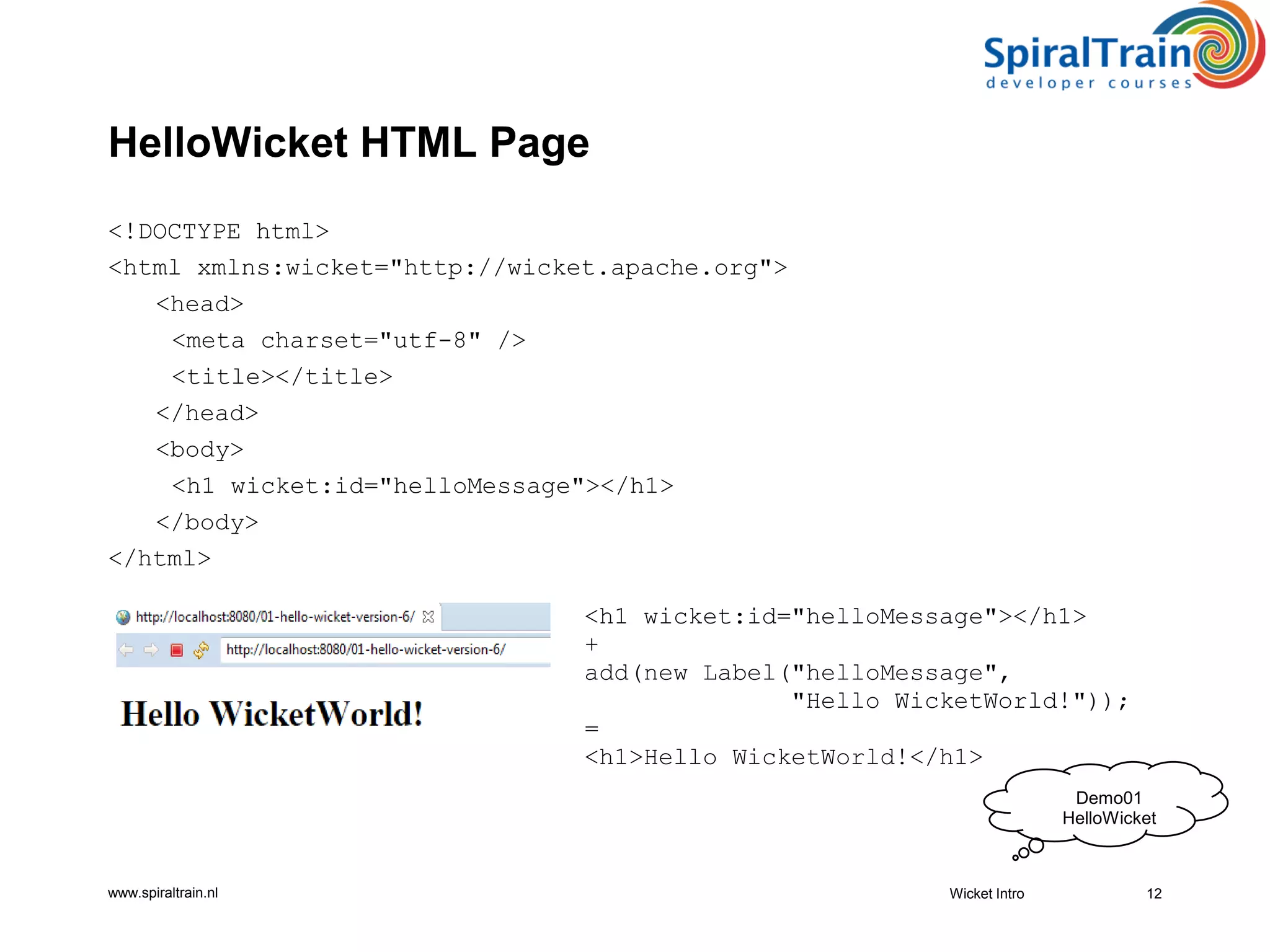
• Hello Wicket HTML Page
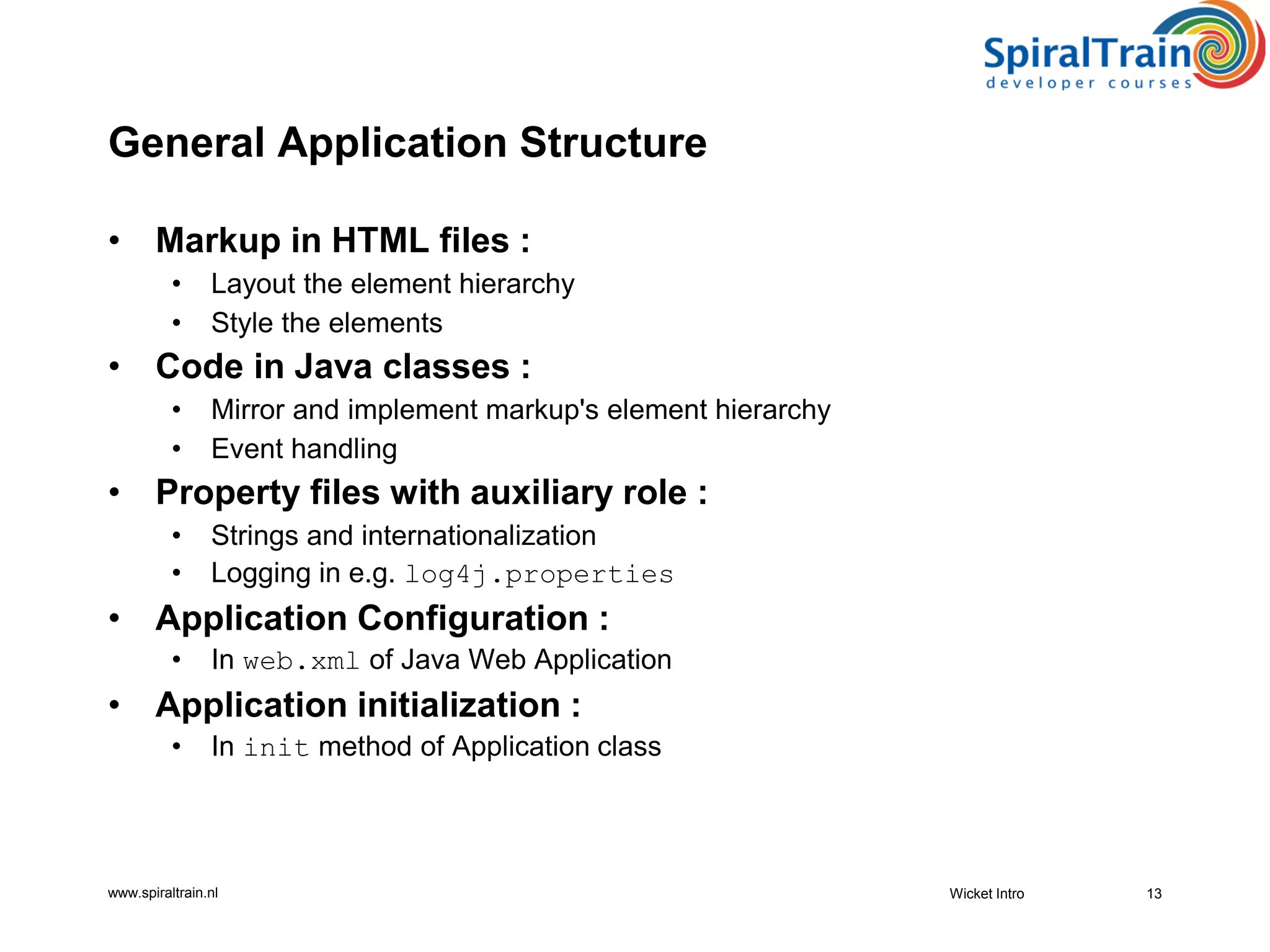
• General Application Structure
• Wicket Run Modes
• Setting Up Wicket
• Wicket Distribution and Modules
• Wicket Resources
www.spiraltrain.nl
What is Wicket?
• Wicket is a Component Oriented Web Application framework :
• Web Development done with pure Java and pure HTML
• Brings object oriented programming to the view layer :
• Re-applies Model View Controller pattern on components instead of requests
• Follows traditional model for UI development on thick clients :
• Unlike traditional Web Application frameworks like Struts and Spring MVC
• Clean separation of concerns between HTML and Java
• Enables component-oriented, programmatic manipulation of markup
• HTML not polluted with programming semantics :
• Only simple tagging constructs in markup
• Open Source Framework of Apache Software Foundation :
• Enthusiastic developer community
• Name “Wicket” means “gate” and is easy to remember :
• Lightweight door in immovable Java EE gate
3Wicket Intro
www.spiraltrain.nl
Component Orientation
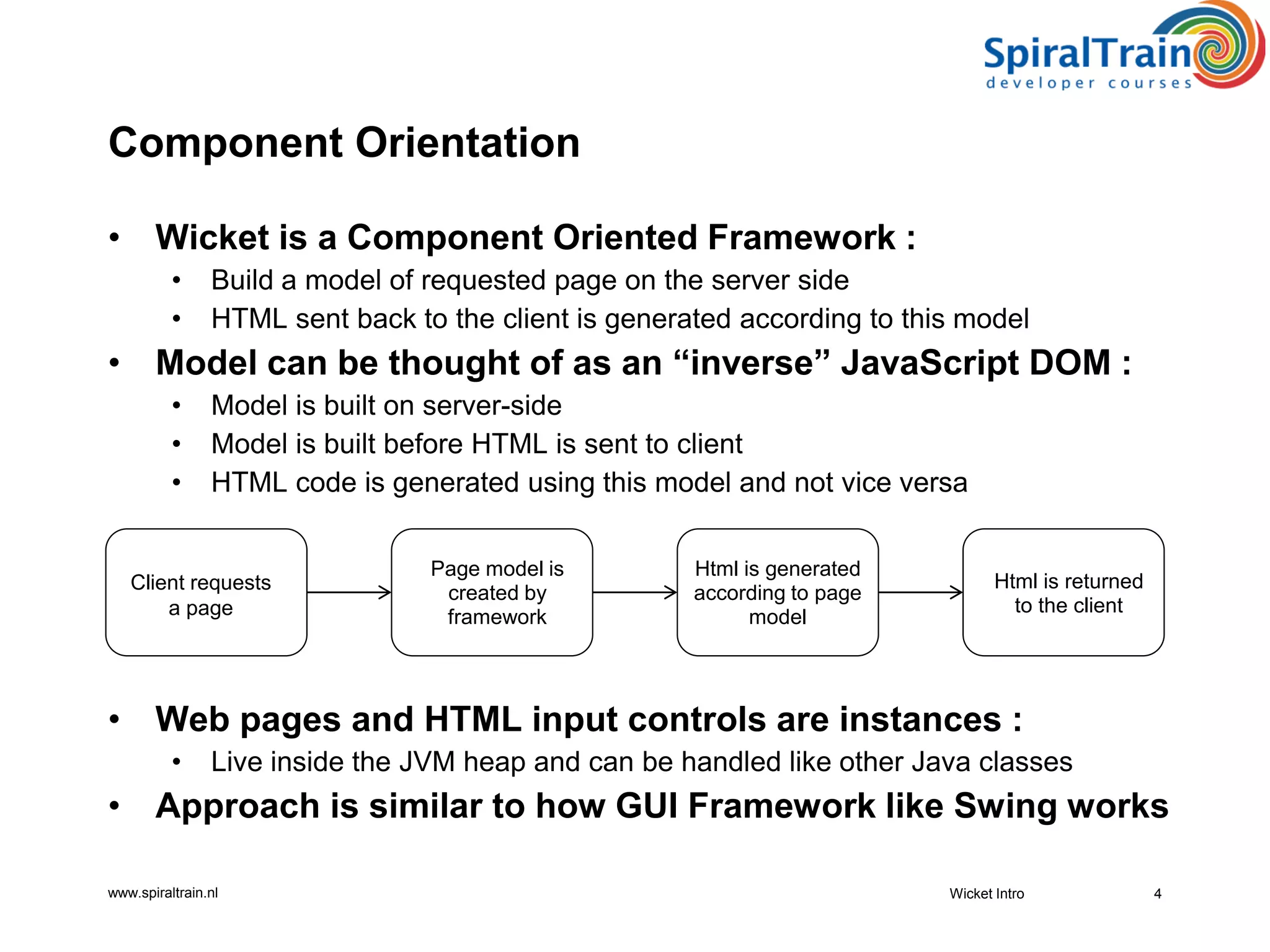
• Wicket is a Component Oriented Framework :
• Build a model of requested page on the server side
• HTML sent back to the client is generated according to this model
• Model can be thought of as an “inverse” JavaScript DOM :
• Model is built on server-side
• Model is built before HTML is sent to client
• HTML code is generated using this model and not vice versa
• Web pages and HTML input controls are instances :
• Live inside the JVM heap and can be handled like other Java classes
• Approach is similar to how GUI Framework like Swing works
Wicket Intro 4
Client requests
a page
Page model is
created by
framework
Html is generated
according to page
model
Html is returned
to the client
www.spiraltrain.nl
Wicket Features
• Based on Plain Old Java Objects (POJO‘s) :
• All code written in Java like in Swing GUI with maximum type safety
• Requires minimal configuration :
• Avoids overuse of XML configuration files
• Web Form support with :
• Nested forms and no more double submit of forms
• Offers Ajax functionality "without" JavaScript :
• Fully solves back button problem and has Ajax Debug Window
• Easy to create bookmarkable pages
• Page composition :
• Panels, borders and markup inheritance
• Excellent I18n localization and style support :
• Automatic client capabilities detection and template and resource loading
• Offers fancy components out of the box :
• Data aware tables, date picker, Google Maps tabbed panel, tree, wizard
5Wicket Intro
www.spiraltrain.nl
More Wicket Features
• Easy to integrate with Java security :
• Offers component level security
• Can integrate with many other frameworks :
• Spring, Guice, Hibernate, JasperReports, OSGi
• Easy creation and use of custom components :
• Reusable components
• URL Handling :
• Safe URLs and Nice URLs (mounting) pretty URLs
• JUnit testing :
• WicketTester Testing support
• And the following as well :
• Out of the Box support for clustering
• State management through type safe sessions
• Extensive logging and error reporting facilities
• Header contribution Javascript and CSS
6Wicket Intro
www.spiraltrain.nl
Wicket Timeline
• 2004 :
• First Encounter, Jonathan Locke envisioned and originated Wicket
• 2005 :
• Demonstrated at JavaOne 05
• 2007 :
• Adopted at Apache Software Foundation, WUG‘s start spawning
• 2008 :
• Version1.3 released with many improvements
• 2009 :
• Version 1.4 requires Java 5 as the minimum JDK version, generics support
• 2012 :
• Version 1.6 brings jQuery integration, complete control over AJAX requests
• 20015 :
• Version Wicket 7 released
• 20019 :
• Milestone version Wicket 9 released
Wicket Intro 7
www.spiraltrain.nl
Component Hierarchy
• Wicket :
public class HelloWorld extends WebPage {
public HelloWorld() {
add(new Label("message", "Hello, World!"));
}
}
• Swing :
public class HelloWorld extends JFrame {
public HelloWorld() {
add(new Label("Hello, World!"));
}
}
8Wicket Intro
www.spiraltrain.nl Wicket Intro 9
Presentation Tier
Business Tier
Integration Tier
Shared
Objects
UserWicket in Architecture
www.spiraltrain.nl
Wicket Configuration
• Wicket is configured in web.xml :
<web-app xmlns:xsi="http://www.w3.org/2001/XMLSchema-instance"
xmlns="http://java.sun.com/xml/ns/javaee"
xsi:schemaLocation="http://java.sun.com/xml/ns/javaee
http://java.sun.com/xml/ns/javaee/web-app_3_0.xsd"
id="WebApp_ID" version="3.0">
<filter>
<filter-name>HelloWorldWicket</filter-name>
<filter-class>
org.apache.wicket.protocol.http.WicketFilter</filter-class>
<init-param>
<param-name>applicationClassName</param-name>
<param-value>hellowicket.WicketApplication</param-value>
</init-param>
</filter>
<filter-mapping>
<filter-name>HelloWorldWicket</filter-name>
<url-pattern>/*</url-pattern>
</filter-mapping>
</web-app>
• Filter maps all requests to WicketApplication class
10Wicket Intro
www.spiraltrain.nl
HelloWicket Application
• Wicket application class loads Wicket WebPage :
public class WicketApplication extends WebApplication {
public Class<? extends WebPage> getHomePage() {
return HelloWicket.class;
}
public void init() {
super.init();
}
}
• Wicket WebPage loads label for GUI :
public class HelloWicket extends WebPage {
public HelloWicket() {
add(new Label("helloMessage", "Hello WicketWorld!"));
}
}
Wicket Intro 11
www.spiraltrain.nl
HelloWicket HTML Page
<!DOCTYPE html>
<html xmlns:wicket="http://wicket.apache.org">
<head>
<meta charset="utf-8" />
<title></title>
</head>
<body>
<h1 wicket:id="helloMessage"></h1>
</body>
</html>
Wicket Intro 12
<h1 wicket:id="helloMessage"></h1>
+
add(new Label("helloMessage",
"Hello WicketWorld!"));
=
<h1>Hello WicketWorld!</h1>
Demo01
HelloWicket
www.spiraltrain.nl
General Application Structure
• Markup in HTML files :
• Layout the element hierarchy
• Style the elements
• Code in Java classes :
• Mirror and implement markup's element hierarchy
• Event handling
• Property files with auxiliary role :
• Strings and internationalization
• Logging in e.g. log4j.properties
• Application Configuration :
• In web.xml of Java Web Application
• Application initialization :
• In init method of Application class
13Wicket Intro
www.spiraltrain.nl
Wicket Run Modes
• Development mode :
• Exceptional error pages, Dynamic markup reloading, No caching
• No JavaScript/CSS Optimizations, Wicker Debugger visible
• Discover mistakes early (serialization, missing components)
• Wicket warns when running in development mode as follows :
********************************************************************
*** WARNING: Wicket is running in DEVELOPMENT mode. ***
********************************************************************
• Deployment mode :
• Cache markup resources, No checks, Don’t display stack traces to users
• Minimize and compress JavaScript, Don’t generate Wicket tags
• Wicket Debugger not visible
• Do not run an application in production using development mode
• Change by setting context parameter in web.xml :
<context-param>
<param-name>configuration</param-name>
<param-value>deployment</param-value>
</context-param>
Wicket Intro 14
www.spiraltrain.nl
• Download Wicket Binaries Library :
• from http://wicket.apache.org/
• Or
• Use Maven :
<dependency>
<groupid>org.apache.wicket</groupid>
<artifactid>wicket-core</artifactid>
<version>${wicket.version*}</version>
</dependency>
Wicket Intro 15
Setting Up Wicket
www.spiraltrain.nl
Wicket in IDE’s
• NetBeans includes Maven support :
• Start directly by just opening the folder containing our project
• Intellj IDEA comes with a Maven importing functionality :
• Started under “File/New Project/Import from external model/Maven”
• Next just select pom.xml file of our project
• Eclipse import procedure :
• Select import maven project and point to pom.xml file
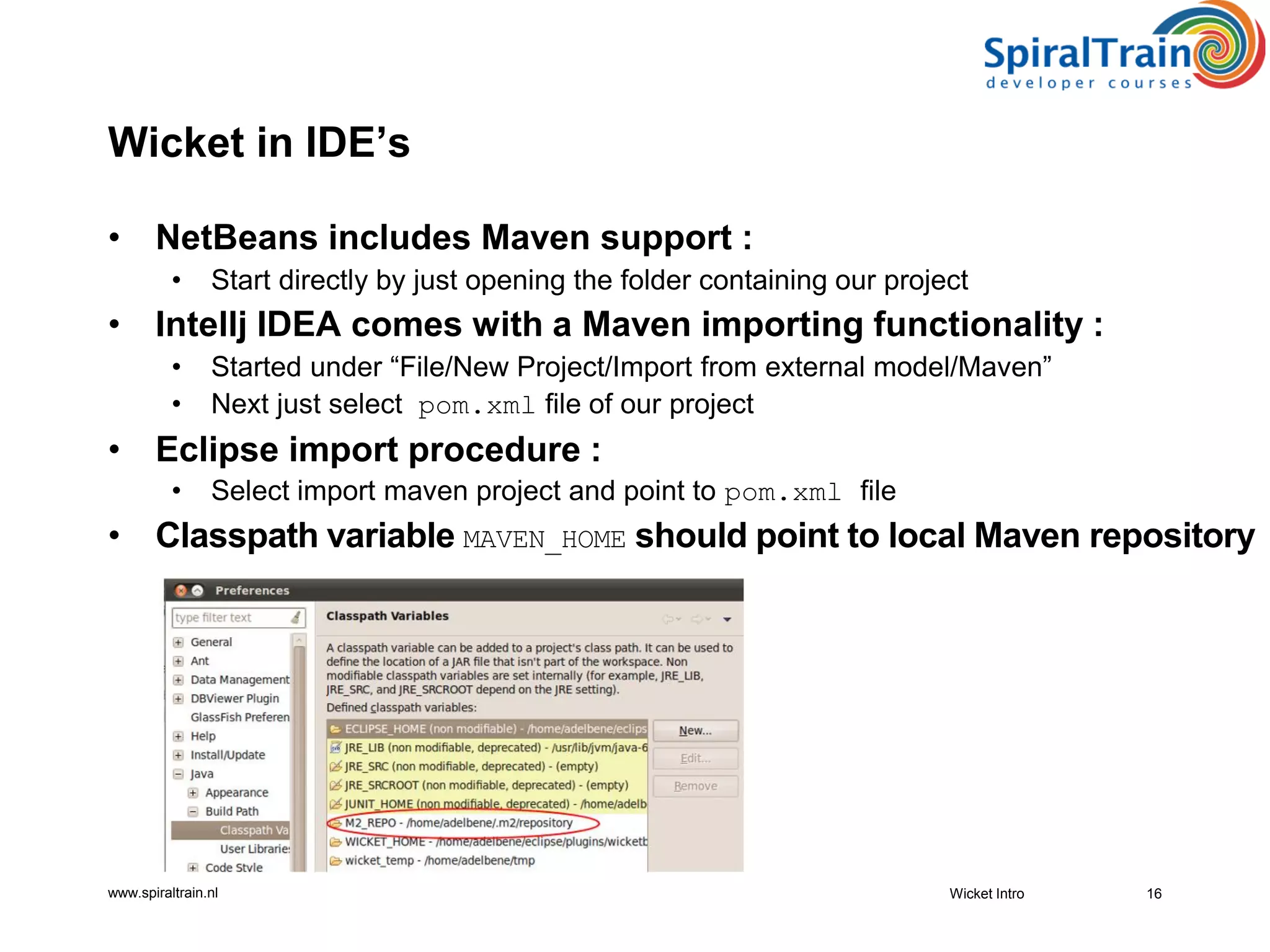
• Classpath variable MAVEN_HOME should point to local Maven repository
Wicket Intro 16
www.spiraltrain.nl
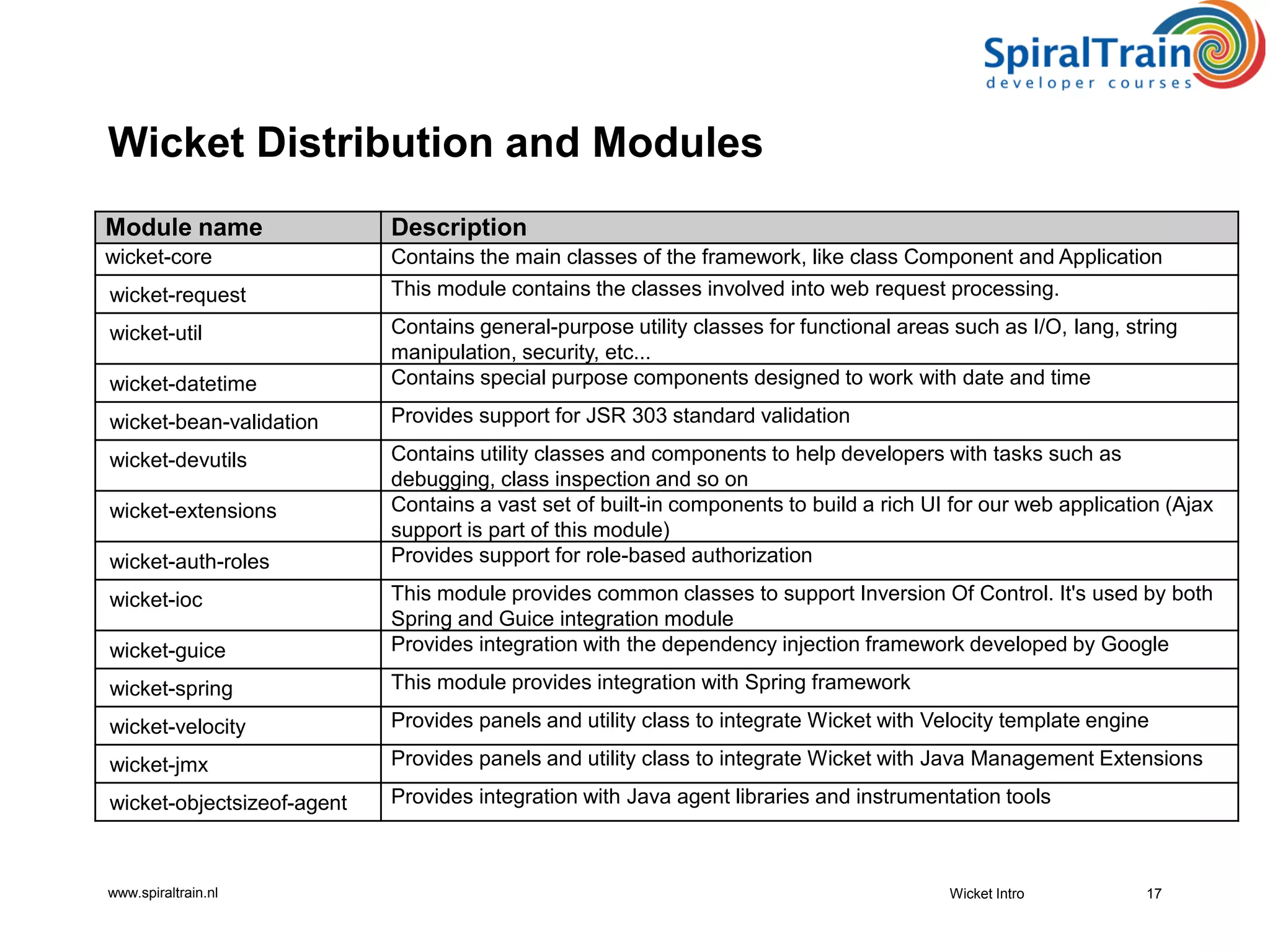
Wicket Distribution and Modules
Module name Description
wicket-core Contains the main classes of the framework, like class Component and Application
wicket-request This module contains the classes involved into web request processing.
wicket-util Contains general-purpose utility classes for functional areas such as I/O, lang, string
manipulation, security, etc...
wicket-datetime Contains special purpose components designed to work with date and time
wicket-bean-validation Provides support for JSR 303 standard validation
wicket-devutils Contains utility classes and components to help developers with tasks such as
debugging, class inspection and so on
wicket-extensions Contains a vast set of built-in components to build a rich UI for our web application (Ajax
support is part of this module)
wicket-auth-roles Provides support for role-based authorization
wicket-ioc This module provides common classes to support Inversion Of Control. It's used by both
Spring and Guice integration module
wicket-guice Provides integration with the dependency injection framework developed by Google
wicket-spring This module provides integration with Spring framework
wicket-velocity Provides panels and utility class to integrate Wicket with Velocity template engine
wicket-jmx Provides panels and utility class to integrate Wicket with Java Management Extensions
wicket-objectsizeof-agent Provides integration with Java agent libraries and instrumentation tools
Wicket Intro 17
www.spiraltrain.nl
Wicket Resources
• Homepage : http://wicket.apache.org
• Documentation : https://code.google.com/p/wicket-guide
• Wiki : https://cwiki.apache.org/WICKET
• Source code : https://github.com/apache/wicket
• Demo site : http://www.wicket-library.com
• Official user list : users@wicket.apache.org
• Official development list : dev@wicket.apache.org
• Official forum : http://apache-wicket.1842946.n4.nabble.com
• Official IRC channel : irc.freenode.net ##wicket channel
• Users FAQ : http://cwiki.apache.org/WICKET/faqs.html
• Why Wicket? article at http://wicket.apache.org/meet/introduction
• Confluence : https://cwiki.apache.org/confluence/display/WICKET/
• Twitter accounts of :
• Jonathan Locke, Igor Vaynberg, Martijn Dashorst, Eelco Hillenius
18Wicket Intro
© copyright : spiraltrain@gmail.com
Summary : Wicket Intro
• Wicket is a Component Oriented Web Application framework :
• Web Development done with pure Java and pure HTML
• Open Source Framework of Apache Software Foundation :
• Enthusiastic developer community
• Wickets place in architecture :
• Situated in presentation tier of application
• HTML not polluted with programming semantics :
• Only simple tagging constructs in markup
• In Wicket Web pages and HTML input controls are instances :
• Live inside the JVM heap and can be handled like other Java classes
• Wicket is configured in web.xml :
• Filter maps all requests to WicketApplication class
• Wicket application can execute in two modes :
• Development mode and deployment mode
• Development mode gives a lot more debug information
Wicket Intro 19
Exercise 01
Getting Started

Wicket Intro

  • 1.
  • 2.
    © copyright :spiraltrain@gmail.com Course Schedule • Wicket Intro • Core Concepts • Components • Forms and Models • Validation • Wicket and Ajax • Data Components • jQuery Integration • New Features 2 • What is Wicket? • Component Orientation • Wicket Features • More Wicket Features • Wicket Timeline • Component Hierarchy • Wicket in Architecture • Wicket Configuration • Hello Wicket Application • Hello Wicket HTML Page • General Application Structure • Wicket Run Modes • Setting Up Wicket • Wicket Distribution and Modules • Wicket Resources
  • 3.
    www.spiraltrain.nl What is Wicket? •Wicket is a Component Oriented Web Application framework : • Web Development done with pure Java and pure HTML • Brings object oriented programming to the view layer : • Re-applies Model View Controller pattern on components instead of requests • Follows traditional model for UI development on thick clients : • Unlike traditional Web Application frameworks like Struts and Spring MVC • Clean separation of concerns between HTML and Java • Enables component-oriented, programmatic manipulation of markup • HTML not polluted with programming semantics : • Only simple tagging constructs in markup • Open Source Framework of Apache Software Foundation : • Enthusiastic developer community • Name “Wicket” means “gate” and is easy to remember : • Lightweight door in immovable Java EE gate 3Wicket Intro
  • 4.
    www.spiraltrain.nl Component Orientation • Wicketis a Component Oriented Framework : • Build a model of requested page on the server side • HTML sent back to the client is generated according to this model • Model can be thought of as an “inverse” JavaScript DOM : • Model is built on server-side • Model is built before HTML is sent to client • HTML code is generated using this model and not vice versa • Web pages and HTML input controls are instances : • Live inside the JVM heap and can be handled like other Java classes • Approach is similar to how GUI Framework like Swing works Wicket Intro 4 Client requests a page Page model is created by framework Html is generated according to page model Html is returned to the client
  • 5.
    www.spiraltrain.nl Wicket Features • Basedon Plain Old Java Objects (POJO‘s) : • All code written in Java like in Swing GUI with maximum type safety • Requires minimal configuration : • Avoids overuse of XML configuration files • Web Form support with : • Nested forms and no more double submit of forms • Offers Ajax functionality "without" JavaScript : • Fully solves back button problem and has Ajax Debug Window • Easy to create bookmarkable pages • Page composition : • Panels, borders and markup inheritance • Excellent I18n localization and style support : • Automatic client capabilities detection and template and resource loading • Offers fancy components out of the box : • Data aware tables, date picker, Google Maps tabbed panel, tree, wizard 5Wicket Intro
  • 6.
    www.spiraltrain.nl More Wicket Features •Easy to integrate with Java security : • Offers component level security • Can integrate with many other frameworks : • Spring, Guice, Hibernate, JasperReports, OSGi • Easy creation and use of custom components : • Reusable components • URL Handling : • Safe URLs and Nice URLs (mounting) pretty URLs • JUnit testing : • WicketTester Testing support • And the following as well : • Out of the Box support for clustering • State management through type safe sessions • Extensive logging and error reporting facilities • Header contribution Javascript and CSS 6Wicket Intro
  • 7.
    www.spiraltrain.nl Wicket Timeline • 2004: • First Encounter, Jonathan Locke envisioned and originated Wicket • 2005 : • Demonstrated at JavaOne 05 • 2007 : • Adopted at Apache Software Foundation, WUG‘s start spawning • 2008 : • Version1.3 released with many improvements • 2009 : • Version 1.4 requires Java 5 as the minimum JDK version, generics support • 2012 : • Version 1.6 brings jQuery integration, complete control over AJAX requests • 20015 : • Version Wicket 7 released • 20019 : • Milestone version Wicket 9 released Wicket Intro 7
  • 8.
    www.spiraltrain.nl Component Hierarchy • Wicket: public class HelloWorld extends WebPage { public HelloWorld() { add(new Label("message", "Hello, World!")); } } • Swing : public class HelloWorld extends JFrame { public HelloWorld() { add(new Label("Hello, World!")); } } 8Wicket Intro
  • 9.
    www.spiraltrain.nl Wicket Intro9 Presentation Tier Business Tier Integration Tier Shared Objects UserWicket in Architecture
  • 10.
    www.spiraltrain.nl Wicket Configuration • Wicketis configured in web.xml : <web-app xmlns:xsi="http://www.w3.org/2001/XMLSchema-instance" xmlns="http://java.sun.com/xml/ns/javaee" xsi:schemaLocation="http://java.sun.com/xml/ns/javaee http://java.sun.com/xml/ns/javaee/web-app_3_0.xsd" id="WebApp_ID" version="3.0"> <filter> <filter-name>HelloWorldWicket</filter-name> <filter-class> org.apache.wicket.protocol.http.WicketFilter</filter-class> <init-param> <param-name>applicationClassName</param-name> <param-value>hellowicket.WicketApplication</param-value> </init-param> </filter> <filter-mapping> <filter-name>HelloWorldWicket</filter-name> <url-pattern>/*</url-pattern> </filter-mapping> </web-app> • Filter maps all requests to WicketApplication class 10Wicket Intro
  • 11.
    www.spiraltrain.nl HelloWicket Application • Wicketapplication class loads Wicket WebPage : public class WicketApplication extends WebApplication { public Class<? extends WebPage> getHomePage() { return HelloWicket.class; } public void init() { super.init(); } } • Wicket WebPage loads label for GUI : public class HelloWicket extends WebPage { public HelloWicket() { add(new Label("helloMessage", "Hello WicketWorld!")); } } Wicket Intro 11
  • 12.
    www.spiraltrain.nl HelloWicket HTML Page <!DOCTYPEhtml> <html xmlns:wicket="http://wicket.apache.org"> <head> <meta charset="utf-8" /> <title></title> </head> <body> <h1 wicket:id="helloMessage"></h1> </body> </html> Wicket Intro 12 <h1 wicket:id="helloMessage"></h1> + add(new Label("helloMessage", "Hello WicketWorld!")); = <h1>Hello WicketWorld!</h1> Demo01 HelloWicket
  • 13.
    www.spiraltrain.nl General Application Structure •Markup in HTML files : • Layout the element hierarchy • Style the elements • Code in Java classes : • Mirror and implement markup's element hierarchy • Event handling • Property files with auxiliary role : • Strings and internationalization • Logging in e.g. log4j.properties • Application Configuration : • In web.xml of Java Web Application • Application initialization : • In init method of Application class 13Wicket Intro
  • 14.
    www.spiraltrain.nl Wicket Run Modes •Development mode : • Exceptional error pages, Dynamic markup reloading, No caching • No JavaScript/CSS Optimizations, Wicker Debugger visible • Discover mistakes early (serialization, missing components) • Wicket warns when running in development mode as follows : ******************************************************************** *** WARNING: Wicket is running in DEVELOPMENT mode. *** ******************************************************************** • Deployment mode : • Cache markup resources, No checks, Don’t display stack traces to users • Minimize and compress JavaScript, Don’t generate Wicket tags • Wicket Debugger not visible • Do not run an application in production using development mode • Change by setting context parameter in web.xml : <context-param> <param-name>configuration</param-name> <param-value>deployment</param-value> </context-param> Wicket Intro 14
  • 15.
    www.spiraltrain.nl • Download WicketBinaries Library : • from http://wicket.apache.org/ • Or • Use Maven : <dependency> <groupid>org.apache.wicket</groupid> <artifactid>wicket-core</artifactid> <version>${wicket.version*}</version> </dependency> Wicket Intro 15 Setting Up Wicket
  • 16.
    www.spiraltrain.nl Wicket in IDE’s •NetBeans includes Maven support : • Start directly by just opening the folder containing our project • Intellj IDEA comes with a Maven importing functionality : • Started under “File/New Project/Import from external model/Maven” • Next just select pom.xml file of our project • Eclipse import procedure : • Select import maven project and point to pom.xml file • Classpath variable MAVEN_HOME should point to local Maven repository Wicket Intro 16
  • 17.
    www.spiraltrain.nl Wicket Distribution andModules Module name Description wicket-core Contains the main classes of the framework, like class Component and Application wicket-request This module contains the classes involved into web request processing. wicket-util Contains general-purpose utility classes for functional areas such as I/O, lang, string manipulation, security, etc... wicket-datetime Contains special purpose components designed to work with date and time wicket-bean-validation Provides support for JSR 303 standard validation wicket-devutils Contains utility classes and components to help developers with tasks such as debugging, class inspection and so on wicket-extensions Contains a vast set of built-in components to build a rich UI for our web application (Ajax support is part of this module) wicket-auth-roles Provides support for role-based authorization wicket-ioc This module provides common classes to support Inversion Of Control. It's used by both Spring and Guice integration module wicket-guice Provides integration with the dependency injection framework developed by Google wicket-spring This module provides integration with Spring framework wicket-velocity Provides panels and utility class to integrate Wicket with Velocity template engine wicket-jmx Provides panels and utility class to integrate Wicket with Java Management Extensions wicket-objectsizeof-agent Provides integration with Java agent libraries and instrumentation tools Wicket Intro 17
  • 18.
    www.spiraltrain.nl Wicket Resources • Homepage: http://wicket.apache.org • Documentation : https://code.google.com/p/wicket-guide • Wiki : https://cwiki.apache.org/WICKET • Source code : https://github.com/apache/wicket • Demo site : http://www.wicket-library.com • Official user list : users@wicket.apache.org • Official development list : dev@wicket.apache.org • Official forum : http://apache-wicket.1842946.n4.nabble.com • Official IRC channel : irc.freenode.net ##wicket channel • Users FAQ : http://cwiki.apache.org/WICKET/faqs.html • Why Wicket? article at http://wicket.apache.org/meet/introduction • Confluence : https://cwiki.apache.org/confluence/display/WICKET/ • Twitter accounts of : • Jonathan Locke, Igor Vaynberg, Martijn Dashorst, Eelco Hillenius 18Wicket Intro
  • 19.
    © copyright :spiraltrain@gmail.com Summary : Wicket Intro • Wicket is a Component Oriented Web Application framework : • Web Development done with pure Java and pure HTML • Open Source Framework of Apache Software Foundation : • Enthusiastic developer community • Wickets place in architecture : • Situated in presentation tier of application • HTML not polluted with programming semantics : • Only simple tagging constructs in markup • In Wicket Web pages and HTML input controls are instances : • Live inside the JVM heap and can be handled like other Java classes • Wicket is configured in web.xml : • Filter maps all requests to WicketApplication class • Wicket application can execute in two modes : • Development mode and deployment mode • Development mode gives a lot more debug information Wicket Intro 19 Exercise 01 Getting Started