Constructionof the music video
Music videoediting
- Warp stabiliser
- Motionand speed/slowmotion to 50%
- Gaussianblur
- Music
- Sound
- Mutedsound
- Captions
- Colour corrections
- Creditsopeningand closing
- Logo
- Title
- Transitionsof slides
- Special effectssuch as rewind
- Lumetri curve
- Exposure
- Black videoand transparent openingand closingcredits
- Differenttransitioningofclips such as `filmdissolve` and`crosszoom` mainly,others
includediriscross, slide,cube spin, irisdiamond
- Zoomin on some shotsby addingkeyframesto the clipsandchanging`scale` and`position`.
- The logo isembeddedinthe musicvideoandname of the artist.
- Captionsaddedinorderto make the story clearso the audience understandsclearlywhatis
happeningateachmoment
- Volume decreaseatthe closingcreditswhenthe videoisending
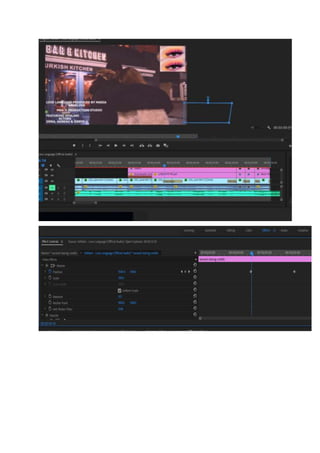
- Bluron the side of the closingclipsinthe restaurant
-
Introduction
Aftershootingthe videoI usedthe programme PremierProinorderto put togetherall of the clips
and add the soundtrack inorder to constructthe whole musicvideo.The programme PremierPro
and effectscontrolsandeditingopportunitiesitoffersallowedme toimprove the overall
appearance of the musicvideoinorderto make it more suitable forthe targetdemographicwhichis
funand loving16-25 yearolds.Thiswasdone,mainlythroughthe editingof the lightingandadding
transitionandspecial effectstomake the videomore interactive.
Editing
Opencaptions
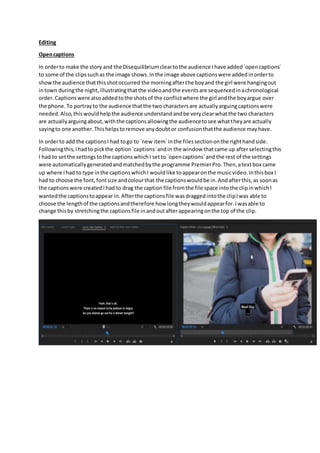
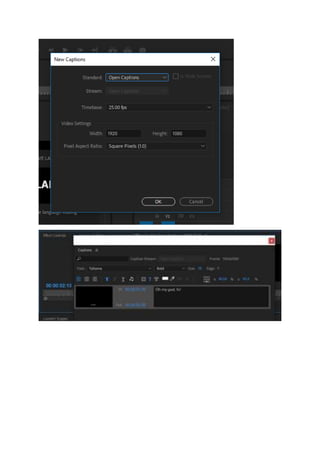
In orderto make the story and the Disequilibriumcleartothe audience Ihave added`opencaptions`
to some of the clipssuchas the image shows.Inthe image above captionswere addedinorderto
showthe audience thatthisshotoccurred the morningafterthe boyand the girl were hangingout
intown duringthe night,illustratingthatthe videoandthe eventsare sequencedinachronological
order.Captionswere alsoaddedtothe shotsof the conflictwhere the girl andthe boyargue over
the phone.To portrayto the audience thatthe two charactersare actuallyarguingcaptionswere
needed.Also,thiswouldhelpthe audience understandandbe veryclearwhatthe two characters
are actuallyarguingabout,withthe captionsallowingthe audiencetosee whattheyare actually
sayingto one another.Thishelpstoremove anydoubtor confusionthatthe audience mayhave.
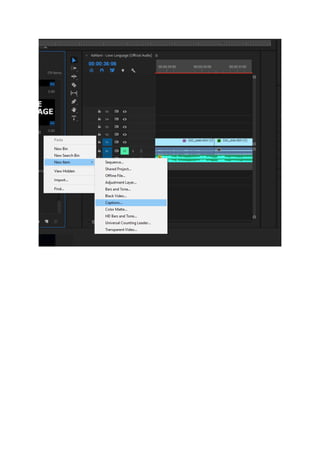
In orderto add the captionsI had togo to `new item`inthe filessectiononthe righthandside.
Followingthis,Ihadto pickthe option`captions`andin the window thatcame up afterselectingthis
I had to setthe settingstothe captionswhichI setto `opencaptions`and the rest of the settings
were automaticallygeneratedandmatchedbythe programme PremierPro.Then,atextbox came
up where Ihad to type inthe captionswhichI wouldlike toappearonthe musicvideo.Inthisbox I
had to choose the font,fontsize andcolourthat the captionswouldbe in.Andafterthis,as soonas
the captionswere createdIhad to drag the caption file fromthe file space intothe clipinwhichI
wantedthe captionstoappear in.Afterthe captionsfile wasdraggedintothe clipIwas able to
choose the lengthof the captionsandtherefore how longtheywouldappearfor.Iwasable to
change thisby stretchingthe captionsfile inandoutafterappearingonthe top of the clip.
Lightingchange
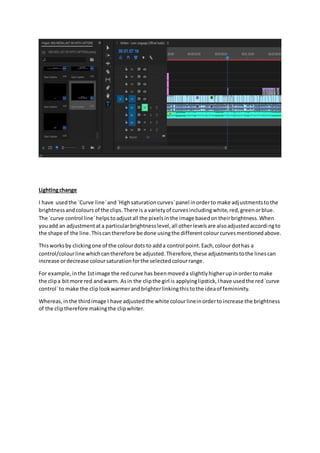
I have usedthe `Curve line`and`Highsaturationcurves`panel inorderto make adjustmentstothe
brightness andcoloursof the clips.There is a varietyof curvesincludingwhite,red,greenorblue.
The `curve control line`helpstoadjustall the pixelsinthe image basedontheirbrightness.When
youadd an adjustmentata particularbrightnesslevel,all otherlevelsare alsoadjustedaccordingto
the shape of the line.Thiscantherefore be done usingthe differentcolourcurvesmentionedabove.
Thisworksby clickingone of the colourdots to adda control point.Each,colour dothas a
control/colourline whichcantherefore be adjusted.Therefore,these adjustmentstothe linescan
increase ordecrease coloursaturationforthe selectedcolourrange.
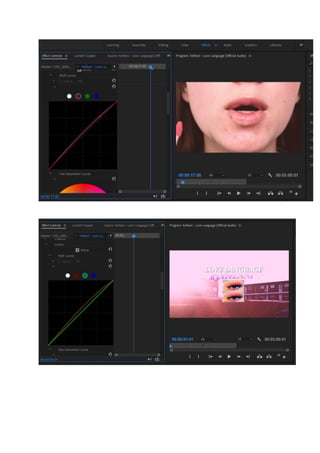
For example,inthe 1stimage the redcurve has beenmoveda slightly higherupinordertomake
the clipa bitmore red andwarm. Asin the clipthe girl is applyinglipstick,Ihave usedthe red`curve
control`to make the cliplookwarmerandbrighterlinkingthistothe ideaof femininity.
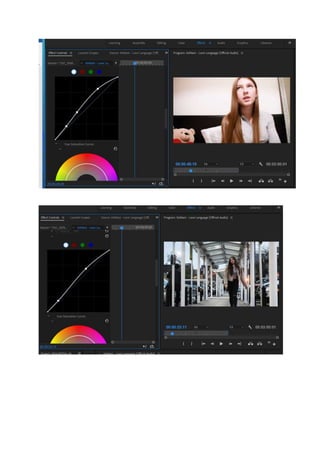
Whereas,inthe thirdimage I have adjustedthe white colourlineinordertoincrease the brightness
of the cliptherefore makingthe clipwhiter.
Basic correction tools
From the `effectcontrols`Ihave mainlyusedthe `basiccorrectiontools`such as the `White balance
selectiontool`inmanyof the clipsinorderimprove the colourof the lightingasinsome of the
internal locationssuchasinthe female`sandmale`shome asa resultof the natural lightingand
colourof the walls,the clipsendedupbeingquit`yellow`.Iusedthe white balance selectiontool
and the `whites`inorderto brightenupthe shotsalsomade the clipsandthe atmosphere livelier
therefore more suitable forthe targetage demographic.
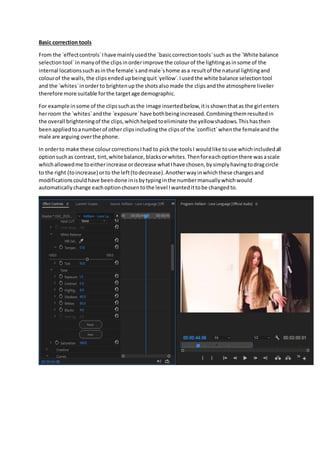
For example insome of the clipssuchasthe image insertedbelow,itisshownthatas the girl enters
herroom the `whites`andthe `exposure`have bothbeingincreased.Combiningthemresultedin
the overall brighteningof the clips,whichhelpedtoeliminate the yellowshadows.Thishasthen
beenappliedtoanumberof other clipsincludingthe clipsof the `conflict`whenthe femaleandthe
male are arguing overthe phone.
In orderto make these colourcorrectionsIhad to pickthe toolsI wouldlike touse whichincludedall
optionsuchas contrast, tint,white balance,blacksorwhites.Thenforeachoptionthere wasascale
whichallowedme toeitherincrease ordecrease whatIhave chosen,bysimplyhavingtodragcircle
to the right (toincrease) orto the left(todecrease).Anotherwayinwhichthese changesand
modificationscouldhave beendone inisbytypinginthe numbermanuallywhichwould
automaticallychange eachoptionchosentothe level Iwantedittobe changedto.
Temperature and Tint
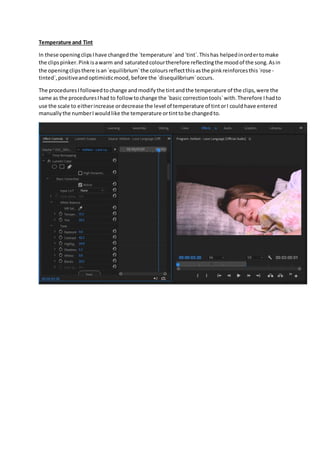
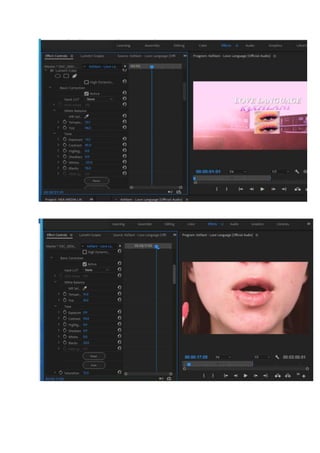
In these openingclipsIhave changedthe `temperature`and`tint`.Thishas helpedinordertomake
the clipspinker.Pinkisawarm and saturatedcolourtherefore reflectingthe moodof the song.Asin
the openingclipsthere isan`equilibrium`the coloursreflectthisasthe pinkreinforcesthis`rose -
tinted`,positiveandoptimisticmood, before the `disequilibrium`occurs.
The proceduresIfollowedtochange andmodifythe tintandthe temperature of the clips,were the
same as the proceduresIhad to followtochange the `basic correctiontools`with.Therefore Ihadto
use the scale to eitherincrease ordecrease the level of temperature of tintorI couldhave entered
manuallythe numberIwouldlike the temperature ortinttobe changedto.
Contrast
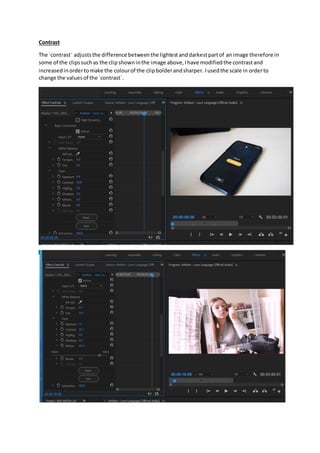
The `contrast` adjuststhe difference betweenthe lightestanddarkestpartof an image therefore in
some of the clipssuchas the clipshowninthe image above,Ihave modifiedthe contrastand
increasedinordertomake the colourof the clipbolderandsharper. Iusedthe scale in orderto
change the valuesof the `contrast`.
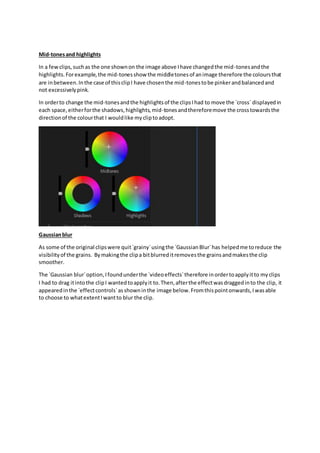
Mid-tonesand highlights
In a fewclips,suchas the one shownon the image above Ihave changedthe mid-tonesandthe
highlights.Forexample,the mid-tonesshow the middletonesof animage therefore the coloursthat
are inbetween.Inthe case of thisclipI have chosenthe mid-tonestobe pinkerandbalancedand
not excessivelypink.
In orderto change the mid-tonesandthe highlightsof the clipsIhad to move the `cross` displayedin
each space,eitherforthe shadows,highlights,mid-tonesandthereforemove the crosstowardsthe
directionof the colourthat I wouldlike mycliptoadopt.
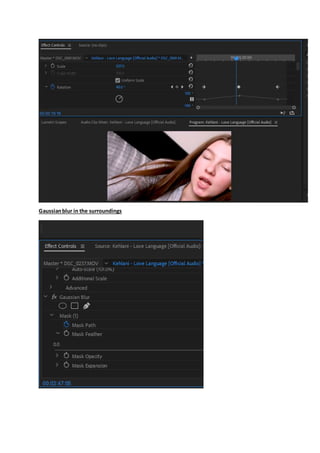
Gaussianblur
As some of the original clipswere quit`grainy`usingthe `GaussianBlur`has helpedme toreduce the
visibilityof the grains. Bymakingthe clipa bitblurreditremovesthe grainsandmakesthe clip
smoother.
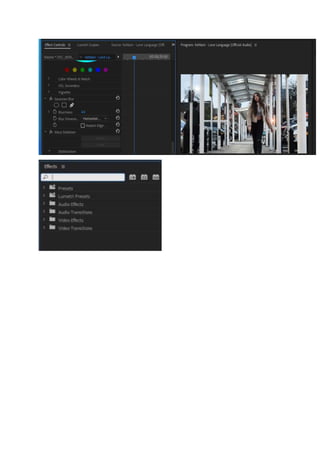
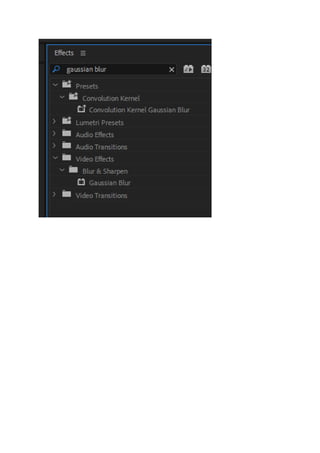
The `Gaussian blur`option,Ifoundunderthe `videoeffects`therefore inordertoapplyitto myclips
I had to drag itintothe clipI wantedtoapplyit to.Then,afterthe effectwasdraggedinto the clip, it
appearedinthe `effectcontrols`asshowninthe image below.Fromthispointonwards,Iwasable
to choose to whatextentIwantto blur the clip.
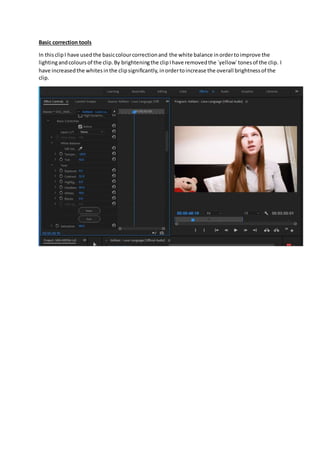
Basic correction tools
In thisclipI have usedthe basiccolourcorrectionand the white balance inordertoimprove the
lightingandcoloursof the clip.By brighteningthe clipIhave removedthe `yellow`tonesof the clip. I
have increasedthe whitesinthe clipsignificantly,inordertoincrease the overall brightnessof the
clip.
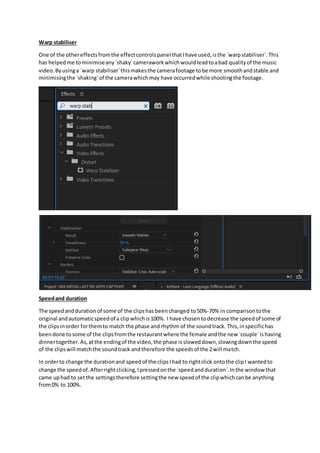
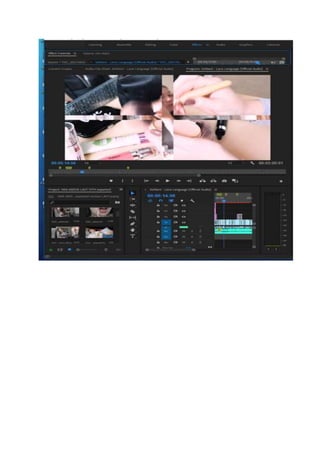
Warp stabiliser
One of the othereffectsfromthe effectcontrolspanel thatIhave used,isthe `warpstabiliser`.This
has helpedme tominimiseany`shaky`cameraworkwhichwouldleadtoabad qualityof the music
video.Byusinga `warp stabiliser`thismakesthe camerafootage tobe more smoothandstable and
minimisingthe `shaking`of the camerawhichmay have occurredwhile shootingthe footage.
Speedand duration
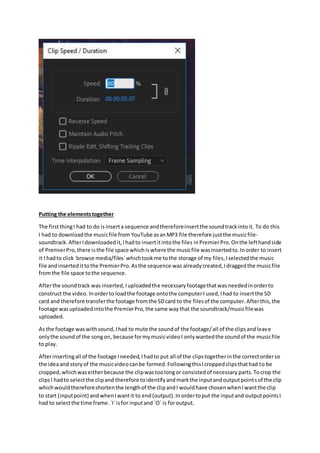
The speedanddurationof some of the clipshas beenchanged to50%-70% in comparisontothe
original andautomaticspeedof a clipwhichis100%. I have chosentodecrease the speedof some of
the clipsinorder forthemto match the phase and rhythm of the soundtrack. This,inspecifichas
beendone tosome of the clipsfromthe restaurantwhere the female andthe new `couple`ishaving
dinnertogether.As,atthe endingof the video,the phase issloweddown,slowingdownthe speed
of the clipswill matchthe soundtrack andtherefore the speedsof the 2will match.
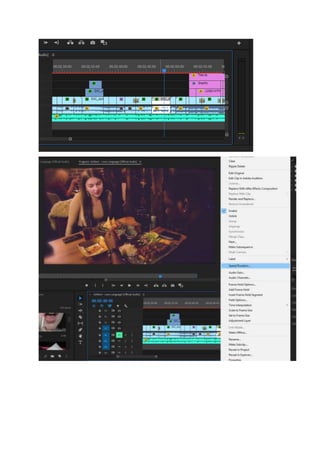
In orderto change the durationand speedof the clipsIhad to rightclick ontothe clipI wantedto
change the speedof.Afterrightclicking,Ipressedonthe `speedandduration`.Inthe window that
came uphad to setthe settingstherefore settingthe new speedof the clipwhichcanbe anything
from0% to 100%.
Putting the elementstogether
The firstthingI had to do isinserta sequence andthereforeinsertthe soundtrackintoit. To do this
I had to downloadthe musicfile from YouTube asanMP3 file therefore justthe musicfile-
soundtrack.AfterIdownloadedit,Ihadto insertitintothe files inPremierPro.On the lefthandside
of PremierPro,there isthe file space whichiswhere the musicfile wasinsertedto.Inorder to insert
it I hadto click`browse media/files`whichtookme tothe storage of my files,Iselectedthe music
file andinsertedittothe PremierPro.Asthe sequence was already created,Idraggedthe musicfile
fromthe file space tothe sequence.
Afterthe soundtrack was inserted,Iuploadedthe necessaryfootagethatwas neededinorderto
construct the video. Inorderto loadthe footage ontothe computerI used,Ihad to insertthe SD
card and therefore transferthe footage fromthe SDcard to the filesof the computer.Afterthis,the
footage wasuploadedintothe PremierPro,the same waythat the soundtrack/musicfilewas
uploaded.
As the footage waswithsound,Ihad to mute the soundof the footage/all of the clipsandleave
onlythe soundof the songon, because formymusicvideoI onlywantedthe soundof the musicfile
to play.
Afterinsertingall of the footage Ineeded,Ihadto put all of the clipstogetherinthe correctorderso
the ideaand storyof the musicvideocanbe formed.FollowingthisIcroppedclipsthathad to be
cropped,whichwaseitherbecause the clipwastoolongor consistedof necessary parts. Tocrop the
clipsI hadto selectthe clipand therefore toidentifyandmarkthe inputandoutputpointsof the clip
whichwouldthereforeshortenthe lengthof the clipandI wouldhave chosenwhenIwantthe clip
to start (inputpoint) andwhenIwantit to end(output).Inordertoput the inputand outputpointsI
had to selectthe time frame.`I`isfor inputand `O` is foroutput.
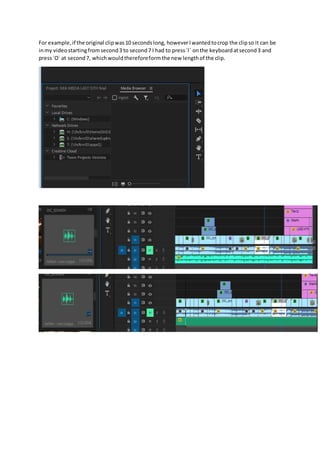
For example,if the original clipwas10 secondslong, howeverIwantedtocrop the clipso it can be
inmy videostartingfromsecond3 to second7 I had to press`I` onthe keyboardatsecond3 and
press`O` at second7, whichwouldthereforeform the new lengthof the clip.
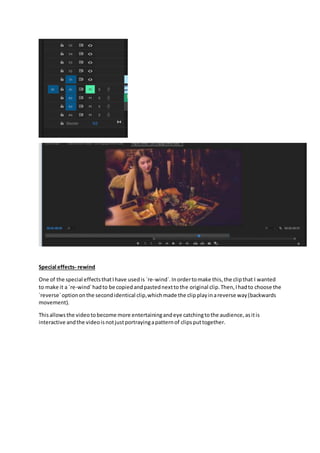
Special effects- rewind
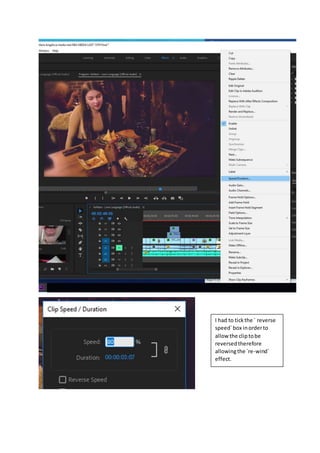
One of the special effectsthatIhave usedis `re-wind`.Inordertomake this,the clipthat I wanted
to make it a `re-wind`hadto be copiedandpastednexttothe original clip.Then,Ihadto choose the
`reverse`optiononthe secondidentical clip,whichmade the clipplayinareverse way(backwards
movement).
Thisallowsthe videotobecome more entertainingandeye catchingtothe audience,asitis
interactive andthe videoisnotjustportrayingapatternof clipsputtogether.
I had to tickthe ` reverse
speed`box inorderto
allow the cliptobe
reversedtherefore
allowingthe `re-wind`
effect.
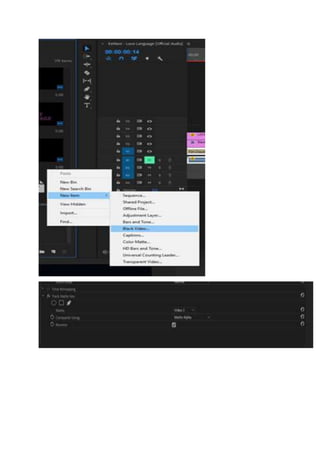
Transparent openingand closingcreditsusing black video
The openingcreditsof myvideoinclude the name of the song,artistname andthe logoof the artist.
I have createdthe openingcreditsusingblackvideoinordertomake the title- name of the song
transparent. Inorderto make my musicvideo conformtoexistingcodesandconventionsIhadto
insertopeningcreditswhichisnecessaryinordertointroduce the audience tothe song,artistand
the musicvideoasa whole.
In orderto do this,as a base I had a clipthat I editedandchangedthe temperature andtintsothe
clipwill be pinkertosymbolise the femininityandfemalepoweraswell astoact as a hintthat the
musicvideowill consistof alove storyandromance. Also,the colourpinkisa delicate colour
symbolisingsweetnessandcharmtherefore portrayingthe positivityof the video.Ihadto inserta
blackvideo byinsertingitfromthe projectbell andselectblackvideo.Inthe nextwindow,Ihadto
setthe blackvideosettingshoweverPremierProautomaticallydisplayedthe settingsfromthe
sequence andkeptthemto`default`.Afterthe blackvideowascreatedIdraggedintothe timeline
and placeditabove the clipand stretcheditsoit can match the durationof the videoclipinthe first
videofile inthe timeline.The nextstepwastocreate a new title,byclicking`new`andthen`legacy
title`andthengivinga name to the legacytitle.Inthe nextwindow Ihadto setthe settingsof the
title suchas the `font`, `colour`and size of the title.After,the settingswere set Idraggedthe title
intothe timeline andplaceditabove the blackvideoandstretcheditaswell sothe title will match
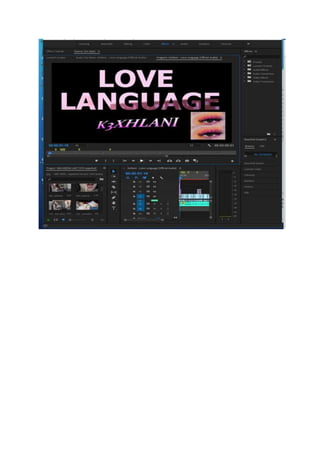
durationof the videoclipandblackvideo.Asthe 3 layerswere setup,I startedapplying effects.In
the `effects`panel Isearchedfor`track matte key`inthe searchbar. The effect`track matte key`was
situatedinthe `videoeffects`andthen`keying`.Iappliedthiseffectbydraggingintothe `black
video`inthe timeline.Inthe `control effectspanel`the `track matte key`was appliedandIhad to
selectvideo3and enable `reverse`byclickingthe box.Idouble clickedonthe `textlayer`/title,and
checkedthe positioningof the title,colourandfont.Finally,Iwentbackto the timelineandplayed
the video. The results are showninthe photobelow.
Closingcredits
I have addedclosingcreditstothe my musicvideoinordertoportray overall informationaboutthe
constructionof the musicvideosuchas includingandmentioningthe namesof the actorsthat
contributedinthe musicvideo.Also,Iembeddedthe designforthe productioncompany.The name
of the productioncompanywascreatingthroughusing`Photoshop`therefore Isavedthe file asa
PDS whichtherefore allowedme toinsertittoPremierPro.Afterthe file wasinserteditappearedin
the file space onthe lefthandside of PremierPro.Therefore,fromthe filespace Idraggedthe file to
the sequence andplaceditto where andwhenIwanteditto appear. Otherlabels,inthe closing
creditsinclude the cameraworkpeople andeditingwhichisbyMaria Angelova(Me).Thistherefore,
portraysimportantinformationaboutthe constructionof the videoitself.
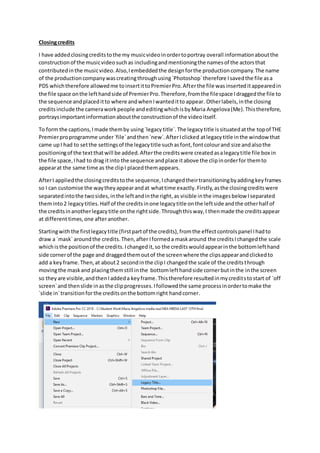
To form the captions,Imade themby using`legacytitle`.The legacytitle issituatedatthe topof THE
Premierproprogramme under`file`andthen`new`.AfterIclicked atlegacytitle inthe window that
came upI had to setthe settingsof the legacytitle suchasfont,fontcolourand size andalsothe
positioningof the textthatwill be added.Afterthe creditswere createdasalegacytitle file box in
the file space,Ihad to drag itinto the sequence andplace itabove the clipinorderfor themto
appearat the same time as the clipI placedthemappears.
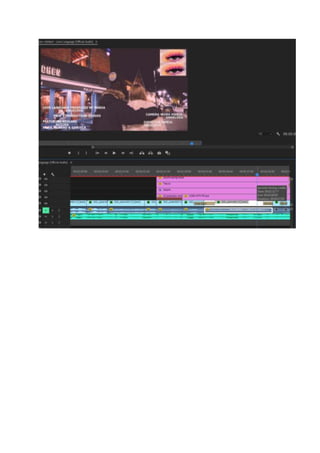
AfterI appliedthe closingcreditstothe sequence,Ichangedtheirtransitioningbyaddingkeyframes
so I can customise the waytheyappearandat whattime exactly.Firstly,asthe closingcreditswere
separatedintothe twosides,inthe leftandinthe right,as visible inthe imagesbelow Iseparated
theminto2 legacytitles.Half of the creditsinone legacytitle onthe leftside andthe otherhalf of
the creditsinanotherlegacytitle onthe rightside.Throughthisway,I thenmade the creditsappear
at differenttimes,one afteranother.
Startingwiththe firstlegacytitle (firstpartof the credits),fromthe effectcontrolspanel Ihadto
draw a `mask` aroundthe credits.Then,after Iformeda maskaround the creditsIchangedthe scale
whichisthe positionof the credits.Ichangedit,so the creditswouldappearinthe bottomlefthand
side cornerof the page and draggedthemoutof the screenwhere the clipsappearandclickedto
add a keyframe.Then,at about2 secondinthe clipI changedthe scale of the creditsthrough
movingthe maskand placingthemstill inthe bottomlefthandside cornerbutinthe inthe screen
so theyare visible,andthenIaddeda keyframe.Thistherefore resultedinmycreditstostart of `off
screen`and thenslide inasthe clipprogresses.Ifollowedthe same processinordertomake the
`slide in`transitionforthe creditsonthe bottomright handcorner.
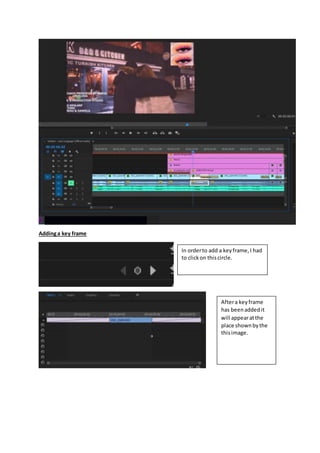
Addinga key frame
In orderto add a keyframe,I had
to clickon thiscircle.
Aftera keyframe
has beenaddedit
will appearatthe
place shownbythe
thisimage.
Videotransitions
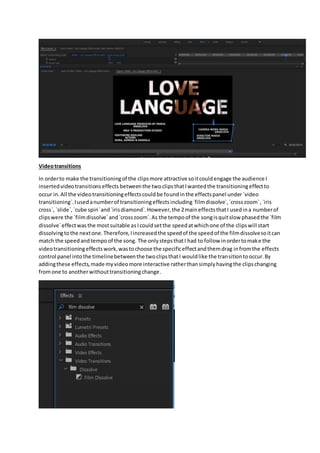
In orderto make the transitioningof the clipsmore attractive soitcouldengage the audience I
insertedvideotransitionseffects betweenthe twoclipsthatIwantedthe transitioningeffectto
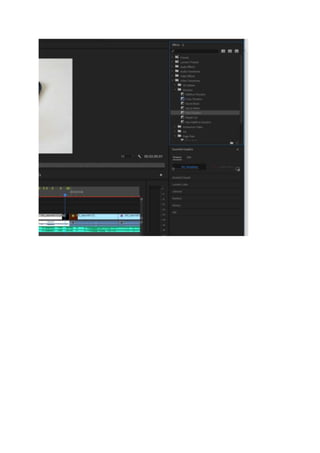
occur in.All the videotransitioningeffectscouldbe foundinthe effectspanel under `video
transitioning`.Iusedanumberof transitioningeffectsincluding`filmdissolve`,`crosszoom`,`iris
cross`, `slide`,`cube spin`and`irisdiamond`.However,the 2maineffectsthatI usedina numberof
clipswere the `filmdissolve`and`crosszoom`.As the tempoof the songisquitslow phasedthe `film
dissolve`effectwasthe mostsuitable asIcouldsetthe speedatwhichone of the clipswill start
dissolvingtothe nextone.Therefore,Iincreasedthe speedof the speedof the filmdissolvesoitcan
match the speedandtempoof the song. The onlystepsthatI had to follow inordertomake the
videotransitioningeffectswork,wastochoose the specificeffectandthemdrag infromthe effects
control panel intothe timelinebetweenthe twoclipsthatI wouldlike the transitiontooccur.By
addingthese effects,made myvideomore interactive ratherthansimplyhavingthe clipschanging
fromone to anotherwithouttransitioningchange.
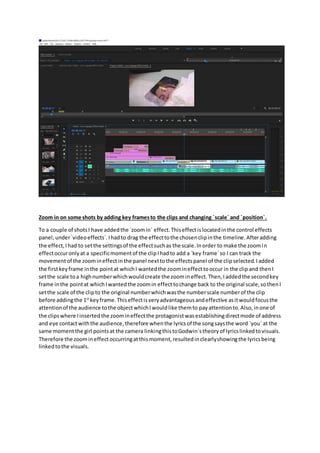
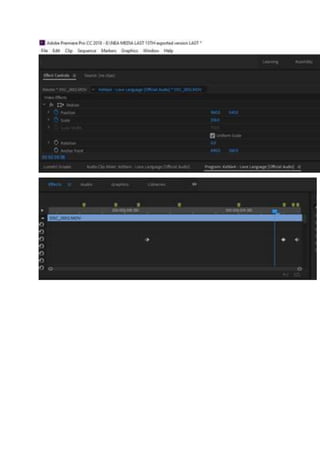
Zoom in on some shots by adding key framesto the clips and changing `scale` and `position`.
To a couple of shotsI have addedthe `zoomin` effect.Thiseffectislocatedinthe control effects
panel,under`videoeffects`.Ihadto drag the effecttothe chosenclipinthe timeline.Afteradding
the effect,Ihad to setthe settingsof the effectsuchas the scale.Inorder to make the zoomin
effectoccuronlyat a specificmomentof the clipIhadto add a `key frame`so I can track the
movementof the zoomineffectinthe panel nexttothe effectspanel of the clipselected.Iadded
the firstkeyframe inthe pointat whichI wantedthe zoomineffecttooccur in the clip and thenI
setthe scale toa highnumberwhichwouldcreate the zoomineffect.Then,Iaddedthe secondkey
frame inthe pointat whichIwantedthe zoomin effecttochange back to the original scale,sothenI
setthe scale of the clipto the original numberwhichwasthe numberscale numberof the clip
before addingthe 1st
keyframe.Thiseffectisveryadvantageousandeffective asitwouldfocusthe
attentionof the audience tothe objectwhichIwouldlike themto payattentionto.Also, inone of
the clipswhere Iinsertedthe zoomineffectthe protagonistwasestablishingdirectmode of address
and eye contactwiththe audience,therefore whenthe lyricsof the songsaysthe word `you` at the
same momentthe girl pointsat the camera linkingthistoGodwin`stheoryof lyricslinkedtovisuals.
Therefore the zoomineffectoccurringatthismoment,resultedinclearlyshowingthe lyricsbeing
linkedtothe visuals.
Gaussianblur in the surroundings
Opacity
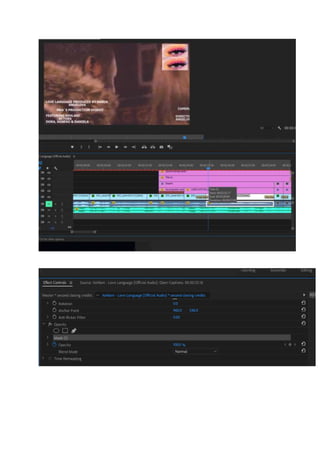
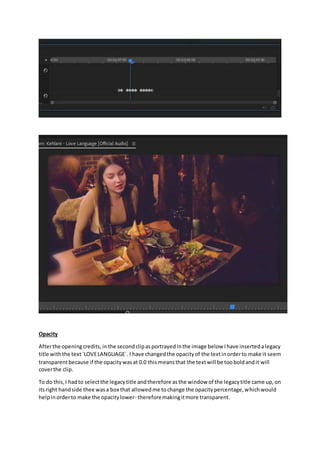
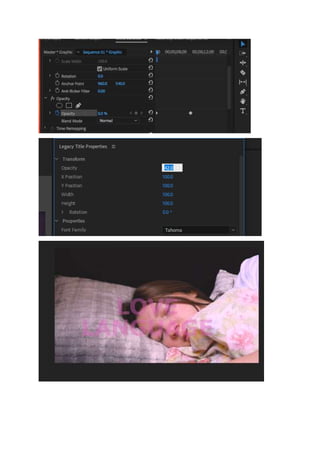
Afterthe openingcredits,inthe secondclipasportrayedinthe image below Ihave insertedalegacy
title withthe text`LOVELANGUAGE`. I have changedthe opacityof the textinorderto make it seem
transparentbecause if the opacitywasat 0.0 thismeansthat the textwill be tooboldandit will
coverthe clip.
To do this,I hadto selectthe legacytitle andtherefore asthe window of the legacytitle came up,on
itsright handside thee wasa box that allowedme tochange the opacitypercentage,whichwould
helpinorderto make the opacitylower- thereforemakingitmore transparent.
Volume at the endof the music videodecreasing
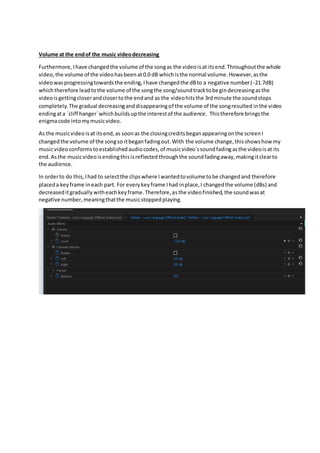
Furthermore,Ihave changedthe volume of the songas the videoisat itsend.Throughoutthe whole
video, the volume of the videohasbeenat0.0 dB whichisthe normal volume.However,asthe
videowasprogressingtowardsthe ending,Ihave changedthe dBto a negative number(-21.7dB)
whichtherefore leadtothe volume of the songthe song/soundtracktobegindecreasingasthe
videoisgettingcloserandclosertothe endand as the videohitsthe 3rdminute the soundstops
completely.The gradual decreasinganddisappearingof the volume of the songresulted inthe video
endingata `cliff hanger`whichbuildsupthe interestof the audience. Thistherefore bringsthe
enigmacode intomymusicvideo.
As the musicvideoisat itsend,as soonas the closingcreditsbeganappearingonthe screenI
changedthe volume of the songso itbeganfadingout.With the volume change,thisshowshow my
musicvideoconformstoestablishedaudiocodes,of musicvideo`ssoundfadingasthe videoisat its
end.Asthe musicvideoisendingthisisreflectedthroughthe soundfadingaway,makingitclearto
the audience.
In orderto do this,Ihad to selectthe clipswhere Iwantedtovolume tobe changedand therefore
placeda keyframe ineach part. For everykeyframe Ihad inplace,I changedthe volume (dBs) and
decreaseditgraduallywitheachkeyframe.Therefore,asthe videofinished,the soundwasat
negative number,meaningthatthe musicstoppedplaying.
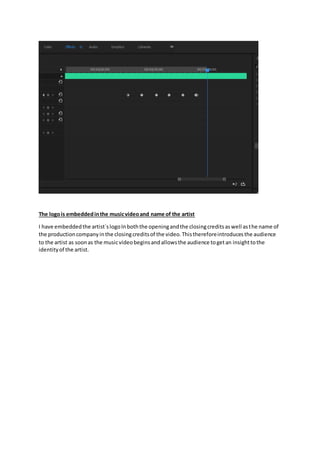
The logois embeddedinthe musicvideoand name of the artist
I have embeddedthe artist`slogoInboththe openingandthe closingcreditsaswell asthe name of
the productioncompanyinthe closingcreditsof the video.Thisthereforeintroducesthe audience
to the artist as soonas the musicvideobeginsandallowsthe audience togetan insighttothe
identityof the artist.
Font, size, colourand size used/design
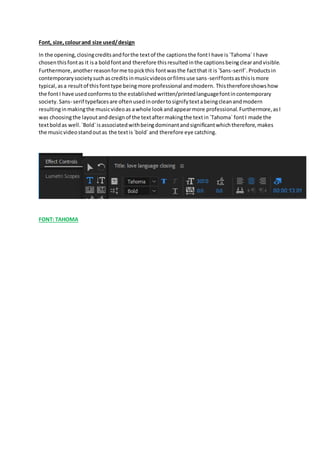
In the opening,closingcreditsandforthe textof the captionsthe fontI have is`Tahoma` I have
chosenthisfontas it isa boldfontand therefore thisresultedinthe captionsbeingclearandvisible.
Furthermore,anotherreasonforme topickthis fontwasthe factthat it is`Sans-serif`.Productsin
contemporarysocietysuchascreditsinmusicvideosorfilmsuse sans-seriffontsasthisismore
typical,asa resultof thisfonttype beingmore professional andmodern. Thisthereforeshowshow
the fontI have usedconformsto the established written/printedlanguagefontincontemporary
society. Sans- serif typefacesare oftenusedinordertosignifytextabeingcleanandmodern
resultinginmakingthe musicvideoas awhole lookandappearmore professional.Furthermore,asI
was choosingthe layoutanddesignof the textaftermakingthe textin`Tahoma` fontI made the
textboldas well.`Bold`isassociatedwithbeingdominantandsignificantwhichtherefore,makes
the musicvideostandoutas the textis`bold`and therefore eye catching.
FONT: TAHOMA

Music video construction last version 11.15

  • 1.
    Constructionof the musicvideo Music videoediting - Warp stabiliser - Motionand speed/slowmotion to 50% - Gaussianblur - Music - Sound - Mutedsound - Captions - Colour corrections - Creditsopeningand closing - Logo - Title - Transitionsof slides - Special effectssuch as rewind - Lumetri curve - Exposure - Black videoand transparent openingand closingcredits - Differenttransitioningofclips such as `filmdissolve` and`crosszoom` mainly,others includediriscross, slide,cube spin, irisdiamond - Zoomin on some shotsby addingkeyframesto the clipsandchanging`scale` and`position`. - The logo isembeddedinthe musicvideoandname of the artist. - Captionsaddedinorderto make the story clearso the audience understandsclearlywhatis happeningateachmoment - Volume decreaseatthe closingcreditswhenthe videoisending - Bluron the side of the closingclipsinthe restaurant -
  • 2.
    Introduction Aftershootingthe videoI usedtheprogramme PremierProinorderto put togetherall of the clips and add the soundtrack inorder to constructthe whole musicvideo.The programme PremierPro and effectscontrolsandeditingopportunitiesitoffersallowedme toimprove the overall appearance of the musicvideoinorderto make it more suitable forthe targetdemographicwhichis funand loving16-25 yearolds.Thiswasdone,mainlythroughthe editingof the lightingandadding transitionandspecial effectstomake the videomore interactive.
  • 3.
    Editing Opencaptions In orderto makethe story and the Disequilibriumcleartothe audience Ihave added`opencaptions` to some of the clipssuchas the image shows.Inthe image above captionswere addedinorderto showthe audience thatthisshotoccurred the morningafterthe boyand the girl were hangingout intown duringthe night,illustratingthatthe videoandthe eventsare sequencedinachronological order.Captionswere alsoaddedtothe shotsof the conflictwhere the girl andthe boyargue over the phone.To portrayto the audience thatthe two charactersare actuallyarguingcaptionswere needed.Also,thiswouldhelpthe audience understandandbe veryclearwhatthe two characters are actuallyarguingabout,withthe captionsallowingthe audiencetosee whattheyare actually sayingto one another.Thishelpstoremove anydoubtor confusionthatthe audience mayhave. In orderto add the captionsI had togo to `new item`inthe filessectiononthe righthandside. Followingthis,Ihadto pickthe option`captions`andin the window thatcame up afterselectingthis I had to setthe settingstothe captionswhichI setto `opencaptions`and the rest of the settings were automaticallygeneratedandmatchedbythe programme PremierPro.Then,atextbox came up where Ihad to type inthe captionswhichI wouldlike toappearonthe musicvideo.Inthisbox I had to choose the font,fontsize andcolourthat the captionswouldbe in.Andafterthis,as soonas the captionswere createdIhad to drag the caption file fromthe file space intothe clipinwhichI wantedthe captionstoappear in.Afterthe captionsfile wasdraggedintothe clipIwas able to choose the lengthof the captionsandtherefore how longtheywouldappearfor.Iwasable to change thisby stretchingthe captionsfile inandoutafterappearingonthe top of the clip.
  • 6.
    Lightingchange I have usedthe`Curve line`and`Highsaturationcurves`panel inorderto make adjustmentstothe brightness andcoloursof the clips.There is a varietyof curvesincludingwhite,red,greenorblue. The `curve control line`helpstoadjustall the pixelsinthe image basedontheirbrightness.When youadd an adjustmentata particularbrightnesslevel,all otherlevelsare alsoadjustedaccordingto the shape of the line.Thiscantherefore be done usingthe differentcolourcurvesmentionedabove. Thisworksby clickingone of the colourdots to adda control point.Each,colour dothas a control/colourline whichcantherefore be adjusted.Therefore,these adjustmentstothe linescan increase ordecrease coloursaturationforthe selectedcolourrange. For example,inthe 1stimage the redcurve has beenmoveda slightly higherupinordertomake the clipa bitmore red andwarm. Asin the clipthe girl is applyinglipstick,Ihave usedthe red`curve control`to make the cliplookwarmerandbrighterlinkingthistothe ideaof femininity. Whereas,inthe thirdimage I have adjustedthe white colourlineinordertoincrease the brightness of the cliptherefore makingthe clipwhiter.
  • 9.
    Basic correction tools Fromthe `effectcontrols`Ihave mainlyusedthe `basiccorrectiontools`such as the `White balance selectiontool`inmanyof the clipsinorderimprove the colourof the lightingasinsome of the internal locationssuchasinthe female`sandmale`shome asa resultof the natural lightingand colourof the walls,the clipsendedupbeingquit`yellow`.Iusedthe white balance selectiontool and the `whites`inorderto brightenupthe shotsalsomade the clipsandthe atmosphere livelier therefore more suitable forthe targetage demographic. For example insome of the clipssuchasthe image insertedbelow,itisshownthatas the girl enters herroom the `whites`andthe `exposure`have bothbeingincreased.Combiningthemresultedin the overall brighteningof the clips,whichhelpedtoeliminate the yellowshadows.Thishasthen beenappliedtoanumberof other clipsincludingthe clipsof the `conflict`whenthe femaleandthe male are arguing overthe phone. In orderto make these colourcorrectionsIhad to pickthe toolsI wouldlike touse whichincludedall optionsuchas contrast, tint,white balance,blacksorwhites.Thenforeachoptionthere wasascale whichallowedme toeitherincrease ordecrease whatIhave chosen,bysimplyhavingtodragcircle to the right (toincrease) orto the left(todecrease).Anotherwayinwhichthese changesand modificationscouldhave beendone inisbytypinginthe numbermanuallywhichwould automaticallychange eachoptionchosentothe level Iwantedittobe changedto.
  • 10.
    Temperature and Tint Inthese openingclipsIhave changedthe `temperature`and`tint`.Thishas helpedinordertomake the clipspinker.Pinkisawarm and saturatedcolourtherefore reflectingthe moodof the song.Asin the openingclipsthere isan`equilibrium`the coloursreflectthisasthe pinkreinforcesthis`rose - tinted`,positiveandoptimisticmood, before the `disequilibrium`occurs. The proceduresIfollowedtochange andmodifythe tintandthe temperature of the clips,were the same as the proceduresIhad to followtochange the `basic correctiontools`with.Therefore Ihadto use the scale to eitherincrease ordecrease the level of temperature of tintorI couldhave entered manuallythe numberIwouldlike the temperature ortinttobe changedto.
  • 12.
    Contrast The `contrast` adjuststhedifference betweenthe lightestanddarkestpartof an image therefore in some of the clipssuchas the clipshowninthe image above,Ihave modifiedthe contrastand increasedinordertomake the colourof the clipbolderandsharper. Iusedthe scale in orderto change the valuesof the `contrast`.
  • 13.
    Mid-tonesand highlights In afewclips,suchas the one shownon the image above Ihave changedthe mid-tonesandthe highlights.Forexample,the mid-tonesshow the middletonesof animage therefore the coloursthat are inbetween.Inthe case of thisclipI have chosenthe mid-tonestobe pinkerandbalancedand not excessivelypink. In orderto change the mid-tonesandthe highlightsof the clipsIhad to move the `cross` displayedin each space,eitherforthe shadows,highlights,mid-tonesandthereforemove the crosstowardsthe directionof the colourthat I wouldlike mycliptoadopt. Gaussianblur As some of the original clipswere quit`grainy`usingthe `GaussianBlur`has helpedme toreduce the visibilityof the grains. Bymakingthe clipa bitblurreditremovesthe grainsandmakesthe clip smoother. The `Gaussian blur`option,Ifoundunderthe `videoeffects`therefore inordertoapplyitto myclips I had to drag itintothe clipI wantedtoapplyit to.Then,afterthe effectwasdraggedinto the clip, it appearedinthe `effectcontrols`asshowninthe image below.Fromthispointonwards,Iwasable to choose to whatextentIwantto blur the clip.
  • 16.
    Basic correction tools InthisclipI have usedthe basiccolourcorrectionand the white balance inordertoimprove the lightingandcoloursof the clip.By brighteningthe clipIhave removedthe `yellow`tonesof the clip. I have increasedthe whitesinthe clipsignificantly,inordertoincrease the overall brightnessof the clip.
  • 17.
    Warp stabiliser One ofthe othereffectsfromthe effectcontrolspanel thatIhave used,isthe `warpstabiliser`.This has helpedme tominimiseany`shaky`cameraworkwhichwouldleadtoabad qualityof the music video.Byusinga `warp stabiliser`thismakesthe camerafootage tobe more smoothandstable and minimisingthe `shaking`of the camerawhichmay have occurredwhile shootingthe footage. Speedand duration The speedanddurationof some of the clipshas beenchanged to50%-70% in comparisontothe original andautomaticspeedof a clipwhichis100%. I have chosentodecrease the speedof some of the clipsinorder forthemto match the phase and rhythm of the soundtrack. This,inspecifichas beendone tosome of the clipsfromthe restaurantwhere the female andthe new `couple`ishaving dinnertogether.As,atthe endingof the video,the phase issloweddown,slowingdownthe speed of the clipswill matchthe soundtrack andtherefore the speedsof the 2will match. In orderto change the durationand speedof the clipsIhad to rightclick ontothe clipI wantedto change the speedof.Afterrightclicking,Ipressedonthe `speedandduration`.Inthe window that came uphad to setthe settingstherefore settingthe new speedof the clipwhichcanbe anything from0% to 100%.
  • 19.
    Putting the elementstogether ThefirstthingI had to do isinserta sequence andthereforeinsertthe soundtrackintoit. To do this I had to downloadthe musicfile from YouTube asanMP3 file therefore justthe musicfile- soundtrack.AfterIdownloadedit,Ihadto insertitintothe files inPremierPro.On the lefthandside of PremierPro,there isthe file space whichiswhere the musicfile wasinsertedto.Inorder to insert it I hadto click`browse media/files`whichtookme tothe storage of my files,Iselectedthe music file andinsertedittothe PremierPro.Asthe sequence was already created,Idraggedthe musicfile fromthe file space tothe sequence. Afterthe soundtrack was inserted,Iuploadedthe necessaryfootagethatwas neededinorderto construct the video. Inorderto loadthe footage ontothe computerI used,Ihad to insertthe SD card and therefore transferthe footage fromthe SDcard to the filesof the computer.Afterthis,the footage wasuploadedintothe PremierPro,the same waythat the soundtrack/musicfilewas uploaded. As the footage waswithsound,Ihad to mute the soundof the footage/all of the clipsandleave onlythe soundof the songon, because formymusicvideoI onlywantedthe soundof the musicfile to play. Afterinsertingall of the footage Ineeded,Ihadto put all of the clipstogetherinthe correctorderso the ideaand storyof the musicvideocanbe formed.FollowingthisIcroppedclipsthathad to be cropped,whichwaseitherbecause the clipwastoolongor consistedof necessary parts. Tocrop the clipsI hadto selectthe clipand therefore toidentifyandmarkthe inputandoutputpointsof the clip whichwouldthereforeshortenthe lengthof the clipandI wouldhave chosenwhenIwantthe clip to start (inputpoint) andwhenIwantit to end(output).Inordertoput the inputand outputpointsI had to selectthe time frame.`I`isfor inputand `O` is foroutput.
  • 20.
    For example,if theoriginal clipwas10 secondslong, howeverIwantedtocrop the clipso it can be inmy videostartingfromsecond3 to second7 I had to press`I` onthe keyboardatsecond3 and press`O` at second7, whichwouldthereforeform the new lengthof the clip.
  • 21.
    Special effects- rewind Oneof the special effectsthatIhave usedis `re-wind`.Inordertomake this,the clipthat I wanted to make it a `re-wind`hadto be copiedandpastednexttothe original clip.Then,Ihadto choose the `reverse`optiononthe secondidentical clip,whichmade the clipplayinareverse way(backwards movement). Thisallowsthe videotobecome more entertainingandeye catchingtothe audience,asitis interactive andthe videoisnotjustportrayingapatternof clipsputtogether.
  • 22.
    I had totickthe ` reverse speed`box inorderto allow the cliptobe reversedtherefore allowingthe `re-wind` effect.
  • 23.
    Transparent openingand closingcreditsusingblack video The openingcreditsof myvideoinclude the name of the song,artistname andthe logoof the artist. I have createdthe openingcreditsusingblackvideoinordertomake the title- name of the song transparent. Inorderto make my musicvideo conformtoexistingcodesandconventionsIhadto insertopeningcreditswhichisnecessaryinordertointroduce the audience tothe song,artistand the musicvideoasa whole. In orderto do this,as a base I had a clipthat I editedandchangedthe temperature andtintsothe clipwill be pinkertosymbolise the femininityandfemalepoweraswell astoact as a hintthat the musicvideowill consistof alove storyandromance. Also,the colourpinkisa delicate colour symbolisingsweetnessandcharmtherefore portrayingthe positivityof the video.Ihadto inserta blackvideo byinsertingitfromthe projectbell andselectblackvideo.Inthe nextwindow,Ihadto setthe blackvideosettingshoweverPremierProautomaticallydisplayedthe settingsfromthe sequence andkeptthemto`default`.Afterthe blackvideowascreatedIdraggedintothe timeline and placeditabove the clipand stretcheditsoit can match the durationof the videoclipinthe first videofile inthe timeline.The nextstepwastocreate a new title,byclicking`new`andthen`legacy title`andthengivinga name to the legacytitle.Inthe nextwindow Ihadto setthe settingsof the title suchas the `font`, `colour`and size of the title.After,the settingswere set Idraggedthe title intothe timeline andplaceditabove the blackvideoandstretcheditaswell sothe title will match durationof the videoclipandblackvideo.Asthe 3 layerswere setup,I startedapplying effects.In the `effects`panel Isearchedfor`track matte key`inthe searchbar. The effect`track matte key`was situatedinthe `videoeffects`andthen`keying`.Iappliedthiseffectbydraggingintothe `black video`inthe timeline.Inthe `control effectspanel`the `track matte key`was appliedandIhad to selectvideo3and enable `reverse`byclickingthe box.Idouble clickedonthe `textlayer`/title,and checkedthe positioningof the title,colourandfont.Finally,Iwentbackto the timelineandplayed the video. The results are showninthe photobelow.
  • 26.
    Closingcredits I have addedclosingcreditstothemy musicvideoinordertoportray overall informationaboutthe constructionof the musicvideosuchas includingandmentioningthe namesof the actorsthat contributedinthe musicvideo.Also,Iembeddedthe designforthe productioncompany.The name of the productioncompanywascreatingthroughusing`Photoshop`therefore Isavedthe file asa PDS whichtherefore allowedme toinsertittoPremierPro.Afterthe file wasinserteditappearedin the file space onthe lefthandside of PremierPro.Therefore,fromthe filespace Idraggedthe file to the sequence andplaceditto where andwhenIwanteditto appear. Otherlabels,inthe closing creditsinclude the cameraworkpeople andeditingwhichisbyMaria Angelova(Me).Thistherefore, portraysimportantinformationaboutthe constructionof the videoitself. To form the captions,Imade themby using`legacytitle`.The legacytitle issituatedatthe topof THE Premierproprogramme under`file`andthen`new`.AfterIclicked atlegacytitle inthe window that came upI had to setthe settingsof the legacytitle suchasfont,fontcolourand size andalsothe positioningof the textthatwill be added.Afterthe creditswere createdasalegacytitle file box in the file space,Ihad to drag itinto the sequence andplace itabove the clipinorderfor themto appearat the same time as the clipI placedthemappears. AfterI appliedthe closingcreditstothe sequence,Ichangedtheirtransitioningbyaddingkeyframes so I can customise the waytheyappearandat whattime exactly.Firstly,asthe closingcreditswere separatedintothe twosides,inthe leftandinthe right,as visible inthe imagesbelow Iseparated theminto2 legacytitles.Half of the creditsinone legacytitle onthe leftside andthe otherhalf of the creditsinanotherlegacytitle onthe rightside.Throughthisway,I thenmade the creditsappear at differenttimes,one afteranother. Startingwiththe firstlegacytitle (firstpartof the credits),fromthe effectcontrolspanel Ihadto draw a `mask` aroundthe credits.Then,after Iformeda maskaround the creditsIchangedthe scale whichisthe positionof the credits.Ichangedit,so the creditswouldappearinthe bottomlefthand side cornerof the page and draggedthemoutof the screenwhere the clipsappearandclickedto add a keyframe.Then,at about2 secondinthe clipI changedthe scale of the creditsthrough movingthe maskand placingthemstill inthe bottomlefthandside cornerbutinthe inthe screen so theyare visible,andthenIaddeda keyframe.Thistherefore resultedinmycreditstostart of `off screen`and thenslide inasthe clipprogresses.Ifollowedthe same processinordertomake the `slide in`transitionforthe creditsonthe bottomright handcorner.
  • 27.
    Addinga key frame Inorderto add a keyframe,I had to clickon thiscircle. Aftera keyframe has beenaddedit will appearatthe place shownbythe thisimage.
  • 31.
    Videotransitions In orderto makethe transitioningof the clipsmore attractive soitcouldengage the audience I insertedvideotransitionseffects betweenthe twoclipsthatIwantedthe transitioningeffectto occur in.All the videotransitioningeffectscouldbe foundinthe effectspanel under `video transitioning`.Iusedanumberof transitioningeffectsincluding`filmdissolve`,`crosszoom`,`iris cross`, `slide`,`cube spin`and`irisdiamond`.However,the 2maineffectsthatI usedina numberof clipswere the `filmdissolve`and`crosszoom`.As the tempoof the songisquitslow phasedthe `film dissolve`effectwasthe mostsuitable asIcouldsetthe speedatwhichone of the clipswill start dissolvingtothe nextone.Therefore,Iincreasedthe speedof the speedof the filmdissolvesoitcan match the speedandtempoof the song. The onlystepsthatI had to follow inordertomake the videotransitioningeffectswork,wastochoose the specificeffectandthemdrag infromthe effects control panel intothe timelinebetweenthe twoclipsthatI wouldlike the transitiontooccur.By addingthese effects,made myvideomore interactive ratherthansimplyhavingthe clipschanging fromone to anotherwithouttransitioningchange.
  • 34.
    Zoom in onsome shots by adding key framesto the clips and changing `scale` and `position`. To a couple of shotsI have addedthe `zoomin` effect.Thiseffectislocatedinthe control effects panel,under`videoeffects`.Ihadto drag the effecttothe chosenclipinthe timeline.Afteradding the effect,Ihad to setthe settingsof the effectsuchas the scale.Inorder to make the zoomin effectoccuronlyat a specificmomentof the clipIhadto add a `key frame`so I can track the movementof the zoomineffectinthe panel nexttothe effectspanel of the clipselected.Iadded the firstkeyframe inthe pointat whichI wantedthe zoomineffecttooccur in the clip and thenI setthe scale toa highnumberwhichwouldcreate the zoomineffect.Then,Iaddedthe secondkey frame inthe pointat whichIwantedthe zoomin effecttochange back to the original scale,sothenI setthe scale of the clipto the original numberwhichwasthe numberscale numberof the clip before addingthe 1st keyframe.Thiseffectisveryadvantageousandeffective asitwouldfocusthe attentionof the audience tothe objectwhichIwouldlike themto payattentionto.Also, inone of the clipswhere Iinsertedthe zoomineffectthe protagonistwasestablishingdirectmode of address and eye contactwiththe audience,therefore whenthe lyricsof the songsaysthe word `you` at the same momentthe girl pointsat the camera linkingthistoGodwin`stheoryof lyricslinkedtovisuals. Therefore the zoomineffectoccurringatthismoment,resultedinclearlyshowingthe lyricsbeing linkedtothe visuals.
  • 36.
    Gaussianblur in thesurroundings
  • 37.
    Opacity Afterthe openingcredits,inthe secondclipasportrayedintheimage below Ihave insertedalegacy title withthe text`LOVELANGUAGE`. I have changedthe opacityof the textinorderto make it seem transparentbecause if the opacitywasat 0.0 thismeansthat the textwill be tooboldandit will coverthe clip. To do this,I hadto selectthe legacytitle andtherefore asthe window of the legacytitle came up,on itsright handside thee wasa box that allowedme tochange the opacitypercentage,whichwould helpinorderto make the opacitylower- thereforemakingitmore transparent.
  • 39.
    Volume at theendof the music videodecreasing Furthermore,Ihave changedthe volume of the songas the videoisat itsend.Throughoutthe whole video, the volume of the videohasbeenat0.0 dB whichisthe normal volume.However,asthe videowasprogressingtowardsthe ending,Ihave changedthe dBto a negative number(-21.7dB) whichtherefore leadtothe volume of the songthe song/soundtracktobegindecreasingasthe videoisgettingcloserandclosertothe endand as the videohitsthe 3rdminute the soundstops completely.The gradual decreasinganddisappearingof the volume of the songresulted inthe video endingata `cliff hanger`whichbuildsupthe interestof the audience. Thistherefore bringsthe enigmacode intomymusicvideo. As the musicvideoisat itsend,as soonas the closingcreditsbeganappearingonthe screenI changedthe volume of the songso itbeganfadingout.With the volume change,thisshowshow my musicvideoconformstoestablishedaudiocodes,of musicvideo`ssoundfadingasthe videoisat its end.Asthe musicvideoisendingthisisreflectedthroughthe soundfadingaway,makingitclearto the audience. In orderto do this,Ihad to selectthe clipswhere Iwantedtovolume tobe changedand therefore placeda keyframe ineach part. For everykeyframe Ihad inplace,I changedthe volume (dBs) and decreaseditgraduallywitheachkeyframe.Therefore,asthe videofinished,the soundwasat negative number,meaningthatthe musicstoppedplaying.
  • 40.
    The logois embeddedinthemusicvideoand name of the artist I have embeddedthe artist`slogoInboththe openingandthe closingcreditsaswell asthe name of the productioncompanyinthe closingcreditsof the video.Thisthereforeintroducesthe audience to the artist as soonas the musicvideobeginsandallowsthe audience togetan insighttothe identityof the artist.
  • 41.
    Font, size, colourandsize used/design In the opening,closingcreditsandforthe textof the captionsthe fontI have is`Tahoma` I have chosenthisfontas it isa boldfontand therefore thisresultedinthe captionsbeingclearandvisible. Furthermore,anotherreasonforme topickthis fontwasthe factthat it is`Sans-serif`.Productsin contemporarysocietysuchascreditsinmusicvideosorfilmsuse sans-seriffontsasthisismore typical,asa resultof thisfonttype beingmore professional andmodern. Thisthereforeshowshow the fontI have usedconformsto the established written/printedlanguagefontincontemporary society. Sans- serif typefacesare oftenusedinordertosignifytextabeingcleanandmodern resultinginmakingthe musicvideoas awhole lookandappearmore professional.Furthermore,asI was choosingthe layoutanddesignof the textaftermakingthe textin`Tahoma` fontI made the textboldas well.`Bold`isassociatedwithbeingdominantandsignificantwhichtherefore,makes the musicvideostandoutas the textis`bold`and therefore eye catching. FONT: TAHOMA