Some rights reserved
Multiple Site Management
Engine Summit June 7, 2011
Environments for Humans
with ExpressionEngine
Multiple Site Management Engine Summit 2
Web Designer Writer Instructor
http://emilylewisdesign.com
Author, Microformats Made Simple
http://microformatsmadesimple.com
Contributing author, HTML5 Cookbook
http://oreilly.com/catalog/0636920016038
Email: emily@emilylewisdesign.com
Blog: http://ablognotlimited.com
Twitter: @emilylewis
Multiple Site Management Engine Summit
Today, you’ll learn
3
• What Multiple Site Manager is
• Benefits of MSM
• Use cases for MSM
• How to install MSM and create new sites
& challenges with
^
Multiple Site Management Engine Summit
Multiple Site Manager
• Allows you to create and maintain multiple sites
from a single EE install
• Expansion from EllisLab introduced in v1.6 and
available for v2+
• Available with non-commercial ($79.95) and
commercial ($199.95) EE licenses
4
Multiple Site Management Engine Summit
The Rules
• The EE/MSM license holder has to own all sites
• All sites have to reside on the same server
• Sub-domain/domain directories have to be able to
access the main EE install directory
5
Multiple Site Management Engine Summit
The Benefits
• Content, templates and members can be shared
across all sites
• Each site has its own system preferences and
specialty templates
• Fast and easy site duplication, with options for
selective duplication
• Extensions, modules and plug-ins can be shared
across sites, with site-specific settings*
• Money-saving
6
Multiple Site Management Engine Summit
The Problems
• Installation-wide updates affect all sites.
• If something goes wrong with an installation-wide
asset, it can affect all the sites.
• Be aware of extensions
• Test carefully for scalability
• Make sure you check licensing
• Does it have site-specific settings or only global?
• No automated way of exporting a site out of MSM
7
challenges
Multiple Site Management Engine Summit
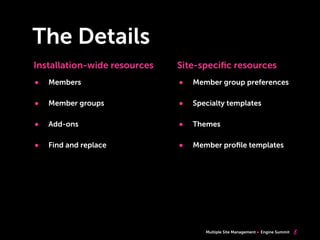
The Details
8
• Members
• Member groups
• Add-ons
• Find and replace
Installation-wide resources Site-specific resources
• Member group preferences
• Specialty templates
• Themes
• Member profile templates
Multiple Site Management Engine Summit
Do you ...
• Want a centralized install for multiple sites?
• Want a single control panel as a Super Admin, but
still limit site access to other member groups?
• Need to establish consistency in branding with
shared templates for different sites?
• Want to share content across sites and reduce
redundancy?
• Want to have independent forums, but with a
shared member base?
9
Multiple Site Management Engine Summit
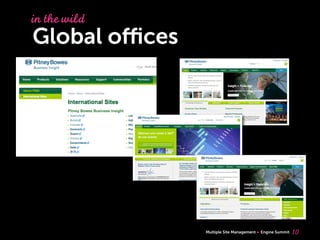
Global offices
10
in thewild
Multiple Site Management Engine Summit
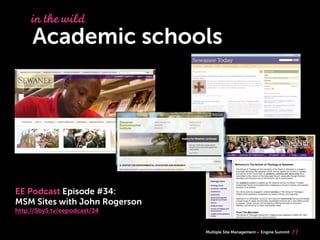
Academic schools
11
in thewild
EE Podcast Episode #34:
MSM Sites with John Rogerson
http://5by5.tv/eepodcast/34
Multiple Site Management Engine Summit
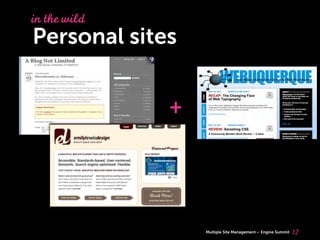
Personal sites
12
in thewild
+
Multiple Site Management Engine Summit
Getting Started
13
woohoo!
Multiple Site Management Engine Summit
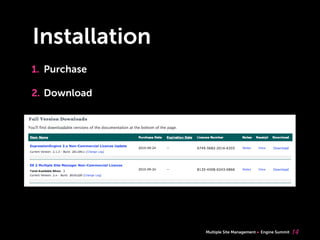
Installation
1. Purchase
2. Download
14
Multiple Site Management Engine Summit
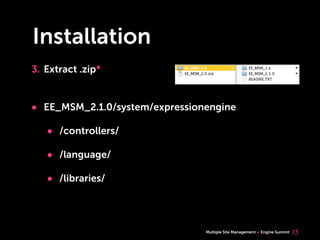
Installation
3. Extract .zip*
15
• EE_MSM_2.1.0/system/expressionengine
• /controllers/
• /language/
• /libraries/
Multiple Site Management Engine Summit
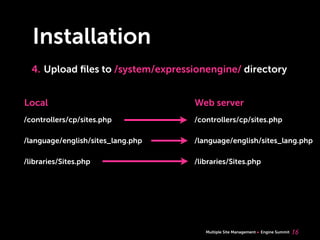
Installation
4. Upload files to /system/expressionengine/ directory
16
/controllers/cp/sites.php
/language/english/sites_lang.php
/libraries/Sites.php
/controllers/cp/sites.php
/language/english/sites_lang.php
/libraries/Sites.php
Local Web server
Multiple Site Management Engine Summit
Backup database!
17
Multiple Site Management Engine Summit
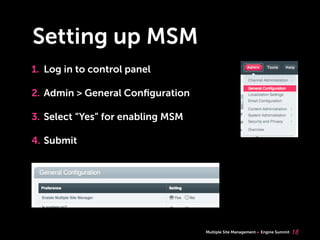
Setting up MSM
1. Log in to control panel
2. Admin > General Configuration
3. Select “Yes” for enabling MSM
4. Submit
18
Multiple Site Management Engine Summit
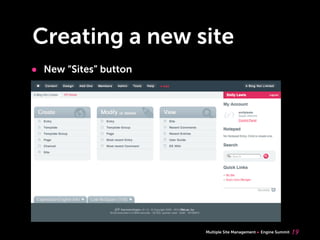
Creating a new site
• New “Sites” button
19
Multiple Site Management Engine Summit
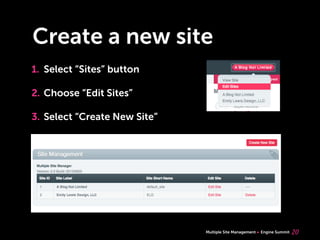
Create a new site
1. Select “Sites” button
2. Choose “Edit Sites”
3. Select “Create New Site”
20
Multiple Site Management Engine Summit
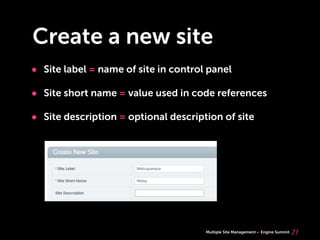
Create a new site
• Site label = name of site in control panel
• Site short name = value used in code references
• Site description = optional description of site
21
Multiple Site Management Engine Summit
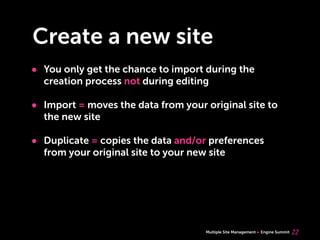
Create a new site
• You only get the chance to import during the
creation process not during editing
• Import = moves the data from your original site to
the new site
• Duplicate = copies the data and/or preferences
from your original site to your new site
22
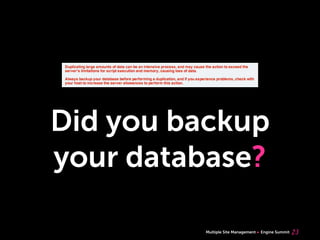
Multiple Site Management Engine Summit
Did you backup
your database?
23
Multiple Site Management Engine Summit
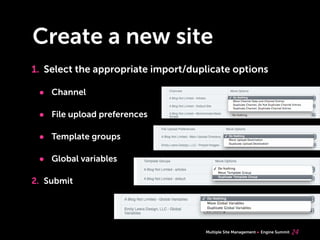
Create a new site
1. Select the appropriate import/duplicate options
• Channel
• File upload preferences
• Template groups
• Global variables
2. Submit
24
Multiple Site Management Engine Summit
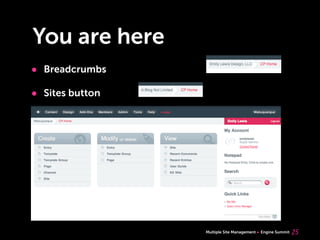
You are here
• Breadcrumbs
• Sites button
25
Multiple Site Management Engine Summit
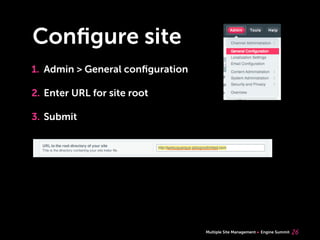
Configure site
1. Admin > General configuration
2. Enter URL for site root
3. Submit
26
Multiple Site Management Engine Summit
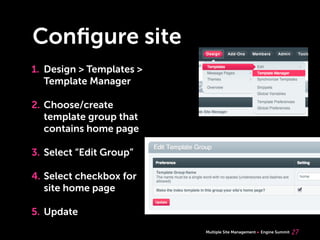
Configure site
1. Design > Templates >
Template Manager
2. Choose/create
template group that
contains home page
3. Select “Edit Group”
4. Select checkbox for
site home page
5. Update
27
Multiple Site Management Engine Summit
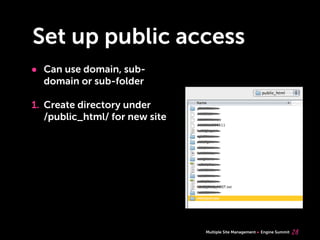
Set up public access
• Can use domain, sub-
domain or sub-folder
1. Create directory under
/public_html/ for new site
28
Multiple Site Management Engine Summit
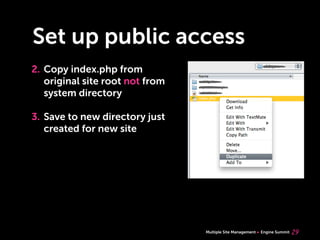
Set up public access
2. Copy index.php from
original site root not from
system directory
3. Save to new directory just
created for new site
29
Multiple Site Management Engine Summit
Set up public access
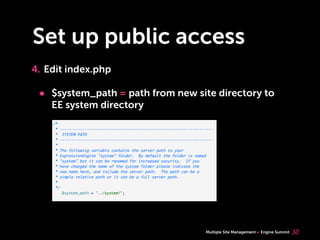
4. Edit index.php
• $system_path = path from new site directory to
EE system directory
30
Multiple Site Management Engine Summit
Set up public access
4. Edit index.php
• $assign_to_config[‘site_name’] = Site short name
• $assign_to_config[‘cp_url’] = Site control panel
• $assign_to_config[‘site_url’] = Site URL
31
Multiple Site Management Engine Summit
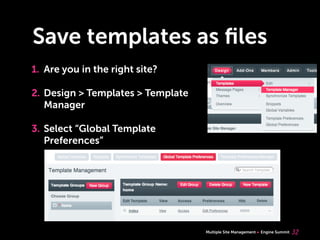
Save templates as files
1. Are you in the right site?
2. Design > Templates > Template
Manager
3. Select “Global Template
Preferences”
32
Multiple Site Management Engine Summit
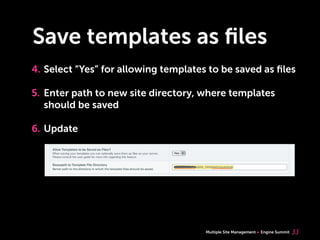
Save templates as files
4. Select “Yes” for allowing templates to be saved as files
5. Enter path to new site directory, where templates
should be saved
6. Update
33
Multiple Site Management Engine Summit
Global variables
• MSM comes with 3 global variables:
• {site_id} = the site’s ID number
• {site_label} = name of site in control panel
• {site_short_name} = value used in code references
34
Multiple Site Management Engine Summit
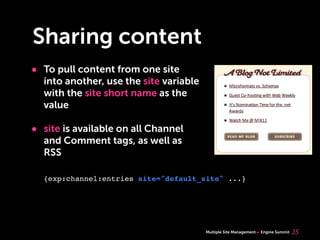
Sharing content
• To pull content from one site
into another, use the site variable
with the site short name as the
value
• site is available on all Channel
and Comment tags, as well as
RSS
35
{exp:channel:entries site="default_site" ...}
Multiple Site Management Engine Summit
Sharing content
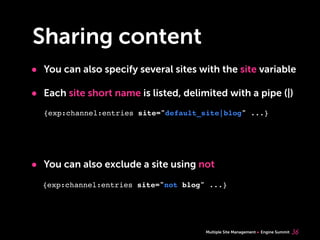
• You can also specify several sites with the site variable
• Each site short name is listed, delimited with a pipe (|)
• You can also exclude a site using not
36
{exp:channel:entries site="default_site|blog" ...}
{exp:channel:entries site="not blog" ...}
Multiple Site Management Engine Summit
Sharing content
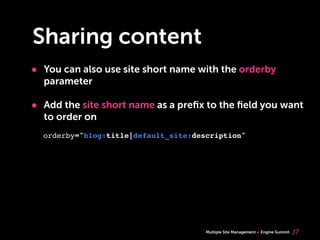
• You can also use site short name with the orderby
parameter
• Add the site short name as a prefix to the field you want
to order on
37
orderby="blog:title|default_site:description"
Multiple Site Management Engine Summit
Sharing templates
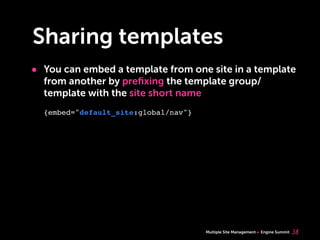
• You can embed a template from one site in a template
from another by prefixing the template group/
template with the site short name
38
{embed="default_site:global/nav"}
Multiple Site Management Engine Summit
Resources
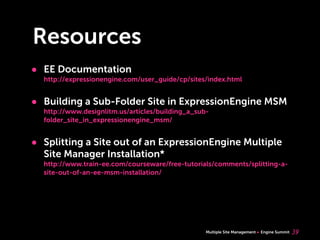
• EE Documentation
http://expressionengine.com/user_guide/cp/sites/index.html
• Building a Sub-Folder Site in ExpressionEngine MSM
http://www.designlitm.us/articles/building_a_sub-
folder_site_in_expressionengine_msm/
• Splitting a Site out of an ExpressionEngine Multiple
Site Manager Installation*
http://www.train-ee.com/courseware/free-tutorials/comments/splitting-a-
site-out-of-an-ee-msm-installation/
39
Multiple Site Management Engine Summit
Questions?
40
emily@emilylewisdesign.com @emilylewis
Multiple Site Management Engine Summit
Thank you!
41

Multiple Site Management with ExpressionEngine

  • 1.
    Some rights reserved MultipleSite Management Engine Summit June 7, 2011 Environments for Humans with ExpressionEngine
  • 2.
    Multiple Site ManagementEngine Summit 2 Web Designer Writer Instructor http://emilylewisdesign.com Author, Microformats Made Simple http://microformatsmadesimple.com Contributing author, HTML5 Cookbook http://oreilly.com/catalog/0636920016038 Email: emily@emilylewisdesign.com Blog: http://ablognotlimited.com Twitter: @emilylewis
  • 3.
    Multiple Site ManagementEngine Summit Today, you’ll learn 3 • What Multiple Site Manager is • Benefits of MSM • Use cases for MSM • How to install MSM and create new sites & challenges with ^
  • 4.
    Multiple Site ManagementEngine Summit Multiple Site Manager • Allows you to create and maintain multiple sites from a single EE install • Expansion from EllisLab introduced in v1.6 and available for v2+ • Available with non-commercial ($79.95) and commercial ($199.95) EE licenses 4
  • 5.
    Multiple Site ManagementEngine Summit The Rules • The EE/MSM license holder has to own all sites • All sites have to reside on the same server • Sub-domain/domain directories have to be able to access the main EE install directory 5
  • 6.
    Multiple Site ManagementEngine Summit The Benefits • Content, templates and members can be shared across all sites • Each site has its own system preferences and specialty templates • Fast and easy site duplication, with options for selective duplication • Extensions, modules and plug-ins can be shared across sites, with site-specific settings* • Money-saving 6
  • 7.
    Multiple Site ManagementEngine Summit The Problems • Installation-wide updates affect all sites. • If something goes wrong with an installation-wide asset, it can affect all the sites. • Be aware of extensions • Test carefully for scalability • Make sure you check licensing • Does it have site-specific settings or only global? • No automated way of exporting a site out of MSM 7 challenges
  • 8.
    Multiple Site ManagementEngine Summit The Details 8 • Members • Member groups • Add-ons • Find and replace Installation-wide resources Site-specific resources • Member group preferences • Specialty templates • Themes • Member profile templates
  • 9.
    Multiple Site ManagementEngine Summit Do you ... • Want a centralized install for multiple sites? • Want a single control panel as a Super Admin, but still limit site access to other member groups? • Need to establish consistency in branding with shared templates for different sites? • Want to share content across sites and reduce redundancy? • Want to have independent forums, but with a shared member base? 9
  • 10.
    Multiple Site ManagementEngine Summit Global offices 10 in thewild
  • 11.
    Multiple Site ManagementEngine Summit Academic schools 11 in thewild EE Podcast Episode #34: MSM Sites with John Rogerson http://5by5.tv/eepodcast/34
  • 12.
    Multiple Site ManagementEngine Summit Personal sites 12 in thewild +
  • 13.
    Multiple Site ManagementEngine Summit Getting Started 13 woohoo!
  • 14.
    Multiple Site ManagementEngine Summit Installation 1. Purchase 2. Download 14
  • 15.
    Multiple Site ManagementEngine Summit Installation 3. Extract .zip* 15 • EE_MSM_2.1.0/system/expressionengine • /controllers/ • /language/ • /libraries/
  • 16.
    Multiple Site ManagementEngine Summit Installation 4. Upload files to /system/expressionengine/ directory 16 /controllers/cp/sites.php /language/english/sites_lang.php /libraries/Sites.php /controllers/cp/sites.php /language/english/sites_lang.php /libraries/Sites.php Local Web server
  • 17.
    Multiple Site ManagementEngine Summit Backup database! 17
  • 18.
    Multiple Site ManagementEngine Summit Setting up MSM 1. Log in to control panel 2. Admin > General Configuration 3. Select “Yes” for enabling MSM 4. Submit 18
  • 19.
    Multiple Site ManagementEngine Summit Creating a new site • New “Sites” button 19
  • 20.
    Multiple Site ManagementEngine Summit Create a new site 1. Select “Sites” button 2. Choose “Edit Sites” 3. Select “Create New Site” 20
  • 21.
    Multiple Site ManagementEngine Summit Create a new site • Site label = name of site in control panel • Site short name = value used in code references • Site description = optional description of site 21
  • 22.
    Multiple Site ManagementEngine Summit Create a new site • You only get the chance to import during the creation process not during editing • Import = moves the data from your original site to the new site • Duplicate = copies the data and/or preferences from your original site to your new site 22
  • 23.
    Multiple Site ManagementEngine Summit Did you backup your database? 23
  • 24.
    Multiple Site ManagementEngine Summit Create a new site 1. Select the appropriate import/duplicate options • Channel • File upload preferences • Template groups • Global variables 2. Submit 24
  • 25.
    Multiple Site ManagementEngine Summit You are here • Breadcrumbs • Sites button 25
  • 26.
    Multiple Site ManagementEngine Summit Configure site 1. Admin > General configuration 2. Enter URL for site root 3. Submit 26
  • 27.
    Multiple Site ManagementEngine Summit Configure site 1. Design > Templates > Template Manager 2. Choose/create template group that contains home page 3. Select “Edit Group” 4. Select checkbox for site home page 5. Update 27
  • 28.
    Multiple Site ManagementEngine Summit Set up public access • Can use domain, sub- domain or sub-folder 1. Create directory under /public_html/ for new site 28
  • 29.
    Multiple Site ManagementEngine Summit Set up public access 2. Copy index.php from original site root not from system directory 3. Save to new directory just created for new site 29
  • 30.
    Multiple Site ManagementEngine Summit Set up public access 4. Edit index.php • $system_path = path from new site directory to EE system directory 30
  • 31.
    Multiple Site ManagementEngine Summit Set up public access 4. Edit index.php • $assign_to_config[‘site_name’] = Site short name • $assign_to_config[‘cp_url’] = Site control panel • $assign_to_config[‘site_url’] = Site URL 31
  • 32.
    Multiple Site ManagementEngine Summit Save templates as files 1. Are you in the right site? 2. Design > Templates > Template Manager 3. Select “Global Template Preferences” 32
  • 33.
    Multiple Site ManagementEngine Summit Save templates as files 4. Select “Yes” for allowing templates to be saved as files 5. Enter path to new site directory, where templates should be saved 6. Update 33
  • 34.
    Multiple Site ManagementEngine Summit Global variables • MSM comes with 3 global variables: • {site_id} = the site’s ID number • {site_label} = name of site in control panel • {site_short_name} = value used in code references 34
  • 35.
    Multiple Site ManagementEngine Summit Sharing content • To pull content from one site into another, use the site variable with the site short name as the value • site is available on all Channel and Comment tags, as well as RSS 35 {exp:channel:entries site="default_site" ...}
  • 36.
    Multiple Site ManagementEngine Summit Sharing content • You can also specify several sites with the site variable • Each site short name is listed, delimited with a pipe (|) • You can also exclude a site using not 36 {exp:channel:entries site="default_site|blog" ...} {exp:channel:entries site="not blog" ...}
  • 37.
    Multiple Site ManagementEngine Summit Sharing content • You can also use site short name with the orderby parameter • Add the site short name as a prefix to the field you want to order on 37 orderby="blog:title|default_site:description"
  • 38.
    Multiple Site ManagementEngine Summit Sharing templates • You can embed a template from one site in a template from another by prefixing the template group/ template with the site short name 38 {embed="default_site:global/nav"}
  • 39.
    Multiple Site ManagementEngine Summit Resources • EE Documentation http://expressionengine.com/user_guide/cp/sites/index.html • Building a Sub-Folder Site in ExpressionEngine MSM http://www.designlitm.us/articles/building_a_sub- folder_site_in_expressionengine_msm/ • Splitting a Site out of an ExpressionEngine Multiple Site Manager Installation* http://www.train-ee.com/courseware/free-tutorials/comments/splitting-a- site-out-of-an-ee-msm-installation/ 39
  • 40.
    Multiple Site ManagementEngine Summit Questions? 40 emily@emilylewisdesign.com @emilylewis
  • 41.
    Multiple Site ManagementEngine Summit Thank you! 41