Hernâni Borges de Freitas
@hernanibf / hernani.pt

One Drupal to
Rule them all !
1
About me
•
•
•
•
•

2

.PT
Technical Team Lead PS
Drupal* many things
Twitter.com/hernanibf
Hernani.pt
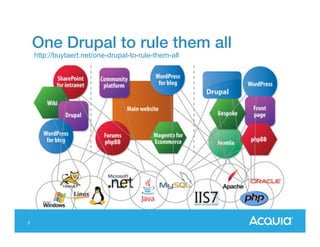
One Drupal to rule them all
http://buytaert.net/one-drupal-to-rule-them-all

3
This presentation
 The challenge to manage a platform in
Drupal for sites with common business
features.
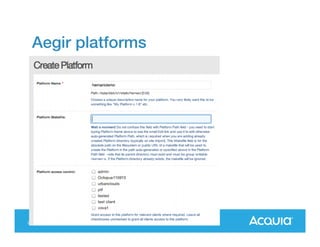
o Common software / common infrastructure.
o Launch new sites and introduce new features
with minimal downtime allowed per site.
o Share content/user data among sites.

4
First challenge
“In our university we have old sites for
our main departments and projects. We
want to start from scratch and rebuild a
single experience in Drupal. ”
• Similar look and feel.
• Similar backend / architecture / editorial
experience.
• Possible to reuse content / features
5
First question
What are several sites and what is a single
site?

One site == One Drupal site?
Many sites == Many Drupal sites?

6
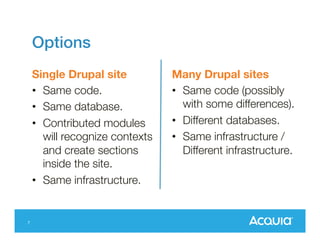
Options
Single Drupal site
• Same code.
• Same database.
• Contributed modules
will recognize
contexts and create
sections inside the
site.
• Same infrastructure.
7

Many Drupal sites
• Same code (possibly
with some
differences).
• Different databases.
• Same infrastructure /
Different
infrastructure.
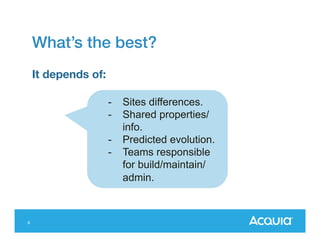
What’s the best?
It depends of:
-

-

8

Sites differences.
Shared
properties/info.
Predicted evolution.
Teams responsible
for
build/maintain/admin
.
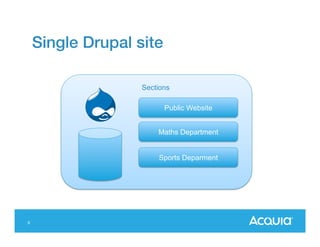
Single Drupal site
Sections
Public Website
Maths Department

Sports Deparment

9
Single Drupal site
Solution based:
 A single Drupal installation.
 Divided in sections managed by different people.
 Sections can be created using different modules:
 OG
 Context
…

Mostly used for:
 Webs/Intranets with different sections /
departments.
 Sections with different publishing workflow.
10
Single Drupal site
Better fit for:
 Content shared amongst several sites.
 Similar user base / admin workflow.
 Small differences between sites in terms of
functionality.
 Similar look and feel.

Mostly used for:

11

 Webs/Intranets with different sections /
departments.
 Sites with sections with different publishing
workflow.
Single Drupal site
Example: Organic groups (OG)
 Groups define sections/sites.
 Content and users are associated with
groups.
 Users have different roles and permissions
within the group.
 Very good integration with
views, panels, rules
 Good suite of complementary modules
(og_theme, og_menu, workbench_og).
12
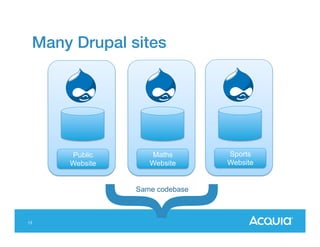
Many Drupal sites

Public
Website

Maths
Website

Same codebase

13

Sports
Website
Many Drupal sites
• Multisite installation
• Deployed separately
Solution based:
 Same code base.
 Different site installations (database).

14
Many Drupal Sites - Multisite
Advantages
• One codebase to maintain / update.
• Easier to reuse infrastructure.
• Lower memory utilization (APC).
• Simpler at all levels.
Drawbacks
• Single point of failure.
• Common maintenance windows.
• Harder to maintain differences in code (multiple
versions for same module).
15
Many Drupal sites - Different
codebases
Advantages
• Can be deployed in different locations.
• No single point of failure in infrastructure.
• Easier to support differences.

Drawbacks
• Harder to manage pushes of code to all sites.
• Need for a consistent process to manage updates
of code.
• As there can be more differences, harder to test.
16
Assuming you select the multiple site
route
“Marketing is demanding us to be able to spin up
new sites that are limited in functionality but
require minimal development time”.

“Operations is asking us for a standard
deployment/maintenance process for all of our
sites.

17
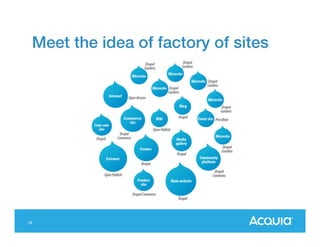
Meet the idea of factory of sites

18
Meet the idea of factory of sites
• Single codebase/distribution with enough
modules/features allowing customize sites
without touching code.
• Limited functionality (less is good).
• Easy to spin a new site in few minutes.
• Easy to update sites in the factory without
impacting full network.
• Easy to grow infrastructure by adding server
nodes where different sites are hosted.
19
Solutions working in this space
•
•
•
•

Custom solutions
Aegir – Started in 2007
Drupal Gardens – Launched in 2011
Acquia Cloud Site Factory – Launched in
2013
• Pantheon One – Launched in 2013

20
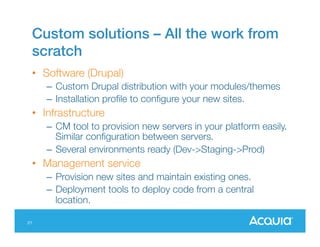
Custom solutions – All the work from
scratch
• Software (Drupal)
– Custom Drupal distribution with your modules/themes
– Installation profile to configure your new sites.

• Infrastructure
– CM tool to provision new servers in your platform
easily. Similar configuration between servers.
– Several environments ready (Dev->Staging->Prod)

• Management service
– Provision new sites and maintain existing ones.
– Deployment tools to deploy code from a central
location.
21
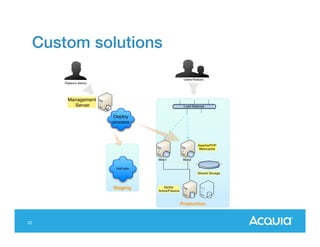
Custom solutions
Users/Visitors
Platform Admin

Management
Server

Load Balancer

Deploy
process

Apache/PHP
Memcache

Web1

Web2

Half size
Shared Storage

Staging

MySql
Active/Passive

Production

22
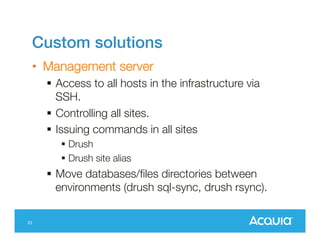
Custom solutions
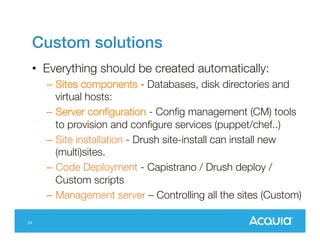
• Everything should be created automatically:

24

– Sites components - Databases, disk directories and
virtual hosts:
– Server configuration - Config management (CM)
tools to provision and configure services
(puppet/chef..)
– Site installation - Drush site-install can install new
(multi)sites.
– Code Deployment - Capistrano / Drush deploy /
Custom scripts
– Management server – Controlling all the sites
(Custom)
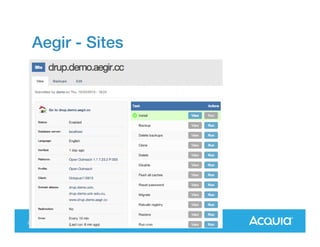
Aegir
• Community project to control Drupal
hosting.
• Open source, Self Hosted.
• Hostmaster controls the websites in the
network.
• Aegir is responsible for controlling code
deployment, database creation, vhost
changes.
25
Aegir
Good
• Simple networks / small sites.
• It can be self hosted.
Drawbacks
• Using a Drupal site to manage infrastructure is
tricky.
• Install and configure Aegir is not straightforward.
• Deploy code to several servers is challenging.
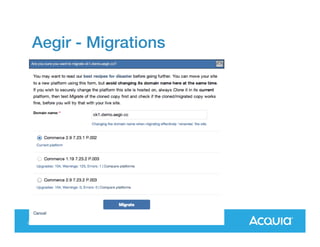
• Migrating sites involves copy all the database, files
and code and swap the vhost (Hard to scale for
larger sites).
• Hard to support the concept of several
environments.
29
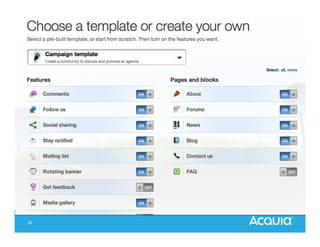
Drupalgardens.com
• Software as a Service (SaaS). Freely available !
• One distribution (gardens) provides a rich editing
experience (D7).
– Rich field types (Link, Date, Field
Collection), Wysiwyg, Media, Theme
editor, WebForms
– Create content through the Drupal Gardens iPhone
app.

• Multisite installation.
• Hosted in Amazon Web Services (AWS), easy to
grow and allocate more machines to the cluster.
30
Drupalgardens.com
• SSO using OpenId. Accounts controlled in
the gardener site.
• Not possible to add any code.
• No vendor lock-in. Possible to export
code/db/files.
• Pricing depending on features enabled
and bandwith consumed.

31
32
Acquia Cloud Site Factory
• Several distributions are available
(gardens, commons, commerce). New ones
can be created.
• Control Panel (Site Factory) controls all sites
in the network.
• Code is controlled from a GIT repository.
• Two environments are created
(production/sandboxes).
• Sites are created directly in production. Sites
can be cloned in sandbox for testing.
33
Acquia Cloud Site Factory
• SaaS
– Support and SLA on the software. Several
distributions available

• SaaS+
– Support and SLA on the software. Client can add
code audited by us.

• PaaS
– Support on the platform. Client can add any code
to the platform.
34
Acquia Site Factory
• Freedom to customize it to your needs
with your code.
• All features associated with Acquia Cloud
– Scalable with suupport included.
• Powering the largest networks of Drupal
websites in the world.

35
Demo
36
We are hiring!
•
•
•
•

37

Consultants
Support
Sales
Engineering
Questions?
@hernanibf / hernani.pt

38

One Drupal to rule them all - Drupalcamp London

  • 1.
    Hernâni Borges deFreitas @hernanibf / hernani.pt One Drupal to Rule them all ! 1
  • 2.
    About me • • • • • 2 .PT Technical TeamLead PS Drupal* many things Twitter.com/hernanibf Hernani.pt
  • 3.
    One Drupal torule them all http://buytaert.net/one-drupal-to-rule-them-all 3
  • 4.
    This presentation  Thechallenge to manage a platform in Drupal for sites with common business features. o Common software / common infrastructure. o Launch new sites and introduce new features with minimal downtime allowed per site. o Share content/user data among sites. 4
  • 5.
    First challenge “In ouruniversity we have old sites for our main departments and projects. We want to start from scratch and rebuild a single experience in Drupal. ” • Similar look and feel. • Similar backend / architecture / editorial experience. • Possible to reuse content / features 5
  • 6.
    First question What areseveral sites and what is a single site? One site == One Drupal site? Many sites == Many Drupal sites? 6
  • 7.
    Options Single Drupal site •Same code. • Same database. • Contributed modules will recognize contexts and create sections inside the site. • Same infrastructure. 7 Many Drupal sites • Same code (possibly with some differences). • Different databases. • Same infrastructure / Different infrastructure.
  • 8.
    What’s the best? Itdepends of: - - 8 Sites differences. Shared properties/info. Predicted evolution. Teams responsible for build/maintain/admin .
  • 9.
    Single Drupal site Sections PublicWebsite Maths Department Sports Deparment 9
  • 10.
    Single Drupal site Solutionbased:  A single Drupal installation.  Divided in sections managed by different people.  Sections can be created using different modules:  OG  Context … Mostly used for:  Webs/Intranets with different sections / departments.  Sections with different publishing workflow. 10
  • 11.
    Single Drupal site Betterfit for:  Content shared amongst several sites.  Similar user base / admin workflow.  Small differences between sites in terms of functionality.  Similar look and feel. Mostly used for: 11  Webs/Intranets with different sections / departments.  Sites with sections with different publishing workflow.
  • 12.
    Single Drupal site Example:Organic groups (OG)  Groups define sections/sites.  Content and users are associated with groups.  Users have different roles and permissions within the group.  Very good integration with views, panels, rules  Good suite of complementary modules (og_theme, og_menu, workbench_og). 12
  • 13.
  • 14.
    Many Drupal sites •Multisite installation • Deployed separately Solution based:  Same code base.  Different site installations (database). 14
  • 15.
    Many Drupal Sites- Multisite Advantages • One codebase to maintain / update. • Easier to reuse infrastructure. • Lower memory utilization (APC). • Simpler at all levels. Drawbacks • Single point of failure. • Common maintenance windows. • Harder to maintain differences in code (multiple versions for same module). 15
  • 16.
    Many Drupal sites- Different codebases Advantages • Can be deployed in different locations. • No single point of failure in infrastructure. • Easier to support differences. Drawbacks • Harder to manage pushes of code to all sites. • Need for a consistent process to manage updates of code. • As there can be more differences, harder to test. 16
  • 17.
    Assuming you selectthe multiple site route “Marketing is demanding us to be able to spin up new sites that are limited in functionality but require minimal development time”. “Operations is asking us for a standard deployment/maintenance process for all of our sites. 17
  • 18.
    Meet the ideaof factory of sites 18
  • 19.
    Meet the ideaof factory of sites • Single codebase/distribution with enough modules/features allowing customize sites without touching code. • Limited functionality (less is good). • Easy to spin a new site in few minutes. • Easy to update sites in the factory without impacting full network. • Easy to grow infrastructure by adding server nodes where different sites are hosted. 19
  • 20.
    Solutions working inthis space • • • • Custom solutions Aegir – Started in 2007 Drupal Gardens – Launched in 2011 Acquia Cloud Site Factory – Launched in 2013 • Pantheon One – Launched in 2013 20
  • 21.
    Custom solutions –All the work from scratch • Software (Drupal) – Custom Drupal distribution with your modules/themes – Installation profile to configure your new sites. • Infrastructure – CM tool to provision new servers in your platform easily. Similar configuration between servers. – Several environments ready (Dev->Staging->Prod) • Management service – Provision new sites and maintain existing ones. – Deployment tools to deploy code from a central location. 21
  • 22.
    Custom solutions Users/Visitors Platform Admin Management Server LoadBalancer Deploy process Apache/PHP Memcache Web1 Web2 Half size Shared Storage Staging MySql Active/Passive Production 22
  • 23.
    Custom solutions • Everythingshould be created automatically: 24 – Sites components - Databases, disk directories and virtual hosts: – Server configuration - Config management (CM) tools to provision and configure services (puppet/chef..) – Site installation - Drush site-install can install new (multi)sites. – Code Deployment - Capistrano / Drush deploy / Custom scripts – Management server – Controlling all the sites (Custom)
  • 24.
    Aegir • Community projectto control Drupal hosting. • Open source, Self Hosted. • Hostmaster controls the websites in the network. • Aegir is responsible for controlling code deployment, database creation, vhost changes. 25
  • 25.
    Aegir Good • Simple networks/ small sites. • It can be self hosted. Drawbacks • Using a Drupal site to manage infrastructure is tricky. • Install and configure Aegir is not straightforward. • Deploy code to several servers is challenging. • Migrating sites involves copy all the database, files and code and swap the vhost (Hard to scale for larger sites). • Hard to support the concept of several environments. 29
  • 26.
    Drupalgardens.com • Software asa Service (SaaS). Freely available ! • One distribution (gardens) provides a rich editing experience (D7). – Rich field types (Link, Date, Field Collection), Wysiwyg, Media, Theme editor, WebForms – Create content through the Drupal Gardens iPhone app. • Multisite installation. • Hosted in Amazon Web Services (AWS), easy to grow and allocate more machines to the cluster. 30
  • 27.
    Drupalgardens.com • SSO usingOpenId. Accounts controlled in the gardener site. • Not possible to add any code. • No vendor lock-in. Possible to export code/db/files. • Pricing depending on features enabled and bandwith consumed. 31
  • 28.
  • 29.
    Acquia Cloud SiteFactory • Several distributions are available (gardens, commons, commerce). New ones can be created. • Control Panel (Site Factory) controls all sites in the network. • Code is controlled from a GIT repository. • Two environments are created (production/sandboxes). • Sites are created directly in production. Sites can be cloned in sandbox for testing. 33
  • 30.
    Acquia Cloud SiteFactory • SaaS – Support and SLA on the software. Several distributions available • SaaS+ – Support and SLA on the software. Client can add code audited by us. • PaaS – Support on the platform. Client can add any code to the platform. 34
  • 31.
    Acquia Site Factory •Freedom to customize it to your needs with your code. • All features associated with Acquia Cloud – Scalable with suupport included. • Powering the largest networks of Drupal websites in the world. 35
  • 32.
  • 33.
  • 34.

Editor's Notes

  • #37 Drush site aliases in both sites