AEM – OFFLINE CONTENT
APPROACHES
Different approaches to extract authored content,
and serve it directly from a web server
Why?
• A majority of the content on AEM gets cached on dispatcher on
1st request (and it should).
• What if my website has content, all of which can be cached on
dispatcher… What purpose does building out the infrastructure
for publish instances & dispatchers and the overhead of
maintaining them serve
• Add to it the software licensing cost associated with such a setup
Surprisingly AEM provides a few options out of the box and some features & APIs
which can be leveraged to build custom solution to extract content as html’s along with
their dependent assets and resources, which can then be independently hosted on any web
server
When not to use…
• When there is user management and ACLs involved to serve
appropriate content to authorized users
• When there is Personalization and Targeting of content to users
involved
• When you have dynamic functionalities like User generated
content, workflow management, searching of content, …
• When you want an absolute link between author and publish
instance statuses, with activation/deactivation status and audit logs
tracked for each action
• When the no. of authoring activities are high and need real-time
publishing (running into hundreds of publishes per day)
Options
• Page Exporter
• Build the statics on dispatcher
• Static replication agents
• RetrieverService & RetrieverStorage API
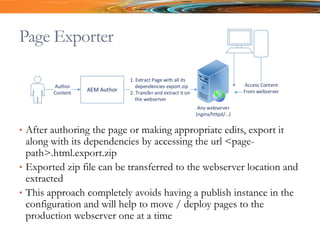
Page Exporter
• After authoring the page or making appropriate edits, export it
along with its dependencies by accessing the url <page-
path>.html.export.zip
• Exported zip file can be transferred to the webserver location and
extracted
• This approach completely avoids having a publish instance in the
configuration and will help to move / deploy pages to the
production webserver one at a time
AEM Author
Any webserver
(nginx/httpd/ )
Author
Content
1. Extract Page with all its
dependencies export.zip
2. Transfer and extract it on
the webserver
Access Content
From webserver
Build the statics on Dispatcher
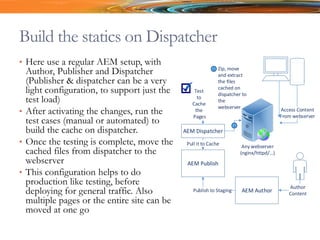
• Here use a regular AEM setup, with
Author, Publisher and Dispatcher
(Publisher & dispatcher can be a very
light configuration, to support just the
test load)
• After activating the changes, run the
test cases (manual or automated) to
build the cache on dispatcher.
• Once the testing is complete, move the
cached files from dispatcher to the
webserver
• This configuration helps to do
production like testing, before
deploying for general traffic. Also
multiple pages or the entire site can be
moved at one go
AEM Author
Any webserver
(nginx/httpd/ )
Author
Content
Access Content
From webserver
AEM Publish
AEM Dispatcher
Publish to Staging
Pull it to Cache
Test
to
Cache
the
Pages
1
1 Zip, move
and extract
the files
cached on
dispatcher to
the
webserver
Using Static Replication Agents
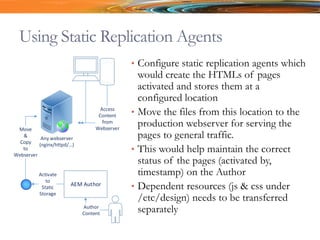
• Configure static replication agents which
would create the HTMLs of pages
activated and stores them at a
configured location
• Move the files from this location to the
production webserver for serving the
pages to general traffic.
• This would help maintain the correct
status of the pages (activated by,
timestamp) on the Author
• Dependent resources (js & css under
/etc/design) needs to be transferred
separately
AEM Author
Any webserver
(nginx/httpd/ )
Author
Content
Access
Content
from
Webserver
Activate
to
Static
Storage
Move
&
Copy
to
Webserver
RetrieverService API
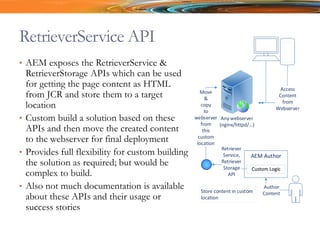
• AEM exposes the RetrieverService &
RetrieverStorage APIs which can be used
for getting the page content as HTML
from JCR and store them to a target
location
• Custom build a solution based on these
APIs and then move the created content
to the webserver for final deployment
• Provides full flexibility for custom building
the solution as required; but would be
complex to build.
• Also not much documentation is available
about these APIs and their usage or
success stories
AEM Author
Any webserver
(nginx/httpd/ )
Author
Content
Access
Content
from
Webserver
Retriever
Service,
Retriever
Storage
API
Move
&
copy
to
webserver
from
this
custom
location
Custom Logic
Store content in custom
location
Some Use Cases
• Data Center Restrictions – Does not allow authoring in
production. All changes to production should go through an
audited process
• Deploy your site content as micro-service by having all the site
content extracted and bundled as a Docker or a Spring Boot
image.
• Have the content accessible directly from file system for your
internal users
• Provide a feature like download the site for offline use 
THANK YOU
Feedback and suggestions welcome. Please write to
ashokkumar_ta / ashokkumar.ta@gmail.com

Aem offline content

  • 1.
    AEM – OFFLINECONTENT APPROACHES Different approaches to extract authored content, and serve it directly from a web server
  • 2.
    Why? • A majorityof the content on AEM gets cached on dispatcher on 1st request (and it should). • What if my website has content, all of which can be cached on dispatcher… What purpose does building out the infrastructure for publish instances & dispatchers and the overhead of maintaining them serve • Add to it the software licensing cost associated with such a setup Surprisingly AEM provides a few options out of the box and some features & APIs which can be leveraged to build custom solution to extract content as html’s along with their dependent assets and resources, which can then be independently hosted on any web server
  • 3.
    When not touse… • When there is user management and ACLs involved to serve appropriate content to authorized users • When there is Personalization and Targeting of content to users involved • When you have dynamic functionalities like User generated content, workflow management, searching of content, … • When you want an absolute link between author and publish instance statuses, with activation/deactivation status and audit logs tracked for each action • When the no. of authoring activities are high and need real-time publishing (running into hundreds of publishes per day)
  • 4.
    Options • Page Exporter •Build the statics on dispatcher • Static replication agents • RetrieverService & RetrieverStorage API
  • 5.
    Page Exporter • Afterauthoring the page or making appropriate edits, export it along with its dependencies by accessing the url <page- path>.html.export.zip • Exported zip file can be transferred to the webserver location and extracted • This approach completely avoids having a publish instance in the configuration and will help to move / deploy pages to the production webserver one at a time AEM Author Any webserver (nginx/httpd/ ) Author Content 1. Extract Page with all its dependencies export.zip 2. Transfer and extract it on the webserver Access Content From webserver
  • 6.
    Build the staticson Dispatcher • Here use a regular AEM setup, with Author, Publisher and Dispatcher (Publisher & dispatcher can be a very light configuration, to support just the test load) • After activating the changes, run the test cases (manual or automated) to build the cache on dispatcher. • Once the testing is complete, move the cached files from dispatcher to the webserver • This configuration helps to do production like testing, before deploying for general traffic. Also multiple pages or the entire site can be moved at one go AEM Author Any webserver (nginx/httpd/ ) Author Content Access Content From webserver AEM Publish AEM Dispatcher Publish to Staging Pull it to Cache Test to Cache the Pages 1 1 Zip, move and extract the files cached on dispatcher to the webserver
  • 7.
    Using Static ReplicationAgents • Configure static replication agents which would create the HTMLs of pages activated and stores them at a configured location • Move the files from this location to the production webserver for serving the pages to general traffic. • This would help maintain the correct status of the pages (activated by, timestamp) on the Author • Dependent resources (js & css under /etc/design) needs to be transferred separately AEM Author Any webserver (nginx/httpd/ ) Author Content Access Content from Webserver Activate to Static Storage Move & Copy to Webserver
  • 8.
    RetrieverService API • AEMexposes the RetrieverService & RetrieverStorage APIs which can be used for getting the page content as HTML from JCR and store them to a target location • Custom build a solution based on these APIs and then move the created content to the webserver for final deployment • Provides full flexibility for custom building the solution as required; but would be complex to build. • Also not much documentation is available about these APIs and their usage or success stories AEM Author Any webserver (nginx/httpd/ ) Author Content Access Content from Webserver Retriever Service, Retriever Storage API Move & copy to webserver from this custom location Custom Logic Store content in custom location
  • 9.
    Some Use Cases •Data Center Restrictions – Does not allow authoring in production. All changes to production should go through an audited process • Deploy your site content as micro-service by having all the site content extracted and bundled as a Docker or a Spring Boot image. • Have the content accessible directly from file system for your internal users • Provide a feature like download the site for offline use 
  • 10.
    THANK YOU Feedback andsuggestions welcome. Please write to ashokkumar_ta / ashokkumar.ta@gmail.com