MULTIMEDIA
I/O TECHNOLOGIES
MULTIMEDIA
• Many media
• Combination of media text , image ,sound and
movement
• Allow the end user to control
• Way of presenting contents through computer
and or electronics devices
DIFFERENCE BETWEEN GRAPHICS
AND MULTIMEDIA
• GRAPHICS
1.Visual representation
• MULTIMEDIA
1. Use of different
media to convey
information into a
single package
INPUT AND OUTPUT TECHNOLOGIES
• System to receive information from the
outside world - INPUT DEVICES
• Communicate results to the external world –
OUTPUT DEVICES
KEYBOARD
• Array of switches send unique signals when
pressed
• Key code stored in ROM
TYPES OF SWITCHES
RUBBER MECHANICAL
WORKING OF KEYBOARD
KEYBOARD
QWERTY KEYBOARD
COMPACT
KEYBOARD
Cont.
EROGONOMIC
VIRTUAL KEYBOARD
MOUSE
• Moved on smooth surface which cause the
movement of cursor on the screen
• Input the data and information into
computer system directly
• “Direct manipulation device”
TYPES
BALL MOUSE
OPTICAL MOUSE
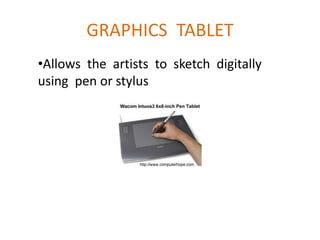
GRAPHICS TABLET
•Allows the artists to sketch digitally
using pen or stylus
TRACK BALLS
• moveable ball mounted on a stationary device
• Pointing device
• Ball is placed on the top along with buttons
DIFFERENCE
TRACK BALLS MOUSE
1.Manually rotating the balls 1.Balls internally rotates by moving
over surface
JOY STICK
• Lever that moves in all the directions
• Stick that pivots on a base and is used for
controlling the action in video games
• Unlike mouse ,it continues moving in the
direction
TOUCH SCREENS
Monitors / Electronic visual display screens
- Detects where they are touched
- Make selection by directly touching the
screen rather than moving mouse
OUTPUT TECHNOLOGIES
DISPLAY CHARACTERISTICS
• Size of display
• Information content (total no of pixels)
• Resolution (pixel size)
• Color
• Brightness
• Picture quality
CRT
• Part of computer which looks like a TV set.
Image projection on the screen by using
electron beams.
• Color display also possible.
LCD SCREENS
• Fixed type displays
• Light source generated by fluorescent lamp
• Travels in one direction
• LCD cells controlled by applying electric
charge
LED DISPLAYS
• Semi-conductor light source
• Electronic device that lights up when
electricity is passed through it
• Requires more power than LCD display
devices
• Very useful for displaying relatively smaller
images
PLASMA DISPLAY
Ionised gases that lights when we pass the
electric current through it
• Lights up when electricity is passed through it
• Small cell is fitted with xenon and neon
gases and electrode used to apply the
electricity
• Electric current ionizing the gas mixture
and transform it into plasma and plasma
emits ultraviolet light

MULTIMEDIA

  • 1.
  • 2.
    MULTIMEDIA • Many media •Combination of media text , image ,sound and movement • Allow the end user to control • Way of presenting contents through computer and or electronics devices
  • 3.
    DIFFERENCE BETWEEN GRAPHICS ANDMULTIMEDIA • GRAPHICS 1.Visual representation • MULTIMEDIA 1. Use of different media to convey information into a single package
  • 4.
    INPUT AND OUTPUTTECHNOLOGIES • System to receive information from the outside world - INPUT DEVICES • Communicate results to the external world – OUTPUT DEVICES
  • 5.
    KEYBOARD • Array ofswitches send unique signals when pressed • Key code stored in ROM TYPES OF SWITCHES RUBBER MECHANICAL
  • 6.
  • 7.
  • 8.
  • 9.
    MOUSE • Moved onsmooth surface which cause the movement of cursor on the screen • Input the data and information into computer system directly • “Direct manipulation device”
  • 10.
  • 11.
  • 12.
    GRAPHICS TABLET •Allows theartists to sketch digitally using pen or stylus
  • 13.
    TRACK BALLS • moveableball mounted on a stationary device • Pointing device • Ball is placed on the top along with buttons
  • 14.
    DIFFERENCE TRACK BALLS MOUSE 1.Manuallyrotating the balls 1.Balls internally rotates by moving over surface
  • 15.
    JOY STICK • Leverthat moves in all the directions • Stick that pivots on a base and is used for controlling the action in video games • Unlike mouse ,it continues moving in the direction
  • 16.
    TOUCH SCREENS Monitors /Electronic visual display screens - Detects where they are touched - Make selection by directly touching the screen rather than moving mouse
  • 17.
  • 18.
    DISPLAY CHARACTERISTICS • Sizeof display • Information content (total no of pixels) • Resolution (pixel size) • Color • Brightness • Picture quality
  • 19.
    CRT • Part ofcomputer which looks like a TV set. Image projection on the screen by using electron beams. • Color display also possible.
  • 20.
    LCD SCREENS • Fixedtype displays • Light source generated by fluorescent lamp • Travels in one direction • LCD cells controlled by applying electric charge
  • 21.
    LED DISPLAYS • Semi-conductorlight source • Electronic device that lights up when electricity is passed through it • Requires more power than LCD display devices • Very useful for displaying relatively smaller images
  • 22.
    PLASMA DISPLAY Ionised gasesthat lights when we pass the electric current through it • Lights up when electricity is passed through it • Small cell is fitted with xenon and neon gases and electrode used to apply the electricity • Electric current ionizing the gas mixture and transform it into plasma and plasma emits ultraviolet light