UMITT TRAINING
Getting Started with Word
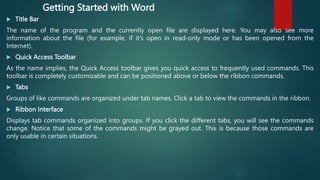
 Title Bar
The name of the program and the currently open file are displayed here. You may also see more
information about the file (for example, if it’s open in read-only mode or has been opened from the
Internet).
 Quick Access Toolbar
As the name implies, the Quick Access toolbar gives you quick access to frequently used commands. This
toolbar is completely customizable and can be positioned above or below the ribbon commands.
 Tabs
Groups of like commands are organized under tab names. Click a tab to view the commands in the ribbon.
 Ribbon Interface
Displays tab commands organized into groups. If you click the different tabs, you will see the commands
change. Notice that some of the commands might be grayed out. This is because those commands are
only usable in certain situations.
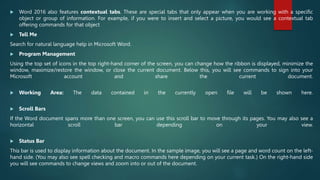
 Word 2016 also features contextual tabs. These are special tabs that only appear when you are working with a specific
object or group of information. For example, if you were to insert and select a picture, you would see a contextual tab
offering commands for that object
 Tell Me
Search for natural language help in Microsoft Word.
 Program Management
Using the top set of icons in the top right-hand corner of the screen, you can change how the ribbon is displayed, minimize the
window, maximize/restore the window, or close the current document. Below this, you will see commands to sign into your
Microsoft account and share the current document.
 Working Area: The data contained in the currently open file will be shown here.
 Scroll Bars
If the Word document spans more than one screen, you can use this scroll bar to move through its pages. You may also see a
horizontal scroll bar depending on your view.
 Status Bar
This bar is used to display information about the document. In the sample image, you will see a page and word count on the left-
hand side. (You may also see spell checking and macro commands here depending on your current task.) On the right-hand side
you will see commands to change views and zoom into or out of the document.
Create a Word Document
You have three primary ways to fire up Word, so use whichever method you find quickest:
 Start menu. The Start button in the lower-left corner of your screen gives you access
to all programs on your PC—Word included. To start Word, choose Start → All
Programs → Microsoft Office → Microsoft Office Word.
 Quick Launch toolbar. The Quick Launch toolbar at the bottom of your screen (just to
the right of the Start menu) is a great place to start programs you use frequently.
Microsoft modestly assumes that you’ll be using Word a lot, so it usually installs the
Word icon in the Quick Launch toolbar. To start using Word, just click the W icon, and
voilá!
 Opening a Word document. Once you’ve created some Word documents, this
method is fastest of all, since you don’t have to start Word as a separate step. Just
open an existing Word document, and Word starts itself. Try going to Start → My
Recent Documents, and then, from the list of files, choose a Word document. You can
also double-click the document’s icon on the desktop or wherever it lives on your PC.
Creating a New Blank Document
Say you want a new blank document, just like the one Word shows you when you start the
program. No problem—here are the steps:
 Choose Office button → New.
The New Document dialog box appears.
 In the upper-left corner of the large “Create a new Word document” panel, click “Blank
document”.
The New Document box presents a seemingly endless number of options, but don’t panic.
The “Blank document” option you want is on the left side of the first line.
 At the bottom of the New Document dialog box, click Create.
The dialog box disappears, and you’re gazing at the blank page of a new Word document.
Creating a New Document from an Existing Document
 Choose Office button → New (Alt+F, N) to open the New Document window. Then click “New from
existing…” (it sits directly below the “Blank document” button).
The three dots at the end of the button’s title tell you that there’s another dialog box to come. And sure
enough, when you click “New from existing…”, it opens another box, appropriately titled New from Existing
Document. This box looks—and works—like a standard Windows Open File box. It lets you navigate to a
specific folder and open a file.
 On your computer, find the existing document you’re using for a model.
You can use the bar on the left to change the folder view. Word starts you in your My Documents folder,
but you can switch to your desktop or your My Computer icon by clicking the icons on the left. Double-
click folder icons in the large window to open them and see their contents.
 Click to select the file, and then click Create New (in the lower-right corner). (Alternatively, just double-
click the file’s icon to open it. This trick works in all Open File boxes.)
Instead of the usual Open button at the bottom of the box, the button in the New from Existing Document
box reads Create New—your clue that this box behaves differently in one important respect: Instead of
opening an existing file, you’re making a copy of an existing file. Once open, the file’s name is something
like Document2.docx instead of the original name. This way, when you save the file, you don’t overwrite the
original document. (Still, it’s best to save it with a new descriptive name right away.)
Creating a New Document from a Template
 Choose Office button → New (Alt+F, N) to open the New Document window.
On the left of the New Document box is a Template Categories list. The top entry on this list is
Installed Templates—the ones Word has installed on your computer.
 Scroll down the Template Categories list to the Microsoft Office Online heading. Under this
heading, select Minutes.
In the center pane, you’ll see all different types of minutes templates, from PTA minutes to Annual
shareholder’s meeting minutes. When you click a template’s icon, a preview appears in the pane
on the right. When you’re done perusing the various styles, click the Formal Meeting Minutes
icon. (After all, CEOSA is a very formal organization.) Then click Download.
Word downloads and opens the document.
 Start writing up the minutes for the CEO Surfers.
To follow the template’s structure, replace all the words in square brackets ([ ]) with text relevant to
CEOSA.
Opening an Existing Document
 Choose Office button → Open (Alt+F, O). In the Open window, navigate to the folder and file
you want to open.
The Open window starts out showing your My Documents folder, since that’s where Word
suggests you save your files. When your document’s in a more exotic location, click the My
Computer icon, and then navigate to the proper folder from there
 With the file selected, click Open in the lower-right corner.
The Open box goes away and your document opens in Word. You’re all set to get to work. Just
remember, when you save this document (Alt+F, S or Ctrl+S), you write over the previous file.
Essentially, you create a new, improved, and only copy of the file you just opened. If you don’t
want to write over the existing document, use the Save As command (Alt+F, A), and then type a
new name in the File Name text box.
Your Different Document Views
 Document Views. These commands change the big picture. For the most part, use these when
you want to view a document in a dramatically different way: two pages side by side, Outline
view, Web layout view, and so on.
 Show/Hide. The Show/Hide commands display and conceal Word tools like rulers and gridlines.
These tools don’t show when you print your document; they’re just visual aids that help you
when you’re working in Word.
 Zoom. As you can guess, the Zoom tools let you choose between a close-up and a long shot of
your document. Getting in close makes your words easier to read and helps prevent eyestrain.
But zooming out makes scrolling faster and helps you keep your eye on the big picture.
 Window. In the Window group, you’ll find creative ways to organize document windows on your
screen—like split views of a single document or side-by-side views of two different documents.
 Print Layout (Alt+W, P). The most frequently used view in Word, Print Layout, is the one you see
when you first start the program or create a new blank document. In this view, the page you see
on your computer screen looks much as it does when you print it. This view’s handy for letters,
reports, and most documents headed for the printer.
 Full Screen Reading (Alt+W, F). If you’d like to get rid of the clutter of menus, ribbons, and all the
rest of the word-processing gadgetry, then use Full Screen Reading view. As the name implies,
this view’s designed primarily for reading documents. It includes options you don’t find in the
other views, like a command that temporarily decreases or increases the text size. In the upper-
right corner you see some document-proofing tools (like a text highlighter and an insert
comment command), but when you want to change or edit your document, you must first use
the View Options → Allow Typing command. For more details on using Word for reviewing and
proofing.
 Web Layout (Alt+W, L). This view shows your document as if it were a single Web page loaded in
a browser. You don’t see any page breaks in this view. Along with your text, you see any photos
or videos that you’ve placed in the document—just like a Web page.
 Outline (Alt+W, U). For lots of writers, an outline is the first step in creating a manuscript. Once
they’ve created a framework of chapters and headings, they dive in and fill out the document
with text. If you like to work this way, then you’ll love Outline view. It’s easy to jump back and
forth between Outline view and Print Layout view or Draft view, so you can bounce back and
forth between a macro and a micro view of your epic.
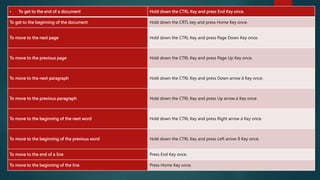
 To get to the end of a document Hold down the CTRL Key and press End Key once.
To get to the beginning of the document Hold down the CRTL key and press Home Key once.
To move to the next page Hold down the CTRL Key and press Page Down Key once.
To move to the previous page Hold down the CTRL Key and press Page Up Key once.
To move to the next paragraph Hold down the CTRL Key and press Down arrow â Key once.
To move to the previous paragraph Hold down the CTRL Key and press Up arrow á Key once.
To move to the beginning of the next word Hold down the CTRL Key and press Right arrow à Key once.
To move to the beginning of the previous word Hold down the CTRL Key and press Left arrow ß Key once.
To move to the end of a line Press End Key once.
To move to the beginning of the line Press Home Key once.
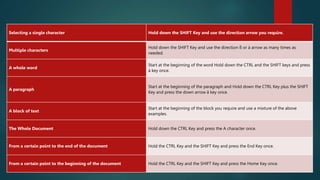
How to select text with the keyboard.
Selecting a single character Hold down the SHIFT Key and use the direction arrow you require.
Multiple characters
Hold down the SHIFT Key and use the direction ß or à arrow as many times as
needed.
A whole word
Start at the beginning of the word Hold down the CTRL and the SHIFT keys and press
à key once.
A paragraph
Start at the beginning of the paragraph and Hold down the CTRL Key plus the SHIFT
Key and press the down arrow â key once.
A block of text
Start at the beginning of the block you require and use a mixture of the above
examples.
The Whole Document Hold down the CTRL Key and press the A character once.
From a certain point to the end of the document Hold the CTRL Key and the SHIFT Key and press the End Key once.
From a certain point to the beginning of the document Hold the CTRL Key and the SHIFT Key and press the Home Key once.
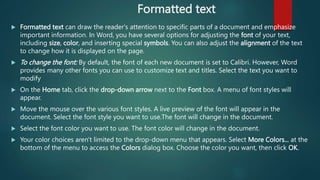
Formatted text
 Formatted text can draw the reader's attention to specific parts of a document and emphasize
important information. In Word, you have several options for adjusting the font of your text,
including size, color, and inserting special symbols. You can also adjust the alignment of the text
to change how it is displayed on the page.
 To change the font: By default, the font of each new document is set to Calibri. However, Word
provides many other fonts you can use to customize text and titles. Select the text you want to
modify
 On the Home tab, click the drop-down arrow next to the Font box. A menu of font styles will
appear.
 Move the mouse over the various font styles. A live preview of the font will appear in the
document. Select the font style you want to use.The font will change in the document.
 Select the font color you want to use. The font color will change in the document.
 Your color choices aren't limited to the drop-down menu that appears. Select More Colors... at the
bottom of the menu to access the Colors dialog box. Choose the color you want, then click OK.
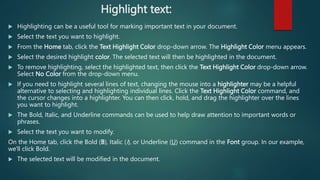
Highlight text:
 Highlighting can be a useful tool for marking important text in your document.
 Select the text you want to highlight.
 From the Home tab, click the Text Highlight Color drop-down arrow. The Highlight Color menu appears.
 Select the desired highlight color. The selected text will then be highlighted in the document.
 To remove highlighting, select the highlighted text, then click the Text Highlight Color drop-down arrow.
Select No Color from the drop-down menu.
 If you need to highlight several lines of text, changing the mouse into a highlighter may be a helpful
alternative to selecting and highlighting individual lines. Click the Text Highlight Color command, and
the cursor changes into a highlighter. You can then click, hold, and drag the highlighter over the lines
you want to highlight.
 The Bold, Italic, and Underline commands can be used to help draw attention to important words or
phrases.
 Select the text you want to modify.
On the Home tab, click the Bold (B), Italic (I), or Underline (U) command in the Font group. In our example,
we'll click Bold.
 The selected text will be modified in the document.
To change the text case:
When you need to quickly change text case, you can use the Change Case command instead of deleting
and retyping text.
 Select the text you want to modify.
 On the Home tab, click the Change Case command in the Font group.
A drop-down menu will appear. Select the desired case option from the menu. The text case will be changed
in the document.
To change text alignment
By default, Word aligns text to the left margin in new documents. However, there may be times when you
want to adjust text alignment to the center or right.
 Select the text you want to modify.
 On the Home tab, select one of the four alignment options from the Paragraph group.
 Click the arrows in the slideshow below to learn more about the four text alignment options.
 Align Text Left: This aligns all selected text to the left margin. The Align Text Left command is the most
common alignment and is selected by default when a new document is created..
Symbols
 Sometimes you may find that you need to add a symbol to your text, such as the Copyright symbol ©.
Word offers a collection of symbols for currency, languages, mathematics, and more.
Formatting Text, Paragraphs, and Headings
Formatting is the fine art of making your documents effective and attractive. Good formatting
distinguishes different parts of your text and helps your readers take in your message. You can apply
formatting to just about every element of your document, from a single character to entire
paragraphs. Body text needs to be readable and easy on the eyes. Headings should be big and bold,
and they should also be consistent throughout your document. Important words need to resonate
with emphasis. Quotes and references should be set off from the other text.
Formatting Paragraphs
 Formatting a paragraph usually entails changing its shape. You may be squeezing it in with indents
or stretching it out with additional line spacing. Other kinds of formatting change a paragraph’s
very nature, like adding a border or making it part of a numbered or bulleted list. The Paragraph
formatting group (Home → Paragraph) is right next door to the Font group. You don’t need
to select text to format a paragraph; just make sure the insertion point is in the paragraph you
want to format. However, if you want to format several paragraphs at once, select them all before
you apply a command.
Aligning Text
 It’s easy to apply alignment to text. With your insertion point in the paragraph you want to change,
click one of the alignment buttons in the Paragraph group on the Home Tab. For example, Home →
Paragraph → Left sets the current paragraph’s alignment. you have four choices when it comes to
aligning your paragraphs:
 Left (Alt+H, AL). Aligns the lines in the paragraph flush on the left side and ragged on the right. Left
alignment is standard for letters, reports, and many business documents.
 Centered (Alt+H, AC). Centers each line in the paragraph, leaving both left and right margins ragged.
This setting is appropriate for headings and short chunks of text, as in invitations and advertisements.
Avoid using centered text for long paragraphs, since it’s hard for readers’ eyes to track from the end of
one line to the beginning of the next when the left margin is uneven.
 Right (Alt+H, AR). Aligns the lines in the paragraph flush on the right side and ragged on the left. This
unusual alignment is most often used for setting captions or quotations apart from the main text.
 Justified (Alt+H, AJ). Adds space between letters and words so that both the left and right sides of the
paragraph are straight and flush with the margins. Justified margins give text a more formal look
suitable for textbooks or scholarly documents. If your justified text looks odd because big gaps appear
between the letters or words, try using a long line—that is, putting more characters per line. You can do
this by extending the margins (Alt+P, M) or by changing the size of your font (Alt+H, FS).
Indenting Paragraphs
 One of the most common reasons for indenting a paragraph is to set off quoted text from
the rest of the document. Usually, you move the paragraph’s left edge in about a half inch
from the left margin. Word makes it easy to indent text in this way. Just use the Increase
Indent button on the ribbon or the shortcut Alt+H, AI. If you change your mind and want
to remove the indent, use the companion command Decrease Indent (Alt+H, AO).
 The ribbon buttons handle most everyday indentation chores, but what if you need to
customize your indents? To do that, open the Paragraph dialog box to the Indents and
Spacing tab (Alt+H, PG), and you see the Indentation tools in the middle of the tab.
 The indentation tools in the Paragraph box let you set indents with much more precision
than the simple Increase and Decrease buttons. For one thing, you can indent your
paragraph from both margins using the Left and Right text boxes. Type a number in the
box or use the arrow buttons to make an adjustment. Look in the Preview window at
bottom to get a sense of the changes you’re making.
Spacing Between Paragraphs
 For documents like business letters or reports that use block-style paragraphs,
there’s usually a little space between each. You can adjust this spacing between
paragraphs to set off some blocks of text from the rest.
 Use the Paragraph dialog box to adjust the distance between paragraphs. On the
left, you can enter numbers to set the space before the paragraph and the space
after. With body text paragraphs, it’s good to set the same, relatively small
distance before and after—say, three points. For headers, you may want to put a
little extra space before the header to distance it from the preceding text. That
space makes it clear that the header is related to the text beneath it. Generally
speaking, the more significant the header, the larger the type and the greater
the spacing around it.
Spacing Between Lines
In the Paragraph box, to the right of the paragraph spacing controls, you find the “Line spacing” tools.
Use these controls to set the distance between lines within paragraphs. You have three presets and
three custom settings:
 Single keeps the lines close together, with a minimum amount of space between. Single spacing is
usually easy to read, and it sure saves paper.
 1.5 lines gives your text a little more breathing room, and still offers a nice professional look.
 Double is the option preferred by teachers and editors, so there’s plenty of room for their helpful
comments.
 At least is a good option if you have a mix of font sizes or include inline graphics with your text.
This option ensures that everything fits.
 Exactly puts you in control. Type a number in the At box, and Word won’t mess with that setting.
 Multiple is the oddball of the bunch. Think of Multiple as a percentage of a single line space:
1=100 percent; .8=80 percent; 1.2=120 percent; and so on.
Inserting Page Breaks and Line Breaks
 Some things just look wrong, such as a heading at the bottom of a page with no text beneath it. That
heading should be at the top of the next page. Sure, you could force it over there with a page break
(Ctrl+Enter), but that can cause trouble if you edit your text and things move around. You could end
up with a page break in some weird spot. The solution is to adjust your Line and Page Break settings
so that headings and paragraphs behave the way you want them to.
 On the Paragraph box’s Line and Page Breaks tab, you can adjust how paragraphs handle these
breaks. The behavior becomes part of the paragraph’s formatting and travels with the text no matter
where you move the text or breaks. The keyboard shortcut to get there is Alt+H, PG, Alt+P. You can
use four settings:
 Widow/Orphan control. Single lines abandoned at the top (widows) or bottom (orphans) of the page
look out of place. Turn on this checkbox, and Word keeps the whole family, paragraph together.
 Keep with next. Certain paragraphs, like headings, need to stay attached to the paragraph that comes
immediately after them. Choose the “Keep with next” option for your headings, and they always
appear above following paragraph.
 Keep lines together. Sometimes you have a paragraph that shouldn’t be split between two pages, like
a one-paragraph quote or disclaimer. Use this option to keep the paragraph as one unit.
 Page break before. Use this command with major headings to make sure new sections of your
document start on a new page.
Creating Bulleted and Numbered Lists
 Bullets and numbers add impact and help organize information. The bullets in the previous section
call attention to the Line and Page Breaks commands and show that the commands are related to
each other. Numbered paragraphs send a different signal, implying that the items listed are
sequential or have a hierarchy. This book uses numbered paragraphs for step-by-step instructions.
Meeting minutes are usually numbered, both as a point of reference and to indicate the order of
the meeting’s events.
 Bulleted paragraphs
 It’s easy to turn an ordinary paragraph into a bulleted paragraph—Word does all the heavy lifting
for you. You may spend more time choosing a bullet style than applying it.
 Here’s how to create a bulleted list:
 Go to Home → Paragraph, and then click the triangle next to the Bullet button to open the
Bullets menu (or press Alt+H, U).
 At the top of the menu, you see bullet styles that you used recently. In the middle, you see your
Bullet Library. The bottom section shows bullet styles that have already been used in the document.
At the very bottom are two commands for customizing bullets.
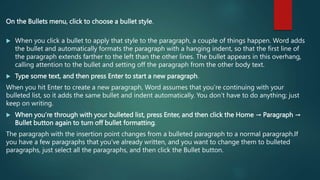
On the Bullets menu, click to choose a bullet style.
 When you click a bullet to apply that style to the paragraph, a couple of things happen. Word adds
the bullet and automatically formats the paragraph with a hanging indent, so that the first line of
the paragraph extends farther to the left than the other lines. The bullet appears in this overhang,
calling attention to the bullet and setting off the paragraph from the other body text.
 Type some text, and then press Enter to start a new paragraph.
When you hit Enter to create a new paragraph, Word assumes that you’re continuing with your
bulleted list, so it adds the same bullet and indent automatically. You don’t have to do anything; just
keep on writing.
 When you’re through with your bulleted list, press Enter, and then click the Home → Paragraph →
Bullet button again to turn off bullet formatting.
The paragraph with the insertion point changes from a bulleted paragraph to a normal paragraph.If
you have a few paragraphs that you’ve already written, and you want to change them to bulleted
paragraphs, just select all the paragraphs, and then click the Bullet button.
Tables
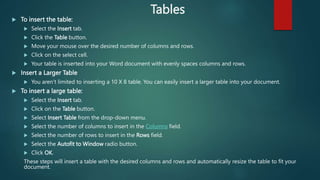
 To insert the table:
 Select the Insert tab.
 Click the Table button.
 Move your mouse over the desired number of columns and rows.
 Click on the select cell.
 Your table is inserted into your Word document with evenly spaces columns and rows.
 Insert a Larger Table
 You aren’t limited to inserting a 10 X 8 table. You can easily insert a larger table into your document.
 To insert a large table:
 Select the Insert tab.
 Click on the Table button.
 Select Insert Table from the drop-down menu.
 Select the number of columns to insert in the Columns field.
 Select the number of rows to insert in the Rows field.
 Select the Autofit to Window radio button.
 Click OK.
These steps will insert a table with the desired columns and rows and automatically resize the table to fit your
document.
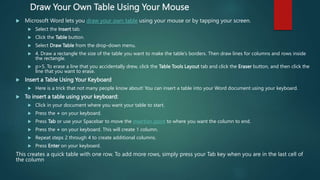
Draw Your Own Table Using Your Mouse
 Microsoft Word lets you draw your own table using your mouse or by tapping your screen.
 Select the Insert tab.
 Click the Table button.
 Select Draw Table from the drop-down menu.
 4. Draw a rectangle the size of the table you want to make the table’s borders. Then draw lines for columns and rows inside
the rectangle.
 p>5. To erase a line that you accidentally drew, click the Table Tools Layout tab and click the Eraser button, and then click the
line that you want to erase.
 Insert a Table Using Your Keyboard
 Here is a trick that not many people know about! You can insert a table into your Word document using your keyboard.
 To insert a table using your keyboard:
 Click in your document where you want your table to start.
 Press the + on your keyboard.
 Press Tab or use your Spacebar to move the insertion point to where you want the column to end.
 Press the + on your keyboard. This will create 1 column.
 Repeat steps 2 through 4 to create additional columns.
 Press Enter on your keyboard.
This creates a quick table with one row. To add more rows, simply press your Tab key when you are in the last cell of
the column
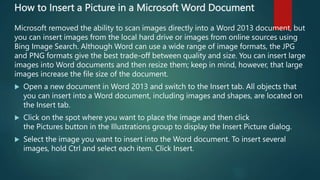
How to Insert a Picture in a Microsoft Word Document
Microsoft removed the ability to scan images directly into a Word 2013 document, but
you can insert images from the local hard drive or images from online sources using
Bing Image Search. Although Word can use a wide range of image formats, the JPG
and PNG formats give the best trade-off between quality and size. You can insert large
images into Word documents and then resize them; keep in mind, however, that large
images increase the file size of the document.
 Open a new document in Word 2013 and switch to the Insert tab. All objects that
you can insert into a Word document, including images and shapes, are located on
the Insert tab.
 Click on the spot where you want to place the image and then click
the Pictures button in the Illustrations group to display the Insert Picture dialog.
 Select the image you want to insert into the Word document. To insert several
images, hold Ctrl and select each item. Click Insert.
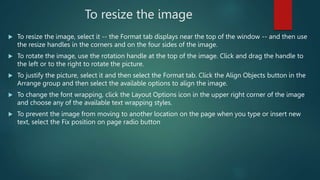
To resize the image
 To resize the image, select it -- the Format tab displays near the top of the window -- and then use
the resize handles in the corners and on the four sides of the image.
 To rotate the image, use the rotation handle at the top of the image. Click and drag the handle to
the left or to the right to rotate the picture.
 To justify the picture, select it and then select the Format tab. Click the Align Objects button in the
Arrange group and then select the available options to align the image.
 To change the font wrapping, click the Layout Options icon in the upper right corner of the image
and choose any of the available text wrapping styles.
 To prevent the image from moving to another location on the page when you type or insert new
text, select the Fix position on page radio button
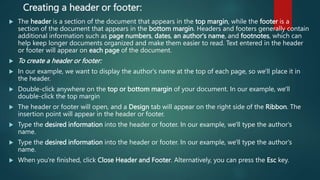
Creating a header or footer:
 The header is a section of the document that appears in the top margin, while the footer is a
section of the document that appears in the bottom margin. Headers and footers generally contain
additional information such as page numbers, dates, an author's name, and footnotes, which can
help keep longer documents organized and make them easier to read. Text entered in the header
or footer will appear on each page of the document.
 To create a header or footer:
 In our example, we want to display the author's name at the top of each page, so we'll place it in
the header.
 Double-click anywhere on the top or bottom margin of your document. In our example, we'll
double-click the top margin
 The header or footer will open, and a Design tab will appear on the right side of the Ribbon. The
insertion point will appear in the header or footer.
 Type the desired information into the header or footer. In our example, we'll type the author's
name.
 Type the desired information into the header or footer. In our example, we'll type the author's
name.
 When you're finished, click Close Header and Footer. Alternatively, you can press the Esc key.
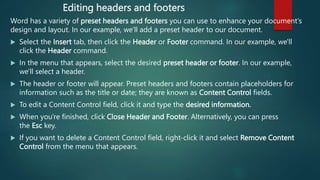
Editing headers and footers
Word has a variety of preset headers and footers you can use to enhance your document's
design and layout. In our example, we'll add a preset header to our document.
 Select the Insert tab, then click the Header or Footer command. In our example, we'll
click the Header command.
 In the menu that appears, select the desired preset header or footer. In our example,
we'll select a header.
 The header or footer will appear. Preset headers and footers contain placeholders for
information such as the title or date; they are known as Content Control fields.
 To edit a Content Control field, click it and type the desired information.
 When you're finished, click Close Header and Footer. Alternatively, you can press
the Esc key.
 If you want to delete a Content Control field, right-click it and select Remove Content
Control from the menu that appears.
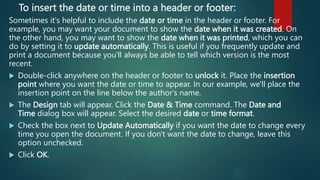
To insert the date or time into a header or footer:
Sometimes it's helpful to include the date or time in the header or footer. For
example, you may want your document to show the date when it was created. On
the other hand, you may want to show the date when it was printed, which you can
do by setting it to update automatically. This is useful if you frequently update and
print a document because you'll always be able to tell which version is the most
recent.
 Double-click anywhere on the header or footer to unlock it. Place the insertion
point where you want the date or time to appear. In our example, we'll place the
insertion point on the line below the author's name.
 The Design tab will appear. Click the Date & Time command. The Date and
Time dialog box will appear. Select the desired date or time format.
 Check the box next to Update Automatically if you want the date to change every
time you open the document. If you don't want the date to change, leave this
option unchecked.
 Click OK.
Adding page numbers
Word can automatically label each page with a page number and place it in
a header, footer, or side margin. When you need to number some pages differently,
Word allows you to restart page numbering.
To add page numbers to a document: In our example, we'll add page numbering to
our document's footer.
 Double-click anywhere on the header or footer to unlock it. If you don't already
have a header or footer, you can double-click near the top or bottom of the
page. The Design tab will appear on the right side of the Ribbon.
 Click the Page Number command. In the menu that appears, hover the mouse
over Current Position and select the desired page numbering style. Page
numbering will appear.
 To edit the font, font size, and alignment of page numbers, select a page number
and click the Home tab. Word's text formatting options will appear.
To run a Spelling and Grammar check:
From the Review tab, click the Spelling & Grammar command.The Spelling and Grammar pane will
appear. For each error in your document, Word will try to offer one or more suggestions. You can select a
suggestion and click Change to correct the error.
Word will move through each error until you have reviewed all of them. After the last error has been
reviewed, a dialog box will appear confirming that the spelling and grammar check is complete. Click OK.
If no suggestions are given, you can manually type the correct spelling in your document.
Automatic spelling and grammar checking
By default, Word automatically checks your document for spelling and grammar errors, so you may not
even need to run a separate check. These errors are indicated by colored, wavy lines.
 The red line indicates a misspelled word.
 The blue line indicates a grammatical error, including misused words.
 A misused word—also known as a contextual spelling error—occurs when a word is spelled correctly
but used incorrectly. For example, if you used the phrase Deer Mr. Theodore at the beginning of a
letter, deer would be a contextual spelling error. Deer is spelled correctly, but it is used incorrectly in
the letter. The correct word is dear.
 In previous versions of Word, grammar errors were marked with a green line, while contextual spelling
errors were marked with a blue line.
To correct spelling errors:
 Right-click the underlined word. A menu will appear.
 Select the correct spelling from the list of suggestions. The corrected word will
appear in the document. You can also choose to Ignore All instances of an
underlined word or add it to the dictionary.
 To correct grammar errors:
 Right-click the underlined word or phrase. A menu will appear.
 Select the correct spelling or phrase from the list of suggestions.
 The corrected phrase will appear in the document.
 You can also choose to Ignore an underlined word or phrase or go to
the Spelling & Grammar pane for information about the grammar rule.
Microsoft PowerPoint
The Content We Will Cover
 Open a Presentation
 Open a New Presentation
 Save a Slide Show
 Create a New Slide
 Add Slides
 Insert Pictures
 Insert Clip Art
 Format Pictures
 Format Fonts
 Header and Footer
 Hyperlinks
 Tables
 Charts
 Slide Themes
 Slide Transitions
 Rearrange Slides
 Preview Presentations
 View Outline
 Print Handouts
PowerPoint Ribbon
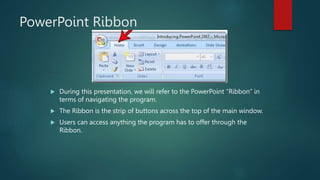
 During this presentation, we will refer to the PowerPoint “Ribbon” in
terms of navigating the program.
 The Ribbon is the strip of buttons across the top of the main window.
 Users can access anything the program has to offer through the
Ribbon.
Create a New Presentation
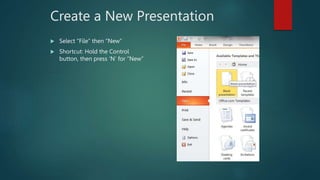
 Select “File” then “New”
 Shortcut: Hold the Control
button, then press ‘N’ for “New”
Open an Existing Presentation
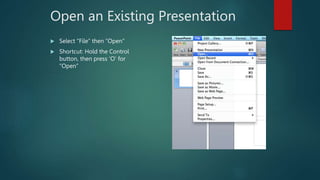
 Select “File” then “Open”
 Shortcut: Hold the Control
button, then press ‘O’ for
“Open”
Saving a Presentation
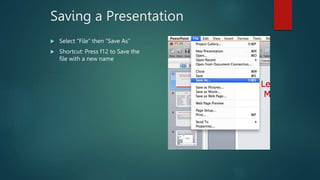
 Select “File” then “Save As”
 Shortcut: Press f12 to Save the
file with a new name
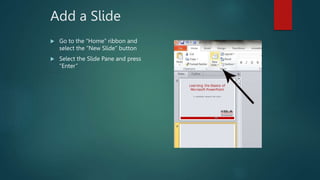
Add a Slide
 Go to the “Home” ribbon and
select the “New Slide” button
 Select the Slide Pane and press
“Enter”
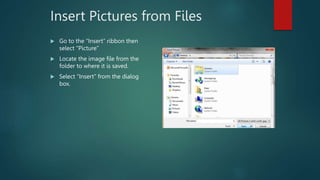
Insert Pictures from Files
 Go to the “Insert” ribbon then
select “Picture”
 Locate the image file from the
folder to where it is saved.
 Select “Insert” from the dialog
box.
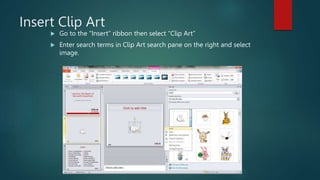
Insert Clip Art
 Go to the “Insert” ribbon then select “Clip Art”
 Enter search terms in Clip Art search pane on the right and select
image.
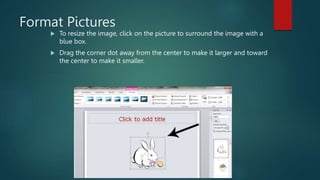
Format Pictures
 To resize the image, click on the picture to surround the image with a
blue box.
 Drag the corner dot away from the center to make it larger and toward
the center to make it smaller.
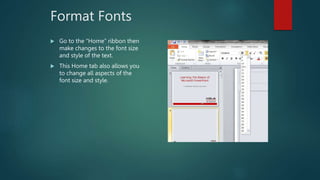
Format Fonts
 Go to the “Home” ribbon then
make changes to the font size
and style of the text.
 This Home tab also allows you
to change all aspects of the
font size and style.
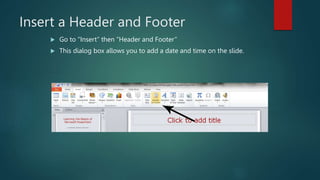
Insert a Header and Footer
 Go to “Insert” then “Header and Footer”
 This dialog box allows you to add a date and time on the slide.
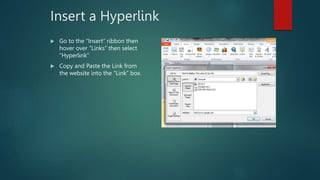
Insert a Hyperlink
 Go to the “Insert” ribbon then
hover over “Links” then select
“Hyperlink”
 Copy and Paste the Link from
the website into the “Link” box.
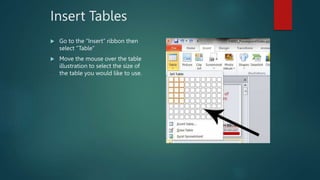
Insert Tables
 Go to the “Insert” ribbon then
select “Table”
 Move the mouse over the table
illustration to select the size of
the table you would like to use.
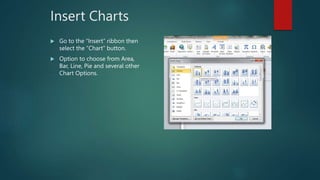
Insert Charts
 Go to the “Insert” ribbon then
select the “Chart” button.
 Option to choose from Area,
Bar, Line, Pie and several other
Chart Options.
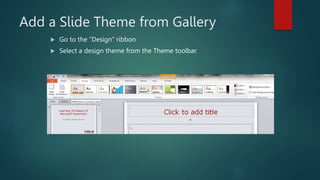
Add a Slide Theme from Gallery
 Go to the “Design” ribbon
 Select a design theme from the Theme toolbar.
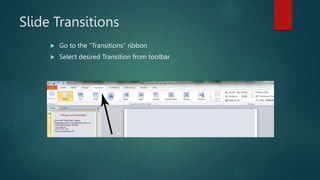
Slide Transitions
 Go to the “Transitions” ribbon
 Select desired Transition from toolbar
Rearrange Slides
 To move a slide, click on the slide thumbnail in the left column
 Drag and drop the slide at the desired location.
 To move consecutive slides at one time, click and hold the Shift key as
you select the slides you want to move.
 Drag and drop the slides at the desired location.
Preview a Presentation
 Go to the “Slide Show” ribbon
 Select the point in the slide show that you would like to begin viewing.
 From beginning
 From current slide
 The shortcut key is F5
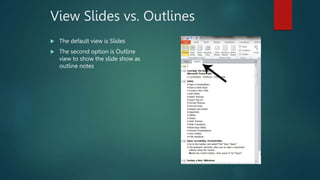
View Slides vs. Outlines
 The default view is Slides
 The second option is Outline
view to show the slide show as
outline notes
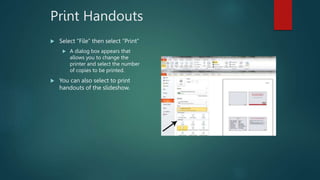
Print Handouts
 Select “File” then select “Print”
 A dialog box appears that
allows you to change the
printer and select the number
of copies to be printed.
 You can also select to print
handouts of the slideshow.

WORD LESSON (1).pptx

  • 1.
  • 2.
    Getting Started withWord  Title Bar The name of the program and the currently open file are displayed here. You may also see more information about the file (for example, if it’s open in read-only mode or has been opened from the Internet).  Quick Access Toolbar As the name implies, the Quick Access toolbar gives you quick access to frequently used commands. This toolbar is completely customizable and can be positioned above or below the ribbon commands.  Tabs Groups of like commands are organized under tab names. Click a tab to view the commands in the ribbon.  Ribbon Interface Displays tab commands organized into groups. If you click the different tabs, you will see the commands change. Notice that some of the commands might be grayed out. This is because those commands are only usable in certain situations.
  • 3.
     Word 2016also features contextual tabs. These are special tabs that only appear when you are working with a specific object or group of information. For example, if you were to insert and select a picture, you would see a contextual tab offering commands for that object  Tell Me Search for natural language help in Microsoft Word.  Program Management Using the top set of icons in the top right-hand corner of the screen, you can change how the ribbon is displayed, minimize the window, maximize/restore the window, or close the current document. Below this, you will see commands to sign into your Microsoft account and share the current document.  Working Area: The data contained in the currently open file will be shown here.  Scroll Bars If the Word document spans more than one screen, you can use this scroll bar to move through its pages. You may also see a horizontal scroll bar depending on your view.  Status Bar This bar is used to display information about the document. In the sample image, you will see a page and word count on the left- hand side. (You may also see spell checking and macro commands here depending on your current task.) On the right-hand side you will see commands to change views and zoom into or out of the document.
  • 4.
    Create a WordDocument You have three primary ways to fire up Word, so use whichever method you find quickest:  Start menu. The Start button in the lower-left corner of your screen gives you access to all programs on your PC—Word included. To start Word, choose Start → All Programs → Microsoft Office → Microsoft Office Word.  Quick Launch toolbar. The Quick Launch toolbar at the bottom of your screen (just to the right of the Start menu) is a great place to start programs you use frequently. Microsoft modestly assumes that you’ll be using Word a lot, so it usually installs the Word icon in the Quick Launch toolbar. To start using Word, just click the W icon, and voilá!  Opening a Word document. Once you’ve created some Word documents, this method is fastest of all, since you don’t have to start Word as a separate step. Just open an existing Word document, and Word starts itself. Try going to Start → My Recent Documents, and then, from the list of files, choose a Word document. You can also double-click the document’s icon on the desktop or wherever it lives on your PC.
  • 5.
    Creating a NewBlank Document Say you want a new blank document, just like the one Word shows you when you start the program. No problem—here are the steps:  Choose Office button → New. The New Document dialog box appears.  In the upper-left corner of the large “Create a new Word document” panel, click “Blank document”. The New Document box presents a seemingly endless number of options, but don’t panic. The “Blank document” option you want is on the left side of the first line.  At the bottom of the New Document dialog box, click Create. The dialog box disappears, and you’re gazing at the blank page of a new Word document.
  • 6.
    Creating a NewDocument from an Existing Document  Choose Office button → New (Alt+F, N) to open the New Document window. Then click “New from existing…” (it sits directly below the “Blank document” button). The three dots at the end of the button’s title tell you that there’s another dialog box to come. And sure enough, when you click “New from existing…”, it opens another box, appropriately titled New from Existing Document. This box looks—and works—like a standard Windows Open File box. It lets you navigate to a specific folder and open a file.  On your computer, find the existing document you’re using for a model. You can use the bar on the left to change the folder view. Word starts you in your My Documents folder, but you can switch to your desktop or your My Computer icon by clicking the icons on the left. Double- click folder icons in the large window to open them and see their contents.  Click to select the file, and then click Create New (in the lower-right corner). (Alternatively, just double- click the file’s icon to open it. This trick works in all Open File boxes.) Instead of the usual Open button at the bottom of the box, the button in the New from Existing Document box reads Create New—your clue that this box behaves differently in one important respect: Instead of opening an existing file, you’re making a copy of an existing file. Once open, the file’s name is something like Document2.docx instead of the original name. This way, when you save the file, you don’t overwrite the original document. (Still, it’s best to save it with a new descriptive name right away.)
  • 7.
    Creating a NewDocument from a Template  Choose Office button → New (Alt+F, N) to open the New Document window. On the left of the New Document box is a Template Categories list. The top entry on this list is Installed Templates—the ones Word has installed on your computer.  Scroll down the Template Categories list to the Microsoft Office Online heading. Under this heading, select Minutes. In the center pane, you’ll see all different types of minutes templates, from PTA minutes to Annual shareholder’s meeting minutes. When you click a template’s icon, a preview appears in the pane on the right. When you’re done perusing the various styles, click the Formal Meeting Minutes icon. (After all, CEOSA is a very formal organization.) Then click Download. Word downloads and opens the document.  Start writing up the minutes for the CEO Surfers. To follow the template’s structure, replace all the words in square brackets ([ ]) with text relevant to CEOSA.
  • 8.
    Opening an ExistingDocument  Choose Office button → Open (Alt+F, O). In the Open window, navigate to the folder and file you want to open. The Open window starts out showing your My Documents folder, since that’s where Word suggests you save your files. When your document’s in a more exotic location, click the My Computer icon, and then navigate to the proper folder from there  With the file selected, click Open in the lower-right corner. The Open box goes away and your document opens in Word. You’re all set to get to work. Just remember, when you save this document (Alt+F, S or Ctrl+S), you write over the previous file. Essentially, you create a new, improved, and only copy of the file you just opened. If you don’t want to write over the existing document, use the Save As command (Alt+F, A), and then type a new name in the File Name text box.
  • 9.
    Your Different DocumentViews  Document Views. These commands change the big picture. For the most part, use these when you want to view a document in a dramatically different way: two pages side by side, Outline view, Web layout view, and so on.  Show/Hide. The Show/Hide commands display and conceal Word tools like rulers and gridlines. These tools don’t show when you print your document; they’re just visual aids that help you when you’re working in Word.  Zoom. As you can guess, the Zoom tools let you choose between a close-up and a long shot of your document. Getting in close makes your words easier to read and helps prevent eyestrain. But zooming out makes scrolling faster and helps you keep your eye on the big picture.  Window. In the Window group, you’ll find creative ways to organize document windows on your screen—like split views of a single document or side-by-side views of two different documents.  Print Layout (Alt+W, P). The most frequently used view in Word, Print Layout, is the one you see when you first start the program or create a new blank document. In this view, the page you see on your computer screen looks much as it does when you print it. This view’s handy for letters, reports, and most documents headed for the printer.
  • 10.
     Full ScreenReading (Alt+W, F). If you’d like to get rid of the clutter of menus, ribbons, and all the rest of the word-processing gadgetry, then use Full Screen Reading view. As the name implies, this view’s designed primarily for reading documents. It includes options you don’t find in the other views, like a command that temporarily decreases or increases the text size. In the upper- right corner you see some document-proofing tools (like a text highlighter and an insert comment command), but when you want to change or edit your document, you must first use the View Options → Allow Typing command. For more details on using Word for reviewing and proofing.  Web Layout (Alt+W, L). This view shows your document as if it were a single Web page loaded in a browser. You don’t see any page breaks in this view. Along with your text, you see any photos or videos that you’ve placed in the document—just like a Web page.  Outline (Alt+W, U). For lots of writers, an outline is the first step in creating a manuscript. Once they’ve created a framework of chapters and headings, they dive in and fill out the document with text. If you like to work this way, then you’ll love Outline view. It’s easy to jump back and forth between Outline view and Print Layout view or Draft view, so you can bounce back and forth between a macro and a micro view of your epic.
  • 11.
     To getto the end of a document Hold down the CTRL Key and press End Key once. To get to the beginning of the document Hold down the CRTL key and press Home Key once. To move to the next page Hold down the CTRL Key and press Page Down Key once. To move to the previous page Hold down the CTRL Key and press Page Up Key once. To move to the next paragraph Hold down the CTRL Key and press Down arrow â Key once. To move to the previous paragraph Hold down the CTRL Key and press Up arrow á Key once. To move to the beginning of the next word Hold down the CTRL Key and press Right arrow à Key once. To move to the beginning of the previous word Hold down the CTRL Key and press Left arrow ß Key once. To move to the end of a line Press End Key once. To move to the beginning of the line Press Home Key once.
  • 12.
    How to selecttext with the keyboard. Selecting a single character Hold down the SHIFT Key and use the direction arrow you require. Multiple characters Hold down the SHIFT Key and use the direction ß or à arrow as many times as needed. A whole word Start at the beginning of the word Hold down the CTRL and the SHIFT keys and press à key once. A paragraph Start at the beginning of the paragraph and Hold down the CTRL Key plus the SHIFT Key and press the down arrow â key once. A block of text Start at the beginning of the block you require and use a mixture of the above examples. The Whole Document Hold down the CTRL Key and press the A character once. From a certain point to the end of the document Hold the CTRL Key and the SHIFT Key and press the End Key once. From a certain point to the beginning of the document Hold the CTRL Key and the SHIFT Key and press the Home Key once.
  • 13.
    Formatted text  Formattedtext can draw the reader's attention to specific parts of a document and emphasize important information. In Word, you have several options for adjusting the font of your text, including size, color, and inserting special symbols. You can also adjust the alignment of the text to change how it is displayed on the page.  To change the font: By default, the font of each new document is set to Calibri. However, Word provides many other fonts you can use to customize text and titles. Select the text you want to modify  On the Home tab, click the drop-down arrow next to the Font box. A menu of font styles will appear.  Move the mouse over the various font styles. A live preview of the font will appear in the document. Select the font style you want to use.The font will change in the document.  Select the font color you want to use. The font color will change in the document.  Your color choices aren't limited to the drop-down menu that appears. Select More Colors... at the bottom of the menu to access the Colors dialog box. Choose the color you want, then click OK.
  • 14.
    Highlight text:  Highlightingcan be a useful tool for marking important text in your document.  Select the text you want to highlight.  From the Home tab, click the Text Highlight Color drop-down arrow. The Highlight Color menu appears.  Select the desired highlight color. The selected text will then be highlighted in the document.  To remove highlighting, select the highlighted text, then click the Text Highlight Color drop-down arrow. Select No Color from the drop-down menu.  If you need to highlight several lines of text, changing the mouse into a highlighter may be a helpful alternative to selecting and highlighting individual lines. Click the Text Highlight Color command, and the cursor changes into a highlighter. You can then click, hold, and drag the highlighter over the lines you want to highlight.  The Bold, Italic, and Underline commands can be used to help draw attention to important words or phrases.  Select the text you want to modify. On the Home tab, click the Bold (B), Italic (I), or Underline (U) command in the Font group. In our example, we'll click Bold.  The selected text will be modified in the document.
  • 15.
    To change thetext case: When you need to quickly change text case, you can use the Change Case command instead of deleting and retyping text.  Select the text you want to modify.  On the Home tab, click the Change Case command in the Font group. A drop-down menu will appear. Select the desired case option from the menu. The text case will be changed in the document. To change text alignment By default, Word aligns text to the left margin in new documents. However, there may be times when you want to adjust text alignment to the center or right.  Select the text you want to modify.  On the Home tab, select one of the four alignment options from the Paragraph group.  Click the arrows in the slideshow below to learn more about the four text alignment options.  Align Text Left: This aligns all selected text to the left margin. The Align Text Left command is the most common alignment and is selected by default when a new document is created.. Symbols  Sometimes you may find that you need to add a symbol to your text, such as the Copyright symbol ©. Word offers a collection of symbols for currency, languages, mathematics, and more.
  • 16.
    Formatting Text, Paragraphs,and Headings Formatting is the fine art of making your documents effective and attractive. Good formatting distinguishes different parts of your text and helps your readers take in your message. You can apply formatting to just about every element of your document, from a single character to entire paragraphs. Body text needs to be readable and easy on the eyes. Headings should be big and bold, and they should also be consistent throughout your document. Important words need to resonate with emphasis. Quotes and references should be set off from the other text. Formatting Paragraphs  Formatting a paragraph usually entails changing its shape. You may be squeezing it in with indents or stretching it out with additional line spacing. Other kinds of formatting change a paragraph’s very nature, like adding a border or making it part of a numbered or bulleted list. The Paragraph formatting group (Home → Paragraph) is right next door to the Font group. You don’t need to select text to format a paragraph; just make sure the insertion point is in the paragraph you want to format. However, if you want to format several paragraphs at once, select them all before you apply a command.
  • 17.
    Aligning Text  It’seasy to apply alignment to text. With your insertion point in the paragraph you want to change, click one of the alignment buttons in the Paragraph group on the Home Tab. For example, Home → Paragraph → Left sets the current paragraph’s alignment. you have four choices when it comes to aligning your paragraphs:  Left (Alt+H, AL). Aligns the lines in the paragraph flush on the left side and ragged on the right. Left alignment is standard for letters, reports, and many business documents.  Centered (Alt+H, AC). Centers each line in the paragraph, leaving both left and right margins ragged. This setting is appropriate for headings and short chunks of text, as in invitations and advertisements. Avoid using centered text for long paragraphs, since it’s hard for readers’ eyes to track from the end of one line to the beginning of the next when the left margin is uneven.  Right (Alt+H, AR). Aligns the lines in the paragraph flush on the right side and ragged on the left. This unusual alignment is most often used for setting captions or quotations apart from the main text.  Justified (Alt+H, AJ). Adds space between letters and words so that both the left and right sides of the paragraph are straight and flush with the margins. Justified margins give text a more formal look suitable for textbooks or scholarly documents. If your justified text looks odd because big gaps appear between the letters or words, try using a long line—that is, putting more characters per line. You can do this by extending the margins (Alt+P, M) or by changing the size of your font (Alt+H, FS).
  • 18.
    Indenting Paragraphs  Oneof the most common reasons for indenting a paragraph is to set off quoted text from the rest of the document. Usually, you move the paragraph’s left edge in about a half inch from the left margin. Word makes it easy to indent text in this way. Just use the Increase Indent button on the ribbon or the shortcut Alt+H, AI. If you change your mind and want to remove the indent, use the companion command Decrease Indent (Alt+H, AO).  The ribbon buttons handle most everyday indentation chores, but what if you need to customize your indents? To do that, open the Paragraph dialog box to the Indents and Spacing tab (Alt+H, PG), and you see the Indentation tools in the middle of the tab.  The indentation tools in the Paragraph box let you set indents with much more precision than the simple Increase and Decrease buttons. For one thing, you can indent your paragraph from both margins using the Left and Right text boxes. Type a number in the box or use the arrow buttons to make an adjustment. Look in the Preview window at bottom to get a sense of the changes you’re making.
  • 19.
    Spacing Between Paragraphs For documents like business letters or reports that use block-style paragraphs, there’s usually a little space between each. You can adjust this spacing between paragraphs to set off some blocks of text from the rest.  Use the Paragraph dialog box to adjust the distance between paragraphs. On the left, you can enter numbers to set the space before the paragraph and the space after. With body text paragraphs, it’s good to set the same, relatively small distance before and after—say, three points. For headers, you may want to put a little extra space before the header to distance it from the preceding text. That space makes it clear that the header is related to the text beneath it. Generally speaking, the more significant the header, the larger the type and the greater the spacing around it.
  • 20.
    Spacing Between Lines Inthe Paragraph box, to the right of the paragraph spacing controls, you find the “Line spacing” tools. Use these controls to set the distance between lines within paragraphs. You have three presets and three custom settings:  Single keeps the lines close together, with a minimum amount of space between. Single spacing is usually easy to read, and it sure saves paper.  1.5 lines gives your text a little more breathing room, and still offers a nice professional look.  Double is the option preferred by teachers and editors, so there’s plenty of room for their helpful comments.  At least is a good option if you have a mix of font sizes or include inline graphics with your text. This option ensures that everything fits.  Exactly puts you in control. Type a number in the At box, and Word won’t mess with that setting.  Multiple is the oddball of the bunch. Think of Multiple as a percentage of a single line space: 1=100 percent; .8=80 percent; 1.2=120 percent; and so on.
  • 21.
    Inserting Page Breaksand Line Breaks  Some things just look wrong, such as a heading at the bottom of a page with no text beneath it. That heading should be at the top of the next page. Sure, you could force it over there with a page break (Ctrl+Enter), but that can cause trouble if you edit your text and things move around. You could end up with a page break in some weird spot. The solution is to adjust your Line and Page Break settings so that headings and paragraphs behave the way you want them to.  On the Paragraph box’s Line and Page Breaks tab, you can adjust how paragraphs handle these breaks. The behavior becomes part of the paragraph’s formatting and travels with the text no matter where you move the text or breaks. The keyboard shortcut to get there is Alt+H, PG, Alt+P. You can use four settings:  Widow/Orphan control. Single lines abandoned at the top (widows) or bottom (orphans) of the page look out of place. Turn on this checkbox, and Word keeps the whole family, paragraph together.  Keep with next. Certain paragraphs, like headings, need to stay attached to the paragraph that comes immediately after them. Choose the “Keep with next” option for your headings, and they always appear above following paragraph.  Keep lines together. Sometimes you have a paragraph that shouldn’t be split between two pages, like a one-paragraph quote or disclaimer. Use this option to keep the paragraph as one unit.  Page break before. Use this command with major headings to make sure new sections of your document start on a new page.
  • 22.
    Creating Bulleted andNumbered Lists  Bullets and numbers add impact and help organize information. The bullets in the previous section call attention to the Line and Page Breaks commands and show that the commands are related to each other. Numbered paragraphs send a different signal, implying that the items listed are sequential or have a hierarchy. This book uses numbered paragraphs for step-by-step instructions. Meeting minutes are usually numbered, both as a point of reference and to indicate the order of the meeting’s events.  Bulleted paragraphs  It’s easy to turn an ordinary paragraph into a bulleted paragraph—Word does all the heavy lifting for you. You may spend more time choosing a bullet style than applying it.  Here’s how to create a bulleted list:  Go to Home → Paragraph, and then click the triangle next to the Bullet button to open the Bullets menu (or press Alt+H, U).  At the top of the menu, you see bullet styles that you used recently. In the middle, you see your Bullet Library. The bottom section shows bullet styles that have already been used in the document. At the very bottom are two commands for customizing bullets.
  • 23.
    On the Bulletsmenu, click to choose a bullet style.  When you click a bullet to apply that style to the paragraph, a couple of things happen. Word adds the bullet and automatically formats the paragraph with a hanging indent, so that the first line of the paragraph extends farther to the left than the other lines. The bullet appears in this overhang, calling attention to the bullet and setting off the paragraph from the other body text.  Type some text, and then press Enter to start a new paragraph. When you hit Enter to create a new paragraph, Word assumes that you’re continuing with your bulleted list, so it adds the same bullet and indent automatically. You don’t have to do anything; just keep on writing.  When you’re through with your bulleted list, press Enter, and then click the Home → Paragraph → Bullet button again to turn off bullet formatting. The paragraph with the insertion point changes from a bulleted paragraph to a normal paragraph.If you have a few paragraphs that you’ve already written, and you want to change them to bulleted paragraphs, just select all the paragraphs, and then click the Bullet button.
  • 24.
    Tables  To insertthe table:  Select the Insert tab.  Click the Table button.  Move your mouse over the desired number of columns and rows.  Click on the select cell.  Your table is inserted into your Word document with evenly spaces columns and rows.  Insert a Larger Table  You aren’t limited to inserting a 10 X 8 table. You can easily insert a larger table into your document.  To insert a large table:  Select the Insert tab.  Click on the Table button.  Select Insert Table from the drop-down menu.  Select the number of columns to insert in the Columns field.  Select the number of rows to insert in the Rows field.  Select the Autofit to Window radio button.  Click OK. These steps will insert a table with the desired columns and rows and automatically resize the table to fit your document.
  • 25.
    Draw Your OwnTable Using Your Mouse  Microsoft Word lets you draw your own table using your mouse or by tapping your screen.  Select the Insert tab.  Click the Table button.  Select Draw Table from the drop-down menu.  4. Draw a rectangle the size of the table you want to make the table’s borders. Then draw lines for columns and rows inside the rectangle.  p>5. To erase a line that you accidentally drew, click the Table Tools Layout tab and click the Eraser button, and then click the line that you want to erase.  Insert a Table Using Your Keyboard  Here is a trick that not many people know about! You can insert a table into your Word document using your keyboard.  To insert a table using your keyboard:  Click in your document where you want your table to start.  Press the + on your keyboard.  Press Tab or use your Spacebar to move the insertion point to where you want the column to end.  Press the + on your keyboard. This will create 1 column.  Repeat steps 2 through 4 to create additional columns.  Press Enter on your keyboard. This creates a quick table with one row. To add more rows, simply press your Tab key when you are in the last cell of the column
  • 26.
    How to Inserta Picture in a Microsoft Word Document Microsoft removed the ability to scan images directly into a Word 2013 document, but you can insert images from the local hard drive or images from online sources using Bing Image Search. Although Word can use a wide range of image formats, the JPG and PNG formats give the best trade-off between quality and size. You can insert large images into Word documents and then resize them; keep in mind, however, that large images increase the file size of the document.  Open a new document in Word 2013 and switch to the Insert tab. All objects that you can insert into a Word document, including images and shapes, are located on the Insert tab.  Click on the spot where you want to place the image and then click the Pictures button in the Illustrations group to display the Insert Picture dialog.  Select the image you want to insert into the Word document. To insert several images, hold Ctrl and select each item. Click Insert.
  • 27.
    To resize theimage  To resize the image, select it -- the Format tab displays near the top of the window -- and then use the resize handles in the corners and on the four sides of the image.  To rotate the image, use the rotation handle at the top of the image. Click and drag the handle to the left or to the right to rotate the picture.  To justify the picture, select it and then select the Format tab. Click the Align Objects button in the Arrange group and then select the available options to align the image.  To change the font wrapping, click the Layout Options icon in the upper right corner of the image and choose any of the available text wrapping styles.  To prevent the image from moving to another location on the page when you type or insert new text, select the Fix position on page radio button
  • 28.
    Creating a headeror footer:  The header is a section of the document that appears in the top margin, while the footer is a section of the document that appears in the bottom margin. Headers and footers generally contain additional information such as page numbers, dates, an author's name, and footnotes, which can help keep longer documents organized and make them easier to read. Text entered in the header or footer will appear on each page of the document.  To create a header or footer:  In our example, we want to display the author's name at the top of each page, so we'll place it in the header.  Double-click anywhere on the top or bottom margin of your document. In our example, we'll double-click the top margin  The header or footer will open, and a Design tab will appear on the right side of the Ribbon. The insertion point will appear in the header or footer.  Type the desired information into the header or footer. In our example, we'll type the author's name.  Type the desired information into the header or footer. In our example, we'll type the author's name.  When you're finished, click Close Header and Footer. Alternatively, you can press the Esc key.
  • 29.
    Editing headers andfooters Word has a variety of preset headers and footers you can use to enhance your document's design and layout. In our example, we'll add a preset header to our document.  Select the Insert tab, then click the Header or Footer command. In our example, we'll click the Header command.  In the menu that appears, select the desired preset header or footer. In our example, we'll select a header.  The header or footer will appear. Preset headers and footers contain placeholders for information such as the title or date; they are known as Content Control fields.  To edit a Content Control field, click it and type the desired information.  When you're finished, click Close Header and Footer. Alternatively, you can press the Esc key.  If you want to delete a Content Control field, right-click it and select Remove Content Control from the menu that appears.
  • 30.
    To insert thedate or time into a header or footer: Sometimes it's helpful to include the date or time in the header or footer. For example, you may want your document to show the date when it was created. On the other hand, you may want to show the date when it was printed, which you can do by setting it to update automatically. This is useful if you frequently update and print a document because you'll always be able to tell which version is the most recent.  Double-click anywhere on the header or footer to unlock it. Place the insertion point where you want the date or time to appear. In our example, we'll place the insertion point on the line below the author's name.  The Design tab will appear. Click the Date & Time command. The Date and Time dialog box will appear. Select the desired date or time format.  Check the box next to Update Automatically if you want the date to change every time you open the document. If you don't want the date to change, leave this option unchecked.  Click OK.
  • 31.
    Adding page numbers Wordcan automatically label each page with a page number and place it in a header, footer, or side margin. When you need to number some pages differently, Word allows you to restart page numbering. To add page numbers to a document: In our example, we'll add page numbering to our document's footer.  Double-click anywhere on the header or footer to unlock it. If you don't already have a header or footer, you can double-click near the top or bottom of the page. The Design tab will appear on the right side of the Ribbon.  Click the Page Number command. In the menu that appears, hover the mouse over Current Position and select the desired page numbering style. Page numbering will appear.  To edit the font, font size, and alignment of page numbers, select a page number and click the Home tab. Word's text formatting options will appear.
  • 32.
    To run aSpelling and Grammar check: From the Review tab, click the Spelling & Grammar command.The Spelling and Grammar pane will appear. For each error in your document, Word will try to offer one or more suggestions. You can select a suggestion and click Change to correct the error. Word will move through each error until you have reviewed all of them. After the last error has been reviewed, a dialog box will appear confirming that the spelling and grammar check is complete. Click OK. If no suggestions are given, you can manually type the correct spelling in your document. Automatic spelling and grammar checking By default, Word automatically checks your document for spelling and grammar errors, so you may not even need to run a separate check. These errors are indicated by colored, wavy lines.  The red line indicates a misspelled word.  The blue line indicates a grammatical error, including misused words.  A misused word—also known as a contextual spelling error—occurs when a word is spelled correctly but used incorrectly. For example, if you used the phrase Deer Mr. Theodore at the beginning of a letter, deer would be a contextual spelling error. Deer is spelled correctly, but it is used incorrectly in the letter. The correct word is dear.  In previous versions of Word, grammar errors were marked with a green line, while contextual spelling errors were marked with a blue line.
  • 33.
    To correct spellingerrors:  Right-click the underlined word. A menu will appear.  Select the correct spelling from the list of suggestions. The corrected word will appear in the document. You can also choose to Ignore All instances of an underlined word or add it to the dictionary.  To correct grammar errors:  Right-click the underlined word or phrase. A menu will appear.  Select the correct spelling or phrase from the list of suggestions.  The corrected phrase will appear in the document.  You can also choose to Ignore an underlined word or phrase or go to the Spelling & Grammar pane for information about the grammar rule.
  • 34.
  • 35.
    The Content WeWill Cover  Open a Presentation  Open a New Presentation  Save a Slide Show  Create a New Slide  Add Slides  Insert Pictures  Insert Clip Art  Format Pictures  Format Fonts  Header and Footer  Hyperlinks  Tables  Charts  Slide Themes  Slide Transitions  Rearrange Slides  Preview Presentations  View Outline  Print Handouts
  • 36.
    PowerPoint Ribbon  Duringthis presentation, we will refer to the PowerPoint “Ribbon” in terms of navigating the program.  The Ribbon is the strip of buttons across the top of the main window.  Users can access anything the program has to offer through the Ribbon.
  • 37.
    Create a NewPresentation  Select “File” then “New”  Shortcut: Hold the Control button, then press ‘N’ for “New”
  • 38.
    Open an ExistingPresentation  Select “File” then “Open”  Shortcut: Hold the Control button, then press ‘O’ for “Open”
  • 39.
    Saving a Presentation Select “File” then “Save As”  Shortcut: Press f12 to Save the file with a new name
  • 40.
    Add a Slide Go to the “Home” ribbon and select the “New Slide” button  Select the Slide Pane and press “Enter”
  • 41.
    Insert Pictures fromFiles  Go to the “Insert” ribbon then select “Picture”  Locate the image file from the folder to where it is saved.  Select “Insert” from the dialog box.
  • 42.
    Insert Clip Art Go to the “Insert” ribbon then select “Clip Art”  Enter search terms in Clip Art search pane on the right and select image.
  • 43.
    Format Pictures  Toresize the image, click on the picture to surround the image with a blue box.  Drag the corner dot away from the center to make it larger and toward the center to make it smaller.
  • 44.
    Format Fonts  Goto the “Home” ribbon then make changes to the font size and style of the text.  This Home tab also allows you to change all aspects of the font size and style.
  • 45.
    Insert a Headerand Footer  Go to “Insert” then “Header and Footer”  This dialog box allows you to add a date and time on the slide.
  • 46.
    Insert a Hyperlink Go to the “Insert” ribbon then hover over “Links” then select “Hyperlink”  Copy and Paste the Link from the website into the “Link” box.
  • 47.
    Insert Tables  Goto the “Insert” ribbon then select “Table”  Move the mouse over the table illustration to select the size of the table you would like to use.
  • 48.
    Insert Charts  Goto the “Insert” ribbon then select the “Chart” button.  Option to choose from Area, Bar, Line, Pie and several other Chart Options.
  • 49.
    Add a SlideTheme from Gallery  Go to the “Design” ribbon  Select a design theme from the Theme toolbar.
  • 50.
    Slide Transitions  Goto the “Transitions” ribbon  Select desired Transition from toolbar
  • 51.
    Rearrange Slides  Tomove a slide, click on the slide thumbnail in the left column  Drag and drop the slide at the desired location.  To move consecutive slides at one time, click and hold the Shift key as you select the slides you want to move.  Drag and drop the slides at the desired location.
  • 52.
    Preview a Presentation Go to the “Slide Show” ribbon  Select the point in the slide show that you would like to begin viewing.  From beginning  From current slide  The shortcut key is F5
  • 53.
    View Slides vs.Outlines  The default view is Slides  The second option is Outline view to show the slide show as outline notes
  • 54.
    Print Handouts  Select“File” then select “Print”  A dialog box appears that allows you to change the printer and select the number of copies to be printed.  You can also select to print handouts of the slideshow.