
MS Office
VS.
Google Docs
VS.
Office 365
VS.
iWork
VS.
Apache OpenOffice
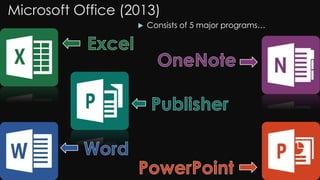
Microsoft Office (2013)
 Consists of 5 major programs…
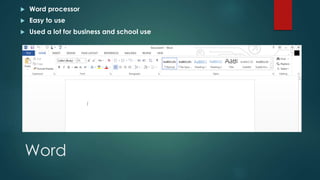
Word
 Word processor
 Easy to use
 Used a lot for business and school use
Excel
 Make spreadsheets to organize information
 Create graphs of any sort
 Solve equations by simply inputting formulas
Publisher
 Make posters, format pictures etc.
 Easy Interface
 Align pictures to exact places with scales
OneNote
 Make quick notes in discussions
 Organize ideas into notebooks
 Insert reminders from Outlook with an existing Outlook account
 Easy to copy and paste assignments into OneNote
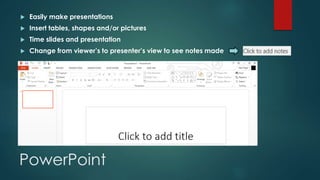
PowerPoint
 Easily make presentations
 Insert tables, shapes and/or pictures
 Time slides and presentation
 Change from viewer’s to presenter’s view to see notes made
Pros: Microsoft Office
 MS Office 2013 is
completely integrated
with SkyDrive (cloud)
 Can edit PDF files using
Word
 New Read Mode allows
users to read documents
from the internet safely
(option to edit as well)
 Lots of people use this
program so it is easier to
send files to others
Cons: Microsoft Office
 New interface is overly
simplistic
 Microsoft claims PowerPoint
can have imbedded videos
but many people find this
difficult to do
 A lot of people have the
problem where they can’t
put pictures somewhere or
start typing somewhere
Google Documents
 It is very useful
because you can edit
documents from
different softwares.
 It is also very good
because it is
connected directly to
Gmail so you can work
together on the same
document with Gmail
Google Sheets
 Google Sheets is
exactly like Excel
except it is free
 You can easily
collaborate with
peers.
Google Slides
 Is very much like
PowerPoint except
there are many more
templates and you
can add many more
of your own.
 Google slides is also
very good because
you can embed and
add in videos more
easily
Google Forms (Extension to Sheets)
 It is very easy to make
surveys on this
application
 It is much more easier
to use than word and is
better to use for surveys
 Google forms is very
easy to use and is free
for use
Pros: Google Docs
 It is free.
 It has all the features
of Microsoft office.
 It is very easy to learn
 You can email files
directly from on the
site
Cons: Google Docs
 It is online.
 There have been
many privacy
hacks and
information leaks
 Not as many
people use this
program or know
abut it
Features: Office 365
 Contains 4/5 major programs of MS Office
2013
 PowerPoint
 Word
 Excel
 OneNote
 Also contains Excel Survey
 Work on projects/assignments simultaneously
with peers
Built in OneDrive and Outlook
 OneDrive storage for files
 Easy to share files with peers
 Comes with built-in email (Outlook)
Pros: Office 365
 Easy and simple to use
 Competitively priced
 Everything is stored on
a cloud
 Mobility
 Collaboration and
Communication
 Email hosted in the
cloud
Cons: Office 365
 Requires WIFI to
function
 Data privacy
 Software boundaries
and limits
 Less flexible
infrastructure
 Subscription based
Pages
 Typing
processor
produced by
Apple Inc.
 Difficult to use
for new people
 Edit very small
details to
perfection
Keynote
 Used to make
professional
presentations
 Variety of
different
animations to
insert slides
Numbers
 Starts you off with
a blank canvas to
“express
creativity”
 Prebuilt templates
to start you off (if
you need it)
 Compatible with
Microsoft Excel
files
Pros
 Very useful for school
purposes
 All programs are simple
to use once you get the
hang of them
 Create amazing
presentations and
spreadsheets with ease
 Free when you buy an
Apple Product
 iWork beta is available
to users with a
legitimate iCloud login
ID
Cons
 Difficult for new
users
 Expensive (Must buy
an Apple product to
get iWork)
 Not fully compatible
with other programs
(MS Office etc.)
Programs
 Does what Microsoft Office does in terms of programs
 Easy to use
 Quick start-up
 Low use of RAM
Pros
 Free download
 Quick help for bugs
found by users
 Quick start-up
 Low use of RAM
(Random Access
Memory)
Cons
 Compatibility with MS
Office Formats must
be fixed (formatting
losses)
 Interface is clunky
(full)
 Spell checker isn’t
very good
Final Tally: Microsoft Office 2013
Pros Cons
SkyDrive (Cloud Server) Overly Simplistic
Edit PDF Files Difficult to Embed Videos
Read Mode Can’t Put Things in Specific Places
Lots of People Use This Program
Final Tally: Google Tools
Pros Cons
Free It is online.
All Features of MS Office Privacy Hacks/Leaks
Easy to Learn
Email Files Directly off Site
Final Tally: Office 365
Pros Cons
Easy and Simple Requires WIFI to function
Competitively Priced Data privacy
Cloud Storage Software boundaries and limits
Mobility Less flexible infrastructure
Collaboration and Communication Subscription based
Email In Cloud
Ability To Simultaneously Work With Peers
Final Tally: iWork
Pros Cons
Useful for School Purposes Difficult for New Users
Simple (Experience Helps) Expensive for old Apple Products
Easy to Make and Impress Not fully Compatible
Free After Purchase of Apple Product
Free iWork beta with iCloud login
Final Tally: Apache OpenOffice
Pros Cons
Free Download Not Fully Compatible Yet
Quick Help for Bugs Spell-Checker Bugs Out Sometimes
Quick Start-Up Interface is Little Clunky
Low Use of RAM
Conclusion
It is up to you, with this information to decide
which one is right for you.
All of the softwares
have their ups and
downs…

Ms office vs_google_docs_vs_office_365_vs_apache_openoffice_vs_iwork

  • 1.
    MS Office VS. Google Docs VS. Office365 VS. iWork VS. Apache OpenOffice
  • 2.
    Microsoft Office (2013) Consists of 5 major programs…
  • 3.
    Word  Word processor Easy to use  Used a lot for business and school use
  • 4.
    Excel  Make spreadsheetsto organize information  Create graphs of any sort  Solve equations by simply inputting formulas
  • 5.
    Publisher  Make posters,format pictures etc.  Easy Interface  Align pictures to exact places with scales
  • 6.
    OneNote  Make quicknotes in discussions  Organize ideas into notebooks  Insert reminders from Outlook with an existing Outlook account  Easy to copy and paste assignments into OneNote
  • 7.
    PowerPoint  Easily makepresentations  Insert tables, shapes and/or pictures  Time slides and presentation  Change from viewer’s to presenter’s view to see notes made
  • 8.
    Pros: Microsoft Office MS Office 2013 is completely integrated with SkyDrive (cloud)  Can edit PDF files using Word  New Read Mode allows users to read documents from the internet safely (option to edit as well)  Lots of people use this program so it is easier to send files to others
  • 9.
    Cons: Microsoft Office New interface is overly simplistic  Microsoft claims PowerPoint can have imbedded videos but many people find this difficult to do  A lot of people have the problem where they can’t put pictures somewhere or start typing somewhere
  • 11.
    Google Documents  Itis very useful because you can edit documents from different softwares.  It is also very good because it is connected directly to Gmail so you can work together on the same document with Gmail
  • 12.
    Google Sheets  GoogleSheets is exactly like Excel except it is free  You can easily collaborate with peers.
  • 13.
    Google Slides  Isvery much like PowerPoint except there are many more templates and you can add many more of your own.  Google slides is also very good because you can embed and add in videos more easily
  • 14.
    Google Forms (Extensionto Sheets)  It is very easy to make surveys on this application  It is much more easier to use than word and is better to use for surveys  Google forms is very easy to use and is free for use
  • 15.
    Pros: Google Docs It is free.  It has all the features of Microsoft office.  It is very easy to learn  You can email files directly from on the site
  • 16.
    Cons: Google Docs It is online.  There have been many privacy hacks and information leaks  Not as many people use this program or know abut it
  • 18.
    Features: Office 365 Contains 4/5 major programs of MS Office 2013  PowerPoint  Word  Excel  OneNote  Also contains Excel Survey  Work on projects/assignments simultaneously with peers
  • 19.
    Built in OneDriveand Outlook  OneDrive storage for files  Easy to share files with peers  Comes with built-in email (Outlook)
  • 20.
    Pros: Office 365 Easy and simple to use  Competitively priced  Everything is stored on a cloud  Mobility  Collaboration and Communication  Email hosted in the cloud
  • 21.
    Cons: Office 365 Requires WIFI to function  Data privacy  Software boundaries and limits  Less flexible infrastructure  Subscription based
  • 23.
    Pages  Typing processor produced by AppleInc.  Difficult to use for new people  Edit very small details to perfection
  • 24.
    Keynote  Used tomake professional presentations  Variety of different animations to insert slides
  • 25.
    Numbers  Starts youoff with a blank canvas to “express creativity”  Prebuilt templates to start you off (if you need it)  Compatible with Microsoft Excel files
  • 26.
    Pros  Very usefulfor school purposes  All programs are simple to use once you get the hang of them  Create amazing presentations and spreadsheets with ease  Free when you buy an Apple Product  iWork beta is available to users with a legitimate iCloud login ID
  • 27.
    Cons  Difficult fornew users  Expensive (Must buy an Apple product to get iWork)  Not fully compatible with other programs (MS Office etc.)
  • 29.
    Programs  Does whatMicrosoft Office does in terms of programs  Easy to use  Quick start-up  Low use of RAM
  • 30.
    Pros  Free download Quick help for bugs found by users  Quick start-up  Low use of RAM (Random Access Memory)
  • 31.
    Cons  Compatibility withMS Office Formats must be fixed (formatting losses)  Interface is clunky (full)  Spell checker isn’t very good
  • 32.
    Final Tally: MicrosoftOffice 2013 Pros Cons SkyDrive (Cloud Server) Overly Simplistic Edit PDF Files Difficult to Embed Videos Read Mode Can’t Put Things in Specific Places Lots of People Use This Program
  • 33.
    Final Tally: GoogleTools Pros Cons Free It is online. All Features of MS Office Privacy Hacks/Leaks Easy to Learn Email Files Directly off Site
  • 34.
    Final Tally: Office365 Pros Cons Easy and Simple Requires WIFI to function Competitively Priced Data privacy Cloud Storage Software boundaries and limits Mobility Less flexible infrastructure Collaboration and Communication Subscription based Email In Cloud Ability To Simultaneously Work With Peers
  • 35.
    Final Tally: iWork ProsCons Useful for School Purposes Difficult for New Users Simple (Experience Helps) Expensive for old Apple Products Easy to Make and Impress Not fully Compatible Free After Purchase of Apple Product Free iWork beta with iCloud login
  • 36.
    Final Tally: ApacheOpenOffice Pros Cons Free Download Not Fully Compatible Yet Quick Help for Bugs Spell-Checker Bugs Out Sometimes Quick Start-Up Interface is Little Clunky Low Use of RAM
  • 37.
    Conclusion It is upto you, with this information to decide which one is right for you. All of the softwares have their ups and downs…